instrument panel VOLVO XC90 TWIN ENGINE 2019 Owners Manual
[x] Cancel search | Manufacturer: VOLVO, Model Year: 2019, Model line: XC90 TWIN ENGINE, Model: VOLVO XC90 TWIN ENGINE 2019Pages: 697, PDF Size: 10.33 MB
Page 626 of 697
MAINTENANCE AND SERVICE
624Checking and filling engine oil
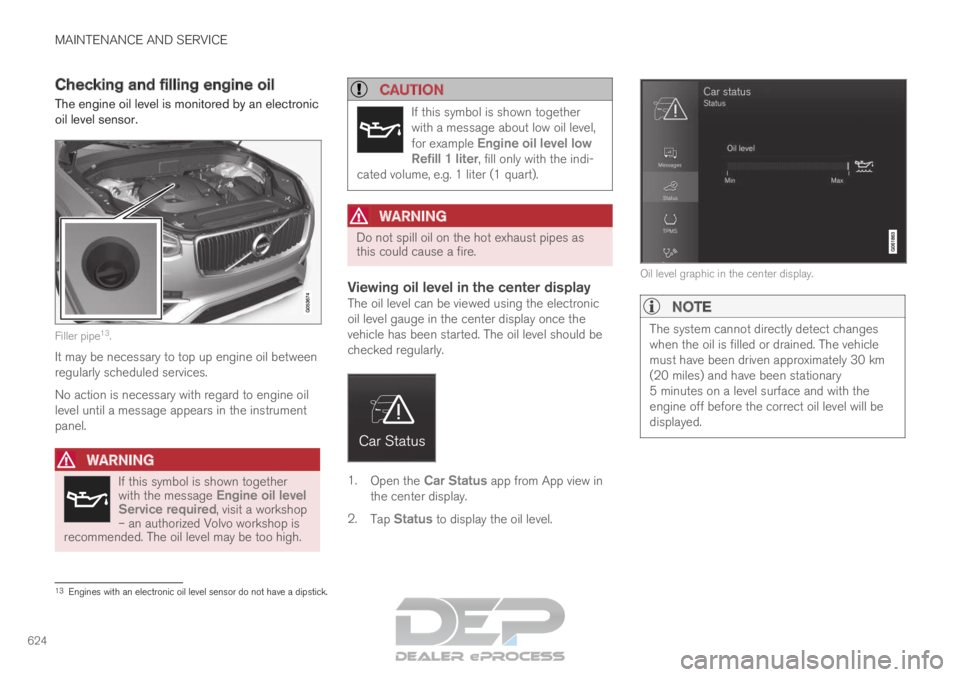
The engine oil level is monitored by an electronic
oil level sensor. Filler pipe
13
.
It may be necessary to top up engine oil between
regularly scheduled services.
No action is necessary with regard to engine oil
level until a message appears in the instrument
panel.
WARNING If this symbol is shown together
with the message
Engine oil level
Service required, visit a workshop – an authorized Volvo workshop is
recommended. The oil level may be too high.
CAUTION If this symbol is shown together
with a message about low oil level,
for example
Engine oil level low
Refill 1 liter, fill only with the indi-
cated volume, e.g. 1 liter (1 quart).
WARNING Do not spill oil on the hot exhaust pipes as
this could cause a fire.
Viewing oil level in the center displayThe oil level can be viewed using the electronic
oil level gauge in the center display once the
vehicle has been started. The oil level should be
checked regularly.
1.
Open the Car Status app from App view in
the center display.
2. Tap Status to display the oil level. Oil level graphic in the center display.NOTE
The system cannot directly detect changes
when the oil is filled or drained. The vehicle
must have been driven approximately 30 km
(20 miles) and have been stationary
5 minutes on a level surface and with the
engine off before the correct oil level will be
displayed.
13
Engines with an electronic oil level sensor do not have a dipstick.
Page 641 of 697
MAINTENANCE AND SERVICE
}}
* Option/accessory. 639
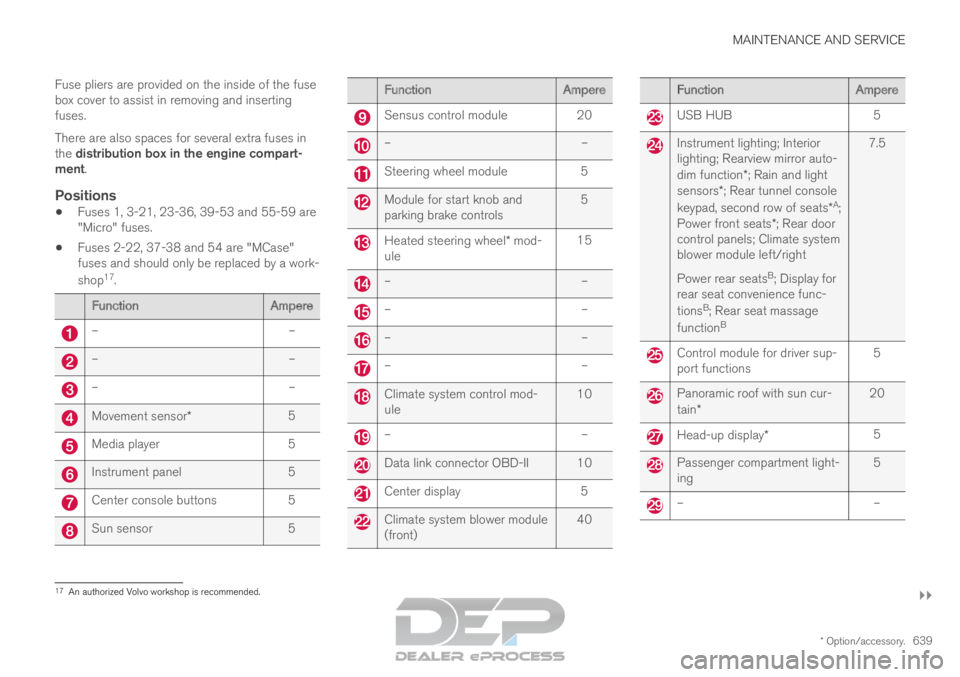
Fuse pliers are provided on the inside of the fuse
box cover to assist in removing and inserting
fuses.
There are also spaces for several extra fuses in
the distribution box in the engine compart-
ment.
Positions
Fuses 1, 3-21, 23-36, 39-53 and 55-59 are
"Micro" fuses.
Fuses 2-22, 37-38 and 54 are "MCase"
fuses and should only be replaced by a work-
shop 17
. Function
Ampere–
––
––
–Movement sensor*
5Media player
5Instrument panel
5Center console buttons
5Sun sensor
5 Function
Ampere Sensus control module
20 –
– Steering wheel module
5 Module for start knob and
parking brake controls
5 Heated steering wheel* mod-
ule 15 –
– –
– –
– –
– Climate system control mod-
ule
10 –
– Data link connector OBD-II 10
Center display
5 Climate system blower module
(front)
40 Function
Ampere USB HUB
5 Instrument lighting; Interior
lighting; Rearview mirror auto-
dim function*; Rain and light
sensors*; Rear tunnel console
keypad, second row of seats* A
;
Power front seats *; Rear door
control panels; Climate system
blower module left/right
Power rear seats B
; Display for
rear seat convenience func-
tions B
; Rear seat massage
function B 7.5 Control module for driver sup-
port functions
5 Panoramic roof with sun cur-
tain*
20 Head-up display*
5 Passenger compartment light-
ing
5 –
–17
An authorized Volvo workshop is recommended.
Page 652 of 697

MAINTENANCE AND SERVICE
650Cleaning interior plastic, metal and
wood surfaces
Only use cleaning agents and car care products
recommended by Volvo. Clean regularly and
treat stains immediately for best results.
Interior plastic, metal and wood
surfaces
A lightly dampened microfiber cloth is recom-
mended for cleaning interior details and surfaces.
These cloths are available for purchase at Volvo
retailers.
Never scrape or rub a stain. Never use strong
stain removers.
CAUTION
Do not use solvent containing alcohol to
clean the instrument panel glass.
CAUTION
Keep in mind that glossy surfaces can be
easily scratched. Wipe these surfaces with a
clean and dry microfiber cloth using small, cir-
cular motions. If necessary, moisten the cloth
lightly with clean water.
Related information
Cleaning the interior (p. 645)
Cleaning the center display (p. 645)
Cleaning fabric upholstery and ceiling liner
(p. 647)
Cleaning the seat belt (p. 647)
Cleaning floor mats and inlay mats (p. 647)
Cleaning leather upholstery (p. 648)
Cleaning the leather steering wheel (p. 649) Cleaning the exterior
The vehicle should be washed as soon as it
becomes dirty. This makes the vehicle easier to
clean because dirt does not attach as strongly. It
also reduces the risk of scratches and keeps the
vehicle looking new. Wash the vehicle in a car
wash or garage with an oil separator and use car
washing detergent.
Related information
Cleaning the exterior (p. 650)
Polishing and waxing (p. 651)
Hand washing (p. 651)
Automatic car washes (p. 653)
High-pressure washing (p. 654)
Cleaning the wiper blades (p. 654)
Cleaning exterior plastic, rubber and trim
components (p. 655)
Cleaning rims (p. 656)
Corrosion protection (p. 656)
Page 664 of 697
MAINTENANCE AND SERVICE
* Option/accessory.
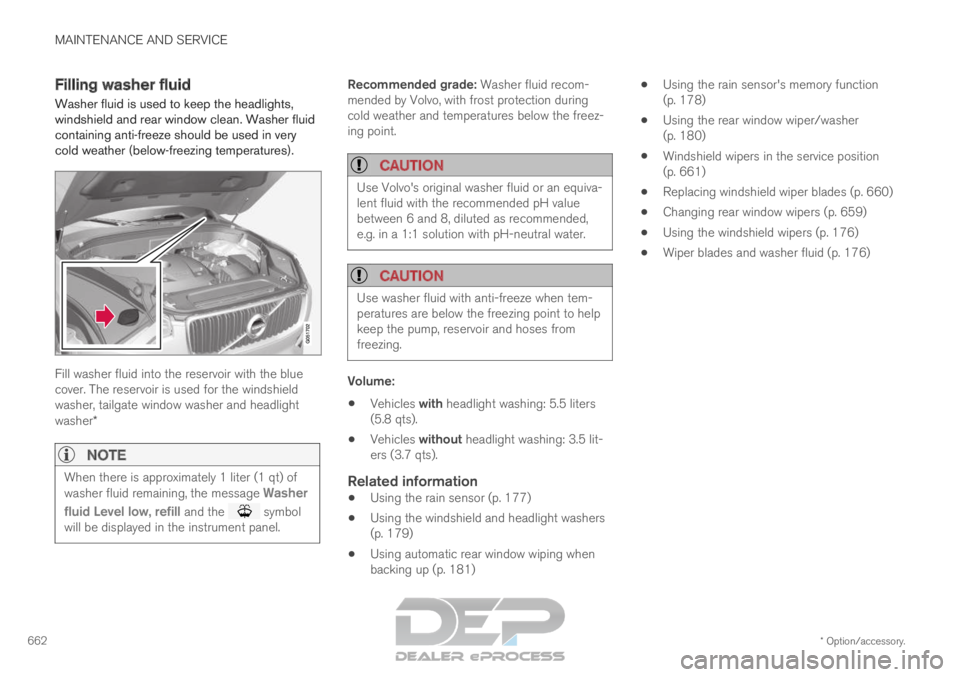
662 Filling washer fluid
Washer fluid is used to keep the headlights,
windshield and rear window clean. Washer fluid
containing anti-freeze should be used in very
cold weather (below-freezing temperatures). Fill washer fluid into the reservoir with the blue
cover. The reservoir is used for the windshield
washer, tailgate window washer and headlight
washer*
NOTE
When there is approximately 1 liter (1 qt) of
washer fluid remaining, the message
Washer
fluid
Level low, refill and the symbol
will be displayed in the instrument panel. Recommended grade: Washer fluid recom-
mended by Volvo, with frost protection during
cold weather and temperatures below the freez-
ing point.
CAUTION
Use Volvo's original washer fluid or an equiva-
lent fluid with the recommended pH value
between 6 and 8, diluted as recommended,
e.g. in a 1:1 solution with pH-neutral water.
CAUTION
Use washer fluid with anti-freeze when tem-
peratures are below the freezing point to help
keep the pump, reservoir and hoses from
freezing.
Volume:
Vehicles with headlight washing: 5.5 liters
(5.8 qts).
Vehicles without headlight washing: 3.5 lit-
ers (3.7 qts).
Related information
Using the rain sensor (p. 177)
Using the windshield and headlight washers
(p. 179)
Using automatic rear window wiping when
backing up (p. 181)
Using the rain sensor's memory function
(p. 178)
Using the rear window wiper/washer
(p. 180)
Windshield wipers in the service position
(p. 661)
Replacing windshield wiper blades (p. 660)
Changing rear window wipers (p. 659)
Using the windshield wipers (p. 176)
Wiper blades and washer fluid (p. 176)
Page 685 of 697
INDEX
683
Inflatable Curtain 60
Inflating tires 587
Inflation pressure
adjusting 568
Checking 567
decal 569
recommended 569
Inflation pressure monitoring 569 action 573
Status 572
Inflation pressure table 675
Information display 84, 86
Infotainment (Audio and media) 496
Instrument cluster 84 settings 86
Instrument illumination 164
Instrument lighting 164
Instrument panel 84 App menu 103, 104
hybrid-related symbols and messages 430
messages 105
settings 86
Instruments and controls 82
Instruments overview left-hand drive vehicle 82 Integrated booster cushion
76
folding down
78
folding up 77
IntelliSafe driver support 28
Interior Air Quality System 208
Intermittent wiping 176
Internet, see Internet-connected vehicle 541
Internet-connected vehicle 541
book service and repair 615
No connection or poor connection 546
send car data 616
system updates 613
iPod® , connecting 524
ISOFIX/LATCH anchors 74
J Jack
575
Jump-start
481
K Key
243
Keyboard
126, 129
change language 129 Keyless
locking/unlocking
259
settings 261
touch-sensitive surfaces 258
Key tag 243
L Labels
location
664
Laminated glass 166
Lamps changing 626
Trailer 486
Lane Keeping Aid operation 375
Lane Keeping Aid (LKA) 372, 374, 375, 376, 377, 379
Language 132
Leather upholstery, cleaning instructions 648
Leveling control 461 settings 464
License agreement 98, 549
Lifting tools 575
Light control 152, 164