warning VOLVO XC90 TWIN ENGINE 2019 Owners Manual
[x] Cancel search | Manufacturer: VOLVO, Model Year: 2019, Model line: XC90 TWIN ENGINE, Model: VOLVO XC90 TWIN ENGINE 2019Pages: 697, PDF Size: 10.33 MB
Page 393 of 697
DRIVER SUPPORT
}}
391
Park Assist front, rear and sides
Park Assist has different parameters depending
on which part of the vehicle is approaching an
obstacle.
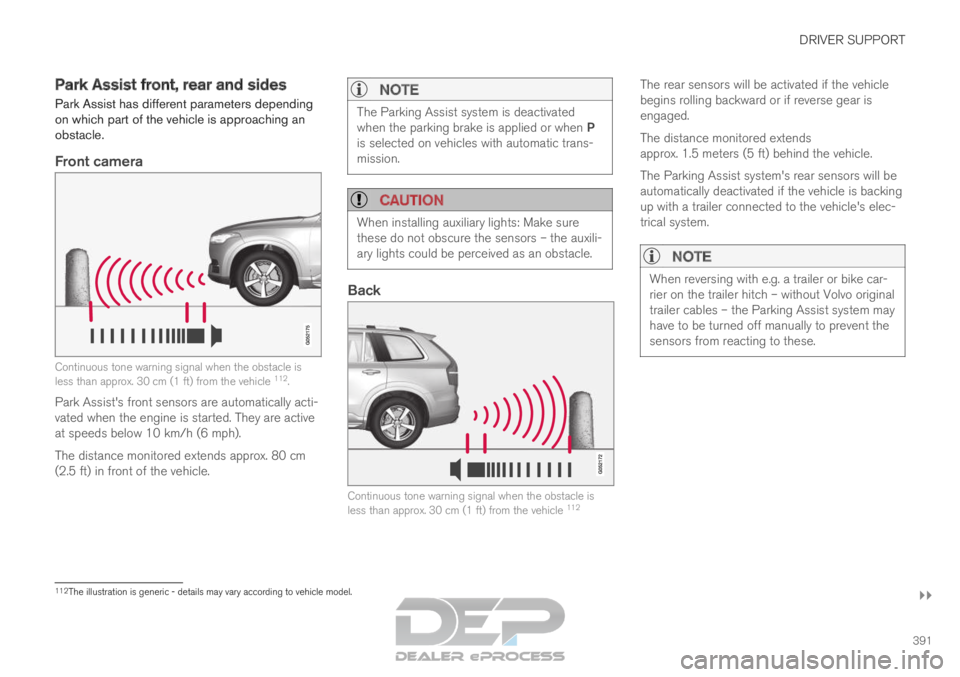
Front camera Continuous tone warning signal when the obstacle is
less than approx. 30 cm (1 ft) from the vehicle
112
.
Park Assist's front sensors are automatically acti-
vated when the engine is started. They are active
at speeds below 10 km/h (6 mph).
The distance monitored extends approx. 80 cm
(2.5 ft) in front of the vehicle.
NOTE The Parking Assist system is deactivated
when the parking brake is applied or when P
is selected on vehicles with automatic trans-
mission.
CAUTION
When installing auxiliary lights: Make sure
these do not obscure the sensors – the auxili-
ary lights could be perceived as an obstacle.
Back
Continuous tone warning signal when the obstacle is
less than approx. 30 cm (1 ft) from the vehicle
112The rear sensors will be activated if the vehicle
begins rolling backward or if reverse gear is
engaged.
The distance monitored extends
approx. 1.5 meters (5 ft) behind the vehicle.
The Parking Assist system's rear sensors will be
automatically deactivated if the vehicle is backing
up with a trailer connected to the vehicle's elec-
trical system.
NOTE
When reversing with e.g. a trailer or bike car-
rier on the trailer hitch – without Volvo original
trailer cables – the Parking Assist system may
have to be turned off manually to prevent the
sensors from reacting to these.
112
The illustration is generic - details may vary according to vehicle mode\
l.
Page 394 of 697

||DRIVER SUPPORT
* Option/accessory.
392
Side sensors Rapid pulsing warning signal when the obstacle is less
than approx. 25 cm (0.8 ft) from the vehicle
112
.
Park Assist's side sensors are automatically acti-
vated when the engine is started. They are active
at speeds below 10 km/h (6 mph).
The distance monitored is approx. 25 cm (0.8 ft)
out from the sides.
The detection area increases significantly when
the steering angle of the front wheels increases
and depending on the steering wheel position,
obstacles up to approx. 90 cm (3 ft) directly
behind or in front of the vehicle can be detected
(also see “Side sensor fields” in the section “Sen-
sor field from Park Assist for Park Assist Cam-
era”).Related information
Park Assist* (p. 390)
Sensor field from Park Assist for Park Assist
Camera (p. 401) Activating/deactivating Park Assist
The Park Assist Pilot function can be activated/
deactivated.
On/OffPark Assist's front and side sensors are automat-
ically activated when the engine is started. The
rear sensors are activated if the vehicle is moving
backward or reverse gear is engaged.
The function can be activated/
deactivated in the center dis-
play's Function view. –
Tap the
Park Assist button in Function view.
>
The Park Assist Pilot indicator light shows
the status of the function: GREEN (on) or
GRAY (off).
In vehicles equipped with Park Assist Camera,
Park Assist can also be activated/deactivated
from the relevant camera view.
Related information
Park Assist* (p. 390) 112
The illustration is generic - details may vary according to vehicle mode\
l.
Page 395 of 697
DRIVER SUPPORT
* Option/accessory.393
Park Assist limitations
Park Assist may not be able to detect all condi-
tions in all situations and functionality may there-
fore be limited in certain cases.
The driver should be aware of the following limi-
tations for Park Assist:
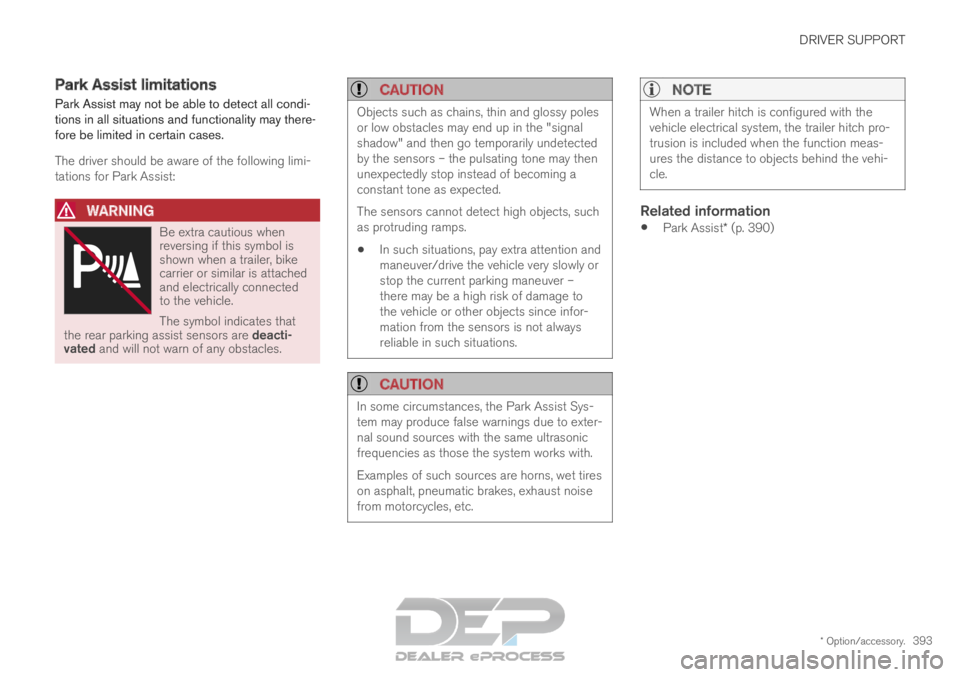
WARNING Be extra cautious when
reversing if this symbol is
shown when a trailer, bike
carrier or similar is attached
and electrically connected
to the vehicle.
The symbol indicates that
the rear parking assist sensors are deacti-
vated and will not warn of any obstacles.
CAUTION Objects such as chains, thin and glossy poles
or low obstacles may end up in the "signal
shadow" and then go temporarily undetected
by the sensors – the pulsating tone may then
unexpectedly stop instead of becoming a
constant tone as expected.
The sensors cannot detect high objects, such
as protruding ramps.
In such situations, pay extra attention and
maneuver/drive the vehicle very slowly or
stop the current parking maneuver –
there may be a high risk of damage to
the vehicle or other objects since infor-
mation from the sensors is not always
reliable in such situations.
CAUTION In some circumstances, the Park Assist Sys-
tem may produce false warnings due to exter-
nal sound sources with the same ultrasonic
frequencies as those the system works with.
Examples of such sources are horns, wet tires
on asphalt, pneumatic brakes, exhaust noise
from motorcycles, etc.
NOTE When a trailer hitch is configured with the
vehicle electrical system, the trailer hitch pro-
trusion is included when the function meas-
ures the distance to objects behind the vehi-
cle.
Related information
Park Assist* (p. 390)
Page 396 of 697
DRIVER SUPPORT
* Option/accessory.
394 Recommended maintenance for
Park Assist
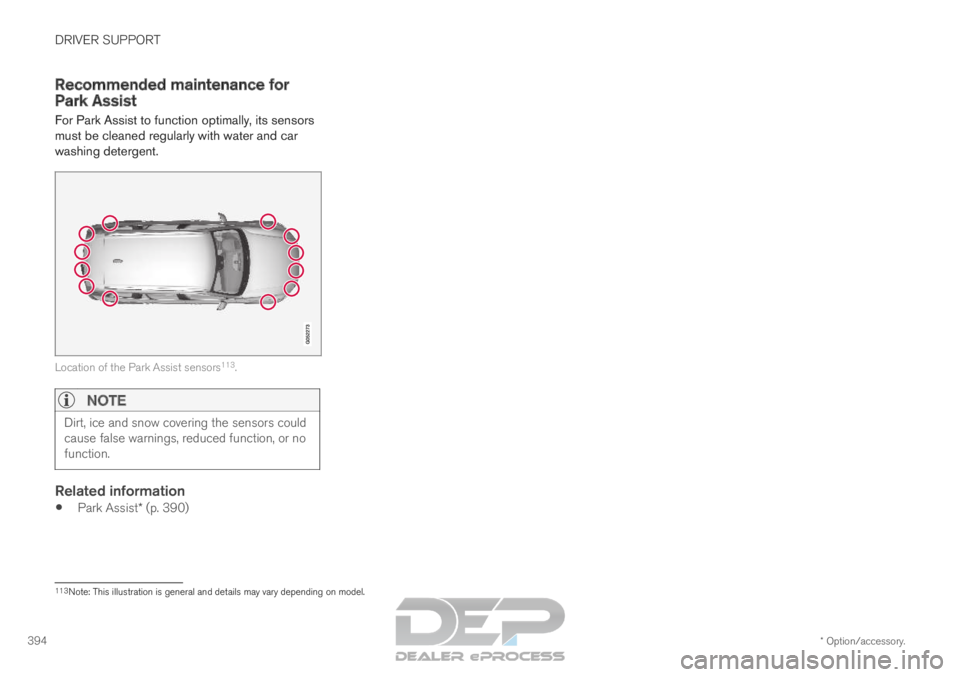
For Park Assist to function optimally, its sensors
must be cleaned regularly with water and car
washing detergent. Location of the Park Assist sensors
113
.
NOTE Dirt, ice and snow covering the sensors could
cause false warnings, reduced function, or no
function.
Related information
Park Assist* (p. 390) 113
Note: This illustration is general and details may vary depending on mod\
el.
Page 397 of 697

DRIVER SUPPORT
* Option/accessory.395
Park Assist symbols and messages
Symbols and messages for the Park Assist may
be displayed in the instrument panel and/or the
center display. Some examples of symbols and messages are shown in the table below. Symbol
Message Meaning The rear Park Assist sensors are turned off and no acoustic warnings for obstacles/objects will
be provided.
Park Assist System
Sensors blocked, cleaning nee-
ded One or more of the sensors are blocked. Check and clean/remove the obsta\
cle as soon as pos-
sible.
Park Assist System
Unavailable Service required The system is not functioning as intended. Contact a workshop ‒ an authorized Volvo workshop
is recommended. A text message can be erased by briefly pressing
the
button in the center of the right-side
steering wheel keypad.
If the message persists: Contact a workshop ‒ an
authorized Volvo workshop is recommended.
Related information
Park Assist* (p. 390)
Page 398 of 697

DRIVER SUPPORT
* Option/accessory.
396 Park Assist Camera*
The Park Assist Camera can help provide the
driver when maneuvering in tight spaces by alert-
ing the driver to obstacles using the camera
screen and graphics in the center display.
The Park Assist Camera is a support function
that is automatically activated when reverse gear
is engaged. It can also be started manually from
the center display.
Example camera view
114
. Zoom
115
- zoom in/out 360° view
* - activate/deactivate all cameras
PAS
* - activate/deactivate Parking Assist
Lines
- activate/deactivate trajectory lines Towbar
* - activate/deactivate trajectory lines
for towbar* 116 CTA
* - activate/deactivate Cross Traffic Alert
WARNING
The Parking Camera function is supple-
mentary driver support intended to facili-
tate driving and help make it safer – it
cannot handle all situations in all traffic,
weather and road conditions.
The parking cameras have dead/blind
spots where objects cannot be detected.
Pay particular attention to people and
animals near the vehicle.
Objects/obstacles may be closer to the
vehicle than they appear on the screen.
The parking cameras are not a substitute
for the driver's attention and judgment.
The driver is always responsible for
ensuring the vehicle is driven in a safe
manner, at the appropriate speed, with an
appropriate distance to other vehicles,
and in accordance with current traffic
rules and regulations. 114
The illustration is generic - details may vary according to vehicle mode\
l.
115 The trajectory lines will not be displayed when zooming in.
116 Not available in all markets.
Page 403 of 697
DRIVER SUPPORT
}}
401
Sensor field from Park Assist for
Park Assist Camera
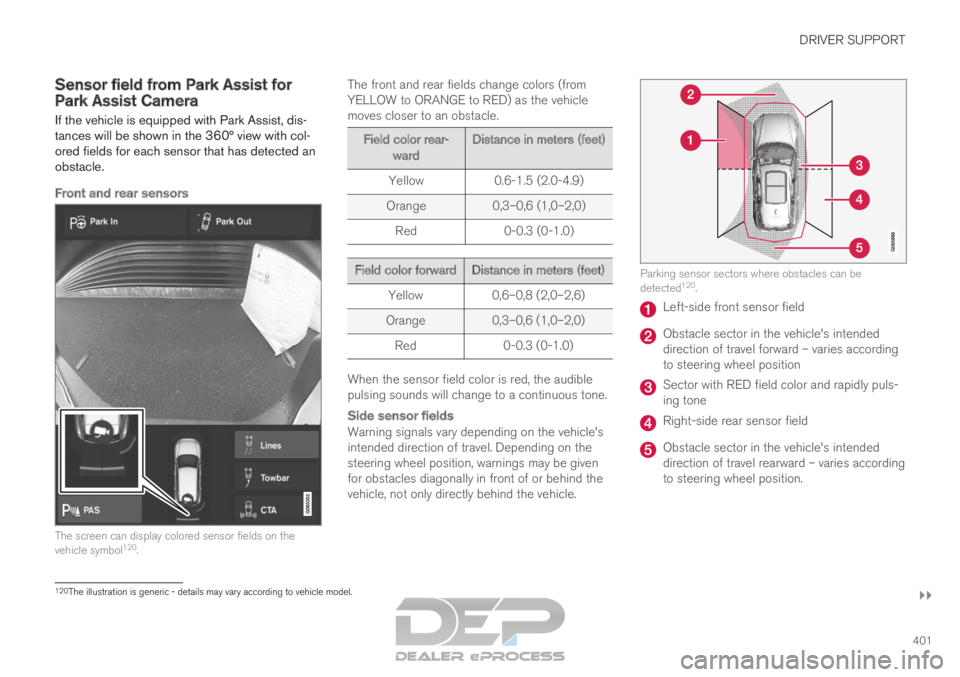
If the vehicle is equipped with Park Assist, dis-
tances will be shown in the 360° view with col-
ored fields for each sensor that has detected an
obstacle.
Front and rear sensors The screen can display colored sensor fields on the
vehicle symbol
120
. The front and rear fields change colors (from
YELLOW to ORANGE to RED) as the vehicle
moves closer to an obstacle. Field color rear-
ward Distance in meters (feet)
Yellow
0.6-1.5 (2.0-4.9)
Orange 0,3–0,6 (1,0–2,0)
Red 0-0.3 (0-1.0) Field color forward
Distance in meters (feet)
Yellow
0,6–0,8 (2,0–2,6)
Orange 0,3–0,6 (1,0–2,0)
Red 0-0.3 (0-1.0) When the sensor field color is red, the audible
pulsing sounds will change to a continuous tone.
Side sensor fields
Warning signals vary depending on the vehicle's
intended direction of travel. Depending on the
steering wheel position, warnings may be given
for obstacles diagonally in front of or behind the
vehicle, not only directly behind the vehicle. Parking sensor sectors where obstacles can be
detected
120
. Left-side front sensor field
Obstacle sector in the vehicle's intended
direction of travel forward – varies according
to steering wheel position
Sector with RED field color and rapidly puls-
ing tone
Right-side rear sensor field
Obstacle sector in the vehicle's intended
direction of travel rearward – varies according
to steering wheel position.
120
The illustration is generic - details may vary according to vehicle mode\
l.
Page 405 of 697

DRIVER SUPPORT
}}
403
Park Assist Camera limitations
The Park Assist Camera may not be able to
detect all conditions in all situations and func-
tionality may therefore be limited.
The driver should be aware of the following limi-
tations for the Park Assist Camera:
WARNING Be extra cautious when
reversing if this symbol is
shown when a trailer, bike
carrier or similar is attached
and electrically connected
to the vehicle.
The symbol indicates that
the rear parking assist sensors are deacti-
vated and will not warn of any obstacles.
NOTE A bike carrier and other accessories mounted
on the rear of the vehicle can obscure the
camera's view.
Blind sectors There are "blind" sectors between the cameras' fields of
vision.
With 360° view selected, objects/obstacles may
not be detected if they are located in the "joints"
where the edges of the individual camera views
meet.
WARNING
Even if it seems as though only a fairly small
section of the screen image is obstructed, this
may mean that a relatively large sector is hid-
den and obstacles there may not be detected
until they are very near the vehicle.
Defective cameraIf a camera sector is dark and
contains this symbol, this indi-
cates that the camera is not
functioning properly.
See the following illustration for
an example. The vehicle's left-side camera is malfunctioning.
Dark camera sector
A dark camera sector may also be displayed in
the following situations, but without the defective
camera symbol:
a door is open
the tailgate is open
a rearview mirror is folded in
Lighting conditionsThe camera image is automatically adjusted
according to the current lighting conditions. This
Page 407 of 697

DRIVER SUPPORT
* Option/accessory.405
Park Assist Camera symbols and
messages
Symbols and messages for the Park Assist
Camera may be displayed in the instrument
panel and/or the center display.
Some examples of symbols and messages are shown in the table below. Symbol
Message Meaning The rear Park Assist sensors are turned off and no acoustic warnings or field markings for obsta-
cles/objects will be provided.
The camera is not functioning properly.
Park Assist System
Sensors blocked, cleaning
needed One or more of the sensors are blocked. Check and clean/remove the obsta\
cle as soon as possible.
Park Assist System
Unavailable Service required The system is not functioning as intended. Contact a workshop ‒ an authorized Volvo workshop is
recommended. A text message can be erased by briefly pressing
the
button in the center of the right-side
steering wheel keypad. If the message persists: Contact a workshop ‒ an
authorized Volvo workshop is recommended.
Related information
Park Assist Camera* (p. 396)
Page 408 of 697
DRIVER SUPPORT
* Option/accessory.
406 Park Assist Pilot*
Park Assist Pilot (
PAP 122
) helps the driver pull
into and out of parking spaces.
PAP first checks whether there
is sufficient space and then
steers the car into the space.
The center display uses sym-
bols, graphics and messages to
inform the driver of what steps
need to be taken and when.
WARNING
The PAP function is supplementary driver
support intended to facilitate driving and
help make it safer – it cannot handle all
situations in all traffic, weather and road
conditions.
Pay particular attention to people and
animals near the vehicle.
PAP is not a substitute for the driver's
attention and judgment. The driver is
always responsible for ensuring the vehi-
cle is driven in a safe manner, at the
appropriate speed, with an appropriate
distance to other vehicles, and in accord-
ance with current traffic rules and regula-
tions.
NOTE The PAP function measures the space and
steers the vehicle – the driver's role is to:
keep close watch of the area around the
vehicle
follow the instructions on the center dis-
play
change gears (reverse/forward) – a
"ping" sound indicates when the driver
should change gears
regulate and maintain a safe speed
apply the brakes and stop.
Related information
Types of parking with Park Assist Pilot
(p. 406)
Parking with Park Assist Pilot (p. 408)
Leaving a parking space with Park Assist
Pilot (p. 410)
Park Assist Pilot* limitations (p. 411)
Recommended maintenance for Park Assist
Pilot (p. 413)
Park Assist Pilot* messages (p. 414) Types of parking with Park Assist
Pilot
Park Assist Pilot (PAP 123
) can be used for the
following types of parking. 122
Park Assist Pilot
123 Park Assist Pilot