warning VOLVO XC90 TWIN ENGINE 2019 Owners Manual
[x] Cancel search | Manufacturer: VOLVO, Model Year: 2019, Model line: XC90 TWIN ENGINE, Model: VOLVO XC90 TWIN ENGINE 2019Pages: 697, PDF Size: 10.33 MB
Page 326 of 697

||DRIVER SUPPORT
324
Select one of the following:
Eco - Pilot Assist will focus on providing
optimal fuel economy, which will increase the
time interval to the vehicle ahead.
Comfort - Pilot Assist will focus on following
the set time interval to the vehicle ahead as
smoothly as possible.
Dynamic - Pilot Assist will focus on follow-
ing the set time interval to the vehicle ahead
more exactly, which could mean faster accel-
eration and heavier braking.
For more information, see "Drive modes".
Related information
Pilot Assist (p. 316)
Drive modes (p. 454)
Managing Cruise Control speed (p. 293) Deactivating/reactivating Pilot
Assist
Pilot Assist
can be temporarily put into standby
mode and then reactivated.
Deactivating and putting Pilot Assist in
standby mode Note: This illustration is general and details may vary
depending on model.
To temporarily deactivate Pilot Assist and put it in
standby mode:
–
Press the button on the steering wheel
(2).
>
Pilot Assist goes into standby mode - the
symbol (8) in the instrument panel
changes color from WHITE to GRAY and
the set speed in the center of the speed-
ometer will change from BEIGE to GRAY.
...or... –
Press the ◀ button on the steering wheel (3).
>
Pilot Assist is turned off and Adaptive
Cruise Control will go into active mode.
WARNING
With Pilot Assist in standby mode, the
driver must intervene and steer and regu-
late both speed and distance to the vehi-
cle ahead.
If the vehicle comes too close to a vehicle
ahead when Pilot Assist is in standby
mode, the driver is instead warned of the
short distance by the Distance Alert func-
tion.
Page 327 of 697
DRIVER SUPPORT
}}
325
Standby mode due to action by the driver
Pilot Assist will be temporarily deactivated and
put in standby mode if: the brakes are applied.
the gear selector is moved to N
a turn signal is used for more than 1 minute.
the vehicle is driven faster than the set
speed for more than 1 minute
Temporarily increasing speed using the accelera-
tor pedal, e.g. when passing another vehicle, will
not affect the setting. The vehicle will return to
the set speed when the accelerator pedal is
released.
When the turn signals are used, Pilot Assist's
steering assistance will be temporarily deacti-
vated. When the turn signal is switched off, steer-
ing assistance will be automatically reactivated if
the traffic lane's side markings can still be
detected.
Automatic standby mode
Pilot Assist is dependent on other systems, such
as Electronic Stability Control (ESC 61
). If any of
these other systems stops working, Pilot Assist
will automatically switch off.
WARNING With automatic standby mode, the driver is
warned by an acoustic signal and a message
on the instrument panel.
The driver must then regulate vehicle
speed, apply the brakes if necessary, and
maintain a safe distance to other vehicles.
Adaptive Cruise Control may go into standby
mode if, e.g.:
the driver opens the door.
the brake temperature is high.
the driver's hands are not on the steering
wheel.
the parking brake is applied.
the engine speed (rpm) is too low/high.
the driver unbuckles the seat belt.
one or more of the wheels lose traction.
the camera/radar sensor is covered by snow
or heavy rain (the camera lens/radar waves
are blocked)
your vehicle's speed goes below 5 km/h
(3 mph) and Pilot Assist cannot determine if
the vehicle ahead is stationary or if it is
another object, e.g. a speed bump.
your vehicle's speed goes under 5 km/h
(3 mph) and the vehicle ahead turns so that
Pilot Assist no longer has a vehicle to follow.
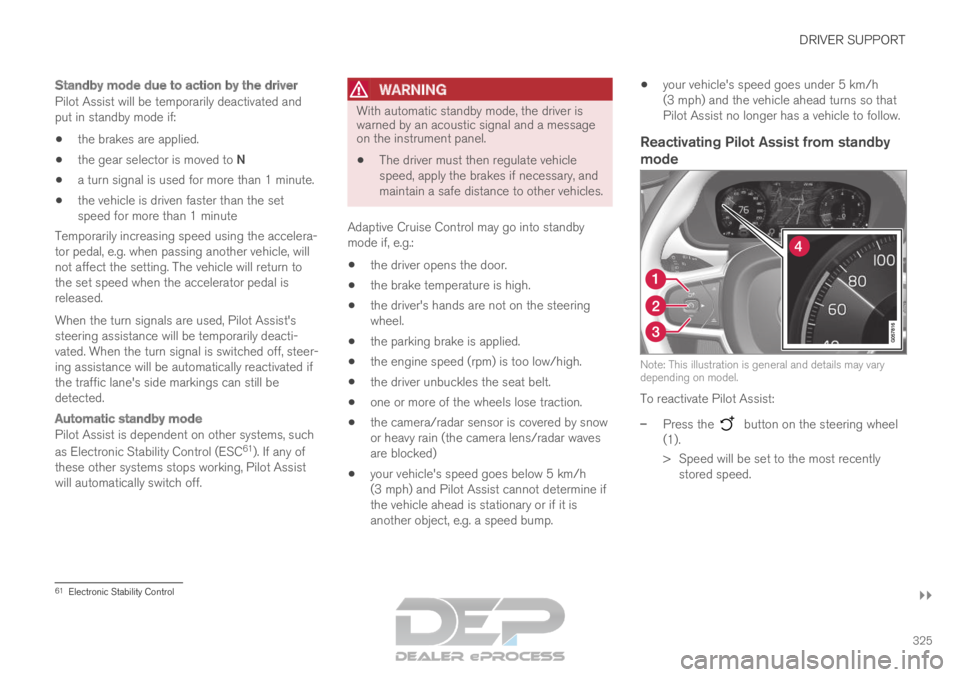
Reactivating Pilot Assist from standby
mode Note: This illustration is general and details may vary
depending on model.
To reactivate Pilot Assist:
–
Press the button on the steering wheel
(1).
>
Speed will be set to the most recently
stored speed. 61
Electronic Stability Control
Page 328 of 697

||DRIVER SUPPORT
326
WARNING
A noticeable increase in speed may follow
when the speed is resumed with the
steering wheel button.
Related information
Pilot Assist (p. 316) Passing assistance with Pilot Assist
Pilot Assist can assist the driver when passing
other vehicles.
How passing assistance worksWhen Pilot Assist is following another vehicle
and you indicate that you intend to pass that
vehicle by using the turn signal 62
, Pilot Assist will
begin accelerating toward the vehicle ahead
before your vehicle has moved into the passing
lane.
The function will then delay a speed reduction to
avoid early braking as your vehicle approaches a
slower-moving vehicle.
The function remains active until your vehicle has
passed the other vehicle.
WARNING Please note that this function can be acti-
vated in more situations than just passing
another vehicle, such as when a direction indi-
cator is used to indicate a lane change or
before exiting to another road – the vehicle
will then briefly accelerate.
Related information
Pilot Assist (p. 316)
Starting passing assistance with Pilot Assist
(p. 327)
Passing assistance with Pilot Assist limita-
tions (p. 327) 62
Only the left-hand turn signal for left-hand drive vehicles, or right-ha\
nd turn signal for right-hand drive vehicles.
Page 329 of 697
DRIVER SUPPORT
}}
327
Starting passing assistance with
Pilot Assist
Several conditions must be met for passing
assistance to be possible.
In order to activate passing assistance:
your vehicle must be following a vehicle
ahead (target vehicle)
your vehicle's current speed must be
at least 70 km/h (43 mph)
the set speed for Pilot Assist must be high
enough to safely pass another vehicle.
Starting parking assistanceTo start passing assistance:
–
Turn on the left turn signal.
>
Passing assistance will start.
Related information
Pilot Assist (p. 316)
Passing assistance with Pilot Assist (p. 326) Passing assistance with Pilot Assist
limitations
Passing assistance functionality may be reduced
in certain situations.
WARNING The driver should be aware that if conditions
suddenly change when using Parking Assis-
tance, the function may implement an unde-
sired acceleration in certain conditions.
Some situations should be avoided, e.g. if:
the vehicle is approaching an exit in the
same direction as passing would normally
occur
the vehicle ahead slows before your vehi-
cle has had time to switch to the passing
lane
traffic in the passing lane slows down
a vehicle for right-hand traffic is driven in
a country with left-hand traffic (or vice
versa).
Situations of this type can be avoided by tempo-
rarily putting Pilot Assist in standby mode.
Related information
Pilot Assist (p. 316)
Passing assistance with Pilot Assist (p. 326) Switching target vehicles with Pilot
Assist
At certain speeds, models with automatic trans-
missions and
Pilot Assist can switch target vehi-
cles.
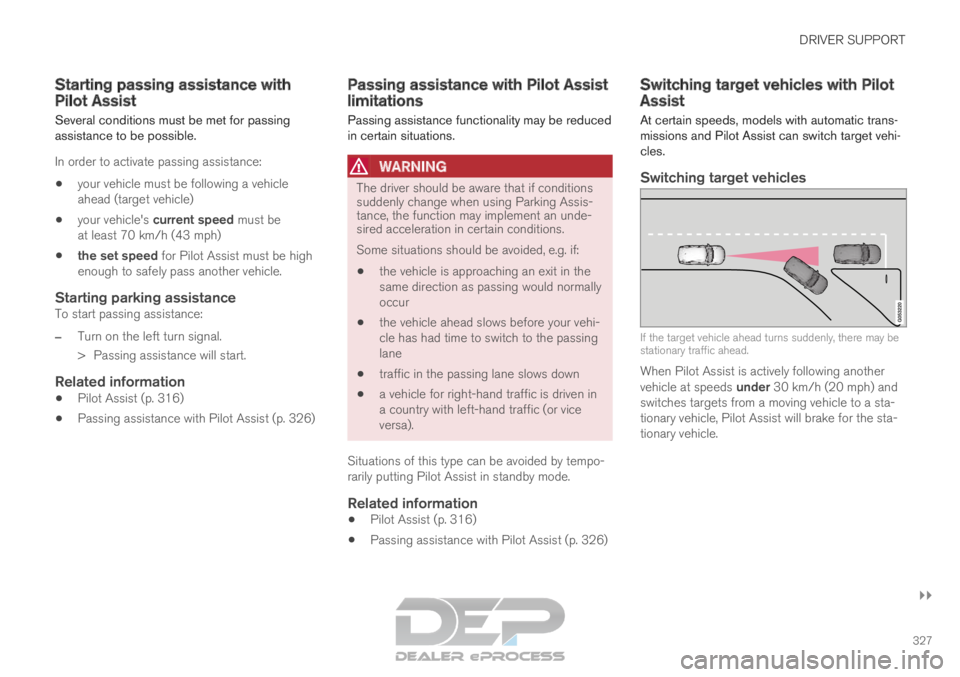
Switching target vehicles If the target vehicle ahead turns suddenly, there may be
stationary traffic ahead.
When Pilot Assist is actively following another
vehicle at speeds under 30 km/h (20 mph) and
switches targets from a moving vehicle to a sta-
tionary vehicle,
Pilot Assist will brake for the sta-
tionary vehicle.
Page 330 of 697
||DRIVER SUPPORT
328
WARNING
When Pilot Assist follows another vehicle at
speeds over approx. 30 km/h (20 mph) and
changes target vehicle – from a moving vehi-
cle to a stationary one – Pilot Assist will
ignore the stationary vehicle and instead
accelerate to the stored speed.
The driver must then intervene and apply
the brakes.
Automatic standby mode when switching
targets
Pilot Assist disengages and goes into standby
mode if:
your vehicle's speed goes below 5 km/h
(3 mph) and Pilot Assist cannot determine if
the target object is a stationary vehicle or
another object, e.g. a speed bump.
your vehicle's speed goes under 5 km/h
(3 mph) and the vehicle ahead turns so that
Pilot Assist no longer has a vehicle to follow.
Related information
Pilot Assist (p. 316) Auto-hold braking with Pilot Assist
Pilot Assist has a special braking function in
slow traffic and at a standstill.
Braking function in slow traffic and at a
standstill
In slow-moving, stop-and-go traffic or when stop-
ped at a traffic light, driving will resume automati-
cally if the vehicle is stopped for less than
approx. 3 seconds. If it takes more than 3 sec-
onds for the vehicle ahead to begin moving again,
Pilot Assist will go into standby mode and the
Auto-hold brake function will activate.
– Pilot Assist can be reactivated by:
Pressing the button on the steering
wheel keypad.
Pressing the accelerator pedal.
>
Pilot Assist will resume following the vehi-
cle ahead if it begins to move within
approx. 6 seconds.
NOTE Pilot Assist can keep the vehicle stationary
for no more than 5 minutes – after that time
the parking brake is applied and the function
is deactivated.
The parking brake must be released before
Pilot Assist can be reactivated.
Deactivation of the Auto-hold brake function
In certain situations, Auto-hold will be deactivated
when the vehicle is at a standstill and Pilot Assist
will go into standby mode. This means that the
brakes will be released and the vehicle could
begin to roll. The driver must actively apply the
brakes to keep the vehicle stationary.
This can occur if:
the driver depresses the brake pedal
the parking brake is applied
the gear selector is moved to the P, N or R
positions
the driver puts Pilot Assist in standby mode.
Auto Activate Parking BrakeIn certain situations, the parking brake will be
applied to keep the vehicle at a standstill.
This occurs if Pilot Assist is keeping the vehicle
stationary using the brakes and:
the driver opens the door or unbuckles
his/her seat belt
Pilot Assist has kept the vehicle at a stand-
still for more than approx. 5 minutes
the brakes overheat
the driver switches off the engine manually.
Related information
Pilot Assist (p. 316)
Page 331 of 697
DRIVER SUPPORT
}}
* Option/accessory. 329
Pilot Assist limitations
Pilot Assist functionality may be reduced in cer-
tain situations.
Pilot Assist is a driver support function designed
to simplify driving and assist the driver in many
situations. However, the driver is always responsi-
ble for maintaining a suitable distance to vehicles
or objects around it and ensuring that the vehicle
is correctly positioned in the traffic lane.
WARNING In some situations, Pilot Assist may have trou-
ble helping the driver properly or may be
deactivated automatically – we advise against
using Pilot Assist in such cases. Examples of
such situations include:
the lane markings are worn, missing or
cross each other.
lane division is unclear, for example, when
the lanes divide or merge or at exits or
when there are multiple sets of markings.
edges or other lines than lane markings
are present on or near the road, e.g.
curbs, joints or repairs to the road sur-
face, edges of barriers, roadside edges or
strong shadows.
the lane is narrow or winding.
the lane contains ridges or holes.
weather conditions are poor, e.g. rain,
snow or fog or slush or reduced visibility
with poor light conditions, backlighting,
wet road surface, etc.
The driver should also note that Pilot Assist
has the following limitations:
High curbs, roadside barriers, temporary
obstacles (traffic cones, safety barriers,
etc.) are not detected. Alternatively, they
may be detected incorrectly as lane mark-
ings, with a subsequent risk of contact
between the vehicle and such obstacles. The driver is responsible for ensuring that
the vehicle maintains a suitable distance
from such obstacles.
The camera and radar sensors do not
have the capacity to detect all oncoming
objects and obstacles in traffic environ-
ments, e.g. potholes, stationary obstacles
or objects that completely or partially
block the route.
Pilot Assist does not "see" pedestrians,
animals, etc.
The recommended steering input is lim-
ited in force, which means that it cannot
always help the driver to steer and keep
the vehicle within the lane.
In vehicles equipped with Sensus
Navigation*, the function is able to use
information from map data, which could
cause variations in performance.
Pilot Assist is switched off if the power
steering is working with reduced power -
e.g. during cooling due to overheating
(see section "Speed-dependent steering
force").
The driver can always correct or adjust steering
assistance provided by Pilot Assist by turning the
steering wheel to the desired position.
Page 344 of 697
||DRIVER SUPPORT
342
WARNING
The City Safety function is supplementary
driver support intended to help improve
driving safety – it cannot handle all situa-
tions in all traffic, weather and road condi-
tions.
The City Safety auto-brake function can
prevent a collision or reduce collision
speed, but to ensure full brake perform-
ance the driver should always depress the
brake pedal – even when the car auto-
brakes.
The warning and steering assistance are
only activated if there is a high risk of col-
lision – you must therefore never wait for
the collision warning or City Safety to
intervene.
Warnings and brake interventions for
pedestrians and cyclists are disengaged
at vehicle speeds over 80 km/h
(50 mph).
City Safety does not activate auto-braking
intervention during heavy acceleration.
City Safety is not a substitute for the driv-
er's attention and judgment. The driver is
always responsible for ensuring the vehi-
cle is driven in a safe manner, at the
appropriate speed, with an appropriate
distance to other vehicles, and in accord-
ance with current traffic rules and regula-
tions.
The driver is advised to read all sections
in the Owner's Manual that relate to City
Safety to learn about factors such as its
limitations and what the driver should be
aware of before using the system (see
the list of links for all subsections).
Related information
City Safety parameters and sub-functions
(p. 342)
Setting a warning distance for City Safety
(p. 344)
Detecting obstacles with City Safety (p. 345)
City Safety in crossing traffic (p. 347)
Limitations of City Safety in crossing traffic
(p. 348)
City Safety and delayed evasive maneuvers
(p. 349)
City Safety braking for oncoming vehicles
(p. 350)
City Safety limitations (p. 351)
City Safety messages (p. 353) City Safety parameters and sub-
functions
City Safety can help avoid a collision with a vehi-
cle, cyclist or large animal ahead by reducing the
vehicle's speed using its automatic braking func-
tion.
If the difference in speed is greater than the
speeds specified below, the City Safety auto-
brake function cannot prevent a collision, but it
can help mitigate its effects.
Vehicles
City Safety can help prevent a collision with a
vehicle ahead by reducing your vehicle's speed
by up to 60 km/h (37 mph).
Cyclists
City Safety can help prevent a collision with a
cyclist ahead by reducing your vehicle's speed by
up to 50 km/h (30 mph).
Pedestrians
City Safety can help prevent a collision with a
pedestrian ahead by reducing your vehicle's
speed by up to 45 km/h (28 mph).
Page 345 of 697
DRIVER SUPPORT
}}
* Option/accessory. 343
Large animals
If there is a risk of colliding with a large animal,
City Safety can help reduce your vehicle's speed
by up to 15 km/h (9 mph).
The braking function for large animals is primarily
intended to mitigate the force of a collision at
higher speeds. Braking is most effective at
speeds above 70 km/h (43 mph) and less effec-
tive at lower speeds.
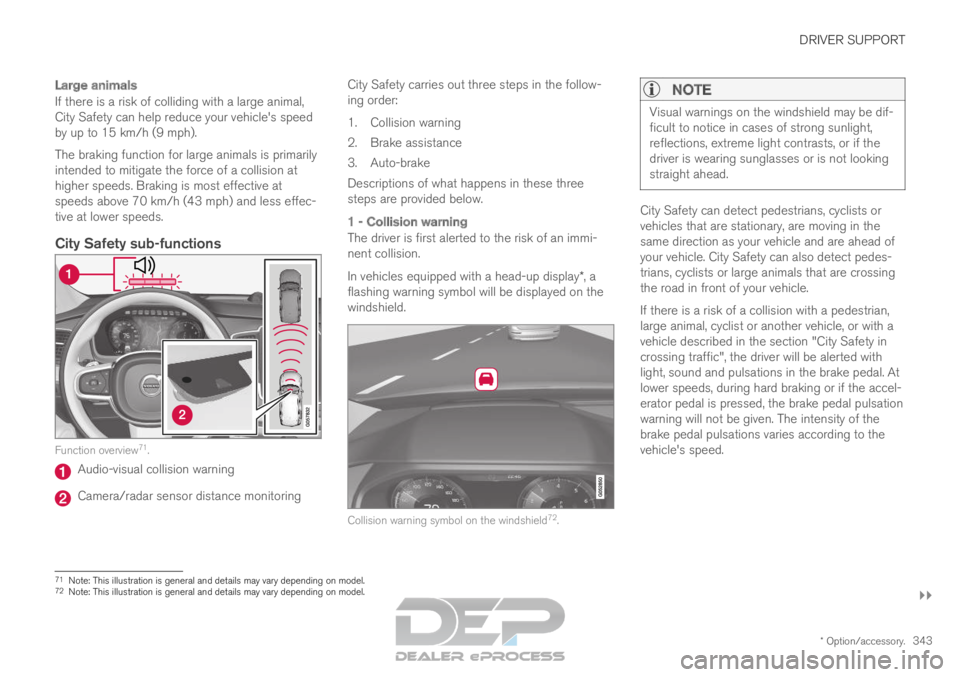
City Safety sub-functionsFunction overview
71
. Audio-visual collision warning
Camera/radar sensor distance monitoring City Safety carries out three steps in the follow-
ing order:
1.
Collision warning
2. Brake assistance
3. Auto-brake
Descriptions of what happens in these three
steps are provided below.
1 - Collision warning
The driver is first alerted to the risk of an immi-
nent collision.
In vehicles equipped with a head-up display*, a
flashing warning symbol will be displayed on the
windshield. Collision warning symbol on the windshield
72
.
NOTE Visual warnings on the windshield may be dif-
ficult to notice in cases of strong sunlight,
reflections, extreme light contrasts, or if the
driver is wearing sunglasses or is not looking
straight ahead.
City Safety can detect pedestrians, cyclists or
vehicles that are stationary, are moving in the
same direction as your vehicle and are ahead of
your vehicle. City Safety can also detect pedes-
trians, cyclists or large animals that are crossing
the road in front of your vehicle.
If there is a risk of a collision with a pedestrian,
large animal, cyclist or another vehicle, or with a
vehicle described in the section "City Safety in
crossing traffic", the driver will be alerted with
light, sound and pulsations in the brake pedal. At
lower speeds, during hard braking or if the accel-
erator pedal is pressed, the brake pedal pulsation
warning will not be given. The intensity of the
brake pedal pulsations varies according to the
vehicle's speed.
71
Note: This illustration is general and details may vary depending on mod\
el.
72 Note: This illustration is general and details may vary depending on mod\
el.
Page 346 of 697
||DRIVER SUPPORT
344
2 - Brake assistance
If the risk of a collision increases after the colli-
sion warning, brake support will be activated.
If the system determines that the pressure the
driver is exerting on the brake pedal is insufficient
to prevent the collision, brake support will
increase pressure.
3 - Auto-brake
The automatic braking function is activated at the
last moment.
If the driver has not taken evasive action by this
stage and a collision is imminent, the automatic
braking function will be triggered. This occurs
whether or not the driver is pressing the brake
pedal. Full braking force will be applied to reduce
the speed at impact or reduced braking effect will
be applied if this is sufficient to avoid the colli-
sion.
The seat belt tensioners may be activated along
with the automatic braking function. See "Seat
belt tensioners" for more information.
In certain situations, auto-braking may begin with
a limited braking force before applying full brak-
ing force.
If City Safety has prevented a collision, the vehi-
cle will be kept at a standstill until the driver
takes action. If the vehicle has slowed to avoid
colliding with a slower-moving vehicle ahead, your
speed will be reduced to that vehicle's speed.
Auto-braking can always be cancelled if the
driver presses hard on the accelerator pedal.
NOTE When City Safety activates the brakes, the
brake lights come on.
When City Safety applies the brakes, a text mes-
sage will appear in the instrument panel to notify
the driver that the function is/was activated.
WARNING
City Safety may not be used to change how
the driver operates the vehicle. The driver
must not only rely on City Safety to brake the
vehicle.
Related information
City Safety™ (p. 341) Setting a warning distance for City
Safety
City Safety is always active, but the function's
warning distance can be adjusted.
NOTE The City Safety function cannot be deacti-
vated. It is activated automatically each time
the engine/electric motor is started.
The alert distance determines the sensitivity of
the system and regulates the distance at which
the light, sound and brake pulsations will be acti-
vated.
To select warning distance:
1.
Select Settings My Car IntelliSafe
in
the center display's Top view.
2. Under City Safety Warning, tap Late,
Normal or Early to set the desired warning distance.
If the driver feels that the Early setting is giving
too many warnings or finds them irritating, the
Normal or Late warning distance settings can
be selected instead.
If the driver feels that the warnings are too fre-
quent and distracting, the warning distance can
be reduced. This will reduce the total number of
warnings, but it will also result in City Safety pro-
viding warnings at a later stage.
Page 347 of 697
DRIVER SUPPORT
}}
345
The
Late warning distance setting should there-
fore only be used in exceptional cases, such as
when a more dynamic driving style is preferred.
WARNING
No automatic system can guarantee
100% correct function in all situations.
You should therefore never test use of
City Safety in the direction of people, ani-
mals or vehicles – this could lead to
severe damage, serious personal injury or
even death.
City Safety warns the driver if there is a
risk of collision, but the function cannot
reduce the driver's reaction time.
Even if the warning distance has been set
to Early, warnings may be perceived as
late in certain situations – e.g. when there
are large speed differences or if the vehi-
cle ahead suddenly brakes heavily.
With the warning distance set to
Early,
warnings come further in advance. This
may cause the warnings to come more
frequently than with warning distance
Normal, but is recommended since it can
make City Safety more effective.
NOTE The warning with direction indicators for Rear
Collision Warning is deactivated if the colli-
sion warning distance in the City Safety func-
tion is set to the lowest level "
Late".
The seat belt tensioning and braking func-
tions remain active.
Related information
City Safety™ (p. 341) Detecting obstacles with City Safety
City Safety can help detect vehicles, cyclists,
large animals and pedestrians.
VehiclesCity Safety detects most types of vehicles that
are either stationary, moving in the same direc-
tion as your vehicle or those described in “City
Safety in crossing traffic” and City Safety braking
for oncoming vehicles”.
For City Safety to be able to detect a vehicle in
the dark, its headlights and taillights must be on
and clearly visible.
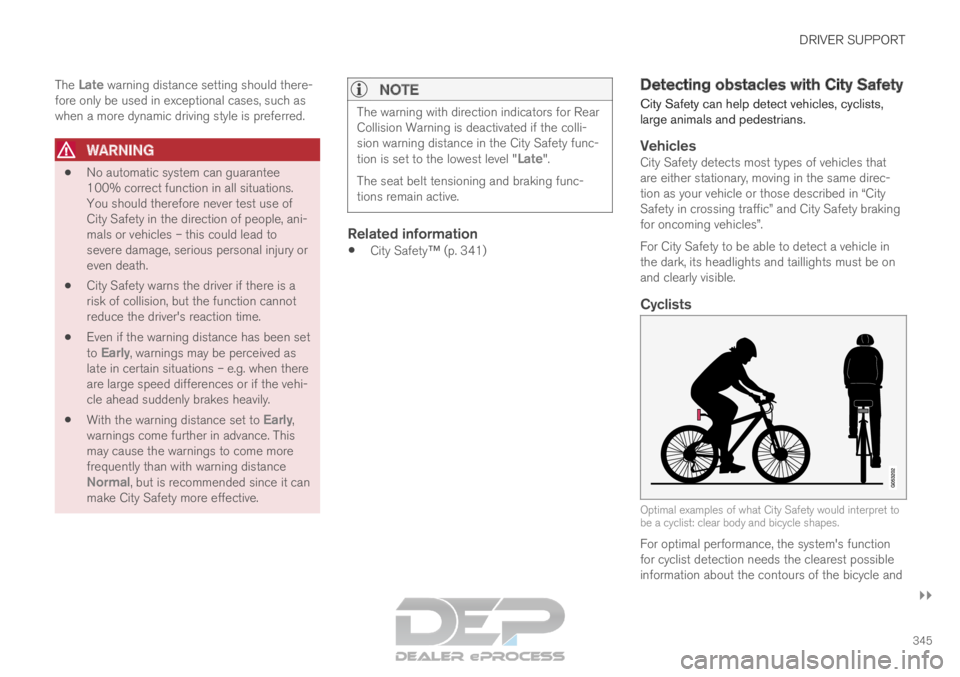
Cyclists
Optimal examples of what City Safety would interpret to
be a cyclist: clear body and bicycle shapes.
For optimal performance, the system's function
for cyclist detection needs the clearest possible
information about the contours of the bicycle and