key VOLVO XC90 TWIN ENGINE 2019 Manual PDF
[x] Cancel search | Manufacturer: VOLVO, Model Year: 2019, Model line: XC90 TWIN ENGINE, Model: VOLVO XC90 TWIN ENGINE 2019Pages: 697, PDF Size: 10.33 MB
Page 275 of 697
KEY, LOCKS AND ALARM
}}
273
Related information
Private Locking (p. 271) Alarm
The alarm emits sound and light signals if any-
one without a valid remote key attempts to break
into the vehicle or interferes with the start battery
or alarm siren.
When armed, the alarm will be triggered if:
the hood, tailgate or any door is opened.
a battery cable is disconnected.
the alarm siren is disconnected.
Alarm signalsThe following occurs if the alarm is triggered:
A siren will sound for 30 seconds or until the
alarm is turned off.
All turn signals will flash for 5 minutes or
until the alarm is turned off.
If the reason the alarm was triggered is not recti-
fied, the alarm cycle will repeat up to 10 times 20
.
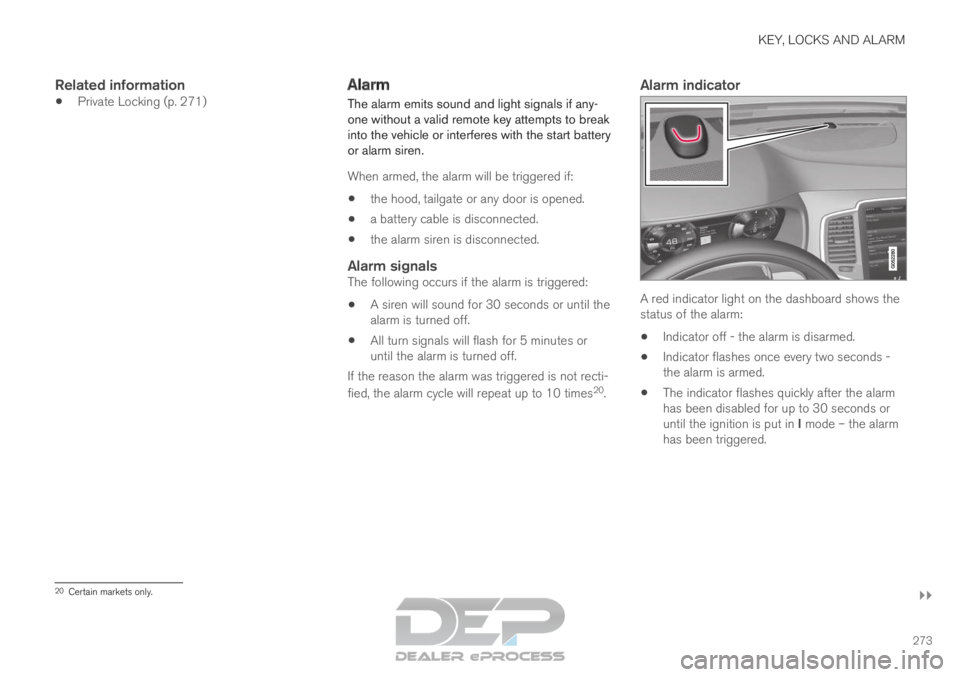
Alarm indicator A red indicator light on the dashboard shows the
status of the alarm:
Indicator off - the alarm is disarmed.
Indicator flashes once every two seconds -
the alarm is armed.
The indicator flashes quickly after the alarm
has been disabled for up to 30 seconds or
until the ignition is put in I mode – the alarm
has been triggered. 20
Certain markets only.
Page 276 of 697
||KEY, LOCKS AND ALARM
* Option/accessory.
274
In the event of alarm system failureIf a problem is detected in the alarm
system, a symbol and the message
Alarm system failure Service
required will appear in the instrument
panel. Contact a workshop - an authorized Volvo
workshop is recommended.
NOTE Do not attempt to repair or alter any of the
components in the alarm system yourself. Any
such attempt could affect the terms and con-
ditions of your insurance policy.
Related information
Arming and disarming the alarm (p. 274) Arming and disarming the alarm
The alarm is armed when the vehicle is locked.
Arming the alarmLock and arm the vehicle by:
pressing the lock button on the remote key .
touch the marked surface on the outside of
the door handle or the rubberized pressure
plate on the tailgate 21
.
If the vehicle is equipped with both keyless lock-
ing/unlocking* and power tailgate*, the button on the lower edge of the tailgate can also
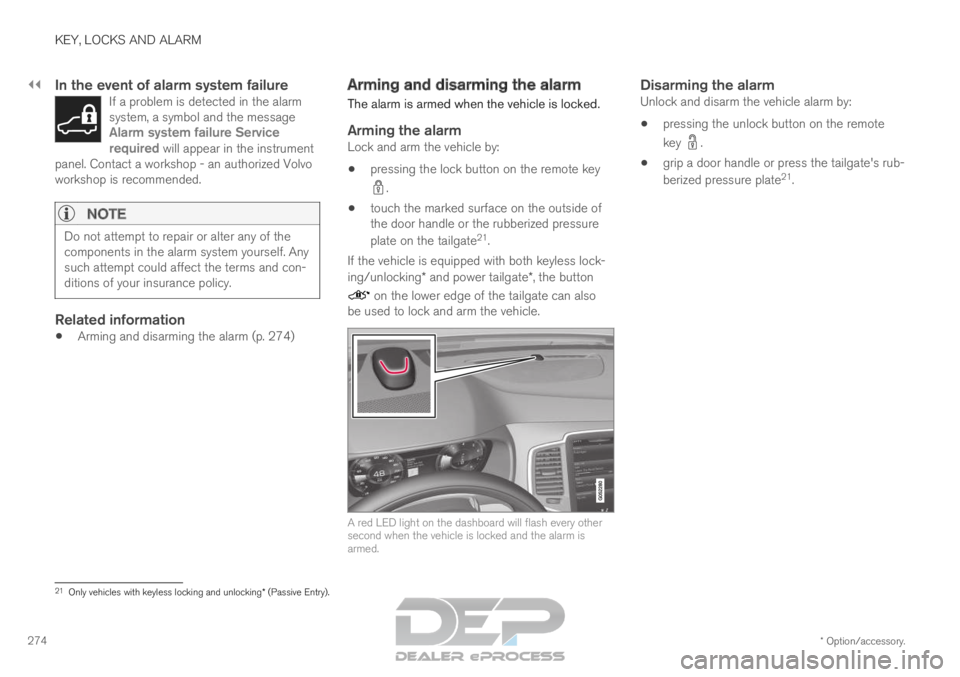
be used to lock and arm the vehicle. A red LED light on the dashboard will flash every other
second when the vehicle is locked and the alarm is
armed.
Disarming the alarmUnlock and disarm the vehicle alarm by:
pressing the unlock button on the remote
key .
grip a door handle or press the tailgate's rub-
berized pressure plate 21
. 21
Only vehicles with keyless locking and unlocking* (Passive Entry).
Page 277 of 697
KEY, LOCKS AND ALARM
275
Disarming the alarm without a functioning
remote key
The vehicle can be unlocked and disarmed even
if the remote key is not functioning, e.g. if the
battery is discharged.
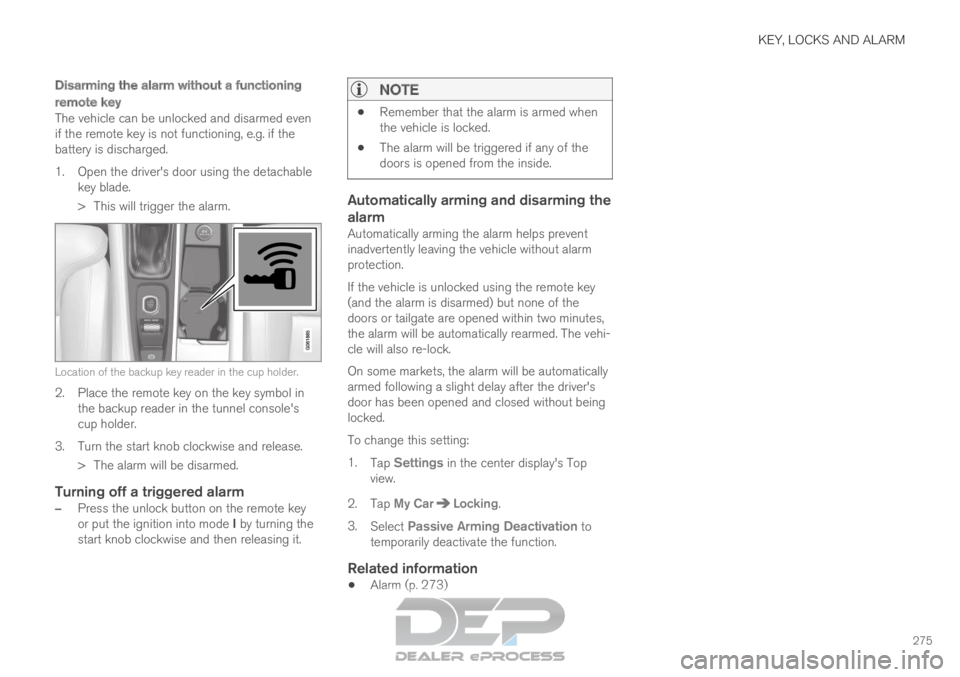
1. Open the driver's door using the detachablekey blade.
> This will trigger the alarm. Location of the backup key reader in the cup holder.
2. Place the remote key on the key symbol in
the backup reader in the tunnel console's
cup holder.
3.
Turn the start knob clockwise and release.
> The alarm will be disarmed.
Turning off a triggered alarm
– Press the unlock button on the remote key
or put the ignition into mode I by turning the
start knob clockwise and then releasing it.
NOTE
Remember that the alarm is armed when
the vehicle is locked.
The alarm will be triggered if any of the
doors is opened from the inside.
Automatically arming and disarming the
alarm
Automatically arming the alarm helps prevent
inadvertently leaving the vehicle without alarm
protection.
If the vehicle is unlocked using the remote key
(and the alarm is disarmed) but none of the
doors or tailgate are opened within two minutes,
the alarm will be automatically rearmed. The vehi-
cle will also re-lock.
On some markets, the alarm will be automatically
armed following a slight delay after the driver's
door has been opened and closed without being
locked.
To change this setting:
1.
Tap Settings in the center display's Top
view.
2.
Tap My Car Locking
.
3. Select Passive Arming Deactivation to
temporarily deactivate the function.
Related information
Alarm (p. 273)
Page 284 of 697
DRIVER SUPPORT
282Electronic Stability Control symbols
and messages
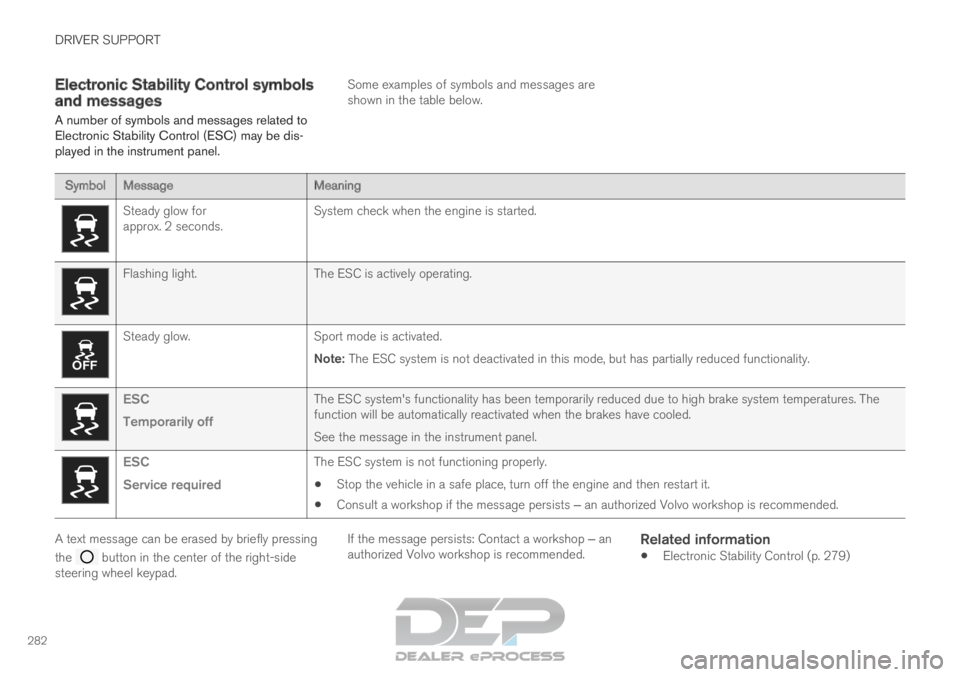
A number of symbols and messages related to
Electronic Stability Control (ESC) may be dis-
played in the instrument panel. Some examples of symbols and messages are
shown in the table below.Symbol
Message MeaningSteady glow for
approx. 2 seconds.
System check when the engine is started.Flashing light.
The ESC is actively operating.Steady glow.
Sport mode is activated.
Note: The ESC system is not deactivated in this mode, but has partially reduc\
ed functionality. ESC
Temporarily off
The ESC system's functionality has been temporarily reduced due to hi\
gh brake system temperatures. The
function will be automatically reactivated when the brakes have cooled.
See the message in the instrument panel.ESC
Service required
The ESC system is not functioning properly.
Stop the vehicle in a safe place, turn off the engine and then restart i\
t.
Consult a workshop if the message persists ‒ an authorized Volvo workshop is recommended. A text message can be erased by briefly pressing
the
button in the center of the right-side
steering wheel keypad. If the message persists: Contact a workshop ‒ an
authorized Volvo workshop is recommended.
Related information
Electronic Stability Control (p. 279)
Page 286 of 697
DRIVER SUPPORT
284Activating and starting Speed
Limiter
The Speed Limiter (SL 13
) function must be
selected and activated in order to regulate
speed.
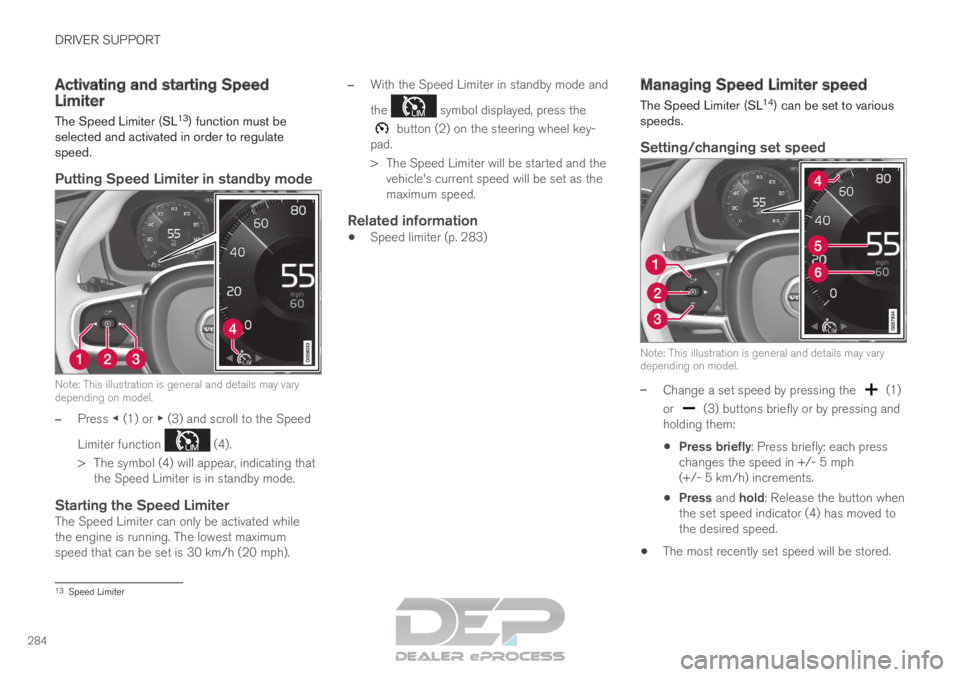
Putting Speed Limiter in standby mode Note: This illustration is general and details may vary
depending on model.
–
Press ◀ (1) or ▶ (3) and scroll to the Speed
Limiter function (4).
>
The symbol (4) will appear, indicating that
the Speed Limiter is in standby mode.
Starting the Speed LimiterThe Speed Limiter can only be activated while
the engine is running. The lowest maximum
speed that can be set is 30 km/h (20 mph). –
With the Speed Limiter in standby mode and
the symbol displayed, press the
button (2) on the steering wheel key-
pad.
>
The Speed Limiter will be started and the
vehicle's current speed will be set as the
maximum speed.
Related information
Speed limiter (p. 283) Managing Speed Limiter speed
The Speed Limiter (SL
14
) can be set to various
speeds.
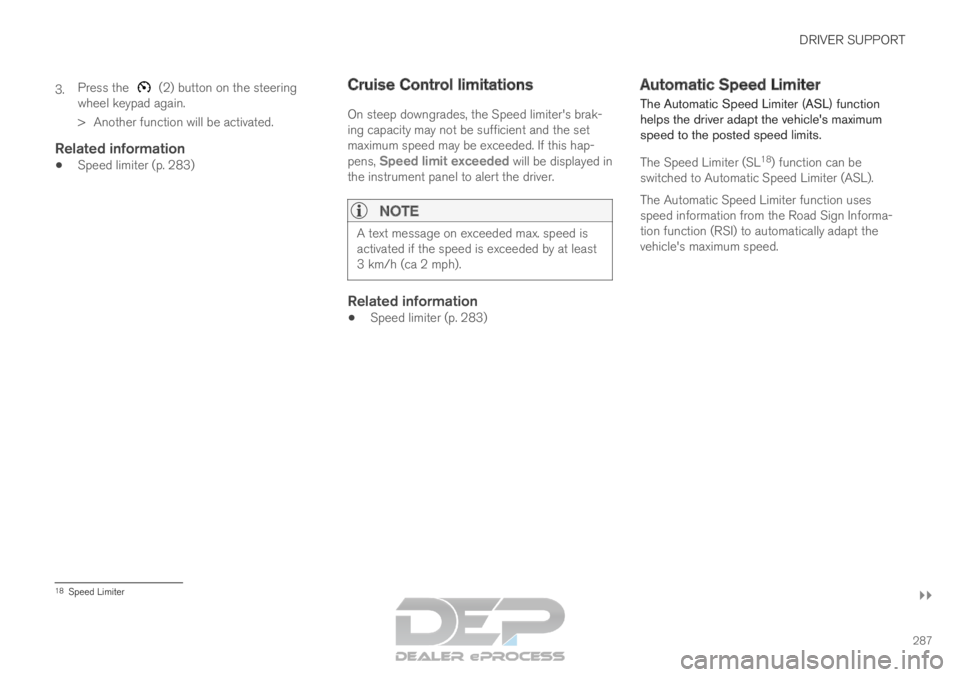
Setting/changing set speed Note: This illustration is general and details may vary
depending on model.
–
Change a set speed by pressing the (1)
or (3) buttons briefly or by pressing and
holding them:
Press briefly: Press briefly: each press
changes the speed in +/- 5 mph
(+/- 5 km/h) increments.
Press and hold: Release the button when
the set speed indicator (4) has moved to
the desired speed.
The most recently set speed will be stored. 13
Speed Limiter
Page 289 of 697
DRIVER SUPPORT
}}
287
3.
Press the (2) button on the steering
wheel keypad again.
>
Another function will be activated.
Related information
Speed limiter (p. 283) Cruise Control limitations
On steep downgrades, the Speed limiter's brak-
ing capacity may not be sufficient and the set
maximum speed may be exceeded. If this hap-
pens,
Speed limit exceeded will be displayed in
the instrument panel to alert the driver.
NOTE A text message on exceeded max. speed is
activated if the speed is exceeded by at least
3 km/h (ca 2 mph).
Related information
Speed limiter (p. 283) Automatic Speed Limiter
The Automatic Speed Limiter (ASL) function
helps the driver adapt the vehicle's maximum
speed to the posted speed limits.
The Speed Limiter (SL 18
) function can be
switched to Automatic Speed Limiter (ASL).
The Automatic Speed Limiter function uses
speed information from the Road Sign Informa-
tion function (RSI) to automatically adapt the
vehicle's maximum speed. 18
Speed Limiter
Page 291 of 697

DRIVER SUPPORT
289
Activating/deactivating Automatic
Speed Limiter
The Automatic Speed Limiter (ASL) is a supple-
ment to the Speed Limiter (SL) and can be acti-
vated/deactivated.
Activating ASLThe Speed Sign Assist but- ton is located in the center dis-
play's Function view. To activate the Automatic Speed Limiter:
1.
Tap the Speed Sign Assist button.
>
ASL will go into standby mode and a
green indicator light will illuminate. A road
sign symbol will be displayed in the center
of the speedometer in the instrument
panel.
2. Pressing the button on the steering
wheel keypad.
>
ASL will be activated and set to the vehi-
cle's current speed.
NOTE
If the Automatic Speed Limiter function is
activated, road sign information is shown
in the driver display even if RSI 19
is not
activated.
To remove road sign information from the
driver display, you must deactivate both
Automatic Speed Limiter and RSI.
When the Automatic Speed Limiter func-
tion is activated but RSI is deactivated, no
warnings are given from RSI. RSI must
also be activated for warnings to be pos-
sible.
Deactivating ASLTo deactivate the Automatic Speed Limiter:
–
Tap the
Speed Sign Assist button in Func-
tion view.
>
ASL will be deactivated, the indicator light
in the button will be GRAY and SL will be
activated instead.
WARNING The vehicle will no longer follow the posted
maximum speed after switching from ASL to
SL – it then only follows the maximum speed
stored in the memory.
Related information
Speed limiter (p. 283)
Automatic Speed Limiter (p. 287)
Activating/deactivating Road Sign Informa-
tion (p. 365) 19
Road Sign Information (RSI)
Page 292 of 697

DRIVER SUPPORT
* Option/accessory.
290 Changing Automatic Speed Limiter
tolerance
The Automatic Speed Limiter (ASL) can be set
to different tolerance levels.
It is also possible to allow the vehicle to drive
above or below the posted speed limit. For exam-
ple, if the vehicle is following a current posted
speed limit of 70 km/h (43 mph), the driver can
instead allow the vehicle to maintain a speed of
75 km/h (47 mph).
Function buttons and symbols
20
. –
Tap the (1) button on the steering
wheel keypad until 70 km/h (43 mph) has
been changed to 75 km/h (47 mph) in the
center of the speedometer (4).
>
The vehicle will then use the selected tol-
erance of 5 km/h (4 mph) as long as the
posted speed limit the vehicle passes is
70 km/h (43 mph).
This tolerance level will be followed until
the vehicle passes a sign with a lower or
higher speed. The vehicle will then adjust
to the new speed limit and the set toler-
ance will be deleted from the system's
memory.
If Road Sign Information* 21
is activated,
the posted speed limit will also be indi-
cated by a RED marking on the speedom-
eter.
The set tolerance can be adjusted in the same
way as for the Speed Limiter's speed.
NOTE The highest possible selectable tolerance is
+/- 10 km/h (5 mph).
Related information
Speed limiter (p. 283)
Automatic Speed Limiter (p. 287)
Activating/deactivating Road Sign Informa-
tion (p. 365) 20
Note: This illustration is general and details may vary depending on mod\
el.
21 Road Sign Information (RSI)
Page 295 of 697
DRIVER SUPPORT
}}
293
30 km/h (20 mph) or higher. The lowest speed
that can be set is 30 km/h (20 mph).
To start Cruise Control:
– With the function displayed, press
(2) on the steering wheel keypad.
>
Cruise Control will be started and the
vehicle's current speed will be set.
NOTE Cruise control can then not be connected at
speeds below 30 km/h (20 mph).
Related information
Cruise control (p. 291) Managing Cruise Control speed
Cruise Control (CC 25
) can be set to various
speeds.
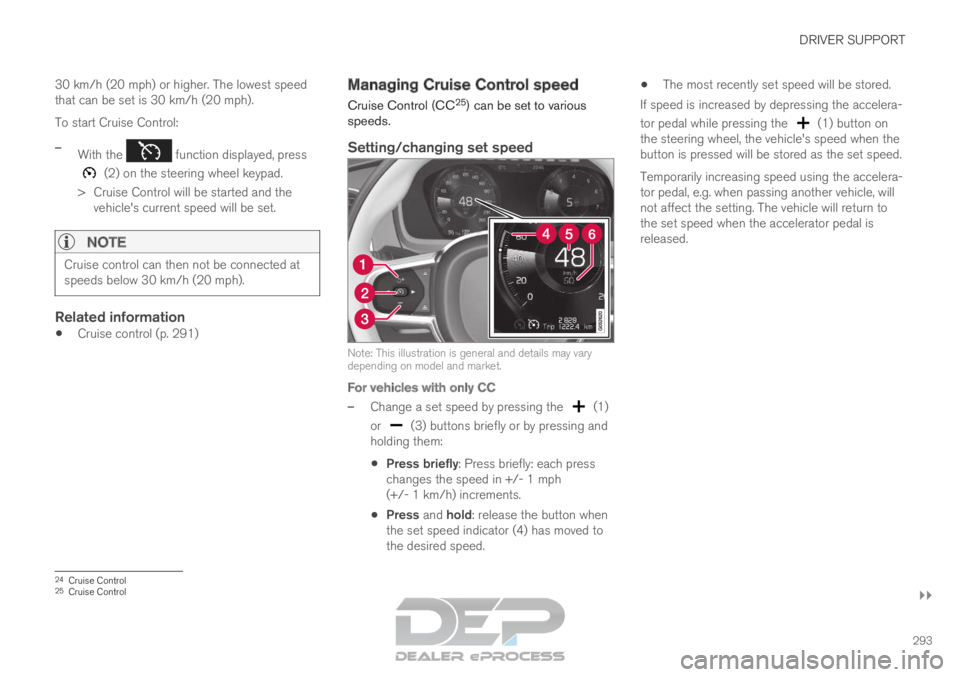
Setting/changing set speed Note: This illustration is general and details may vary
depending on model and market.
For vehicles with only CC
–
Change a set speed by pressing the (1)
or (3) buttons briefly or by pressing and
holding them:
Press briefly: Press briefly: each press
changes the speed in +/- 1 mph
(+/- 1 km/h) increments.
Press and hold: release the button when
the set speed indicator (4) has moved to
the desired speed.
The most recently set speed will be stored.
If speed is increased by depressing the accelera-
tor pedal while pressing the (1) button on
the steering wheel, the vehicle's speed when the
button is pressed will be stored as the set speed.
Temporarily increasing speed using the accelera-
tor pedal, e.g. when passing another vehicle, will
not affect the setting. The vehicle will return to
the set speed when the accelerator pedal is
released. 24
Cruise Control
25 Cruise Control
Page 298 of 697

DRIVER SUPPORT
* Option/accessory.
296 Switching off Cruise Control
Cruise control (Cruise Control - CC) can be
turned off. Function buttons and symbols
29
.
To turn off Cruise Control:
1. Press the button on the steering wheel
(2).
>
Cruise Control will go into standby mode.
2. Press the ◀ (1) or ▶ (3) buttons on the
steering wheel to select another function.
>
The Cruise Control symbol (4) in
the instrument panel will go out and the
set speed will be erased. 3.
Press the (2) button on the steering
wheel keypad again.
>
Another function will be activated.
NOTE In vehicles equipped with Adaptive Cruise
Control*, it is possible to switch between
cruise control and Adaptive Cruise Control –
see the heading "Switching between CC and
ACC".
Related information
Cruise control (p. 291)
Switching between Cruise Control and Adap-
tive Cruise Control (p. 313) Distance Alert*
30
The Distance Alert 31
function can help the driver
become aware if the time interval to the vehicle
in front is too short.
However, the vehicle must be equipped with a
head-up display in order to display the Distance
Alert, which will then be indicated by a symbol
on the windshield as long as the time interval to
the vehicle ahead is shorter than the set time
interval.
Distance Alert is active at speeds above 30 km/h
(20 mph) and only reacts for vehicles ahead mov-
ing in the same direction as your vehicle. No dis-
tance information is provided for oncoming, slow-
moving or stationary vehicles. 29
Note: This illustration is general and details may vary depending on mod\
el.
30 The Distance Alert function is only available in vehicles that can displ\
ay information on the windshield with a head-up display.
31 Distance Alert