ECU VOLVO XC90 TWIN ENGINE 2020 Owner's Manual
[x] Cancel search | Manufacturer: VOLVO, Model Year: 2020, Model line: XC90 TWIN ENGINE, Model: VOLVO XC90 TWIN ENGINE 2020Pages: 693, PDF Size: 13.34 MB
Page 200 of 693
SEATS AND STEERING WHEEL
* Option/accessory.
198
Folding the second row backrests
The second row of seats has three individual seating positions 5
. The backrests can be
folded down separately.
WARNING
Adjust the seat and ensure it locks into position before driving. Use cautionwhen adjusting the seat. Uncontrolledor careless adjustments could lead toinjury.
Long objects must always be securelytied down to help prevent injury ordamage in the event of sudden brak-ing.
Always turn off the engine and applythe parking brake when loading orunloading the vehicle.
Put the gear selector in
P to help pre-
vent the gear selector from being inad-vertently moved.
CAUTION
When the backrest is folded down, make sure there are no objects in the rear seat,and the seat belts are not buckled. Other-wise there is a risk of damage to theupholstery.
CAUTION
The seat cushion of the integrated child restraint * must be in the stowed position
before the center seat backrest can be folded down. The armrest * in the center seat must be
raised before the seat backrest is folded down.
NOTE
The front seats may need to be pushed for- ward and/or the backrest adjusted so thatthe rear seat backrests can be fully low-ered. The rear seats may also need to be moved rearward. The seats in the second row must be in the upright position before they can be foldeddown completely. They should not befolded down when they are tilted forwardto access the third row of seats.
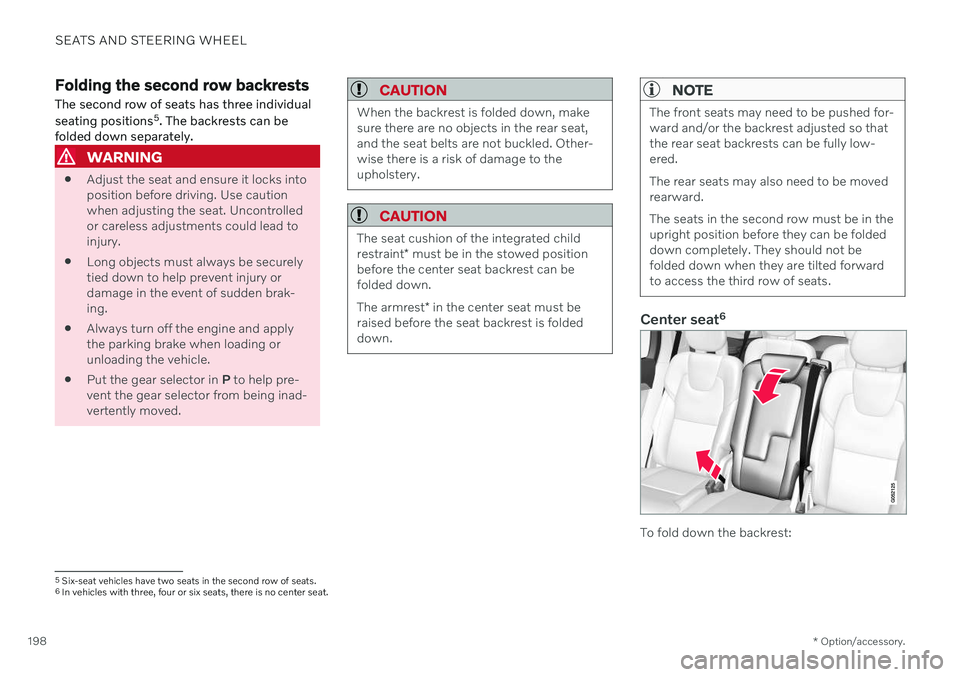
Center seat 6
To fold down the backrest:
5
Six-seat vehicles have two seats in the second row of seats.6In vehicles with three, four or six seats, there is no center seat.
Page 201 of 693
SEATS AND STEERING WHEEL
}}
* Option/accessory.199
1. Push down the head restraint manually.
2. Pull the strap on the right side of the cen-
ter seat.
3. Fold the backrest down until it locks into position. The seat cushion will move downward/forward when the backrest isfolded down and create a flat surface.
To return the backrest to the upright position:
1. Pull the strap.
2. Fold up the backrest and release the strap. Push the backrest until it locks into posi- tion.
3. Adjust the head restraint if necessary.
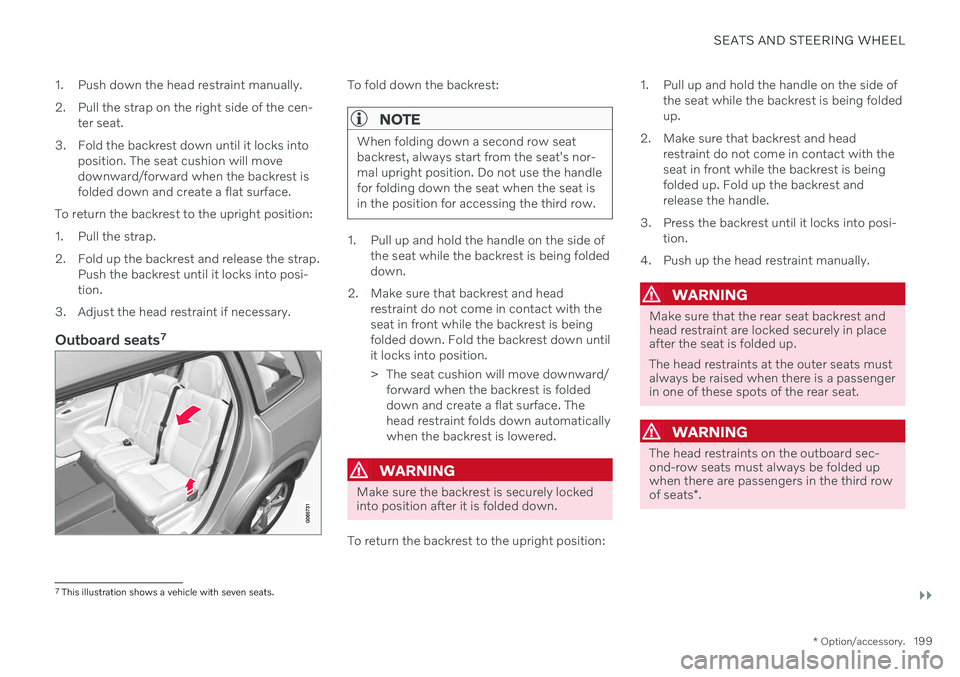
Outboard seats 7
To fold down the backrest:
NOTE
When folding down a second row seat backrest, always start from the seat's nor-mal upright position. Do not use the handlefor folding down the seat when the seat isin the position for accessing the third row.
1. Pull up and hold the handle on the side of
the seat while the backrest is being folded down.
2. Make sure that backrest and head restraint do not come in contact with theseat in front while the backrest is beingfolded down. Fold the backrest down untilit locks into position.
> The seat cushion will move downward/forward when the backrest is folded down and create a flat surface. Thehead restraint folds down automaticallywhen the backrest is lowered.
WARNING
Make sure the backrest is securely locked into position after it is folded down.
To return the backrest to the upright position: 1. Pull up and hold the handle on the side of
the seat while the backrest is being folded up.
2. Make sure that backrest and head restraint do not come in contact with theseat in front while the backrest is beingfolded up. Fold up the backrest andrelease the handle.
3. Press the backrest until it locks into posi- tion.
4. Push up the head restraint manually.
WARNING
Make sure that the rear seat backrest and head restraint are locked securely in placeafter the seat is folded up. The head restraints at the outer seats must always be raised when there is a passengerin one of these spots of the rear seat.
WARNING
The head restraints on the outboard sec- ond-row seats must always be folded upwhen there are passengers in the third row of seats *.
7
This illustration shows a vehicle with seven seats.
Page 203 of 693
SEATS AND STEERING WHEEL
}}
* Option/accessory.201
Electrically folding down the rear seat's outboard head restraints *
The outer head restraints can be folded via the center display's function view. The headrestraint can be folded down when the vehicleis in ignition mode 0.
Tap the
Headrest Fold but-
ton to activate/deactivate folding.
Manually push the head restraint until it clicks into position.
WARNING
Do not lower the head restraint if there are passengers in any of the rear seats.
WARNING
The head restraint must be locked in the upright position after it has been folded up.
WARNING
The head restraints on the outboard sec- ond-row seats must always be folded upwhen there are passengers in the third row of seats *.
Related information
Folding the second row backrests (p. 198)
Moving the second row seats forward/ rearward
* (p. 201)
Adjusting the second row backrest tilt (p. 202)
Getting into and out of the third row of seats
* (p. 203)
Folding the third row backrests
* (p. 204)
Moving the second row seats forward/rearward *
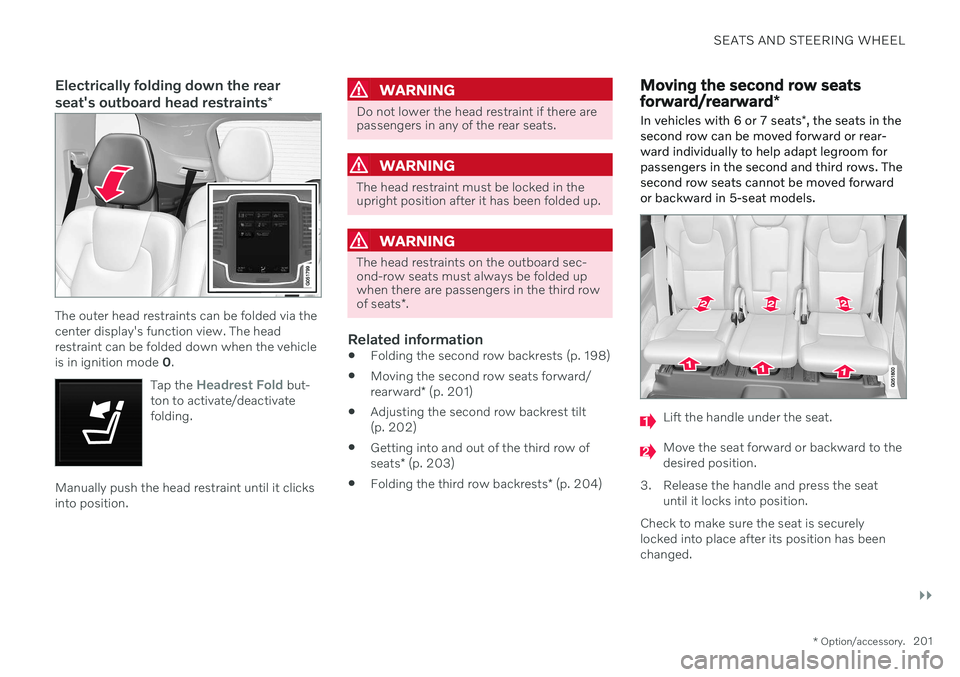
In vehicles with 6 or 7 seats *, the seats in the
second row can be moved forward or rear- ward individually to help adapt legroom forpassengers in the second and third rows. Thesecond row seats cannot be moved forwardor backward in 5-seat models.
Lift the handle under the seat.
Move the seat forward or backward to the desired position.
3. Release the handle and press the seat until it locks into position.
Check to make sure the seat is securelylocked into place after its position has beenchanged.
Page 204 of 693
||
SEATS AND STEERING WHEEL
* Option/accessory.
202
WARNING
Adjust the seat and ensure it locks into position before driving. Use cautionwhen adjusting the seat. Uncontrolledor careless adjustments could lead toinjury.
Long objects must always be securelytied down to help prevent injury ordamage in the event of sudden brak-ing.
Always turn off the engine and applythe parking brake when loading orunloading the vehicle.
Put the gear selector in
P to help pre-
vent the gear selector from being inad-vertently moved.
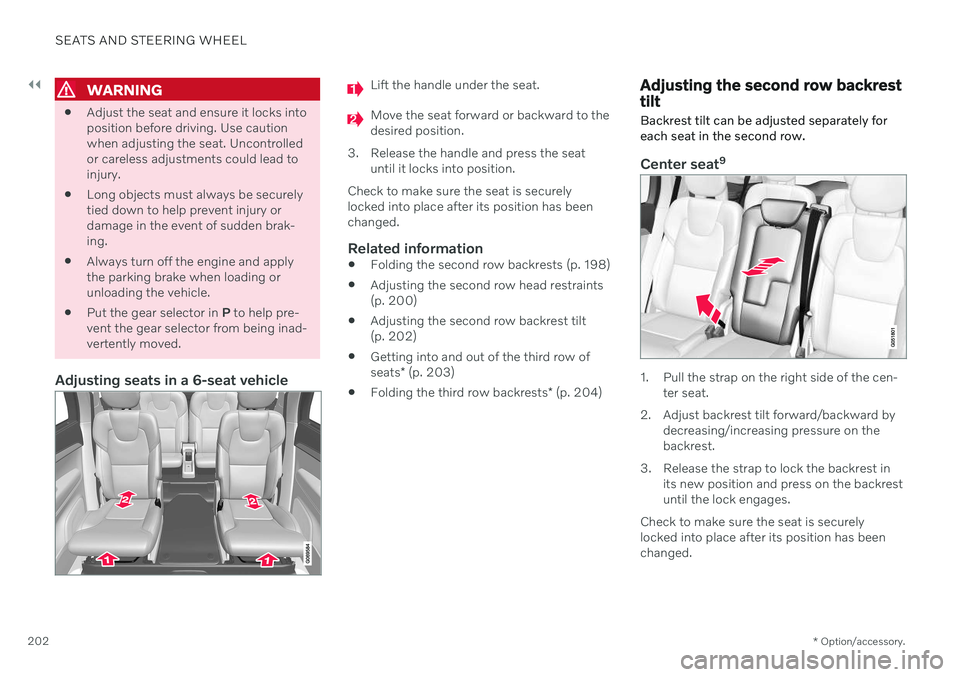
Adjusting seats in a 6-seat vehicle
Lift the handle under the seat.
Move the seat forward or backward to the desired position.
3. Release the handle and press the seat until it locks into position.
Check to make sure the seat is securelylocked into place after its position has beenchanged.
Related information
Folding the second row backrests (p. 198)
Adjusting the second row head restraints(p. 200)
Adjusting the second row backrest tilt(p. 202)
Getting into and out of the third row of seats
* (p. 203)
Folding the third row backrests
* (p. 204)
Adjusting the second row backrest tilt Backrest tilt can be adjusted separately for each seat in the second row.
Center seat 9
1. Pull the strap on the right side of the cen-
ter seat.
2. Adjust backrest tilt forward/backward by decreasing/increasing pressure on the backrest.
3. Release the strap to lock the backrest in its new position and press on the backrestuntil the lock engages.
Check to make sure the seat is securelylocked into place after its position has beenchanged.
Page 205 of 693
SEATS AND STEERING WHEEL
}}
* Option/accessory.203
Outboard seats
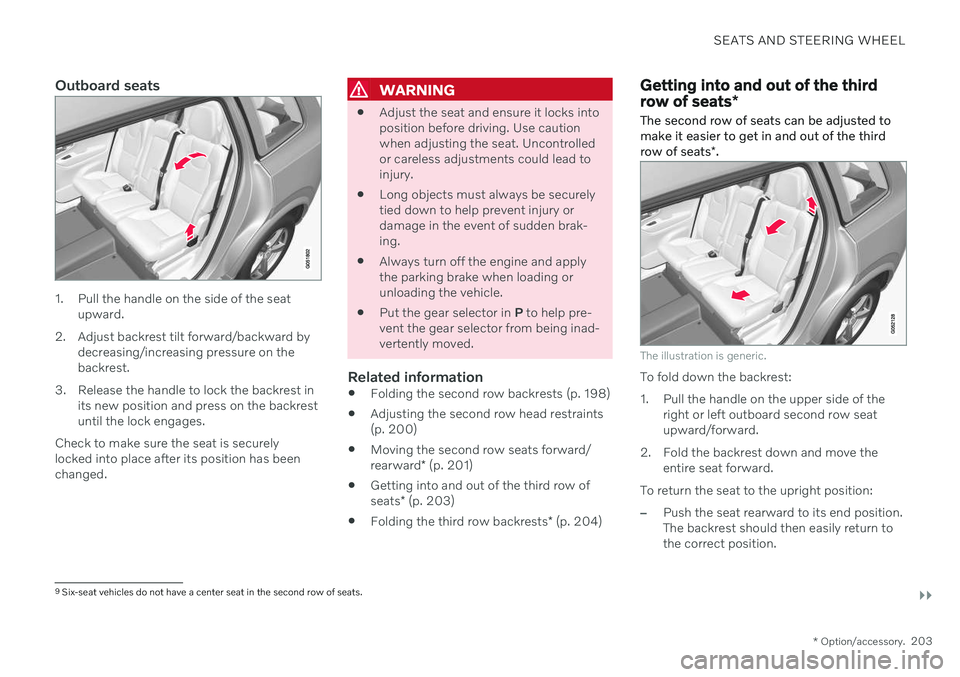
1. Pull the handle on the side of the seat
upward.
2. Adjust backrest tilt forward/backward by decreasing/increasing pressure on the backrest.
3. Release the handle to lock the backrest in its new position and press on the backrestuntil the lock engages.
Check to make sure the seat is securelylocked into place after its position has beenchanged.
WARNING
Adjust the seat and ensure it locks into position before driving. Use cautionwhen adjusting the seat. Uncontrolledor careless adjustments could lead toinjury.
Long objects must always be securelytied down to help prevent injury ordamage in the event of sudden brak-ing.
Always turn off the engine and applythe parking brake when loading orunloading the vehicle.
Put the gear selector in
P to help pre-
vent the gear selector from being inad-vertently moved.
Related information
Folding the second row backrests (p. 198)
Adjusting the second row head restraints(p. 200)
Moving the second row seats forward/ rearward
* (p. 201)
Getting into and out of the third row ofseats
* (p. 203)
Folding the third row backrests
* (p. 204)
Getting into and out of the third row of seats *
The second row of seats can be adjusted to make it easier to get in and out of the third row of seats *.
The illustration is generic.
To fold down the backrest:
1. Pull the handle on the upper side of the
right or left outboard second row seat upward/forward.
2. Fold the backrest down and move the entire seat forward.
To return the seat to the upright position:
–Push the seat rearward to its end position. The backrest should then easily return tothe correct position.
9 Six-seat vehicles do not have a center seat in the second row of seats.
Page 206 of 693
||
SEATS AND STEERING WHEEL
* Option/accessory.
204
NOTE
If a backrest in the second row of seats does not lock back into the upright posi-tion after being folded down (e.g. for get-ting in or out of the third row of seats), itmay need to be pushed forward again andthen pushed back with more force.
WARNING
Make sure that the rear seat backrest and head restraint are locked securely in placeafter the seat is folded up. The head restraints at the outer seats must always be raised when there is a passengerin one of these spots of the rear seat.
Related information
Folding the second row backrests (p. 198)
Adjusting the second row head restraints (p. 200)
Moving the second row seats forward/ rearward
* (p. 201)
Adjusting the second row backrest tilt (p. 202)
Folding the third row backrests
* (p. 204)
Folding the third row backrests *
The third row has two individual seats. These can be folded down separately.
CAUTION
To fold down the third-row seat backrests, it may be necessary to change the posi-tion/tilt the seats in the second row.
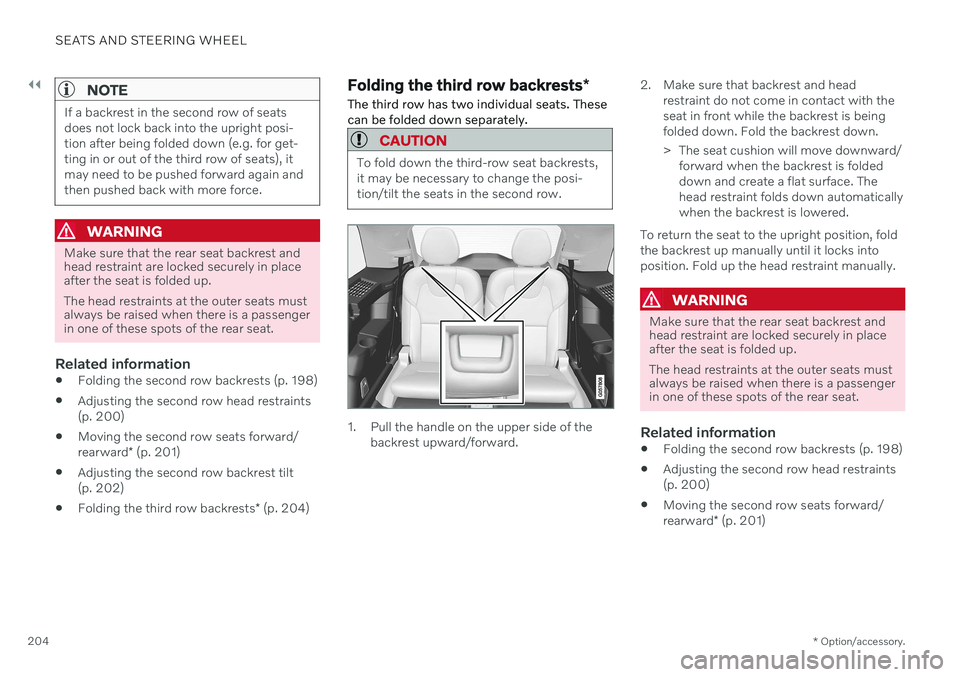
1. Pull the handle on the upper side of the backrest upward/forward. 2. Make sure that backrest and head
restraint do not come in contact with the seat in front while the backrest is beingfolded down. Fold the backrest down.
> The seat cushion will move downward/forward when the backrest is folded down and create a flat surface. Thehead restraint folds down automaticallywhen the backrest is lowered.
To return the seat to the upright position, foldthe backrest up manually until it locks intoposition. Fold up the head restraint manually.
WARNING
Make sure that the rear seat backrest and head restraint are locked securely in placeafter the seat is folded up. The head restraints at the outer seats must always be raised when there is a passengerin one of these spots of the rear seat.
Related information
Folding the second row backrests (p. 198)
Adjusting the second row head restraints (p. 200)
Moving the second row seats forward/ rearward
* (p. 201)
Page 257 of 693

KEY, LOCKS AND ALARM
* Option/accessory.255
NOTE
Volvo recommends that you order a new or duplicate remote control key from anauthorized Volvo workshop. You can also obtain additional or duplicate remote control keys from certain independ-ent repair facilities and locksmiths that arequalified to make remote control keys.Each key must be programmed to workwith your vehicle. A list of independent repair facilities and/or locksmiths known to Volvo that can cutand code replacement keys can be found:
on Volvo's websitewww.volvocars.com/us
by calling Volvo Customer Care1-800-458-1552.
Related information
Remote key (p. 246)
Red Key - restricted remote key
*
A Red Key makes it possible for the vehicle owner to set limitations for certain vehicleproperties. The limitations are intended topromote safe use of the vehicle, e.g. when itis loaned out.
For a Red Key, it is possible to define the vehi- cle's maximum speed, set speed remindersand limit the audio system's volume. Severalof the driver support systems will also alwaysbe active. Otherwise, the Red Key functions inthe same way as a standard remote key. These restrictions are intended to help reduce the risk of accidents and help the driver feelmore secure when handing over the vehicle toe.g. a young driver, parking attendant or work-shop.
Driver profile for Red KeyA Red Key is linked to a specific Red Keydriver profile, and when it is active the key'ssettings cannot be changed. It is also not pos-sible to switch to another driver profile, as thisrequires a regular remote key. The Red Key driver profile is activated when the vehicle is unlocked using a Red Key with-out a regular remote key nearby.
NOTE
If the vehicle changes owners, the vehicle must be locked and then unlocked for anew driver profile to be activated.
Ordering a Red KeyOne or more Red Key can be ordered from a Volvo retailer. A total of twelve keys can beprogrammed and used for the same vehicle.Up to ten may be restricted keys, but at leasttwo must be standard remote keys.
Related information
Settings for Red Key
* (p. 256)
Remote key (p. 246)
Page 276 of 693

||
KEY, LOCKS AND ALARM
* Option/accessory.
274
Kicking motion within the sensor's activation area.
Related information
Keyless and touch-sensitive surfaces
*
(p. 261)
Opening and closing the power tailgate
*
(p. 269)
Remote key range (p. 250)
Private Locking The tailgate and the glove compartment can be locked using the private locking functionto prevent them from being opened, e.g.when the vehicle is left at a workshop or witha valet.
The function button for pri- vate locking is located in thecenter display's Functionview. Depending on the cur-rent status of the lock,
Private Locking Unlockedor Private Locking Lockedwill be displayed.
Related information
Activating and deactivating private locking (p. 274)
Activating and deactivating private locking
Private locking is activated using the function button in the center display and a PIN code.
NOTE
For the valet lock function to be activated the car must be in at least ignition mode I.
Two codes are used for private locking:
A security code, which is created the first time the function is used.
A PIN code, which is changed each timethe function is activated.
Entering security code before initial
use
The first time the function is used, a securitycode must be selected. This code can then beused to deactivate private locking if theselected PIN code has been forgotten or lost.The security code functions as a PUK (secur-ity) code for all PIN codes used for privatelocking. Save the security code in a safe place.
Page 277 of 693

KEY, LOCKS AND ALARM
275
To create a security code:
1. Tap the button for private locking in Func-
tion view.
> A pop-up window will appear.
2. Enter the desired security code and press
Confirm.
> The security code is saved. The private locking function is now ready for activa- tion.
Activating private locking1. Tap the button for private locking in Func- tion view.
> A pop-up window will appear. 2. Enter the code you would like to use to
unlock the glove compartment and the tailgate and tap
Confirm.
> The glove compartment and tailgate will lock. A green indicator light will illu- minate next to the button in Functionview to confirm locked status.
Deactivating private locking1. Tap the button for private locking in Func- tion view.
> A pop-up window will appear.
2. Enter the code used for locking and tap
Confirm.
> The glove compartment and tailgate will unlock. The green indicator light next to the button in Function view willgo out to confirm unlocked status.
Forgotten PIN codeIf you have forgotten your PIN code or enteredit incorrectly more than three times, the secur-ity code can be used to deactivate privatelocking. If the vehicle is unlocked using Volvo On Callor the Volvo On Call app, private locking willbe automatically deactivated.
Forgotten security code
If you have forgotten your security code, con- tact an authorized Volvo retailer for assistancedeactivating private locking.
Related information
Private Locking (p. 274)
Page 302 of 693
DRIVER SUPPORT
* Option/accessory.
300
Pilot Assist *38
Pilot Assist can help the driver keep the vehi- cle in the current traffic lane by providingsteering assistance and maintaining an evenspeed and a set time interval to the vehicleahead.
How Pilot Assist worksThe Pilot Assist function is primarily intended for use on highways and other major roadswhere it can help provide a more comfortableand relaxing driving experience.
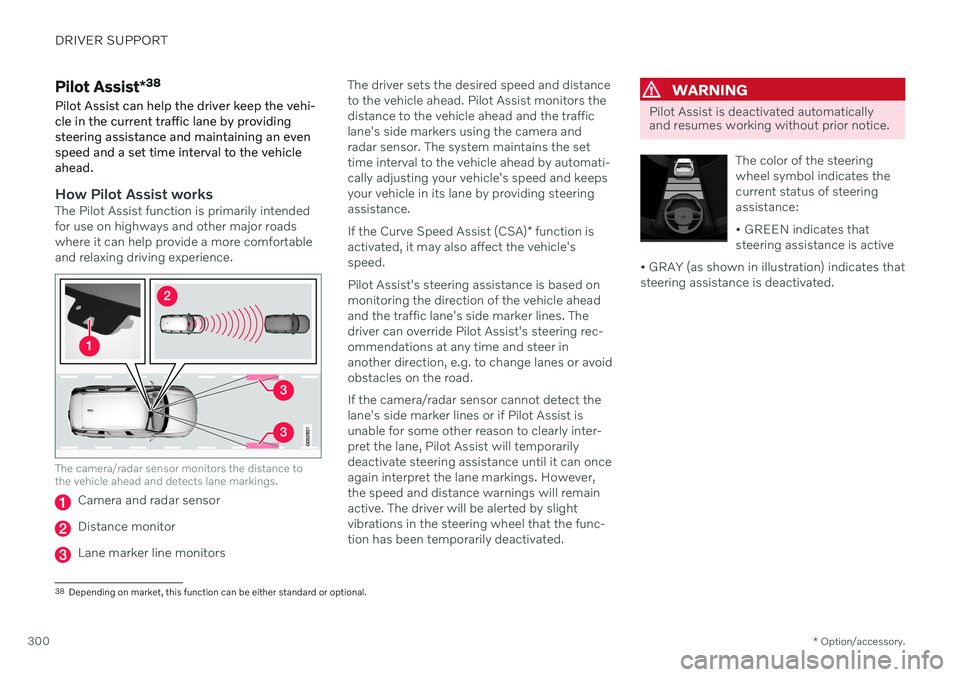
The camera/radar sensor monitors the distance to the vehicle ahead and detects lane markings.
Camera and radar sensor
Distance monitor
Lane marker line monitors The driver sets the desired speed and distance to the vehicle ahead. Pilot Assist monitors thedistance to the vehicle ahead and the trafficlane's side markers using the camera andradar sensor. The system maintains the settime interval to the vehicle ahead by automati-cally adjusting your vehicle's speed and keepsyour vehicle in its lane by providing steeringassistance. If the Curve Speed Assist (CSA)
* function is
activated, it may also affect the vehicle's speed. Pilot Assist's steering assistance is based on monitoring the direction of the vehicle aheadand the traffic lane's side marker lines. Thedriver can override Pilot Assist's steering rec-ommendations at any time and steer inanother direction, e.g. to change lanes or avoidobstacles on the road. If the camera/radar sensor cannot detect the lane's side marker lines or if Pilot Assist isunable for some other reason to clearly inter-pret the lane, Pilot Assist will temporarilydeactivate steering assistance until it can onceagain interpret the lane markings. However,the speed and distance warnings will remainactive. The driver will be alerted by slightvibrations in the steering wheel that the func-tion has been temporarily deactivated.
WARNING
Pilot Assist is deactivated automatically and resumes working without prior notice.
The color of the steering wheel symbol indicates thecurrent status of steeringassistance: • GREEN indicates that steering assistance is active
• GRAY (as shown in illustration) indicates thatsteering assistance is deactivated.
38 Depending on market, this function can be either standard or optional.