ECU VOLVO XC90 TWIN ENGINE 2020 Repair Manual
[x] Cancel search | Manufacturer: VOLVO, Model Year: 2020, Model line: XC90 TWIN ENGINE, Model: VOLVO XC90 TWIN ENGINE 2020Pages: 693, PDF Size: 13.34 MB
Page 595 of 693
LOADING, STORAGE AND PASSENGER COMPARTMENT
}}
593
WARNING
Objects in the cargo compartment must always be securely anchored, even with acorrectly installed cargo net.
Installing the cargo net
WARNING
All of the cargo net's upper consoles, hooks and straps must be securely moun-ted and attached before the net is used. Never use the net if it is damaged.
NOTE
With front mounting, the cargo net is most easily installed via a rear door.
1. Fold out the cargo net and make sure thatthe upper rod folds out and locks into position.
2. Insert one of the net's hooks into the front or rear ceiling mounting point with thestrap lock facing you. 3. Insert the net's other upper hook into the
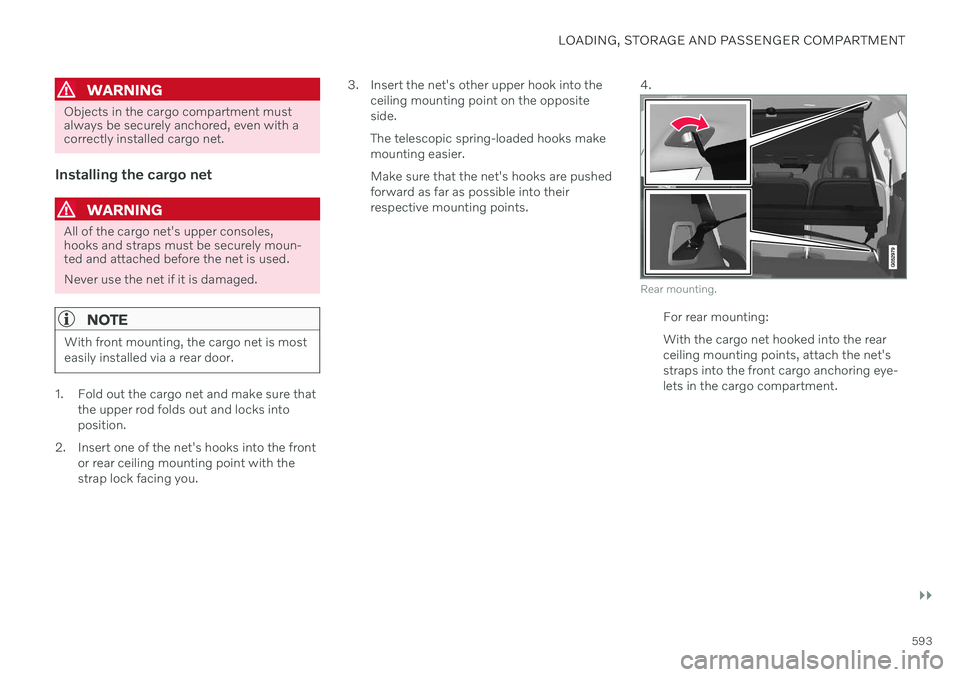
ceiling mounting point on the oppositeside. The telescopic spring-loaded hooks make mounting easier. Make sure that the net's hooks are pushed forward as far as possible into theirrespective mounting points. 4.
Rear mounting.
For rear mounting: With the cargo net hooked into the rear ceiling mounting points, attach the net'sstraps into the front cargo anchoring eye-lets in the cargo compartment.
Page 608 of 693
||
MAINTENANCE AND SERVICE
606
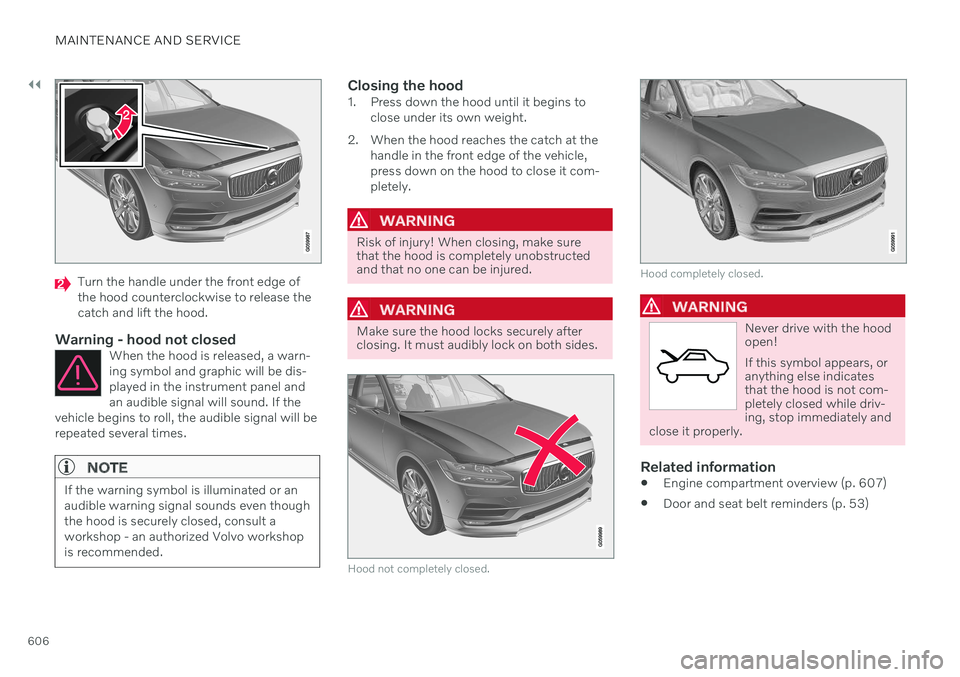
Turn the handle under the front edge of the hood counterclockwise to release thecatch and lift the hood.
Warning - hood not closedWhen the hood is released, a warn-ing symbol and graphic will be dis-played in the instrument panel andan audible signal will sound. If the
vehicle begins to roll, the audible signal will berepeated several times.
NOTE
If the warning symbol is illuminated or an audible warning signal sounds even thoughthe hood is securely closed, consult aworkshop - an authorized Volvo workshopis recommended.
Closing the hood1. Press down the hood until it begins to close under its own weight.
2. When the hood reaches the catch at the handle in the front edge of the vehicle, press down on the hood to close it com-pletely.
WARNING
Risk of injury! When closing, make sure that the hood is completely unobstructedand that no one can be injured.
WARNING
Make sure the hood locks securely after closing. It must audibly lock on both sides.
Hood not completely closed.
Hood completely closed.
WARNING
Never drive with the hood open! If this symbol appears, or anything else indicatesthat the hood is not com-pletely closed while driv-ing, stop immediately and
close it properly.
Related information
Engine compartment overview (p. 607)
Door and seat belt reminders (p. 53)
Page 615 of 693
MAINTENANCE AND SERVICE
}}
613
Start battery
The vehicle has a single-pole electrical sys- tem that uses the chassis and engine mountas conductors. The start battery is used to start the electrical system and power electrical equipment in thevehicle. The hybrid battery is used to start thecombustion engine. The start battery should only be replaced by a workshop 17
.
The start battery is a 12 V AGM (Absorbed Glass Mat) battery, dimensioned for regenera-tive charging and to support the function ofthe vehicle's various systems. The service life and performance of the start battery are affected by factors such as drivingstyle, driving conditions, climate, battery dis-charges, number of starts, etc. Never disconnect the start battery while the engine is running.
Make sure the cables to the start batteryare correctly connected and the clampsare securely tightened.
WARNING
Batteries generate hydrogen gas, which is flammable and explosive.
Do not connect the jumper cable toany part of the fuel system or to anymoving parts. Avoid touching hotmanifolds.
Battery fluid contains sulfuric acid. Donot allow battery fluid to contact eyes,skin, fabrics or painted surfaces.
If contact occurs, flush the affectedarea immediately with water. Obtainmedical help immediately if eyes areaffected.
Never expose the battery to open flameor electric spark. Do not smoke nearthe battery. Failure to follow theinstructions for jump starting can leadto injury.
Connection points
WARNING
California Proposition 65 Operating, servicing and maintaining a pas- senger vehicle can expose you to chemi-cals including engine exhaust, carbon mon-oxide, phthalates, and lead, which areknown to the State of California to causecancer and birth defects or other reproduc-tive harm. To minimize exposure, avoidbreathing exhaust, do not idle the engineexcept as necessary, service your vehicle ina well ventilated area and wear gloves orwash your hands frequently when servicingyour vehicle. For more information go towww.P65Warnings.ca.gov/passenger-vehicle.
Use the vehicle's connection points in the engine compartment to connect an externalstart battery or battery charger. The battery terminals on the car's start battery in the luggage/cargo area must not be used.
17
An authorized Volvo workshop is recommended.
Page 617 of 693
MAINTENANCE AND SERVICE
}}
615
NOTE
If the starter battery becomes discharged too many times, it will shorten its servicelife. The service life of the starter battery is affected by several factors, such as drivingconditions and climate. The startingcapacity of the battery reduces graduallyover time. The battery must therefore berecharged if the vehicle is not used or along period of time or if it is only drivenshort distances. Severe cold further limitsthe starting capacity. To keep the starter battery in a good condi- tion, the vehicle should be driven at least15 minutes per week or the battery shouldbe connected to a battery charger withautomatic trickle charging. A starter battery that is always kept fully charged has the maximum service life.Location
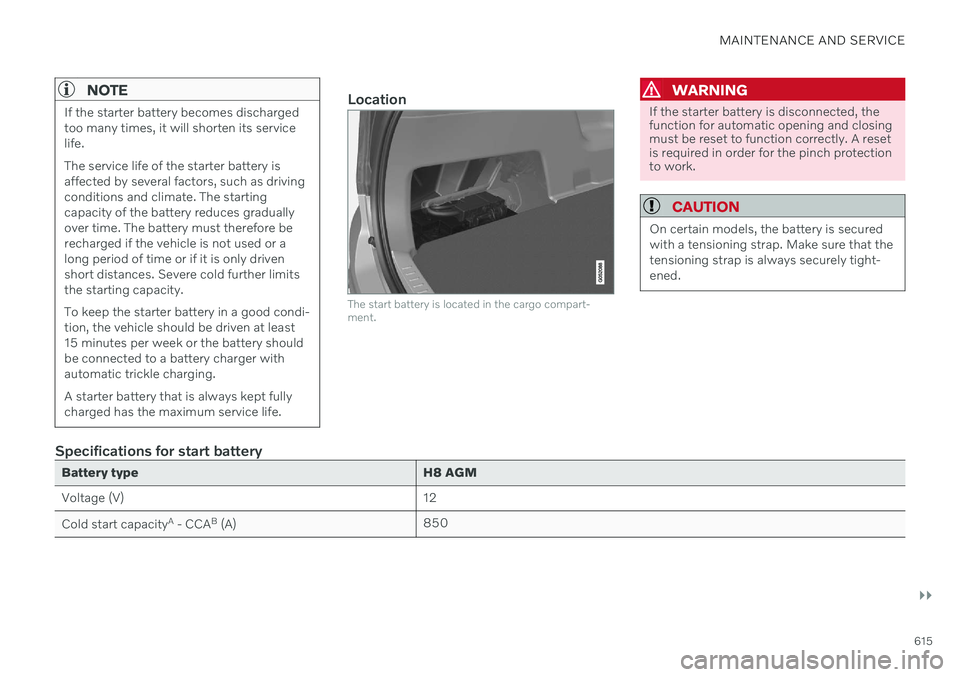
The start battery is located in the cargo compart- ment.
WARNING
If the starter battery is disconnected, the function for automatic opening and closingmust be reset to function correctly. A resetis required in order for the pinch protectionto work.
CAUTION
On certain models, the battery is secured with a tensioning strap. Make sure that thetensioning strap is always securely tight-ened.
Specifications for start battery
Battery typeH8 AGM
Voltage (V) 12
Cold start capacity A
- CCA B
(A) 850
Page 643 of 693
MAINTENANCE AND SERVICE
}}
* Option/accessory.641
Cleaning fabric upholstery and ceiling liner
Only use cleaning agents and car care prod- ucts recommended by Volvo. Clean regularlyand treat stains immediately. It is importantto vacuum before using a cleaning agent.
Never scrape or rub a stain, as this could dam- age the upholstery or ceiling liner. Never usestrong stain removers, as this could changethe color of the upholstery or ceiling liner. Use soapy water or a similar detergent. For more difficult stains caused by oil, ice cream,shoe polish, etc., use a stain remover. Consultwith your Volvo retailer.
Related information
Cleaning the interior (p. 639)
Cleaning the center display (p. 639)
Cleaning the seat belt (p. 641)
Cleaning floor mats and inlay mats(p. 641)
Cleaning leather upholstery
* (p. 642)
Cleaning the leather steering wheel(p. 643)
Cleaning interior plastic, metal and woodsurfaces (p. 643)
Cleaning the seat belt
Only use cleaning agents and car care prod- ucts recommended by Volvo. Clean regularlyand treat stains immediately. It is importantto vacuum before using a cleaning agent.
Use water and a synthetic soap solution. Spe- cially designed textile cleaning agents areavailable for purchase at Volvo retailers. Makesure the belt is dry before it is retracted.
Related information
Cleaning the interior (p. 639)
Cleaning the center display (p. 639)
Cleaning fabric upholstery and ceiling liner(p. 641)
Cleaning floor mats and inlay mats(p. 641)
Cleaning leather upholstery
* (p. 642)
Cleaning the leather steering wheel(p. 643)
Cleaning interior plastic, metal and woodsurfaces (p. 643)
Cleaning floor mats and inlay mats
Only use cleaning agents and car care prod- ucts recommended by Volvo. Clean regularlyand treat stains immediately. It is importantto vacuum before using a cleaning agent.
Remove the inlay mats to clean the floor mats and inlay mats separately. Each inlay mat issecured into place with pins.
1. Remove the inlay mat by grasping the inlay mat at each pin and lifting the mat straight up.
2. Use a vacuum to remove dust and dirt.
NOTE
Do not swing or strike the inlay mats vio- lently against another object to remove dirtas this could damage the mats.
3. After vacuuming, a specially designed tex- tile cleaning agent should be used to remove stains on floor mats. Floor matsshould be cleaned with products recom-mended by Volvo retailers.
4. After cleaning, put the inlay mat back into place by pressing it in at each pin.
Page 644 of 693

||
MAINTENANCE AND SERVICE
* Option/accessory.
642
WARNING
Never use more than one inlay mat at a time on the driver's floor. If any othertype of floor mat is used, remove theoriginal mat from the driver's seat floorbefore driving. All types of mats mustbe securely anchored in the attach-ment points in the floor. Make sure thefloor mat does not impede the move-ment of the brake pedal or acceleratorpedal in any way, as this could be aserious safety hazard.
Volvo's floor mats are specially manu-factured for your vehicle. They must beproperly secured in the attachmentpoints in the floor to help ensure theycannot slide and become trappedunder the pedals.
Related information
Cleaning the interior (p. 639)
Cleaning the center display (p. 639)
Cleaning fabric upholstery and ceiling liner(p. 641)
Cleaning the seat belt (p. 641)
Cleaning leather upholstery
* (p. 642)
Cleaning the leather steering wheel(p. 643)
Cleaning interior plastic, metal and woodsurfaces (p. 643)
Cleaning leather upholstery
*
Only use cleaning agents and car care prod- ucts recommended by Volvo. Clean regularlyand treat stains immediately. It is importantto vacuum before using a cleaning agent.
Volvo's leather upholstery * is treated to pro-
tect its original appearance. Over time, sun- light, grease, dirt, etc. could break down theprotective layer. This could result in scratchesand cracking. Leather upholstery * is a natural product that
changes and acquires a beautiful patina over time. Regular cleaning and treatments arerequired to preserve the qualities and color ofthe leather. Volvo offers a comprehensiveproduct, Volvo Leather Care KitWipes, forcleaning and treating leather upholstery.When used as directed, it helps preserve theleather's protective coating. For optimal results, Volvo recommends clean- ing and applying protective cream one to fourtimes a year (or more often as needed). VolvoLeather Care Kit 951 0251 and Volvo LeatherSoftener 943 7429 are available for purchaseat Volvo retailers.
Cleaning the leather upholstery1. Apply the leather cleaner to a damp sponge and squeeze it until the cleanerfoams. 2. Move the sponge in circular motions to
apply the foam to the stain.
3. Dampen the stain thoroughly with the sponge. Let the sponge absorb the stainand do not rub.
4. Dry the stain using a soft towel and let the leather dry completely.
Protecting the leather upholstery1. Apply a small amount of leather protectorto a cloth and then apply the protector tothe leather using light circular movements.
2. Let it dry for approximately 20 minutes. > Protecting the leather upholsterymakes it better able to withstand sun-light's harmful UV rays.
Related information
Cleaning the interior (p. 639)
Cleaning the center display (p. 639)
Cleaning fabric upholstery and ceiling liner(p. 641)
Cleaning the seat belt (p. 641)
Cleaning floor mats and inlay mats(p. 641)
Cleaning the leather steering wheel(p. 643)
Cleaning interior plastic, metal and wood surfaces (p. 643)
Page 649 of 693
MAINTENANCE AND SERVICE
}}
* Option/accessory.647
Automatic car washes
The vehicle should be washed as soon as it becomes dirty. The longer the dirt remains,the more difficult it will be to keep the vehicleclean. It could also lead to paint damage.
Washing your vehicle in an automatic car wash is a fast and easy way to keep your vehi-cle clean, but it does not reach all areas of thevehicle. Volvo recommends washing yourvehicle by hand or supplementing automaticcar washes with a hand wash.
NOTE
Volvo recommends not washing the vehi- cle in an automatic car wash during thefirst few months; the paintwork on newvehicles takes some time to fully harden.
CAUTION
Before driving the vehicle into a car wash, deactivate the Automatic Braking whenStationary and Automatic Parking BrakeApplication functions. If the functions arenot deactivated, the brake system willseize when the vehicle is stationary and thevehicle will not be able to roll.
CAUTION
For automatic car washes in which the vehicle is pulled forward on rolling wheels:
1. Before washing the vehicle, make sure that the automatic rain sensor is deac- tivated. If it is not deactivated andinadvertently starts, the wiper armscould be damaged.
2. To help prevent damage from the auto- matic car wash machinery, make surethat the door mirrors are folded in,antennas retracted or removed, andany auxiliary lights secured.
3. Drive into the automatic car wash.
4. Turn off the "Automatic Braking when Stationary" function using the
but-
ton in the tunnel console.
5. Turn off the "Automatic Parking Brake Application" function in the center dis- play's Top view.
6. Turn off the engine by turning the start knob in the tunnel console clockwise.Hold the knob in position for at least2 seconds.
The vehicle is now ready for the automaticcar wash.
CAUTION
The system will automatically change to P
mode if the above steps are not followed. In P mode, the wheels are locked, which
they should not be when the vehicle isbeing washed in a car wash.
NOTE
Keep in mind that if the vehicle is equipped with the keyless locking and unlocking function *, the doors and tailgate/trunk lid
may open when washing the vehicle if the remote key is within range.
Related information
Cleaning the exterior (p. 644)
Polishing and waxing (p. 644)
Hand washing (p. 645)
High-pressure washing (p. 648)
Cleaning the wiper blades (p. 648)
Cleaning exterior plastic, rubber and trim components (p. 649)
Cleaning rims (p. 650)
Corrosion protection (p. 650)
Auto-hold brakes (p. 424)
Page 656 of 693
||
MAINTENANCE AND SERVICE
6543. Press the new wiper blade until it clicks
into place. Check to make sure the blade is securely in place.
4. Fold the wiper arm back toward the win- dow.
CAUTION
Check the blades regularly. Neglected maintenance shortens the life of theblades.
Related information
Using the rain sensor (p. 182)
Using the windshield and headlight wash- ers (p. 184)
Using automatic rear window wipingwhen backing up (p. 186)
Using the rain sensor's memory function(p. 183)
Using the rear window wiper/washer(p. 185)
Filling washer fluid (p. 656)
Putting the wiper blades in service posi-tion (p. 655)
Replacing windshield wiper blades(p. 654)
Using the windshield wipers (p. 181)
Wiper blades and washer fluid (p. 181)
Replacing windshield wiper blades
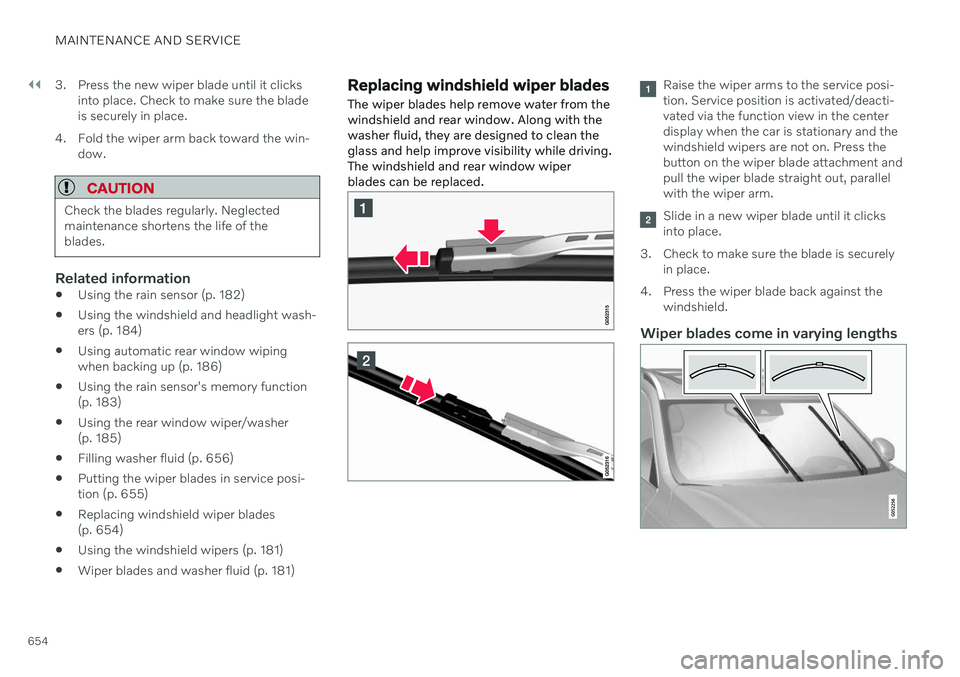
The wiper blades help remove water from the windshield and rear window. Along with thewasher fluid, they are designed to clean theglass and help improve visibility while driving.The windshield and rear window wiperblades can be replaced.Raise the wiper arms to the service posi- tion. Service position is activated/deacti-vated via the function view in the centerdisplay when the car is stationary and thewindshield wipers are not on. Press thebutton on the wiper blade attachment andpull the wiper blade straight out, parallelwith the wiper arm.
Slide in a new wiper blade until it clicks into place.
3. Check to make sure the blade is securely in place.
4. Press the wiper blade back against the windshield.
Wiper blades come in varying lengths
Page 686 of 693
INDEX
684Sensus Navigation 352
settings 353
speed camera information 352
Speed warning 352
Road trip 450
Roll-over protection 285
Roll Stability Control 285
Roof load, max. weight 665
Run-off Mitigation 365
S
Safety 44 pregnancy 45
Safety belt, see Seat belt 49
Safety defects, reporting 46
Safety mode 64 starting/moving 64
Sealing compound 568
Seat, see Seats 188
Seat belt reminder 53
Seat belts 49 Automatic locking retractor/Emer-
gency locking retractor 67
buckling/unbuckling 50
pregnancy 45
seat belt reminder 53
seat belt tensioner 52
securing child restraint systems 69,72, 74
Seat belt tensioner 52 resetting 53
Seats heating 221, 222
manual front seat 188
power front seats 189
store position 190, 191
ventilation 222
whiplash protection 48
Security code 274 Sensors air quality 213
Camera unit 321
climate 208
Radar unit 318
Sensus connection and entertainment 32
Sensus Navigation Road Sign Information 352
Service position 655
Service program 596
Set time interval for Distance Alert 312settings Categories 138
contextual 136
resetting 137
Shiftlock 430
Side airbag 62
Side Impact Protection System 62, 63
SIM card 527SIPS (Side Impact Protection Sys-
tem) 62, 63 Sirius Satellite radio Travel link 494
SiriusXM ®
Satellite radio
traffic information 490, 491, 492
Slippery conditions 450, 451
Slippery road conditions 451
Snow chains 567
Software updates 35
Sound experience 479
Sound settings 478, 521 phone 522
playing media 500, 501
text message 521
Spare tire 565 handling 566
Speed camera information 352
Page 687 of 693
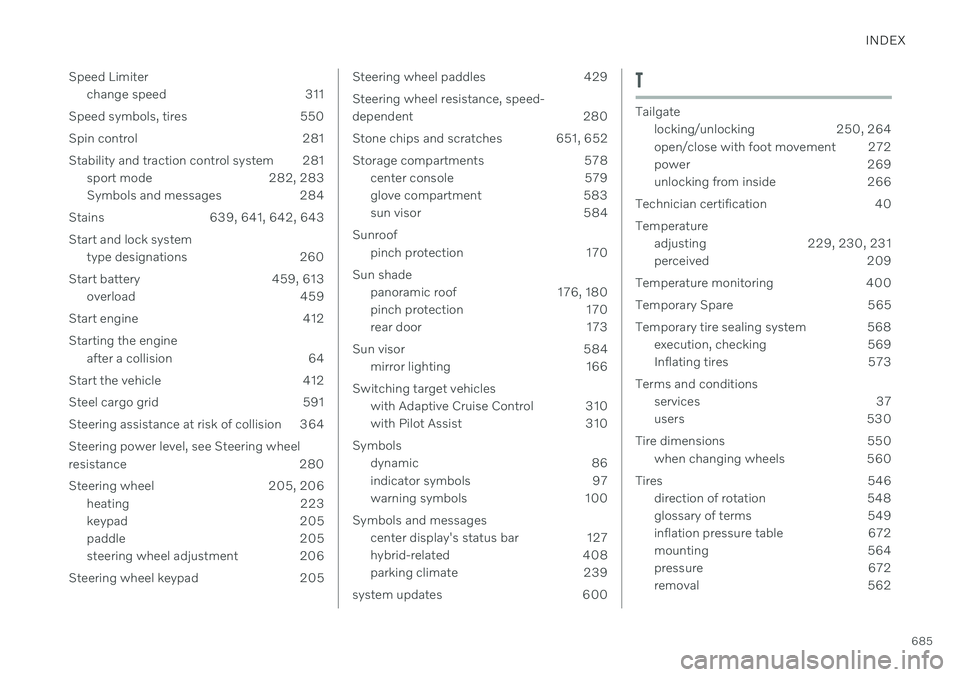
INDEX
685
Speed Limiter
change speed 311
Speed symbols, tires 550 Spin control 281
Stability and traction control system 281 sport mode 282, 283
Symbols and messages 284
Stains 639, 641, 642, 643
Start and lock system type designations 260
Start battery 459, 613 overload 459
Start engine 412 Starting the engine after a collision 64
Start the vehicle 412
Steel cargo grid 591
Steering assistance at risk of collision 364 Steering power level, see Steering wheel
resistance 280
Steering wheel 205, 206 heating 223
keypad 205
paddle 205
steering wheel adjustment 206
Steering wheel keypad 205
Steering wheel paddles 429 Steering wheel resistance, speed-
dependent 280
Stone chips and scratches 651, 652
Storage compartments 578 center console 579
glove compartment 583
sun visor 584
Sunroof pinch protection 170
Sun shade panoramic roof 176, 180
pinch protection 170
rear door 173
Sun visor 584 mirror lighting 166
Switching target vehicles with Adaptive Cruise Control 310
with Pilot Assist 310
Symbols dynamic 86
indicator symbols 97
warning symbols 100
Symbols and messages center display's status bar 127
hybrid-related 408
parking climate 239
system updates 600T
Tailgate locking/unlocking 250, 264
open/close with foot movement 272
power 269
unlocking from inside 266
Technician certification 40 Temperature adjusting 229, 230, 231
perceived 209
Temperature monitoring 400
Temporary Spare 565
Temporary tire sealing system 568 execution, checking 569
Inflating tires 573
Terms and conditions services 37
users 530
Tire dimensions 550 when changing wheels 560
Tires 546 direction of rotation 548
glossary of terms 549
inflation pressure table 672
mounting 564
pressure 672
removal 562