service VOLVO XC90 TWIN ENGINE 2020 Owner's Guide
[x] Cancel search | Manufacturer: VOLVO, Model Year: 2020, Model line: XC90 TWIN ENGINE, Model: VOLVO XC90 TWIN ENGINE 2020Pages: 693, PDF Size: 13.34 MB
Page 140 of 693
DISPLAYS AND VOICE CONTROL
* Option/accessory.
138
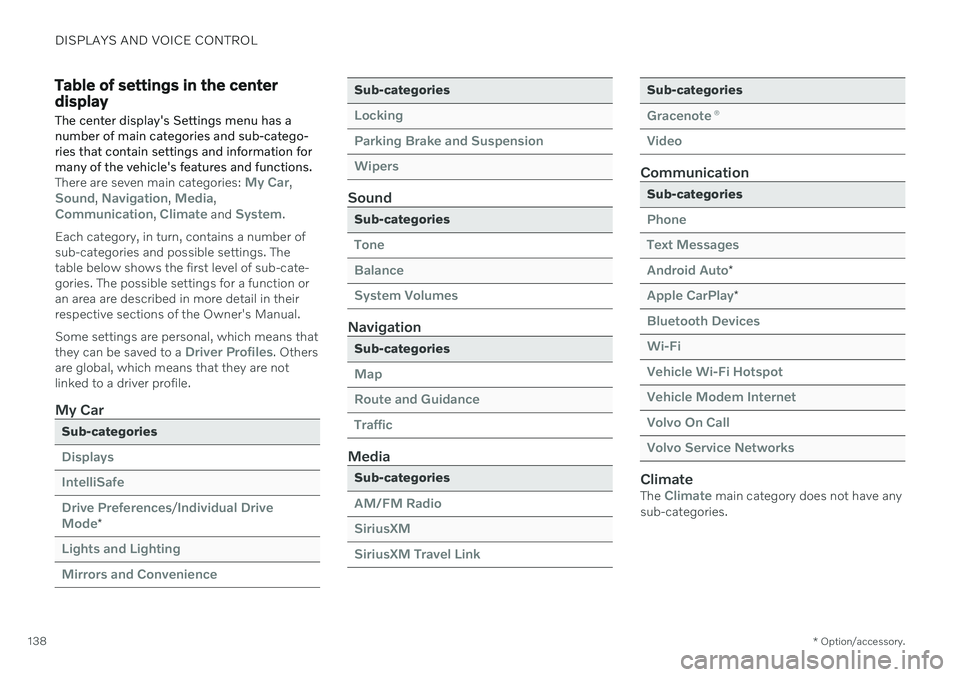
Table of settings in the center display
The center display's Settings menu has a number of main categories and sub-catego-ries that contain settings and information formany of the vehicle's features and functions.
There are seven main categories: My Car,Sound, Navigation, Media,Communication, Climate and System.
Each category, in turn, contains a number of sub-categories and possible settings. Thetable below shows the first level of sub-cate-gories. The possible settings for a function oran area are described in more detail in theirrespective sections of the Owner's Manual. Some settings are personal, which means that they can be saved to a
Driver Profiles. Others
are global, which means that they are not linked to a driver profile.
My Car
Sub-categories
Displays IntelliSafeDrive Preferences
/Individual Drive
Mode*
Lights and Lighting Mirrors and Convenience
Sub-categories
Locking Parking Brake and SuspensionWipers
Sound
Sub-categories
Tone BalanceSystem Volumes
Navigation
Sub-categories
Map Route and GuidanceTraffic
Media
Sub-categories
AM/FM Radio SiriusXMSiriusXM Travel Link
Sub-categories
Gracenote ®
Video
Communication
Sub-categories
Phone Text MessagesAndroid Auto
*
Apple CarPlay*
Bluetooth Devices Wi-FiVehicle Wi-Fi Hotspot Vehicle Modem Internet Volvo On Call Volvo Service Networks
ClimateThe Climate main category does not have any
sub-categories.
Page 183 of 693
WINDOWS, GLASS AND MIRRORS
}}
* Option/accessory.181
Wiper blades and washer fluid The wipers and the washer fluid are designed to improve visibility and the headlight pat-tern.
The washer nozzles are heated * automatically
in cold weather to prevent the washer fluid from freezing. When there is approximately 1 liter (1 qt) of washer fluid remaining, a message to refill willappear in the instrument panel.
Related information
Using the rain sensor (p. 182)
Using the windshield and headlight wash-ers (p. 184)
Using automatic rear window wipingwhen backing up (p. 186)
Using the rain sensor's memory function(p. 183)
Using the rear window wiper/washer(p. 185)
Filling washer fluid (p. 656)
Putting the wiper blades in service posi-tion (p. 655)
Replacing windshield wiper blades(p. 654)
Changing rear window wipers (p. 653)
Using the windshield wipers (p. 181)
Using the windshield wipers
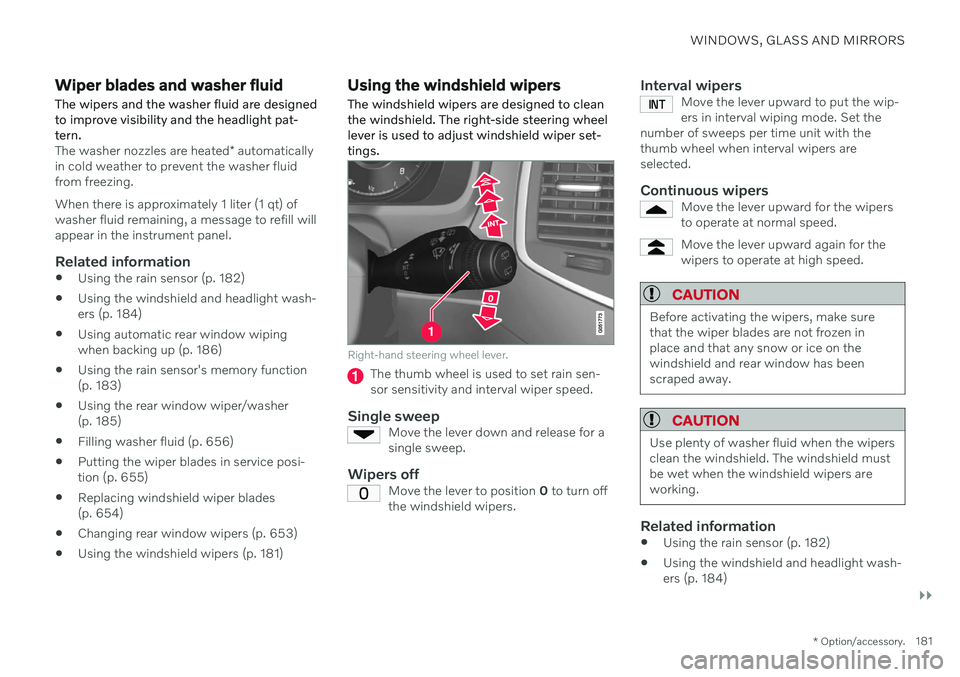
The windshield wipers are designed to clean the windshield. The right-side steering wheellever is used to adjust windshield wiper set-tings.
Right-hand steering wheel lever.
The thumb wheel is used to set rain sen- sor sensitivity and interval wiper speed.
Single sweepMove the lever down and release for asingle sweep.
Wipers offMove the lever to position 0 to turn off
the windshield wipers.
Interval wipersMove the lever upward to put the wip- ers in interval wiping mode. Set the
number of sweeps per time unit with thethumb wheel when interval wipers areselected.
Continuous wipersMove the lever upward for the wipers to operate at normal speed.
Move the lever upward again for the wipers to operate at high speed.
CAUTION
Before activating the wipers, make sure that the wiper blades are not frozen inplace and that any snow or ice on thewindshield and rear window has beenscraped away.
CAUTION
Use plenty of washer fluid when the wipers clean the windshield. The windshield mustbe wet when the windshield wipers areworking.
Related information
Using the rain sensor (p. 182)
Using the windshield and headlight wash- ers (p. 184)
Page 184 of 693
WINDOWS, GLASS AND MIRRORS
182
Using automatic rear window wiping when backing up (p. 186)
Wiper blades and washer fluid (p. 181)
Using the rain sensor's memory function(p. 183)
Using the rear window wiper/washer(p. 185)
Filling washer fluid (p. 656)
Putting the wiper blades in service posi-tion (p. 655)
Replacing windshield wiper blades(p. 654)
Changing rear window wipers (p. 653)
Using the rain sensor
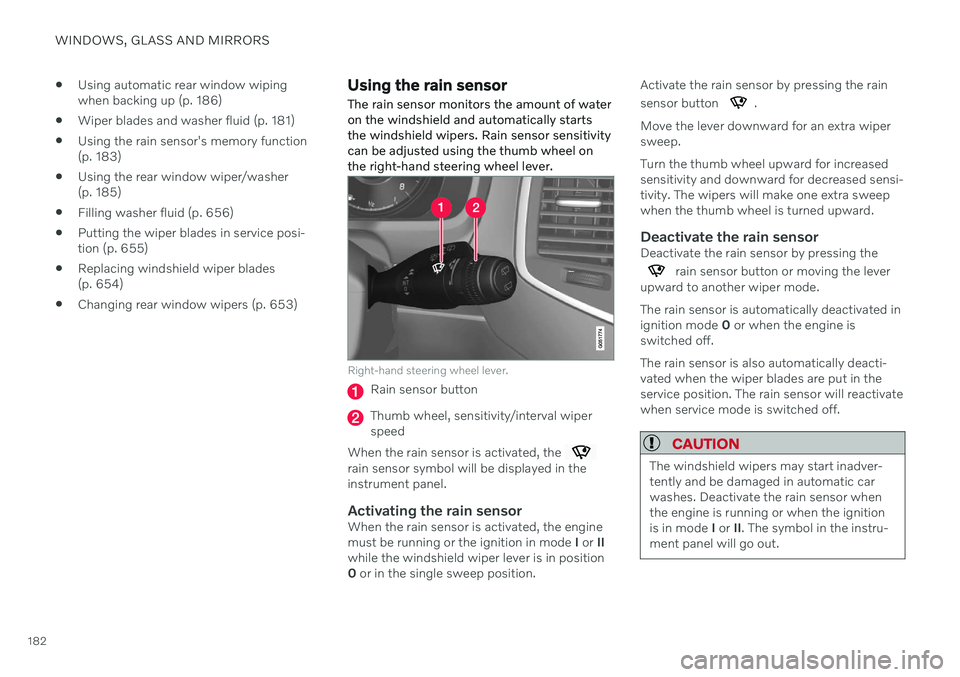
The rain sensor monitors the amount of water on the windshield and automatically startsthe windshield wipers. Rain sensor sensitivitycan be adjusted using the thumb wheel onthe right-hand steering wheel lever.
Right-hand steering wheel lever.
Rain sensor button
Thumb wheel, sensitivity/interval wiper speed
When the rain sensor is activated, the
rain sensor symbol will be displayed in the instrument panel.
Activating the rain sensorWhen the rain sensor is activated, the enginemust be running or the ignition in mode I or II
while the windshield wiper lever is in position0 or in the single sweep position. Activate the rain sensor by pressing the rain sensor button
.
Move the lever downward for an extra wiper sweep. Turn the thumb wheel upward for increased sensitivity and downward for decreased sensi-tivity. The wipers will make one extra sweepwhen the thumb wheel is turned upward.
Deactivate the rain sensorDeactivate the rain sensor by pressing the
rain sensor button or moving the lever
upward to another wiper mode. The rain sensor is automatically deactivated in ignition mode 0 or when the engine is
switched off. The rain sensor is also automatically deacti- vated when the wiper blades are put in theservice position. The rain sensor will reactivatewhen service mode is switched off.
CAUTION
The windshield wipers may start inadver- tently and be damaged in automatic carwashes. Deactivate the rain sensor whenthe engine is running or when the ignitionis in mode I or II. The symbol in the instru-
ment panel will go out.
Page 185 of 693
WINDOWS, GLASS AND MIRRORS
183
Related information
Using the windshield and headlight wash- ers (p. 184)
Using automatic rear window wipingwhen backing up (p. 186)
Wiper blades and washer fluid (p. 181)
Using the rain sensor's memory function(p. 183)
Using the rear window wiper/washer (p. 185)
Filling washer fluid (p. 656)
Putting the wiper blades in service posi- tion (p. 655)
Replacing windshield wiper blades(p. 654)
Changing rear window wipers (p. 653)
Using the windshield wipers (p. 181)
Using the rain sensor's memory function
The rain sensor monitors the amount of water on the windshield and automatically startsthe windshield wipers.
Activating/deactivating memory function
The rain sensor's memory function can be set to activate so that the rain sensor button doesnot need to be pressed each time the engineis started: 1. Tap
Settings in the Top view in the center
display.
2. Tap
My CarWipers.
3. Select
Rain Sensor Memory to activate/
deactivate the memory function.
Related information
Using the rain sensor (p. 182)
Using the windshield and headlight wash- ers (p. 184)
Using automatic rear window wipingwhen backing up (p. 186)
Wiper blades and washer fluid (p. 181)
Using the rear window wiper/washer(p. 185)
Filling washer fluid (p. 656)
Putting the wiper blades in service posi-tion (p. 655)
Replacing windshield wiper blades(p. 654)
Changing rear window wipers (p. 653)
Using the windshield wipers (p. 181)
Page 186 of 693
WINDOWS, GLASS AND MIRRORS
* Option/accessory.
184
Using the windshield and headlight washers The windshield and headlight washers are designed to clean the windshield and head-lights. Use the right-side steering wheel leverto start the windshield and headlight wash-ers.
Starting the windshield and headlight washers
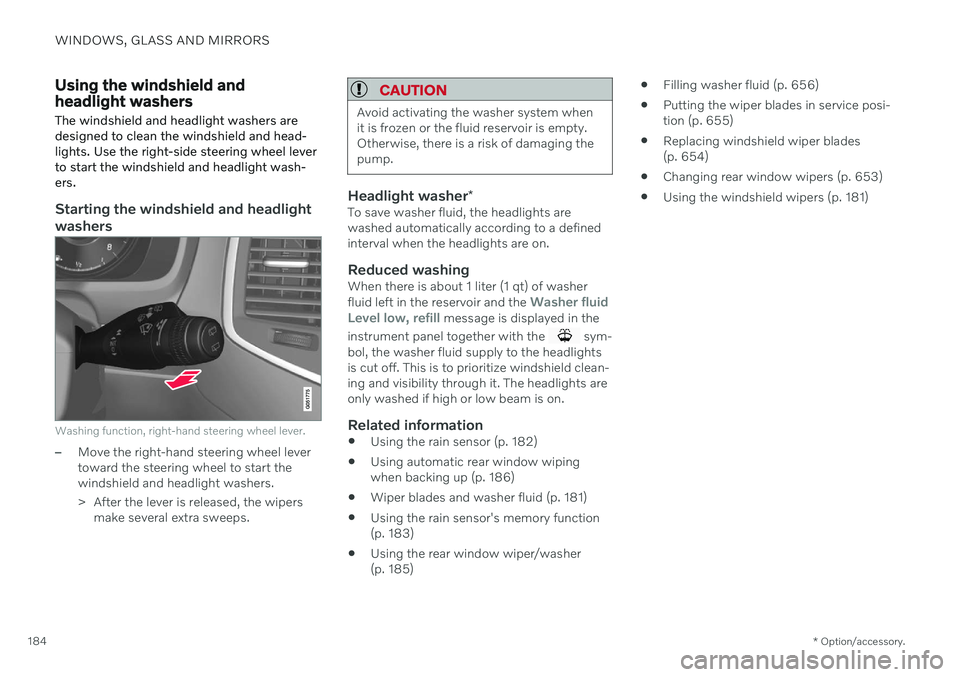
Washing function, right-hand steering wheel lever.
–Move the right-hand steering wheel lever toward the steering wheel to start thewindshield and headlight washers.
> After the lever is released, the wipers
make several extra sweeps.
CAUTION
Avoid activating the washer system when it is frozen or the fluid reservoir is empty.Otherwise, there is a risk of damaging thepump.
Headlight washer *To save washer fluid, the headlights are washed automatically according to a definedinterval when the headlights are on.
Reduced washingWhen there is about 1 liter (1 qt) of washer fluid left in the reservoir and the Washer fluid
Level low, refill message is displayed in the
instrument panel together with the
sym-
bol, the washer fluid supply to the headlights is cut off. This is to prioritize windshield clean-ing and visibility through it. The headlights areonly washed if high or low beam is on.
Related information
Using the rain sensor (p. 182)
Using automatic rear window wipingwhen backing up (p. 186)
Wiper blades and washer fluid (p. 181)
Using the rain sensor's memory function(p. 183)
Using the rear window wiper/washer(p. 185)
Filling washer fluid (p. 656)
Putting the wiper blades in service posi-tion (p. 655)
Replacing windshield wiper blades(p. 654)
Changing rear window wipers (p. 653)
Using the windshield wipers (p. 181)
Page 187 of 693
WINDOWS, GLASS AND MIRRORS
185
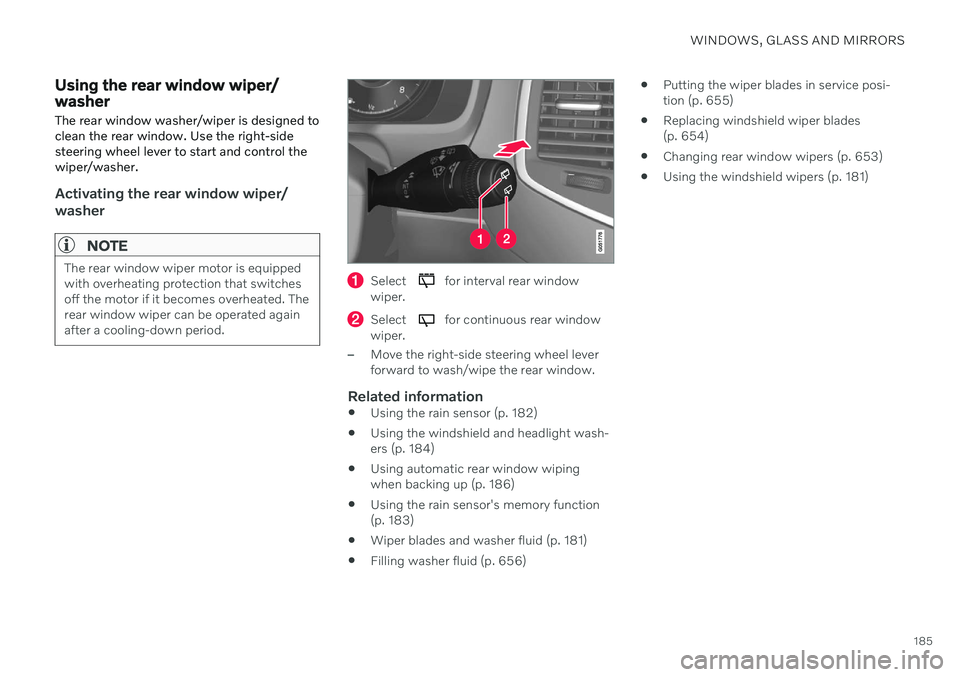
Using the rear window wiper/ washer The rear window washer/wiper is designed to clean the rear window. Use the right-sidesteering wheel lever to start and control thewiper/washer.
Activating the rear window wiper/ washer
NOTE
The rear window wiper motor is equipped with overheating protection that switchesoff the motor if it becomes overheated. Therear window wiper can be operated againafter a cooling-down period.Select for interval rear window
wiper.
Select for continuous rear window
wiper.
–Move the right-side steering wheel lever forward to wash/wipe the rear window.
Related information
Using the rain sensor (p. 182)
Using the windshield and headlight wash-ers (p. 184)
Using automatic rear window wipingwhen backing up (p. 186)
Using the rain sensor's memory function(p. 183)
Wiper blades and washer fluid (p. 181)
Filling washer fluid (p. 656)
Putting the wiper blades in service posi-tion (p. 655)
Replacing windshield wiper blades(p. 654)
Changing rear window wipers (p. 653)
Using the windshield wipers (p. 181)
Page 188 of 693
WINDOWS, GLASS AND MIRRORS
186
Using automatic rear window wiping when backing upIf reverse gear is engaged while the wind- shield wipers are on, the rear window wiperswill start. This function is deactivated when adifferent gear is selected.
1. Tap Settings in the Top view in the center
display.
2. Tap
My CarWipers.
3. Select
Auto Rear Wiper to activate/deac-
tivate automatic rear window wiping when backing up.
If the rear window wipers are already in con-tinuous wiper mode, no change will be madewhen reverse gear is engaged.
Related information
Using the rain sensor (p. 182)
Using the windshield and headlight wash-ers (p. 184)
Wiper blades and washer fluid (p. 181)
Using the rain sensor's memory function(p. 183)
Using the rear window wiper/washer(p. 185)
Filling washer fluid (p. 656)
Putting the wiper blades in service posi-tion (p. 655)
Replacing windshield wiper blades(p. 654)
Changing rear window wipers (p. 653)
Using the windshield wipers (p. 181)
Page 215 of 693
CLIMATE CONTROL
}}
* Option/accessory.213
Activating and deactivating the air quality sensor *
The air quality sensor is part of the fully auto- mated Interior Air Quality System (IAQS).
The air quality sensor can be switched on or off. 1. Tap
Settings in the Top view in the center
display.
2. Tap
Climate.
3. Select
Air Quality Sensor to activate/
deactivate the air quality sensor.
Related information
Interior Air Quality System
* (p. 212)
Passenger compartment air filter
All air entering the passenger compartment through the climate control system intake isfiltered.
Replacing the passenger compartment filter
To maintain the high performance of the cli- mate control system, the filter must bereplaced regularly. Follow Volvo's serviceschedule for recommended replacement inter-vals. When driving in areas with a lot of smog,dust, etc., the filter may need to be changedmore frequently.
NOTE
There are two types of passenger compart- ment filters. Make sure that the correct fil-ter is installed.
Related information
Air quality (p. 210)
Clean Zone
* (p. 211)
Clean Zone Interior Package
* (p. 212)
Interior Air Quality System
* (p. 212)
Air distribution
The climate system distributes incoming air through a number of vents in the passengercompartment.
Automatic and manual air distributionWhen the auto-climate feature is on, air distri- bution is regulated automatically. Air distribu-tion can also be controlled manually.
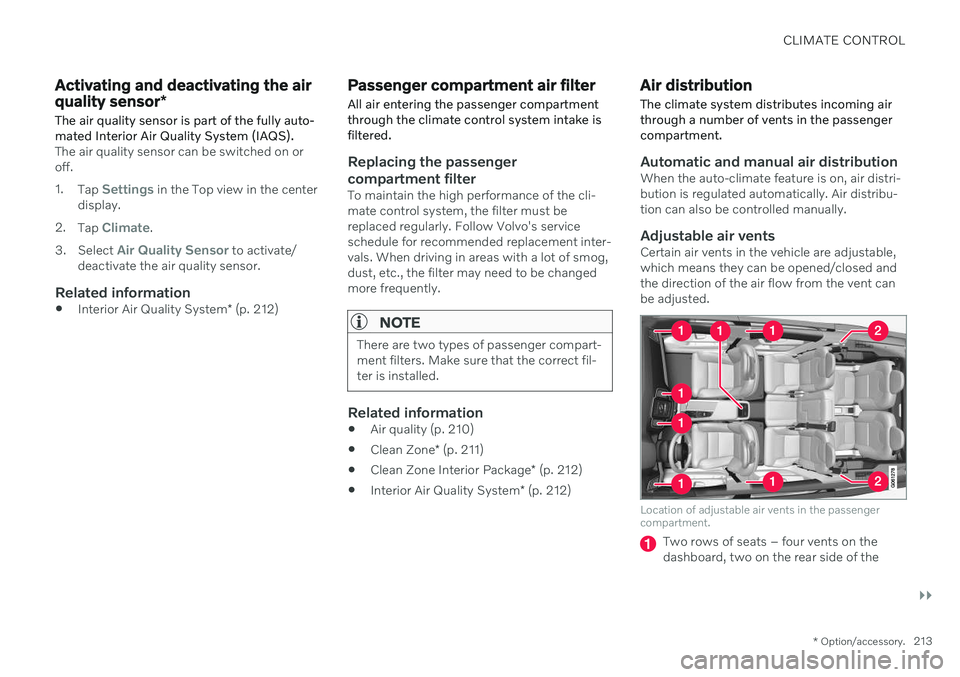
Adjustable air ventsCertain air vents in the vehicle are adjustable,which means they can be opened/closed andthe direction of the air flow from the vent canbe adjusted.
Location of adjustable air vents in the passenger compartment.
Two rows of seats – four vents on the dashboard, two on the rear side of the
Page 241 of 693

CLIMATE CONTROL
* Option/accessory.239
Parking climate symbols and messages
A number of symbols and messages related to parking climate may be displayed in theinstrument panel.Messages related to parking climate can also be displayed in a device that has the Volvo On Call * app.
Symbol Message Meaning
Parking climate Service requiredParking climate is not functioning properly. Contact a workshop A
to have the system
checked as soon as possible.
Parking climate Temporarily unavailableParking climate is temporarily not functioning properly. If the problem persists, contact a workshop A
to have the system checked.
Parking climate Unavailable Charge level too lowThe parking climate cannot be activated because the hybrid battery's charge level is too low to start the parking heater. Start the vehicle.
Parking climate Unavailable, not connected to power supplyThe parking climate cannot be activated if the charging cable is not connected. Connect the charging cable.
Parking climate Limited Charge level too lowParking climate will only run for a limited time when the hybrid battery's charge level is too low. Start the vehicle.
A An authorized Volvo workshop is recommended.
Related information
Parking climate (p. 233)
Page 249 of 693
KEY, LOCKS AND ALARM
}}
* Option/accessory.247
NOTE
Be aware of the risk of locking the remote key in the vehicle. If the remote key or key tag is left in the vehicle, it will be deactivated whenthe vehicle is locked and the alarm setusing another valid key. The key will bereactivated when the vehicle isunlocked.
If the remote key or Red Key is left inthe vehicle, it will be deactivated evenif the vehicle is locked using Volvo OnCall, and will be reactivated when thevehicle is unlocked using Volvo On Callor another valid key.
Button-less key (Key Tag)
*
The button-less key4
provided with the keyless
locking and unlocking function works in the same way as the regular remote key for key-less start, locking and unlocking. The key iswaterproof up to a depth of approx. 10 meters(30 feet) for up to 60 minutes. It does nothave a detachable key blade and its batterycannot be replaced.
Red Key - restricted remote key *A Red Key is a key that makes it possible to set restrictions for some of the vehicle's func- tions, e.g. maximum speed and maximum audio system volume. It helps vehicle ownersensure that the vehicle is being operatedresponsibly by other drivers.
InterferenceElectromagnetic fields or obstructing objectsmay interfere with the remote key's functionsfor keyless start and keyless locking and unlocking
*.
NOTE
Avoid storing the remote control key near metal objects or electronic devices, e.g.cell phones, tablets, laptops or chargers –preferably no closer than 10-15 cm(4-6 in.).
If you experience interference, use the remote key's detachable blade to unlock the vehicleand then place the remote key in the backupreader in the tunnel console cup holder to dis-arm the alarm and start the vehicle.
NOTE
When the remote control key is placed in the cup holder, make sure that no othervehicle keys, metal objects or electronicdevices (e.g. cell phones, tablets, laptopsor chargers) are found in the cup holder.Multiple vehicle keys close to each other inthe cup holder can disrupt their functional-ity.
WARNING
California Proposition 65 Operating, servicing and maintaining a pas- senger vehicle can expose you to chemi-cals including engine exhaust, carbon mon-oxide, phthalates, and lead, which areknown to the State of California to causecancer and birth defects or other reproduc-tive harm. To minimize exposure, avoidbreathing exhaust, do not idle the engineexcept as necessary, service your vehicle ina well ventilated area and wear gloves orwash your hands frequently when servicingyour vehicle. For more information go towww.P65Warnings.ca.gov/passenger-vehicle.
4
Also called sport key.