service VOLVO XC90 TWIN ENGINE 2020 Owner's Manual
[x] Cancel search | Manufacturer: VOLVO, Model Year: 2020, Model line: XC90 TWIN ENGINE, Model: VOLVO XC90 TWIN ENGINE 2020Pages: 693, PDF Size: 13.34 MB
Page 61 of 693
SAFETY
}}
59
Occupant weight sensor
The Occupant Weight Sensor (OWS) is designed to meet the regulatory require-ments of Federal Motor Vehicle SafetyStandard (FMVSS) 208 and is designed todisable (will not inflate) the passenger's sidefront airbag under certain conditions.
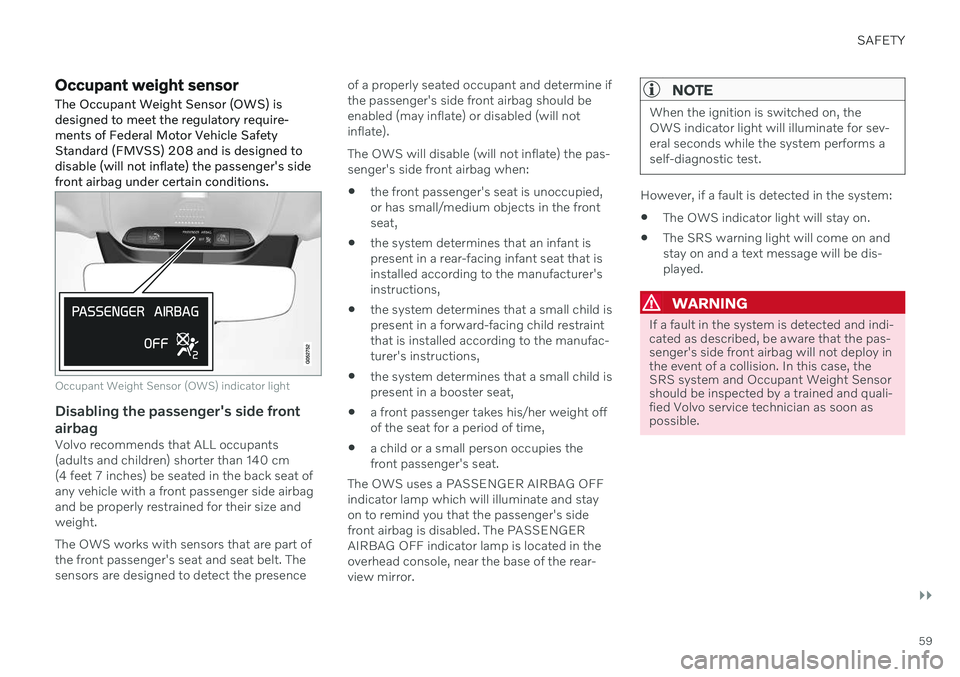
Occupant Weight Sensor (OWS) indicator light
Disabling the passenger's side front airbag
Volvo recommends that ALL occupants (adults and children) shorter than 140 cm(4 feet 7 inches) be seated in the back seat ofany vehicle with a front passenger side airbagand be properly restrained for their size andweight. The OWS works with sensors that are part of the front passenger's seat and seat belt. Thesensors are designed to detect the presence of a properly seated occupant and determine ifthe passenger's side front airbag should beenabled (may inflate) or disabled (will notinflate). The OWS will disable (will not inflate) the pas- senger's side front airbag when:
the front passenger's seat is unoccupied,or has small/medium objects in the frontseat,
the system determines that an infant ispresent in a rear-facing infant seat that isinstalled according to the manufacturer'sinstructions,
the system determines that a small child ispresent in a forward-facing child restraintthat is installed according to the manufac-turer's instructions,
the system determines that a small child ispresent in a booster seat,
a front passenger takes his/her weight offof the seat for a period of time,
a child or a small person occupies thefront passenger's seat.
The OWS uses a PASSENGER AIRBAG OFFindicator lamp which will illuminate and stayon to remind you that the passenger's sidefront airbag is disabled. The PASSENGERAIRBAG OFF indicator lamp is located in theoverhead console, near the base of the rear-view mirror.
NOTE
When the ignition is switched on, the OWS indicator light will illuminate for sev-eral seconds while the system performs aself-diagnostic test.
However, if a fault is detected in the system:
The OWS indicator light will stay on.
The SRS warning light will come on and stay on and a text message will be dis-played.
WARNING
If a fault in the system is detected and indi- cated as described, be aware that the pas-senger's side front airbag will not deploy inthe event of a collision. In this case, theSRS system and Occupant Weight Sensorshould be inspected by a trained and quali-fied Volvo service technician as soon aspossible.
Page 62 of 693
||
SAFETY
60
WARNING
Never try to open, remove or repair any components in the OWS system. Thiscould cause the system to malfunction.Maintenance or repairs should only becarried out by an a trained and qualifiedVolvo service technician.
The front passenger's seat should notbe modified in any way. This couldreduce pressure on the seat cushion,which might interfere with the OWSsystem's function.
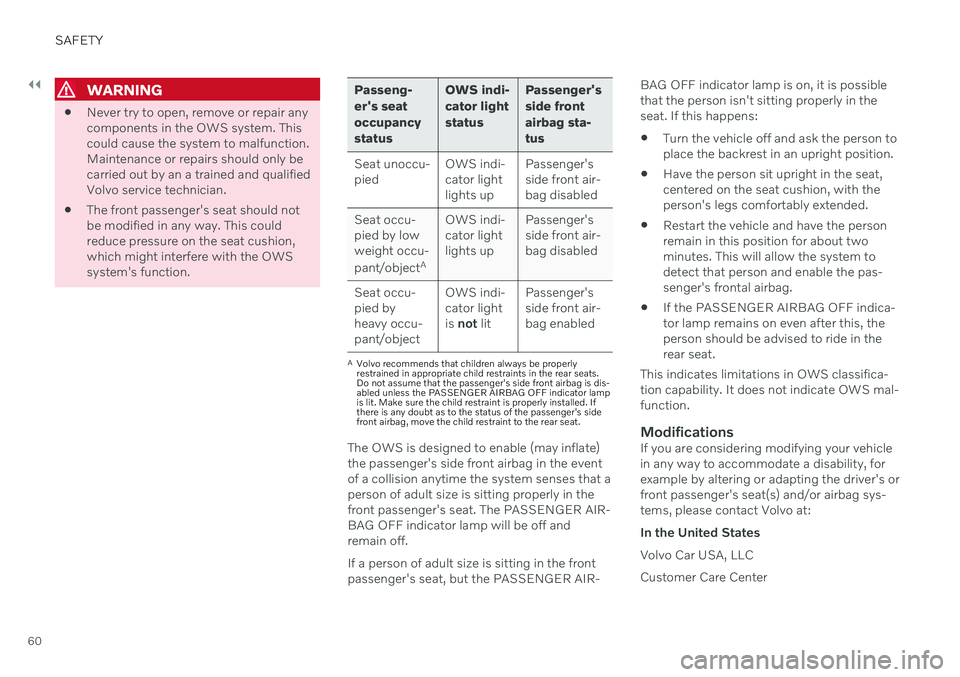
Passeng- er's seatoccupancystatus OWS indi-cator lightstatus
Passenger'sside frontairbag sta-tus
Seat unoccu- pied OWS indi-cator lightlights upPassenger'sside front air-bag disabled
Seat occu-pied by lowweight occu- pant/object AOWS indi-
cator light lights up Passenger'sside front air-
bag disabled
Seat occu- pied byheavy occu-
pant/object OWS indi-
cator lightis not lit Passenger'sside front air-bag enabled
A
Volvo recommends that children always be properly restrained in appropriate child restraints in the rear seats.Do not assume that the passenger's side front airbag is dis-abled unless the PASSENGER AIRBAG OFF indicator lampis lit. Make sure the child restraint is properly installed. Ifthere is any doubt as to the status of the passenger's sidefront airbag, move the child restraint to the rear seat.
The OWS is designed to enable (may inflate) the passenger's side front airbag in the eventof a collision anytime the system senses that aperson of adult size is sitting properly in thefront passenger's seat. The PASSENGER AIR-BAG OFF indicator lamp will be off andremain off. If a person of adult size is sitting in the front passenger's seat, but the PASSENGER AIR- BAG OFF indicator lamp is on, it is possiblethat the person isn't sitting properly in theseat. If this happens:
Turn the vehicle off and ask the person toplace the backrest in an upright position.
Have the person sit upright in the seat,centered on the seat cushion, with theperson's legs comfortably extended.
Restart the vehicle and have the personremain in this position for about twominutes. This will allow the system todetect that person and enable the pas-senger's frontal airbag.
If the PASSENGER AIRBAG OFF indica-tor lamp remains on even after this, theperson should be advised to ride in therear seat.
This indicates limitations in OWS classifica-tion capability. It does not indicate OWS mal-function.ModificationsIf you are considering modifying your vehiclein any way to accommodate a disability, forexample by altering or adapting the driver's orfront passenger's seat(s) and/or airbag sys-tems, please contact Volvo at: In the United StatesVolvo Car USA, LLCCustomer Care Center
Page 82 of 693
||
SAFETY
* Option/accessory.
80
formed by a trained and qualified Volvo service technician only.
Related information
Child restraints (p. 67)
Folding up the integrated booster cush- ion
* (p. 80)
Folding down the integrated boostercushion
* (p. 81)
Folding up the integrated booster cushion *
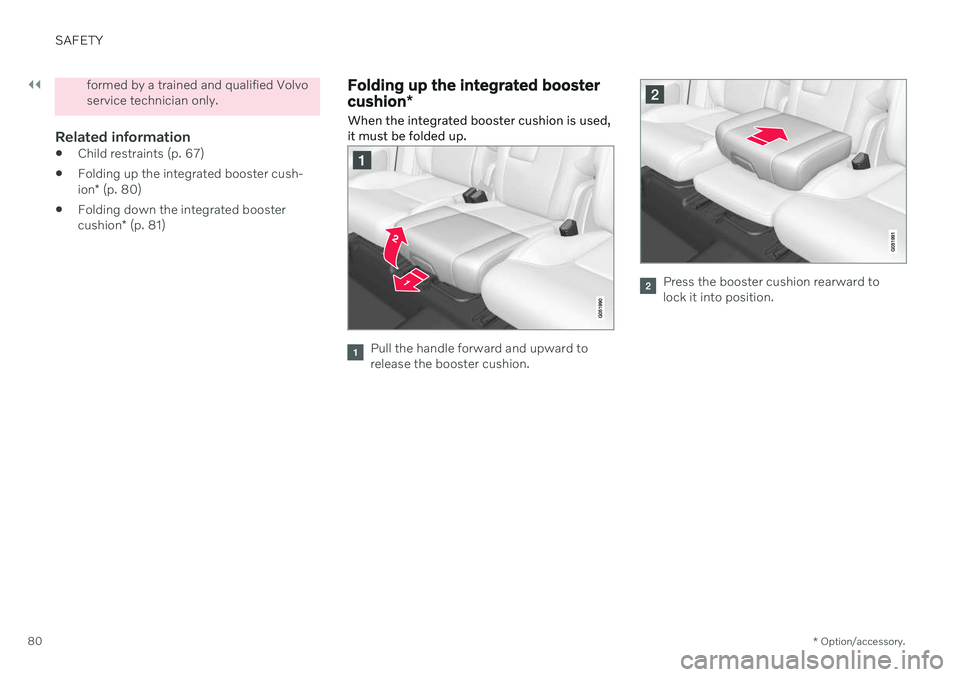
When the integrated booster cushion is used, it must be folded up.
Pull the handle forward and upward to release the booster cushion.
Press the booster cushion rearward to lock it into position.
Page 83 of 693
SAFETY
}}
* Option/accessory.81
WARNING
DEATH or SERIOUS INJURY can occur
Follow all instructions on this child restraint and in the vehi-cle's owner's manual.
Make sure the booster cushionis securely locked before thechild is seated.
Only use for children who weigh between 15-36 kg (33-80 lbs) andwho are between 97-137 cm(38-54 tum) in height. In Canada: 18kg (40 lbs) is the minimum weightrequirement for a child using boostercushions according to the Canadianregulation CMVSS 213.4
Use only the vehicle's lap and shoulderbelt system when restraining the childin this booster cushion.
In the event of a collision while theintegrated booster cushion was occu-pied, the entire booster cushion andseat belt must be replaced. Thebooster cushion should also bereplaced if it is badly worn or damagedin any way. This work should be per-formed by a trained and qualified Volvo service technician only.
Related information
Integrated booster cushion
* (p. 79)
Folding down the integrated booster cushion
* (p. 81)
Folding down the integrated booster cushion *
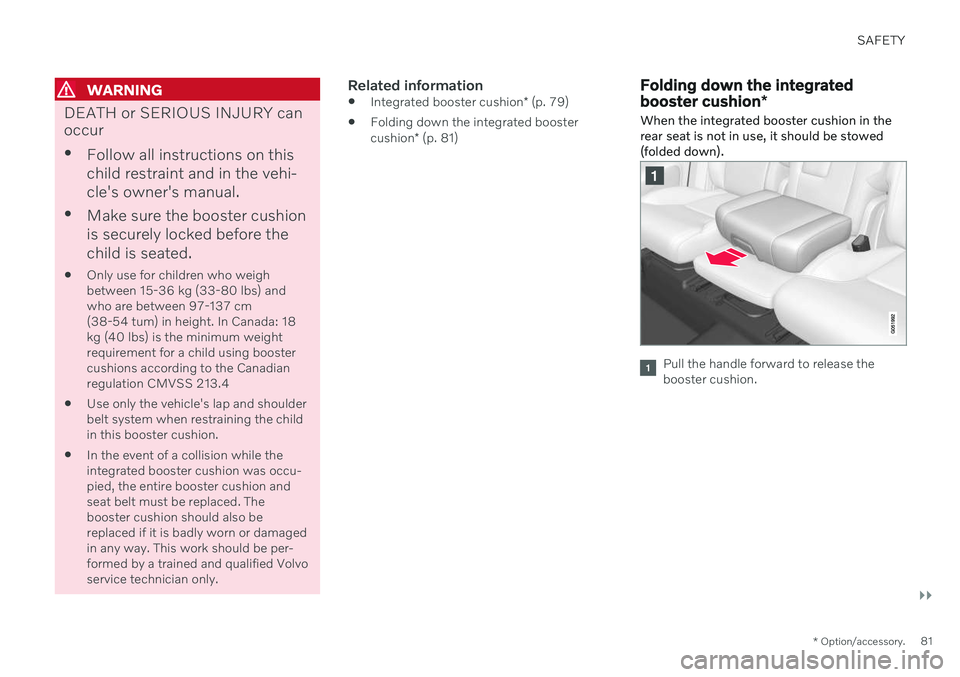
When the integrated booster cushion in the rear seat is not in use, it should be stowed(folded down).
Pull the handle forward to release the booster cushion.
Page 84 of 693
||
SAFETY
* Option/accessory.
82
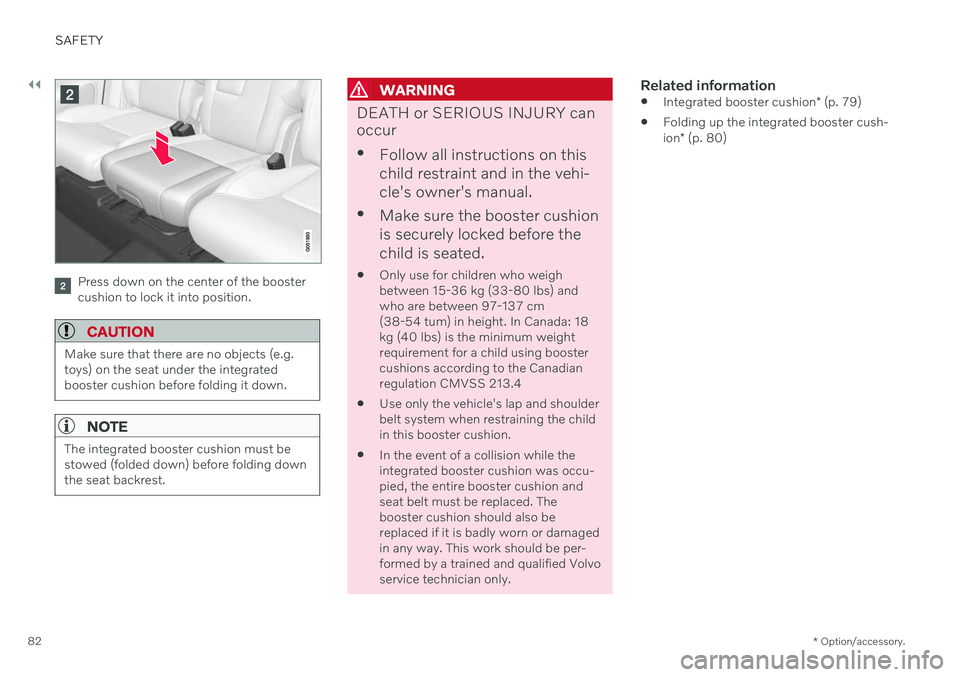
Press down on the center of the booster cushion to lock it into position.
CAUTION
Make sure that there are no objects (e.g. toys) on the seat under the integratedbooster cushion before folding it down.
NOTE
The integrated booster cushion must be stowed (folded down) before folding downthe seat backrest.
WARNING
DEATH or SERIOUS INJURY can occur
Follow all instructions on this child restraint and in the vehi-cle's owner's manual.
Make sure the booster cushionis securely locked before thechild is seated.
Only use for children who weigh between 15-36 kg (33-80 lbs) andwho are between 97-137 cm(38-54 tum) in height. In Canada: 18kg (40 lbs) is the minimum weightrequirement for a child using boostercushions according to the Canadianregulation CMVSS 213.4
Use only the vehicle's lap and shoulderbelt system when restraining the childin this booster cushion.
In the event of a collision while theintegrated booster cushion was occu-pied, the entire booster cushion andseat belt must be replaced. Thebooster cushion should also bereplaced if it is badly worn or damagedin any way. This work should be per-formed by a trained and qualified Volvo service technician only.
Related information
Integrated booster cushion
* (p. 79)
Folding up the integrated booster cush- ion
* (p. 80)
Page 104 of 693

||
DISPLAYS AND VOICE CONTROL
102
BSD 4-clause "Original" or "Old" License
Copyright (c) 1982, 1986, 1990, 1991, 1993 The Regents of the University of California. Allrights reserved. Redistribution and use in source and binary forms, with or without modification, arepermitted provided that the followingconditions are met:
1. Redistributions of source code must retainthe above copyright notice, this list of conditions and the following disclaimer.
2. Redistributions in binary form must reproduce the above copyright notice, thislist of conditions and the followingdisclaimer in the documentation and/orother materials provided with thedistribution.
3. All advertising materials mentioning features or use of this software mustdisplay the following acknowledgement:This product includes software developedby the University of California, Berkeleyand its contributors.
4. Neither the name of the University nor the names of its contributors may be used toendorse or promote products derived fromthis software without specific prior writtenpermission.
THIS SOFTWARE IS PROVIDED BY THEREGENTS AND CONTRIBUTORS ``AS IS''AND ANY EXPRESS OR IMPLIED WARRANTIES, INCLUDING, BUT NOTLIMITED TO, THE IMPLIED WARRANTIESOF MERCHANTABILITY AND FITNESS FORA PARTICULAR PURPOSE AREDISCLAIMED. IN NO EVENT SHALL THEREGENTS OR CONTRIBUTORS BE LIABLEFOR ANY DIRECT, INDIRECT, INCIDENTAL,SPECIAL, EXEMPLARY, ORCONSEQUENTIAL DAMAGES (INCLUDING,BUT NOT LIMITED TO, PROCUREMENT OFSUBSTITUTE GOODS OR SERVICES; LOSSOF USE, DATA, OR PROFITS; OR BUSINESSINTERRUPTION) HOWEVER CAUSED ANDON ANY THEORY OF LIABILITY, WHETHERIN CONTRACT, STRICT LIABILITY, OR TORT(INCLUDING NEGLIGENCE OROTHERWISE) ARISING IN ANY WAY OUTOF THE USE OF THIS SOFTWARE, EVEN IFADVISED OF THE POSSIBILITY OF SUCH DAMAGE.
BSD 3-clause "New" or "Revised" License
Copyright (c) 2011-2014, Yann Collet. Redistribution and use in source and binary forms, with or without modification, arepermitted provided that the followingconditions are met:
1. Redistributions of source code must retain
the above copyright notice, this list of conditions and the following disclaimer.
2. Redistributions in binary form must reproduce the above copyright notice, thislist of conditions and the following disclaimer in the documentation and/orother materials provided with thedistribution.
3. Neither the name of the organisation nor the names of its contributors may be usedto endorse or promote products derivefrom this software without specific priorwritten permission.
THIS SOFTWARE IS PROVIDED BY THECOPYRIGHT HOLDERS ANDCONTRIBUTORS "AS IS" AND ANYEXPRESS OR IMPLIED WARRANTIES,INCLUDING, BUT NOT LIMITED TO, THEIMPLIED WARRANTIES OFMERCHANTABILITY AND FITNESS FOR APARTICULAR PURPOSE ARE DISCLAIMED.IN NO EVENT SHALL THE COPYRIGHTHOLDER OR CONTRIBUTORS BE LIABLEFOR ANY DIRECT, INDIRECT, INCIDENTAL,SPECIAL, EXEMPLARY, ORCONSEQUENTIAL DAMAGES (INCLUDING,BUT NOT LIMITED TO, PROCUREMENT OFSUBSTITUTE GOODS OR SERVICES; LOSSOF USE, DATA, OR PROFITS; OR BUSINESSINTERRUPTION) HOWEVER CAUSED ANDON ANY THEORY OF LIABILITY, WHETHERIN CONTRACT, STRICT LIABILITY, OR TORT(INCLUDING NEGLIGENCE OROTHERWISE) ARISING IN ANY WAY OUTOF THE USE OF THIS SOFTWARE, EVEN IFADVISED OF THE POSSIBILITY OF SUCHDAMAGE.
Page 105 of 693

DISPLAYS AND VOICE CONTROL
}}
103
BSD 2-clause “Simplified” license
Copyright (c)
reserved. Redistribution and use in source and binary forms, with or without modification, arepermitted provided that the followingconditions are met:
1. Redistributions of source code must retain the above copyright notice, this list of conditions and the following disclaimer.
2. Redistributions in binary form must reproduce the above copyright notice, thislist of conditions and the followingdisclaimer in the documentation and/orother materials provided with thedistribution.
THIS SOFTWARE IS PROVIDED BY THECOPYRIGHT HOLDERS ANDCONTRIBUTORS "AS IS" AND ANY EXPRESS OR IMPLIED WARRANTIES, INCLUDING, BUT NOT LIMITED TO, THE IMPLIED WARRANTIES OF MERCHANTABILITY AND FITNESS FOR APARTICULAR PURPOSE ARE DISCLAIMED. IN NO EVENT SHALL THE COPYRIGHT OWNER OR CONTRIBUTORS BE LIABLEFOR ANY DIRECT, INDIRECT, INCIDENTAL,SPECIAL, EXEMPLARY, ORCONSEQUENTIAL DAMAGES (INCLUDING,BUT NOT LIMITED TO, PROCUREMENT OFSUBSTITUTE GOODS OR SERVICES; LOSS OF USE, DATA, OR PROFITS; OR BUSINESSINTERRUPTION) HOWEVER CAUSED ANDON ANY THEORY OF LIABILITY, WHETHERIN CONTRACT, STRICT LIABILITY, OR TORT(INCLUDING NEGLIGENCE OROTHERWISE) ARISING IN ANY WAY OUTOF THE USE OF THIS SOFTWARE, EVEN IFADVISED OF THE POSSIBILITY OF SUCHDAMAGE. The views and conclusions contained in the software and documentation are those of theauthors and should not be interpreted asrepresenting official policies, either expressedor implied, of the FreeBSD Project.
FreeType Project License
1. 1 Copyright 1996-1999 by David Turner,
Robert Wilhelm, and Werner Lemberg Introduction The FreeType Project isdistributed in several archive packages;some of them may contain, in addition tothe FreeType font engine, various toolsand contributions which rely on, or relateto, the FreeType Project. This licenseapplies to all files found in such packages,and which do not fall under their ownexplicit license. The license affects thusthe FreeType font engine, the testprograms, documentation and makefiles,at the very least. This license was inspiredby the BSD, Artistic, and IJG(Independent JPEG Group) licenses,which all encourage inclusion and use of free software in commercial and freewareproducts alike. As a consequence, its mainpoints are that: o We don't promise thatthis software works. However, we are beinterested in any kind of bug reports. (`asis' distribution) o You can use thissoftware for whatever you want, in partsor full form, without having to pay us.(`royalty-free' usage) o You may notpretend that you wrote this software. Ifyou use it, or only parts of it, in a program,you must acknowledge somewhere inyour documentation that you've used theFreeType code. (`credits') We specificallypermit and encourage the inclusion of thissoftware, with or without modifications, incommercial products, provided that allwarranty or liability claims are assumed bythe product vendor. Legal Terms 0.Definitions Throughout this license, theterms `package', `FreeType Project', and`FreeType archive' refer to the set of filesoriginally distributed by the authors (DavidTurner, Robert Wilhelm, and WernerLemberg) as the `FreeType project', bethey named as alpha, beta or final release.`You' refers to the licensee, or personusing the project, where `using' is ageneric term including compiling theproject's source code as well as linking itto form a `program' or `executable'. Thisprogram is referred to as `a program usingthe FreeType engine'. This license applies
Page 112 of 693
||
DISPLAYS AND VOICE CONTROL
110
Service messages
The following table lists a selection of impor- tant service messages and what they mean.
Message Meaning
Stop safelyAStop and switch off the engine. Serious risk ofdamage - contact a workshop B
.
Turn off engineA Stop and switch off the engine. Serious risk ofdamage - contact a workshop
B
.
Service urgent Drive to work- shop
A Contact a workshop
B
to
have the vehicle inspec- ted immediately.
Service requiredA Contact a workshop
B
to
have the vehicle inspec- ted as soon as possible.
Regular main- tenance Book time for maintenanceTime for service - contact a workshop B
. Shown
before the next service date.
Regular main- tenance Time for main- tenanceTime for service - contact a workshop B
. Shown on
the next service date.
Message Meaning
Regular main- tenance Maintenance overdueTime for service - contact a workshop B
. Shown
when the date for service has passed.
Temporarily offA A function has been tem- porarily deactivated andwill be reactivated auto-matically while driving orafter the engine is restar-ted.
A
Part of message, shown along with information on the loca- tion of the problem.
B An authorized Volvo workshop is recommended.
Related information
Handling messages in the instrument panel (p. 110)
Handling messages saved from the instru- ment panel (p. 111)
Messages in the center display (p. 143)
Handling messages in the instrument panel
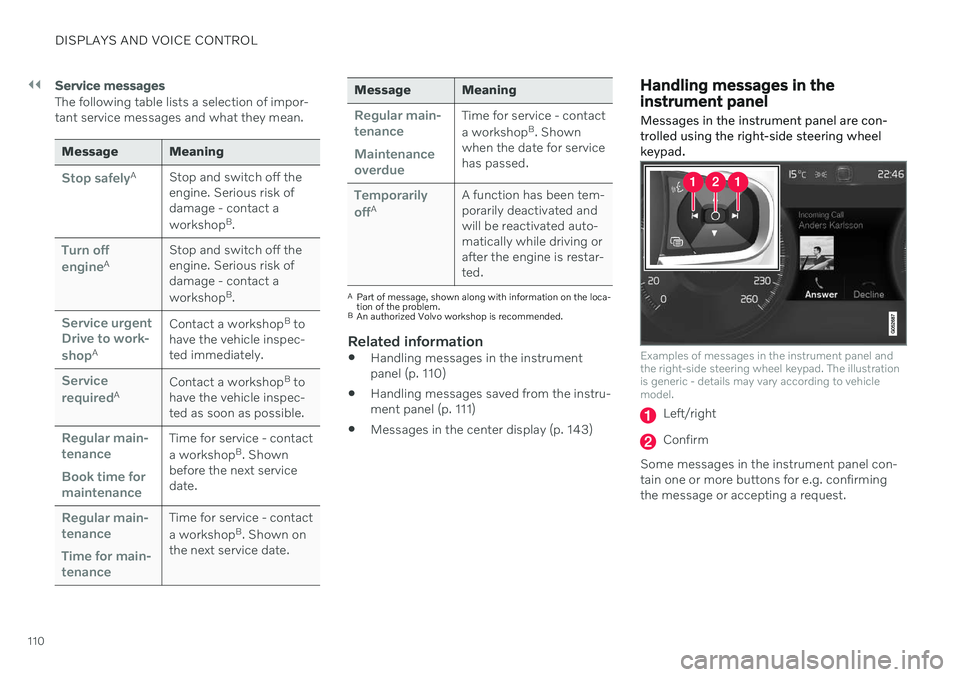
Messages in the instrument panel are con- trolled using the right-side steering wheelkeypad.
Examples of messages in the instrument panel and the right-side steering wheel keypad. The illustrationis generic - details may vary according to vehiclemodel.
Left/right
Confirm
Some messages in the instrument panel con- tain one or more buttons for e.g. confirmingthe message or accepting a request.
Page 114 of 693
||
DISPLAYS AND VOICE CONTROL
112
Handling saved messages
In expanded form, some messages have two buttons available for booking service or read-ing the Owner's Manual. Booking service for saved messages:
–With the message in expanded form, tapRequest appoint./Call to make
Appointment3 for assistance booking
service. > With
Request appoint.: TheAppointments tab will open in the app
and create a request for a service/repair appointment. With
Call to make Appointment: The
phone app will open and call a service center to make an appointment forservice or repairs.
Reading the Owner's Manual for saved mes-sages:
–With the message in expanded form, tapOwner's manual to read relevant infor-
mation about the message in the Owner's Manual.
> The Owner's Manual will open in the center display and provide information related to the message.
Saved messages in the app are automaticallydeleted each time the engine is started.
Related information
Messages in the instrument panel (p. 109)
Handling messages in the instrumentpanel (p. 110)
Messages in the center display (p. 143)
3
Market dependent. Volvo ID and selected workshop also need to be registered
Page 139 of 693

DISPLAYS AND VOICE CONTROL
137
Resetting user data when the vehicle changes owners
If the vehicle changes owners, all user data and system settings should be reset to fac-tory defaults.
Vehicle settings can be reset at different lev- els. Reset all user data and system settings totheir original factory defaults when the vehiclechanges owner. It is also important to changethe owner of the Volvo On Call service.
Related information
Resetting center display settings (p. 137)
Resetting driver profile settings (p. 143)
Resetting center display settings
All settings made in the center display's Set- tings menu can be reset to default values.
Two types of resetThere are two ways to reset the settings in the Settings menu:
Factory Reset- erases all data and files
and resets all settings to factory default.
Reset Personal Settings- erases per-
sonal data and resets personalized set- tings to factory default.
Resetting settingsFollow these instructions to reset the settings.
NOTE
Factory Reset is only possible when the
vehicle is stationary.
1. Tap Settings in the Top view in the center
display.
2. Proceed to
SystemFactory Reset.
3. Select the type of reset you would like to do.
> A pop-up window will appear. 4.
Tap
OK to confirm the reset.
For
Reset Personal Settings, confirm
the reset by tapping Reset for the active
profile or Reset for all profiles.
> The selected settings will be reset.
Related information
Center display overview (p. 113)
Changing settings in the center display's Top view (p. 135)
Table of settings in the center display(p. 138)