seats VOLVO XC90 TWIN ENGINE 2020 Workshop Manual
[x] Cancel search | Manufacturer: VOLVO, Model Year: 2020, Model line: XC90 TWIN ENGINE, Model: VOLVO XC90 TWIN ENGINE 2020Pages: 693, PDF Size: 13.34 MB
Page 207 of 693
SEATS AND STEERING WHEEL
* Option/accessory.205
Adjusting the second row backrest tilt (p. 202)
Getting into and out of the third row of seats
* (p. 203)
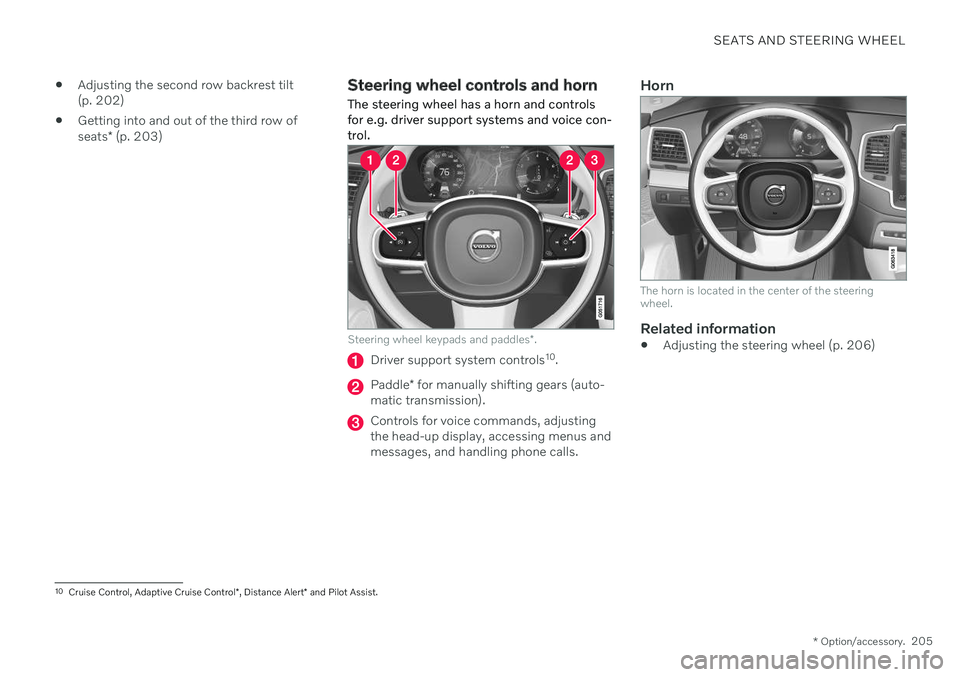
Steering wheel controls and horn The steering wheel has a horn and controls for e.g. driver support systems and voice con-trol.
Steering wheel keypads and paddles *.
Driver support system controls 10
.
Paddle * for manually shifting gears (auto-
matic transmission).
Controls for voice commands, adjusting the head-up display, accessing menus andmessages, and handling phone calls.
Horn
The horn is located in the center of the steering wheel.
Related information
Adjusting the steering wheel (p. 206)
10
Cruise Control, Adaptive Cruise Control *, Distance Alert * and Pilot Assist.
Page 208 of 693

SEATS AND STEERING WHEEL
* Option/accessory.
206
Adjusting the steering wheel The steering wheel can be adjusted to various positions.
The steering wheel's reach and height can be adjusted.
WARNING
Adjust the steering wheel and ensure it locks into position before driving. Neveradjust the steering wheel while driving.
Steering wheel force can be adjusted with speed-dependent power steering. Steeringwheel force is adjusted according to the vehi-cle's speed to give the driver an enhancedsense of control and stability.
Steering wheel adjuster lever.
1. Move the lever forward to release the steering wheel.
2. Adjust the steering wheel to the desired position.
3. Pull the lever back to lock the steering wheel into place. If the lever is difficult to move, press the steering wheel lightlywhile pulling the lever.
Related information
Steering wheel controls and horn (p. 205)
Adjusting the power
* front seats (p. 189)
Page 210 of 693

CLIMATE CONTROL
* Option/accessory.
208
Climate The vehicle is equipped with electronic cli- mate control. The climate system cools, heatsand dehumidifies the air in the passengercompartment.
All of the climate system functions are con- trolled from the center display and the buttonson the center console. Certain rear seat functions can also be con- trolled from the climate controls * on the rear
of the tunnel console.
Related information
Climate zones (p. 208)
Climate control sensors (p. 208)
Perceived temperature (p. 209)
Climate control system voice commands (p. 209)
Parking climate (p. 233)
Heater (p. 240)
Air quality (p. 210)
Air distribution (p. 213)
Climate system controls (p. 219)
Climate zones The vehicle is divided into climate zones to make it possible to set different temperaturesfor different parts of the passenger compart-ment.
4-zone climate system
Climate zones with 4-zone climate system.
In 4-zone climate systems, the passenger compartment temperature can be set sepa-rately for the left and right sides of the vehicle,and for the front and rear seats.
Related information
Climate (p. 208)
Climate control sensors
The climate system has a number of sensors to help regulate the climate settings in thevehicle.
Location of the sensors
Sunlight sensors - on the upper side of the dashboard.
Humidity sensor - in the rearview mirror console.
Ambient temperature sensor - in the right- side door mirror.
Passenger compartment temperature sen- sor - near the buttons in the center con-sole.
Page 215 of 693
CLIMATE CONTROL
}}
* Option/accessory.213
Activating and deactivating the air quality sensor *
The air quality sensor is part of the fully auto- mated Interior Air Quality System (IAQS).
The air quality sensor can be switched on or off. 1. Tap
Settings in the Top view in the center
display.
2. Tap
Climate.
3. Select
Air Quality Sensor to activate/
deactivate the air quality sensor.
Related information
Interior Air Quality System
* (p. 212)
Passenger compartment air filter
All air entering the passenger compartment through the climate control system intake isfiltered.
Replacing the passenger compartment filter
To maintain the high performance of the cli- mate control system, the filter must bereplaced regularly. Follow Volvo's serviceschedule for recommended replacement inter-vals. When driving in areas with a lot of smog,dust, etc., the filter may need to be changedmore frequently.
NOTE
There are two types of passenger compart- ment filters. Make sure that the correct fil-ter is installed.
Related information
Air quality (p. 210)
Clean Zone
* (p. 211)
Clean Zone Interior Package
* (p. 212)
Interior Air Quality System
* (p. 212)
Air distribution
The climate system distributes incoming air through a number of vents in the passengercompartment.
Automatic and manual air distributionWhen the auto-climate feature is on, air distri- bution is regulated automatically. Air distribu-tion can also be controlled manually.
Adjustable air ventsCertain air vents in the vehicle are adjustable,which means they can be opened/closed andthe direction of the air flow from the vent canbe adjusted.
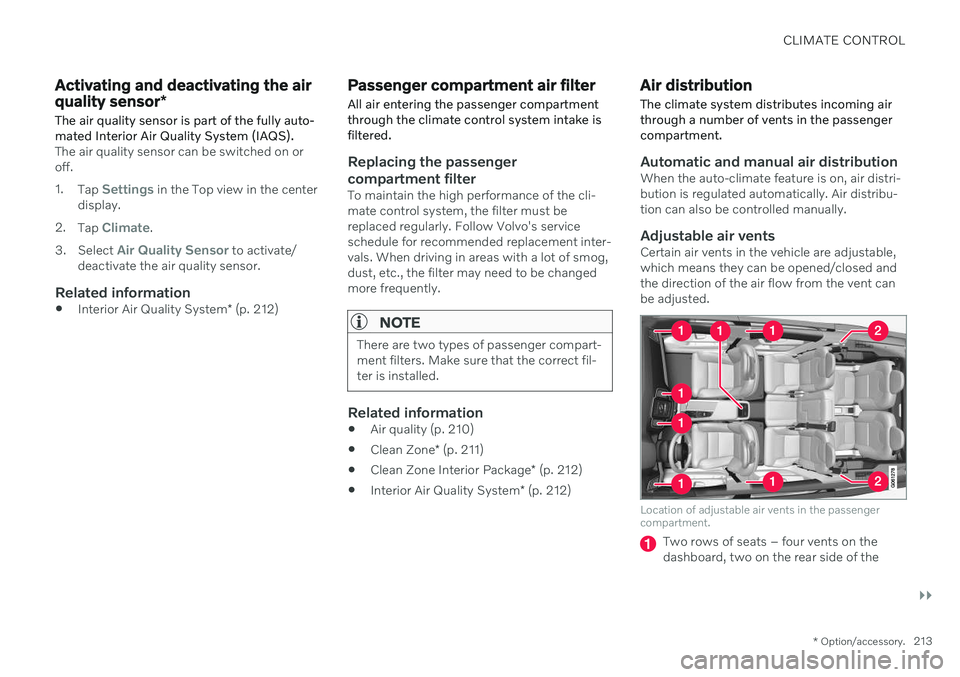
Location of adjustable air vents in the passenger compartment.
Two rows of seats – four vents on the dashboard, two on the rear side of the
Page 216 of 693

||
CLIMATE CONTROL
214tunnel console and one on each side of the pillars between the front and rear doors.
A third row of seats – one additional vent on each of the pillars behind the reardoors.
Related information
Climate (p. 208)
Adjusting air distribution (p. 214)
Opening, closing and directing air vents(p. 215)
Air distribution options (p. 216)
Adjusting air distribution
Air distribution can be adjusted manually if needed.
1. Tap the symbol in the center of the climate bar to open Climate view in the center dis- play.
Air distribution buttons in Climate view.
Air distribution - windshield defrost vents
Air distribution - dashboard and center console air vents
Air distribution - floor air vents
2. Tap one or more air distribution buttons to open/close the airflow for that vent.
> The air distribution changes and the
buttons will light up or go out.
Related information
Air distribution (p. 213)
Opening, closing and directing air vents (p. 215)
Air distribution options (p. 216)
Page 222 of 693
||
CLIMATE CONTROL
* Option/accessory.
220
Blower control for front seats.
AUTO - Automatic climate control.
Rear climate control
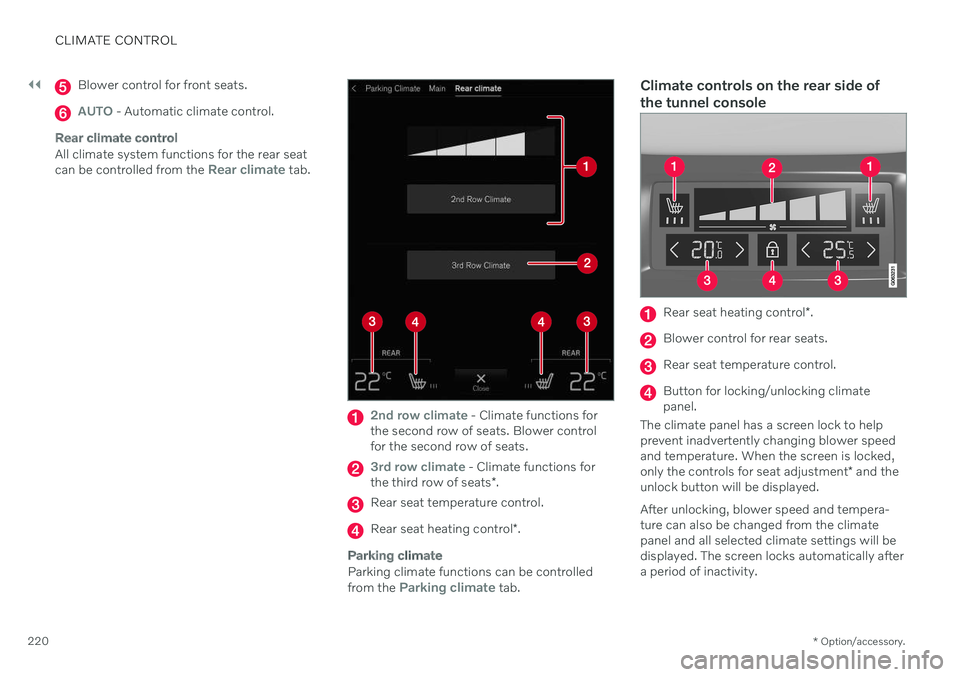
All climate system functions for the rear seat can be controlled from the Rear climate tab.
2nd row climate - Climate functions for
the second row of seats. Blower control for the second row of seats.
3rd row climate - Climate functions for
the third row of seats *.
Rear seat temperature control.
Rear seat heating control *.
Parking climate
Parking climate functions can be controlled from the Parking climate tab.
Climate controls on the rear side of the tunnel console
Rear seat heating control *.
Blower control for rear seats.
Rear seat temperature control.
Button for locking/unlocking climate panel.
The climate panel has a screen lock to helpprevent inadvertently changing blower speedand temperature. When the screen is locked, only the controls for seat adjustment * and the
unlock button will be displayed. After unlocking, blower speed and tempera- ture can also be changed from the climate panel and all selected climate settings will be displayed. The screen locks automatically aftera period of inactivity.
Page 223 of 693

CLIMATE CONTROL
* Option/accessory.221
Related information
Climate (p. 208)
Activating and deactivating power front seats
* (p. 221)
Activating and deactivating the heatedrear seats
* (p. 222)
Activating and deactivating front seat ven-tilation
* (p. 222)
Activating and deactivating the heatedsteering wheel
* (p. 223)
Activating auto climate control (p. 224)
Activating and deactivating recirculation (p. 224)
Activating and deactivating max defroster(p. 225)
Activating and deactivating the heatedrear window and door mirrors (p. 226)
Setting the blower speed for the frontseats (p. 227)
Setting the blower speed for the rearseats (p. 228)
Synchronize temperature (p. 231)
Activating and deactivating air condition-ing (p. 232)
Activating and deactivating climate con- trol for the third-row seats
* (p. 233)
Activating and deactivating power front seats *
The seats can be heated for added comfort for the driver and passengers in cold weather.
1. Tap the left- or right-side steering wheel and seat button in the center display's cli- mate bar to open the controls for steeringwheel and seat heating. If the vehicle is not equipped with ventila- ted seats or heated steering wheel (for thedriver's side), the button for seat heating isdirectly accessible in the climate bar.
2. Tap the seat heating button repeatedly to
select one of the four levels: Off, High,Medium or Low.
> The level is changed and the set level is displayed in the button.
Related information
Climate system controls (p. 219)
Activating and deactivating the heated front seat
* (p. 221)
Activating and deactivating the heated front seat *
The seats can be heated for added comfort for the driver and passengers in cold weather.
Seat heating can be set to automatically acti- vate when the engine is started. When set toautomatically activate, heating will be turnedon at low ambient temperatures. 1. Tap
Settings in the Top view in the center
display.
2. Tap
Climate.
3. Select
Auto Driver Seat Heating Leveland Auto Passenger Seat Heating Levelto activate/deactivate automatic start of heated driver's and passenger seat.
> An "A" will be displayed next to the rel-
evant seat heating button in the climate bar when auto start has been activated.
4. Select
Low, Medium or High to select
level after the function has been activated.
Related information
Climate system controls (p. 219)
Activating and deactivating power front seats
* (p. 221)
Page 224 of 693

CLIMATE CONTROL
* Option/accessory.
222
Activating and deactivating the heated rear seats *
The seats can be heated for added comfort for the driver and passengers in cold weather.
Activating and deactivating the heated rear seats from the front seats
1. Tap the symbol in the center of the climate bar to open Climate view in the center dis- play.
2. Select the
Rear climate tab.
3. Tap the seat heating button repeatedly to
select one of the four levels: Off, High,Medium or Low.
> The level is changed and the set level is displayed in the button.
Activating and deactivating the heated rear seats from the rear seat
Seat heating controls and indicator lights on the rear side of the tunnel console.
–Press repeatedly on the left or right seat heating buttons in the climate panel onthe tunnel console to select one of four levels:
Off, High, Medium or Low.
> The level will be changed and the cli- mate panel screen will show the new level.
Related information
Climate system controls (p. 219)
Activating and deactivating front seat ventilation
*
The seats can be ventilated to provide increased comfort in warm weather.
The ventilation system consists of fans in the seats and backrest that draw air through theseat upholstery. The cooler the passengercompartment is, the greater the cooling effectof the ventilation. The system can be activatedwhen the engine is running.
1. Tap the left- or right-side steering wheel and seat button in the center display's cli- mate bar to open the controls for steeringwheel and seat heating. If the vehicle is not equipped with heated seats or heated steering wheel (for thedriver's side), the button for seat ventila-tion is directly accessible in the climatebar.
Page 225 of 693

CLIMATE CONTROL
* Option/accessory.223
2. Tap the seat ventilation button repeatedly
to select one of the four levels: Off, High,Medium or Low.
> The level is changed and the set level is displayed in the button.
Related information
Climate system controls (p. 219)
Activating and deactivating the heated steering wheel
*
The steering wheel can be heated for added comfort in cold weather.
1. Tap the driver's side steering wheel and seat button in the climate bar in the center display to open the controls for steeringwheel and seat heating. If the vehicle is not equipped with heated or ventilated seats, the button for steeringwheel heating is directly accessible in theclimate bar.
2. Tap the steering wheel heating buttonrepeatedly to select one of the four levels:
Off, High, Medium or Low.
> The level is changed and the set level is displayed in the button.
Related information
Climate system controls (p. 219)
Activating and deactivating automatic steering wheel heating
* (p. 223)
Activating and deactivating automatic steering wheel heating *
The steering wheel can be heated for added comfort in cold weather.
Steering wheel heating can be set to automat- ically activate when the engine is started.When set to automatically activate, heatingwill be turned on at low ambient tempera-tures. 1. Tap
Settings in the Top view in the center
display.
2. Tap
Climate.
3. Select
Auto Steering Wheel Heating
Level to activate/deactivate automatic
start of heated steering wheel.
> An "A" will be displayed next to the heated steering wheel button in the cli- mate bar when auto start has beenactivated.
4. Select
Low, Medium or High to select
level after the function has been activated.
Related information
Activating and deactivating the heated steering wheel
* (p. 223)
Page 229 of 693

CLIMATE CONTROL
}}
227
Activating and deactivating the heated rear window and door mirrors fromthe center display
1. Tap the symbol in the center of the climatebar to open Climate view in the center dis- play.
2.Tap Rear.
> Heated windows and door mirrors are activated and the button lights up/goes out.
Related information
Climate system controls (p. 219)
Automatically activating and deactivatingthe heated rear window and door mirrors(p. 227)
Automatically activating and deactivating the heated rearwindow and door mirrors
The heated rear window and door mirrors are used to quickly remove condensation and icefrom the glass.
It is possible to select whether rear window and door mirror heating should be automati-cally activated or deactivated when the engineis started. With automatic start activated,heating will be activated when there is a riskof ice or condensation on the windows or mir-rors. Heating is automatically switched offwhen the window or door mirror is sufficientlywarm and the condensation or ice is gone. 1. Tap
Settings in the Top view in the center
display.
2. Tap
Climate.
3. Select
Auto Rear Defroster to activate/
deactivate automatic rear window and door heating.
Related information
Activating and deactivating the heatedrear window and door mirrors (p. 226)
Setting the blower speed for the front seats The blower can be set to several different automatically controlled speeds for the frontseat.
1. Tap the symbol in the center of the climate
bar to open Climate view in the center dis- play.
Blower control buttons in Climate view.
2.Tap the desired blower speed: Off, 1-5 orMax.
> The blower speed will be changed and the buttons for the set speed will light up.