cooling VOLVO XC90 TWIN ENGINE 2020 Owners Manual
[x] Cancel search | Manufacturer: VOLVO, Model Year: 2020, Model line: XC90 TWIN ENGINE, Model: VOLVO XC90 TWIN ENGINE 2020Pages: 693, PDF Size: 13.34 MB
Page 187 of 693
WINDOWS, GLASS AND MIRRORS
185
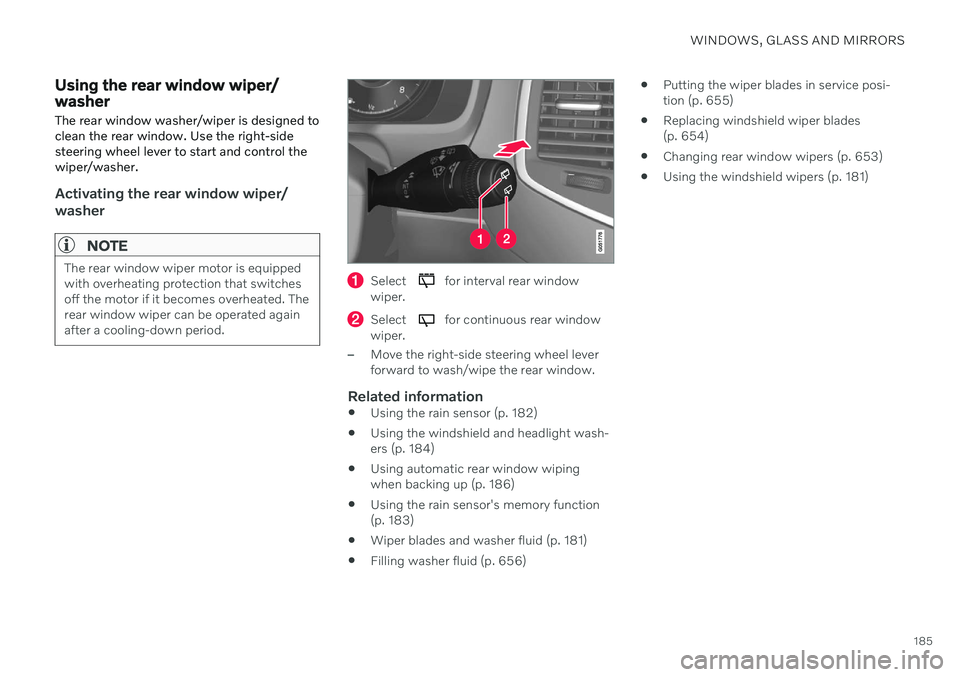
Using the rear window wiper/ washer The rear window washer/wiper is designed to clean the rear window. Use the right-sidesteering wheel lever to start and control thewiper/washer.
Activating the rear window wiper/ washer
NOTE
The rear window wiper motor is equipped with overheating protection that switchesoff the motor if it becomes overheated. Therear window wiper can be operated againafter a cooling-down period.Select for interval rear window
wiper.
Select for continuous rear window
wiper.
–Move the right-side steering wheel lever forward to wash/wipe the rear window.
Related information
Using the rain sensor (p. 182)
Using the windshield and headlight wash-ers (p. 184)
Using automatic rear window wipingwhen backing up (p. 186)
Using the rain sensor's memory function(p. 183)
Wiper blades and washer fluid (p. 181)
Filling washer fluid (p. 656)
Putting the wiper blades in service posi-tion (p. 655)
Replacing windshield wiper blades(p. 654)
Changing rear window wipers (p. 653)
Using the windshield wipers (p. 181)
Page 218 of 693
CLIMATE CONTROL
216
Air distribution options
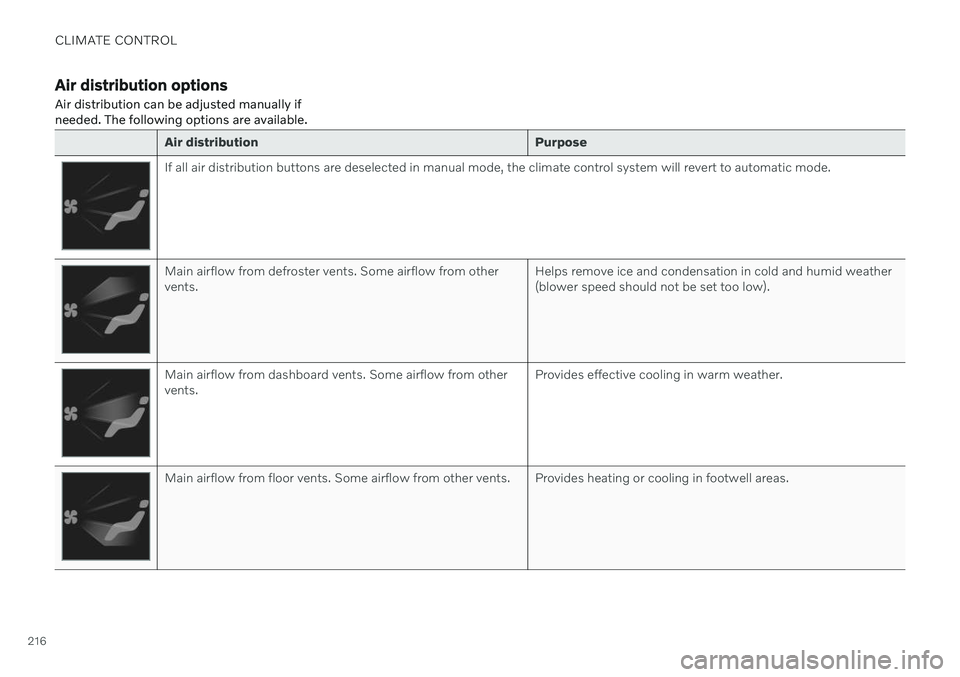
Air distribution can be adjusted manually if needed. The following options are available.
Air distribution Purpose
If all air distribution buttons are deselected in manual mode, the climate control system will revert to automatic mode.
Main airflow from defroster vents. Some airflow from other vents.Helps remove ice and condensation in cold and humid weather(blower speed should not be set too low).
Main airflow from dashboard vents. Some airflow from other vents.Provides effective cooling in warm weather.
Main airflow from floor vents. Some airflow from other vents. Provides heating or cooling in footwell areas.
Page 224 of 693

CLIMATE CONTROL
* Option/accessory.
222
Activating and deactivating the heated rear seats *
The seats can be heated for added comfort for the driver and passengers in cold weather.
Activating and deactivating the heated rear seats from the front seats
1. Tap the symbol in the center of the climate bar to open Climate view in the center dis- play.
2. Select the
Rear climate tab.
3. Tap the seat heating button repeatedly to
select one of the four levels: Off, High,Medium or Low.
> The level is changed and the set level is displayed in the button.
Activating and deactivating the heated rear seats from the rear seat
Seat heating controls and indicator lights on the rear side of the tunnel console.
–Press repeatedly on the left or right seat heating buttons in the climate panel onthe tunnel console to select one of four levels:
Off, High, Medium or Low.
> The level will be changed and the cli- mate panel screen will show the new level.
Related information
Climate system controls (p. 219)
Activating and deactivating front seat ventilation
*
The seats can be ventilated to provide increased comfort in warm weather.
The ventilation system consists of fans in the seats and backrest that draw air through theseat upholstery. The cooler the passengercompartment is, the greater the cooling effectof the ventilation. The system can be activatedwhen the engine is running.
1. Tap the left- or right-side steering wheel and seat button in the center display's cli- mate bar to open the controls for steeringwheel and seat heating. If the vehicle is not equipped with heated seats or heated steering wheel (for thedriver's side), the button for seat ventila-tion is directly accessible in the climatebar.
Page 232 of 693

||
CLIMATE CONTROL
230
Temperature control.
2. Set the temperature by doing one of thefollowing:
dragging the control to the desired temperature, or
tapping
+
− to raise/lower the tempera-
ture.
> The temperature will be set and the button will display the new tempera- ture.
NOTE
Heating/cooling cannot be accelerated by choosing a higher/lower temperature thanthe desired temperature.
Related information
Climate system controls (p. 219)
Setting the temperature for the rear seats
The temperature can be set to the desired number of degrees for the rear seat climatezones.
Setting the temperature for the rear seats from the front seats
1. Tap the symbol in the center of the climate bar to open Climate view in the center dis- play.
2. Select the
Rear climate tab.
Temperature buttons in the Rear climate tab in
Climate view.
3. Tap the left- or right-side temperature but-
ton to open the control.
Page 233 of 693

CLIMATE CONTROL
}}
231
Temperature control.
4. Set the temperature by:dragging the control to the desired temperature.
tapping
+
− to raise/lower the tempera-
ture.
> The temperature will be set and the button will display the new tempera- ture.
Setting the temperature for the rear seats from the rear seats
1. Tap the unlock button on the tunnel con- sole's climate panel to access the con- trols.
Temperature controls on the rear climate panel of the tunnel console.
2.Tap the left or right side's <> buttons to
lower/raise the temperature.
> The temperature will be changed and the climate panel screen will show the new temperature.
NOTE
Heating/cooling cannot be accelerated by choosing a higher/lower temperature thanthe desired temperature.
Related information
Climate system controls (p. 219)
Synchronize temperature
The temperature in the different climate zones of the vehicle can be synchronizedwith the temperature set for the driver's side.
Synchronization button on the driver's side tempera- ture control.
1. Tap the driver's side temperature button in the center display's climate bar to open the control.
2. Tap
Synchronize temperature .
> The temperature for all of the vehicle's climate zones will be synchronized with the one set for the driver's side and thesynchronization symbol will be dis-played next to the temperature button.
Synchronization is stopped with another press on
Synchronize temperature or by changing
the temperature setting for a climate zone other than the driver's.
Page 236 of 693
||
CLIMATE CONTROL
* Option/accessory.
234
NOTE
Preconditioning is only available when the car is connected to an electrical outlet. Acharging post that is not always active, forexample because of a timer, can cause lossof function for preconditioning. If the vehicle is not connected to an electri- cal socket it is still possible in a warm cli-mate to achieve brief cooling of the pas-senger compartment by direct starting pre-conditioning.
NOTE
During preconditioning of the passenger compartment, the vehicle works to reach acomfortable temperature and not the tem-perature set in the climate system.
Related information
Parking climate (p. 233)
Starting and stopping preconditioning (p. 234)
Preconditioning timer (p. 235)
Starting and stopping preconditioning
Preconditioning heats or cools the passenger compartment, if possible, before driving. Thefunction can be started in the center displayor from a cellular phone.
Starting and stopping from the vehicle
1. Tap the symbol in the center of the climate bar to open Climate view in the center dis- play.
2. Select the
Parking climate tab.
3. Tap the boxes to select if seat/steering wheel heating should be activated along with preconditioning for each function.
4. Tap
Preconditioning.
> Preconditioning starts/stops and the button lights up/goes out.
NOTE
Preconditioning is only available when the car is connected to an electrical outlet. Acharging post that is not always active, forexample because of a timer, can cause lossof function for preconditioning. If the vehicle is not connected to an electri- cal socket it is still possible in a warm cli-mate to achieve brief cooling of the pas-senger compartment by direct starting pre-conditioning.
NOTE
The vehicle doors and windows should be closed during preconditioning of the pas-senger compartment.
Starting from app *A device with the Volvo On Call * app can be
used to start preconditioning or check set- tings. Preconditioning heats or cools the pas-senger compartment (using the vehicle's airconditioning) to a comfortable temperature. The passenger compartment can also be pre- conditioned using the Engine Remote Start (ERS) 2
function using the Volvo On Call * app.
2
Certain markets only.
Page 237 of 693

CLIMATE CONTROL
}}
235
Related information
Parking climate (p. 233)
Preconditioning (p. 233)
Preconditioning timer (p. 235)
Preconditioning timer
The timer can be set to finish preconditioning at a predetermined time.
The timer can store up to 8 preset times for: A time on a particular date
A time on one or more days of the week, with or without the repeat function.
NOTE
Preconditioning is only available when the car is connected to an electrical outlet. Acharging post that is not always active, forexample because of a timer, can cause lossof function for preconditioning. If the vehicle is not connected to an electri- cal socket it is still possible in a warm cli-mate to achieve brief cooling of the pas-senger compartment by direct starting pre-conditioning.
Related information
Preconditioning (p. 233)
Adding and editing timer settings for pre- conditioning (p. 235)
Activating and deactivating precondition-ing timer (p. 236)
Deleting preconditioning timer settings(p. 237)
Adding and editing timer settings for preconditioning
The preconditioning timer can store up to 8 preset timer settings.
Adding a timer setting
Button for adding a timer setting in the Parking
climate tab in Climate view.
1. Open Climate view in the center display. 2.
Select the
Parking climate tab.
3. Tap
Add timer.
> A pop-up window will appear.
NOTE
It is not possible to add a time setting if there are already 8 settings for the timer.Delete a time setting to be able to add anew one.
Page 282 of 693
DRIVER SUPPORT
* Option/accessory.
280
Driver support systems
The vehicle is equipped with a number of driver support systems that can provide thedriver with active or passive assistance in var-ious situations.
The systems can, for example, help the driver:
maintain a set speed
maintain a set time interval to the vehicle ahead
help prevent a collision by warning thedriver and applying the brakes
park the vehicle.
Some of the systems are standard and othersare options. This also varies from market tomarket.
Related information
IntelliSafe – driver support and safety(p. 31)
Speed-dependent steering wheel resis-tance (p. 280)
Stability system (p. 285)
Curve Speed Assist (CSA)
* (p. 315)
Electronic Stability Control (p. 281)
Distance Alert
* (p. 285)
Cruise control (p. 287)
Adaptive Cruise Control
* (p. 290)
Pilot Assist
* (p. 300)
Radar sensor (p. 318)
Camera (p. 321)
City Safety
™ (p. 327)
Rear Collision Warning
* (p. 341)
BLIS
* (p. 342)
Cross Traffic Alert
* (p. 346)
Road Sign Information
* (p. 350)
Driver Alert Control (p. 355)
Lane Keeping Aid (p. 357)
Steering assistance at risk of collision(p. 364)
Park Assist
* (p. 370)
Park Assist Camera
* (p. 375)
Park Assist Pilot
* (p. 384)
Speed-dependent steering wheel resistance Speed-dependent power steering increases the steering wheel resistance in pace withthe vehicle's speed, which can help give thedriver an enhanced feeling of control and sta-bility.
Steering is stiffer on highways. When parking and at low speeds, it will be easier to movethe steering wheel.
NOTE
In rare situations, the power steering may become too hot andrequire temporary cooling – dur-ing such time the power steering
will work at reduced output and the steer-ing wheel may feel more difficult to move. The message
Power steering Assistance
temporarily reduced will be displayed
along with this symbol in the instrument panel.
While the power steering is working at reduced power, the driver support func-tions and systems with steering assistanceare not available.
Page 309 of 693
DRIVER SUPPORT
}}
* Option/accessory.307
tively, they may be detected incorrectly as lane markings, with a subsequentrisk of contact between the vehicle andsuch obstacles. The driver is responsi-ble for ensuring that the vehicle main-tains a suitable distance from suchobstacles.
The camera and radar sensors do nothave the capacity to detect all oncom-ing objects and obstacles in trafficenvironments, e.g. potholes, stationaryobstacles or objects that completely orpartially block the route.
Pilot Assist does not "see" pedestrians,animals, etc.
The recommended steering input islimited in force, which means that itcannot always help the driver to steerand keep the vehicle within the lane.
In vehicles equipped with Sensus Navigation
*, the function is able to use
information from map data, which could cause variations in performance.
Pilot Assist will be switched off if thespeed-dependent power steeringwheel resistance is working at reducedpower, e.g. during cooling due to over-heating.WARNING
Pilot Assist should only be used if there are clear lane lines painted on each side of thelane. All other use will increase the risk ofcontact with nearby obstacles that cannotbe detected by the functions.
WARNING
This is not a collision avoidance sys- tem. The driver is always responsibleand must intervene if the system failsto detect a vehicle ahead.
The function does not brake for peopleor animals and does not brake for smallvehicles, such as bikes and motorcy-cles. Similarly, it does not brake for lowtrailers, oncoming, slow-moving or sta-tionary vehicles and objects.
Do not use the function in demandingsituations, such as in city traffic, atintersections, on slippery surfaces,with a lot of water or slush on the road,in heavy rain/snow, in poor visibility, onwinding roads, or on on/off ramps.
The driver can always correct or adjust steer-ing assistance provided by Pilot Assist by turn-ing the steering wheel to the desired position.
Steep roads and/or heavy loadsPilot Assist is primarily intended to be drivenon flat roads. The function may not be able tomaintain the correct time interval to the vehi-cle ahead when driving down steep hills. Thedriver should be extra attentive and preparedto apply the brakes. Do not use Pilot Assist if the vehicle is carrying a heavy load or towing a trailer.
NOTE
Pilot Assist cannot be activated if a trailer, bike carrier or similar is connected to thevehicle electrical system.
Other limitationsThe Off Road drive mode cannot be selected
when Pilot Assist is activated.
NOTE
The function uses the vehicle's camera and radar sensor, which has certain generallimitations.
Related information
Pilot Assist
* (p. 300)
Camera/radar sensor limitations (p. 322)
45
Depending on market, this function can be either standard or optional.
Page 362 of 693

DRIVER SUPPORT
360
Lane Keeping Aid limitations
In certain demanding driving conditions, Lane Keeping Aid (LKA 92
) may not be able to prop-
erly assist the driver. In these situations, it is recommended that the function be deacti-vated.
Examples of such situations include:
road work
winter driving conditions
poor road surfaces
a very sporty driving style
bad weather with reduced visibility
roads with indistinct or no lane markings
sharp edges or lines other than the lane's side markings
when speed-dependent power steeringwheel resistance is working at reducedpower – e.g. during cooling due to over-heating.
The function cannot detect barriers, railings orsimilar obstacles at the side of the lane.
NOTE
The function uses the vehicle's camera and radar sensor, which has certain generallimitations.
Related information
Lane Keeping Aid (p. 357)
Speed-dependent steering wheel resis- tance (p. 280)
Camera/radar sensor limitations (p. 322)
92
Lane Keeping Aid