mirror controls VOLVO XC90 TWIN ENGINE HYBRID 2017 User Guide
[x] Cancel search | Manufacturer: VOLVO, Model Year: 2017, Model line: XC90 TWIN ENGINE HYBRID, Model: VOLVO XC90 TWIN ENGINE HYBRID 2017Pages: 584, PDF Size: 14.2 MB
Page 144 of 584
||
INSTRUMENTS AND CONTROLS
142
SymbolMeaning
Oil pressure
If the symbol illuminates duringdriving, stop the vehicle, theengine oil level is too low. Stop theengine immediately and check theengine oil level. Add oil if neces-sary. If the oil level is normal andthe symbol remains illuminated,have the vehicle towed to thenearest authorized Volvo work-shop or trained and qualified Volvoservice technician.
Generator not charging
This symbol illuminates duringdriving if a fault has occurred inthe electrical system. Contact anauthorized Volvo workshop ortrained and qualified Volvo servicetechnician.
AUS modelsBCanadian models
WARNING
•If the fluid level is below the MIN mark inthe brake fluid reservoir or if a warningmessage is displayed in the text window:DO NOT DRIVE. Have the vehicle towedto a trained and qualified Volvo servicetechnician and have the brake systeminspected.
•If the BRAKE and ABS symbols illumi-nate at the same time, there is a risk ofreduced vehicle stability.
Door/hood/tailgate/fuel filler door
reminder
It a door, tailgate, the hood or the fuel filler doorare not closed properly, the information or warn-ing symbol will illuminate and a graphic will bedisplayed in the instrument panel.
Related information
•Instrument panel (p. 132)
•Indicator symbols in the instrument panel(p. 130)
Compass
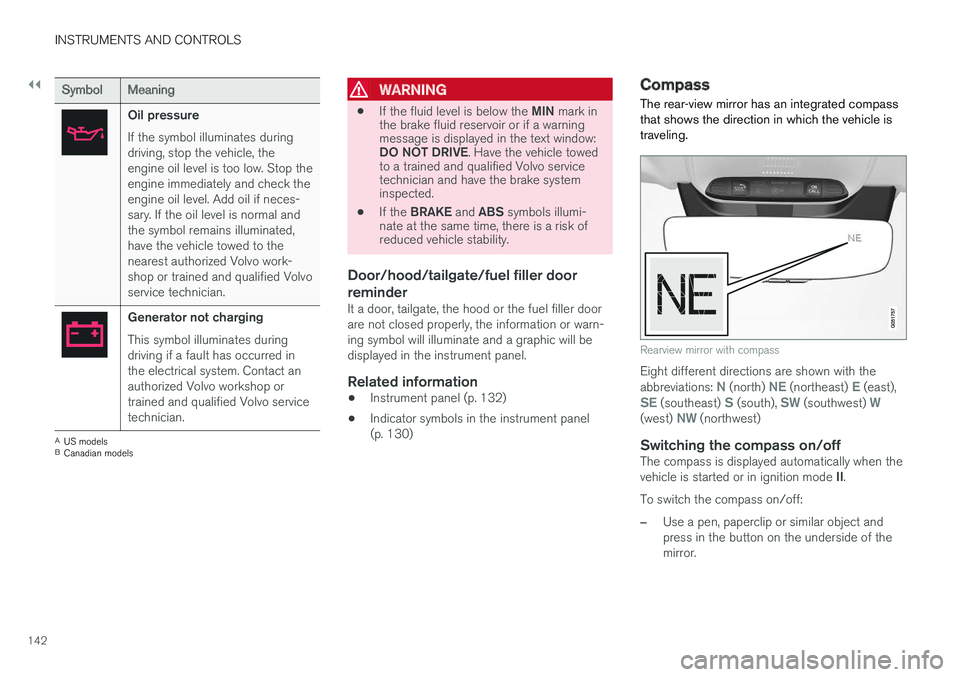
The rear-view mirror has an integrated compassthat shows the direction in which the vehicle istraveling.
Rearview mirror with compass
Eight different directions are shown with theabbreviations: N (north) NE (northeast) E (east),SE (southeast) S (south), SW (southwest) W(west) NW (northwest)
Switching the compass on/off
The compass is displayed automatically when thevehicle is started or in ignition mode II.
To switch the compass on/off:
–Use a pen, paperclip or similar object andpress in the button on the underside of themirror.
Page 145 of 584
INSTRUMENTS AND CONTROLS
}}
* Option/accessory, for more information, see Introduction.143
Related information
•Calibrating the compass (p. 143)
•Ignition modes (p. 400)
Calibrating the compass
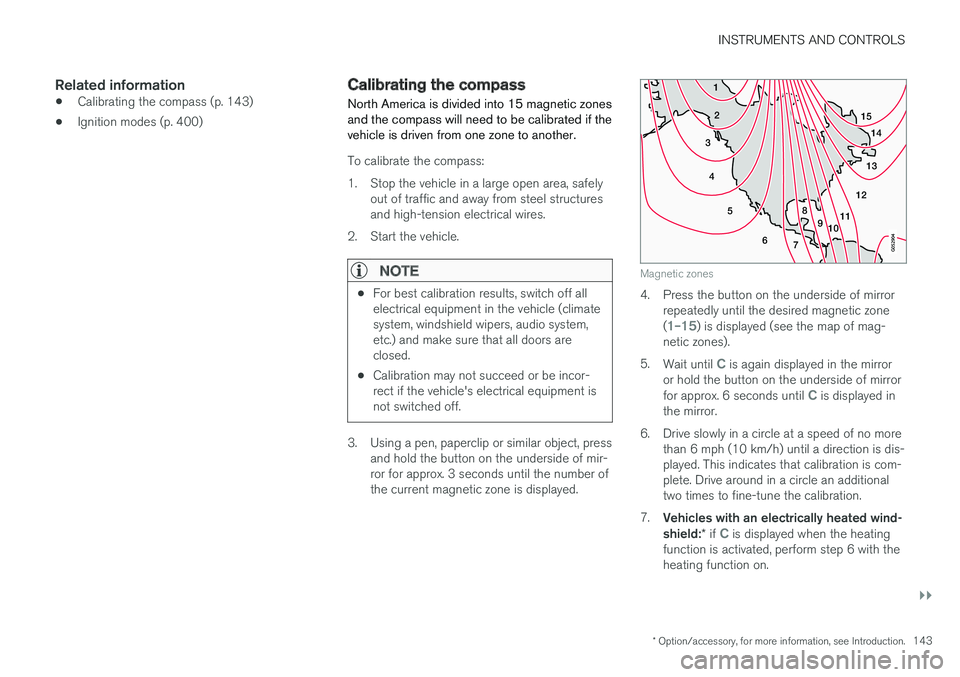
North America is divided into 15 magnetic zonesand the compass will need to be calibrated if thevehicle is driven from one zone to another.
To calibrate the compass:
1.Stop the vehicle in a large open area, safelyout of traffic and away from steel structuresand high-tension electrical wires.
2. Start the vehicle.
NOTE
•For best calibration results, switch off allelectrical equipment in the vehicle (climatesystem, windshield wipers, audio system,etc.) and make sure that all doors areclosed.
•Calibration may not succeed or be incor-rect if the vehicle's electrical equipment isnot switched off.
3. Using a pen, paperclip or similar object, pressand hold the button on the underside of mir-ror for approx. 3 seconds until the number ofthe current magnetic zone is displayed.
15
14
13
12
1198
76
5
4
3
2
1
10
Magnetic zones
4. Press the button on the underside of mirrorrepeatedly until the desired magnetic zone(1–15) is displayed (see the map of mag-netic zones).
5.Wait until C is again displayed in the mirroror hold the button on the underside of mirrorfor approx. 6 seconds until C is displayed inthe mirror.
6.Drive slowly in a circle at a speed of no morethan 6 mph (10 km/h) until a direction is dis-played. This indicates that calibration is com-plete. Drive around in a circle an additionaltwo times to fine-tune the calibration.
7.Vehicles with an electrically heated wind-shield:* if C is displayed when the heatingfunction is activated, perform step 6 with theheating function on.
Page 146 of 584

||
INSTRUMENTS AND CONTROLS
144
8. Repeat the calibration procedure if neces-sary.
Related information
•Defrosting windows and mirrors (p. 206)
•Compass (p. 142)
Lighting panel and controls
The lighting ring on the left-side steering wheellever can be used to activate the vehicle's exte-rior lighting.
Instrument lighting brightness can be adjustedusing the thumb wheel on the lighting panel.
Lighting ring on the left-side steering
wheel lever
Lightingring posi-tion
Result
With the ignition in mode II or ifthe engine is running:
•In the US: the Daytime Run-ning Lights (DRL) will be off
•In Canada: the Daytime Run-ning Lights will be on
•High beam flash can be used
With the ignition in mode II or if
the engine is running:A
•Parking lights will be on
•In the US: the Daytime Run-ning Lights will be off
•In Canada: the Daytime Run-ning Lights will be on
•High beam flash can be used
With the ignition in mode II or ifthe engine is running:
•The Daytime Running Lightswill be off
•The low beam headlights willbe on
•High Beams/High Beamflash can be used
Page 155 of 584
INSTRUMENTS AND CONTROLS
}}
* Option/accessory, for more information, see Introduction.153
Rear interior lighting
Rear reading lights
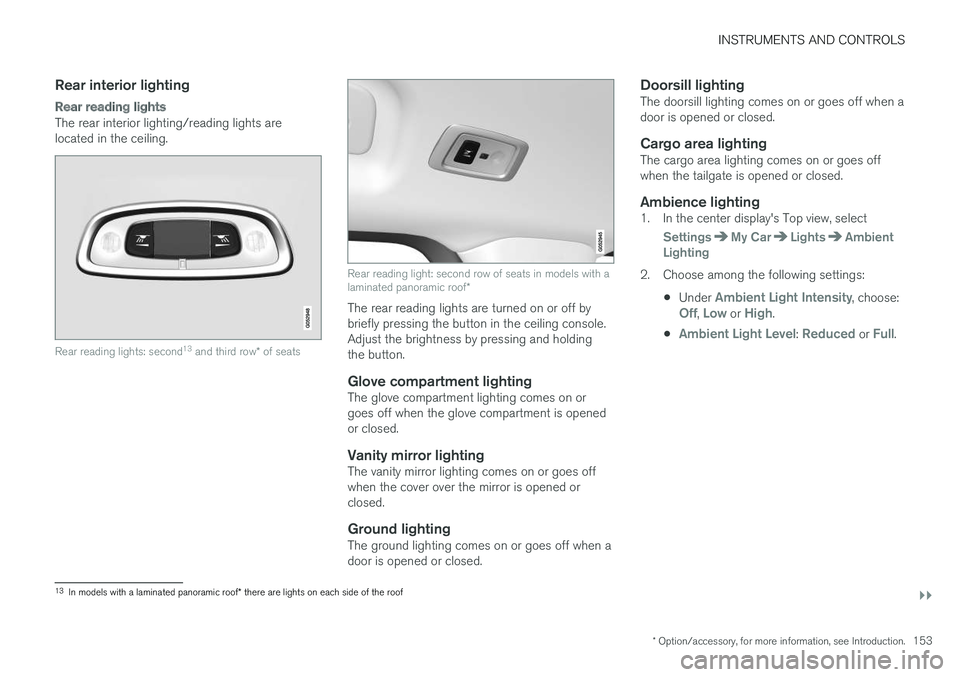
The rear interior lighting/reading lights arelocated in the ceiling.
Rear reading lights: second13 and third row* of seats
Rear reading light: second row of seats in models with alaminated panoramic roof*
The rear reading lights are turned on or off bybriefly pressing the button in the ceiling console.Adjust the brightness by pressing and holdingthe button.
Glove compartment lighting
The glove compartment lighting comes on orgoes off when the glove compartment is openedor closed.
Vanity mirror lighting
The vanity mirror lighting comes on or goes offwhen the cover over the mirror is opened orclosed.
Ground lighting
The ground lighting comes on or goes off when adoor is opened or closed.
Doorsill lighting
The doorsill lighting comes on or goes off when adoor is opened or closed.
Cargo area lighting
The cargo area lighting comes on or goes offwhen the tailgate is opened or closed.
Ambience lighting
1. In the center display's Top view, select
SettingsMy CarLightsAmbientLighting
2. Choose among the following settings:
•Under Ambient Light Intensity, choose:Off, Low or High.
•Ambient Light Level: Reduced or Full.
13In models with a laminated panoramic roof* there are lights on each side of the roof
Page 168 of 584
INSTRUMENTS AND CONTROLS
* Option/accessory, for more information, see Introduction.166
Adjusting the steering wheel
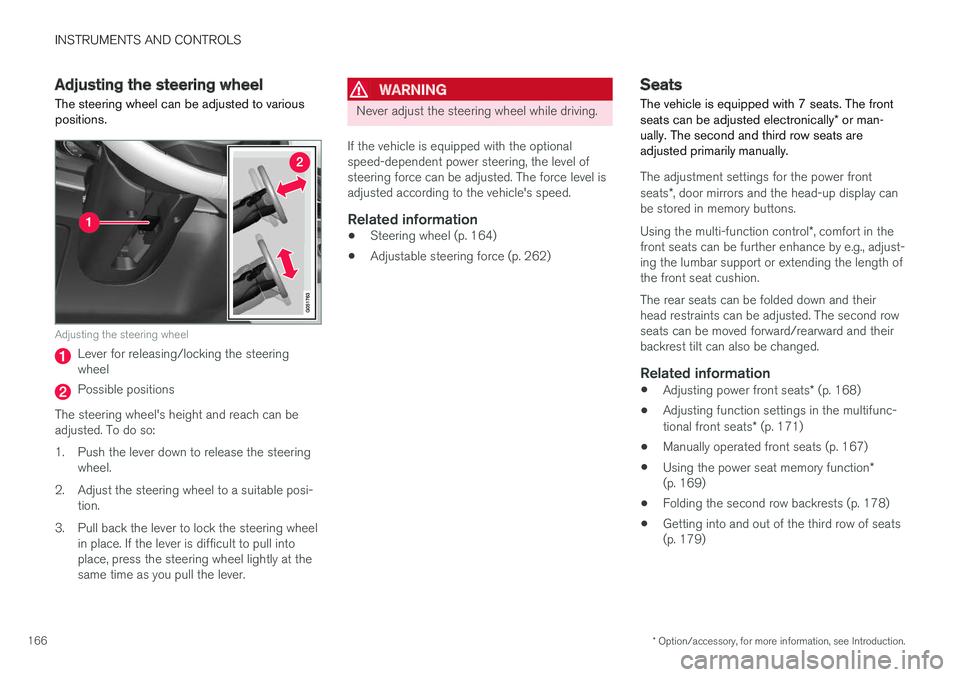
The steering wheel can be adjusted to variouspositions.
Adjusting the steering wheel
Lever for releasing/locking the steeringwheel
Possible positions
The steering wheel's height and reach can beadjusted. To do so:
1.Push the lever down to release the steeringwheel.
2. Adjust the steering wheel to a suitable posi-tion.
3. Pull back the lever to lock the steering wheelin place. If the lever is difficult to pull intoplace, press the steering wheel lightly at thesame time as you pull the lever.
WARNING
Never adjust the steering wheel while driving.
If the vehicle is equipped with the optionalspeed-dependent power steering, the level ofsteering force can be adjusted. The force level isadjusted according to the vehicle's speed.
Related information
•Steering wheel (p. 164)
•Adjustable steering force (p. 262)
Seats
The vehicle is equipped with 7 seats. The frontseats can be adjusted electronically* or man-ually. The second and third row seats areadjusted primarily manually.
The adjustment settings for the power frontseats*, door mirrors and the head-up display canbe stored in memory buttons.
Using the multi-function control*, comfort in thefront seats can be further enhance by e.g., adjust-ing the lumbar support or extending the length ofthe front seat cushion.
The rear seats can be folded down and theirhead restraints can be adjusted. The second rowseats can be moved forward/rearward and theirbackrest tilt can also be changed.
Related information
•Adjusting power front seats* (p. 168)
•Adjusting function settings in the multifunc-tional front seats* (p. 171)
•Manually operated front seats (p. 167)
•Using the power seat memory function*(p. 169)
•Folding the second row backrests (p. 178)
•Getting into and out of the third row of seats(p. 179)
Page 171 of 584
INSTRUMENTS AND CONTROLS
}}
* Option/accessory, for more information, see Introduction.169
Adjusting the passenger's seat from
the driver's seat*
Using the controls on the side of the driver'sseat, the driver can adjust the position of thefront passenger's seat.
Activating the function in the center
display
From the center display, the function can be acti-vated in two ways.
After activating the function, adjust the passeng-er's seat within 10 seconds. If no adjustmentsare made in that time span, the function deacti-vates automatically.
Activating from Function view
1. Go to the center display's Function view.
2.Activate the function by tapping Adjustpassenger seat.
Activating from Settings
–In the center display, select SettingsMy
CarSeatsAdjust Passenger SeatFrom Driver Position.
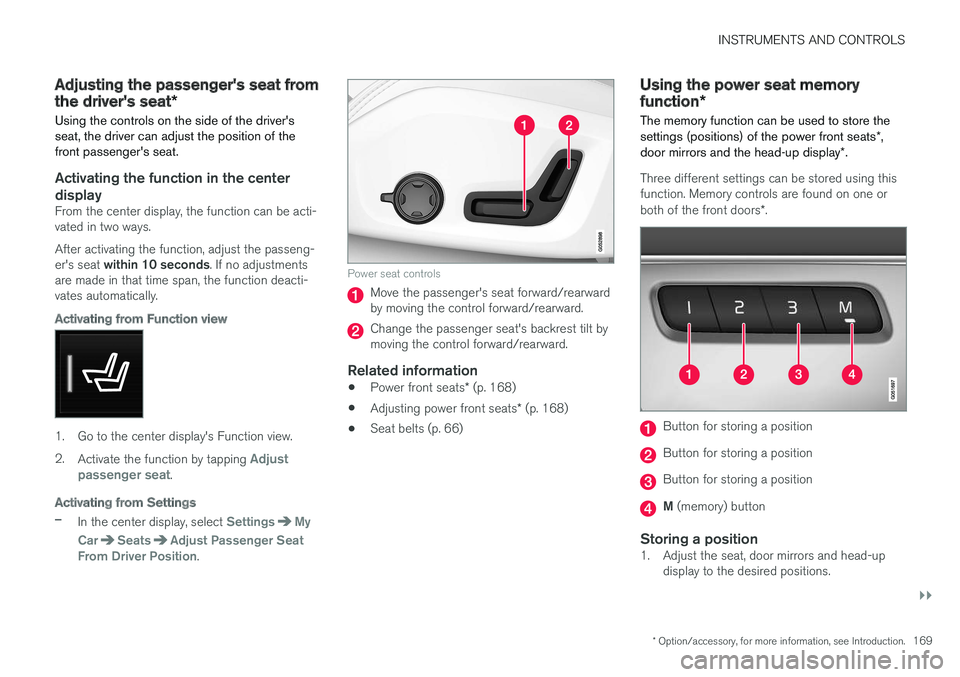
Power seat controls
Move the passenger's seat forward/rearwardby moving the control forward/rearward.
Change the passenger seat's backrest tilt bymoving the control forward/rearward.
Related information
•Power front seats* (p. 168)
•Adjusting power front seats* (p. 168)
•Seat belts (p. 66)
Using the power seat memory
function*
The memory function can be used to store thesettings (positions) of the power front seats*,door mirrors and the head-up display*.
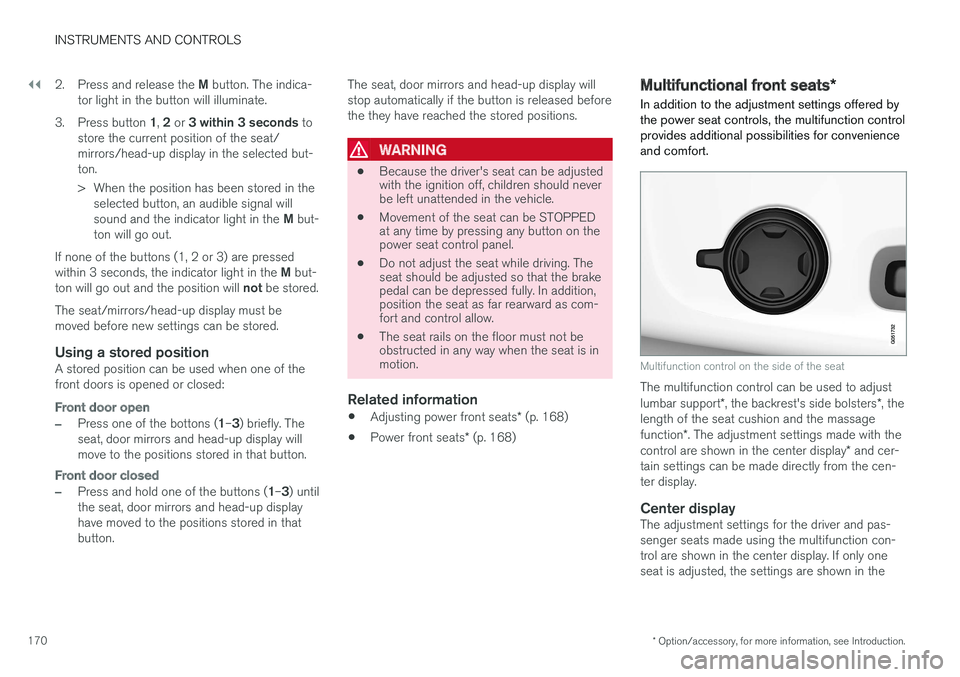
Three different settings can be stored using thisfunction. Memory controls are found on one orboth of the front doors*.
Button for storing a position
Button for storing a position
Button for storing a position
M (memory) button
Storing a position
1. Adjust the seat, door mirrors and head-updisplay to the desired positions.
Page 172 of 584
||
INSTRUMENTS AND CONTROLS
* Option/accessory, for more information, see Introduction.170
2.Press and release the M button. The indica-tor light in the button will illuminate.
3.Press button 1, 2 or 3 within 3 seconds tostore the current position of the seat/mirrors/head-up display in the selected but-ton.
> When the position has been stored in theselected button, an audible signal willsound and the indicator light in the M but-ton will go out.
If none of the buttons (1, 2 or 3) are pressedwithin 3 seconds, the indicator light in the M but-ton will go out and the position will not be stored.
The seat/mirrors/head-up display must bemoved before new settings can be stored.
Using a stored position
A stored position can be used when one of thefront doors is opened or closed:
Front door open
–Press one of the bottons (1–3) briefly. Theseat, door mirrors and head-up display willmove to the positions stored in that button.
Front door closed
–Press and hold one of the buttons (1–3) untilthe seat, door mirrors and head-up displayhave moved to the positions stored in thatbutton.
The seat, door mirrors and head-up display willstop automatically if the button is released beforethe they have reached the stored positions.
WARNING
•Because the driver's seat can be adjustedwith the ignition off, children should neverbe left unattended in the vehicle.
•Movement of the seat can be STOPPEDat any time by pressing any button on thepower seat control panel.
•Do not adjust the seat while driving. Theseat should be adjusted so that the brakepedal can be depressed fully. In addition,position the seat as far rearward as com-fort and control allow.
•The seat rails on the floor must not beobstructed in any way when the seat is inmotion.
Related information
•Adjusting power front seats* (p. 168)
•Power front seats* (p. 168)
Multifunctional front seats*
In addition to the adjustment settings offered bythe power seat controls, the multifunction controlprovides additional possibilities for convenienceand comfort.
Multifunction control on the side of the seat
The multifunction control can be used to adjustlumbar support*, the backrest's side bolsters*, thelength of the seat cushion and the massagefunction*. The adjustment settings made with thecontrol are shown in the center display* and cer-tain settings can be made directly from the cen-ter display.
Center display
The adjustment settings for the driver and pas-senger seats made using the multifunction con-trol are shown in the center display. If only oneseat is adjusted, the settings are shown in the
Page 201 of 584
CLIMATE
}}
* Option/accessory, for more information, see Introduction.199
Climate system controls
Climate system functions are controlled usingbuttons on the center console, the center dis-play and the climate system panel on the rearside of the tunnel console.
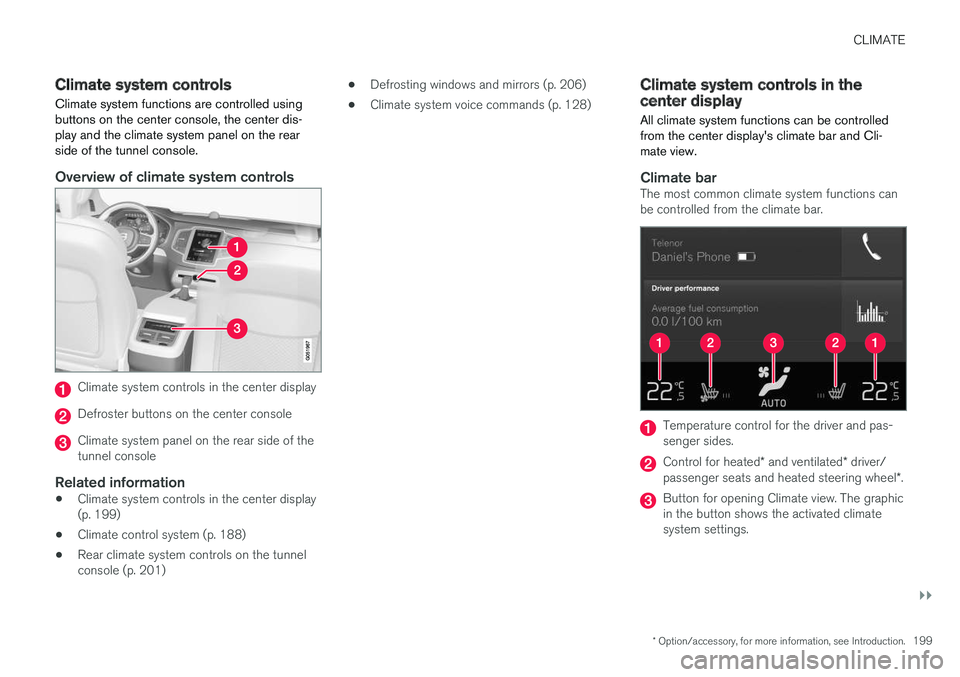
Overview of climate system controls
Climate system controls in the center display
Defroster buttons on the center console
Climate system panel on the rear side of thetunnel console
Related information
•Climate system controls in the center display(p. 199)
•Climate control system (p. 188)
•Rear climate system controls on the tunnelconsole (p. 201)
•Defrosting windows and mirrors (p. 206)
•Climate system voice commands (p. 128)
Climate system controls in thecenter display
All climate system functions can be controlledfrom the center display's climate bar and Cli-mate view.
Climate bar
The most common climate system functions canbe controlled from the climate bar.
Temperature control for the driver and pas-senger sides.
Control for heated* and ventilated* driver/passenger seats and heated steering wheel*.
Button for opening Climate view. The graphicin the button shows the activated climatesystem settings.
Page 202 of 584
||
CLIMATE
200
Climate view
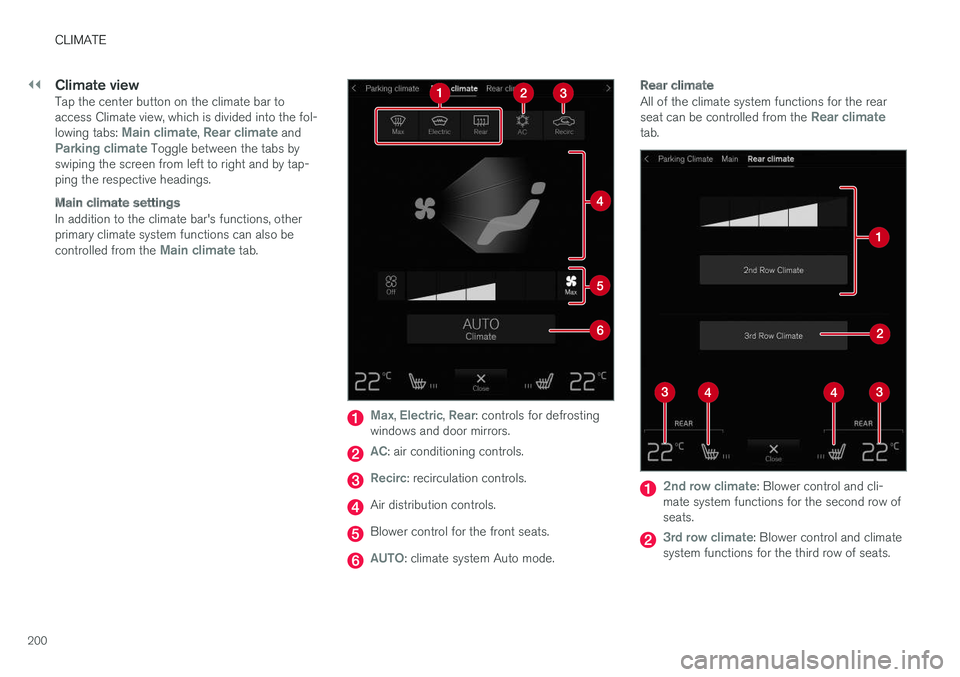
Tap the center button on the climate bar toaccess Climate view, which is divided into the fol-lowing tabs: Main climate, Rear climate andParking climate Toggle between the tabs byswiping the screen from left to right and by tap-ping the respective headings.
Main climate settings
In addition to the climate bar's functions, otherprimary climate system functions can also becontrolled from the Main climate tab.
Max, Electric, Rear: controls for defrostingwindows and door mirrors.
AC: air conditioning controls.
Recirc: recirculation controls.
Air distribution controls.
Blower control for the front seats.
AUTO: climate system Auto mode.
Rear climate
All of the climate system functions for the rearseat can be controlled from the Rear climatetab.
2nd row climate: Blower control and cli-mate system functions for the second row ofseats.
3rd row climate: Blower control and climatesystem functions for the third row of seats.
Page 203 of 584
CLIMATE
}}
* Option/accessory, for more information, see Introduction.201
Rear seat temperature control.
Rear seat heating control*.
Parking climate 1
All of the parking climate functions can be con-trolled from the Parking climate tab.
Related information
•Climate system controls (p. 199)
•Defrosting windows and mirrors (p. 206)
•Air conditioning (p. 209)
•Adjusting air distribution (p. 213)
•Setting the temperature (p. 203)
•Setting the blower speed (p. 201)
•Automatic climate control (p. 198)
•Turning steering wheel heating* on and off(p. 208)
•Turning seat heating* on and off (p. 210)
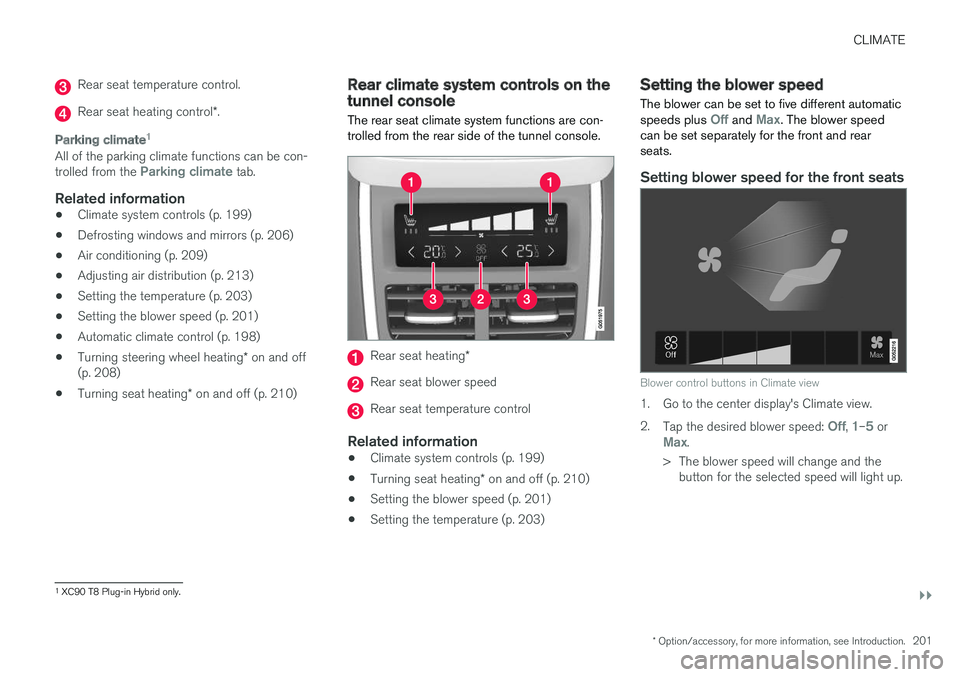
Rear climate system controls on thetunnel console
The rear seat climate system functions are con-trolled from the rear side of the tunnel console.
Rear seat heating*
Rear seat blower speed
Rear seat temperature control
Related information
•Climate system controls (p. 199)
•Turning seat heating* on and off (p. 210)
•Setting the blower speed (p. 201)
•Setting the temperature (p. 203)
Setting the blower speed
The blower can be set to five different automaticspeeds plus Off and Max. The blower speedcan be set separately for the front and rearseats.
Setting blower speed for the front seats
Blower control buttons in Climate view
1. Go to the center display's Climate view.
2.Tap the desired blower speed: Off, 1–5 orMax.
>The blower speed will change and thebutton for the selected speed will light up.
1
XC90 T8 Plug-in Hybrid only.