climate settings VOLVO XC90 TWIN ENGINE HYBRID 2017 Owner's Manual
[x] Cancel search | Manufacturer: VOLVO, Model Year: 2017, Model line: XC90 TWIN ENGINE HYBRID, Model: VOLVO XC90 TWIN ENGINE HYBRID 2017Pages: 584, PDF Size: 14.2 MB
Page 213 of 584

CLIMATE
}}
* Option/accessory, for more information, see Introduction.211
Automatically activating/deactivating
the seat heating function when the
engine is started
The seat heating* can be set to start automati-cally when the engine is started.
The automatic function starts heating the seatswhen the ambient temperature is sufficiently cold.
1.Tap Settings in the center display's Topview.
2.Tap Climate.
3.Under Auto Driver Seat Heating Level andAuto Passenger Seat Heating Level,select Off, Low, Middle or High to activate/deactivate the automatic function and selecta level for the driver's and passenger's seats.
Related information
•Climate system controls (p. 199)
•Climate system controls in the center display(p. 199)
•Rear climate system controls on the tunnelconsole (p. 201)
Turning front seat ventilation* onand off
Seat ventilation can be used e.g., to help removedampness from the seat occupant's clothing.
The ventilation system consists of fans in theseats and backrests that draw air through theseat upholstery. The cooling effect increases asthe air in the passenger compartment becomescooler. This feature can be activated when theengine is running and it monitors the seat's tem-perature, sunlight in the passenger compartmentand the ambient temperature.
Activating/deactivating front seat
ventilation
Steering wheel and seat buttons in the climate bar
1. Tap the left or right side steering wheel andseat button in the center display's climatebar to open the steering wheel and seat con-trols.
If the vehicle is not equipped with theoptional heated steering wheel/seats, thebutton for seat ventilation will be directlyaccessible in the climate bar.
2.Tap the seat ventilation button repeatedly toselect one of four levels: Off, High, Middleor Low.
>The level changes and is displayed in thebutton.
Page 421 of 584
STARTING AND DRIVING
419
Using the electric motor in citydriving
A number of factors affect the electric motor'sdriving range.
The driver can affect some of these factors whileothers depend on outside conditions such astemperature, road surface, etc.
Factors that determine the electric
motor's driving range
Factors outside of the driver's control
The following are examples of factors that thedriver cannot control:
•The current traffic situation
•Driving short distances
•Topography
•Ambient temperature and headwinds
•Road conditions/road surface
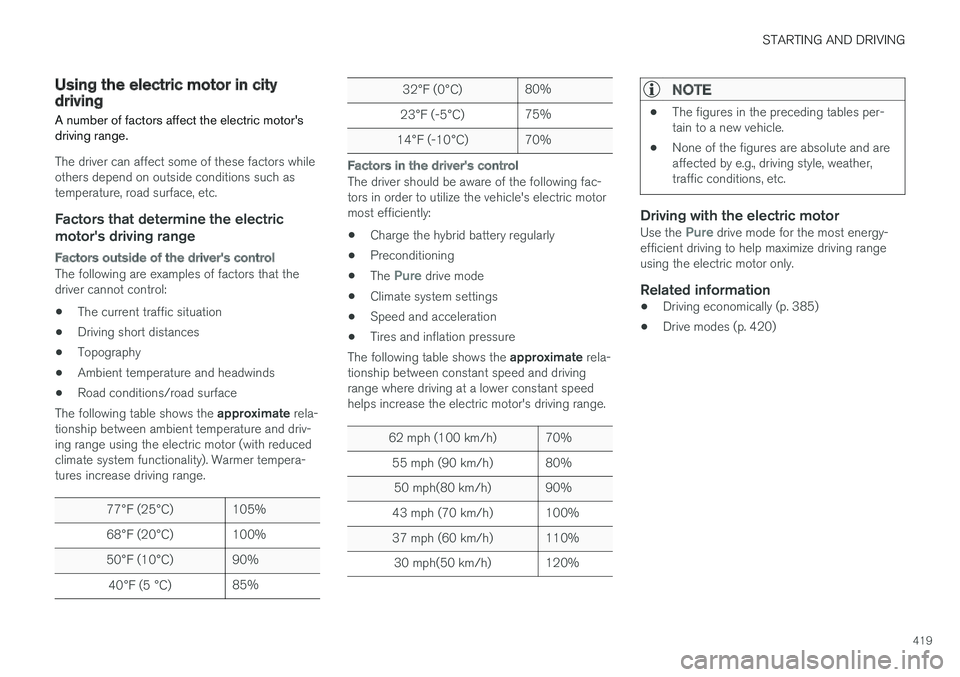
The following table shows the approximate rela-tionship between ambient temperature and driv-ing range using the electric motor (with reducedclimate system functionality). Warmer tempera-tures increase driving range.
77°F (25°C)105%
68°F (20°C)100%
50°F (10°C)90%
40°F (5 °C)85%
32°F (0°C)80%
23°F (-5°C)75%
14°F (-10°C)70%
Factors in the driver's control
The driver should be aware of the following fac-tors in order to utilize the vehicle's electric motormost efficiently:
•Charge the hybrid battery regularly
•Preconditioning
•The Pure drive mode
•Climate system settings
•Speed and acceleration
•Tires and inflation pressure
The following table shows the approximate rela-tionship between constant speed and drivingrange where driving at a lower constant speedhelps increase the electric motor's driving range.
62 mph (100 km/h)70%
55 mph (90 km/h)80%
50 mph(80 km/h)90%
43 mph (70 km/h)100%
37 mph (60 km/h)110%
30 mph(50 km/h)120%
NOTE
•The figures in the preceding tables per-tain to a new vehicle.
•None of the figures are absolute and areaffected by e.g., driving style, weather,traffic conditions, etc.
Driving with the electric motor
Use the Pure drive mode for the most energy-efficient driving to help maximize driving rangeusing the electric motor only.
Related information
•Driving economically (p. 385)
•Drive modes (p. 420)
Page 422 of 584
STARTING AND DRIVING
* Option/accessory, for more information, see Introduction.420
Maintaining/increasing the hybridbattery's charge while driving
In certain situations, it can be useful to controlthe hybrid battery's charge level while the vehicleis being driven. The hybrid battery functionsHold and Charge while driving are available inall drive modes.
The "Hold" and "Charge" function
buttons
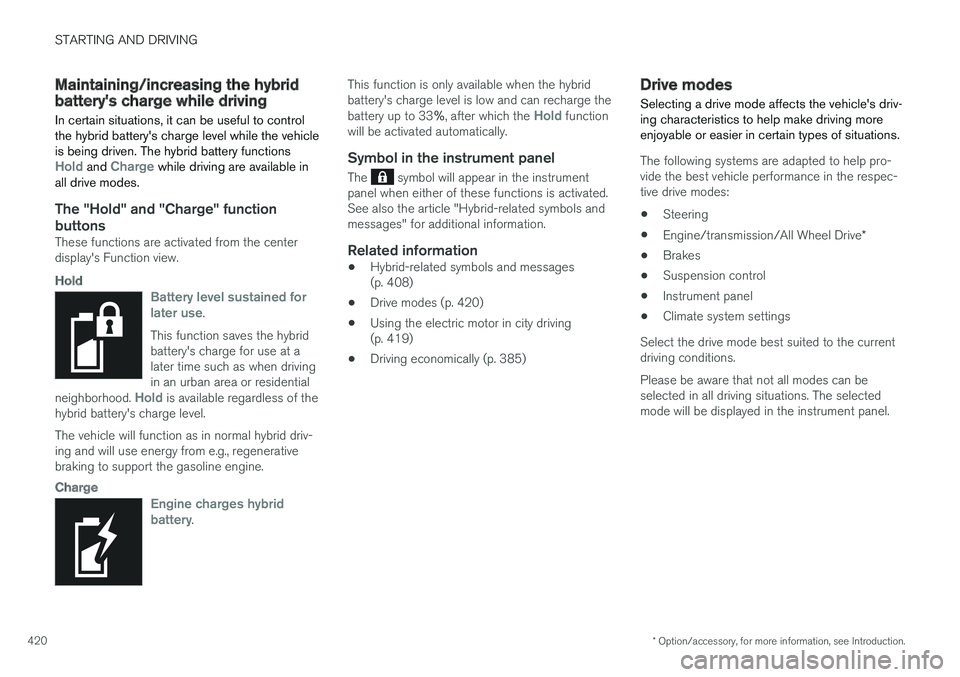
These functions are activated from the centerdisplay's Function view.
Hold
Battery level sustained forlater use.
This function saves the hybridbattery's charge for use at alater time such as when drivingin an urban area or residentialneighborhood. Hold is available regardless of thehybrid battery's charge level.
The vehicle will function as in normal hybrid driv-ing and will use energy from e.g., regenerativebraking to support the gasoline engine.
Charge
Engine charges hybridbattery.
This function is only available when the hybridbattery's charge level is low and can recharge thebattery up to 33%, after which the Hold functionwill be activated automatically.
Symbol in the instrument panel
The symbol will appear in the instrumentpanel when either of these functions is activated.See also the article "Hybrid-related symbols andmessages" for additional information.
Related information
•Hybrid-related symbols and messages(p. 408)
•Drive modes (p. 420)
•Using the electric motor in city driving(p. 419)
•Driving economically (p. 385)
Drive modes
Selecting a drive mode affects the vehicle's driv-ing characteristics to help make driving moreenjoyable or easier in certain types of situations.
The following systems are adapted to help pro-vide the best vehicle performance in the respec-tive drive modes:
•Steering
•Engine/transmission/All Wheel Drive*
•Brakes
•Suspension control
•Instrument panel
•Climate system settings
Select the drive mode best suited to the currentdriving conditions.
Please be aware that not all modes can beselected in all driving situations. The selectedmode will be displayed in the instrument panel.
Page 425 of 584

STARTING AND DRIVING
423
INDIVIDUAL
This setting allows you to adapt a driving mode toyour personal preferences.
Select one of the other driving modes as a basisand change the settings to provide the drivingcharacteristics that you prefer. This driving modeis only available if it has been activated in thecenter display.
INDIVIDUAL is only available if it has been acti-vated in the center display.
Settings view5 for INDIVIDUAL driving mode
1.Tap Settings in the center display's Topview.
2.Tap My CarIndividual Drive Mode andtap Individual Drive Mode.
3.Select: Eco, Comfort or Dynamic.
The following settings can be modified:
•Driver Display (instrument panel)
•Steering force
•Powertrain Characteristics
•Brake Characteristics
•Pneumatic suspension and shockabsorbers
•ECO Climate.
Related information
•Adjustable steering force (p. 262)
•Loading (p. 218)
•General information about the XC90 T8 TwinEngine Plug-in Hybrid (p. 16)
•All Wheel Drive (AWD) (p. 429)
•Hill Descent Control (HDC) (p. 380)
•Brakes (p. 376)
5Generic illustration.
Page 513 of 584

MAINTENANCE AND SERVICING
511
Automatically connecting to a
workshop
Without driver confirmation
This is the most convenient way to transmit trou-ble-shooting data. The driver does not need toconfirm that the vehicle will establish a connec-tion.
If the vehicle stops at a workshop and the engineis switched off using the start knob, a messagewill appear above the status bar in the center dis-play. The vehicle will be automatically connectedwhen the driver's door is opened if the driverdoes not tap the Cancel button in the message.
To help prevent the driver from being disturbedby unwanted requests to connect (e.g., if thevehicle is often parked near a workshop with anauthorized Volvo network), the vehicle will switchto manual connection if the driver cancels a con-nection request twice within 5 days.
With driver confirmation
With this alternative, the driver must confirm aconnection.
If the vehicle stops at a workshop and the engineis switched off using the start knob, a pop-upwindow will open in the center display. The vehi-cle will be automatically connected when the driv-er's door is opened if the driver taps Connect inthe pop-up window. If the driver does nothing ortaps the pop-up window's Abort button, noattempt will be made to establish a connection.
NOTE
To help prevent the driver from being distur-bed by unwanted requests to connect (e.g., ifthe vehicle is often parked near a workshopwith an authorized Volvo network), the vehiclewill switch to manual connection if the drivercancels a connection request twice within5 days.
Manually connecting to a workshop
Manual connections are handled by the servicetechnician.
Changing the way a connection is made
The type of connection (manual or automatic)can be changed in the center display's Settingsmenu.
1. Pull down the center display's Top view andtap Settings.
2.Tap CommunicationVolvo ServiceNetworks.
3.Select Automatically connect when Iarrive, Ask before connecting or Neverconnect and never ask (manual connec-tions).
Related information
•Internet connected vehicle (p. 466)
•Settings view (p. 115)
Climate system service
Service and repairs on the air conditioning sys-tem should only be done by a trained and quali-fied Volvo service technician.
Troubleshooting and repairs
The air conditioning system contains a floures-cent tracer substance. Ultraviolet light is used tosearch for leaks in the system.
Refrigerant R134a
WARNING
The air conditioning system contains therefrigerant R134a under pressure. Serviceand repairs on the system should only bedone by a trained and qualified Volvo servicetechnician.
Related information
•Climate control system (p. 188)
Page 574 of 584

INDEX
572
Brakes
auto-hold 379
Brake system
Brake pad inspection 377
fluid 566
general information 376, 378, 380
Bulbs 534
replacing 530
specifications 536
C
Camera
driver support systems322
limitations323
Camera, Park Assist 362, 364, 366, 367
Capacity weight484, 563
Cargo area, steel grid225
Cargo area cover227
Cargo compartment
fuses527
raising/lowering the level218
Cargo net223
Cargo space218
Car wash547
Catalytic converter394
CD, USB, iPod, AUX, Bluetooth, Recents,
Library, Shuffle, Similar, Change device, Pri-
mary Audio Default Language, Subtitle, Pri-
mary Subtitle Default Language, Video,
DivX® VOD459
CD player 459
Cell phone
hands-free 448
Pairing 449
Cell phone voice control 126
Center display
changing settings 35
cleaning 552
keyboard 36
navigating in 43
overview 33
screen in the center console 50
symbols in the status bar 48
Chains 485
Changing a wheel 487
Charging cable
hybrid battery 405
Child restraints
recalls and registration 83
Child restraint systems 83
booster cushions 89
convertible seats 86
infant seats 84
ISOFIX/LATCH anchors90
top tether anchors92
Child safety81
booster cushions89
child restraint systems83, 91
convertible seats86
infant seats84
Child safety locks257
Child seats
lower attachment points91
City safety326, 334
City Safety
crossing traffic331
detecting objects329
limitations334
rear collision warning338
symbols and messages337
troubleshooting332
City Safety, On/Off328
City Safety™
Multi Target332
Cleaning
exterior547
interior550
Clean Zone Interior Package197
Climate system199
air distribution212, 213, 215
air filter198
Page 579 of 584
INDEX
577
Owner's information
mobile applications 25
Owner's manual 21
Ownership, changing 120
Oxygen sensors, heated 394
P
Paint, touching up553, 554
Park assist358, 359, 360, 361
Park Assist Camera 362, 364, 366, 367
settings362, 366
Park Assist Pilot 368, 369, 372, 374
Parking brake
electric, applying/releasing 382, 384
Parking light bulb, replacing534
Passenger compartment
fuses523
Passive Entry system
location of antennas247
Permissible axle weight563
Phone
receiving calls452
text messages453, 454
Pilot Assist 289, 295, 298, 300, 301,
303, 304, 305, 308, 311, 312, 314, 315
Plug-in hybrid
general information16
Polishing554
Power front seat
memory function169
Power mirrors108
defroster206
Power steering
adjustable262
Power tailgate251
Power windows113
Preconditioning189, 191
starting/stopping194
symbols and messages195
timer192
Preconditioning,
retaining climate comfort191
Pregnancy, using seat belts during 64
PROPOSITION 65 WARNING395
R
Radar
driver support systems318, 322
Radar sensor
limitations 319
Radio
RBDS434
settings434
SiriusXM® Satellite radio 439, 440, 442
Radio functions
HD digital radio 436, 437, 438, 439
Rain sensor 162
Rear Collision Warning 338
Rear fog lights 150
Rear park assist 358, 359, 360, 361
Rear seat head restraints 175
Rear seats 175
accessing the third row 179
adjusting backrest tilt 177
center head restraint 175
folding 178, 179, 180
moving forward/rearward 176
Rearview mirror
compass 142, 143
Rear window defroster 206
Recalls 64
Recalls, child restraints 83
Recirculation (climate system) 205
Refrigerant (A/C system) 565
Refueling 391, 392
fuel filler door 393