warning light VOLVO XC90 TWIN ENGINE HYBRID 2017 Repair Manual
[x] Cancel search | Manufacturer: VOLVO, Model Year: 2017, Model line: XC90 TWIN ENGINE HYBRID, Model: VOLVO XC90 TWIN ENGINE HYBRID 2017Pages: 584, PDF Size: 14.2 MB
Page 343 of 584

DRIVER SUPPORT
}}
* Option/accessory, for more information, see Introduction.341
Blind Spot Information (BLIS)*limitations
Blind Spot Information functionality may bereduced in certain situations.
•Dirt, ice and snow on the sensors mayreduce functionality and prevent the systemfrom providing warnings.
•Do not attach any objects, tape, decals, etc.,on the surface of the sensors.
•BLIS is deactivated if a trailer is attached tothe vehicle's electrical system.
Maintenance
The BLIS/CTA6 sensors are located on theinside of the rear fenders/bumper.
Keep the highlighted area clean (on both sides of thevehicle)
For the system to function optimally, the areaover and around the sensors must be kept clean.
CAUTION
Repairs to the BLIS/CTA systems and/orrepainting the rear bumper should only bedone by a trained and qualified Volvo servicetechnician.
Related information
•Blind Spot Information (BLIS)* On/Off(p. 340)
•Blind Spot Information (BLIS)* (p. 339)
•Cross Traffic Alert (CTA)* (p. 341)
Cross Traffic Alert (CTA)*
Cross Traffic Alert (CTA) is a supplementary partof Blind Spot Information and is intended todetect vehicles crossing behind your vehiclewhile you are backing up.
When does Cross Traffic Alert function
Principle for CTA
CTA supplements BLIS by warning the driver ofcrossing traffic behind your vehicle, for example,when backing out of a parking space.
It is primarily designed to detect another vehiclebut in certain cases may also detect pedestriansor smaller objects such as bicycles.
CTA is only activated when the vehicle is rollingrearward or backing up and is activated automati-cally when the gear selector is put in reverse.
6Cross Traffic Alert*
Page 344 of 584
||
DRIVER SUPPORT
* Option/accessory, for more information, see Introduction.342
•An audible signal indicates that CTA hasdetected something that is approaching fromthe side. The signal will come from either theleft or right infotainment system speakers,depending on which the side of your vehiclethe approaching vehicle/ object has beendetected.
•A warning is indicated using the Park Assist*system's graphic in the instrument panel.
•An icon is also shown in the Park AssistCamera's* Top view.
Related information
•Activating/deactivating Cross Traffic Alert(CTA)* (p. 342)
•Blind Spot Information (BLIS)* with CrossTraffic Alert (CTA)* symbols and messages(p. 345)
•Cross Traffic Alert (CTA)* limitations (p. 343)
Activating/deactivating Cross Traffic
Alert (CTA)*
Cross Traffic Alert (CTA) can be activated/deac-tivated separately from Blind Spot Information(BLIS).
CTA is activated/deactivated inthe center display's Functionview.
–Tap Cross Traffic Alert in Function view.
>CTA activates/deactivates.
•Green indicator light: CTA is activated
•Grey indicator light: CTA is deactivated
CTA is activated when the engine is started.
WARNING
•BLIS and CTA are information systems,NOT warning or safety systems and donot function in all situations.
•BLIS and CTA do not eliminate the needfor you to visually confirm the conditionsaround you, and the need for you to turnyour head and shoulders to make surethat you can safely change lanes or backup.
•As the driver, you have full responsibilityfor changing lanes/backing up in a safemanner.
Related information
•Cross Traffic Alert (CTA)* (p. 341)
•Blind Spot Information (BLIS)* On/Off(p. 340)
Page 349 of 584
DRIVER SUPPORT
* Option/accessory, for more information, see Introduction.347
Activating/deactivating RSI
RSI can be activated/deacti-vated in the center display'sfunction view.
–Tap the Road Sign Information button inFunction view.
>When RSI is activated, the indicator lightin the button will be green. The indicatorlight will be gray when the function isdeactivated.
Activating/deactivating the speed warning
function
The driver can be alerted if the current speedlimit is being exceeded (the symbol for the cur-rent speed limit will begin to flash). This functioncan be activated or deactivated and the limit for awarning can be set.
1.Tap Settings in the center display's Topview.
2.Tap My CarIntelliSafeRoad SignInformation.
3.Tap Speed Limit Warning to activate/deac-tivate this function.
>If the function is activated, a speed selec-tor will be displayed.
4. Select the limit at which the speed warning isto be given by pressing the up/down arrows.
Please be aware that the set warning limitwill not be used when a speed camera sym-bol is displayed in the instrument panel.
Activating/deactivating the audible alert
The audible alert can be activated/deactivatedand the limit for a warning can be set.
1.Tap Settings in the center display's Topview.
2.Tap My CarIntelliSafeRoad SignInformation.
3.Tap Audio Warning to activate/deactivatethis function.
Speed camera alert
Speed camera warning in the instrument panel (genericillustration)
If the Sensus navigation systemin your vehicle is being used,the driver can be alerted if thevehicle is exceeding a detectedspeed limit and is approachinga speed camera.
Related information
•Road Sign Information (RSI)* (p. 346)
•Road Sign Information (RSI)* limitations(p. 348)
Page 354 of 584

||
DRIVER SUPPORT
352
Limitations
In certain demanding driving situations, the driv-ing lane assistance functions may not be able toassist the driver. In these situations, it may beadvisable to turn the function off.
Examples of such situations:
•road construction
•winter driving conditions
•poor road surfaces
•a very active driving style
•bad weather with reduced visibility
•edges or lines other than the lane's markerlines
•roads with indistinct or no lane marker lines
The driving lane assistance function use the vehi-cle's camera, which has general limitations. Seethe article "Camera limitations."
Related information
•Activating/deactivating Lane Keeping Aid(LKA) (p. 352)
•Camera limitations (p. 323)
•Run-off Mitigation (p. 355)
Activating/deactivating LaneKeeping Aid (LKA)
LKA can be activated/deactivated.
Activating/deactivating
The function can be activated/deactivated in thecenter display's Function view.
–Tap Lane Keeping Aid.
>LKA is activated (GREEN indicator light inthe button), or is deactivated (GRAY indi-cator light in the button).
Type of warning
Choose the type of warning that the driver willreceive if the vehicle starts to leave its drivinglane.
1.Tap Settings in the center display's Topview.
2.Tap My CarIntelliSafeLaneAssistance.
3.Under Lane Keeping Aid WarningFeedback, select:
•Sound: an audible warning signal will beprovided
•Vibrations: the driver will be warned byvibrations in the steering wheel
Type of assistance
Select the type of assistance LKA should provide:
1.Tap Settings in the center display's Topview.
2.Tap My CarIntelliSafeLaneAssistance.
3.Under Lane Keeping Aid AssistanceMode, select:
•Steering: the system will provide steeringassistance but no warning.
•Both: the system will provide steeringassistance and warning
•Warning: the system will provide warningbut no steering assistance
Related information
•Driving lane assistance (p. 350)
•Driving lane assistance symbols and mes-sages (p. 353)
Page 360 of 584

DRIVER SUPPORT
* Option/accessory, for more information, see Introduction.358
Park Assist*
The Park Assist system is designed to assist youwhen driving into parking spaces, garages, etc.An audible signal and symbols in the instrumentpanel and center display indicate the distance tothe object.
Display view showing object zones and sensor sectors
The center display shows an overview of the vehi-cle in relation to objects that have been detected.
The highlighted sector shows which of the sen-sors has detected the object. The closer thehighlighted sector is to the vehicle symbol, thecloser the actual object is to your vehicle.
The Park Assist system uses an intermittent tonethat pulses faster as you come closer to anobject. Sound from the infotainment system willbe temporarily turned down.
The audible signals for objects in front of and tothe sides are active while the vehicle is movingand will stop after the vehicle has been stoppedfor approx. 2 seconds. The audible signals forobjects behind the vehicle are active even whenthe vehicle has stopped moving.
The audible signal becomes constant when youare within approximately 1 ft (30 cm) of an objectand the highlighted sensor field is filled in.
While an audible signal is being given, its volumelevel can be raised/lowered using the >II controlin the center console or can be adjusted in thecenter displays Top view under Settings.
NOTE
Audible alerts will only be provided for objectsthat are directly in the vehicle's path.
WARNING
Park Assist is an information system, NOT asafety system. This system is designed to bea supplementary aid when parking the vehicle.It is not, however, intended to replace the driv-er's attention and judgement.
Rear park assist
The system's rear sensors are activated automat-ically when the engine is started and are active ifthe vehicle rolls rearward with the gear selectorin N or if R has been selected.
The distance monitored behind the vehicle isapproximately 5 ft (1.5 m). The audible signalcomes from the rear speakers.
The rear sensors will be deactivated automaticallywhen towing a trailer if Volvo genuine trailer wir-ing is used. If a non-Volvo trailer hitch is beingused, it may be necessary to switch off the sys-tem manually.
Page 361 of 584
DRIVER SUPPORT
* Option/accessory, for more information, see Introduction.359
Side park assist
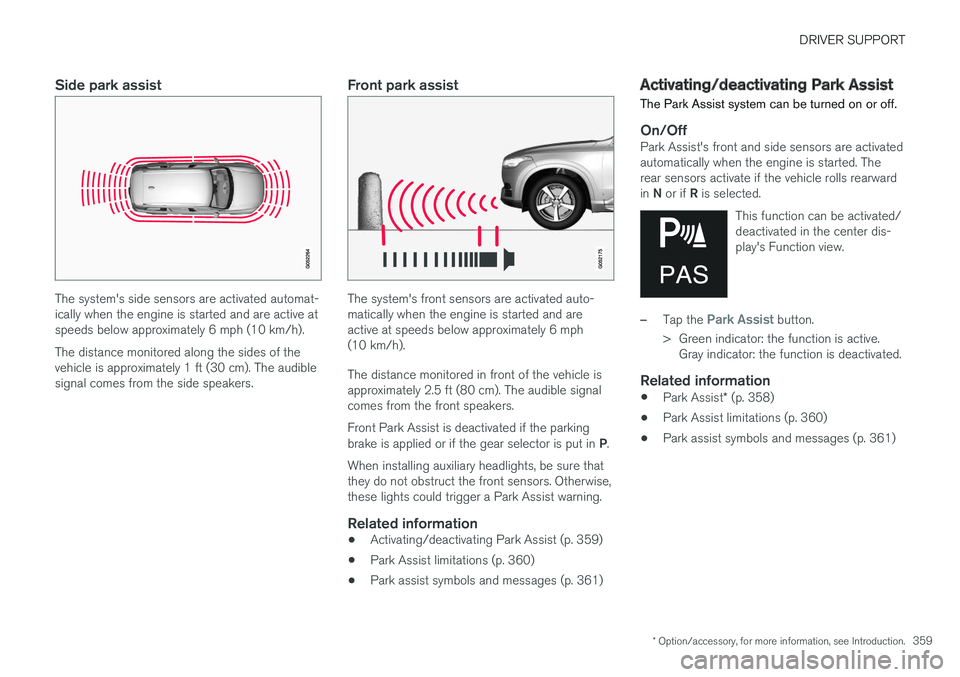
The system's side sensors are activated automat-ically when the engine is started and are active atspeeds below approximately 6 mph (10 km/h).
The distance monitored along the sides of thevehicle is approximately 1 ft (30 cm). The audiblesignal comes from the side speakers.
Front park assist
The system's front sensors are activated auto-matically when the engine is started and areactive at speeds below approximately 6 mph(10 km/h).
The distance monitored in front of the vehicle isapproximately 2.5 ft (80 cm). The audible signalcomes from the front speakers.
Front Park Assist is deactivated if the parkingbrake is applied or if the gear selector is put in P.
When installing auxiliary headlights, be sure thatthey do not obstruct the front sensors. Otherwise,these lights could trigger a Park Assist warning.
Related information
•Activating/deactivating Park Assist (p. 359)
•Park Assist limitations (p. 360)
•Park assist symbols and messages (p. 361)
Activating/deactivating Park Assist
The Park Assist system can be turned on or off.
On/Off
Park Assist's front and side sensors are activatedautomatically when the engine is started. Therear sensors activate if the vehicle rolls rearwardin N or if R is selected.
This function can be activated/deactivated in the center dis-play's Function view.
–Tap the Park Assist button.
>Green indicator: the function is active.Gray indicator: the function is deactivated.
Related information
•Park Assist* (p. 358)
•Park Assist limitations (p. 360)
•Park assist symbols and messages (p. 361)
Page 365 of 584

DRIVER SUPPORT
* Option/accessory, for more information, see Introduction.363
Backing up
Location of the rear Park Assist Camera (generic illus-tration)
The rear camera shows a wide area behind thevehicle and on certain models, part of the bumperand the trailer hitch (if installed) will be visible.
Some objects on the screen may appear to “lean”slightly, which is normal.
WARNING
People/objects/obstructions displayed on thecenter console screen may be closer to thevehicle than they appear.
Front camera
Location of the front Park Assist Camera (generic illus-tration)
The front camera is located behind the grill andcan be useful when driving off in areas with lim-ited visibility (hedges, bushes, etc). It is active atspeeds up to approx. 16 mph (25 km/h) and isautomatically turned off when the vehicleexceeds this speed.
However, if the vehicle's speed does not exceed30 mph (50 km/h) and its speed goes under14 mph (22 km/h) within 60 seconds after thecamera has been switched off, the front camerawill reactivate.
NOTE
The front camera will only reactivate automati-cally if Auto Camera Reverse Activation
has been selected in SettingsMy CarPark Assist.
Side camera
The side cameras are located in the respectivedoor mirrors and shows views along the sides ofthe vehicle.
Related information
•Park Assist Camera (PAC)* trajectory linesand fields (p. 364)
•Park Assist Camera* (PAC) limitations(p. 367)
•Starting the Park Assist Camera (PAC)*(p. 366)
Page 373 of 584

DRIVER SUPPORT
}}
371
When the vehicle is backing up, PAP will steer itinto the parking space. Do as follows:
1.Check that the area behind the vehicle isclear and put the gear selector in R.
2. Back up slowly without moving the steeringwheel. The vehicle's speed must be belowapproximately 4 mph (7 km/h).
3. Keep an eye on the instrument panel and beprepared to stop the vehicle when you areinstructed by PAP to do so.
NOTE
•Release the wheel while PAP is steeringthe vehicle.
•The steering wheel must be able to turnfreely.
•For PAP to function optimally, wait untilthe steering wheel is no longer turningbefore beginning the next phase of theparking procedure.
3: Adjusting the vehicle's position
Parallel
Perpendicular
After the vehicle has backed into the parkingspace, its position in the space has to be
adjusted by driving slightly forward and backingup.
1.Put the gear selector in D, wait until thesteering wheel has turned and drive forwardslowly.
2.Stop the vehicle when you are instructed byPAP to do so.
3.Put the gear selector in R, back up slowlyand stop when you are instructed by PAP todo so.
When the parking procedure is finished (this willbe indicated by a text message and a graphicimage), PAP switches off automatically. If neces-sary, the driver may need to make minor adjust-ments to ensure that the vehicle is parked cor-rectly.
CAUTION
The warning distance is shorter when PAP isusing the sensors than when Park Assist isusing them.
Leaving a parking space
This function can only be usedfor a vehicle that has been par-allel parked and is activated inthe center display's Functionview.
Page 378 of 584
STARTING AND DRIVING
* Option/accessory, for more information, see Introduction.376
Starting and driving
The vehicle is equipped with an automatic trans-mission that also makes it possible to shift gearsmanually.
Certain functions can also be used when theengine is not running, depending on the ignitionmode being used.
Related information
•Starting the engine (p. 402)
•Ignition modes (p. 400)
•Automatic transmission (p. 424)
•Opening/closing the fuel filler door (p. 393)
•Parking brake (p. 382)
Brakes
The brake system is a hydraulic system consist-ing of two separate brake circuits. If a problemshould occur in one of these circuits, it is stillpossible to stop the vehicle with the other brakecircuit.
Brake system
If one of the brake circuits is not functioning,more pressure will be needed on the brake pedal(and the pedal will go down farther) for normalbraking effect.
If the brake pedal must be depressed fartherthan normal and requires greater foot pressure,the stopping distance will be longer.
Pressure on the brake pedal is enhanced by thepower braking function.
WARNING
If the vehicle does not have electrical currentand both the electric motor and gasolineengine are switched off, the brakes cannot beused to stop the vehicle.
When the Hill Start Assist function is being used,it will take slightly longer for the brake pedal toreturn to its normal position if the vehicle isparked on an incline or uneven surface.
When driving in very hilly areas or if the vehicle iscarrying a heavy load, using brake mode B toaugment the brakes or the Off Road* drive
mode can also be used on steep downgrades toincrease the engine braking effect at low speeds.
Anti-lock Braking System ABS
The ABS system helps to improve vehicle control(stopping and steering) during severe brakingconditions by limiting brake lockup.
When ABS is operating, there may be somevibration in the brake pedal, which is normal.
The system performs a brief self-diagnostic testwhen the engine has been started and driverreleases the brake pedal. Another automatic testmay be performed when the vehicle first reachesa speed of approximately 6 mph (10 km/h). Thebrake pedal will pulsate several times and asound may be audible from the ABS controlmodule, which is normal.
Function check when the engine is
started
A Plug-in Hybrid is equipped with a "brake bywire" brake system. A function check is per-formed each time the engine is started and thedriver depresses the brake pedal to move thegear selector from P.
In certain cases, a message may appear in theinstrument panel saying that pressure on thebrake pedal is too low. Press harder on the pedal.
Light braking charges the hybrid battery
When the brakes are applied lightly, the electricmotor's braking function is used, which converts
Page 380 of 584
||
STARTING AND DRIVING
* Option/accessory, for more information, see Introduction.378
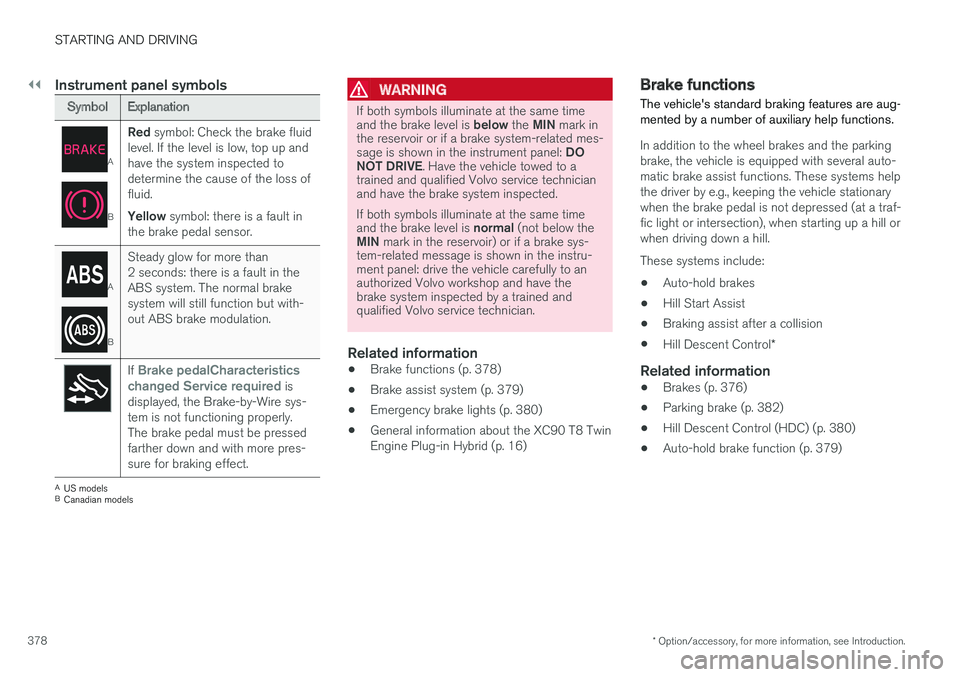
Instrument panel symbols
SymbolExplanation
A
B
Red symbol: Check the brake fluidlevel. If the level is low, top up andhave the system inspected todetermine the cause of the loss offluid.
Yellow symbol: there is a fault inthe brake pedal sensor.
A
B
Steady glow for more than2 seconds: there is a fault in theABS system. The normal brakesystem will still function but with-out ABS brake modulation.
If Brake pedalCharacteristicschanged Service required isdisplayed, the Brake-by-Wire sys-tem is not functioning properly.The brake pedal must be pressedfarther down and with more pres-sure for braking effect.
AUS modelsBCanadian models
WARNING
If both symbols illuminate at the same timeand the brake level is below the MIN mark inthe reservoir or if a brake system-related mes-sage is shown in the instrument panel: DONOT DRIVE. Have the vehicle towed to atrained and qualified Volvo service technicianand have the brake system inspected.
If both symbols illuminate at the same timeand the brake level is normal (not below theMIN mark in the reservoir) or if a brake sys-tem-related message is shown in the instru-ment panel: drive the vehicle carefully to anauthorized Volvo workshop and have thebrake system inspected by a trained andqualified Volvo service technician.
Related information
•Brake functions (p. 378)
•Brake assist system (p. 379)
•Emergency brake lights (p. 380)
•General information about the XC90 T8 TwinEngine Plug-in Hybrid (p. 16)
Brake functions
The vehicle's standard braking features are aug-mented by a number of auxiliary help functions.
In addition to the wheel brakes and the parkingbrake, the vehicle is equipped with several auto-matic brake assist functions. These systems helpthe driver by e.g., keeping the vehicle stationarywhen the brake pedal is not depressed (at a traf-fic light or intersection), when starting up a hill orwhen driving down a hill.
These systems include:
•Auto-hold brakes
•Hill Start Assist
•Braking assist after a collision
•Hill Descent Control*
Related information
•Brakes (p. 376)
•Parking brake (p. 382)
•Hill Descent Control (HDC) (p. 380)
•Auto-hold brake function (p. 379)