trip computer VOLVO XC90 TWIN ENGINE HYBRID 2017 Owners Manual
[x] Cancel search | Manufacturer: VOLVO, Model Year: 2017, Model line: XC90 TWIN ENGINE HYBRID, Model: VOLVO XC90 TWIN ENGINE HYBRID 2017Pages: 584, PDF Size: 14.2 MB
Page 5 of 584
3
Top tether anchors92
Integrated booster cushion*93
Raising the integrated booster cushion*94
Stowing the integrated booster cushion*96
INSTRUMENTS AND CONTROLS
Instruments and controls100
Trip computer101
Displaying trip computer information102
Displaying trip statistics104
HomeLink® Wireless Control System*104
Programming the HomeLink® Wire-less Control System*105
Adjusting the power door mirrors108
Laminated panoramic roof*110
Operating the laminated panoramic roof*111
Power windows113
Operating the power windows113
Rearview mirror114
Using sun shades115
Settings view115
Categories in Settings view116
Changing system settings in Set-tings view118
Changing settings in apps119
Resetting the settings view119
Resetting user data when the vehiclechanges owners120
Ambient temperature sensor120
Clock121
Head-up display (HUD)*122
Voice control125
Using voice commands125
Voice control for cell phones126
Voice control for radio and media127
Climate system voice commands128
Navigation system voice commands129
Voice control settings130
Indicator symbols in the instrument panel130
Instrument panel132
Hybrid-related information in theinstrument panel134
Instrument panel licenses136
Warning symbols in the instrument panel141
Compass142
Calibrating the compass143
Lighting panel and controls144
Parking lights146
Daytime Running Lights (DRL)146
Low beam headlights147
High and low beam headlights148
Active Bending Lights*149
Rear fog lights (certain models only)150
Brake lights151
Hazard warning flashers151
Using turn signals151
Page 102 of 584
INSTRUMENTS AND CONTROLS
* Option/accessory, for more information, see Introduction.100
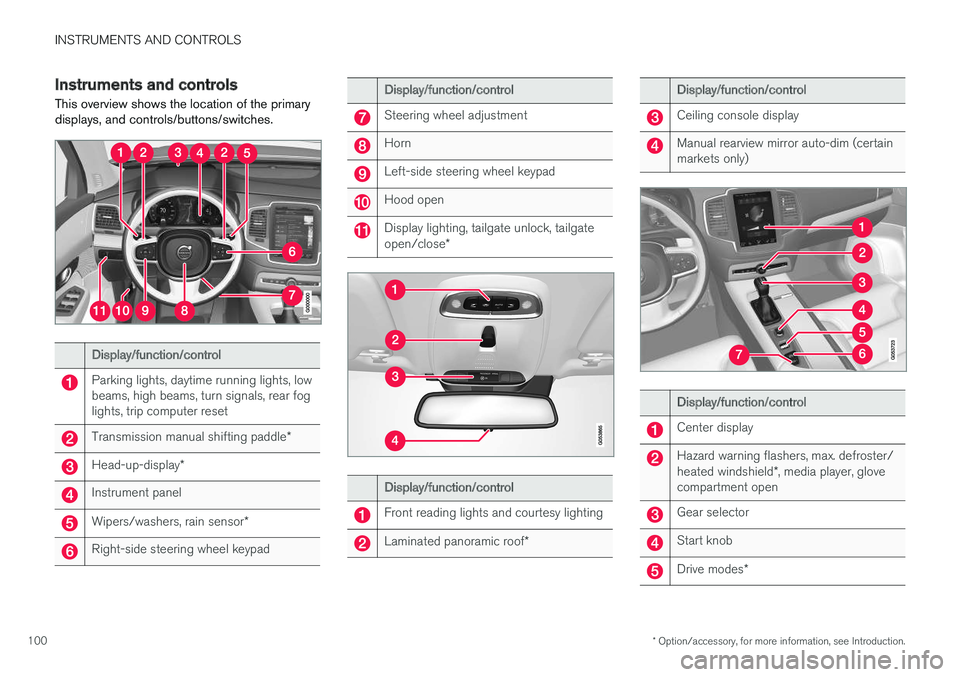
Instruments and controls
This overview shows the location of the primarydisplays, and controls/buttons/switches.
Display/function/control
Parking lights, daytime running lights, lowbeams, high beams, turn signals, rear foglights, trip computer reset
Transmission manual shifting paddle*
Head-up-display*
Instrument panel
Wipers/washers, rain sensor*
Right-side steering wheel keypad
Display/function/control
Steering wheel adjustment
Horn
Left-side steering wheel keypad
Hood open
Display lighting, tailgate unlock, tailgateopen/close*
Display/function/control
Front reading lights and courtesy lighting
Laminated panoramic roof*
Display/function/control
Ceiling console display
Manual rearview mirror auto-dim (certainmarkets only)
Display/function/control
Center display
Hazard warning flashers, max. defroster/heated windshield*, media player, glovecompartment open
Gear selector
Start knob
Drive modes*
Page 103 of 584
INSTRUMENTS AND CONTROLS
}}
* Option/accessory, for more information, see Introduction.101
Display/function/control
Parking brake
Auto-hold brakes
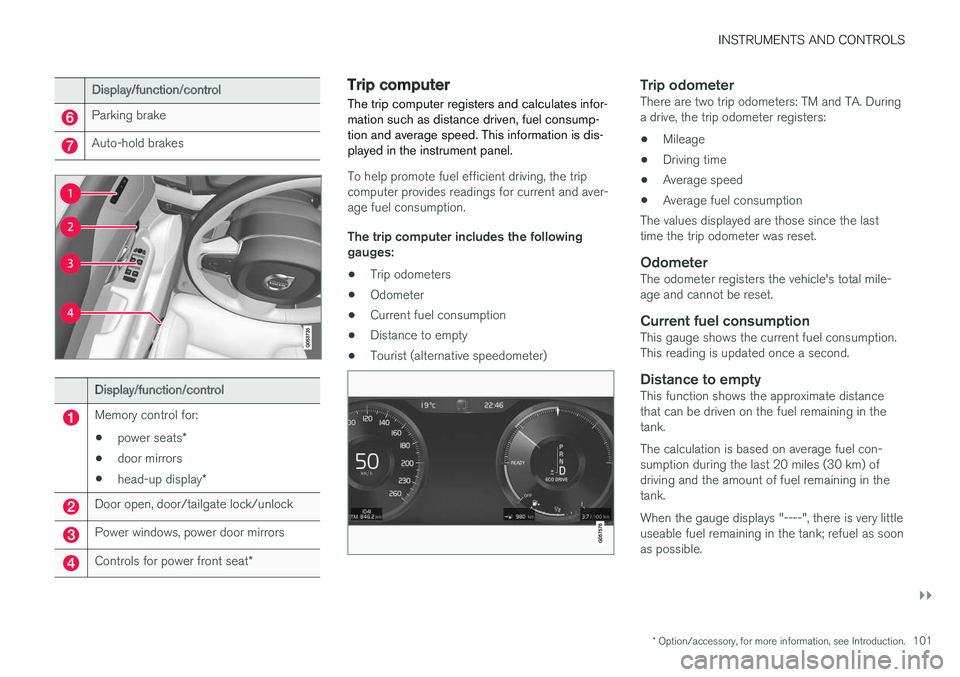
Display/function/control
Memory control for:
•power seats*
•door mirrors
•head-up display*
Door open, door/tailgate lock/unlock
Power windows, power door mirrors
Controls for power front seat*
Trip computer
The trip computer registers and calculates infor-mation such as distance driven, fuel consump-tion and average speed. This information is dis-played in the instrument panel.
To help promote fuel efficient driving, the tripcomputer provides readings for current and aver-age fuel consumption.
The trip computer includes the followinggauges:
•Trip odometers
•Odometer
•Current fuel consumption
•Distance to empty
•Tourist (alternative speedometer)
Trip odometer
There are two trip odometers: TM and TA. Duringa drive, the trip odometer registers:
•Mileage
•Driving time
•Average speed
•Average fuel consumption
The values displayed are those since the lasttime the trip odometer was reset.
Odometer
The odometer registers the vehicle's total mile-age and cannot be reset.
Current fuel consumption
This gauge shows the current fuel consumption.This reading is updated once a second.
Distance to empty
This function shows the approximate distancethat can be driven on the fuel remaining in thetank.
The calculation is based on average fuel con-sumption during the last 20 miles (30 km) ofdriving and the amount of fuel remaining in thetank.
When the gauge displays "----", there is very littleuseable fuel remaining in the tank; refuel as soonas possible.
Page 104 of 584
||
INSTRUMENTS AND CONTROLS
102
The accuracy of this figure may vary if your driv-ing style changes. An economical driving style willgenerally increase this distance.
Distance to discharged battery
This gauge shows the approximate distance thatcan be driven on the charge remaining in thehybrid battery. When the gauge displays "----"there is no guaranteed driving charge remainingin the battery.
This calculation is based on the average electricalcurrent consumption in a normally loaded vehicleduring normal driving, and whether the A/C is onor off.
An economical driving style will generallyincrease this distance.
Distance using the electric motor
To get the optimal driving distance using theelectric motor, it is essential to conserve current.Functions that use a great deal of current (e.g.,audio system, electrical heating in the steeringwheel/door mirrors/rear window/seats, very coldair from the climate system, etc.) reduce the pos-sible driving distance.
NOTE
In addition to high electrical consumption inthe passenger compartment, fast accelera-tion, sudden braking, heavy loads, low ambienttemperatures and driving up hills can reducethe possible driving distance.
Tourist (alternative speedometer)
This is an alternative digital speedometer can beused when driving in areas in which the speedlimit is listed in a different unit of measure. If thespeedometer is in mph, this gauge will show thevehicle's speed in km/h and vice versa.
Related information
•Displaying trip computer information (p. 102)
•Displaying trip statistics (p. 104)
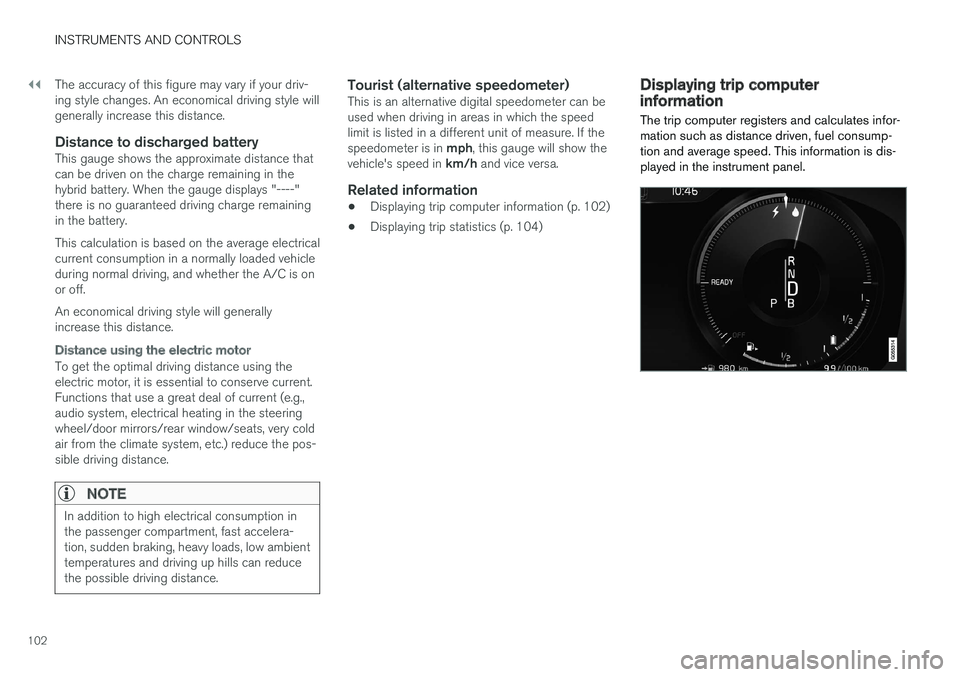
Displaying trip computerinformation
The trip computer registers and calculates infor-mation such as distance driven, fuel consump-tion and average speed. This information is dis-played in the instrument panel.
Page 105 of 584
INSTRUMENTS AND CONTROLS
* Option/accessory, for more information, see Introduction.103
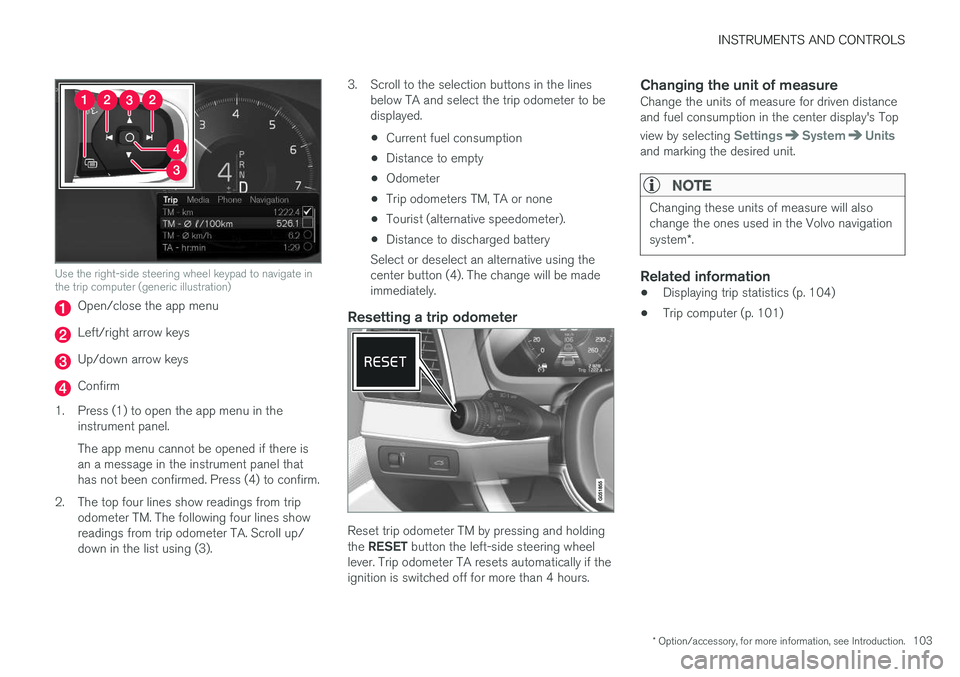
Use the right-side steering wheel keypad to navigate inthe trip computer (generic illustration)
Open/close the app menu
Left/right arrow keys
Up/down arrow keys
Confirm
1.Press (1) to open the app menu in theinstrument panel.
The app menu cannot be opened if there isan a message in the instrument panel thathas not been confirmed. Press (4) to confirm.
2. The top four lines show readings from tripodometer TM. The following four lines showreadings from trip odometer TA. Scroll up/down in the list using (3).
3. Scroll to the selection buttons in the linesbelow TA and select the trip odometer to bedisplayed.
•Current fuel consumption
•Distance to empty
•Odometer
•Trip odometers TM, TA or none
•Tourist (alternative speedometer).
•Distance to discharged battery
Select or deselect an alternative using thecenter button (4). The change will be madeimmediately.
Resetting a trip odometer
Reset trip odometer TM by pressing and holdingthe RESET button the left-side steering wheellever. Trip odometer TA resets automatically if theignition is switched off for more than 4 hours.
Changing the unit of measure
Change the units of measure for driven distanceand fuel consumption in the center display's Top
view by selecting SettingsSystemUnitsand marking the desired unit.
NOTE
Changing these units of measure will alsochange the ones used in the Volvo navigationsystem*.
Related information
•Displaying trip statistics (p. 104)
•Trip computer (p. 101)
Page 106 of 584
INSTRUMENTS AND CONTROLS
* Option/accessory, for more information, see Introduction.104
Displaying trip statistics
Trip computer statistics can be displayed graphi-cally in the center display.
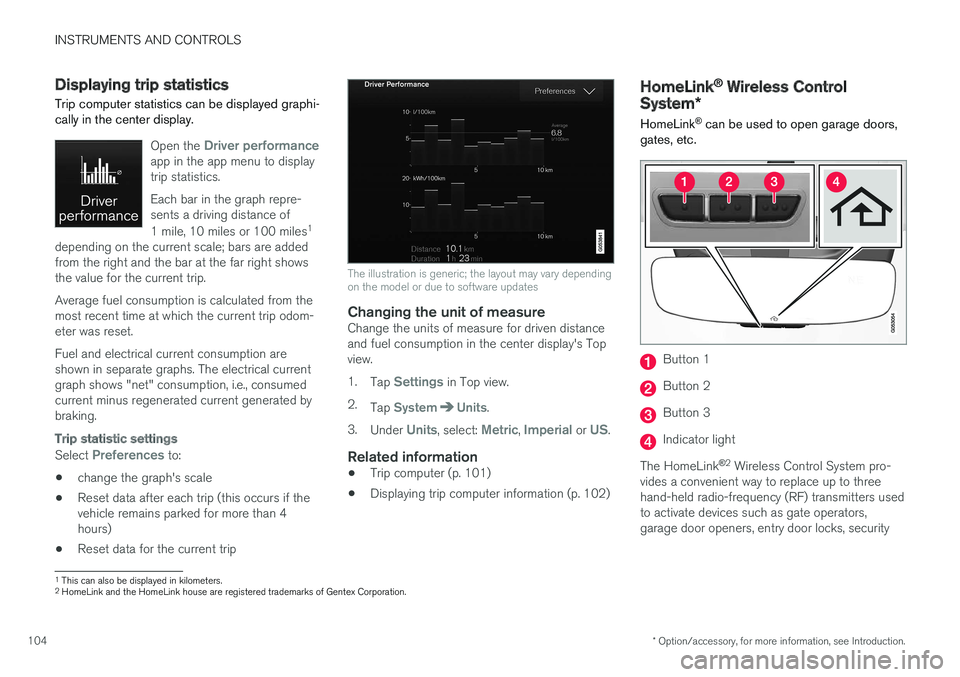
Open the Driver performanceapp in the app menu to displaytrip statistics.
Each bar in the graph repre-sents a driving distance of
1 mile, 10 miles or 100 miles1
depending on the current scale; bars are addedfrom the right and the bar at the far right showsthe value for the current trip.
Average fuel consumption is calculated from themost recent time at which the current trip odom-eter was reset.
Fuel and electrical current consumption areshown in separate graphs. The electrical currentgraph shows "net" consumption, i.e., consumedcurrent minus regenerated current generated bybraking.
Trip statistic settings
Select Preferences to:
•change the graph's scale
•Reset data after each trip (this occurs if thevehicle remains parked for more than 4hours)
•Reset data for the current trip
The illustration is generic; the layout may vary dependingon the model or due to software updates
Changing the unit of measure
Change the units of measure for driven distanceand fuel consumption in the center display's Topview.
1.Tap Settings in Top view.
2.Tap SystemUnits.
3.Under Units, select: Metric, Imperial or US.
Related information
•Trip computer (p. 101)
•Displaying trip computer information (p. 102)
HomeLink® Wireless Control
System*
HomeLink® can be used to open garage doors,gates, etc.
Button 1
Button 2
Button 3
Indicator light
The HomeLink®2 Wireless Control System pro-vides a convenient way to replace up to threehand-held radio-frequency (RF) transmitters usedto activate devices such as gate operators,garage door openers, entry door locks, security
1This can also be displayed in kilometers.2HomeLink and the HomeLink house are registered trademarks of Gentex Corporation.
Page 137 of 584

INSTRUMENTS AND CONTROLS
135
Power utilized by the driver
The indicator shows the amount of power utilized(requested) by the driver through pressure on theaccelerator pedal. The higher the reading on thescale, the greater the amount of power utilized inthe current gear. The mark between the "light-ning" and "drop" symbols is the point at whichthe electric motor switches off and the gasolineengine starts.
Examples
The vehicle has started but is stationary and nopower is being utilized.
The electric motor alone cannot provide thepower requested and the gasoline engine willstart.
The vehicle is generating current to recharge thebattery, e.g., during moderate braking or duringengine braking on a downslope.
The "Hold" and "Charge" functions
The "Hold" or "Charge" function is activated,
which is shown by the symbol near the bat-tery indicator. See also the article "Maintaining/increasing hybrid battery charge while driving" foradditional information.
Related information
•Drive modes (p. 420)
•Displaying trip computer information (p. 102)
•Displaying trip statistics (p. 104)
•Instrument panel (p. 132)
•Maintaining/increasing the hybrid battery'scharge while driving (p. 420)
Page 507 of 584
MAINTENANCE AND SERVICING
}}
505
Emission inspection readiness
How do states use OBD II for emission
inspections?
Many states connect a computer directly to avehicle's OBD II system. The inspector can thenread "faults." In some states, this type of inspec-tion has replaced the tailpipe emission test.
How can my vehicle fail OBD II emission
inspection?
Your vehicle can fail OBD II emission inspectionfor any of the following reasons.
•If your Check Engine (MIL) light is lit, yourvehicle may fail inspection.
•If your vehicle's Check Engine light was lit,but went out without any action on your part,OBD II will still have a recorded fault. Yourvehicle may pass or fail, depending on theinspection practices in your area.
•If you had recent service that required dis-connecting the battery, OBD II diagnosticinformation may be incomplete and "notready" for inspection. A vehicle that is notready may fail inspection.
How can I prepare for my next OBD II
emission inspection?
•If your Check Engine (MIL) light is lit – or waslit but went out without service, have your
vehicle diagnosed and, if necessary, servicedby a qualified Volvo technician.
•If you recently had service for a lit CheckEngine light, or if you had service thatrequired disconnecting the battery, a periodof driving is necessary to bring the OBD IIsystem to "ready" for inspection. Two half-hour trips of mixed stop-and-go/highwaydriving are typically needed to allow OBD II toreach readiness. Your Volvo retailer can pro-vide you with more information on planning atrip.
•Maintain your vehicle in accordance with yourvehicle's maintenance schedule.
Owner maintenance
Periodic maintenance requirements and intervalsare described in your vehicle's Warranty andService Records Information booklet.
The following points can be carried out betweenthe normally scheduled maintenance services.
Each time the car is refueled:
•Check the engine oil level.
•Clean the windshield, windshield wipers,headlights, and taillights.
Monthly:
•Check cold tire pressure in all tires. Inspectthe tires for wear.
•Check that engine coolant and other fluidlevels are between the indicated "min" and"max" markings.
•Clean interior glass surfaces with a glasscleaner and soft paper towels.
•Wipe driver information displays with a softcloth.
•Visually inspect battery terminals for corro-sion. Corrosion may indicate a loose terminalconnector, or a battery near the end of itsuseful service life. Consult your Volvo retailerfor additional information.
As needed:
Wash the car, including the undercarriage, toreduce wear that can be caused by a buildup ofdirt, and corrosion that can be caused by salt res-idues.
Clean leaves and twigs from air intake vents atthe base of the windshield, and from other placeswhere they may collect.
NOTE
Complete service information for qualifiedtechnicians is available online for purchase orsubscription at www.volvotechinfo.com.
Page 582 of 584
INDEX
580
Tread wear indicator 483
Trip computer 101, 102, 104
reset 102
Trip odometers 101
Trips, long distance 385
Trip statistics 104
Turn signals 151
changing bulbs 535
U
Uniform Tire Quality Grading485
Unlocking the tailgate249
Unlocking the vehicle 244, 246
USB/AUX connection 455, 462
User profile 181
V
Vehicle Event Data31
Vehicle information14
Vehicle loading 218, 484
Vehicle maintenance 504
performed by the owner 504
Vehicle status 507
Vehicle weights563
Voice control
cell phones126
giving commands125
introduction125
multimedia devices127
radio127
settings130
Volvo and the environment20
Volvo ID32
Volvo maintenance504
Volvo On Call Roadside Assistance 14
Volvo programs14
W
Warning flashers, hazard151
Warning lights141
Warning system, collision 327
Warranties 504
Washer fluid 547
Washers
headlight 163
windshield 161
Water, driving through 387
Waxing 554
Weights
trailer397
Wheels
changing 487, 489
storing 479
Whiplash Protection System 65
Wi-Fi 470, 471
Windows
laminated glass 59
power 113
sun shade 113
Windshield
rain sensor 162
washers 163
wipers/washers 161
Windshield washer fluid reservoir 547
Windshield wiper blades 544
Windshield wipers
service position 543
Wiper blades
replacing 543, 544
replacing tailgate wiper 544
WMA files 464
Workshop
Wi-Fi connection 510