charging YAMAHA EC-03 2012 User Guide
[x] Cancel search | Manufacturer: YAMAHA, Model Year: 2012, Model line: EC-03, Model: YAMAHA EC-03 2012Pages: 78, PDF Size: 2.19 MB
Page 37 of 78
CHARGING THE BATTERY
6-3
2
3
4
567
8
9
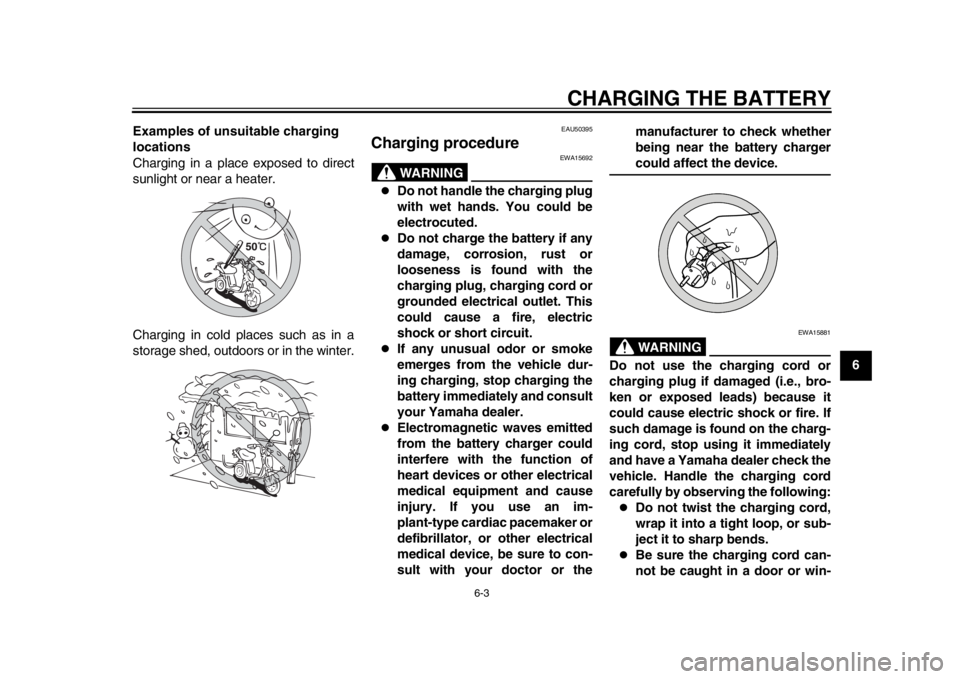
Examples of unsuitable charging
locations
Charging in a place exposed to direct
sunlight or near a heater.
Charging in cold places such as in a
storage shed, outdoors or in the winter.
EAU50395
Charging procedure
WARNING
EWA15692
Do not handle the charging plug
with wet hands. You could be
electrocuted.
Do not charge the battery if any
damage, corrosion, rust or
looseness is found with the
charging plug, charging cord or
grounded electrical outlet. This
could cause a fire, electric
shock or short circuit.
If any unusual odor or smoke
emerges from the vehicle dur-
ing charging, stop charging the
battery immediately and consult
your Yamaha dealer.
Electromagnetic waves emitted
from the battery charger could
interfere with the function of
heart devices or other electrical
medical equipment and cause
injury. If you use an im-
plant-type cardiac pacemaker or
defibrillator, or other electrical
medical device, be sure to con-
sult with your doctor or the manufacturer to check whether
being near the battery charger
could affect the device.WARNING
EWA15881
Do not use the charging cord or
charging plug if damaged (i.e., bro-
ken or exposed leads) because it
could cause electric shock or fire. If
such damage is found on the charg-
ing cord, stop using it immediately
and have a Yamaha dealer check the
vehicle. Handle the charging cord
carefully by observing the following:
Do not twist the charging cord,
wrap it into a tight loop, or sub-
ject it to sharp bends.
Be sure the charging cord can-
not be caught in a door or win-
1CB-9-EA.book 3 ページ 2012年4月11日 水曜日 午前9時34分
Page 38 of 78

CHARGING THE BATTERY
6-4
1
2
3
4
56
7
8
9dow.
Do not pull or apply excessive
force to the charging cord.
Do not drop the charging cord
or charging plug or expose it to
strong impact.
Do not secure the charging cord
or charging plug in a place with
sharp objects such as a nail.
Do not step on the charging
cord or charging plug or place
any object on them.
Do not leave the charging cord
or charging plug near a heater
or other source of heat.
Do not modify the charging cord
or charging plug.
Park the vehicle carefully so the
charging cord cannot be
pinched, stepped on, or pulled
accidentally. Also be sure the
vehicle cannot be knocked over
which could stretch or damage
the charging cord or charging
plug.
Do not pull the charging cord to
unplug the charging plug from
the electrical outlet. Pull only
the charging plug.
Starting charging 1. Place the vehicle on the center- stand.
2. Turn the key to “OFF”.
3. Open the seat. (See page 4-12 for more information.)
4. Grasp the charging plug, and then unwrap the charging cord from its storing place as shown.
5. Place the charging cord in one of the grooves. NOTICE: The charg-
ing cord may be damaged if not
placed into a groove before
closing the seat.
[ECA17460]
1. Charging plug
2. Charging cord
1. Groove
1 21
1CB-9-EA.book 4 ページ 2012年4月11日 水曜日 午前9時34分
Page 39 of 78
CHARGING THE BATTERY
6-5
2
3
4
567
8
9
6. Close the seat and push down on
the back to lock it in position.
TIPBefore closing the seat, make sure thatnothing is left under it.
7. Remove the key. To help prevent theft, be sure to lock the steering,
and then remove the key when
charging the battery.
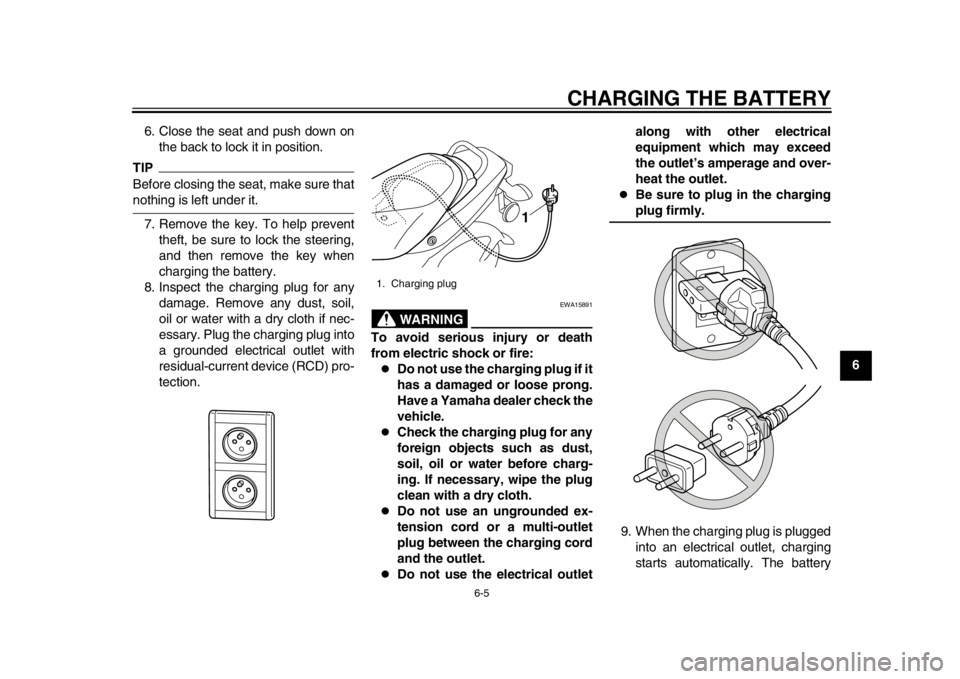
8. Inspect the charging plug for any damage. Remove any dust, soil,
oil or water with a dry cloth if nec-
essary. Plug the charging plug into
a grounded electrical outlet with
residual-current device (RCD) pro-
tection.
WARNING
EWA15891
To avoid serious injury or death
from electric shock or fire:
Do not use the charging plug if it
has a damaged or loose prong.
Have a Yamaha dealer check the
vehicle.
Check the charging plug for any
foreign objects such as dust,
soil, oil or water before charg-
ing. If necessary, wipe the plug
clean with a dry cloth.
Do not use an ungrounded ex-
tension cord or a multi-outlet
plug between the charging cord
and the outlet.
Do not use the electrical outlet along with other electrical
equipment which may exceed
the outlet’s amperage and over-
heat the outlet.
Be sure to plug in the chargingplug firmly.
9. When the charging plug is plugged into an electrical outlet, charging
starts automatically. The battery
1. Charging plug
1
1CB-9-EA.book 5 ページ 2012年4月11日 水曜日 午前9時34分
Page 40 of 78
CHARGING THE BATTERY
6-6
1
2
3
4
56
7
8
9indicator level appears in the dis-
play and the beeper sounds. All in-
dicator segments appear for a few
seconds, and the charging
progress status is shown.
TIP
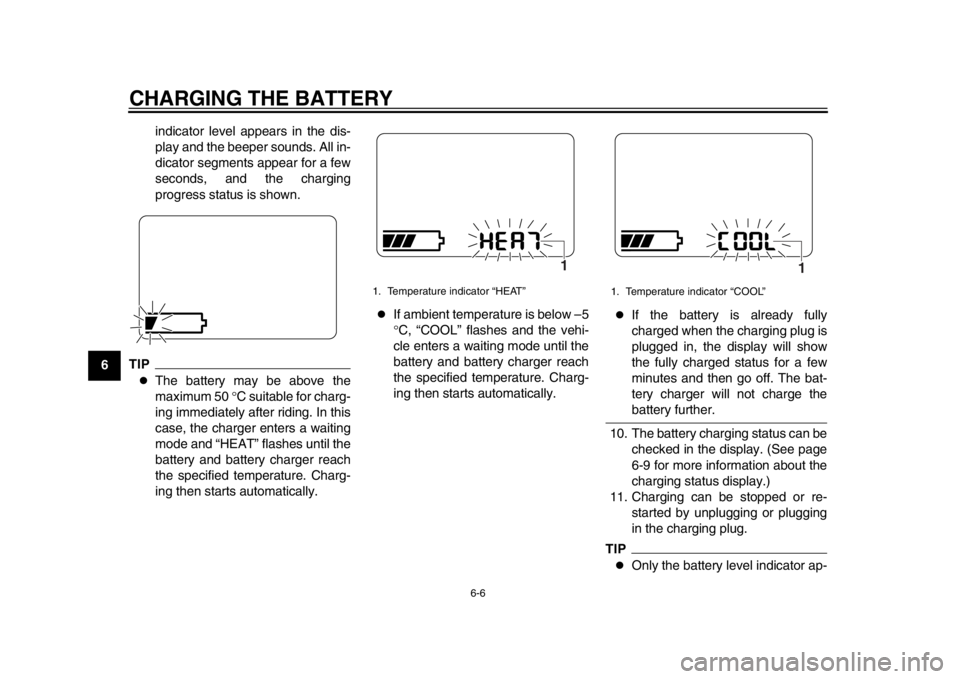
The battery may be above the
maximum 50
C suitable for charg-
ing immediately after riding. In this
case, the charger enters a waiting
mode and “HEAT” flashes until the
battery and battery charger reach
the specified temperature. Charg-
ing then starts automatically.
If ambient temperature is below –5
C, “COOL” flashes and the vehi-
cle enters a waiting mode until the
battery and battery charger reach
the specified temperature. Charg-
ing then starts automatically.
If the battery is already fully
charged when the charging plug is
plugged in, the display will show
the fully charged status for a few
minutes and then go off. The bat-
tery charger will not charge thebattery further.
10. The battery charging status can be checked in the display. (See page
6-9 for more information about the
charging status display.)
11. Charging can be stopped or re- started by unplugging or plugging
in the charging plug.
TIP
Only the battery level indicator ap-
1. Temperature indicator “HEAT”
1
1. Temperature indicator “COOL”
1
1CB-9-EA.book 6 ページ 2012年4月11日 水曜日 午前9時34分
Page 41 of 78
CHARGING THE BATTERY
6-7
2
3
4
567
8
9
pears in the display during charg-
ing. The display goes off if the
charging plug is unplugged during
charging.
Even if the key is turned to “ON”,
the vehicle does not enter thestandby mode during charging.
Completing charging
When the battery is fully charged, the
display goes off automatically after a
few minutes. 1. Grasp the charging plug, and then unplug it from the electrical outlet.
NOTICE: Do not pull the charg-
ing cord to unplug the charging
plug from the electrical outlet.
This could damage the charging
cord.
[ECA17470]
2. Open the seat. (See page 4-12 for
more information.)
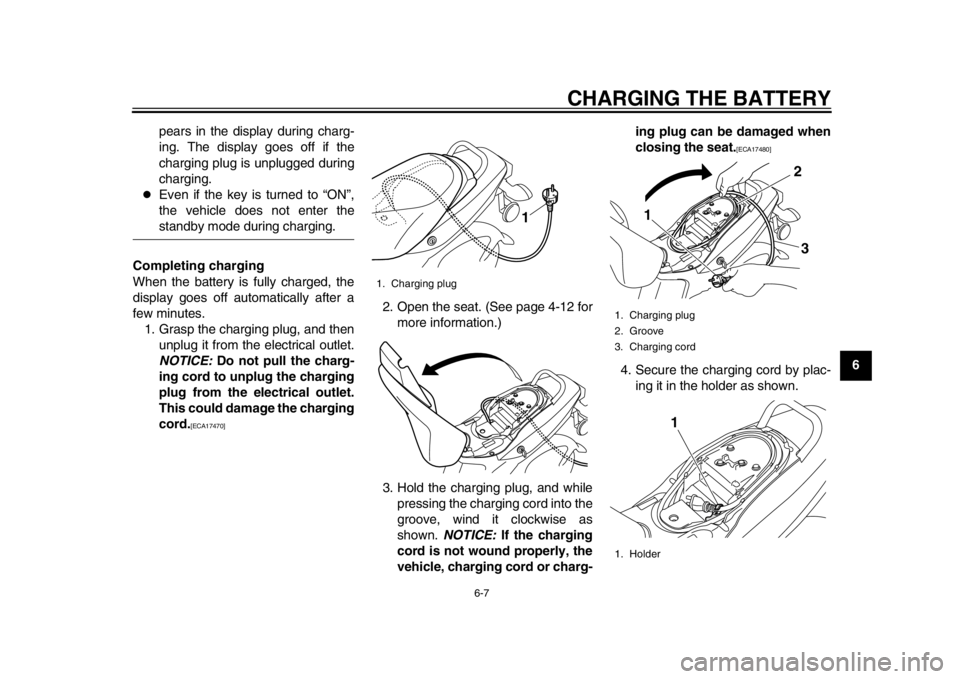
3. Hold the charging plug, and while pressing the charging cord into the
groove, wind it clockwise as
shown. NOTICE: If the charging
cord is not wound properly, the
vehicle, charging cord or charg- ing plug can be damaged when
closing the seat.
[ECA17480]
4. Secure the charging cord by plac- ing it in the holder as shown.
1. Charging plug
1
1. Charging plug
2. Groove
3. Charging cord
1. Holder
1 2
3
1
1CB-9-EA.book 7 ページ 2012年4月11日 水曜日 午前9時34分
Page 42 of 78
CHARGING THE BATTERY
6-8
1
2
3
4
56
7
8
95. Close the seat, and push down on
the back to lock it in position.
TIP
Before closing the seat, make sure
that nothing is left under the seat.
Make sure that the seat is securelylocked before riding.
6. Remove the key.WARNING
EWA15900
When not in use, do not leave the
charging plug plugged into an out-
let. Dust or foreign objects could
build up and cause a fire. Be sure to
unplug the charging plug from theoutlet after use.
EAU50402
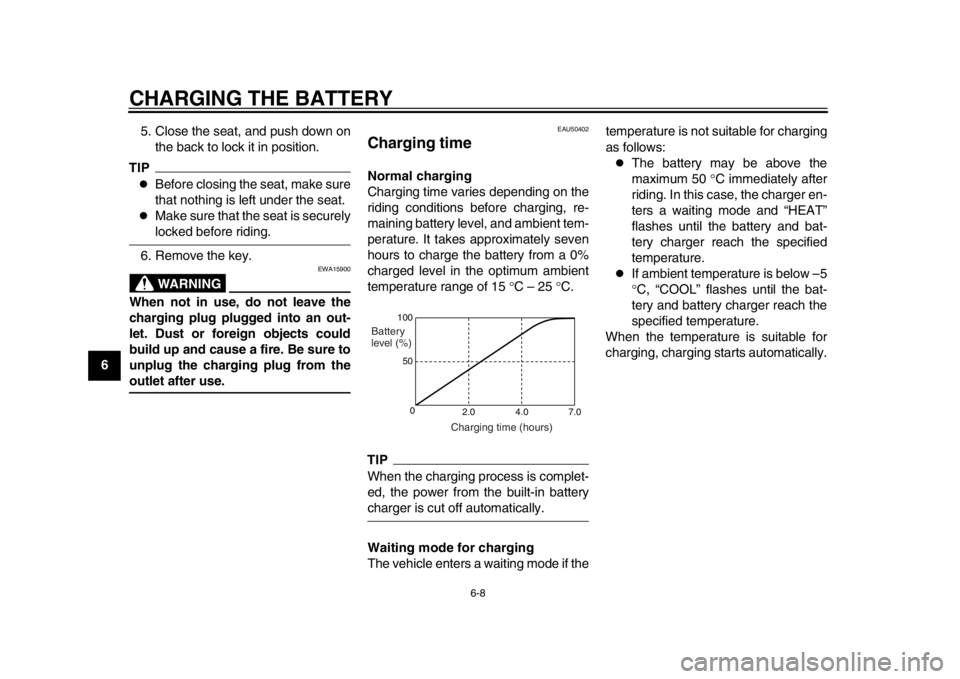
Charging time Normal charging
Charging time varies depending on the
riding conditions before charging, re-
maining battery level, and ambient tem-
perature. It takes approximately seven
hours to charge the battery from a 0%
charged level in the optimum ambient
temperature range of 15 C – 25 C.TIPWhen the charging process is complet-
ed, the power from the built-in batterycharger is cut off automatically.
Waiting mode for charging
The vehicle enters a waiting mode if the temperature is not suitable for charging
as follows:
The battery may be above the
maximum 50
C immediately after
riding. In this case, the charger en-
ters a waiting mode and “HEAT”
flashes until the battery and bat-
tery charger reach the specified
temperature.
If ambient temperature is below –5
C, “COOL” flashes until the bat-
tery and battery charger reach the
specified temperature.
When the temperature is suitable for
charging, charging starts automatically.
100
50
0 2.0 4.0 7.0
Charging time (hours)
Battery
level (%)
1CB-9-EA.book 8 ページ 2012年4月11日 水曜日 午前9時34分
Page 43 of 78
CHARGING THE BATTERY
6-9
2
3
4
567
8
9
EAU50411
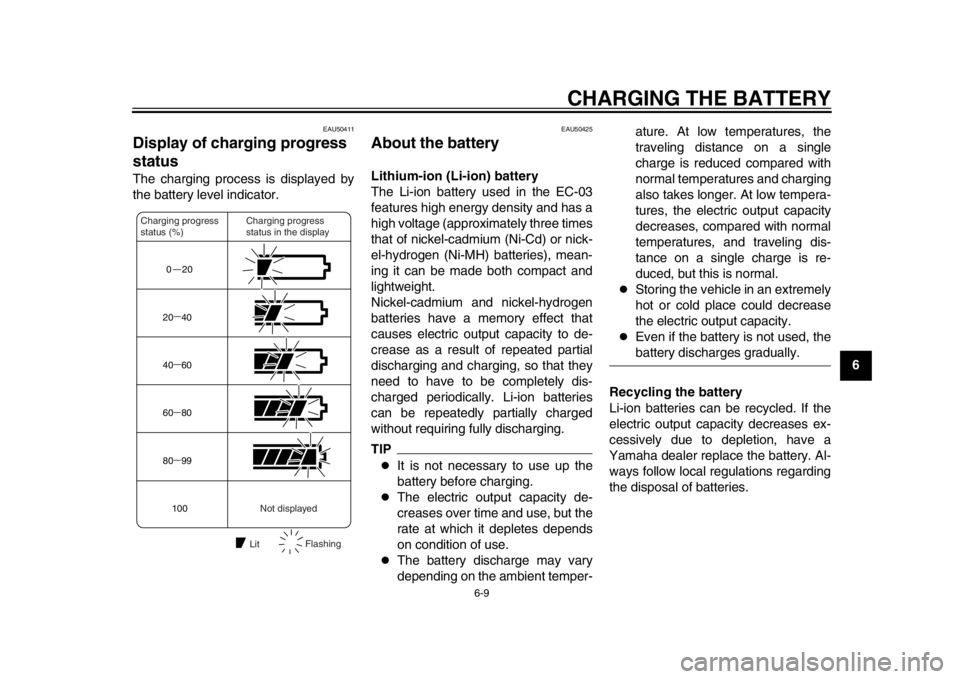
Display of charging progress
status The charging process is displayed by
the battery level indicator.
EAU50425
About the battery Lithium-ion (Li-ion) battery
The Li-ion battery used in the EC-03
features high energy density and has a
high voltage (approximately three times
that of nickel-cadmium (Ni-Cd) or nick-
el-hydrogen (Ni-MH) batteries), mean-
ing it can be made both compact and
lightweight.
Nickel-cadmium and nickel-hydrogen
batteries have a memory effect that
causes electric output capacity to de-
crease as a result of repeated partial
discharging and charging, so that they
need to have to be completely dis-
charged periodically. Li-ion batteries
can be repeatedly partially charged
without requiring fully discharging.TIP
It is not necessary to use up the
battery before charging.
The electric output capacity de-
creases over time and use, but the
rate at which it depletes depends
on condition of use.
The battery discharge may vary
depending on the ambient temper-ature. At low temperatures, the
traveling distance on a single
charge is reduced compared with
normal temperatures and charging
also takes longer. At low tempera-
tures, the electric output capacity
decreases, compared with normal
temperatures, and traveling dis-
tance on a single charge is re-
duced, but this is normal.
Storing the vehicle in an extremely
hot or cold place could decrease
the electric output capacity.
Even if the battery is not used, thebattery discharges gradually.
Recycling the battery
Li-ion batteries can be recycled. If the
electric output capacity decreases ex-
cessively due to depletion, have a
Yamaha dealer replace the battery. Al-
ways follow local regulations regarding
the disposal of batteries.
0 2020 40
40 60
60 80
80 99
100
Charging progress
status in the display
Charging progress
status (%)
Not displayed
Lit Flashing
1CB-9-EA.book 9 ページ 2012年4月11日 水曜日 午前9時34分
Page 44 of 78
CHARGING THE BATTERY
6-10
1
2
3
4
56
7
8
9Battery depletion
The electric output capacity of the
Li-ion battery used in the EC-03 gradu-
ally decreases in the course of use. Al-
though the extent of depletion varies
based on the conditions of use, electric
output capacity typically decreases to
70% of a new battery when having trav-
eled 8000–10000 km for two years.
This is equivalent to charging about
500 times with the condition of riding
16–20 km on a single charge.
Battery electric output auto-stop-
ping function
The battery is equipped with a function
to prevent further use in case of exces-
sive depletion. When eight years have
passed since initial battery charging or the accumulated charging amount has
reached 14000 Ah, the battery will no
longer be usable.
TIP
When the battery is replaced with
a new one, fully charge the battery
once before using it. If the battery
is not fully charged, the battery lev-
el indicator does not show the pre-
cise battery level.
At low temperatures such as 0
C,
the electric output capacity de-
creases by approximately 20%
compared with normal tempera-
ture.
If a depleted battery is used at low
temperatures, the electric output
capacity decreases by approxi-
mately 20% compared with normaltemperatures.
1CB-9-EA.book 10 ページ 2012年4月11日 水曜日 午前9時34分
Page 52 of 78

PERIODIC MAINTENANCE AND ADJUSTMENT
8-3
1
2
3
4
5
6
78
9
7*Chassis fasteners Make sure that all nuts, bolts
and screws are properly
tightened.
8 Front brake lever
pivot shaft Lubricate with
lithium-soap-based grease.
9 Rear brake lever
pivot shaft Lubricate with
lithium-soap-based grease.
10 Centerstand Check operation.
Lubricate.
11 * Front fork Check operation and for oil
leakage.
12 * Shock absorber
assembly Check operation and shock
absorber for oil leakage.
13 * Front and rear
brake switches Check operation.
14 Moving parts and
cables Lubricate.
15 * Accelerator grip Check operation.
Correct if necessary.
16 * Lights, signals and
switches Check operation.
Adjust headlight beam.
17 * Motor noise Check for irregular noise coming
from the motor.
Correct if necessary.
18 * Charging cord and
plug Check condition and for
damage.
Replace if necessary.
NO. ITEM CHECK OR MAINTENANCE JOB
ODOMETER READING
ANNUAL
CHECK
1000 km 6000 km 12000 km 18000 km 24000 km
1CB-9-EA.book 3 ページ 2012年4月11日 水曜日 午前9時34分
Page 63 of 78
PERIODIC MAINTENANCE AND ADJUSTMENT
8-14
2
3
4
5
6
789
EAU50573
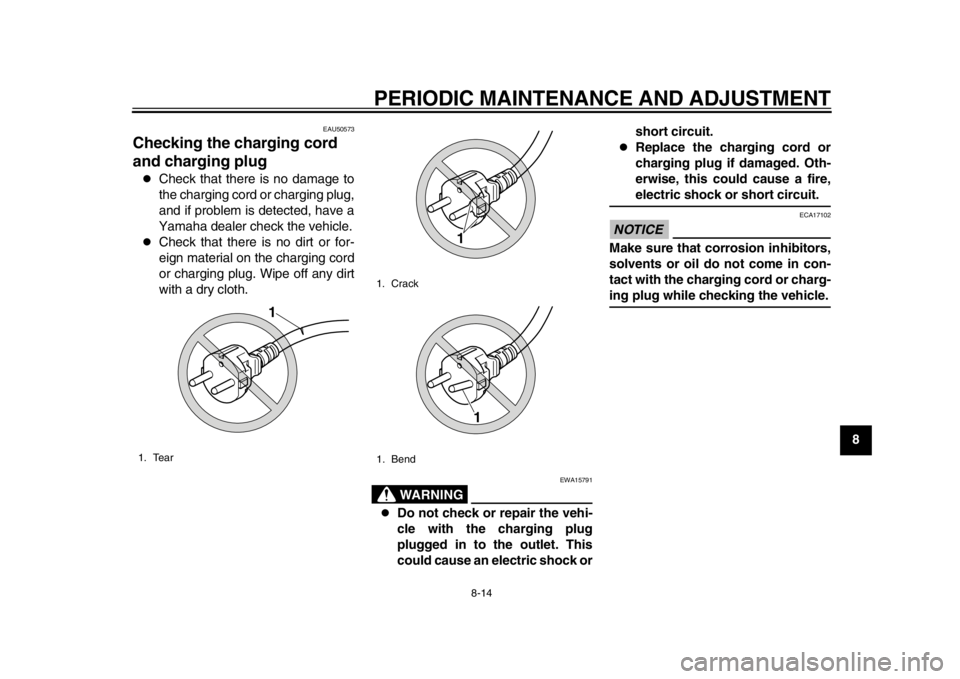
Checking the charging cord
and charging plug
Check that there is no damage to
the charging cord or charging plug,
and if problem is detected, have a
Yamaha dealer check the vehicle.
Check that there is no dirt or for-
eign material on the charging cord
or charging plug. Wipe off any dirt
with a dry cloth.
WARNING
EWA15791
Do not check or repair the vehi-
cle with the charging plug
plugged in to the outlet. This
could cause an electric shock or short circuit.
Replace the charging cord or
charging plug if damaged. Oth-
erwise, this could cause a fire,electric shock or short circuit.
NOTICE
ECA17102
Make sure that corrosion inhibitors,
solvents or oil do not come in con-
tact with the charging cord or charg-ing plug while checking the vehicle.
1. Tear
1
1. Crack
1. Bend
1
1
1CB-9-EA.book 14 ページ 2012年4月11日 水曜日 午前9時34分