oil reset YAMAHA FJR1300A 2013 Owners Manual
[x] Cancel search | Manufacturer: YAMAHA, Model Year: 2013, Model line: FJR1300A, Model: YAMAHA FJR1300A 2013Pages: 118, PDF Size: 3.28 MB
Page 31 of 118
INSTRUMENT AND CONTROL FUNCTIONS
3-16
3
●
The “L/100km” display shows the
amount of fuel necessary to travel
100 km.
●
For the UK only: The “MPG” dis-
play shows the distance that can
be traveled on 1.0 Imp.gal of fuel.
TIPIf traveling at speeds under 10 km/h, “_
_._” will be displayed.NOTICE
ECA15473
If there is a malfunction, “– –.–” will
be continuously displayed. Have a
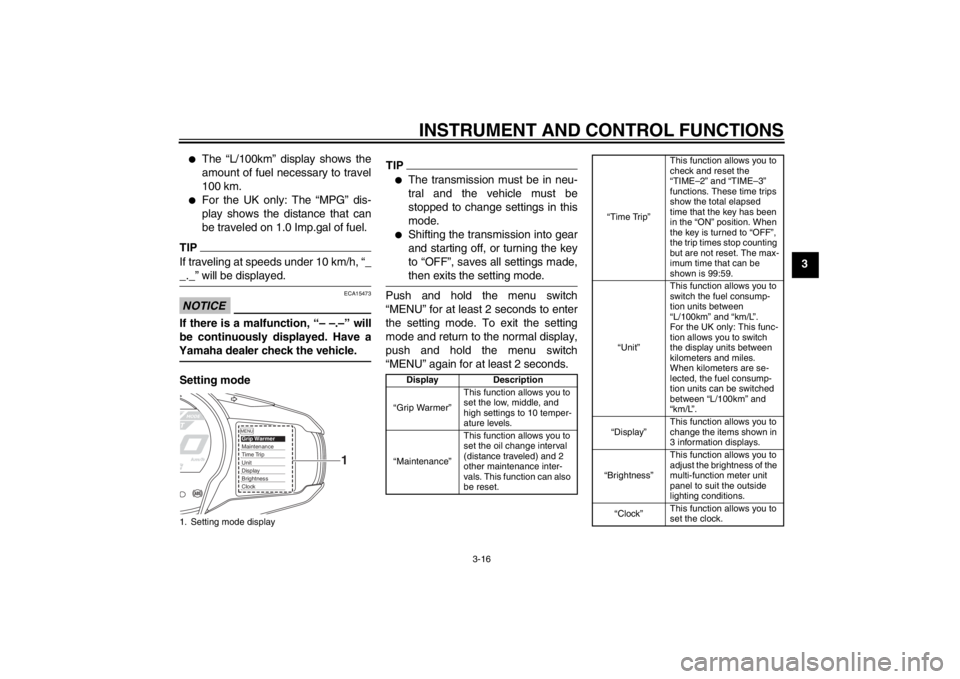
Yamaha dealer check the vehicle.Setting mode
TIP●
The transmission must be in neu-
tral and the vehicle must be
stopped to change settings in this
mode.
●
Shifting the transmission into gear
and starting off, or turning the key
to “OFF”, saves all settings made,
then exits the setting mode.
Push and hold the menu switch
“MENU” for at least 2 seconds to enter
the setting mode. To exit the setting
mode and return to the normal display,
push and hold the menu switch
“MENU” again for at least 2 seconds.
1. Setting mode display
MENUGrip WarmerMaintenanceTime TripUnitDisplayBrightnessClock
1
Display Description
“Grip Warmer” This function allows you to
set the low, middle, and
high settings to 10 temper-
ature levels.
“Maintenance” This function allows you to
set the oil change interval
(distance traveled) and 2
other maintenance inter-
vals. This function can also
be reset.
“Time Trip”This function allows you to
check and reset the
“TIME–2” and “TIME–3”
functions. These time trips
show the total elapsed
time that the key has been
in the “ON” position. When
the key is turned to “OFF”,
the trip times stop counting
but are not reset. The max-
imum time that can be
shown is 99:59.
“Unit” This function allows you to
switch the fuel consump-
tion units between
“L/100km” and “km/L”.
For the UK only: This func-
tion allows you to switch
the display units between
kilometers and miles.
When kilometers are se-
lected, the fuel consump-
tion units can be switched
between “L/100km” and
“km/L”.
“Display” This function allows you to
change the items shown in
3 information displays.
“Brightness” This function allows you to
adjust the brightness of the
multi-function meter unit
panel to suit the outside
lighting conditions.
“Clock” This function allows you to
set the clock.
U1MCE0E0.book Page 16 Thursday, July 19, 2012 6:59 PM
Page 33 of 118
INSTRUMENT AND CONTROL FUNCTIONS
3-18
3
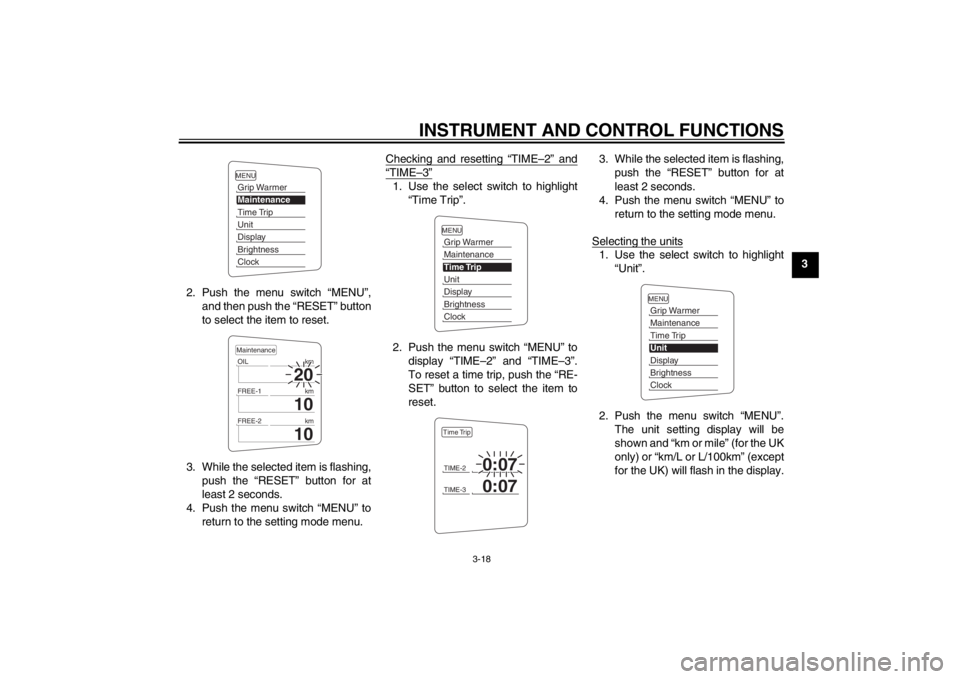
2. Push the menu switch “MENU”, and then push the “RESET” button
to select the item to reset.
3. While the selected item is flashing, push the “RESET” button for at
least 2 seconds.
4. Push the menu switch “MENU” to return to the setting mode menu. Checking and resetting “TIME–2” and
“TIME–3”1. Use the select switch to highlight
“Time Trip”.
2. Push the menu switch “MENU” to display “TIME–2” and “TIME–3”.
To reset a time trip, push the “RE-
SET” button to select the item to
reset. 3. While the selected item is flashing,
push the “RESET” button for at
least 2 seconds.
4. Push the menu switch “MENU” to return to the setting mode menu.
Selecting the units
1. Use the select switch to highlight “Unit”.
2. Push the menu switch “MENU”. The unit setting display will be
shown and “km or mile” (for the UK
only) or “km/L or L/100km” (except
for the UK) will flash in the display.
MENUGrip WarmerMaintenanceTime TripUnitDisplayBrightnessClock
20
OIL km
10
FREE-1km
10
FREE-2kmMaintenance
MENUGrip WarmerMaintenanceTime TripUnitDisplayBrightnessClockTIME-2
0:07
TIME-3
0:07
Time Trip
MENUGrip WarmerMaintenanceTime TripUnitDisplayBrightnessClock
U1MCE0E0.book Page 18 Thursday, July 19, 2012 6:59 PM