pin YAMAHA FX SVHO 2019 Owners Manual
[x] Cancel search | Manufacturer: YAMAHA, Model Year: 2019, Model line: FX SVHO, Model: YAMAHA FX SVHO 2019Pages: 116, PDF Size: 12.33 MB
Page 6 of 116

Table of contents
Engine oil requirements ................ 59
Engine oil .......................................... 59
Draining the bilge water ................ 60
Draining the bilge water on land ...... 60
Draining the bilge water on water .... 61
Transporting on a trailer ................ 62
First-time operation ........................ 63
Engine break-in ............................. 63
Pre-operation checks ..................... 64
Pre-operation checklist .................... 64
Pre-operation check points........... 66
Pre-launch checks ........................... 66
Post-launch checks ......................... 72
Operation ......................................... 74
Operating your watercraft ............. 74
Getting to know your watercraft ...... 74
Learning to operate your
watercraft ...................................... 74
Riding position ................................. 75
Launching the watercraft ................. 75
Starting the engine on water ............ 75
Stopping the engine ......................... 76
Leaving the watercraft...................... 76
Operating the watercraft .................. 76
Turning the watercraft ...................... 77
Stopping the watercraft ................... 78
Operating the watercraft in reverse
or neutral ...................................... 79
Boarding the watercraft ................... 80
Starting off........................................ 82
Capsized watercraft ......................... 83
Beaching and docking the
watercraft ...................................... 84
Operating in weeded areas .............. 84
After removing the watercraft from
the water ....................................... 85
Care and storage............................. 86
Post-operation care ...................... 86
Flushing the cooling water
passages....................................... 86Cleaning the watercraft .................... 87
Battery care ...................................... 87
Long-term storage ........................ 90
Cleaning ........................................... 90
Lubrication ....................................... 90
Rustproofing ..................................... 90
Maintenance .................................... 91
Maintenance ................................. 91
Tool kit.............................................. 91
Removing and installing the engine
cover ............................................. 91
Periodic maintenance chart ............. 93
Engine oil and oil filter ...................... 95
Specifications .................................. 96
Specifications ............................... 96
Trouble recovery ............................. 97
Troubleshooting ............................ 97
Troubleshooting chart ...................... 97
Emergency procedures .............. 100
Cleaning the jet intake and
impeller ....................................... 100
Raising the reverse gate ................ 101
Jumping the battery ....................... 101
Replacing the fuses ........................ 102
Towing the watercraft..................... 104
Submerged watercraft ................... 104
Index............................................... 106
UF3X70E0.book Page 2 Friday, August 24, 2018 9:23 AM
Page 17 of 116
Safety information
11
EJU43321
Cruising limitations
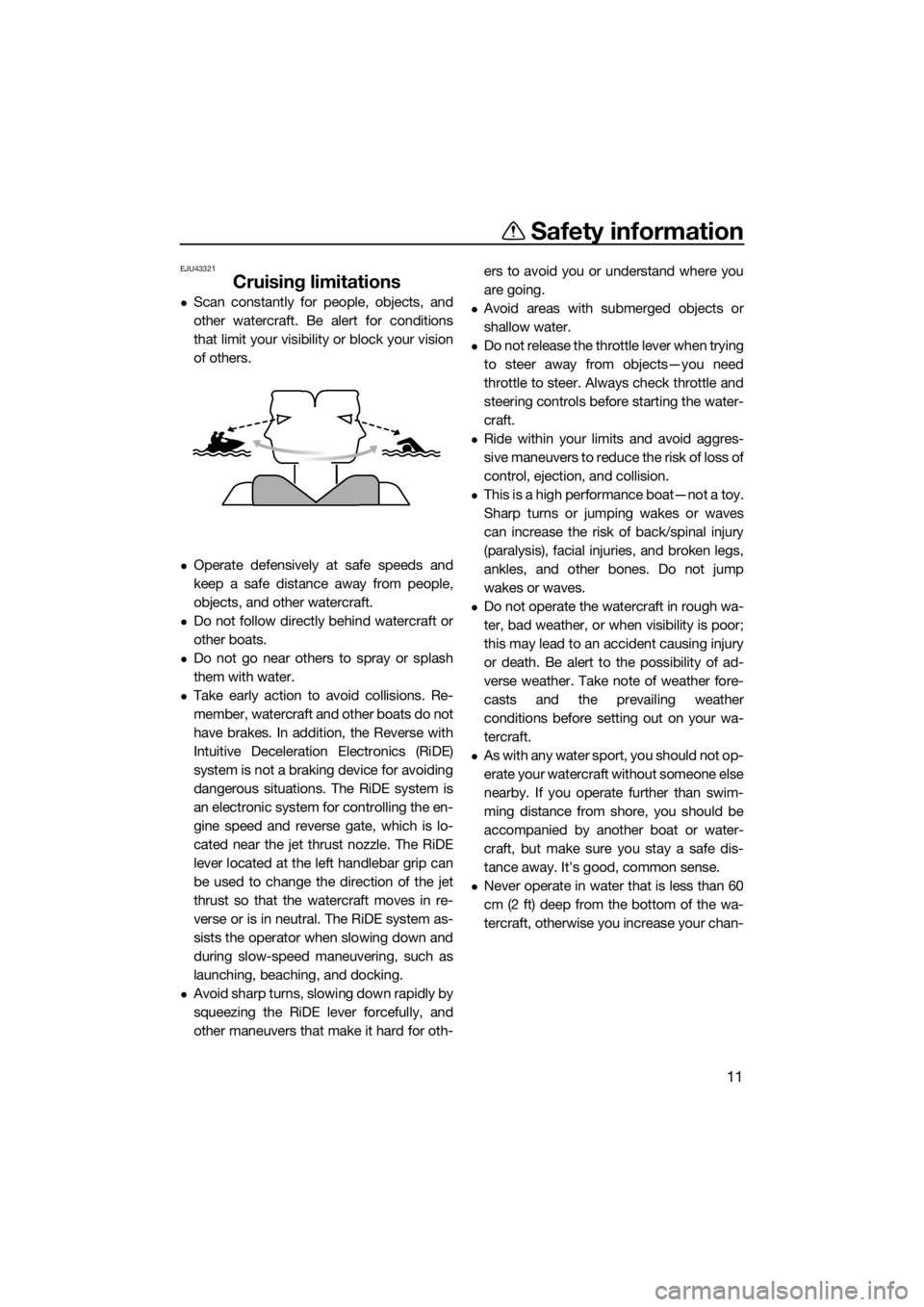
Scan constantly for people, objects, and
other watercraft. Be alert for conditions
that limit your visibility or block your vision
of others.
Operate defensively at safe speeds and
keep a safe distance away from people,
objects, and other watercraft.
Do not follow directly behind watercraft or
other boats.
Do not go near others to spray or splash
them with water.
Take early action to avoid collisions. Re-
member, watercraft and other boats do not
have brakes. In addition, the Reverse with
Intuitive Deceleration Electronics (RiDE)
system is not a braking device for avoiding
dangerous situations. The RiDE system is
an electronic system for controlling the en-
gine speed and reverse gate, which is lo-
cated near the jet thrust nozzle. The RiDE
lever located at the left handlebar grip can
be used to change the direction of the jet
thrust so that the watercraft moves in re-
verse or is in neutral. The RiDE system as-
sists the operator when slowing down and
during slow-speed maneuvering, such as
launching, beaching, and docking.
Avoid sharp turns, slowing down rapidly by
squeezing the RiDE lever forcefully, and
other maneuvers that make it hard for oth-ers to avoid you or understand where you
are going.
Avoid areas with submerged objects or
shallow water.
Do not release the throttle lever when trying
to steer away from objects—you need
throttle to steer. Always check throttle and
steering controls before starting the water-
craft.
Ride within your limits and avoid aggres-
sive maneuvers to reduce the risk of loss of
control, ejection, and collision.
This is a high performance boat—not a toy.
Sharp turns or jumping wakes or waves
can increase the risk of back/spinal injury
(paralysis), facial injuries, and broken legs,
ankles, and other bones. Do not jump
wakes or waves.
Do not operate the watercraft in rough wa-
ter, bad weather, or when visibility is poor;
this may lead to an accident causing injury
or death. Be alert to the possibility of ad-
verse weather. Take note of weather fore-
casts and the prevailing weather
conditions before setting out on your wa-
tercraft.
As with any water sport, you should not op-
erate your watercraft without someone else
nearby. If you operate further than swim-
ming distance from shore, you should be
accompanied by another boat or water-
craft, but make sure you stay a safe dis-
tance away. It’s good, common sense.
Never operate in water that is less than 60
cm (2 ft) deep from the bottom of the wa-
tercraft, otherwise you increase your chan-
UF3X70E0.book Page 11 Friday, August 24, 2018 9:23 AM
Page 24 of 116

Safety information
18
er’s or water-skier’s ability, as well as water
and weather conditions.
When preparing to pull a wakeboarder or
water-skier, operate the watercraft at the
slowest possible speed until the watercraft
is well away from the person being pulled
and slack in the ski rope is taken up. Make
sure that the rope is not looped around
anything.
After checking that the wakeboarder or wa-
ter-skier is ready and that there is no traffic
or other obstacles, apply enough throttle to
raise the person.
Make smooth, wide turns. The watercraft is
capable of very sharp turns, which could
exceed the abilities of the wakeboarder or
water-skier. Keep the person being towed
at least 50 m (164 ft), about twice the dis-
tance of a standard ski rope, away from
any potential hazard.
The operators of boats and other water-
craft may not be aware that you are pulling
a wakeboarder or water-skier. Together
with the spotter, pay attention to others
around you and cruise at safe speeds.
Be alert to the hazard of the ski rope handle
snapping back at the watercraft when the
wakeboarder or water-skier falls or is un-
able to get up.
Towing heavy or bulky objects other than
wakeboarders or water-skiers, such as an-
other boat or watercraft, can cause loss of
steering control and create a hazardous
condition. If you must tow another boat in
an emergency situation, operate slowly
and cautiously.
EJU30971
Safe boating rules
Your Yamaha watercraft is legally considered
a powerboat. Operation of the watercraft
must be in accordance with the rules and
regulations governing the waterway on which
it is used.
UF3X70E0.book Page 18 Friday, August 24, 2018 9:23 AM
Page 31 of 116
Control function operation
25
EJU31026
Watercraft control functionsEJU45090Yamaha Security System
The Yamaha Security System functions to
help prevent unauthorized use or theft of the
watercraft. The lock and unlock modes of the
security system can be selected using the
engine lock screen of the multifunction infor-
mation center. The engine cannot be started
if the lock mode of the security system is se-
lected. The engine can only be started if the
unlock mode is selected.
TIP:
The Yamaha Security System setting can
only be selected while the engine is stopped.
EJU45100Yamaha Security System setting
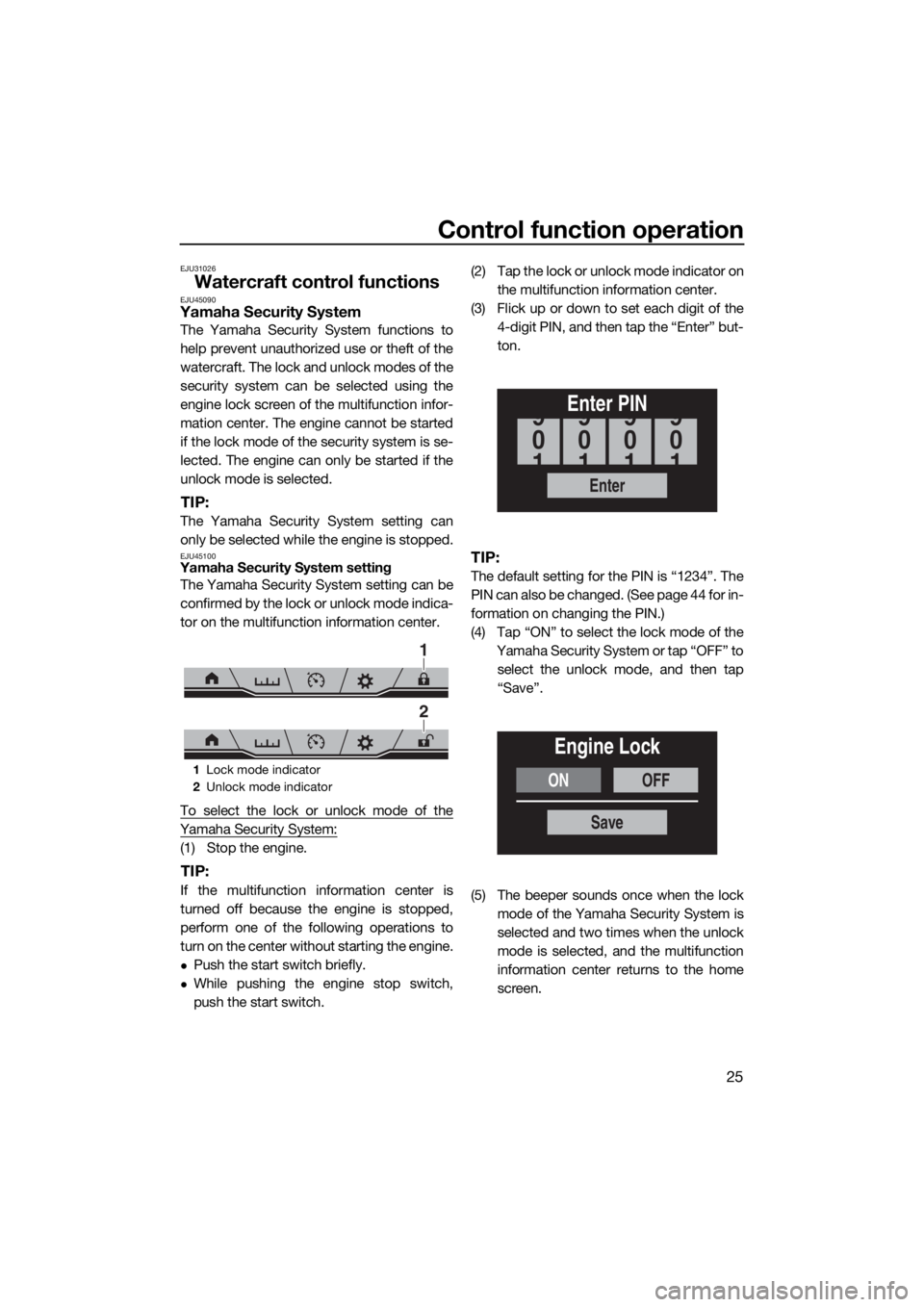
The Yamaha Security System setting can be
confirmed by the lock or unlock mode indica-
tor on the multifunction information center.
To select the lock or unlock mode of the
Yamaha Security System:
(1) Stop the engine.
TIP:
If the multifunction information center is
turned off because the engine is stopped,
perform one of the following operations to
turn on the center without starting the engine.
Push the start switch briefly.
While pushing the engine stop switch,
push the start switch.(2) Tap the lock or unlock mode indicator on
the multifunction information center.
(3) Flick up or down to set each digit of the
4-digit PIN, and then tap the “Enter” but-
ton.
TIP:
The default setting for the PIN is “1234”. The
PIN can also be changed. (See page 44 for in-
formation on changing the PIN.)
(4) Tap “ON” to select the lock mode of the
Yamaha Security System or tap “OFF” to
select the unlock mode, and then tap
“Save”.
(5) The beeper sounds once when the lock
mode of the Yamaha Security System is
selected and two times when the unlock
mode is selected, and the multifunction
information center returns to the home
screen.
1Lock mode indicator
2Unlock mode indicator
1
2
Enter
Enter PIN
0
9
1
0
9
1
0
9
1
0
9
1
ONOFF
Engine Lock
Save
UF3X70E0.book Page 25 Friday, August 24, 2018 9:23 AM
Page 36 of 116
Watercraft operation
30
EJU40014
Watercraft operation functions
EJU43154Shift system
WARNING
EWJ01773
Make sure that there are no obstacles or
people behind you before shifting into
reverse.
Do not touch the reverse gate while the
RiDE lever is being operated, otherwise
you could be pinched.
If the RiDE lever and throttle lever are
being operated at the same time, do not
release only the RiDE lever. Otherwise,
the watercraft could accelerate more
quickly than expected, which may lead
to an accident.
The RiDE lever and throttle lever can be oper-
ated to change the forward or rearward
movement of the watercraft only when the
engine is running. When the RiDE lever is
squeezed, the reverse gate lowers and de-
flects the water jet being discharged from the
jet thrust nozzle so that the watercraft moves
in reverse or is in neutral. When the throttle le-
ver is squeezed, the reverse gate rises and
the watercraft moves forward.
TIP:
This model is equipped with a function
which limits the engine speed in reverse.
When the engine is started, the reverse
gate automatically moves to the neutral po-
sition.
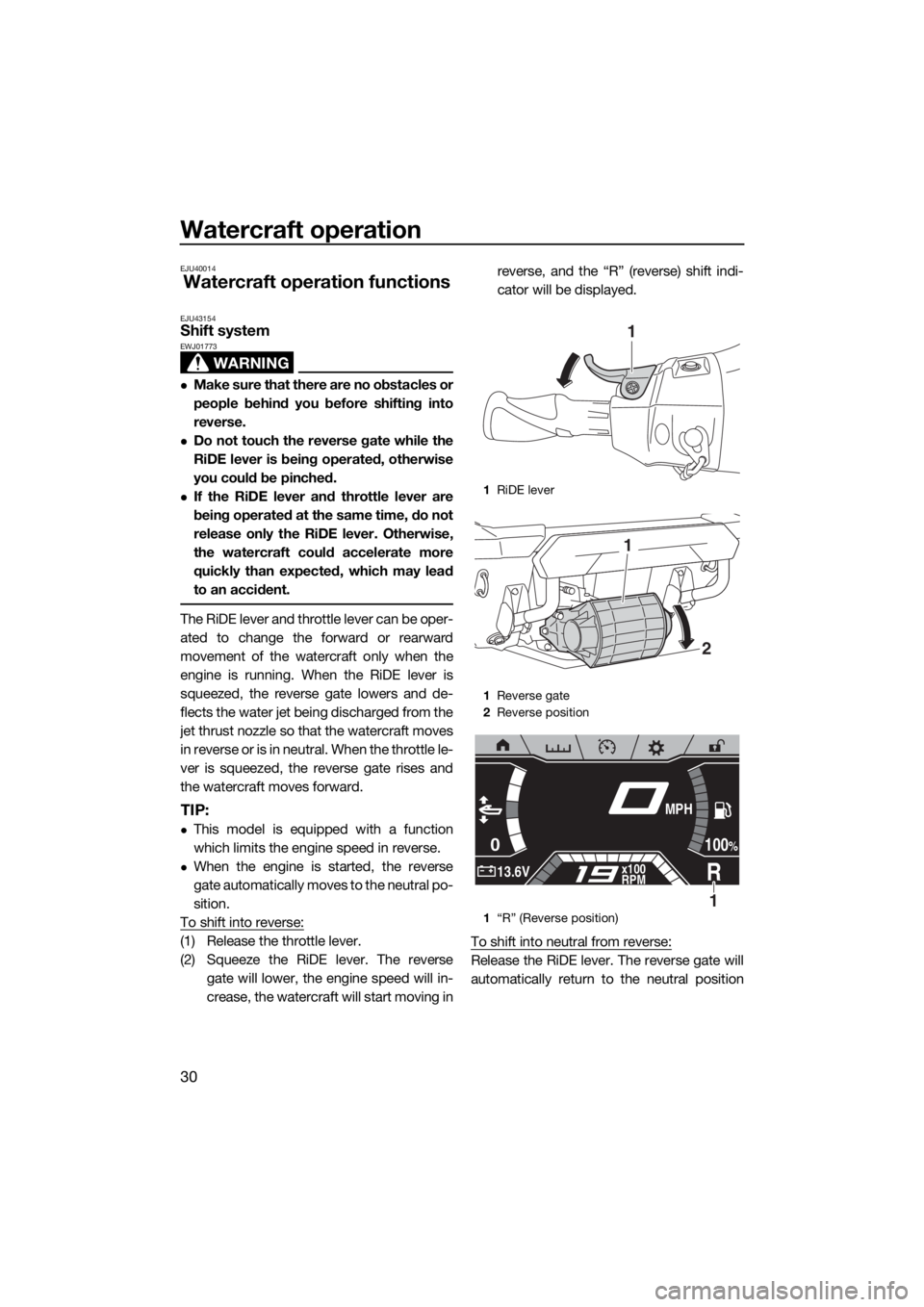
To shift into reverse:
(1) Release the throttle lever.
(2) Squeeze the RiDE lever. The reverse
gate will lower, the engine speed will in-
crease, the watercraft will start moving inreverse, and the “R” (reverse) shift indi-
cator will be displayed.
To shift into neutral from reverse:
Release the RiDE lever. The reverse gate will
automatically return to the neutral position
1RiDE lever
1Reverse gate
2Reverse position
1“R” (Reverse position)
1
2
1
0
R13.6Vx100
RPM
100%
MPH
1
UF3X70E0.book Page 30 Friday, August 24, 2018 9:23 AM
Page 43 of 116
Watercraft operation
37
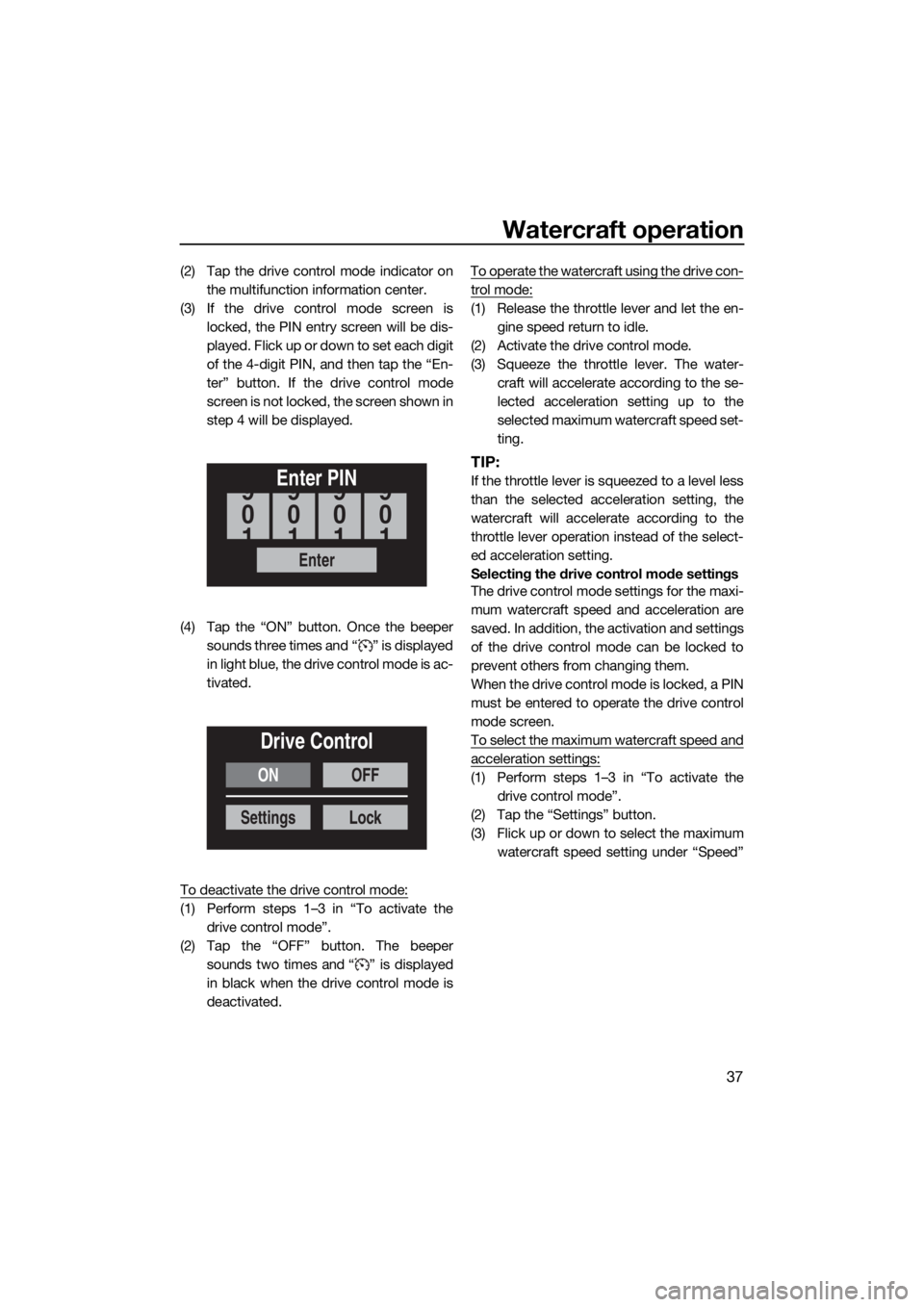
(2) Tap the drive control mode indicator on
the multifunction information center.
(3) If the drive control mode screen is
locked, the PIN entry screen will be dis-
played. F lick up o r down to set each digit
of the 4-digit PIN, and then tap the “En-
ter” button. If the drive control mode
screen is not locked, the screen shown in
step 4 will be displayed.
(4) Tap the “ON” button. Once the beeper
sounds three times and “ ” is displayed
in light blue, the drive control mode is ac-
tivated.
To deactivate the drive control mode:
(1) Perform steps 1–3 in “To activate the
drive control mode”.
(2) Tap the “OFF” button. The beeper
sounds two times and “ ” is displayed
in black when the drive control mode is
deactivated.To operate the watercraft using the drive con-
trol mode:
(1) Release the throttle lever and let the en-
gine speed return to idle.
(2) Activate the drive control mode.
(3) Squeeze the throttle lever. The water-
craft will accelerate according to the se-
lected acceleration setting up to the
selected maximum watercraft speed set-
ting.
TIP:
If the throttle lever is squeezed to a level less
than the selected acceleration setting, the
watercraft will accelerate according to the
throttle lever operation instead of the select-
ed acceleration setting.
Selecting the drive control mode settings
The drive control mode settings for the maxi-
mum watercraft speed and acceleration are
saved. In addition, the activation and settings
of the drive control mode can be locked to
prevent others from changing them.
When the drive control mode is locked, a PIN
must be entered to operate the drive control
mode screen.
To select the maximum watercraft speed and
acceleration settings:
(1) Perform steps 1–3 in “To activate the
drive control mode”.
(2) Tap the “Settings” button.
(3) Flick up or down to select the maximum
watercraft speed setting under “Speed”
Enter
Enter PIN
0
9
1
0
9
1
0
9
1
0
9
1
ON
Settings
OFF
Lock
Drive Control
UF3X70E0.book Page 37 Friday, August 24, 2018 9:23 AM
Page 44 of 116
Watercraft operation
38
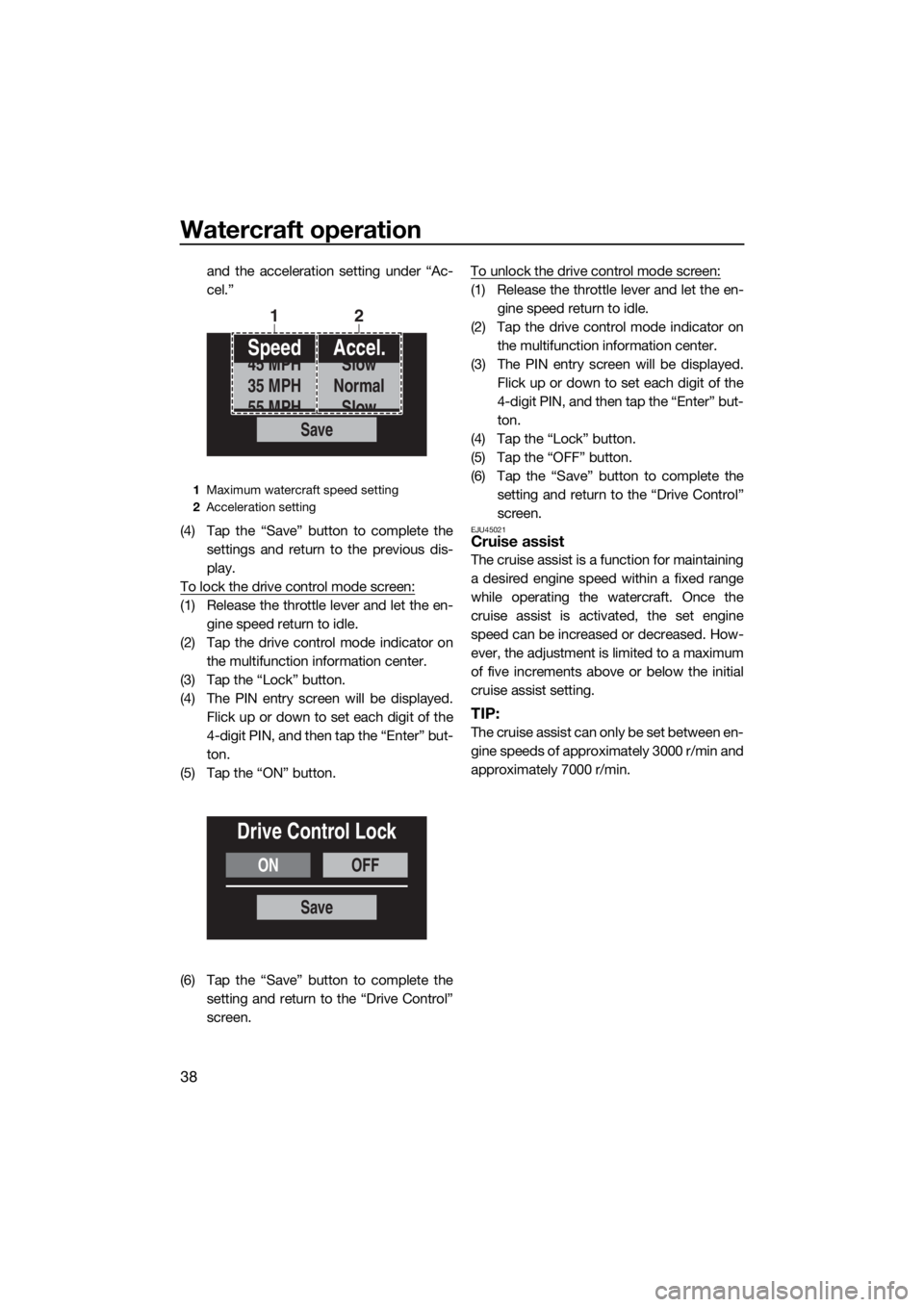
and the acceleration setting under “Ac-
cel.”
(4) Tap the “Save” button to complete the
settings and return to the previous dis-
play.
To lock the drive control mode screen:
(1) Release the throttle lever and let the en-
gine speed return to idle.
(2) Tap the drive control mode indicator on
the multifunction information center.
(3) Tap the “Lock” button.
(4) The PIN entry screen will be displayed.
Flick up or down to set each digit of the
4-digit PIN, and then tap the “Enter” but-
ton.
(5) Tap the “ON” button.
(6) Tap the “Save” button to complete the
setting and return to the “Drive Control”
screen.To unlock the drive control mode screen:
(1) Release the throttle lever and let the en-
gine speed return to idle.
(2) Tap the drive control mode indicator on
the multifunction information center.
(3) The PIN entry screen will be displayed.
Flick up or down to set each digit of the
4-digit PIN, and then tap the “Enter” but-
ton.
(4) Tap the “Lock” button.
(5) Tap the “OFF” button.
(6) Tap the “Save” button to complete the
setting and return to the “Drive Control”
screen.
EJU45021Cruise assist
The cruise assist is a function for maintaining
a desired engine speed within a fixed range
while operating the watercraft. Once the
cruise assist is activated, the set engine
speed can be increased or decreased. How-
ever, the adjustment is limited to a maximum
of five increments above or below the initial
cruise assist setting.
TIP:
The cruise assist can only be set between en-
gine speeds of approximately 3000 r/min and
approximately 7000 r/min.
1Maximum watercraft speed setting
2Acceleration setting
Save
Speed
35 MPH
45 MPH
55 MPHAccel.
Normal
Slow
Slow
12
ONOFF
Drive Control Lock
Save
UF3X70E0.book Page 38 Friday, August 24, 2018 9:23 AM
Page 50 of 116
Instrument operation
44
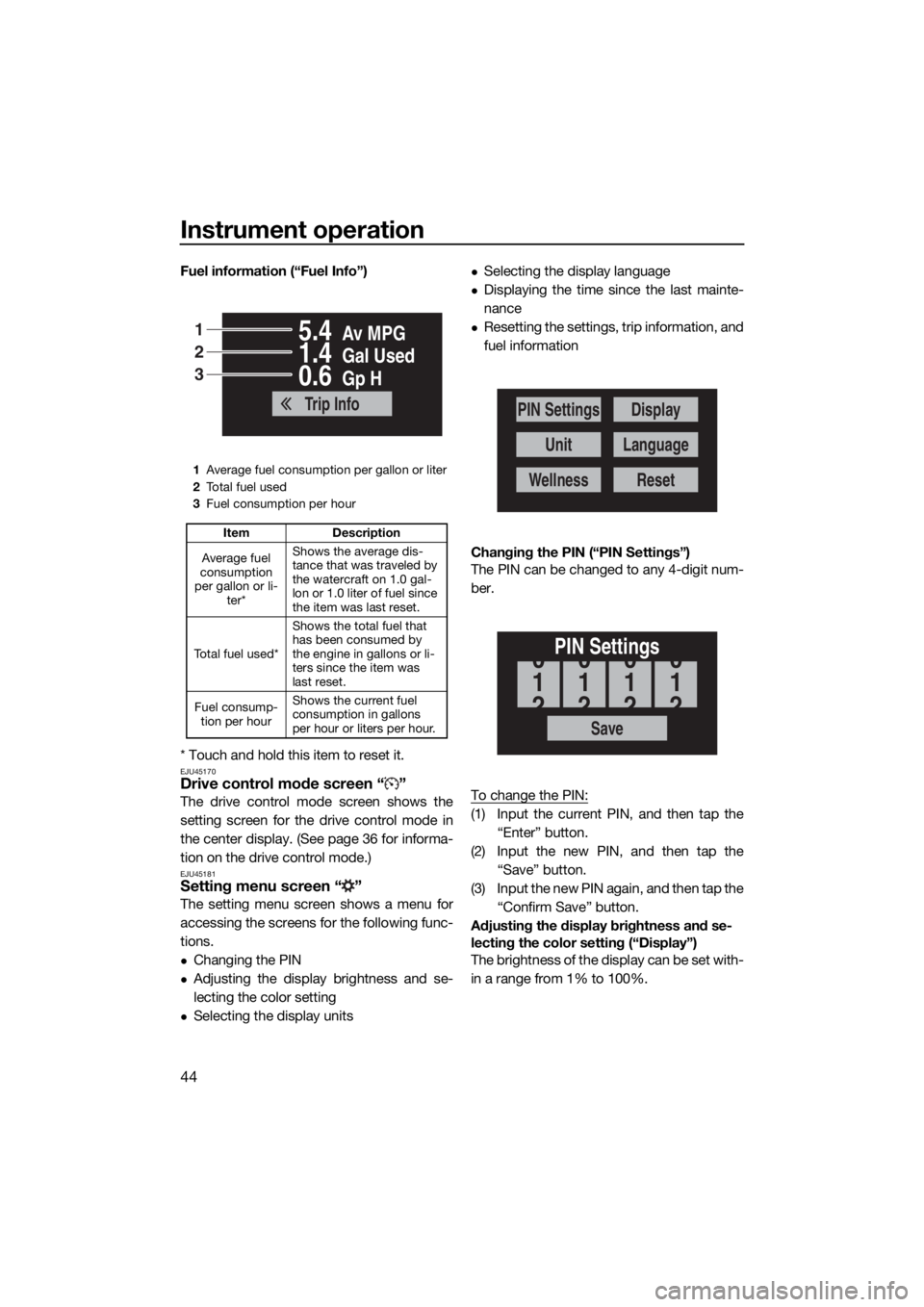
Fuel information (“Fuel Info”)
* Touch and hold this item to reset it.
EJU45170Drive control mode screen “ ”
The drive control mode screen shows the
setting screen for the drive control mode in
the center display. (See page 36 for informa-
tion on the drive control mode.)
EJU45181Setting menu screen “ ”
The setting menu screen shows a menu for
accessing the screens for the following func-
tions.
Changing the PIN
Adjusting the display brightness and se-
lecting the color setting
Selecting the display units
Selecting the display language
Displaying the time since the last mainte-
nance
Resetting the settings, trip information, and
fuel information
Changing the PIN (“PIN Settings”)
The PIN can be changed to any 4-digit num-
ber.
To change the PIN:
(1) Input the current PIN, and then tap the
“Enter” button.
(2) Input the new PIN, and then tap the
“Save” button.
(3) Input the new PIN again, and then tap the
“Confirm Save” button.
Adjusting the display brightness and se-
lecting the color setting (“Display”)
The brightness of the display can be set with-
in a range from 1% to 100%.
1Average fuel consumption per gallon or liter
2To t a l f u e l u s e d
3Fuel consumption per hour
Item Description
Average fuel
consumption
per gallon or li-
ter*Shows the average dis-
tance that was traveled by
the watercraft on 1.0 gal-
lon or 1.0 liter of fuel since
the item was last reset.
To t a l f u e l u s e d *Shows the total fuel that
has been consumed by
the engine in gallons or li-
ters since the item was
last reset.
Fuel consump-
tion per hourShows the current fuel
consumption in gallons
per hour or liters per hour.
Av MPG5.4
Gal Used1.4
Gp H0.6
Trip Info
1
2
3
PIN Settings
Unit
Wellness
Display
Language
Reset
Save
PIN Settings
1
0
2
1
0
2
1
0
2
1
0
2
UF3X70E0.book Page 44 Friday, August 24, 2018 9:23 AM
Page 51 of 116
Instrument operation
45
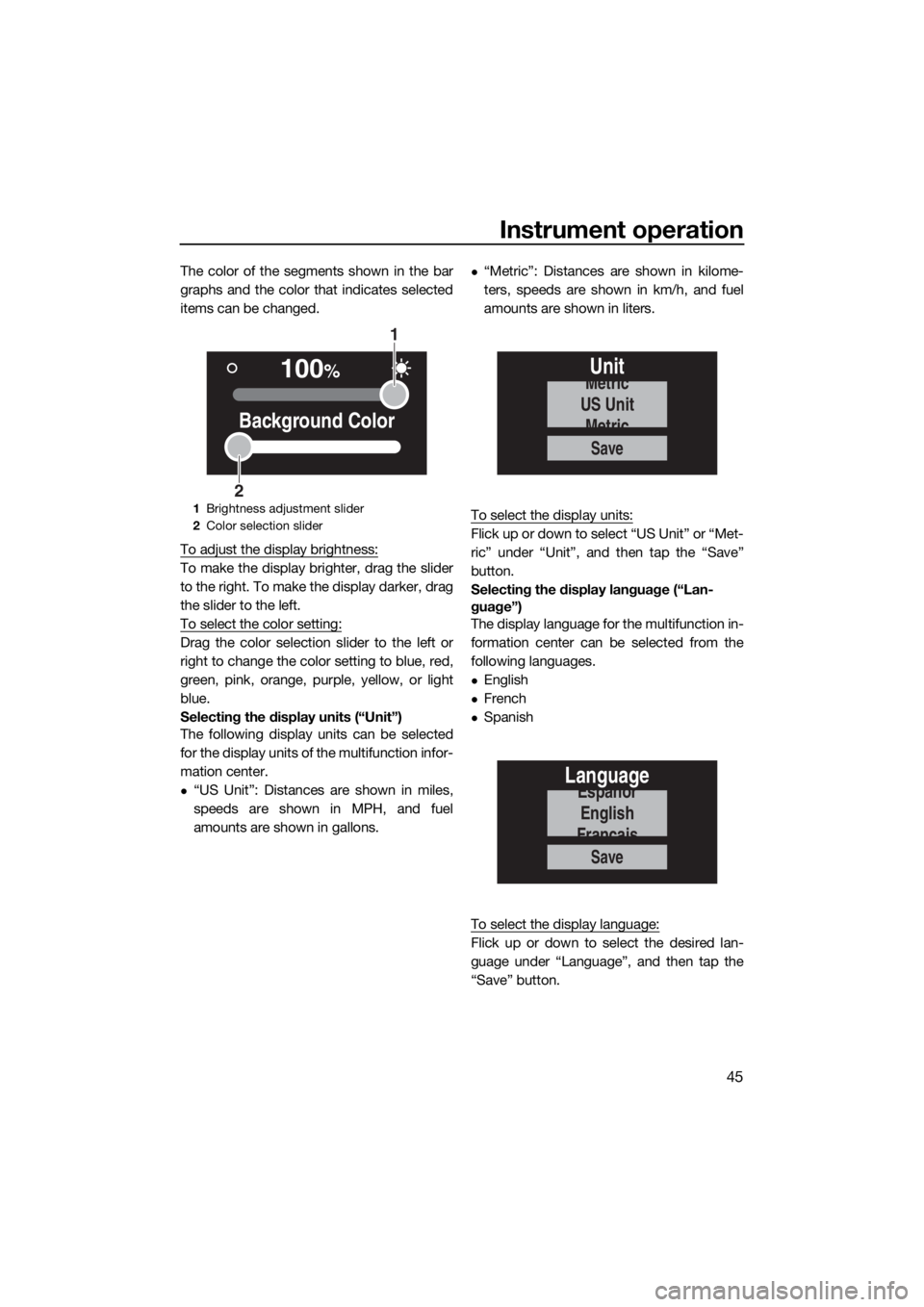
The color of the segments shown in the bar
graphs and the color that indicates selected
items can be changed.
To adjust the display brightness:
To make the display brighter, drag the slider
to the right. To make the display darker, drag
the slider to the left.
To select the color setting:
Drag the color selection slider to the left or
right to change the color setting to blue, red,
green, pink, orange, purple, yellow, or light
blue.
Selecting the display units (“Unit”)
The following display units can be selected
for the display units of the multifunction infor-
mation center.
“US Unit”: Distances are shown in miles,
speeds are shown in MPH, and fuel
amounts are shown in gallons.
“Metric”: Distances are shown in kilome-
ters, speeds are shown in km/h, and fuel
amounts are shown in liters.
To select the display units:
Flick up or down to select “US Unit” or “Met-
ric” under “Unit”, and then tap the “Save”
button.
Selecting the display language (“Lan-
guage”)
The display language for the multifunction in-
formation center can be selected from the
following languages.
English
French
Spanish
To select the display language:
Flick up or down to select the desired lan-
guage under “Language”, and then tap the
“Save” button.
1Brightness adjustment slider
2Color selection slider
100%
Background Color
1
2
Save
Unit
US Unit
Metric
Metric
Save
Language
English
Españor
Français
UF3X70E0.book Page 45 Friday, August 24, 2018 9:23 AM
Page 63 of 116
Operation and handling requirements
57
EJU31823
Fuel requirementsEJU45240Fuel
WARNING
EWJ00283
Gasoline and gasoline vapors are ex-
tremely flammable. To avoid fires and
explosions and to reduce the risk of in-
jury when refueling, follow these in-
structions.
Gasoline is poisonous and can cause in-
jury or death. Handle gasoline with care.
Never siphon gasoline by mouth. If you
should swallow some gasoline, inhale a
lot of gasoline vapor, or get some gaso-
line in your eyes, see your doctor imme-
diately. If gasoline spills on your skin,
wash with soap and water. If gasoline
spills on your clothing, change your
clothes.
NOTICE
ECJ01870
Do not use leaded gasoline. Leaded
gasoline can seriously damage the en-
gine.
Avoid getting water and contaminants in
the fuel tank. Contaminated fuel can
cause poor performance and engine
damage. Use only fresh gasoline that
has been stored in clean containers.
Use only gasoline with a minimum pump
octane number of 91 or a minimum re-
search octane number of 95. Low-oc-
tane gasoline can seriously damage the
engine.
Your Yamaha engine has been designed to
use premium unleaded gasoline with a pump
octane number [(R+M)/2] of 91 or higher, or a
research octane number of 95 or higher. Ifknocking (or pinging) occurs, use a gasoline
of a different brand.
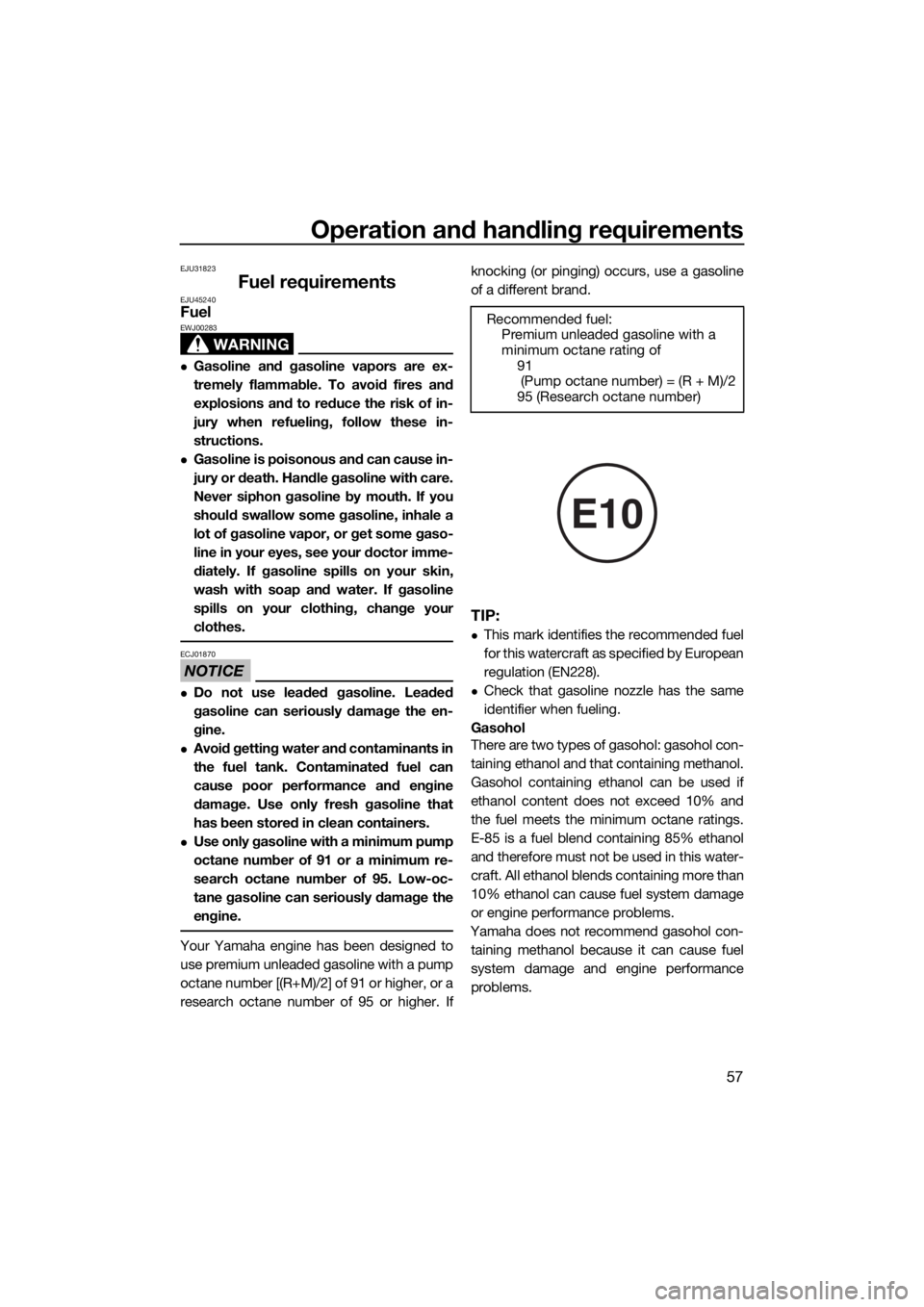
TIP:
This mark identifies the recommended fuel
for this watercraft as specified by European
regulation (EN228).
Check that gasoline nozzle has the same
identifier when fueling.
Gasohol
There are two types of gasohol: gasohol con-
taining ethanol and that containing methanol.
Gasohol containing ethanol can be used if
ethanol content does not exceed 10% and
the fuel meets the minimum octane ratings.
E-85 is a fuel blend containing 85% ethanol
and therefore must not be used in this water-
craft. All ethanol blends containing more than
10% ethanol can cause fuel system damage
or engine performance problems.
Yamaha does not recommend gasohol con-
taining methanol because it can cause fuel
system damage and engine performance
problems.Recommended fuel:
Premium unleaded gasoline with a
minimum octane rating of
91
(Pump octane number) = (R + M)/2
95 (Research octane number)
E10
UF3X70E0.book Page 57 Friday, August 24, 2018 9:23 AM