check YAMAHA GRIZZLY 700 2017 User Guide
[x] Cancel search | Manufacturer: YAMAHA, Model Year: 2017, Model line: GRIZZLY 700, Model: YAMAHA GRIZZLY 700 2017Pages: 174, PDF Size: 4.45 MB
Page 36 of 174
4-4
4tem may not be working correctly. When this oc-
curs, have a Yamaha dealer check the EPS
system.
The electrical circuit of the warning light can be
checked by turning the key to “ ” (on). If the
warning light does not come on, have a Yamaha
dealer check the electrical circuit.
TIP
If the engine is stopped using the engine stop
switch and the key is in the “ ” (on) position,
the EPS warning light comes on to indicate that
the power assistance for the steering is not
functioning.
If the steering load is too heavy (i.e., excessive
steering use when the ATV is traveling at a slow
speed), the power assist is reduced to protect
the EPS motor from overheating. EBU30451On-Command four-wheel-drive indicator “ ”,
On-Command differential gear lock
indicator “ ” and indicator light “DIFF. LOCK”
The On-Command four-wheel-drive indicator “ ”
comes on when the On-Command four-wheel-
drive switch is set to the “4WD” position. The On-Command differential gear lock
indicator “ ” and the On-Command differential
gear lock indicator light “DIFF. LOCK” come on
when the On-Command differential gear lock
switch is set to the “LOCK” position.
TIP
Due to the synchronizing mechanism in the dif-
ferential gear case, the four-wheel-drive indica-
tor may not come on until the ATV starts
moving.
When the On-Command differential gear lock
switch is set to “LOCK” or “4WD”, the
indicator “ ” and the indicator light “DIFF.
LOCK” will flash until the differential gear is
completely locked or unlocked. If the indicator
and the indicator light continue to flash, the dif-
ferential is not completely locked or unlocked.
In this case, start moving to allow time for the
differential to lock or unlock.
U2UD61E0.book Page 4 Monday, April 25, 2016 10:55 AM
Page 38 of 174
4-6
4To reset a tripmeter, set the display to the tripme-
ter you want to reset, then push the “RESET” but-
ton for three seconds.
TIP
The odometer will lock at 99999.
The tripmeters will reset and continue counting
after 9999.9 is reached. Clock and hour meter
The clock displays time in 12-hour format.
The hour meter shows the total time the engine
has been running.
Push the “CLOCK” button to switch between the
clock “CLOCK” and the hour meter mode
“HOUR” in the following order:
CLOCK → HOUR → CLOCK
To set the clock1. Set the display to the clock.
2. Push both the “SELECT” button and “RE- SET” button for three seconds. The hour dig-
its will start flashing.
3. Push the “RESET” button to set the hours.
4. Push the “SELECT” button, and the minute digits will start flashing.
5. Push the “RESET” button to set the minutes. 6. Push the “SELECT” button and then release
it to start the clock.
Fuel gauge
The fuel gauge indicates the amount of fuel in the
fuel tank. The display segments of the fuel gauge
disappear from “F” (full) towards “E” (empty) as
the fuel level decreases. When the “E” segment
disappears and the fuel level warning indicator
flashes, refuel as soon as possible.
TIPThe fuel gauge is equipped with a self-diagnosis
system. If the fuel gauge electrical circuit is not
working correctly, all display segments and the
fuel level warning indicator will flash repeatedly. If
this occurs, have a Yamaha dealer check the ve-
hicle.
U2UD61E0.book Page 6 Monday, April 25, 2016 10:55 AM
Page 39 of 174
4-7
4
Error code display
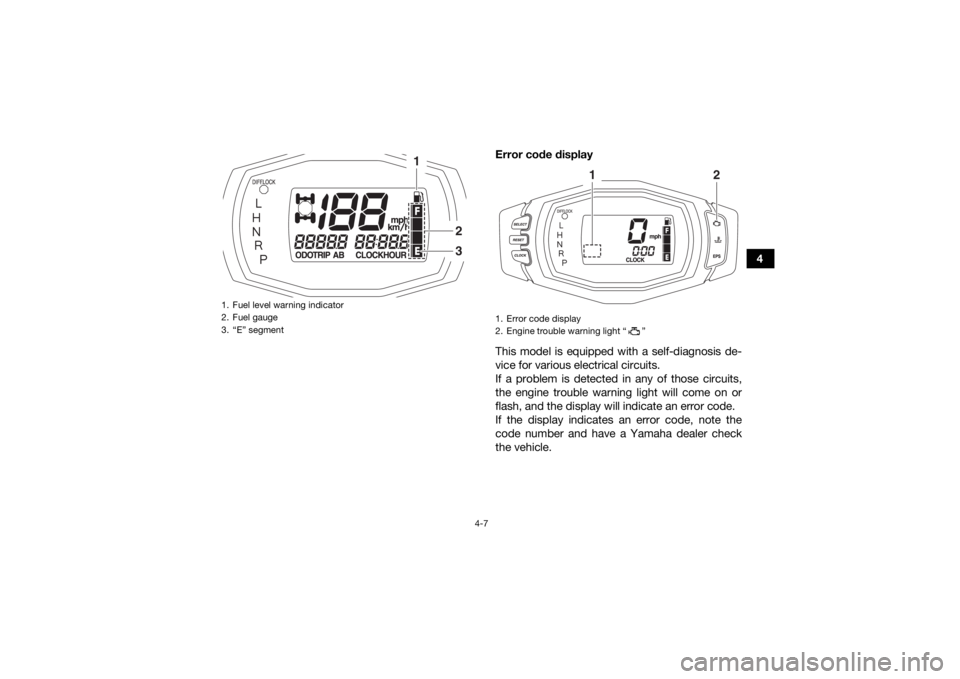
This model is equipped with a self-diagnosis de-
vice for various electrical circuits.
If a problem is detected in any of those circuits,
the engine trouble warning light will come on or
flash, and the display will indicate an error code.
If the display indicates an error code, note the
code number and have a Yamaha dealer check
the vehicle.
1. Fuel level warning indicator
2. Fuel gauge
3. “E” segment
1
23
1. Error code display
2. Engine trouble warning light “ ”
1
2
U2UD61E0.book Page 7 Monday, April 25, 2016 10:55 AM
Page 40 of 174
4-8
4
NOTICEECB00812If the multi-function display indicates an error
code, the vehicle should be checked as soon
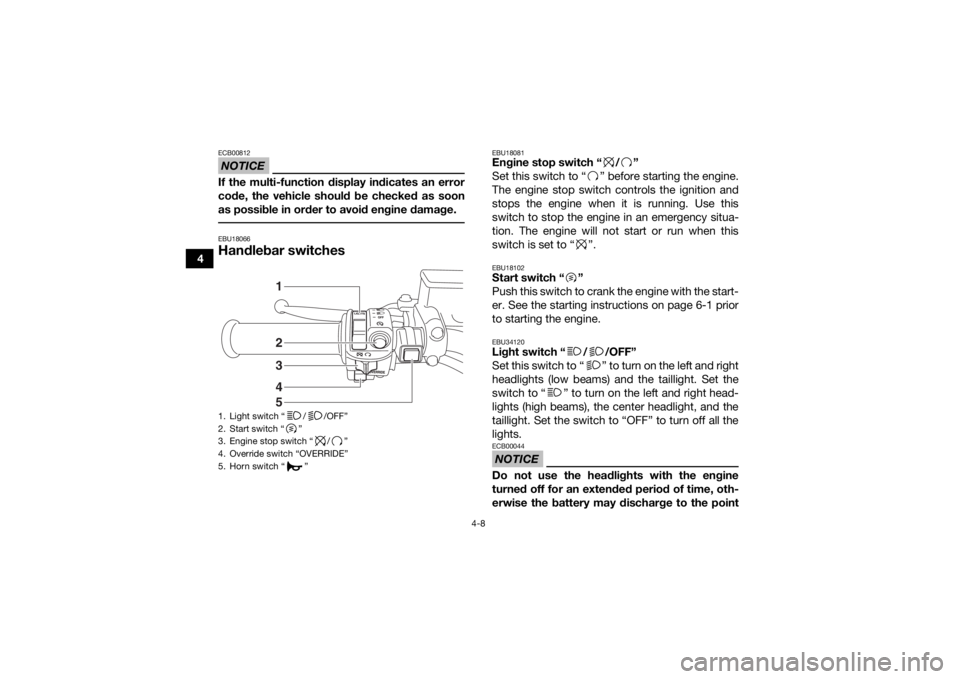
as possible in order to avoid engine damage. EBU18066Handlebar switches
EBU18081Engine stop switch “ / ”
Set this switch to “ ” before starting the engine.
The engine stop switch controls the ignition and
stops the engine when it is running. Use this
switch to stop the engine in an emergency situa-
tion. The engine will not start or run when this
switch is set to “ ”.EBU18102Start switch “ ”
Push this switch to crank the engine with the start-
er. See the starting instructions on page 6-1 prior
to starting the engine.EBU34120Light switch “ / /OFF”
Set this switch to “ ” to turn on the left and right
headlights (low beams) and the taillight. Set the
switch to “ ” to turn on the left and right head-
lights (high beams), the center headlight, and the
taillight. Set the switch to “OFF” to turn off all the
lights.NOTICEECB00044Do not use the headlights with the engine
turned off for an extended period of time, oth-
erwise the battery may discharge to the point
1. Light switch “ / /OFF”
2. Start switch “ ”
3. Engine stop switch “ / ”
4. Override switch “OVERRIDE”
5. Horn switch “ ”
45321
U2UD61E0.book Page 8 Monday, April 25, 2016 10:55 AM
Page 46 of 174
4-14
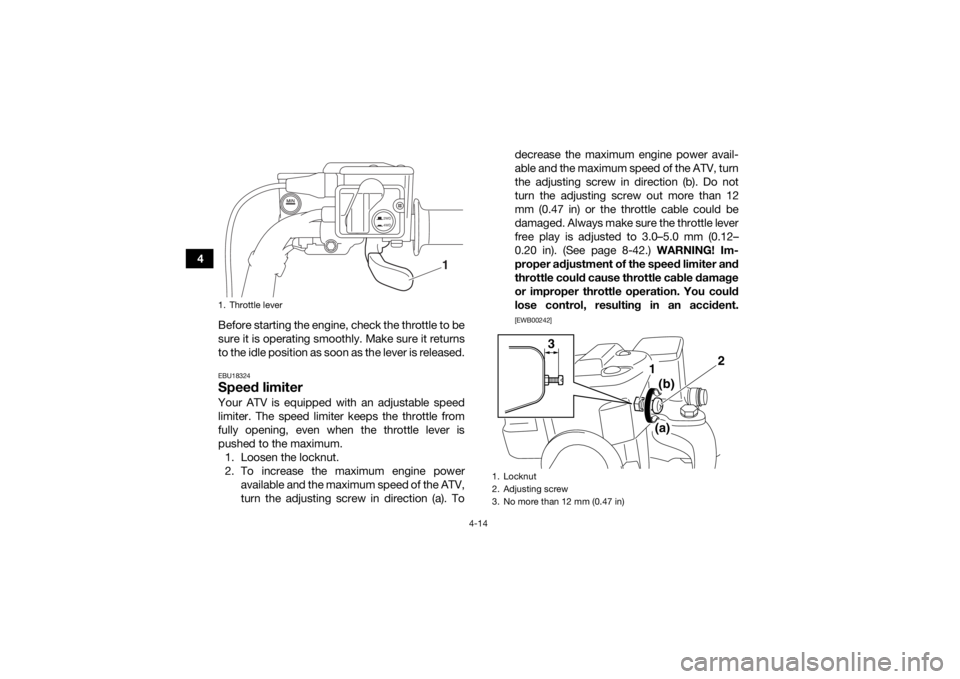
4Before starting the engine, check the throttle to be
sure it is operating smoothly. Make sure it returns
to the idle position as soon as the lever is released.
EBU18324Speed limiterYour ATV is equipped with an adjustable speed
limiter. The speed limiter keeps the throttle from
fully opening, even when the throttle lever is
pushed to the maximum.1. Loosen the locknut.
2. To increase the maximum engine power available and the maximum speed of the ATV,
turn the adjusting screw in direction (a). To decrease the maximum engine power avail-
able and the maximum speed of the ATV, turn
the adjusting screw in direction (b). Do not
turn the adjusting screw out more than 12
mm (0.47 in) or the throttle cable could be
damaged. Always make sure the throttle lever
free play is adjusted to 3.0–5.0 mm (0.12–
0.20 in). (See page 8-42.) WARNING! Im-
proper adjustment of the speed limiter and
throttle could cause throttle cable damage
or improper throttle operation. You could
lose control, resulting in an accident.
[EWB00242]
1. Throttle lever
2WD
4WD
1
1. Locknut
2. Adjusting screw
3. No more than 12 mm (0.47 in)
2
1
3
(b)
(a)
U2UD61E0.book Page 14 Monday, April 25, 2016 10:55 AM
Page 58 of 174
5-1
5
EBU19203
PRE-OPERATION CHECKS
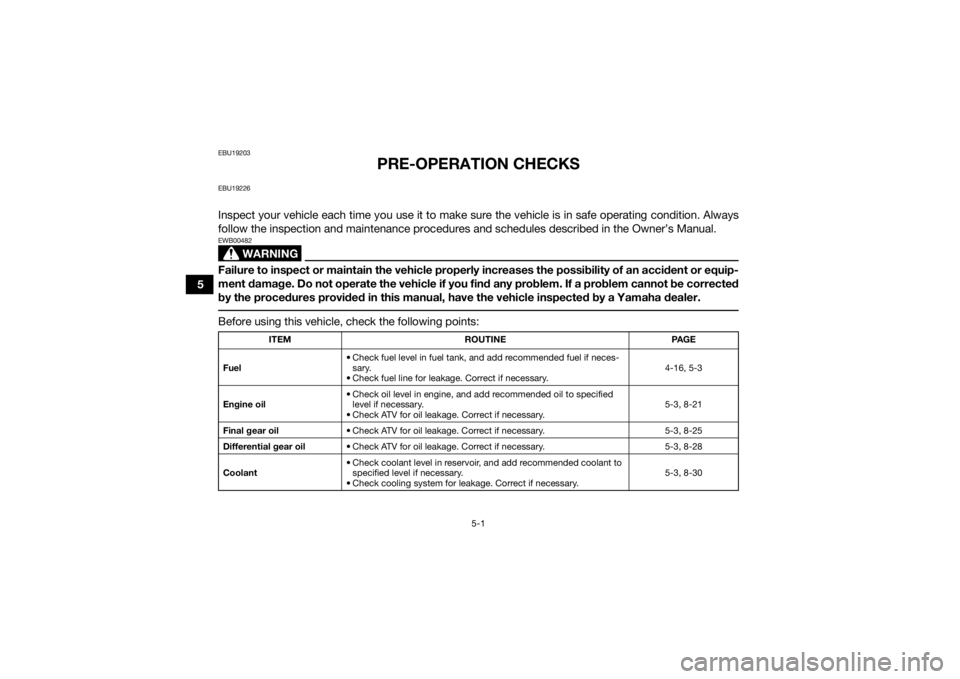
EBU19226Inspect your vehicle each time you use it to make sure the vehicle is in safe operating condition. Always
follow the inspection and maintenance procedures and schedules described in the Owner’s Manual.
WARNING
EWB00482Failure to inspect or maintain the vehicle properly increases the possibility of an accident or equip-
ment damage. Do not operate the vehicle if you find any problem. If a problem cannot be corrected
by the procedures provided in this manual, have the vehicle inspected by a Yamaha dealer. Before using this vehicle, check the following points:
ITEMROUTINE PAGE
Fuel • Check fuel level in fuel tank,
and add recommended fuel if neces-
sary.
• Check fuel line for leakage. Correct if necessary. 4-16, 5-3
Engine oil • Check oil level in engine, and add recommended oil to specified
level if necessary.
• Check ATV for oil leakage. Correct if necessary. 5-3, 8-21
Final gear oil • Check ATV for oil leakage. Correct if necessary. 5-3, 8-25
Differential gear oil • Check ATV for oil leakage. Correct if necessary. 5-3, 8-28
Coolant • Check coolant level in reservoir, and add recommended coolant to
specified level if necessary.
• Check cooling system for leakage. Correct if necessary. 5-3, 8-30
U2UD61E0.book Page 1 Monday, April 25, 2016 10:55 AM
Page 59 of 174

5-2
5
Front brake• Check operation. If soft or spongy, have Yamaha dealer bleed hy-
draulic system.
• Check brake pads for wear, and replace if necessary.
• Check brake fluid level in reservoir, and add specified brake fluid to specified level if necessary.
• Check hydraulic system for leakage. Correct if necessary. 5-3, 8-43, 8-44, 8-46
Rear brake • Check operation. If soft or spongy, have Yamaha dealer bleed hy-
draulic system.
• Check pedal free play, and adjust if necessary.
• Check brake pads for wear, and replace if necessary.
• Check brake fluid level in reservoir, and add specified brake fluid to specified level if necessary.
• Check hydraulic system for leakage. Correct if necessary. 5-3, 8-43, 8-44, 8-46,
8-47
Throttle lever • Make sure that operation is smooth. Lubricate cable and lever
housing if necessary.
• Check lever free play, and adjust if necessary. 5-4, 8-42
Control cables • Make sure that operation is smooth. Lubricate if necessary. 8-49
Wheels and tires • Check wheel condition, and replace if damaged.
• Check tire condition and tread depth. Replace if necessary.
• Check air pressure. Correct if necessary. 5-4
Brake pedal • Make sure that operation is smooth. Lubricate pedal pivoting point
if necessary. 8-51
Brake levers • Make sure that operation is smooth. Lubricate lever pivoting points
if necessary. 8-50
Axle boots • Check for cracks or damage, and replace if necessary. 8-49
Chassis fasteners • Make sure that all nuts, bolts and screws are properly tightened. 5-6
Instruments, lights and
switches • Check operation, and correct if necessary. 5-7
ITEM ROUTINE PAGE
U2UD61E0.book Page 2 Monday, April 25, 2016 10:55 AM
Page 60 of 174
5-3
5
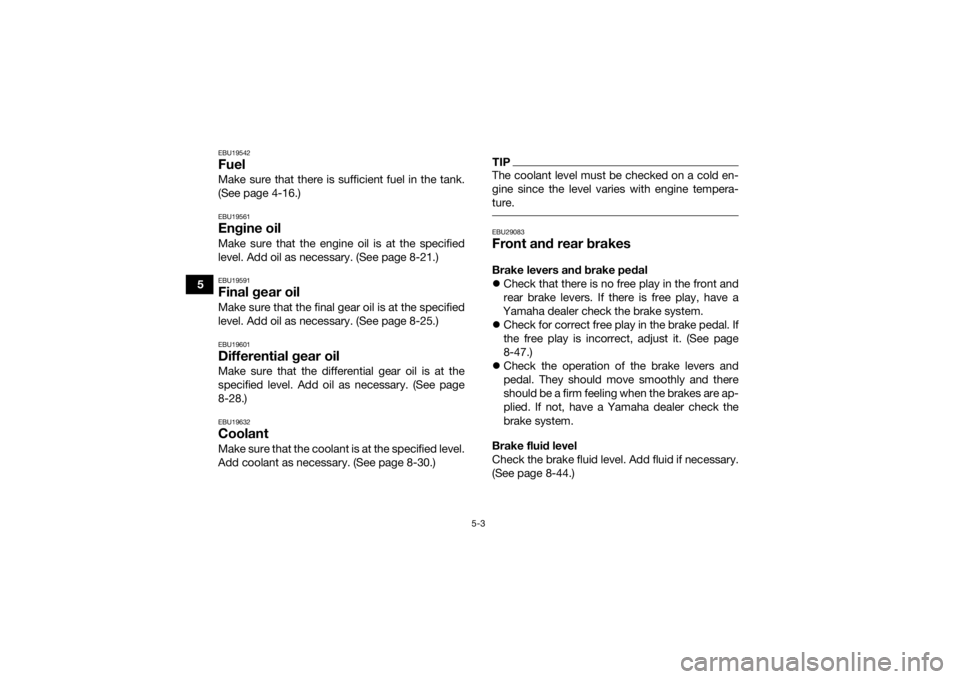
EBU19542FuelMake sure that there is sufficient fuel in the tank.
(See page 4-16.)EBU19561Engine oilMake sure that the engine oil is at the specified
level. Add oil as necessary. (See page 8-21.)EBU19591Final gear oilMake sure that the final gear oil is at the specified
level. Add oil as necessary. (See page 8-25.)EBU19601Differential gear oilMake sure that the differential gear oil is at the
specified level. Add oil as necessary. (See page
8-28.)EBU19632CoolantMake sure that the coolant is at the specified level.
Add coolant as necessary. (See page 8-30.)
TIPThe coolant level must be checked on a cold en-
gine since the level varies with engine tempera-
ture. EBU29083Front and rear brakesBrake levers and brake pedal
Check that there is no free play in the front and
rear brake levers. If there is free play, have a
Yamaha dealer check the brake system.
Check for correct free play in the brake pedal. If
the free play is incorrect, adjust it. (See page
8-47.)
Check the operation of the brake levers and
pedal. They should move smoothly and there
should be a firm feeling when the brakes are ap-
plied. If not, have a Yamaha dealer check the
brake system.
Brake fluid level
Check the brake fluid level. Add fluid if necessary.
(See page 8-44.)
U2UD61E0.book Page 3 Monday, April 25, 2016 10:55 AM
Page 61 of 174

5-4
5
Brake fluid leakage
Check to see if any brake fluid is leaking out of the
pipe joints or brake fluid reservoirs. Apply the
brakes firmly for one minute. If a lever moves
slowly inward, there may be a leak in the brake
system. If there is any leakage, the brake system
should be checked by a Yamaha dealer.
Brake operation
Test the brakes at slow speed after starting out to
make sure they are working properly. If the brakes
do not provide proper braking performance,
check the brake pads for wear. (See page 8-43.)
EBU19762Throttle leverCheck the operation of the throttle lever. It must
open smoothly and spring back to the idle position
when released. Have a Yamaha dealer correct if
necessary.
EBU19815TiresCheck tire pressure regularly to make sure it is at
the recommended specifications. Also check for
wear and damage.
Tire pressure
Use the low-pressure tire gauge to check and ad-
just tire pressures when the tires are cold. Tire
pressures must be equal on both sides.
WARNING! Operation of this vehicle with im- proper tire pressure may cause severe injury or
death from loss of control or rollover. Tire
pressure below the minimum specified could
also cause the tire to dislodge from the rim un-
der severe riding conditions.
[EWB02542]
Set tire
pressures to the following specifications:
Specified brake fluid:
DOT 4
U2UD61E0.book Page 4 Monday, April 25, 2016 10:55 AM
Page 64 of 174

5-7
5
EBU19851Instruments, lights and switchesCheck that all instruments, lights and switches are
working properly. Correct if necessary.U2UD61E0.book Page 7 Monday, April 25, 2016 10:55 AM