key YAMAHA NMAX 125 2020 User Guide
[x] Cancel search | Manufacturer: YAMAHA, Model Year: 2020, Model line: NMAX 125, Model: YAMAHA NMAX 125 2020Pages: 114, PDF Size: 10.63 MB
Page 25 of 114
Smart key system
3-7
3
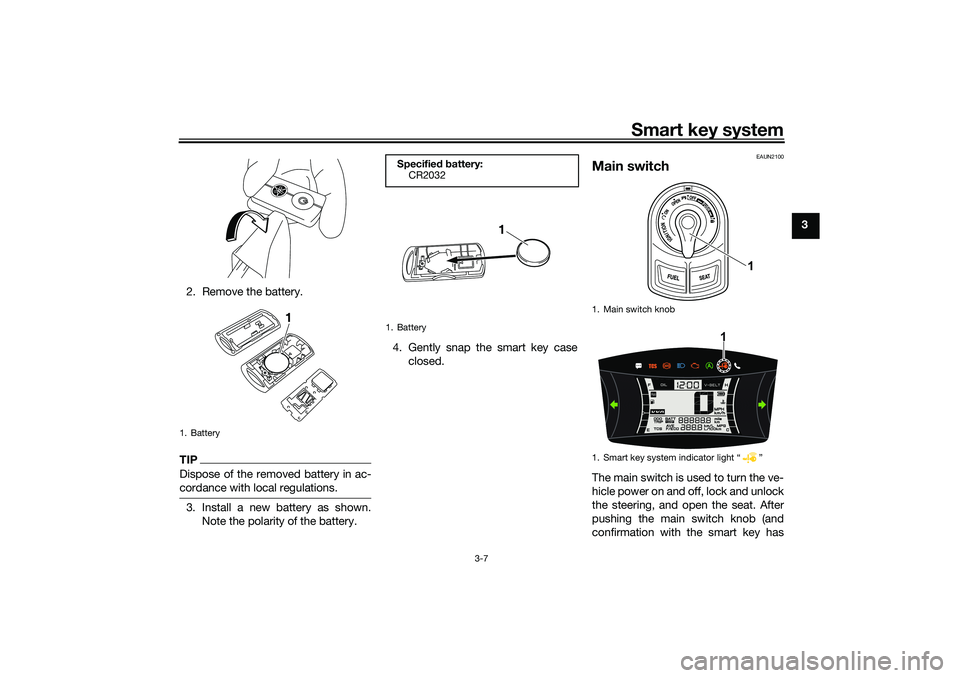
2. Remove the battery.
TIPDispose of the removed battery in ac-
cordance with local regulations.3. Install a new battery as shown.
Note the polarity of the battery.4. Gently snap the smart key case
closed.
EAUN2100
Main switchThe main switch is used to turn the ve-
hicle power on and off, lock and unlock
the steering, and open the seat. After
pushing the main switch knob (and
confirmation with the smart key has
1. Battery
1
Specified battery:
CR2032
1. Battery
1
1. Main switch knob
1. Smart key system indicator light Ž
1
1
UBALE0E0.book Page 7 Wednesday, September 30, 2020 1:37 PM
Page 26 of 114
Smart key system
3-8
3taken place), the main switch can be
turned while the smart key system indi-
cator light is on (approximately 4 sec-
onds).
WARNING
EWA18720
Never turn the main switch to
“OFF”, “ ”, or “OPEN” while the ve-
hicle is moving. Otherwise the elec-
trical systems will be switched off,
which may result in loss of control or
an accident.TIPDo not push the main switch knob re-
peatedly or turn the main switch back
and forth excessively (beyond normal
use). To protect the main switch from
damage, the smart key system will
temporarily disable, and the smart key
system indicator light will flash. If this
occurs, wait until the indicator light
stops flashing, and then operate the
main switch.The main switch positions are de-
scribed below.
EAU76502
ON
All electrical circuits are supplied with
power, and the engine can be started.
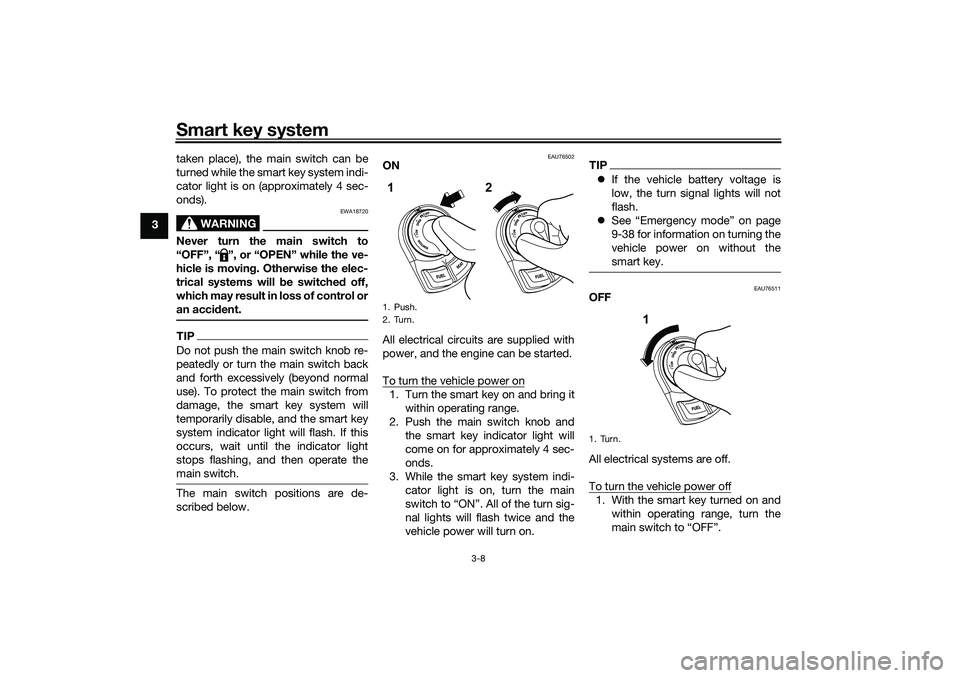
To turn the vehicle power on1. Turn the smart key on and bring it
within operating range.
2. Push the main switch knob and
the smart key indicator light will
come on for approximately 4 sec-
onds.
3. While the smart key system indi-
cator light is on, turn the main
switch to “ON”. All of the turn sig-
nal lights will flash twice and the
vehicle power will turn on.
TIPIf the vehicle battery voltage is
low, the turn signal lights will not
flash.
See “Emergency mode” on page
9-38 for information on turning the
vehicle power on without the
smart key.
EAU76511
OFF
All electrical systems are off.
To turn the vehicle power off1. With the smart key turned on and
within operating range, turn the
main switch to “OFF”.
1. Push.
2. Turn.1
2
1. Turn.
1
UBALE0E0.book Page 8 Wednesday, September 30, 2020 1:37 PM
Page 27 of 114
Smart key system
3-9
3 2. The turn signal lights flash once
and the vehicle power turns off.
TIPWhen the main switch is turned to
confirmed (the smart key is either out-
side operation range or has been
turned off), the beeper will sound for 3
seconds and the smart key system in-
dicator light will flash for 30 seconds.
During this 30 seconds, the main
switch can be freely operated.
After 30 seconds, the vehicle
power will turn off automatically.
To turn the vehicle power off im-
mediately, push the main switch
knob four times within 2 seconds.
EAU76534
OPEN
The fuel tank cap lid and the seat can
be opened:
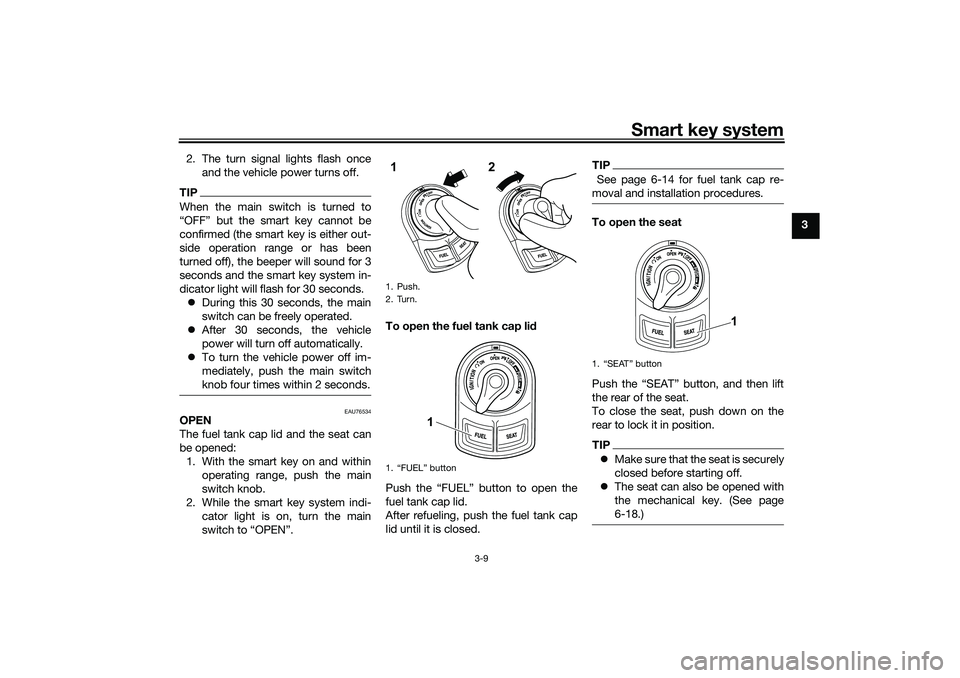
1. With the smart key on and within
operating range, push the main
switch knob.
2. While the smart key system indi-
cator light is on, turn the main
switch to “OPEN”.To open the fuel tank cap lid
Push the “FUEL” button to open the
fuel tank cap lid.
After refueling, push the fuel tank cap
lid until it is closed.
TIP See page 6-14 for fuel tank cap re-
moval and installation procedures.To open the seat
Push the “SEAT” button, and then lift
the rear of the seat.
To close the seat, push down on the
rear to lock it in position.TIPMake sure that the seat is securely
closed before starting off.
The seat can also be opened with
the mechanical key. (See page
6-18.)
1. Push.
2. Turn.
1. “FUEL” button1
2
1
1.
1
UBALE0E0.book Page 9 Wednesday, September 30, 2020 1:37 PM
Page 28 of 114
Smart key system
3-10
3Open position reminder
To prevent you from accidentally leav-
ing the vehicle unlocked by walking
away with the main switch still in the
“OPEN” position, the smart key system
beeper will sound under the following
conditions.
When the main switch has been in
the open position for 3 minutes
If the smart key is turned off while
the main switch is in the open po-
sition
If you walk out of range of the
smart key system with the main
switch in the open position
If the beeper sounds after 3 minutes,
turn the main switch to “OFF” or “ ”. If
the beeper sounds because the smart
key was turned off or moved out of
range, turn the smart key on and walk
back into range.
TIPThe beeper will turn off after 1
minute.
EAU76521
“ ” (lock)
The steering is locked and all electrical
systems are off.
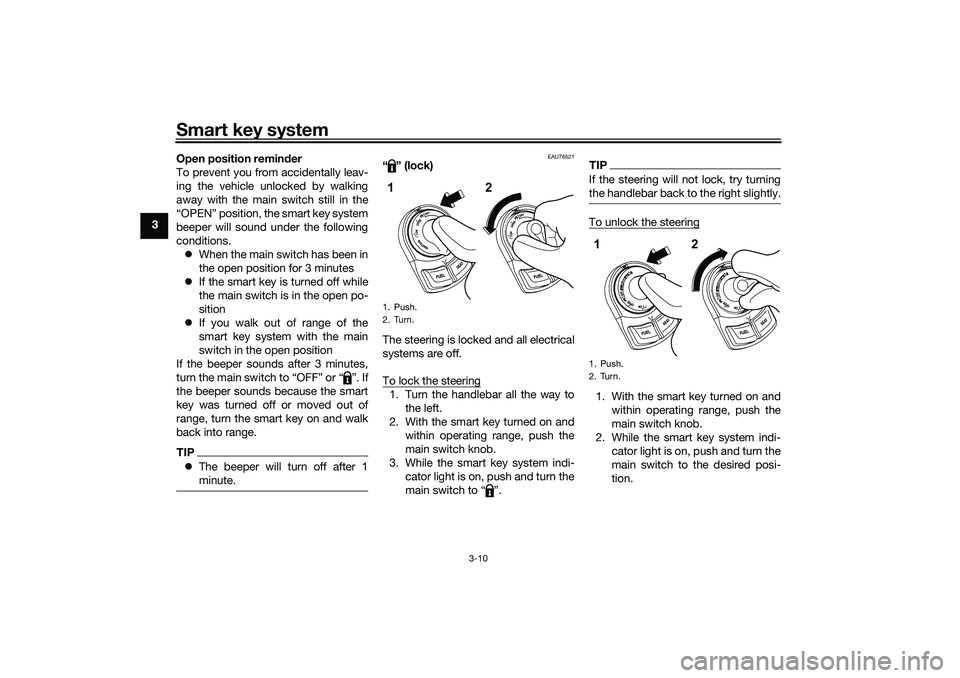
To lock the steering1. Turn the handlebar all the way to
the left.
2. With the smart key turned on and
within operating range, push the
main switch knob.
3. While the smart key system indi-
cator light is on, push and turn the
main switch to “ ”.
TIPIf the steering will not lock, try turning
the handlebar back to the right slightly.To unlock the steering1. With the smart key turned on and
within operating range, push the
main switch knob.
2. While the smart key system indi-
cator light is on, push and turn the
main switch to the desired posi-
tion.
1. Push.
2. Turn.1
2
1. Push.
2. Turn.12
UBALE0E0.book Page 10 Wednesday, September 30, 2020 1:37 PM
Page 35 of 114
Instrument and control functions
6-1
6
EAU77123
Indicator lights and warning
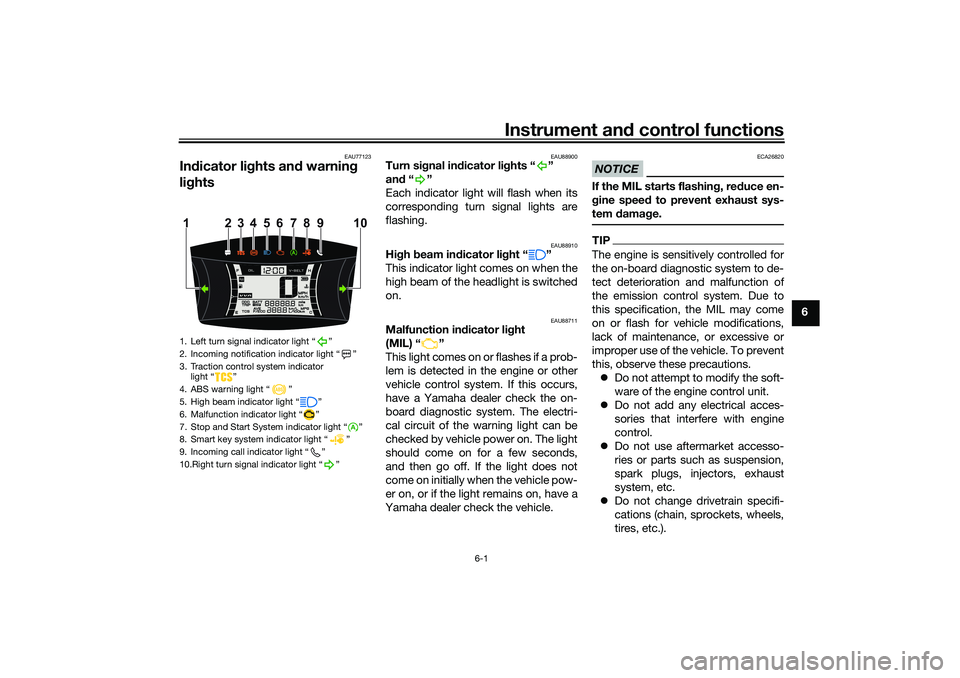
lights
EAU88900
Turn signal indicator lights “ ”
and“”
Each indicator light will flash when its
corresponding turn signal lights are
flashing.
EAU88910
High beam indicator light “ ”
This indicator light comes on when the
high beam of the headlight is switched
on.
EAU88711
Malfunction indicator light
(MIL) “ ”
This light comes on or flashes if a prob-
lem is detected in the engine or other
vehicle control system. If this occurs,
have a Yamaha dealer check the on-
board diagnostic system. The electri-
cal circuit of the warning light can be
checked by vehicle power on. The light
should come on for a few seconds,
and then go off. If the light does not
come on initially when the vehicle pow-
er on, or if the light remains on, have a
Yamaha dealer check the vehicle.
NOTICE
ECA26820
If the MIL starts flashing, reduce en-
gine speed to prevent exhaust sys-
tem damage.TIPThe engine is sensitively controlled for
the on-board diagnostic system to de-
tect deterioration and malfunction of
the emission control system. Due to
this specification, the MIL may come
on or flash for vehicle modifications,
lack of maintenance, or excessive or
improper use of the vehicle. To prevent
this, observe these precautions.
Do not attempt to modify the soft-
ware of the engine control unit.
Do not add any electrical acces-
sories that interfere with engine
control.
Do not use aftermarket accesso-
ries or parts such as suspension,
spark plugs, injectors, exhaust
system, etc.
Do not change drivetrain specifi-
cations (chain, sprockets, wheels,
tires, etc.).
1. Left turn signal indicator light “ ”
2. Incoming notification indicator light “ ”
3. Traction control system indicator
light “ ”
4. ABS warning light “ ”
5. High beam indicator light “ ”
6. Malfunction indicator light “ ”
7. Stop and Start System indicator light “ ”
8. Smart key system indicator light “ ”
9. Incoming call indicator light “ ”
10.Right turn signal indicator light “ ”
4 110
5
6
7
8
23 9
UBALE0E0.book Page 1 Wednesday, September 30, 2020 1:37 PM
Page 36 of 114
Instrument and control functions
6-2
6Do not remove or alter the O2 sen-
sor, air induction system, or ex-
haust parts (catalysts or EXUP,
etc.).
Maintain proper V-belt and drive
belt (if equipped).
Maintain correct tire pressure.
Do not operate the vehicle in an
extreme manner. For example, re-
peated or excessive opening and
closing of the throttle, racing,
burnouts, wheelies, etc.
EAU88890
ABS warning light “ ”
This warning light comes on when the
vehicle is first turned on, and goes off
after starting riding. If the warning light
comes on while riding, the anti-lock
brake system may not work correctly.
WARNING
EWA16043
If the ABS warning light does not
turn off after reaching 10 km/h (6
mi/h), or if the warning light comes
on while riding:
Use extra caution to avoid pos-
sible wheel lock during emer-
gency braking. Have a Yamaha dealer check
the vehicle as soon as possible.
TIPThe ABS warning light may come on
while revving the engine with the vehi-
cle on its centerstand, but this does
not indicate a malfunction.
EAU88930
Traction control system indicator
light “ ”
This indicator light will flash when trac-
tion control has engaged.
If the traction control system is turned
off, this indicator light will come on.
(See page 6-12.)TIPWhen the vehicle is turned on, the light
should come on for a few seconds and
then go off. If the light does not come
on, or if the light remains on, have a
Yamaha dealer check vehicle.
EAUN2770
Smart key system indicator
light “ ”
This indicator light communicates the
status of the smart key system. When
the smart key system is operating nor-
mally, this indicator light will be off. If
there is an error in the smart key sys-
tem, the indicator light will flash. The
indicator light will also flash when com-
munication between the vehicle and
smart key takes place and when cer-
tain smart key system operations are
carried out.
EAUN2830
Stop and Start System indicator
light “ ”
This indicator light comes on when the
Stop and Start System activates. The
indicator light will flash when the en-
gine is automatically stopped by the
Stop and Start System.TIPEven if the Stop and Start Switch is set
to Ž, this indicator light may not
come on. (See page 4-1.)
A
UBALE0E0.book Page 2 Wednesday, September 30, 2020 1:37 PM
Page 46 of 114
Instrument and control functions
6-12
6
TIPThe ABS performs a self-diagno-
sis test each time the vehicle first
starts off after the key is turned to
“ON” and the vehicle has traveled
at a speed of 10 km/h (6 mi/h) or
higher. During this test, a “click-
ing” noise can be heard from the
front of the vehicle, and if either
brake lever is even slightly ap-
plied, a vibration can be felt at the
lever, but these do not indicate a
malfunction.
This ABS has a test mode which
allows the owner to experience
the pulsation at the brake levers
when the ABS is operating. How-
ever, special tools are required, so
please consult your Yamaha deal-
er.NOTICE
ECA20100
Be careful not to damage the wheel
sensor or wheel sensor rotor; other-
wise, improper performance of the
ABS will result.
EAUN2810
Traction control systemThe traction control system (TCS)
helps maintain traction when acceler-
ating on slippery surfaces, such as un-
paved or wet roads. If sensors detect
that the rear wheel is starting to slip
(uncontrolled spinning), the traction
control system assists by regulating
engine power until traction is restored.
When traction control has engaged,
the “ ” indicator light will flash. You
may notice changes in engine re-
sponse or exhaust sound.
WARNING
EWA18860
The traction control system is not a
substitute for riding appropriately
for the conditions. Traction control
cannot prevent loss of traction due
to excessive speed when entering
turns, when accelerating hard at a
sharp lean angle, or while braking,
and cannot prevent front wheel slip-
ping. As with any vehicle, approach
surfaces that may be slippery with
caution and avoid especially slip-
pery surfaces.
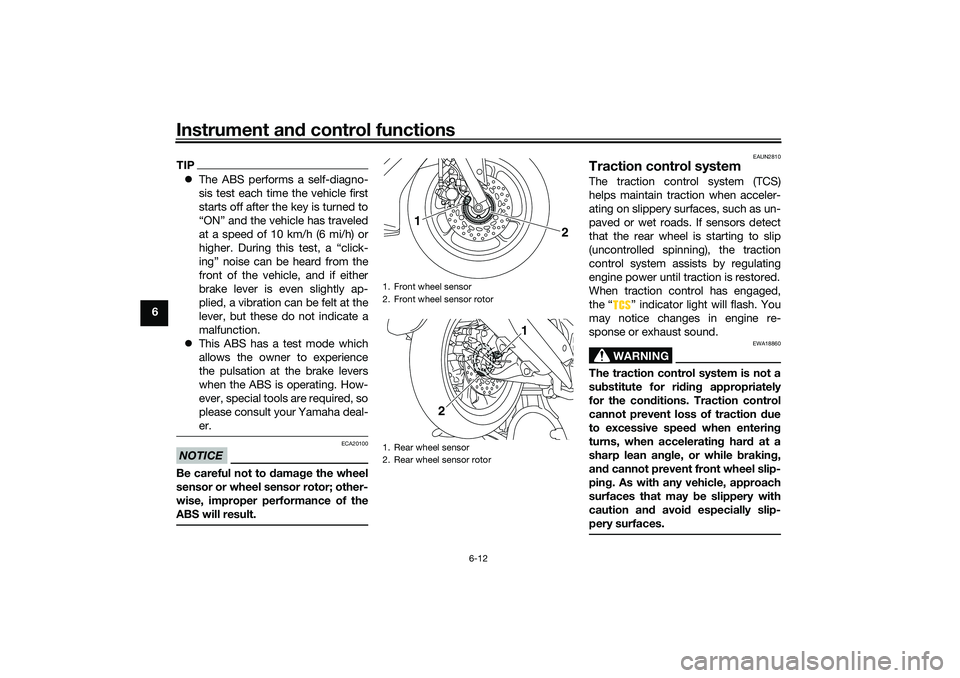
1. Front wheel sensor
2. Front wheel sensor rotor
1. Rear wheel sensor
2. Rear wheel sensor rotor
2
1
1
2
UBALE0E0.book Page 12 Wednesday, September 30, 2020 1:37 PM
Page 51 of 114
Instrument and control functions
6-17
6
EAU89400
SeatTo open the seat
Via the main switchTurn the main switch to “OPEN”, and
then push the “SEAT” button. (See
page 3-9.)
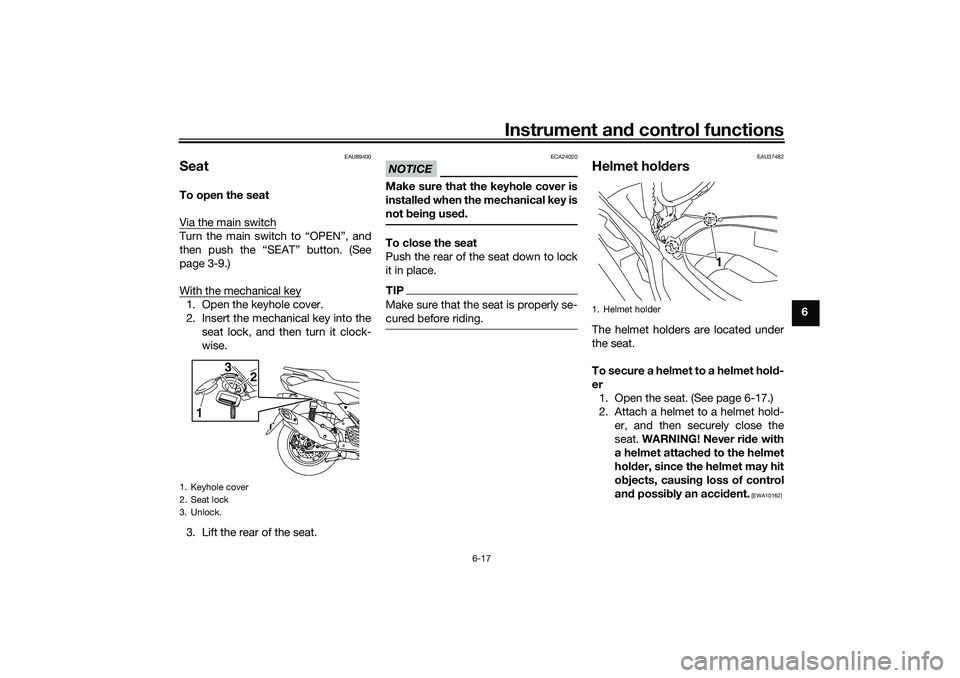
With the mechanical key1. Open the keyhole cover.
2. Insert the mechanical key into the
seat lock, and then turn it clock-
wise.
3. Lift the rear of the seat.
NOTICE
ECA24020
Make sure that the keyhole cover is
installed when the mechanical key is
not being used.To close the seat
Push the rear of the seat down to lock
it in place.TIPMake sure that the seat is properly se-
cured before riding.
EAU37482
Helmet holdersThe helmet holders are located under
the seat.
To secure a helmet to a helmet hold-
er
1. Open the seat. (See page 6-17.)
2. Attach a helmet to a helmet hold-
er, and then securely close the
seat. WARNING! Never ride with
a helmet attached to the helmet
holder, since the helmet may hit
objects, causing loss of control
and possibly an accident.
[EWA10162]
1. Keyhole cover
2. Seat lock
3. Unlock.
13
2
1. Helmet holder
1
UBALE0E0.book Page 17 Wednesday, September 30, 2020 1:37 PM
Page 63 of 114
Operation and important riding points
8-4
8
EAUW4891
Parking When parking, turn off the Stop and
Start System and then stop the engine.
After turning off the main switch, be
sure to turn off the smart key and take
it with you.
WARNING
EWA18840
Since the engine and exhaust
system can become very hot,
park in a place where pedestri-
ans or children are not likely to
touch them and be burned.
Do not park on a slope or on soft
ground, otherwise the vehicle
may overturn, increasing the
risk of a fuel leak and fire.
Do not park near grass or other
flammable materials which
might catch fire.
If the Stop and Start System is
left turned on, the battery could
become discharged and it may
not be possible to restart the
engine due to insufficient bat-
tery voltage.
TIPEven when the vehicle is parked in a lo-
cation partitioned by a fence or the
glass window of a shop, if the smart
key is within operating range, other
people will be able to start the engine
and operate the vehicle. Please turn
the smart key off when leaving the ve-
hicle. (See page 3-8.)
UBALE0E0.book Page 4 Wednesday, September 30, 2020 1:37 PM
Page 93 of 114
Periodic maintenance and adjustment
9-30
9
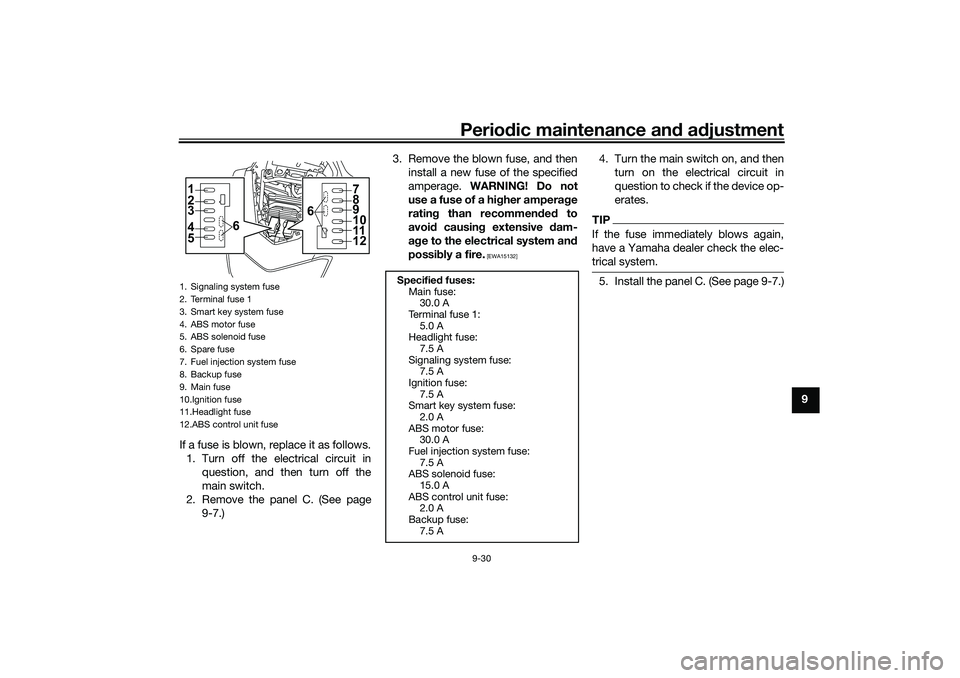
If a fuse is blown, replace it as follows.
1. Turn off the electrical circuit in
question, and then turn off the
main switch.
2. Remove the panel C. (See page
9-7.)3. Remove the blown fuse, and then
install a new fuse of the specified
amperage. WARNING! Do not
use a fuse of a higher amperage
rating than recommended to
avoid causing extensive dam-
age to the electrical system and
possibly a fire.
[EWA15132]
4. Turn the main switch on, and then
turn on the electrical circuit in
question to check if the device op-
erates.TIPIf the fuse immediately blows again,
have a Yamaha dealer check the elec-
trical system.5. Install the panel C. (See page 9-7.)
1. Signaling system fuse
2. Terminal fuse 1
3. Smart key system fuse
4. ABS motor fuse
5. ABS solenoid fuse
6. Spare fuse
7. Fuel injection system fuse
8. Backup fuse
9. Main fuse
10.Ignition fuse
11.Headlight fuse
12.ABS control unit fuse1
6 2
3
4
5
7
8
9
11
12 610
Specified fuses:
Main fuse:
30.0 A
Terminal fuse 1:
5.0 A
Headlight fuse:
7.5 A
Signaling system fuse:
7.5 A
Ignition fuse:
7.5 A
Smart key system fuse:
2.0 A
ABS motor fuse:
30.0 A
Fuel injection system fuse:
7.5 A
ABS solenoid fuse:
15.0 A
ABS control unit fuse:
2.0 A
Backup fuse:
7.5 A
UBALE0E0.book Page 30 Wednesday, September 30, 2020 1:37 PM