battery YAMAHA NMAX 155 2021 User Guide
[x] Cancel search | Manufacturer: YAMAHA, Model Year: 2021, Model line: NMAX 155, Model: YAMAHA NMAX 155 2021Pages: 114, PDF Size: 10.93 MB
Page 30 of 114

Stop and Start System
4-2
4 3. The Stop and Start System acti-
vates and the indicator light
comes on when the following con-
ditions are met: The Stop and Start System
switch is set to “ ”.
After the engine was warmed
up, the engine was left idling
for a certain period.
The vehicle has traveled at a
speed of 10 km/h or higher.
4. To turn off the Stop and Start Sys- tem, set the Stop and Start Sys-
tem switch to “ ”.
TIPTo preserve battery power, the
Stop and Start System may not
activate.
If the Stop and Start System does
not activate, have a Yamaha deal-
er check the battery.
EAU76832
Stop the en gine
The engine will stop automatically
when the following conditions are met: The Stop and Start System switch
is set to “ ”.
The “ ” indicator light on the
multi-function meter is on.
The vehicle is stopped with the
throttle grip fully returned. At this time, the “ ” indicator light
starts flashing to indicate that the en-
gine is currently stopped by the Stop
and Start System.
EAU76704
Restart the en
gine
If the throttle grip is turned while the
Stop and Start System indicator light is
flashing, the engine will automatically
restart and the “ ” indicator light will
stop flashing.
1. On
A1
A
AAA
A
A
1. On
2. Flashing
A
1
2
A
UBBDE0E0.book Page 2 Wednesday, June 2, 2021 2:57 PM
Page 33 of 114
Special features
5-1
5
EAUN3012
CCU (Communication Control
Unit)This model is equipped with a CCU
that allows your vehicle and smart-
phone to connect using Bluetooth
wireless technology and the MyRide
App.
With this connection, notifications from
apps, incoming phone calls and
missed calls are signaled to you, and
the battery level of your smartphone is
displayed.
WARNING
EWAN0070
Always stop the vehicle before
operatin g your smartphone.
Never take your han ds off the
han dle bars while ri din g.
Always concentrate on ri din g b y
keepin g your eyes an d min d on
the roa d.NOTICE
ECAN0150
The Bluetooth connection may not
work in the followin g situations.
In a location exposed to strong
ra dio waves or other electro-
ma gnetic noise.
At facilities near by that are
emittin g stron g ra dio waves (TV
or ra dio towers, power plants,
b roa dcastin g stations, airports,
etc.).
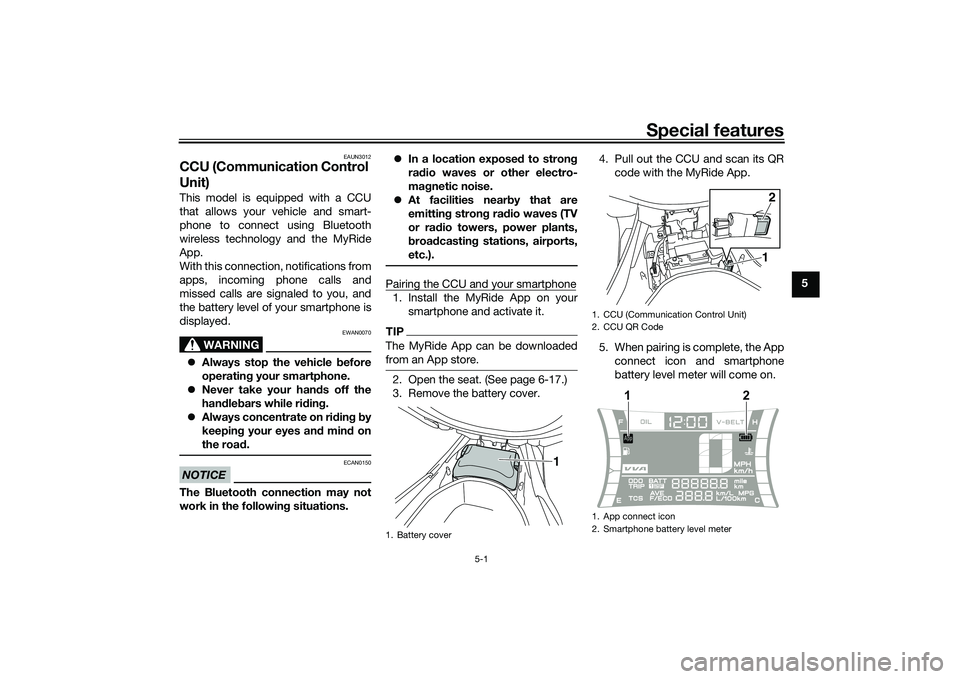
Pairing the CCU and your smartphone1. Install the MyRide App on your smartphone and activate it.TIPThe MyRide App can be downloaded
from an App store.2. Open the seat. (See page 6-17.)
3. Remove the battery cover. 4. Pull out the CCU and scan its QR
code with the MyRide App.
5. When pairing is complete, the App connect icon and smartphone
battery level meter will come on.1. Battery cover
1
1. CCU (Communication Control Unit)
2. CCU QR Code
1. App connect icon
2. Smartphone battery level meter
12
1
2
UBBDE0E0.book Page 1 Wednesday, June 2, 2021 2:57 PM
Page 37 of 114

Instrument and control functions
6-3
6
EAUN2781
Incomin g call in dicator li ght “ ”
This indicator light flashes when there
is an incoming call to the connected
smartphone. If you do not answer the
call, the indicator light stays on until
you turn the vehicle off.TIPThis function works only when the
smartphone is connected to the vehi-
cle.
EAUN2792
Incomin g notification in dicator
lig ht “ ”
This indicator light flashes for 10 sec-
onds when the connected smartphone
receives an SNS, E-mail or other notifi-
cation. After that, the indicator light
stays on until you turn the vehicle off.TIP This function works only when the
smartphone is connected to the
vehicle.
Notification setting is needed for
each application at the connected
smartphone in advance.
EAUN3040
Multi-function meter unit
WARNING
EWA12423
Be sure to stop the vehicle before
makin g any settin g chan ges to the
multi-function meter unit. Chan gin g
settin gs while ri din g can distract the
operator an d increase the risk of an
acci dent.
The “MENU” switch is located on the
left side of handlebar. This switch al-
lows you to control or change the set-
tings of multi-function meter unit.
The multi-function meter unit is
equipped with the following:
a speedometer
a VVA indicator
a clock
a fuel meter
an App connect icon
a smartphone battery level meter
a coolant temperature meter
a multi-function displayTIPBe sure to turn the main switch on be-
1. Fuel meter
2. App connect icon
3. VVA (variable valve actuation) indicator
4. Clock
5. Speedometer
6. Smartphone battery level meter
7. Coolant temperature meter
8. Multi-function display
8
1345 7
6
2
1.
1
UBBDE0E0.book Page 3 Wednesday, June 2, 2021 2:57 PM
Page 38 of 114

Instrument and control functions
6-4
6
EAUN3051
App Connect icon
This icon comes on when CCU and
smartphone is connected via MyRide
App.TIPEven if the smartphone is not connect-
ed, when the vehicle is turned on, this
icon should come on for a few sec-
onds. Otherwise have a Yamaha dealer
check the CCU and the electrical cir-
cuit.
EAUN2873
Smartphone battery level meter
This meter indicates the current battery
level of the connected smartphone.
The display segments of the meter dis-
appear from full to blank as the battery
level decreases. When approximately
10% or less of the battery remains, the
last segment starts flashing.TIPEven if the smartphone is not connect-
ed, when the vehicle is turned on, this
icon should come on for a few sec- onds. Otherwise have a Yamaha dealer
check the CCU and the electrical cir-
cuit.
EAU86820
Switchin
g the display units
The display units can be switched be-
tween kilometers and miles.
To switch the display units1. Turn the vehicle off.
2. While pushing the “MENU” switch, turn the vehicle on.
3. Continue to push the “MENU” switch until the display unit setting
screen comes on (approximately 5
seconds).
4. Push the “MENU” switch once to switch the display units.
5. Push the “MENU” switch for 1 second to confirm the setting.
EAU86831
Speed ometer
The speedometer shows the vehicle’s
traveling speed.
EAU86841
Fuel meter
The fuel meter indicates the amount of
fuel in the fuel tank. The display seg-
ments of the fuel meter disappear from
“F” (full) towards “E” (empty) as the fuel
level decreases. When approximately
1.7 L (0.45 US gal, 0.37 Imp.gal) of fuel
remains, the last segment starts flash-
ing. Refuel as soon as possible.TIPIf a problem is detected in the electrical
circuit, the fuel level segments will flash
repeatedly. If this occurs, have a
Yamaha dealer check the vehicle.1. Fuel meter1
UBBDE0E0.book Page 4 Wednesday, June 2, 2021 2:57 PM
Page 40 of 114
Instrument and control functions
6-6
6 2. While pushing the “MENU”
switch, turn the vehicle on.
3. Continue pushing the “MENU” switch. The display unit setting
screen will come on (after 5 sec-
onds), and after that (an additional
10 seconds) all segments other
than the VVA indicator will start
flashing. Now release the “MENU”
switch.
4. Push the “MENU” switch once to change the on or off setting.
5. Push the “MENU” switch for 1 second to confirm the setting.
TIPTurning the VVA indicator off does not
turn off the variable valve actuation
system.
EAUN2800
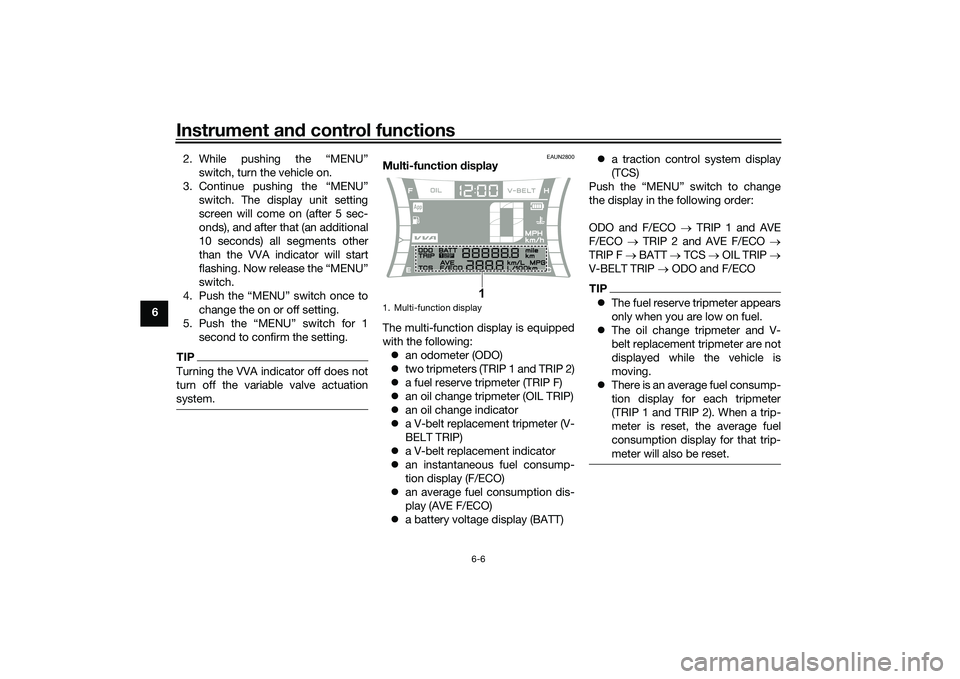
Multi-function display
The multi-function display is equipped
with the following: an odometer (ODO)
two tripmeters (TRIP 1 and TRIP 2)
a fuel reserve tripmeter (TRIP F)
an oil change tripmeter (OIL TRIP)
an oil change indicator
a V-belt replacement tripmeter (V-
BELT TRIP)
a V-belt replacement indicator
an instantaneous fuel consump-
tion display (F/ECO)
an average fuel consumption dis-
play (AVE F/ECO)
a battery voltage display (BATT)
a traction control system display
(TCS)
Push the “MENU” switch to change
the display in the following order:
ODO and F/ECO TRIP 1 and AVE
F/ECO TRIP 2 and AVE F/ECO
TRIP F BATT TCS OIL TRIP
V-BELT TRIP ODO and F/ECO
TIP The fuel reserve tripmeter appears
only when you are low on fuel.
The oil change tripmeter and V-
belt replacement tripmeter are not
displayed while the vehicle is
moving.
There is an average fuel consump-
tion display for each tripmeter
(TRIP 1 and TRIP 2). When a trip-
meter is reset, the average fuel
consumption display for that trip-
meter will also be reset.
1. Multi-function display
1
UBBDE0E0.book Page 6 Wednesday, June 2, 2021 2:57 PM
Page 43 of 114

Instrument and control functions
6-9
6
This display shows fuel consumption
under current riding conditions. It can
be set to either “km/L” or “L/100 km”,
or “MPG” when using miles.
“km/L”: the distance that can be
traveled on 1.0 L of fuel.
“L/100 km”: the amount of fuel
necessary to travel 100 km.
“MPG”: the distance that can be
traveled on 1.0 Imp.gal of fuel.
TIPWhen traveling under 10 km/h (6 mi/h),
EAU86950
Avera ge fuel consumption display This display shows the average fuel
consumption since it was last reset.
The average fuel consumption display
can be set to either “km/L” or “L/100
km”, or “MPG” when using miles.
“km/L”: the average distance that
can be traveled on 1.0 L of fuel.
“L/100 km”: the average amount
of fuel necessary to travel 100 km.
“MPG”: the average distance that
can be traveled on 1.0 Imp.gal of
fuel.
TIPTo reset the display, push the
“MENU” switch until it resets.
After resetting, “_ _._” is shown
until the vehicle has traveled some
distance.
EAU86960
Battery volta ge display
This display shows the current charge
state of the battery. Over 12.8 V = Full charge.
Under 12.7 V = Charging is re-
quired.TIPIf the battery voltage is less than 9.0 V,
1. Average fuel consumption display
1
1. Battery voltage meter
1
UBBDE0E0.book Page 9 Wednesday, June 2, 2021 2:57 PM
Page 61 of 114
Operation and important ri din g points
8-2
8
EAU86741
Startin g the en gineThe ignition circuit cut-off system will
enable starting only when the side-
stand is up.
To start the engine1. Turn the main switch on.
2. Confirm the indicator and warning light(s) come on for a few sec-
onds, and then go off. (See page
6-1.)TIPDo not start the engine if the en-
gine trouble warning light remains
on.
The ABS warning light should
come on and stay on until the ve-
hicle reaches a speed of 10 km/h
(6 mi/h).NOTICE
ECA24110
If a warnin g or in dicator li ght does
not work as d escribed a bove, have a
Yamaha dealer check the vehicle.3. Close the throttle completely.
4. While applying the front or rear
brake, push the start switch. 5. Release the start switch when the
engine starts, or after 5 seconds.
Wait 10 seconds before pressing
the switch again to allow battery
voltage to restore.
NOTICE
ECA11043
For maximum en gine life, never ac-
celerate har d when the en gine is
col d!
EAU45093
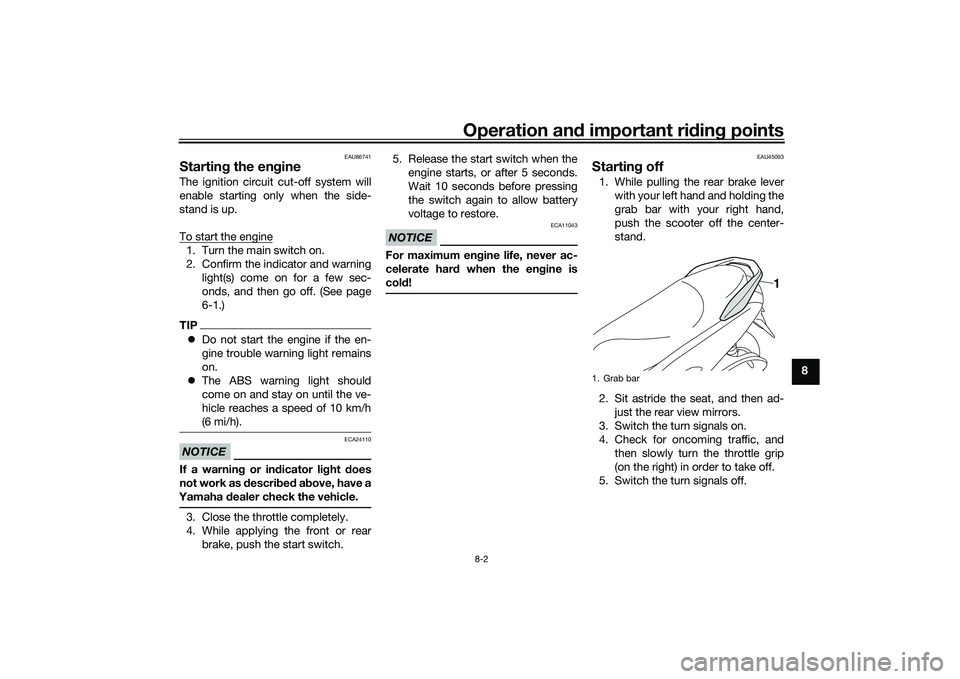
Startin g off1. While pulling the rear brake lever
with your left hand and holding the
grab bar with your right hand,
push the scooter off the center-
stand.
2. Sit astride the seat, and then ad- just the rear view mirrors.
3. Switch the turn signals on.
4. Check for oncoming traffic, and then slowly turn the throttle grip
(on the right) in order to take off.
5. Switch the turn signals off.1. Grab bar
1
UBBDE0E0.book Page 2 Wednesday, June 2, 2021 2:57 PM
Page 66 of 114
Periodic maintenance an d a djustment
9-3
9
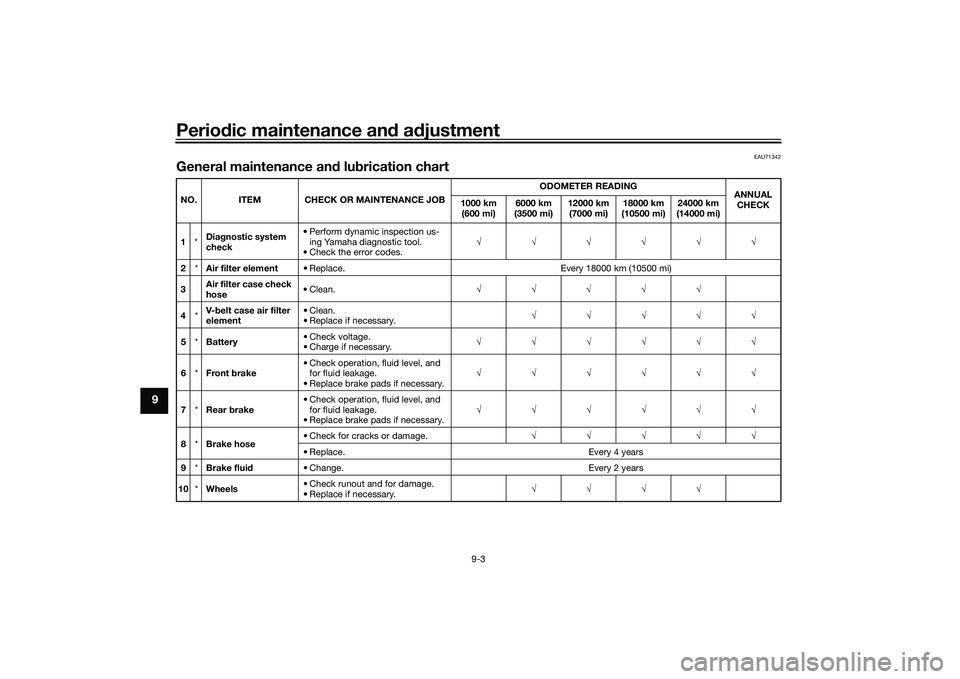
EAU71342
General maintenance an d lu brication chartNO. ITEM CHECK OR MAINTENANCE JOB ODOMETER READING
ANNUAL
CHECK
1000 km
(600 mi) 6000 km
(3500 mi) 12000 km
(7000 mi) 18000 km
(10500 mi) 24000 km
(14000 mi)
1 *Dia
gnostic system
check • Perform dynamic inspection us-
ing Yamaha diagnostic tool.
• Check the error codes.
2 *Air filter element • Replace. Every 18000 km (10500 mi)
3 Air filter case check
hose • Clean.
4 *V-
belt case air filter
element • Clean.
• Replace if necessary.
5 *Battery • Check voltage.
• Charge if necessary.
6 *Front brake • Check operation, fluid level, and
for fluid leakage.
• Replace brake pads if necessary.
7 *Rear brake • Check operation, fluid level, and
for fluid leakage.
• Replace brake pads if necessary.
8 *Brake hose • Check for cracks or damage.
• Replace. Every 4 years
9 *Brake flui d • Change. Every 2 years
10 *Wheels • Check runout and for damage.
• Replace if necessary.
UBBDE0E0.book Page 3 Wednesday, June 2, 2021 2:57 PM
Page 91 of 114

Periodic maintenance an d a djustment
9-28
9
EAU23292
Checkin g the wheel bearin gsThe front and rear wheel bearings must
be checked at the intervals specified in
the periodic maintenance and lubrica-
tion chart. If there is play in the wheel
hub or if the wheel does not turn
smoothly, have a Yamaha dealer
check the wheel bearings.
EAU50292
BatteryThe battery is located under the seat.
(See page 6-17.)
This model is equipped with a VRLA
(Valve Regulated Lead Acid) battery.
There is no need to check the electro-
lyte or to add distilled water. However,
the battery lead connections need to
be checked and, if necessary, tight-
ened.
WARNING
EWA10761
Electrolyte is poisonous an d
d an gerous since it contains sul-
furic aci d, which causes severe b
urns. Avoi d any contact with
skin, eyes or clothin g an d al-
ways shiel d your eyes when
workin g near b atteries. In case
of contact, ad minister the fol-
lowin g FIRST AID.
EXTERNAL: Flush with plenty of water.
INTERNAL: Drink lar ge quan-
tities of water or milk an d im-
me diately call a physician.
EYES: Flush with water for 15 minutes an d seek prompt
me dical attention.
Batteries pro duce explosive hy-
d ro gen gas. Therefore, keep
sparks, flames, ci garettes, etc.,
away from the battery an d pro-
vi de sufficient ventilation when
char gin g it in an enclose d
space.
KEEP THIS AND ALL BATTER-
IES OUT OF THE REACH OF
CHILDREN.
To char ge the b attery
Have a Yamaha dealer charge the bat-
tery as soon as possible if it seems to
have discharged. Keep in mind that the
1. Positive battery lead (red)
2. Battery
3. Negative battery lead (black)
3
2
1
UBBDE0E0.book Page 28 Wednesday, June 2, 2021 2:57 PM
Page 92 of 114

Periodic maintenance an d a djustment
9-29
9 battery tends to discharge more quick-
ly if the vehicle is equipped with op-
tional electrical accessories.
NOTICE
ECA16522
To char
ge a VRLA (Valve Re gulate d
Lea d Aci d) battery, a special (con-
stant-volta ge) battery char ger is re-
quired . Using a conventional b attery
char ger will damag e the b attery.To store the b attery
1. If the vehicle will not be used for more than one month, remove the
battery, fully charge it, and then
place it in a cool, dry place.
NOTICE: When removin g the
b attery, be sure to turn the main
switch off, then disconnect the
ne gative lead before discon-
nectin g the positive lea d.
[ECA16304]
2. If the battery will be stored for
more than two months, check it at
least once a month and fully
charge it if necessary.
3. Fully charge the battery before in- stallation. NOTICE: When install-
in g the b attery, be sure to turn
the main switch off, then con- nect the positive lead
before
connectin g the ne gative lea d.
[ECA16842]
4. After installation, make sure that
the battery leads are properly con-
nected to the battery terminals.NOTICE
ECA16531
Always keep the b attery charged .
Storin g a d ischar ged battery can
cause permanent battery damag e.
EAUN2581
Replacin g the fusesThe fuse boxes, which contain the fus-
es for the individual circuits, are locat-
ed under panel C. (See page 9-7.)1. Fuse box
1
UBBDE0E0.book Page 29 Wednesday, June 2, 2021 2:57 PM