9-38 YAMAHA NMAX 155 2021 Owners Manual
[x] Cancel search | Manufacturer: YAMAHA, Model Year: 2021, Model line: NMAX 155, Model: YAMAHA NMAX 155 2021Pages: 114, PDF Size: 10.93 MB
Page 9 of 114
Table of contents
Checking and lubricating the
throttle grip and cable ................9-25
Lubricating the front and rear brake levers ........................9-25
Checking and lubricating the
centerstand and sidestand ........9-26
Checking the front fork..................9-27
Checking the steering ...................9-27
Checking the wheel bearings ........9-28
Battery ...........................................9-28
Replacing the fuses .......................9-29
Vehicle lights .................................9-31
Replacing a front turn signal light bulb ....................................9-31
Replacing a rear turn signal light bulb ....................................9-32
Troubleshooting ............................9-33
Troubleshooting chart ...................9-36
Emergency mode .........................9-38
Motorcycle care an d stora ge ........10-1
Matte color caution .......................10-1
Care ...............................................10-1
Storage ..........................................10-3
Specifications ..................................11-1
Consumer information ...................12-1
Identification numbers ...................12-1
Diagnostic connector ....................12-2
Vehicle data recording ..................12-2 In
dex ................................................ 13-1
UBBDE0E0.book Page 2 Wednesday, June 2, 2021 2:57 PM
Page 20 of 114
Smart key system
3-2
3
You are carryin g or usin g com-
munication equipment such as
ra dios or mo bile phones in
close proximity of the smart key
The smart key is in contact with
or covere d b y a metallic o bject
Other vehicles equippe d with a
smart key system are near by
In such situations, move the smart
key to another location an d perform
the operation ag ain. If it still does
not work, operate the vehicle in
emer gency mo de. (See pag e 9-38.)
TIPTo preserve vehicle battery power, the
smart key system turns off approxi-
mately 9 days after the vehicle was last
used (the answer-back function is dis-
abled). In this situation, simply push
the main switch knob to turn the smart
key system back on.
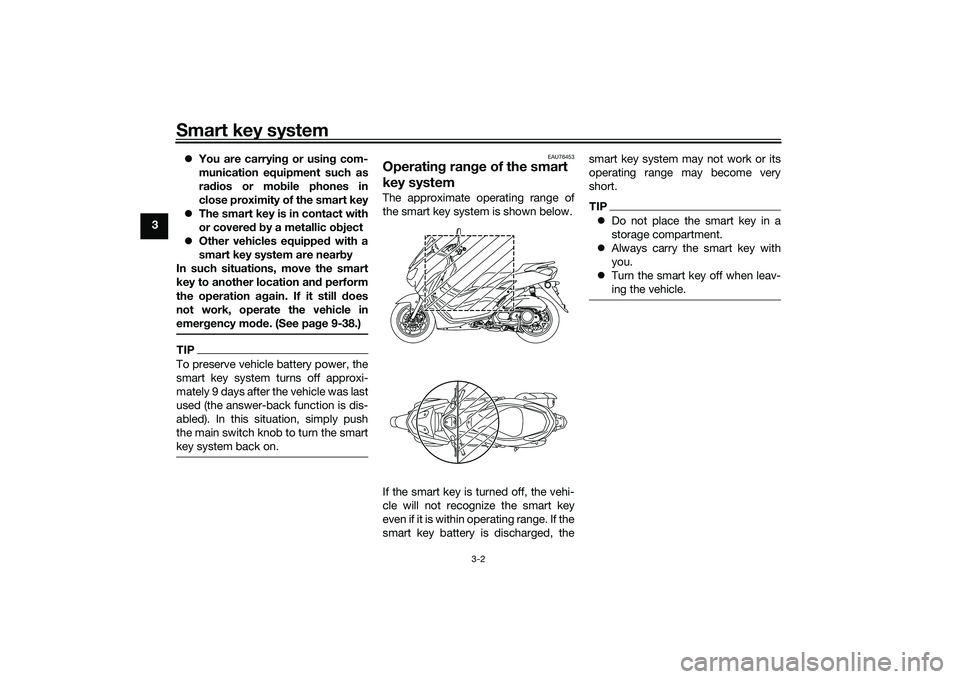
EAU76453
Operating ran ge of the smart
key systemThe approximate operating range of
the smart key system is shown below.
If the smart key is turned off, the vehi-
cle will not recognize the smart key
even if it is within operating range. If the
smart key battery is discharged, the smart key system may not work or its
operating range may become very
short.
TIP
Do not place the smart key in a
storage compartment.
Always carry the smart key with
you.
Turn the smart key off when leav-
ing the vehicle.
UBBDE0E0.book Page 2 Wednesday, June 2, 2021 2:57 PM
Page 26 of 114
Smart key system
3-8
3taken place), the main switch can be
turned while the smart key system indi-
cator light is on (approximately 4 sec-
onds).
WARNING
EWA18720
Never turn the main switch to
“OFF”, “ ”, or “OPEN” while the ve-
hicle is movin
g. Otherwise the elec-
trical systems will b e switched off,
which may result in loss of control or
an acci dent.TIPDo not push the main switch knob re-
peatedly or turn the main switch back
and forth excessively (beyond normal
use). To protect the main switch from
damage, the smart key system will
temporarily disable, and the smart key
system indicator light will flash. If this
occurs, wait until the indicator light
stops flashing, and then operate the
main switch.The main switch positions are de-
scribed below.
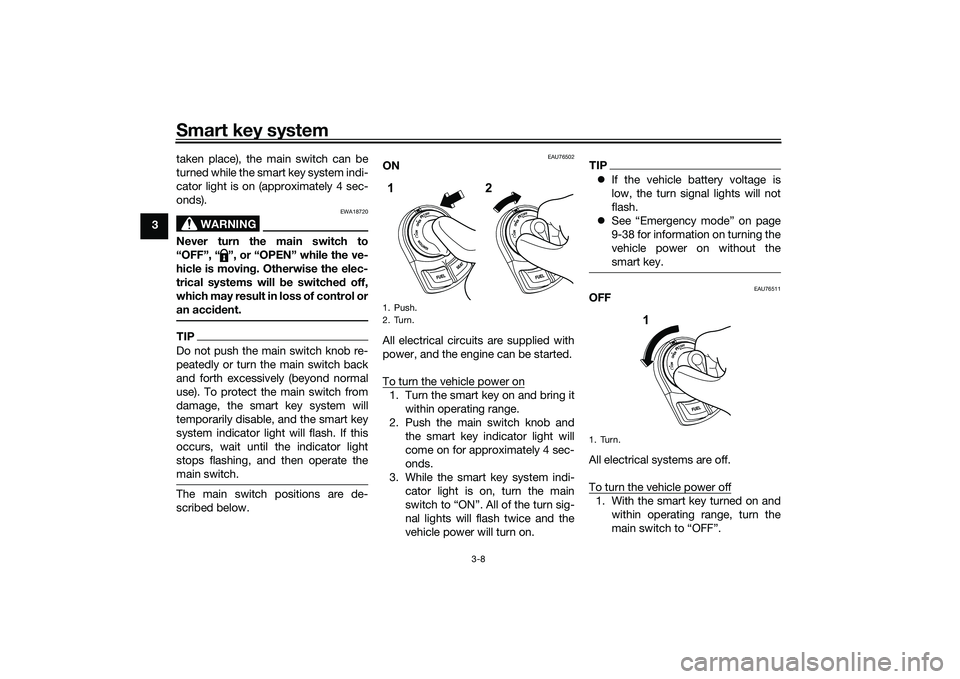
EAU76502
ON
All electrical circuits are supplied with
power, and the engine can be started.
To turn the vehicle power on1. Turn the smart key on and bring it
within operating range.
2. Push the main switch knob and the smart key indicator light will
come on for approximately 4 sec-
onds.
3. While the smart key system indi- cator light is on, turn the main
switch to “ON”. All of the turn sig-
nal lights will flash twice and the
vehicle power will turn on.
TIPIf the vehicle battery voltage is
low, the turn signal lights will not
flash.
See “Emergency mode” on page
9-38 for information on turning the
vehicle power on without the
smart key.
EAU76511
OFF
All electrical systems are off.
To turn the vehicle power off1. With the smart key turned on and
within operating range, turn the
main switch to “OFF”.
1. Push.
2. Turn.1 2
1. Turn.
1
UBBDE0E0.book Page 8 Wednesday, June 2, 2021 2:57 PM
Page 97 of 114

Periodic maintenance an d a djustment
9-34
9
If the smart key system does not work
after checking the above items, have a
Yamaha dealer check the smart key system.
TIPSee Emergency mode on page 9-38
for information on starting the engine
without the smart key.
EAU76843
Stop an d Start System trou ble-
shootin g
If a problem occurs, check the follow-
ing before taking the vehicle to a
Yamaha dealer.
The Stop an d Start System in dicator
lig ht does not come on.
1. Is the main switch turned on?
2. Is the Stop and Start System switch set to “ ”?
3. Was the engine warmed up suffi- ciently after starting?
4. After the engine was warmed up, was the engine left idling for a cer-
tain period of time?
5. Did the vehicle travel at a speed of 10 km/h or higher? Even if the preceding conditions are
met, the Stop and Start System may
not activate in order to preserve bat-
tery power. In this case, continue to
drive the vehicle.
In addition, the Stop and Start System
indicator light does not come on if the
engine trouble warning light is on.
If the Stop and Start System indicator
light still does not come on after you
checked the preceding conditions,
have a Yamaha dealer check the vehi-
cle as soon as possible.
The Stop an
d Start System in dicator
li g ht comes on, b ut the engine does
not stop automatically. 1. Was the vehicle stopped com- pletely?
The engine may not stop automat-
ically until the vehicle is stopped
for a certain period of time. Try
bringing the vehicle to a complete
stop.
2. Is the throttle grip turned? The engine does not stop auto-
matically if the throttle grip is not in
the fully closed position. Turn the throttle grip to the fully
closed position.
If the engine still does not stop auto-
matically after you checked the pre-
ceding conditions, have a Yamaha
dealer check the vehicle as soon as
possible.
After the eng ine was stopped b y the
Stop an d Start System, the en gine
d oes not restart even if the throttle
g rip is turne d.
1. Is the Stop and Start System switch set to “ ”?
If the Stop and Start System
switch is set to “ ” while the Stop
and Start System is activated, the
Stop and Start System will be
turned off.
2. Was the sidestand operated? When the sidestand is lowered,
the Stop and Start System is de-
activated.
3. Was the engine left stopped by the Stop and Start System for a
long period of time?
A
AA
UBBDE0E0.book Page 34 Wednesday, June 2, 2021 2:57 PM
Page 101 of 114

Periodic maintenance an d a djustment
9-38
9
EAU76561
Emer gency mo de When the smart key is lost or dam-
aged, or its battery has discharged, the
vehicle can still be turned on and the
engine started. You will need the smart
key system identification number.
To operate the vehicle in emer gency
mo de
1. Stop the vehicle in a safe place and turn the main switch to “OFF”.
2. Push the main switch knob for 5 seconds until the smart key sys-
tem indicator light flashes once,
then release it. Repeat two more
times. The smart key system indi-
cator light will come on for three
seconds to indicate the transition
to emergency mode. 3. After the smart key system indica-
tor light goes off, input the identifi-
cation number as follows.
4. Inputting the identification number is done by counting the number of
flashes of the smart key system in-
dicator light. For example, if the identification
number is 123456:
Push and hold the knob.
The smart key system indicator
light will start to flash.
Release the knob after the smart
key system indicator light flashes
once.
The first digit of the identification
number has been set as “1”.
Push and hold the knob again.
1. Smart key system indicator light “ ”
1. Identification number card
1
868588
1
UBBDE0E0.book Page 38 Wednesday, June 2, 2021 2:57 PM
Page 112 of 114
13-1
13
IndexAABS ....................................................... 6-12
ABS warning light ................................... 6-2
Acceleration and deceleration ................ 8-3
Activating the Stop and Start System .... 4-1
Air filter and V-belt case air filter
elements ............................................. 9-16
App Connect icon ................................... 6-4BBattery .................................................. 9-28
Brake fluid, changing ............................ 9-24
Brake fluid level, checking .................... 9-23
Brake lever, front .................................. 6-11
Brake lever, rear.................................... 6-11
Brake levers, lubricating ....................... 9-25
Braking.................................................... 8-3CCables, checking and lubricating ......... 9-25
Canister................................................. 9-11
Care ...................................................... 10-1
Catalytic converter ................................ 6-17
CCU (Communication Control Unit) ....... 5-1
Centerstand and sidestand, checking and lubricating .................... 9-26
Clock....................................................... 6-5
Coolant ................................................. 9-15
Coolant temperature meter .................... 6-5DData recording, vehicle ......................... 12-2
Diagnostic connector............................ 12-2
Dimmer switch ...................................... 6-10
Display units, switching .......................... 6-4EEmergency mode.................................. 9-38 Engine break-in ...................................... 8-1
Engine oil and oil strainer ..................... 9-11
Engine overheating ............................... 9-37
Engine serial number ............................ 12-1
FFinal transmission oil ............................ 9-13
Front and rear brake lever free play,
checking............................................. 9-21
Front and rear brake pads, checking ... 9-22
Front fork, checking ............................. 9-27
Fuel ....................................................... 6-15
Fuel consumption, tips for reducing ...... 8-3
Fuel meter .............................................. 6-4
Fuel tank cap ........................................ 6-14
Fuel tank overflow hose ....................... 6-17
Fuses, replacing ................................... 9-29HHandlebar switches .............................. 6-10
Hazard switch....................................... 6-10
Helmet holders ..................................... 6-18
High beam indicator light ....................... 6-1
Horn switch .......................................... 6-10IIdentification numbers .......................... 12-1
Ignition circuit cut-off system ............... 6-22
Incoming call indicator light ................... 6-3
Incoming notification indicator light ....... 6-3
Indicator lights and warning lights ......... 6-1KKey, handling of smart and mechanical keys................................... 3-3MMain switch ............................................ 3-7
Maintenance and lubrication, periodic ... 9-3 Maintenance,
emission control system .......................9-2
Malfunction indicator light (MIL)..............6-1
Matte color, caution ..............................10-1
Menu switch..........................................6-11
Model label ...........................................12-1
Multi-function display .............................6-6
Multi-function meter unit .........................6-3
OOperating range of the smart key system ..................................................3-2PPanels, removing and installing ..............9-7
Parking ....................................................8-4
Part locations ..........................................2-1
Power outlet ..........................................6-21
Precautions when using the Stop and Start System .........................4-3SSafe-riding points....................................1-5
Safety information ...................................1-1
Seat .......................................................6-17
Shock absorber assemblies,
adjusting .............................................6-20
Sidestand ..............................................6-22
Smart key ................................................3-4
Smart key battery, replacing ...................3-6
Smart key system ...................................3-1
Smart key system indicator light.............6-2
Smart key system, troubleshooting ......9-33
Smartphone battery level meter..............6-4
Spark plug, checking ..............................9-9
Special features ......................................5-1
Specifications .......................................11-1
UBBDE0E0.book Page 1 Wednesday, June 2, 2021 2:57 PM