Connect YAMAHA NMAX 155 2021 Owners Manual
[x] Cancel search | Manufacturer: YAMAHA, Model Year: 2021, Model line: NMAX 155, Model: YAMAHA NMAX 155 2021Pages: 114, PDF Size: 10.93 MB
Page 9 of 114
Table of contents
Checking and lubricating the
throttle grip and cable ................9-25
Lubricating the front and rear brake levers ........................9-25
Checking and lubricating the
centerstand and sidestand ........9-26
Checking the front fork..................9-27
Checking the steering ...................9-27
Checking the wheel bearings ........9-28
Battery ...........................................9-28
Replacing the fuses .......................9-29
Vehicle lights .................................9-31
Replacing a front turn signal light bulb ....................................9-31
Replacing a rear turn signal light bulb ....................................9-32
Troubleshooting ............................9-33
Troubleshooting chart ...................9-36
Emergency mode .........................9-38
Motorcycle care an d stora ge ........10-1
Matte color caution .......................10-1
Care ...............................................10-1
Storage ..........................................10-3
Specifications ..................................11-1
Consumer information ...................12-1
Identification numbers ...................12-1
Diagnostic connector ....................12-2
Vehicle data recording ..................12-2 In
dex ................................................ 13-1
UBBDE0E0.book Page 2 Wednesday, June 2, 2021 2:57 PM
Page 13 of 114
Safety information
1-4
1
Genuine Yamaha Accessories
Choosing accessories for your vehicle
is an important decision. Genuine
Yamaha accessories, which are avail- able only from a Yamaha dealer, have
been designed, tested, and approved
by Yamaha for use on your vehicle.
Many companies with no connection
to Yamaha manufacture parts and ac-
cessories or offer other modifications
for Yamaha vehicles. Yamaha is not in
a position to test the products that
these aftermarket companies produce.
Therefore, Yamaha can neither en-
dorse nor recommend the use of ac-
cessories not sold by Yamaha or
modifications not specifically recom-
mended by Yamaha, even if sold and
installed by a Yamaha dealer.
Aftermarket Parts, Accessories, an d
Mo difications
While you may find aftermarket prod-
ucts similar in design and quality to
genuine Yamaha accessories, recog-
nize that some aftermarket accesso-
ries or modifications are not suitable
because of potential safety hazards to
you or others. Installing aftermarket products or having other modifications
performed to your vehicle that change
any of the vehicle’s design or operation
characteristics can put you and others
at greater risk of serious injury or
death. You are responsible for injuries
related to changes in the vehicle.
Keep the following guidelines in mind,
as well as those provided under “Load-
ing” when mounting accessories.
Never install accessories or carry
cargo that would impair the per-
formance of your scooter. Careful-
ly inspect the accessory before
using it to make sure that it does
not in any way reduce ground
clearance or cornering clearance,
limit suspension travel, steering
travel or control operation, or ob-
scure lights or reflectors.
• Accessories fitted to the han- dlebar or the front fork area can
create instability due to improp-
er weight distribution or aerody-
namic changes. If accessories
are added to the handlebar or
front fork area, they must be as
lightweight as possible and
should be kept to a minimum. • Bulky or large accessories may
seriously affect the stability of
the scooter due to aerodynamic
effects. Wind may attempt to lift
the scooter, or the scooter may
become unstable in cross
winds. These accessories may
also cause instability when
passing or being passed by
large vehicles.
• Certain accessories can dis- place the operator from his or
her normal riding position. This
improper position limits the
freedom of movement of the
operator and may limit control
ability, therefore, such accesso-
ries are not recommended.
Use caution when adding electri-
cal accessories. If electrical ac-
cessories exceed the capacity of
the scooter’s electrical system, an
electric failure could result, which
could cause a dangerous loss of
lights or engine power.
UBBDE0E0.book Page 4 Wednesday, June 2, 2021 2:57 PM
Page 33 of 114
Special features
5-1
5
EAUN3012
CCU (Communication Control
Unit)This model is equipped with a CCU
that allows your vehicle and smart-
phone to connect using Bluetooth
wireless technology and the MyRide
App.
With this connection, notifications from
apps, incoming phone calls and
missed calls are signaled to you, and
the battery level of your smartphone is
displayed.
WARNING
EWAN0070
Always stop the vehicle before
operatin g your smartphone.
Never take your han ds off the
han dle bars while ri din g.
Always concentrate on ri din g b y
keepin g your eyes an d min d on
the roa d.NOTICE
ECAN0150
The Bluetooth connection may not
work in the followin g situations.
In a location exposed to strong
ra dio waves or other electro-
ma gnetic noise.
At facilities near by that are
emittin g stron g ra dio waves (TV
or ra dio towers, power plants,
b roa dcastin g stations, airports,
etc.).
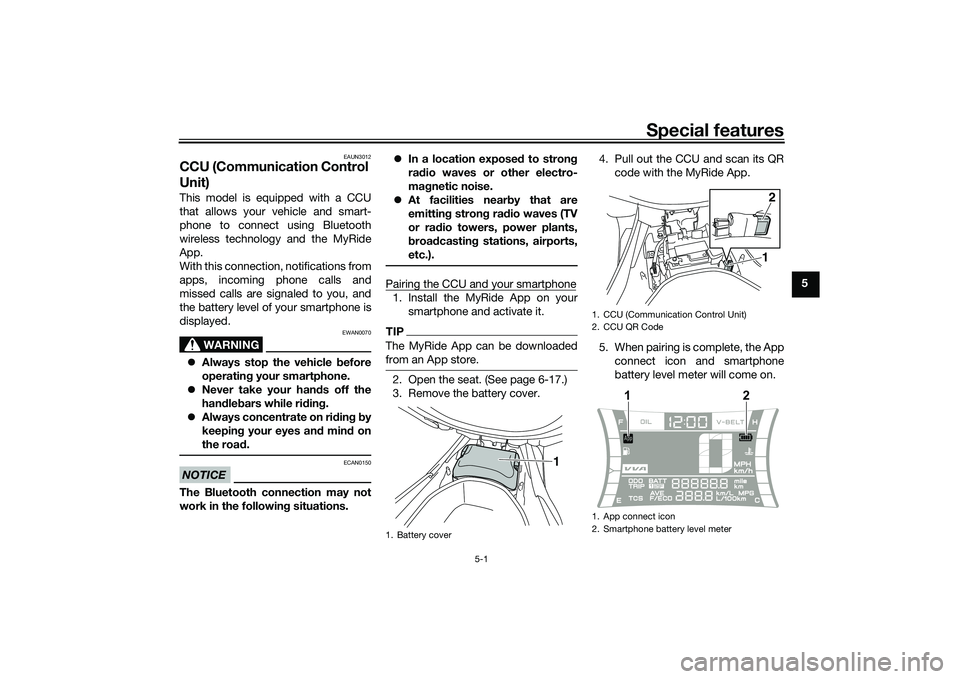
Pairing the CCU and your smartphone1. Install the MyRide App on your smartphone and activate it.TIPThe MyRide App can be downloaded
from an App store.2. Open the seat. (See page 6-17.)
3. Remove the battery cover. 4. Pull out the CCU and scan its QR
code with the MyRide App.
5. When pairing is complete, the App connect icon and smartphone
battery level meter will come on.1. Battery cover
1
1. CCU (Communication Control Unit)
2. CCU QR Code
1. App connect icon
2. Smartphone battery level meter
12
1
2
UBBDE0E0.book Page 1 Wednesday, June 2, 2021 2:57 PM
Page 34 of 114

Special features
5-2
5
TIPOnce paired, the smartphone is
registered in the CCU. The next
time the vehicle is turned on and
the MyRide App is active, the con-
nection will be automatically exe-
cuted.
Only one smartphone can be con-
nected to the CCU at a time.
If more than one phone has been
registered in the CCU, then the
first phone within reach will be
connected.
UBBDE0E0.book Page 2 Wednesday, June 2, 2021 2:57 PM
Page 37 of 114

Instrument and control functions
6-3
6
EAUN2781
Incomin g call in dicator li ght “ ”
This indicator light flashes when there
is an incoming call to the connected
smartphone. If you do not answer the
call, the indicator light stays on until
you turn the vehicle off.TIPThis function works only when the
smartphone is connected to the vehi-
cle.
EAUN2792
Incomin g notification in dicator
lig ht “ ”
This indicator light flashes for 10 sec-
onds when the connected smartphone
receives an SNS, E-mail or other notifi-
cation. After that, the indicator light
stays on until you turn the vehicle off.TIP This function works only when the
smartphone is connected to the
vehicle.
Notification setting is needed for
each application at the connected
smartphone in advance.
EAUN3040
Multi-function meter unit
WARNING
EWA12423
Be sure to stop the vehicle before
makin g any settin g chan ges to the
multi-function meter unit. Chan gin g
settin gs while ri din g can distract the
operator an d increase the risk of an
acci dent.
The “MENU” switch is located on the
left side of handlebar. This switch al-
lows you to control or change the set-
tings of multi-function meter unit.
The multi-function meter unit is
equipped with the following:
a speedometer
a VVA indicator
a clock
a fuel meter
an App connect icon
a smartphone battery level meter
a coolant temperature meter
a multi-function displayTIPBe sure to turn the main switch on be-
1. Fuel meter
2. App connect icon
3. VVA (variable valve actuation) indicator
4. Clock
5. Speedometer
6. Smartphone battery level meter
7. Coolant temperature meter
8. Multi-function display
8
1345 7
6
2
1.
1
UBBDE0E0.book Page 3 Wednesday, June 2, 2021 2:57 PM
Page 38 of 114

Instrument and control functions
6-4
6
EAUN3051
App Connect icon
This icon comes on when CCU and
smartphone is connected via MyRide
App.TIPEven if the smartphone is not connect-
ed, when the vehicle is turned on, this
icon should come on for a few sec-
onds. Otherwise have a Yamaha dealer
check the CCU and the electrical cir-
cuit.
EAUN2873
Smartphone battery level meter
This meter indicates the current battery
level of the connected smartphone.
The display segments of the meter dis-
appear from full to blank as the battery
level decreases. When approximately
10% or less of the battery remains, the
last segment starts flashing.TIPEven if the smartphone is not connect-
ed, when the vehicle is turned on, this
icon should come on for a few sec- onds. Otherwise have a Yamaha dealer
check the CCU and the electrical cir-
cuit.
EAU86820
Switchin
g the display units
The display units can be switched be-
tween kilometers and miles.
To switch the display units1. Turn the vehicle off.
2. While pushing the “MENU” switch, turn the vehicle on.
3. Continue to push the “MENU” switch until the display unit setting
screen comes on (approximately 5
seconds).
4. Push the “MENU” switch once to switch the display units.
5. Push the “MENU” switch for 1 second to confirm the setting.
EAU86831
Speed ometer
The speedometer shows the vehicle’s
traveling speed.
EAU86841
Fuel meter
The fuel meter indicates the amount of
fuel in the fuel tank. The display seg-
ments of the fuel meter disappear from
“F” (full) towards “E” (empty) as the fuel
level decreases. When approximately
1.7 L (0.45 US gal, 0.37 Imp.gal) of fuel
remains, the last segment starts flash-
ing. Refuel as soon as possible.TIPIf a problem is detected in the electrical
circuit, the fuel level segments will flash
repeatedly. If this occurs, have a
Yamaha dealer check the vehicle.1. Fuel meter1
UBBDE0E0.book Page 4 Wednesday, June 2, 2021 2:57 PM
Page 51 of 114
Instrument and control functions
6-17
6
EAU86150
Fuel tank overflow hoseThe overflow hose drains excess gaso-
line and directs it safely away from the
vehicle.
Before operating the vehicle:
Check the fuel tank overflow hose
connection and routing.
Check the fuel tank overflow hose
for cracks or damage, and replace
it if necessary.
Make sure that the fuel tank over-
flow hose is not blocked, and
clean it if necessary.
EAU13435
Catalytic converterThe exhaust system contains catalytic
converter(s) to reduce harmful exhaust
emissions.
WARNING
EWA10863
The exhaust system is hot after op-
eration. To prevent a fire hazar d or
b urns:
Do not park the vehicle near
possi ble fire hazar ds such as
g rass or other materials that
easily burn.
Park the vehicle in a place
where pe destrians or chil dren
are not likely to touch the hot
exhaust system.
Make sure that the exhaust sys-
tem has cooled down before
d oin g any maintenance work.
Do not allow the en gine to id le
more than a few minutes. Lon g
i d lin g can cause a buil d-up of
heat.
EAU89400
SeatTo open the seat
Via the main switchTurn the main switch to “OPEN”, and
then push the “SEAT” button. (See
page 3-9.)
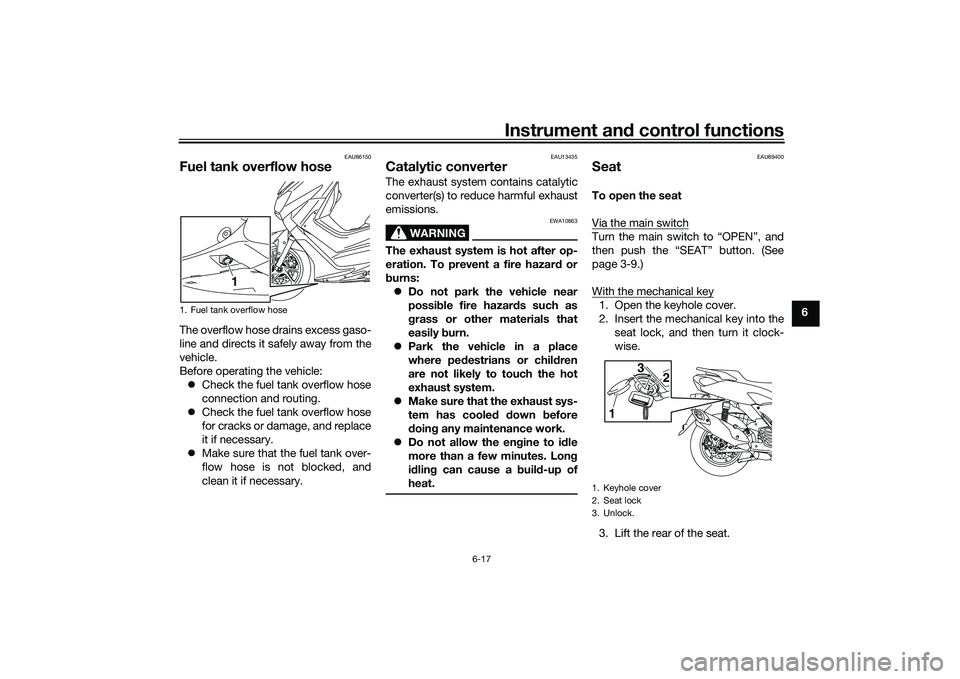
With the mechanical key1. Open the keyhole cover.
2. Insert the mechanical key into the seat lock, and then turn it clock-
wise.
3. Lift the rear of the seat.
1. Fuel tank overflow hose
1
1. Keyhole cover
2. Seat lock
3. Unlock.
1 3
2
UBBDE0E0.book Page 17 Wednesday, June 2, 2021 2:57 PM
Page 55 of 114

Instrument and control functions
6-21
6
EAUN2161
Power outlet This model is equipped with a 12V DC
power outlet.NOTICE
ECAN0140
Do not use the power outlet when
the en gine is off, an d d o not exceed
the specified electrical load ; other-
wise the fuse may blow or the b at-
tery may d ischarge.
When washin g the vehicle, do not di-
rect hi gh-pressure washers at the
power outlet area.
To use the power outlet 1. Turn the vehicle power off.
2. Remove the power outlet cap.
3. Turn the accessory off.
4. Insert the accessory plug into the power outlet.
5. Turn the vehicle power on and start the engine.
6. Turn the accessory on.TIPWhen finished riding, turn off the ac-
cessory and disconnect it from the
power outlet, and then install the cap.
WARNING
EWAN0050
To prevent electrical shock or short-
circuitin g, install the cap when the
power outlet is not in use.
1. Power outletMaximum electrical loa d:
12 W (1A)1
1. Power outlet cap1
UBBDE0E0.book Page 21 Wednesday, June 2, 2021 2:57 PM
Page 58 of 114
For your safety – pre-operation checks
7-1
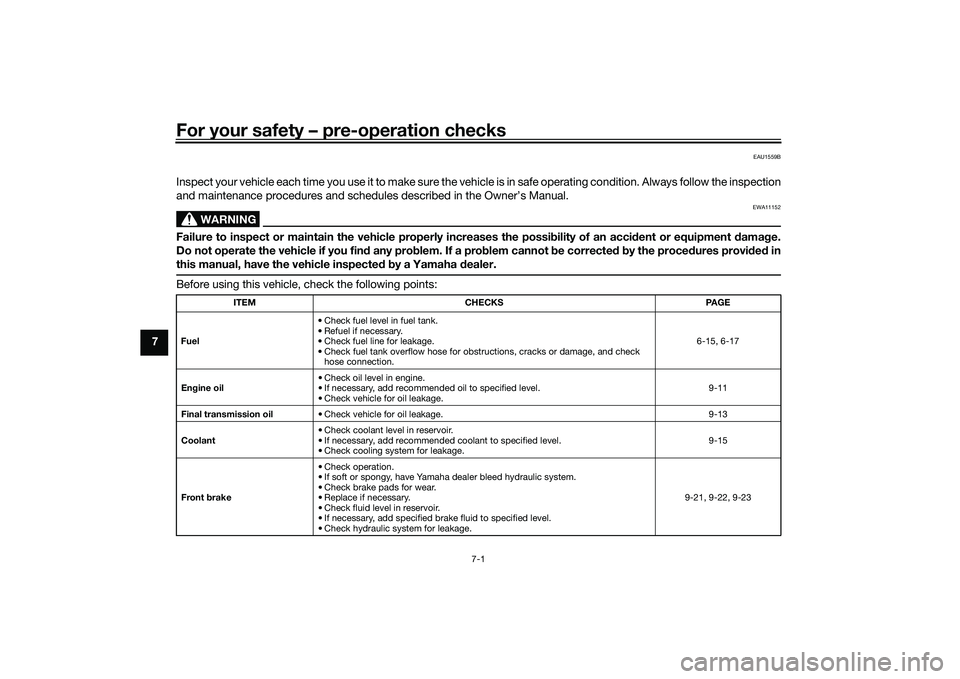
7
EAU1559B
Inspect your vehicle each time you use it to make sure the vehicle is in safe operating condition. Always follow the inspection
and maintenance procedures and schedules described in the Owner’s Manual.
WARNING
EWA11152
Failure to inspect or maintain the vehicle properly increases the possibility of an acci dent or equipment d amage.
Do not operate the vehicle if you fin d any pro blem. If a pro blem cannot be corrected b y the proce dures provi ded in
this manual, have the vehicle inspecte d b y a Yamaha dealer.Before using this vehicle, check the following points:
ITEM CHECKS PAGE
Fuel • Check fuel level in fuel tank.
• Refuel if necessary.
• Check fuel line for leakage.
• Check fuel tank overflow hose for obstructions, cracks or damage, and check
hose connection. 6-15, 6-17
En gine oil • Check oil level in engine.
• If necessary, add recommended oil to specified level.
• Check vehicle for oil leakage. 9-11
Final transmission oil • Check vehicle for oil leakage. 9-13
Coolant • Check coolant level in reservoir.
• If necessary, add recommended coolant to specified level.
• Check cooling system for leakage. 9-15
Front brake • Check operation.
• If soft or spongy, have Yamaha dealer bleed hydraulic system.
• Check brake pads for wear.
• Replace if necessary.
• Check fluid level in reservoir.
• If necessary, add specified brake fluid to specified level.
• Check hydraulic system for leakage. 9-21, 9-22, 9-23
UBBDE0E0.book Page 1 Wednesday, June 2, 2021 2:57 PM
Page 74 of 114

Periodic maintenance an d a djustment
9-11
9
EAU36113
CanisterThis model is equipped with a canister
to prevent the discharging of fuel vapor
into the atmosphere. Before operating
this vehicle, make sure to check the
following:
Check each hose connection.
Check each hose and canister for
cracks or damage. Replace if
damaged.
Make sure that the canister
breather is not blocked, and if
necessary, clean it.
EAU66995
Engine oil an d oil strainerThe engine oil level should be checked
before each ride. In addition, the oil
must be changed and the oil strainer
cleaned at the intervals specified in the
periodic maintenance and lubrication
chart.
To check the en gine oil level
1. Place the vehicle on the center- stand. A slight tilt to the side can
result in a false reading.
2. Start the engine, warm it up for several minutes, and then turn it
off.
3. Wait a few minutes until the oil set- tles, remove the engine oil filler
cap, wipe the engine oil dipstick
clean, insert it back into the oil fill-
er hole (without screwing it in), and
then remove it again to check the
oil level. WARNING! The muffler
an d muffler protector become
very hot d uring use. To avoi d
possi ble burns, let the muffler
an d protector cool before re-
movin g the oil filler cap.
[EWA17810]
TIPThe engine oil should be between the
tip of the dipstick and the maximum
level mark.4. If the engine oil is not between the
tip of the dipstick and the maxi-
mum level mark, add sufficient oil
of the recommended type to raise
it to the correct level.
5. Insert the dipstick into the oil filler hole, and then tighten the oil filler
cap.
1. Canister
2. Canister breather
2
1
1. Oil filler hole
2. O-ring
3. Engine oil dipstick
4. Maximum level mark
5. Tip of the engine oil dipstick
3245
1
UBBDE0E0.book Page 11 Wednesday, June 2, 2021 2:57 PM