lock YAMAHA RHINO 700 2013 Owner's Manual
[x] Cancel search | Manufacturer: YAMAHA, Model Year: 2013, Model line: RHINO 700, Model: YAMAHA RHINO 700 2013Pages: 188, PDF Size: 4.9 MB
Page 83 of 188
6-6
5B410009On-Command four-wheel-drive switch and
differential gear lock switch
You may notice that the vehicle handles dif-
ferently in “2WD”, “4WD”, and “LOCK”. For
example, you should expect that the vehicle
will require more effort to turn in “LOCK”. Al-
ways stop the vehicle before changing be-
tween “2WD” and “4WD” or “4WD” and
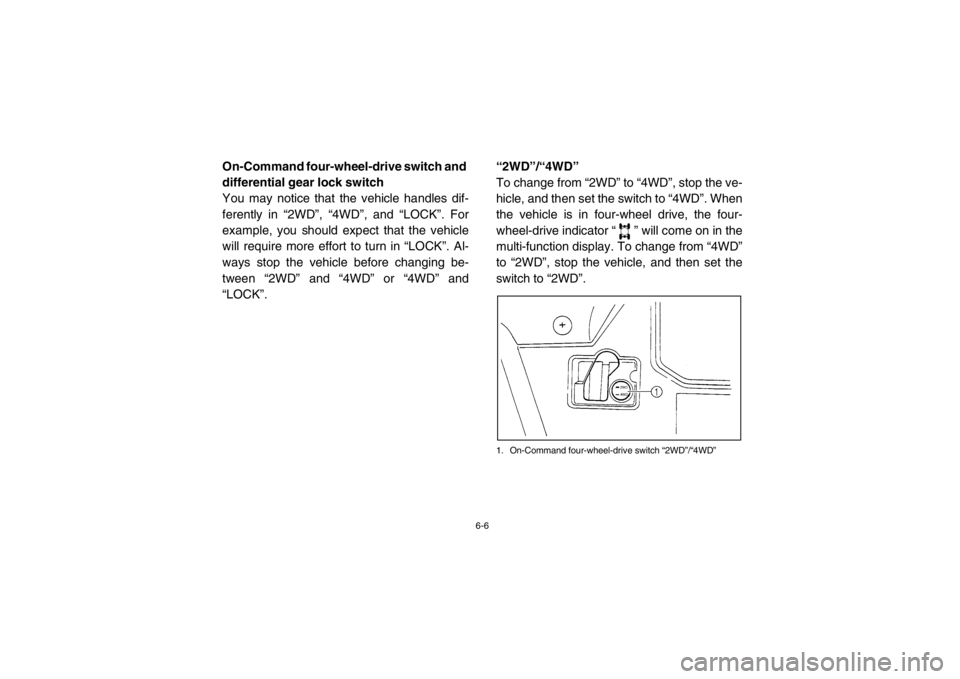
“LOCK”.“2WD”/“4WD”
To change from “2WD” to “4WD”, stop the ve-
hicle, and then set the switch to “4WD”. When
the vehicle is in four-wheel drive, the four-
wheel-drive indicator “ ” will come on in the
multi-function display. To change from “4WD”
to “2WD”, stop the vehicle, and then set the
switch to “2WD”.
1. On-Command four-wheel-drive switch “2WD”/“4WD”
1RB7A_EE.book Page 6 Tuesday, April 24, 2012 9:07 AM
Page 84 of 188
6-7
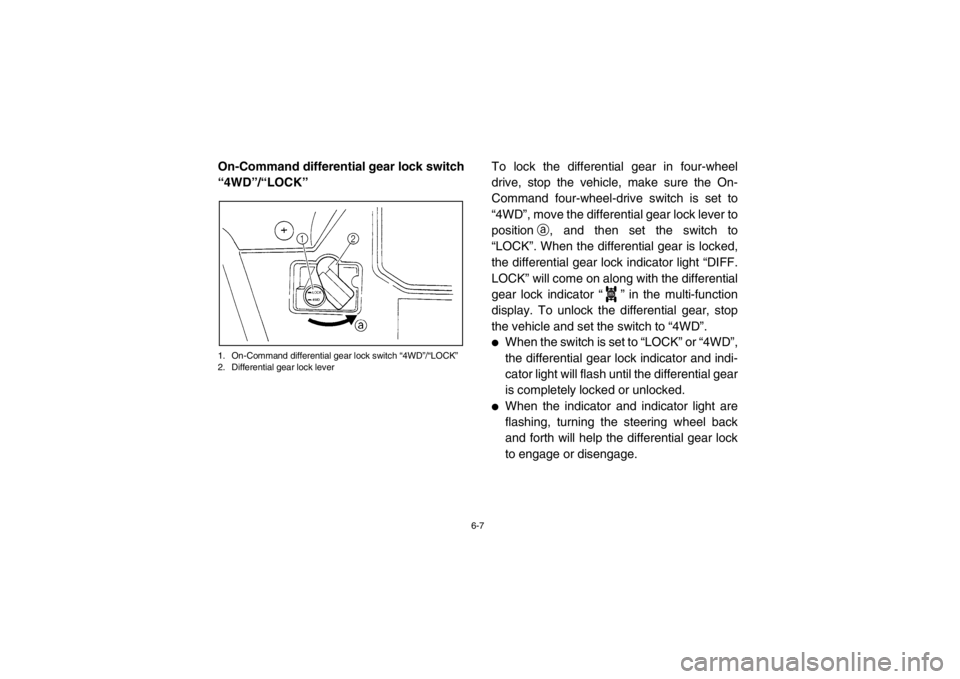
On-Command differential gear lock switch
“4WD”/“LOCK”1. On-Command differential gear lock switch “4WD”/“LOCK”
2. Differential gear lock lever
To lock the differential gear in four-wheel
drive, stop the vehicle, make sure the On-
Command four-wheel-drive switch is set to
“4WD”, move the differential gear lock lever to
positiona, and then set the switch to
“LOCK”. When the differential gear is locked,
the differential gear lock indicator light “DIFF.
LOCK” will come on along with the differential
gear lock indicator “ ” in the multi-function
display. To unlock the differential gear, stop
the vehicle and set the switch to “4WD”.●
When the switch is set to “LOCK” or “4WD”,
the differential gear lock indicator and indi-
cator light will flash until the differential gear
is completely locked or unlocked.
●
When the indicator and indicator light are
flashing, turning the steering wheel back
and forth will help the differential gear lock
to engage or disengage.
DIFF.
LOCK
1RB7A_EE.book Page 7 Tuesday, April 24, 2012 9:07 AM
Page 102 of 188
7-14
Wear eye protection when operating or riding
the vehicle to reduce the risk of a serious ac-
cident or injury. Eye protection, such as a face
shield or goggles, may reduce the risk of for-
eign material getting in your eyes and help
prevent loss of vision.
Practice for new Rhino users
You should become familiar with the perfor-
mance characteristics of the vehicle in a large,
flat area that is free of obstacles and other ve-
hicles. Practice controlling the accelerator
pedal, brakes, steering, and drive select lever.
Drive at slow speeds with gradual accelera-
tion and turning. Practice smooth throttle ap-
plication. Practice slowing down before
turning. Practice maintaining a steady throttle
through the turn. Avoid higher speeds until
you are thoroughly familiar with the operation
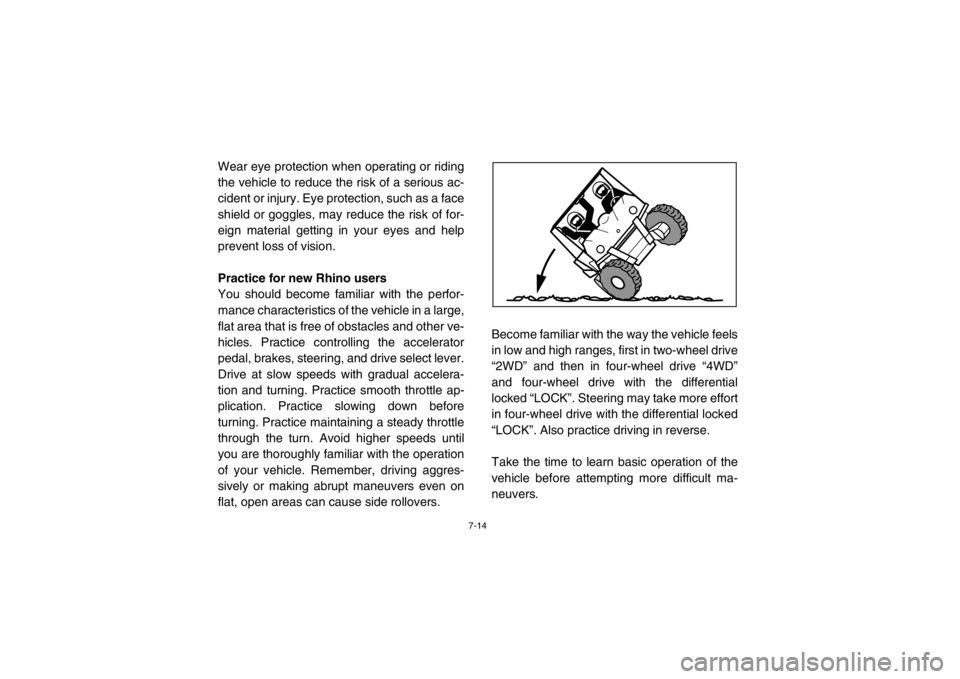
of your vehicle. Remember, driving aggres-
sively or making abrupt maneuvers even on
flat, open areas can cause side rollovers.Become familiar with the way the vehicle feels
in low and high ranges, first in two-wheel drive
“2WD” and then in four-wheel drive “4WD”
and four-wheel drive with the differential
locked “LOCK”. Steering may take more effort
in four-wheel drive with the differential locked
“LOCK”. Also practice driving in reverse.
Take the time to learn basic operation of the
vehicle before attempting more difficult ma-
neuvers.1RB7A_EE.book Page 14 Tuesday, April 24, 2012 9:07 AM
Page 106 of 188

7-18
Leaving the vehicle
Do not get out of the vehicle while the engine
is running and the drive select lever is in any
gear. There is a risk of injury because:●
Children or others may accidentally press
the accelerator pedal.
●
Objects tossed into the vehicle may strike
the accelerator pedal.
●
The parking brake may not keep the vehi-
cle from accelerating.
Unwanted vehicle movement can cause seri-
ous injury or death, and it may be dangerous
to try to stop the vehicle. Parking on a flat area
When parking on a flat area, stop the engine
and shift the drive select lever into the neutral
position. Apply the parking brake to help pre-
vent the vehicle from rolling.
Parking on a slope
The parking brake acts only on the rear
wheels when in “2WD”. For the parking brake
to take effect on all four wheels, shift to
“LOCK” before stopping the engine.
If you park on a hill that is too steep the vehi-
cle may roll out of control. Never park on hills
that are so steep you cannot walk up them
easily. If you must park on an incline follow
these instructions:
1. Bring the vehicle to a stop by applying the
brake pedal.
2. Put the vehicle in “LOCK”.
3. Turn the key to “OFF”.
1RB7A_EE.book Page 18 Tuesday, April 24, 2012 9:07 AM
Page 107 of 188

7-19
4. With the brake pedal applied, set theparking brake.
5. Block the front and rear wheels with
rocks or other objects.
Loading
The total weight of operator, passenger, ac-
cessories, cargo, trailer tongue weight, and
the vehicle itself must not exceed 907 kg
(2000 lb). Vehicle loading can affect handling.
See “Loading” on pages 6-9–6-10. Operation on different surfaces and
terrains
Go slowly and proceed with caution when op-
erating on an unfamiliar surface or terrain.
This vehicle may handle differently in certain
types of terrains or on certain surfaces. You
may come upon hidden rocks, bumps, or
holes without enough time to react. To avoid
loss of control or rollover, always be alert to
changing surfaces or terrain when operating
the vehicle.
The Rhino has higher ground clearance and
other features to handle rugged terrain, and
as a result, can overturn in situations where
some vehicles may not. Abrupt maneuvers or
aggressive driving can cause loss of control,
including rollovers – even on flat, open areas.
These rollovers can result in crushed limbs
and other serious injuries or death to drivers
or passengers.
1RB7A_EE.book Page 19 Tuesday, April 24, 2012 9:07 AM
Page 109 of 188

7-21
Uphill
Do not attempt to climb hills until you have
mastered basic maneuvers on flat ground.
Drive straight up hills, and avoid crossing the
side of a hill, which increases your risk of roll-
over. Practice first on gentle slopes before at-
tempting steeper hills. Always check the
terrain carefully before attempting any hill.
To climb a hill, you need traction, momentum,
and steady throttle. For more traction and
control for climbing steeper and/or rougher
slopes, shift into low gear and select “4WD” or
“LOCK”. Travel fast enough to maintain mo-
mentum, but not so fast that you cannot react
to changes in the terrain as you climb.Slow down when you reach the crest of the hill
if you cannot see clearly what is on the other
side – there could be another person, an ob-
stacle, or a sharp drop-off.
If you start to lose traction or momentum
when climbing, and decide you will be unable
to continue, use the brakes to stop. Do not at-
tempt to turn the vehicle around. With your
foot on the brake pedal, look behind you and
plan your descent. Shift the drive select lever
into reverse so you can use engine braking to
slow your descent. Release the brake and be-
gin to coast down the hill. Use engine braking
as much as possible, gently applying the
brakes when necessary.1RB7A_EE.book Page 21 Tuesday, April 24, 2012 9:07 AM
Page 110 of 188

7-22
Downhill
Check the terrain carefully before going
downhill. When possible, choose a path that
lets you drive your vehicle straight downhill.
Choose your path carefully and drive slowly
enough to be able to react to obstacles that
you encounter.
For more traction and control, before going
down steeper and/or rougher slopes, shift into
low gear and select “4WD” or “LOCK”. Engine
braking will help you go downhill slowly. Go as
slowly as possible. If you begin to go too fast,
apply the brakes gently. Avoid hard applica-
tion of the brakes, which could cause the vehi-
cle to slide.If you are sliding or skidding, try to steer in the
direction the vehicle is sliding, to regain con-
trol. For example, if you feel the back of the
vehicle start to slide to your right, steer to the
right.
If you must turn on the hill to avoid an obsta-
cle, do so slowly and carefully. If the vehicle
starts to tip, immediately steer in the downhill
direction if there are no obstacles in your path.
As you regain proper balance, gradually steer
again in the direction you want to go.1RB7A_EE.book Page 22 Tuesday, April 24, 2012 9:07 AM
Page 150 of 188
8-37
WARNING
Improper maintenance can result in loss of
braking ability. Observe these precautions:●
Insufficient brake fluid may allow air to
enter the brake system, reducing brak-
ing performance.
●
Clean the filler cap before removing.
Use only DOT 4 brake fluid from a
sealed container.
●
Use only the specified brake fluid; oth-
erwise, the rubber seals may deterio-
rate, causing leakage.
●
Refill with the same type of brake fluid.
Adding a brake fluid other than DOT 4
may result in a harmful chemical reac-
tion.
●
Be careful that water does not enter
the brake fluid reservoir when refilling.
Water will significantly lower the boil-
ing point of the fluid and may result in
vapor lock.
NOTICEBrake fluid may damage painted surfaces
or plastic parts. Always clean up spilled
fluid immediately.As the brake pads wear, it is normal for the
brake fluid level to gradually go down. A low
brake fluid level may indicate worn brake
pads and/or brake system leakage; therefore,
be sure to check the brake pads for wear and
the brake system for leakage. If the brake fluid
level goes down suddenly, have a Yamaha
dealer check the cause before further riding.EVU00860Brake fluid replacement
Complete fluid replacement should be done
only by trained Yamaha service personnel.
Have a Yamaha dealer replace the following
components during periodic maintenance or
when they are damaged or leaking.●
Replace the oil seals every two years.
●
Replace the brake hoses every four years.
1RB7A_EE.book Page 37 Tuesday, April 24, 2012 9:07 AM
Page 152 of 188
8-39
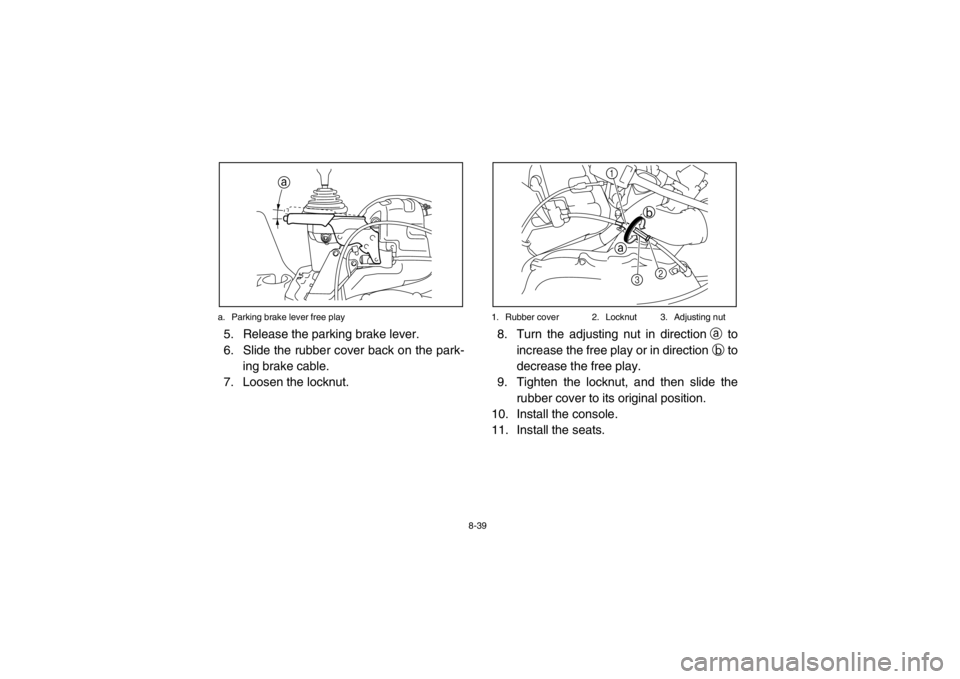
a. Parking brake lever free play
5. Release the parking brake lever.
6. Slide the rubber cover back on the park-
ing brake cable.
7. Loosen the locknut.
1. Rubber cover 2. Locknut 3. Adjusting nut8. Turn the adjusting nut in direction a to
increase the free play or in direction b to
decrease the free play.
9. Tighten the locknut, and then slide the rubber cover to its original position.
10. Install the console.
11. Install the seats.
a
a b
2
1
3
1RB7A_EE.book Page 39 Tuesday, April 24, 2012 9:07 AM
Page 167 of 188
8-54
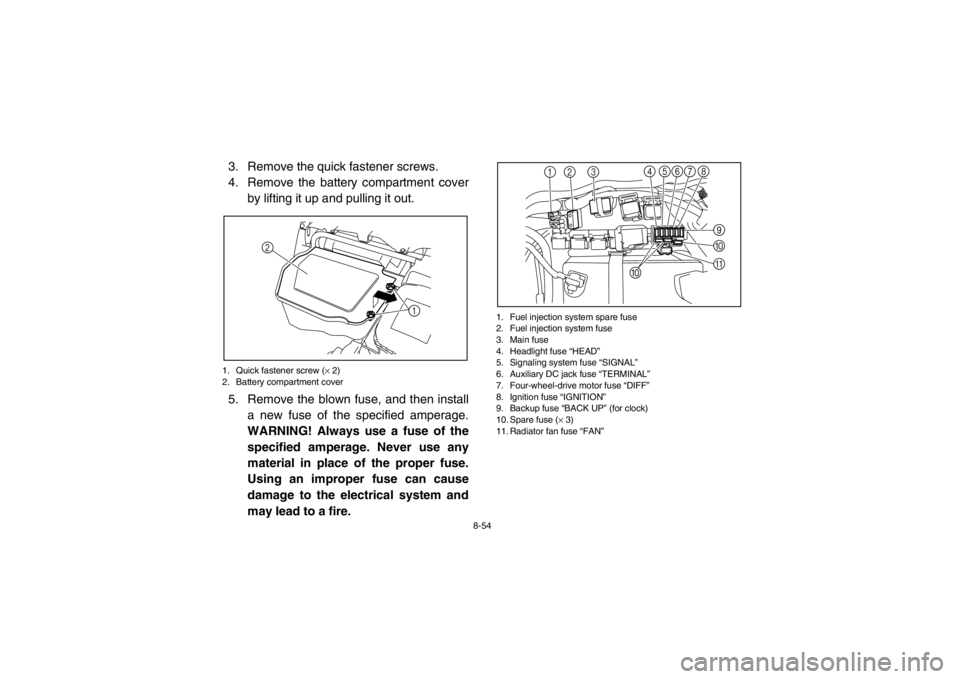
3. Remove the quick fastener screws.
4. Remove the battery compartment coverby lifting it up and pulling it out.1. Quick fastener screw ( × 2)
2. Battery compartment cover5. Remove the blown fuse, and then install
a new fuse of the specified amperage.
WARNING! Always use a fuse of the
specified amperage. Never use any
material in place of the proper fuse.
Using an improper fuse can cause
damage to the electrical system and
may lead to a fire.
1. Fuel injection system spare fuse
2. Fuel injection system fuse
3. Main fuse
4. Headlight fuse “HEAD”
5. Signaling system fuse “SIGNAL”
6. Auxiliary DC jack fuse “TERMINAL”
7. Four-wheel-drive motor fuse “DIFF”
8. Ignition fuse “IGNITION”
9. Backup fuse “BACK UP” (for clock)
10. Spare fuse ( × 3)
11. Radiator fan fuse “FAN”
1
2
12 3 7
9
456 8
A
@
0
1RB7A_EE.book Page 54 Tuesday, April 24, 2012 9:07 AM