oil YAMAHA TMAX 2020 Owners Manual
[x] Cancel search | Manufacturer: YAMAHA, Model Year: 2020, Model line: TMAX, Model: YAMAHA TMAX 2020Pages: 126, PDF Size: 21.59 MB
Page 8 of 126
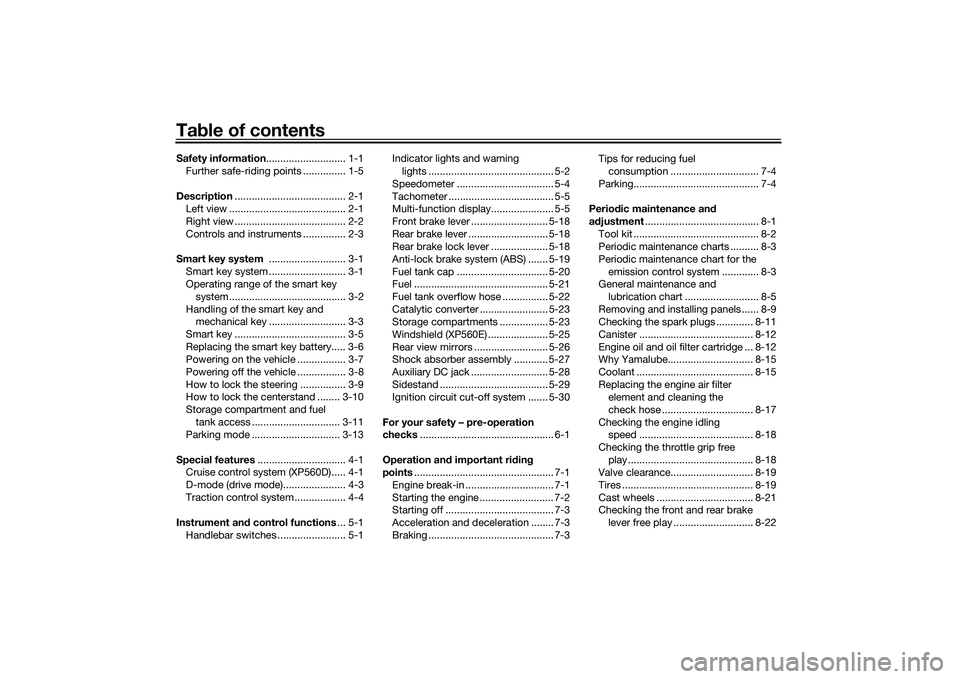
Table of contentsSafety information ............................ 1-1
Further safe-riding points ............... 1-5
Description ....................................... 2-1
Left view ......................................... 2-1
Right view ....................................... 2-2
Controls and instruments ............... 2-3
Smart key system ........................... 3-1
Smart key system ........................... 3-1
Operating range of the smart key system......................................... 3-2
Handling of the smart key and mechanical key ........................... 3-3
Smart key ....................................... 3-5
Replacing the smart key battery..... 3-6
Powering on the vehicle ................. 3-7
Powering off the vehicle ................. 3-8
How to lock the steering ................ 3-9
How to lock the centerstand ........ 3-10
Storage compartment and fuel tank access ............................... 3-11
Parking mode ............................... 3-13
Special features ............................... 4-1
Cruise control system (XP560D)..... 4-1
D-mode (drive mode)...................... 4-3
Traction control system .................. 4-4
Instrument an d control functions ... 5-1
Handlebar switches ........................ 5-1 Indicator lights and warning
lights ............................................ 5-2
Speedometer .................................. 5-4
Tachometer ..................................... 5-5
Multi-function display...................... 5-5
Front brake lever ........................... 5-18
Rear brake lever ............................ 5-18
Rear brake lock lever .................... 5-18
Anti-lock brake system (ABS) ....... 5-19
Fuel tank cap ................................ 5-20
Fuel ............................................... 5-21
Fuel tank overflow hose ................ 5-22
Catalytic converter ........................ 5-23
Storage compartments ................. 5-23
Windshield (XP560E) ..................... 5-25
Rear view mirrors .......................... 5-26
Shock absorber assembly ............ 5-27
Auxiliary DC jack ........................... 5-28
Sidestand ...................................... 5-29
Ignition circuit cut-off system ....... 5-30
For your safety – pre-operation
checks ............................................... 6-1
Operation an d important ri din g
points ................................................. 7-1
Engine break-in ............................... 7-1
Starting the engine .......................... 7-2
Starting off ...................................... 7-3
Acceleration and deceleration ........ 7-3
Braking ............................................ 7-3 Tips for reducing fuel
consumption ............................... 7-4
Parking............................................ 7-4
Perio dic maintenance an d
a d justment ........................................ 8-1
Tool kit ............................................ 8-2
Periodic maintenance charts .......... 8-3
Periodic maintenance chart for the emission control system ............. 8-3
General maintenance and
lubrication chart .......................... 8-5
Removing and installing panels ...... 8-9
Checking the spark plugs ............. 8-11
Canister ........................................ 8-12
Engine oil and oil filter cartridge ... 8-12
Why Yamalube.............................. 8-15
Coolant ......................................... 8-15
Replacing the engine air filter element and cleaning the
check hose ................................ 8-17
Checking the engine idling speed ........................................ 8-18
Checking the throttle grip free play ............................................ 8-18
Valve clearance............................. 8-19
Tires .............................................. 8-19
Cast wheels .................................. 8-21
Checking the front and rear brake
lever free play ............................ 8-22UB3TE0E0.book Page 1 Tuesday, September 17, 2019 9:35 AM
Page 16 of 126
Description
2-1
2
EAU10411
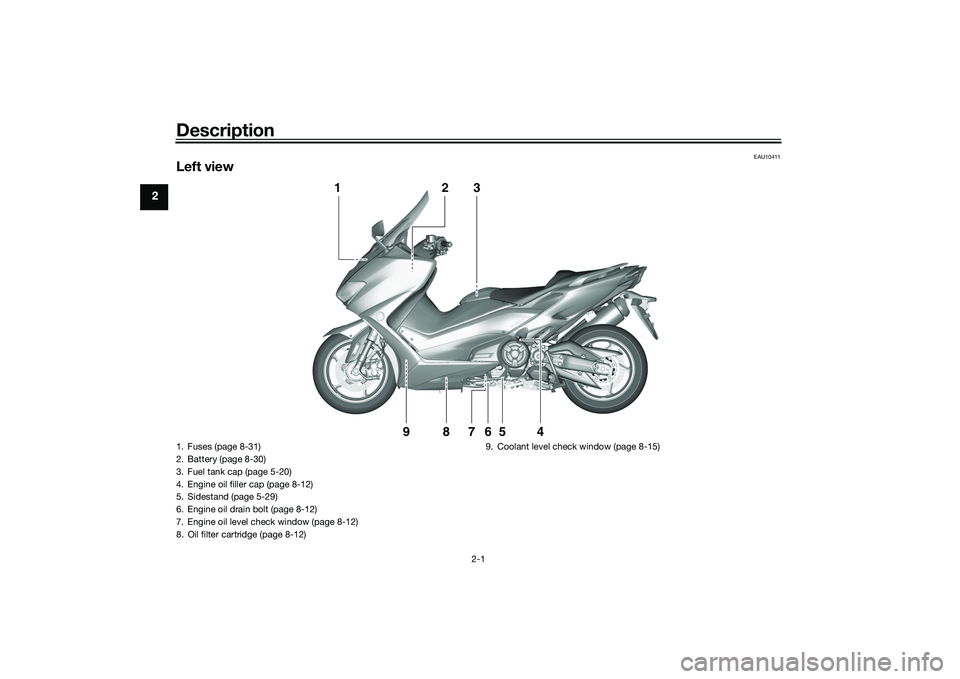
Left view
1
2
3
4
5
6
9
8
7
1. Fuses (page 8-31)
2. Battery (page 8-30)
3. Fuel tank cap (page 5-20)
4. Engine oil filler cap (page 8-12)
5. Sidestand (page 5-29)
6. Engine oil drain bolt (page 8-12)
7. Engine oil level check window (page 8-12)
8. Oil filter cartridge (page 8-12)9. Coolant level check window (page 8-15)UB3TE0E0.book Page 1 Tuesday, September 17, 2019 9:35 AM
Page 22 of 126

Smart key system
3-4
3If the smart key and identification card
of the mechanical key are both lost or
damaged, and there is no record of the
identification number, the entire smart
key system will need to be replaced.
NOTICE
ECA21573
The smart key has precision elec-
tronic components. O bserve the fol-
lowin g precautions to prevent
possi ble malfunction or damag e.
Do not place or store the smart
key in a storag e compartment.
The smart key may b e damag ed
from roa d vi brations or exces-
sive heat.
Do not d rop, ben d, or su bject
the smart key to stron g impacts.
Do not sub merge the smart key
in water or other liqui ds.
Do not place heavy items or ex-
cessive stress on the smart key.
Do not leave the smart key in a
place expose d to d irect sun-
li g ht, hi gh temperature or hi gh
humi dity.
Do not g rind or attempt to mo d-
ify the smart key.
Keep the smart key away from
stron g ma gnetic fiel ds an d
ma gnetic o bjects such as key
hol ders, TVs, an d com
puters.
Keep the smart key away from
electric me dical equipment.
Do not allow oils, polishin g
a g ents, fuel, or any stron g
chemicals to come in contact
with the smart key. The smart
key body may become discol-
ore d or cracke d.
TIP The smart key battery life is ap-
proximately two years, but this
may vary according to operating
conditions.
The smart key battery may be-
come discharged even if it is away
from the vehicle and not being
used.
If the smart key continually re-
ceives radio waves, the smart key
battery will discharge quickly. (For
example, when placed in the vicin-
ity of electrical products such as
televisions, radios, or computers.)Replace the smart key battery when
the smart key system indicator light
flashes for about 20 seconds when the
vehicle is first power on, or when the
smart key indicator light does not
come on when the “ON/OFF” switch is
pushed. (See page 3-6.) After changing
the smart key battery, if the smart key
system still does not operate, have a
Yamaha dealer check the vehicle.
1. Smart key
2. Mechanical key
3. Identification number card
123456
1 2
3
UB3TE0E0.book Page 4 Tuesday, September 17, 2019 9:35 AM
Page 41 of 126

Instrument and control functions
5-5
5
EAU77141
TachometerThe tachometer shows the engine
speed in crankshaft revolutions per
minute (r/min).
When the vehicle power is turned on,
the tachometer needle will sweep
across the r/min range and return to
zero in order to test the electrical cir-
cuit.NOTICE
ECA23050
Do not operate the en gine in the ta-
chometer hi gh-r/min zone.
Hi gh-r/min zone: 8250 r/min an d
a b ove
EAU7733A
Multi-function display
WARNING
EWA12313
Be sure to stop the vehicle before
makin g any settin g chan ges to the
multi-function display. Chan gin g
settin gs while ri din g can d istract the
operator an d increase the risk of an
acci dent.TIPCertain multi-function display items
can be adjusted via the setting mode.
(See page 5-11.)
1. Tachometer
2. High-r/min zone
1 1
2
2
1. Information display
2. Function select icon
3. Fuel meter
4. Clock
5. Grip warmer/Seat heater icons
6. Drive mode display
7. Coolant temperature meter
1 2 3 4 5
6
7
1. Oil change indicator “Oil”
2. V-belt replacement indicator “V-Belt”
3. Eco indicator “ECO”
1 2
3
UB3TE0E0.book Page 5 Tuesday, September 17, 2019 9:35 AM
Page 43 of 126

Instrument and control functions
5-7
5
Drive mo
de display
This display indicates which drive
mode has been selected: “S” sporty or
“T” touring. (See page 4-3.)
V- belt replacement in dicator This indicator flashes every 20000 km
(12500 mi) when the V-belt needs to be
replaced.
After changing the V-belt, reset the V-
belt replacement indicator. (See page
5-13.)
TIPIf the V-belt is changed before the V-
belt replacement indicator flashes, the
indicator must be reset in order for the
next periodic V-belt change to be indi-
cated at the correct time.Oil chan
ge in dicator This indicator flashes at the initial 1000
km (600 mi), then at 5000 km (3000 mi)
and every 5000 km (3000 mi) thereafter
to indicate that the engine oil should be
changed.
After changing the engine oil, reset the
oil change indicator. (See page 5-13.)
TIPIf the engine oil is changed before the
oil change indicator flashes, the indica-
tor must be reset in order for the next
periodic oil change to be indicated at
the correct time.Grip warmer/Seat heater icons
Each icon will appear when the grip
warmer or seat heater is in use.
1. Drive mode display
1. V-belt replacement indicator “V-Belt”
11
1. Oil change indicator “Oil”
1
1. Grip warmer/Seat heater icons
1
UB3TE0E0.book Page 7 Tuesday, September 17, 2019 9:35 AM
Page 47 of 126

Instrument and control functions
5-11
5
Instantaneous fuel consumption:
The instantaneous fuel consumption
mode “CRNT.F” can be set to “km/L”
or “L/100km”. For UK-spec vehicles:
“MPG”. (See page 5-14.)TIPIf traveling at speeds under 10 km/h (6
mi/h), “– –.–” will be displayed.NOTICE
ECA15474
If there is a malfunction, “– –.–” will
b
e continuously d isplayed. Have a
Yamaha dealer check the vehicle.
Settin g mo de
Stop the vehicle and then push the
“MENU” switch for 2 seconds to enter
the setting mode. To exit the setting
mode and return to the standard dis-
play mode, push the “MENU” switch
again for 2 seconds or
select “ ”.TIPWhen the malfunction indicator light is
on, setting mode cannot be entered.Menu items1. Setting mode display
Categ ory Description
This function allows you to
set the low, middle, and
high settings to 10 tem-
perature levels.
1
Grip Warmer
This function allows you to
set the low, middle, and
high settings to 10 tem-
perature levels.
This function allows you to
turn the traction control
system on or off.
This function allows you to
check and reset the oil
change interval (indicator),
V-Belt change interval (in-
dicator), and the “FREE”
maintenance interval.
This function allows you to
switch the fuel consump-
tion units between
“L/100km” and “km/L”.
For UK-spec vehicles: this
function is not available.
This function allows you to
change the items shown in
3 information displays.
This function allows you to
adjust the brightness of
the instrument panel.
This function allows you to
set the clock.
This function allows you to
reset all items to their fac-
tory preset or default set-
tings; excepting the
odometer, clock, and
maintenance counter
items “Oil” and “V-Belt”.
Seat HeaterTraction ControlMaintenance
UnitDisplayBrightnessCloc
k
All Reset
UB3TE0E0.book Page 11 Tuesday, September 17, 2019 9:35 AM
Page 53 of 126

Instrument and control functions
5-17
5
6. Push the “MENU” switch to return
to the menu screen.
Resetting all of the display items
1. Use the select switch to highlight “All Reset”.
2. Push the “MENU” switch.
3. Use the select switch to highlight “YES”, and then push the “MENU”
switch. All items are reset to facto-
ry preset or default settings.
TIPThe odometer, clock, maintenance
counter item “Oil” and maintenance
counter item “V-Belt” will not be reset.To exit the setting mode1. Use the select switch to highlight“Return”. 2. Push the “MENU” switch to exit
the setting mode and return to the
standard display mode.
UB3TE0E0.book Page 17 Tuesday, September 17, 2019 9:35 AM
Page 68 of 126
For your safety – pre-operation checks
6-1
6
EAU1559A
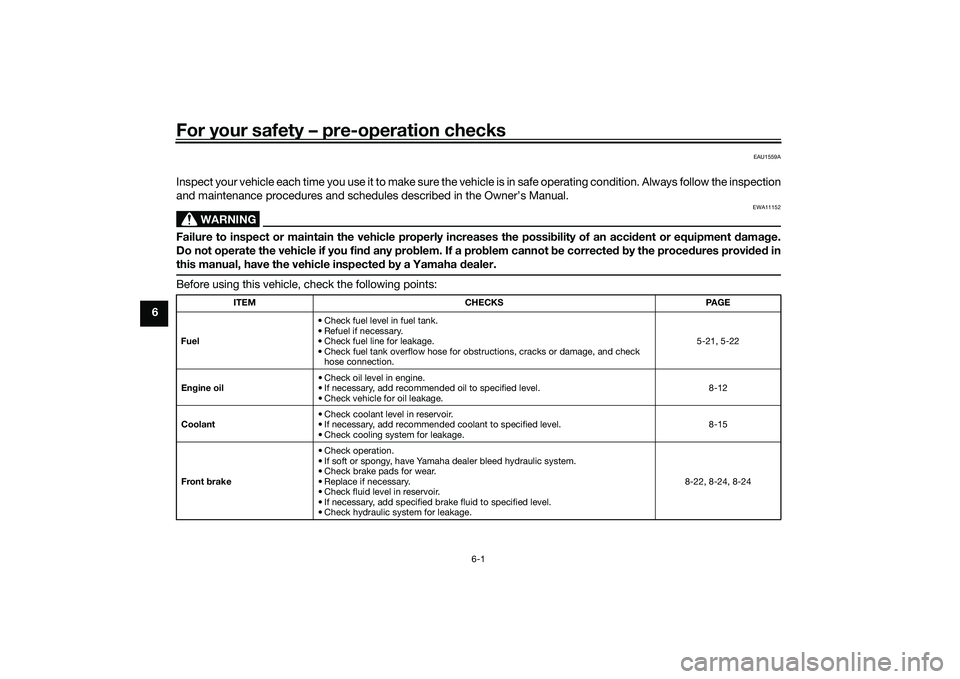
Inspect your vehicle each time you use it to make sure the vehicle is in safe operating condition. Always follow the inspection
and maintenance procedures and schedules described in the Owner’s Manual.
WARNING
EWA11152
Failure to inspect or maintain the vehicle properly increases the possibility of an acci dent or equipment damag e.
Do not operate the vehicle if you fin d any pro blem. If a pro blem cannot be corrected b y the proce dures provi ded in
this manual, have the vehicle inspecte d b y a Yamaha dealer.Before using this vehicle, check the following points:
ITEM CHECKS PAGE
Fuel • Check fuel level in fuel tank.
• Refuel if necessary.
• Check fuel line for leakage.
• Check fuel tank overflow hose for obstructions, cracks or damage, and check
hose connection. 5-21, 5-22
En gine oil • Check oil level in engine.
• If necessary, add recommended oil to specified level.
• Check vehicle for oil leakage. 8-12
Coolant • Check coolant level in reservoir.
• If necessary, add recommended coolant to specified level.
• Check cooling system for leakage. 8-15
Front brake • Check operation.
• If soft or spongy, have Yamaha dealer bleed hydraulic system.
• Check brake pads for wear.
• Replace if necessary.
• Check fluid level in reservoir.
• If necessary, add specified brake fluid to specified level.
• Check hydraulic system for leakage. 8-22, 8-24, 8-24
UB3TE0E0.book Page 1 Tuesday, September 17, 2019 9:35 AM
Page 70 of 126

Operation and important rid ing points
7-1
7
EAU15952
Read the Owner’s Manual carefully to
become familiar with all controls. If
there is a control or function you do not
understand, ask your Yamaha dealer.
WARNING
EWA10272
Failure to familiarize yourself with
the controls can lead to loss of con-
trol, which coul d cause an acci dent
or injury.
EAU16842
En gine break-inThere is never a more important period
in the life of your engine than the period
between 0 and 1600 km (1000 mi). For
this reason, you should read the fol-
lowing material carefully.
Since the engine is brand new, do not
put an excessive load on it for the first
1600 km (1000 mi). The various parts in
the engine wear and polish themselves
to the correct operating clearances.
During this period, prolonged full-throt-
tle operation or any condition that
might result in engine overheating
must be avoided.
EAU81480
0–1000 km (0–600 mi)
Avoid prolonged operation above 5100
r/min. NOTICE: After 1000 km (600
mi) of operation, the en gine oil must
b e chan ged , an d the oil filter car-
tri dg e or element replace d.
[ECA11283]
1000–1600 km (600–1000 mi)
Avoid prolonged operation above 6100
r/min. 1600 km (1000 mi) an
d b eyon d
The vehicle can now be operated nor-
mally.
NOTICE
ECA25880
Keep the en gine spee d out of
the hi gh r/min zone.
If any en gine trou ble shoul d oc-
cur during the en gine break-in
period , imme diately have a
Yamaha dealer check the vehi-
cle.
UB3TE0E0.book Page 1 Tuesday, September 17, 2019 9:35 AM
Page 81 of 126

Periodic maintenance an d a djustment
8-7
8
21 *Front fork • Check operation and for oil leak-
age.
• Replace if necessary. √√√√
22 *Shock a
bsor ber as-
sem bly • Check operation and for oil leak-
age.
• Replace if necessary. √√√√
23 *Rear suspension re-
lay arm an
d con-
nectin g arm
pivotin g points • Check operation.
√√√√
24 En gine oil • Change (warm engine before
draining).
• Check oil level and vehicle for oil leakage. At the initial interval and when the oil change indicator flashes or
comes on. √
25 En
gine oil filter car-
tri dg e •Replace.
√√√
26 *Coolin g system • Check coolant level and vehicle
for coolant leakage. √√√√√
• Change. Every 3 years
27 *V-belt • Replace. When the V-belt replacement indicator flashes [every 20000 km (12000 mi)]
28 *Front an
d rear
b rake switches • Check operation.
√√√√√√
29 *Movin
g parts an d
ca bles • Lubricate.
√√√√√
NO. ITEM CHECK OR MAINTENANCE JOB
ODOMETER READING
ANNUAL
CHECK
1000 km
(600 mi) 10000 km
(6000 mi) 20000 km
(12000 mi) 30000 km
(18000 mi) 4000
0 km
(24000 mi)
UB3TE0E0.book Page 7 Tuesday, September 17, 2019 9:35 AM