lock YAMAHA XJR 1300 2016 Owners Manual
[x] Cancel search | Manufacturer: YAMAHA, Model Year: 2016, Model line: XJR 1300, Model: YAMAHA XJR 1300 2016Pages: 98, PDF Size: 2.59 MB
Page 6 of 98

Table of contentsSafety information ............................ 1-1
Description ....................................... 2-1
Left view ......................................... 2-1
Right view ....................................... 2-2
Controls and instruments ............... 2-3
Instrument an d control functions ... 3-1
Immobilizer system......................... 3-1
Main switch/steering lock............... 3-2
Indicator lights and warning lights............................................ 3-4
Speedometer .................................. 3-5
Tachometer .................................... 3-5
Multi-function display ..................... 3-6
Handlebar switches ........................ 3-9
Clutch lever .................................. 3-10
Shift pedal .................................... 3-11
Brake lever.................................... 3-11
Brake pedal .................................. 3-12
Fuel tank cap ................................ 3-12
Fuel ............................................... 3-13
Fuel tank breather hose and overflow hose ............................ 3-14
Catalytic converters ..................... 3-14
Seat .............................................. 3-15
Adjusting the front fork ................. 3-16
Adjusting the shock absorber assembly ................................... 3-18
Luggage strap holders ................. 3-20
EXUP system ................................ 3-21 Sidestand ...................................... 3-21
Ignition circuit cut-off system ....... 3-22
For your safety – pre-operation
checks ............................................... 4-1
Operation an d important ri din g
points ................................................. 5-1
Starting the engine .......................... 5-1
Shifting ............................................ 5-2
Tips for reducing fuel consumption ................................ 5-3
Engine break-in ............................... 5-3
Parking ............................................ 5-4
Perio dic maintenance an d
a d justment ........................................ 6-1
Owner’s tool kit ............................... 6-2
Periodic maintenance chart for the emission control system .............. 6-3
General maintenance and lubrication chart ........................... 6-4
Removing and installing panels ...... 6-8
Checking the spark plugs ............... 6-9
Engine oil and oil filter element ..... 6-10
Replacing the air filter element
and cleaning the check hose..... 6-13
Checking the throttle grip free play ............................................ 6-15
Valve clearance ............................. 6-15
Tires .............................................. 6-15 Cast wheels .................................. 6-18
Clutch lever................................... 6-18
Checking the brake lever free
play ............................................ 6-18
Brake light switches ..................... 6-19
Checking the front and rear brake
pads .......................................... 6-19
Checking the brake and clutch
fluid levels.................................. 6-20
Changing the brake and clutch fluids .......................................... 6-21
Drive chain slack........................... 6-22
Cleaning and lubricating the drive chain ................................. 6-23
Checking and lubricating the cables ........................................ 6-24
Checking and lubricating the
throttle grip and cable ............... 6-24
Checking and lubricating the brake and shift pedals............... 6-24
Checking and lubricating the brake and clutch levers ............. 6-25
Checking and lubricating the
sidestand................................... 6-26
Lubricating the swingarm pivots......................................... 6-26
Checking the front fork ................. 6-26
Checking the steering................... 6-27
Checking the wheel bearings ....... 6-27
Battery .......................................... 6-28
Replacing the fuses ...................... 6-29U2PNE1E0.book Page 1 Monday, December 28, 2015 11:03 AM
Page 13 of 98
Description
2-1
2
EAU10411
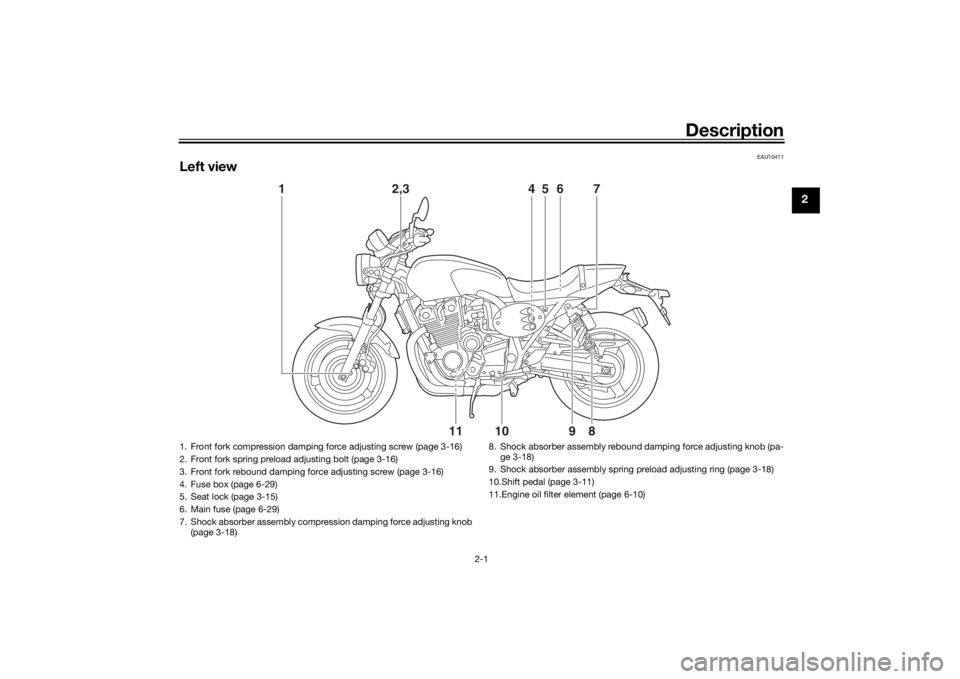
Left view
1
2,3
4
5
6
7
11
10
9
8
1. Front fork compression damping force adjusting screw (page 3-16)
2. Front fork spring preload adjusting bolt (page 3-16)
3. Front fork rebound damping force adjusting screw (page 3-16)
4. Fuse box (page 6-29)
5. Seat lock (page 3-15)
6. Main fuse (page 6-29)
7. Shock absorber assembly compression damping force adjusting knob (page 3-18) 8. Shock absorber assembly rebound damping force adjusting knob (pa-
ge 3-18)
9. Shock absorber assembly spring preload adjusting ring (page 3-18)
10.Shift pedal (page 3-11)
11.Engine oil filter element (page 6-10)
U2PNE1E0.book Page 1 Monday, December 28, 2015 11:03 AM
Page 15 of 98
Description
2-3
2
EAU10431
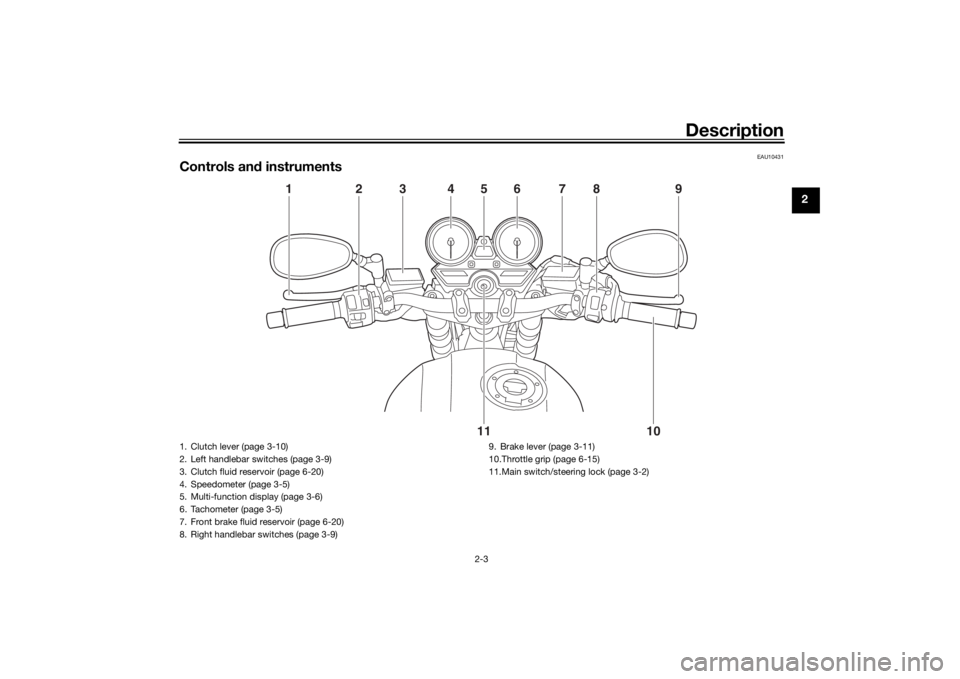
Controls and instruments
1
2
3
4
5
6
7
8
9
10
11
1. Clutch lever (page 3-10)
2. Left handlebar switches (page 3-9)
3. Clutch fluid reservoir (page 6-20)
4. Speedometer (page 3-5)
5. Multi-function display (page 3-6)
6. Tachometer (page 3-5)
7. Front brake fluid reservoir (page 6-20)
8. Right handlebar switches (page 3-9) 9. Brake lever (page 3-11)
10.Throttle grip (page 6-15)
11.Main switch/steering lock (page 3-2)
U2PNE1E0.book Page 3 Monday, December 28, 2015 11:03 AM
Page 17 of 98
Instrument and control functions
3-2
3
Keep other immo bilizer system
keys away from the main switch
as they may cause si gnal inter-
ference.
EAU10474
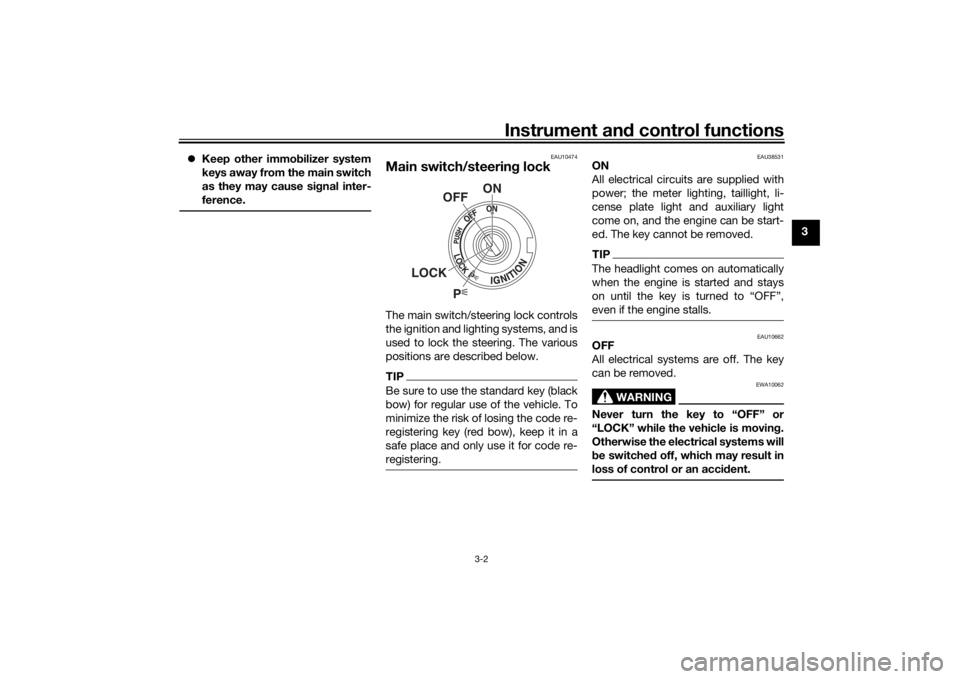
Main switch/steerin g lockThe main switch/steering lock controls
the ignition and lighting systems, and is
used to lock the steering. The various
positions are described below.TIPBe sure to use the standard key (black
bow) for regular use of the vehicle. To
minimize the risk of losing the code re-
registering key (red bow), keep it in a
safe place and only use it for code re-
registering.
EAU38531
ON
All electrical circuits are supplied with
power; the meter lighting, taillight, li-
cense plate light and auxiliary light
come on, and the engine can be start-
ed. The key cannot be removed.TIPThe headlight comes on automatically
when the engine is started and stays
on until the key is turned to “OFF”,
even if the engine stalls.
EAU10662
OFF
All electrical systems are off. The key
can be removed.
WARNING
EWA10062
Never turn the key to “OFF” or
“LOCK” while the vehicle is movin g.
Otherwise the electrical systems will
b e switche d off, which may result in
loss of control or an acci dent.
P
ON
OFF
LOCK
U2PNE1E0.book Page 2 Monday, December 28, 2015 11:03 AM
Page 18 of 98
Instrument and control functions
3-3
3
EAU10696
LOCK
The steering is locked and all electrical
systems are off. The key can be re-
moved.
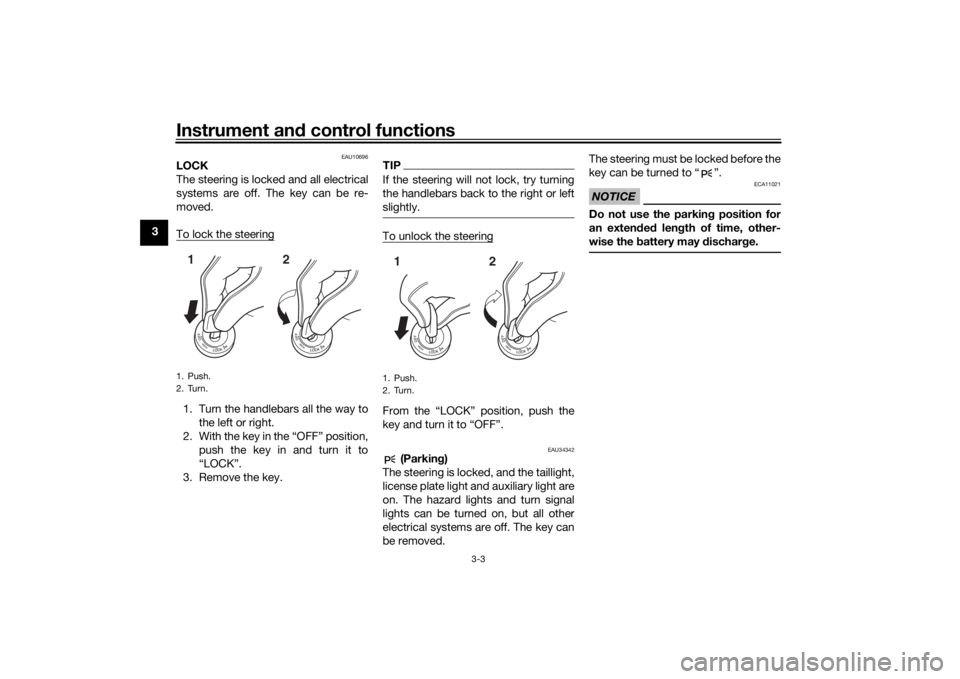
To lock the steering1. Turn the handlebars all the way to
the left or right.
2. With the key in the “OFF” position, push the key in and turn it to
“LOCK”.
3. Remove the key.
TIPIf the steering will not lock, try turning
the handlebars back to the right or left
slightly.To unlock the steeringFrom the “LOCK” position, push the
key and turn it to “OFF”.
EAU34342
(Parkin g)
The steering is locked, and the taillight,
license plate light and auxiliary light are
on. The hazard lights and turn signal
lights can be turned on, but all other
electrical systems are off. The key can
be removed. The steering must be locked before the
key can be turned to “ ”.
NOTICE
ECA11021
Do not use the parkin
g position for
an exten ded len gth of time, other-
wise the battery may d ischarge.
1. Push.
2. Turn.12
1. Push.
2. Turn.12
U2PNE1E0.book Page 3 Monday, December 28, 2015 11:03 AM
Page 21 of 98
Instrument and control functions
3-6
3
EAU4324C
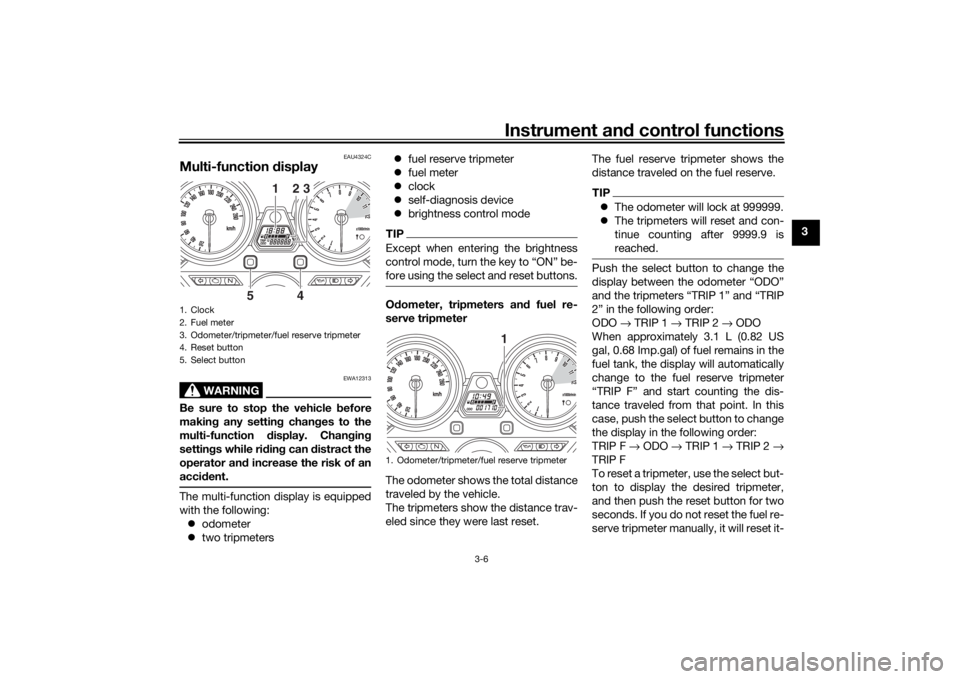
Multi-function display
WARNING
EWA12313
Be sure to stop the vehicle before
makin g any settin g chan ges to the
multi-function display. Chan gin g
settin gs while ri din g can distract the
operator an d increase the risk of an
acci dent.The multi-function display is equipped
with the following:
odometer
two tripmeters
fuel reserve tripmeter
fuel meter
clock
self-diagnosis device
brightness control mode
TIPExcept when entering the brightness
control mode, turn the key to “ON” be-
fore using the select and reset buttons.Odometer, tripmeters an d fuel re-
serve tripmeter
The odometer shows the total distance
traveled by the vehicle.
The tripmeters show the distance trav-
eled since they were last reset. The fuel reserve tripmeter shows the
distance traveled on the fuel reserve.
TIP
The odometer will lock at 999999.
The tripmeters will reset and con-
tinue counting after 9999.9 is
reached.Push the select button to change the
display between the odometer “ODO”
and the tripmeters “TRIP 1” and “TRIP
2” in the following order:
ODO → TRIP 1 → TRIP 2 → ODO
When approximately 3.1 L (0.82 US
gal, 0.68 Imp.gal) of fuel remains in the
fuel tank, the display will automatically
change to the fuel reserve tripmeter
“TRIP F” and start counting the dis-
tance traveled from that point. In this
case, push the select button to change
the display in the following order:
TRIP F → ODO → TRIP 1 → TRIP 2 →
TRIP F
To reset a tripmeter, use the select but-
ton to display the desired tripmeter,
and then push the reset button for two
seconds. If you do not reset the fuel re-
serve tripmeter manually, it will reset it-
1. Clock
2. Fuel meter
3. Odometer/tripmeter/fuel reserve tripmeter
4. Reset button
5. Select button
1
23
5
4
1. Odometer/tripmeter/fuel reserve tripmeter
1
U2PNE1E0.book Page 6 Monday, December 28, 2015 11:03 AM
Page 22 of 98
Instrument and control functions
3-7
3 self automatically and the display will
return to the prior mode after refueling
and traveling 5 km (3 mi).
Fuel meter
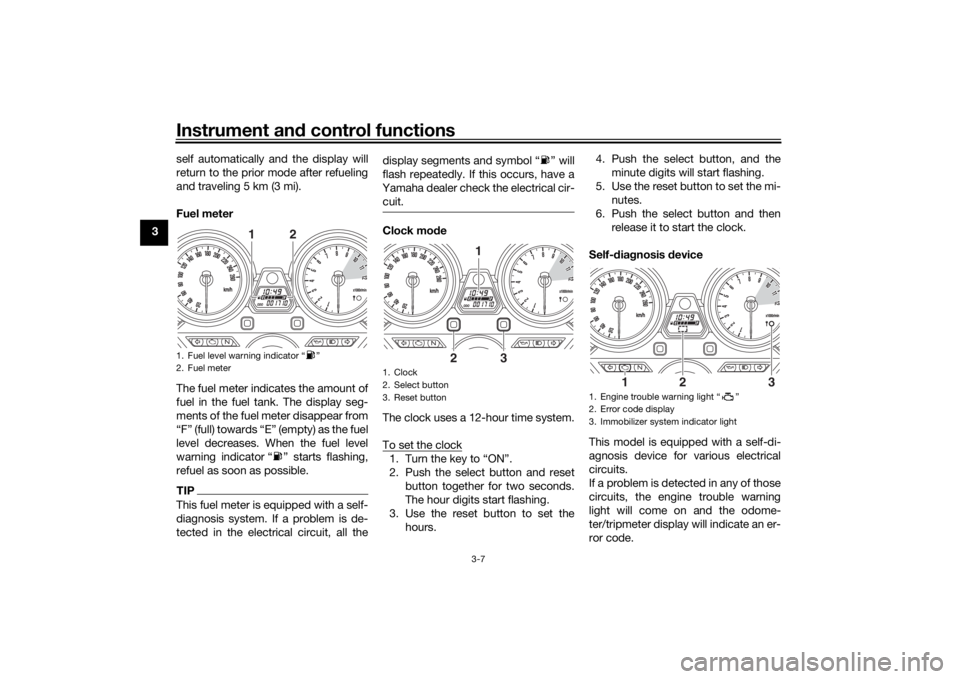
The fuel meter indicates the amount of
fuel in the fuel tank. The display seg-
ments of the fuel meter disappear from
“F” (full) towards “E” (empty) as the fuel
level decreases. When the fuel level
warning indicator “ ” starts flashing,
refuel as soon as possible.
TIPThis fuel meter is equipped with a self-
diagnosis system. If a problem is de-
tected in the electrical circuit, all the display segments and symbol “ ” will
flash repeatedly. If this occurs, have a
Yamaha dealer check the electrical cir- cuit.
Clock mo de
The clock uses a 12-hour time system.
To set the clock1. Turn the key to “ON”.
2. Push the select button and reset button together for two seconds.
The hour digits start flashing.
3. Use the reset button to set the hours. 4. Push the select button, and the
minute digits will start flashing.
5. Use the reset button to set the mi- nutes.
6. Push the select button and then release it to start the clock.
Self-d iagnosis device
This model is equipped with a self-di-
agnosis device for various electrical
circuits.
If a problem is detected in any of those
circuits, the engine trouble warning
light will come on and the odome-
ter/tripmeter display will indicate an er-
ror code.
1. Fuel level warning indicator “ ”
2. Fuel meter
2
1
1. Clock
2. Select button
3. Reset button
1
2
3
1. Engine trouble warning light “ ”
2. Error code display
3. Immobilizer system indicator light
1
2
3
U2PNE1E0.book Page 7 Monday, December 28, 2015 11:03 AM
Page 27 of 98
Instrument and control functions
3-12
3
EAU12944
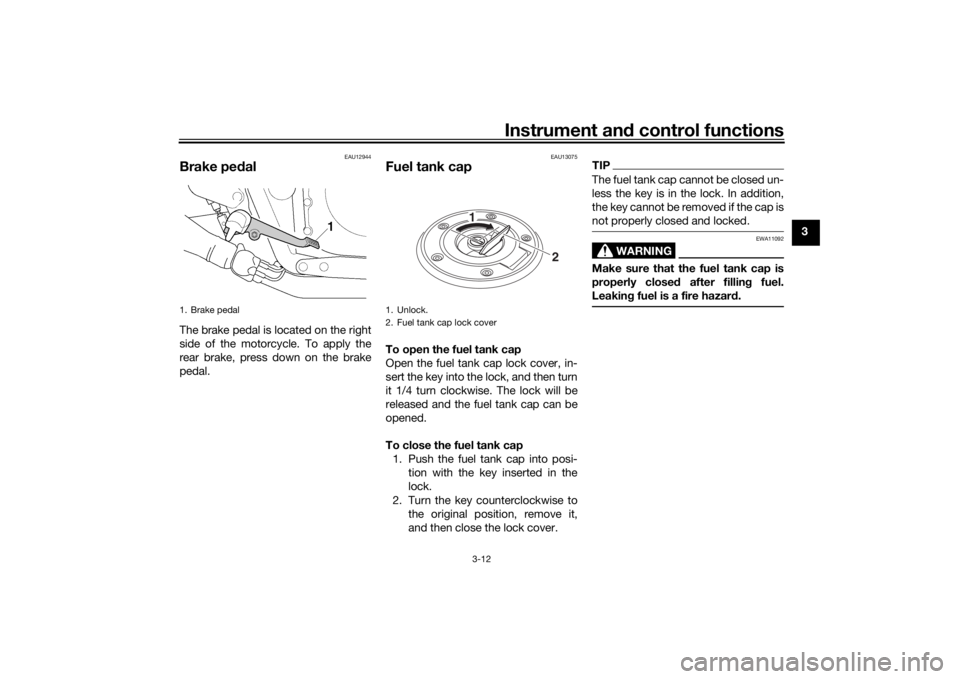
Brake ped alThe brake pedal is located on the right
side of the motorcycle. To apply the
rear brake, press down on the brake
pedal.
EAU13075
Fuel tank capTo open the fuel tank cap
Open the fuel tank cap lock cover, in-
sert the key into the lock, and then turn
it 1/4 turn clockwise. The lock will be
released and the fuel tank cap can be
opened.
To close the fuel tank cap
1. Push the fuel tank cap into posi- tion with the key inserted in the
lock.
2. Turn the key counterclockwise to the original position, remove it,
and then close the lock cover.
TIPThe fuel tank cap cannot be closed un-
less the key is in the lock. In addition,
the key cannot be removed if the cap is
not properly closed and locked.
WARNING
EWA11092
Make sure that the fuel tank cap is
properly close d after fillin g fuel.
Leakin g fuel is a fire hazar d.
1. Brake pedal
1. Unlock.
2. Fuel tank cap lock cover
2
1
U2PNE1E0.book Page 12 Monday, December 28, 2015 11:03 AM
Page 29 of 98
Instrument and control functions
3-14
3
brand. Use of unleaded fuel will extend
spark plug life and reduce mainte-
nance costs.
Gasohol
There are two types of gasohol: gaso-
hol containing ethanol and that con-
taining methanol. Gasohol containing
ethanol can be used if the ethanol con-
tent does not exceed 10% (E10). Gas-
ohol containing methanol is not
recommended by Yamaha because it
can cause damage to the fuel system
or vehicle performance problems.
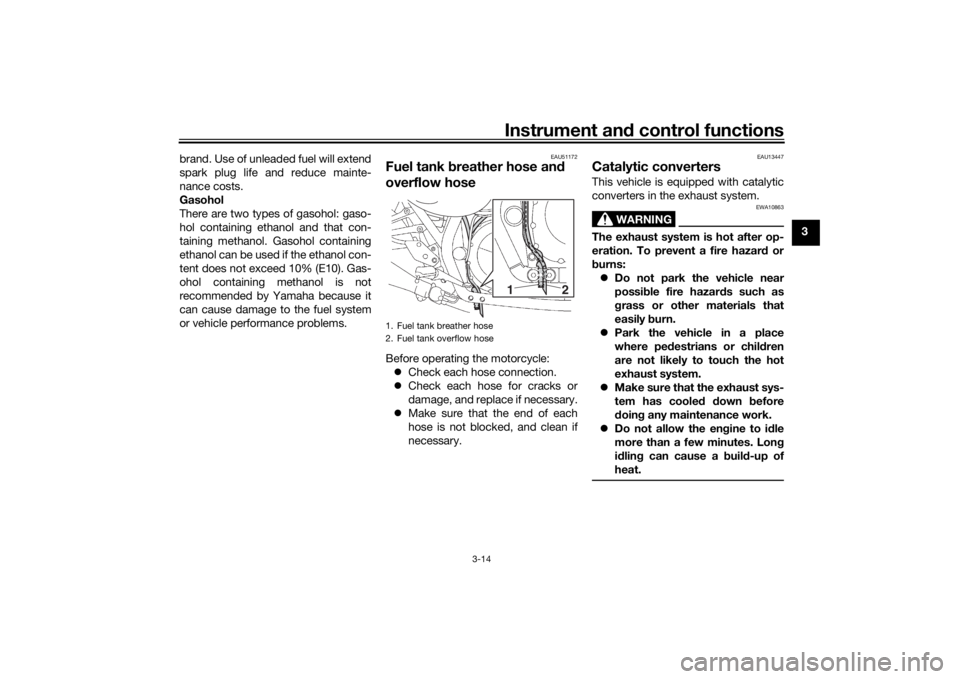
EAU51172
Fuel tank
breather hose an d
overflow hoseBefore operating the motorcycle:
Check each hose connection.
Check each hose for cracks or
damage, and replace if necessary.
Make sure that the end of each
hose is not blocked, and clean if
necessary.
EAU13447
Catalytic converters This vehicle is equipped with catalytic
converters in the exhaust system.
WARNING
EWA10863
The exhaust system is hot after op-
eration. To prevent a fire hazar d or
b urns:
Do not park the vehicle near
possi ble fire hazar ds such as
g rass or other materials that
easily burn.
Park the vehicle in a place
where pe destrians or child ren
are not likely to touch the hot
exhaust system.
Make sure that the exhaust sys-
tem has coole d down before
d oin g any maintenance work.
Do not allow the en gine to i dle
more than a few minutes. Lon g
i d lin g can cause a b uild-up of
heat.
1. Fuel tank breather hose
2. Fuel tank overflow hose
2
1
U2PNE1E0.book Page 14 Monday, December 28, 2015 11:03 AM
Page 30 of 98
Instrument and control functions
3-15
3
NOTICE
ECA10702
Use only unlea ded g asoline. The use
of lead ed g asoline will cause unre-
pairab le damag e to the catalytic
converter.
EAU13941
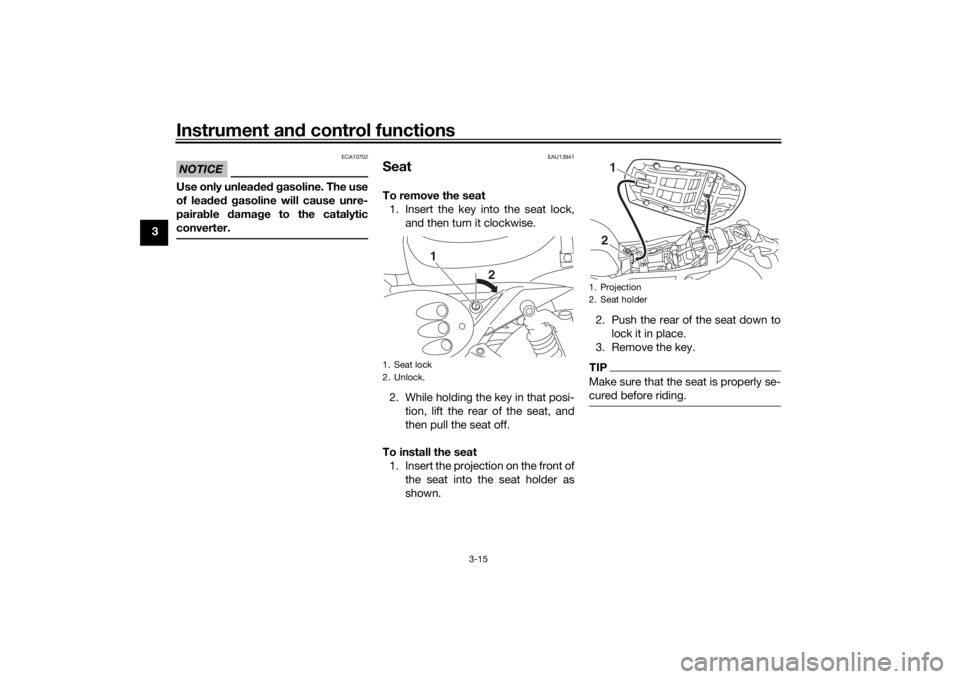
SeatTo remove the seat 1. Insert the key into the seat lock, and then turn it clockwise.
2. While holding the key in that posi- tion, lift the rear of the seat, and
then pull the seat off.
To install the seat 1. Insert the projection on the front of the seat into the seat holder as
shown. 2. Push the rear of the seat down to
lock it in place.
3. Remove the key.
TIPMake sure that the seat is properly se-
cured before riding.
1. Seat lock
2. Unlock.
1
2
1. Projection
2. Seat holder
12
U2PNE1E0.book Page 15 Monday, December 28, 2015 11:03 AM