engine YAMAHA XL 1200 2001 User Guide
[x] Cancel search | Manufacturer: YAMAHA, Model Year: 2001, Model line: XL 1200, Model: YAMAHA XL 1200 2001Pages: 131, PDF Size: 8.12 MB
Page 37 of 131
2-12
E
EJU00354
Cooling water pilot outlet
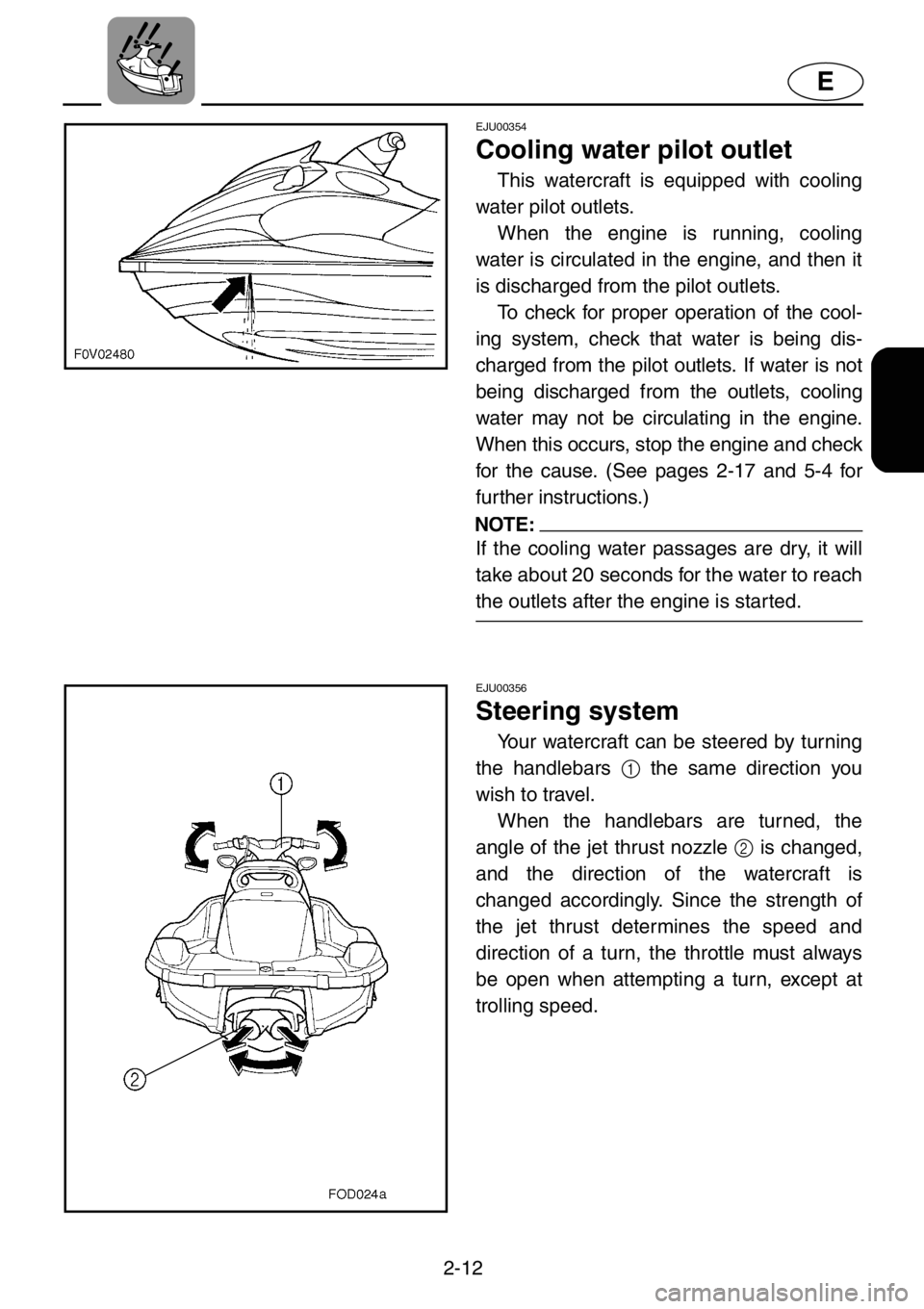
This watercraft is equipped with cooling
water pilot outlets.
When the engine is running, cooling
water is circulated in the engine, and then it
is discharged from the pilot outlets.
To check for proper operation of the cool-
ing system, check that water is being dis-
charged from the pilot outlets. If water is not
being discharged from the outlets, cooling
water may not be circulating in the engine.
When this occurs, stop the engine and check
for the cause. (See pages 2-17 and 5-4 for
further instructions.)
NOTE:
If the cooling water passages are dry, it will
take about 20 seconds for the water to reach
the outlets after the engine is started.
EJU00356
Steering system
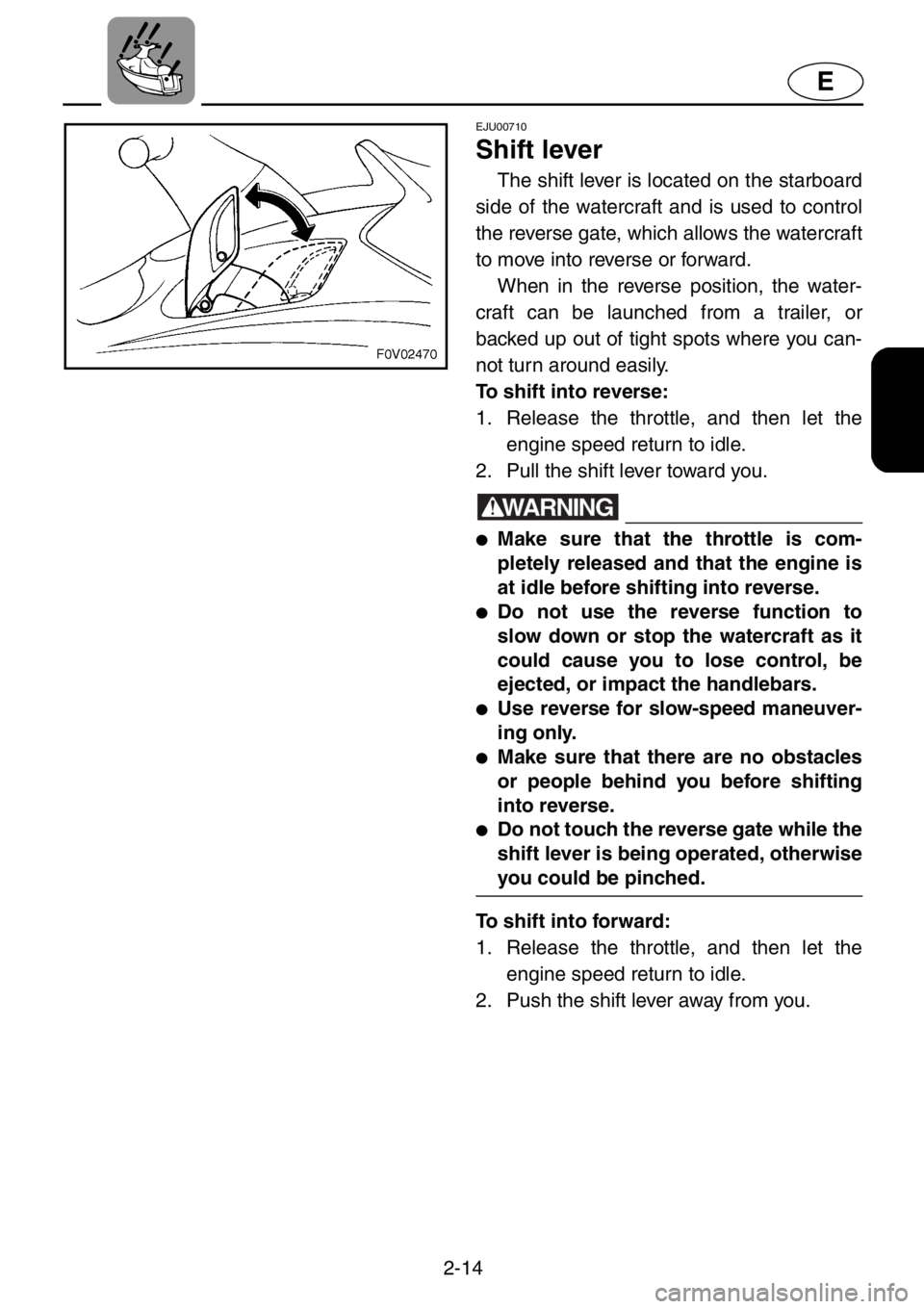
Your watercraft can be steered by turning
the handlebars 1 the same direction you
wish to travel.
When the handlebars are turned, the
angle of the jet thrust nozzle 2 is changed,
and the direction of the watercraft is
changed accordingly. Since the strength of
the jet thrust determines the speed and
direction of a turn, the throttle must always
be open when attempting a turn, except at
trolling speed.
Page 39 of 131
2-14
E
EJU00710
Shift lever
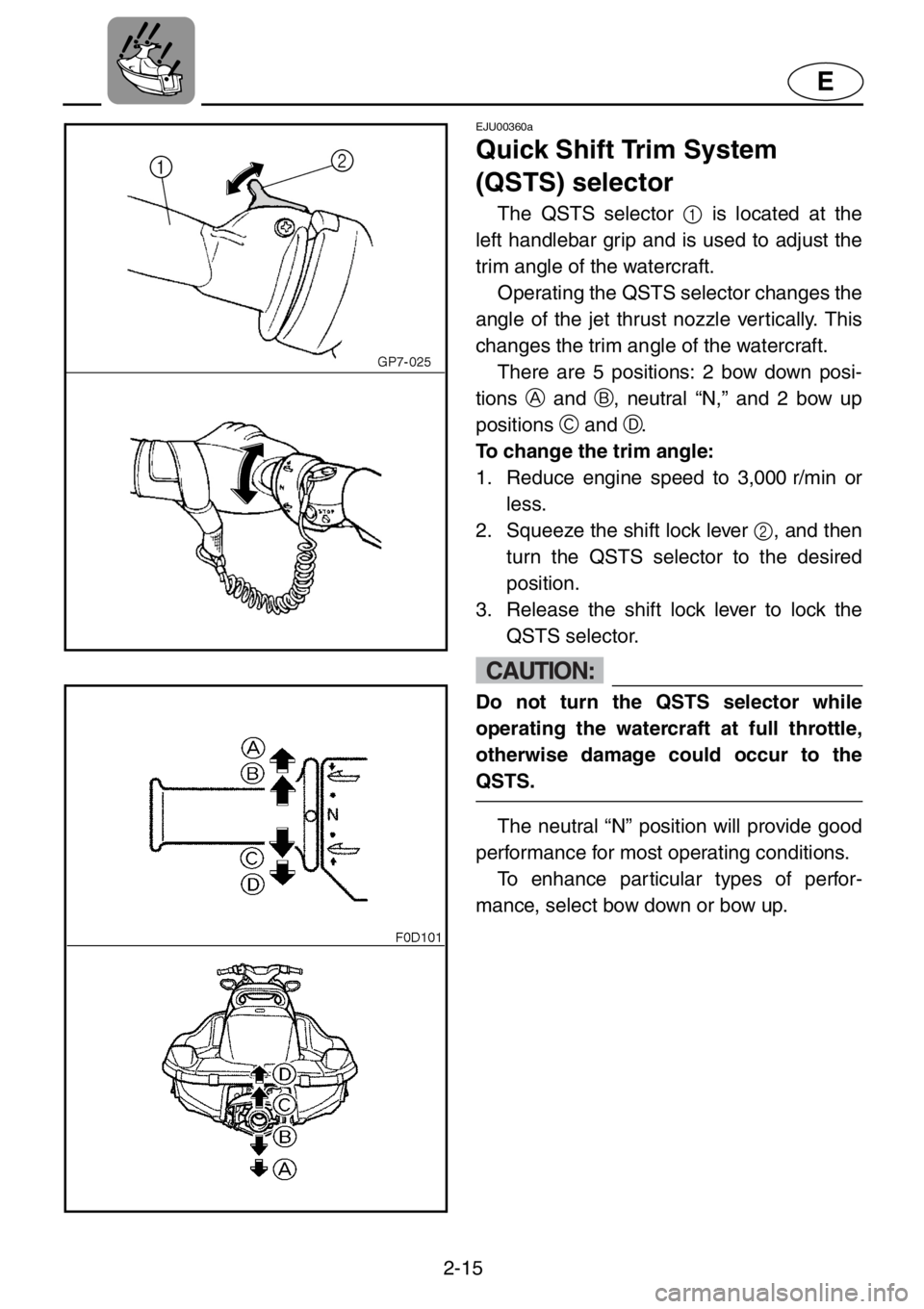
The shift lever is located on the starboard
side of the watercraft and is used to control
the reverse gate, which allows the watercraft
to move into reverse or forward.
When in the reverse position, the water-
craft can be launched from a trailer, or
backed up out of tight spots where you can-
not turn around easily.
To shift into reverse:
1. Release the throttle, and then let the
engine speed return to idle.
2. Pull the shift lever toward you.
WARNING
●Make sure that the throttle is com-
pletely released and that the engine is
at idle before shifting into reverse.
●Do not use the reverse function to
slow down or stop the watercraft as it
could cause you to lose control, be
ejected, or impact the handlebars.
●Use reverse for slow-speed maneuver-
ing only.
●Make sure that there are no obstacles
or people behind you before shifting
into reverse.
●Do not touch the reverse gate while the
shift lever is being operated, otherwise
you could be pinched.
To shift into forward:
1. Release the throttle, and then let the
engine speed return to idle.
2. Push the shift lever away from you.
Page 40 of 131
2-15
E
EJU00360a
Quick Shift Trim System
(QSTS) selector
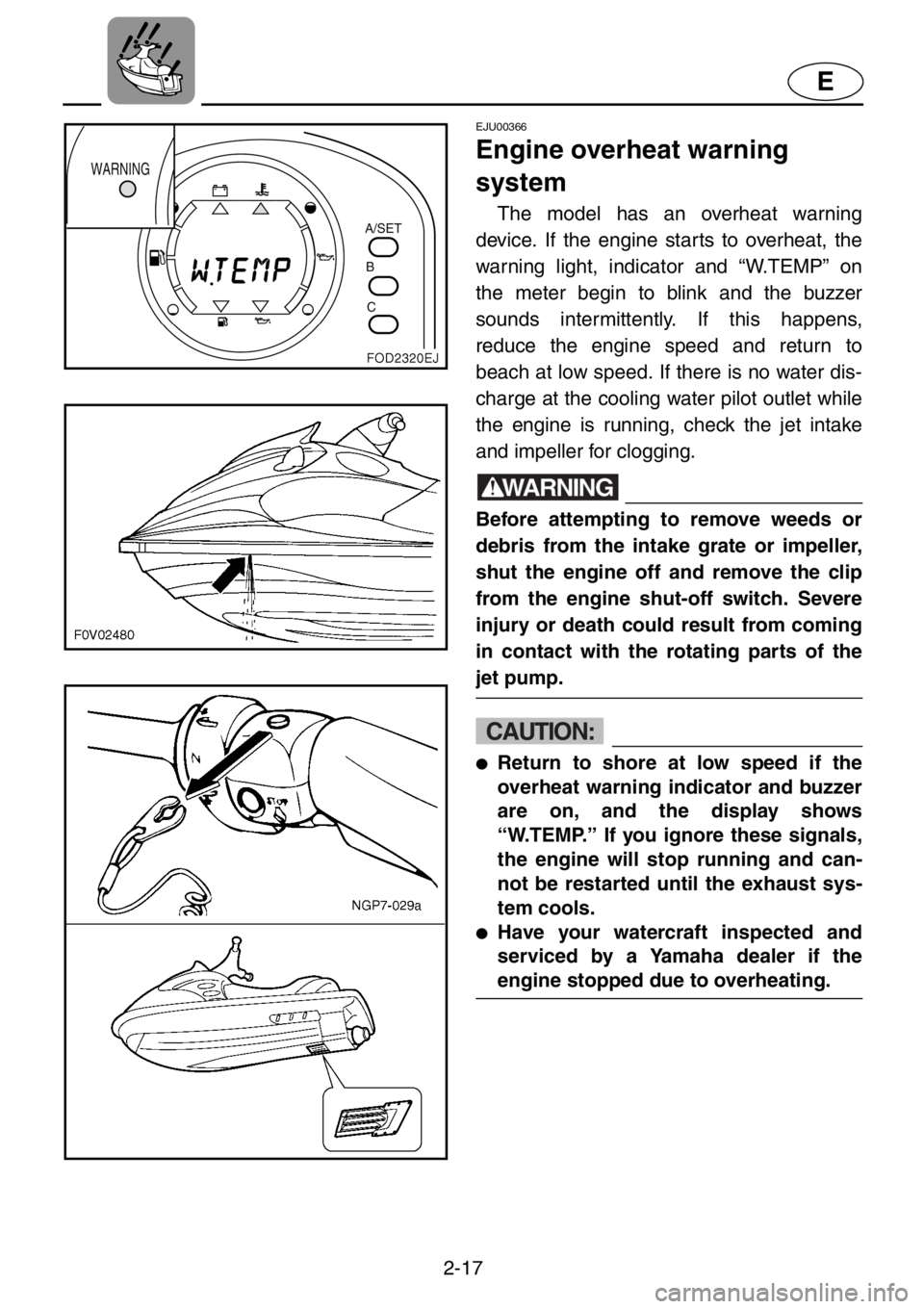
The QSTS selector 1 is located at the
left handlebar grip and is used to adjust the
trim angle of the watercraft.
Operating the QSTS selector changes the
angle of the jet thrust nozzle vertically. This
changes the trim angle of the watercraft.
There are 5 positions: 2 bow down posi-
tionsA and B, neutral “N,” and 2 bow up
positionsC and D.
To change the trim angle:
1. Reduce engine speed to 3,000 r/min or
less.
2. Squeeze the shift lock lever 2, and then
turn the QSTS selector to the desired
position.
3. Release the shift lock lever to lock the
QSTS selector.
CAUTION:
Do not turn the QSTS selector while
operating the watercraft at full throttle,
otherwise damage could occur to the
QSTS.
The neutral “N” position will provide good
performance for most operating conditions.
To enhance particular types of perfor-
mance, select bow down or bow up.
Page 42 of 131
2-17
E
EJU00366
Engine overheat warning
system
The model has an overheat warning
device. If the engine starts to overheat, the
warning light, indicator and “W.TEMP” on
the meter begin to blink and the buzzer
sounds intermittently. If this happens,
reduce the engine speed and return to
beach at low speed. If there is no water dis-
charge at the cooling water pilot outlet while
the engine is running, check the jet intake
and impeller for clogging.
WARNING
Before attempting to remove weeds or
debris from the intake grate or impeller,
shut the engine off and remove the clip
from the engine shut-off switch. Severe
injury or death could result from coming
in contact with the rotating parts of the
jet pump.
CAUTION:
●Return to shore at low speed if the
overheat warning indicator and buzzer
are on, and the display shows
“W.TEMP.” If you ignore these signals,
the engine will stop running and can-
not be restarted until the exhaust sys-
tem cools.
●Have your watercraft inspected and
serviced by a Yamaha dealer if the
engine stopped due to overheating.
Page 43 of 131

2-18
E
If the initial overheat warning is ignored,
engine and exhaust system heat can
increase, particularly if the watercraft contin-
ues to be operated at higher speed. If so,
the warning indicators and buzzer will
change from intermittent to constantly on
and the overheat system will stop ignition to
the engine to reduce the risk of severe over-
heating. The engine cannot be restarted
until it cools down, so it may be necessary to
have the watercraft towed back to the
beach. Refer to “Towing the watercraft” on
page 5-7.
NOTE:
●The buzzer stops sounding if any button
on the meter is pressed.
●Ask a Yamaha dealer to inspect the
watercraft if there is no apparent reason
for overheating.
Page 45 of 131
2-20
E
EJU00698b
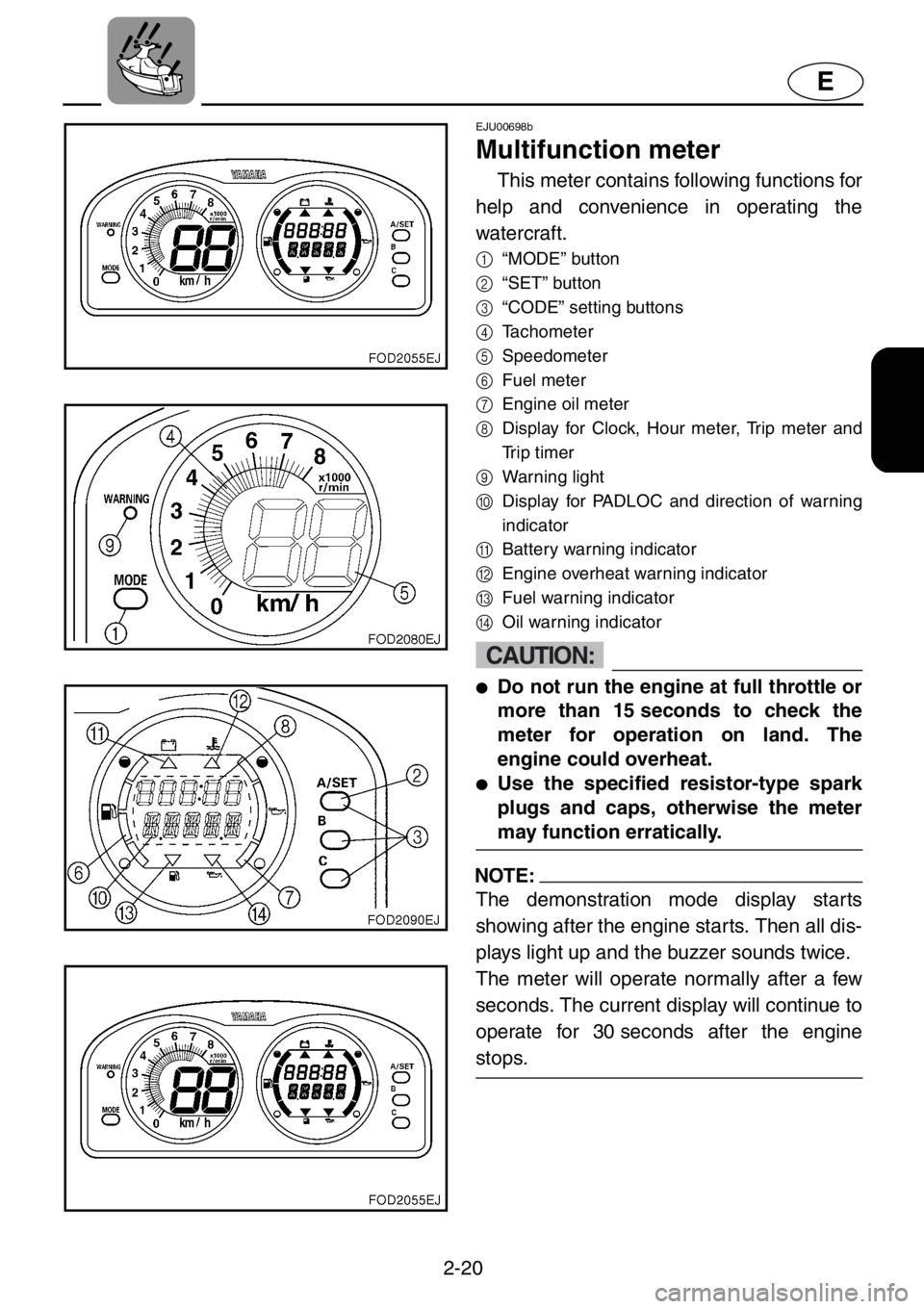
Multifunction meter
This meter contains following functions for
help and convenience in operating the
watercraft.
1
“MODE” button
2
“SET” button
3
“CODE” setting buttons
4
Tachometer
5
Speedometer
6
Fuel meter
7
Engine oil meter
8
Display for Clock, Hour meter, Trip meter and
Trip timer
9
Warning light
0
Display for PADLOC and direction of warning
indicator
A
Battery warning indicator
B
Engine overheat warning indicator
C
Fuel warning indicator
D
Oil warning indicator
CAUTION:
●Do not run the engine at full throttle or
more than 15 seconds to check the
meter for operation on land. The
engine could overheat.
●Use the specified resistor-type spark
plugs and caps, otherwise the meter
may function erratically.
NOTE:
The demonstration mode display starts
showing after the engine starts. Then all dis-
plays light up and the buzzer sounds twice.
The meter will operate normally after a few
seconds. The current display will continue to
operate for 30 seconds after the engine
stops.
Page 46 of 131
2-21
E
EJU00711a
PADLOC (Programmable
digital locking ignition)
This feature is provided to deter unautho-
rized use.
The function allows you to choose either
“START” or “LOCK” mode, as the situation
requires, much as you would use an ignition
key in a motor vehicle. If you have previously
chosen “LOCK” mode, the engine will not
start unless the right code is put in to select
“START” mode.
NOTE:
If you do not use the PADLOC system, it is
unnecessary to perform the initial setting of
the PADLOC. In this case, the “START”
mode is automatically selected.
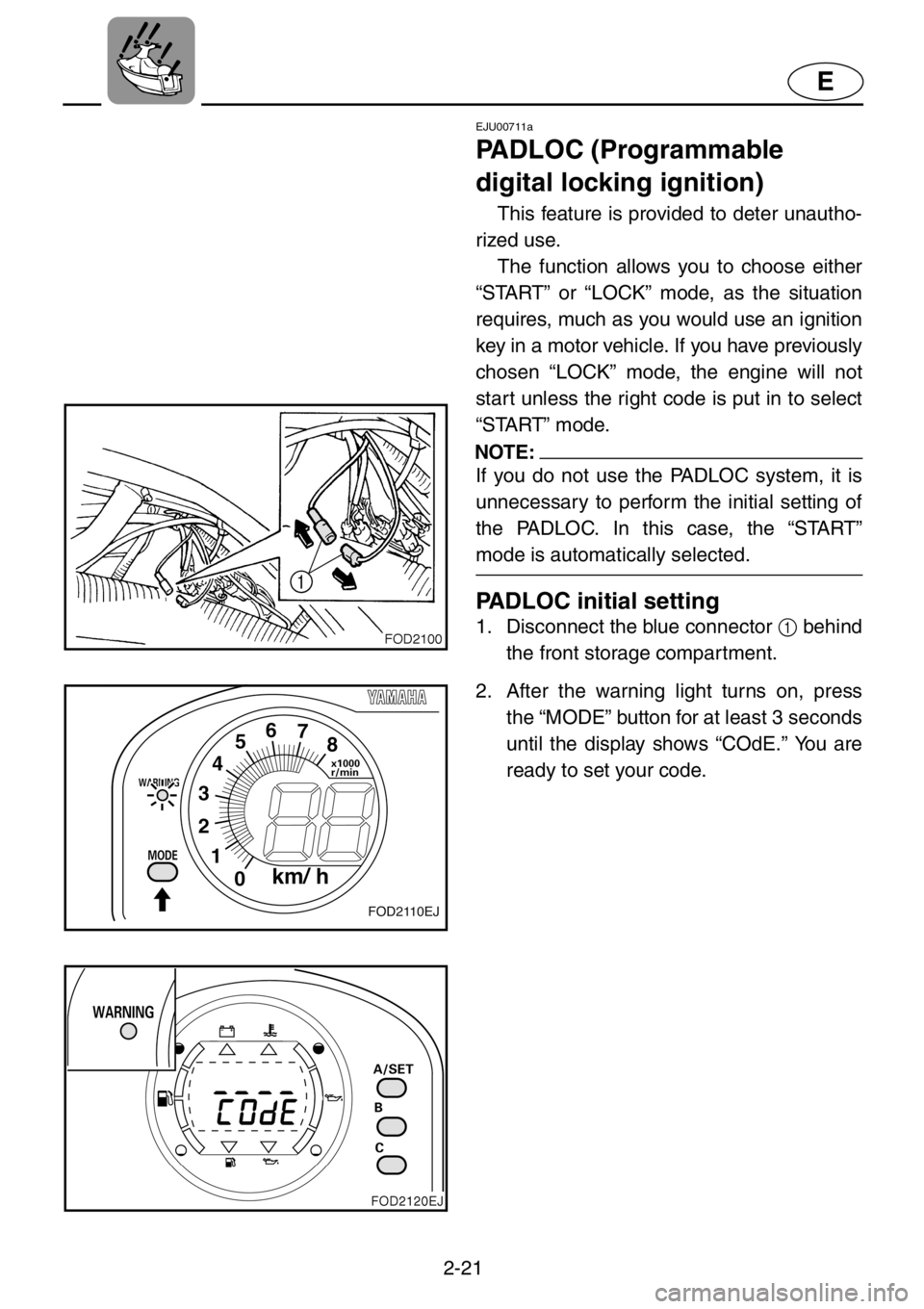
PADLOC initial setting
1. Disconnect the blue connector 1 behind
the front storage compartment.
2. After the warning light turns on, press
the “MODE” button for at least 3 seconds
until the display shows “COdE.” You are
ready to set your code.
Page 48 of 131
2-23
E
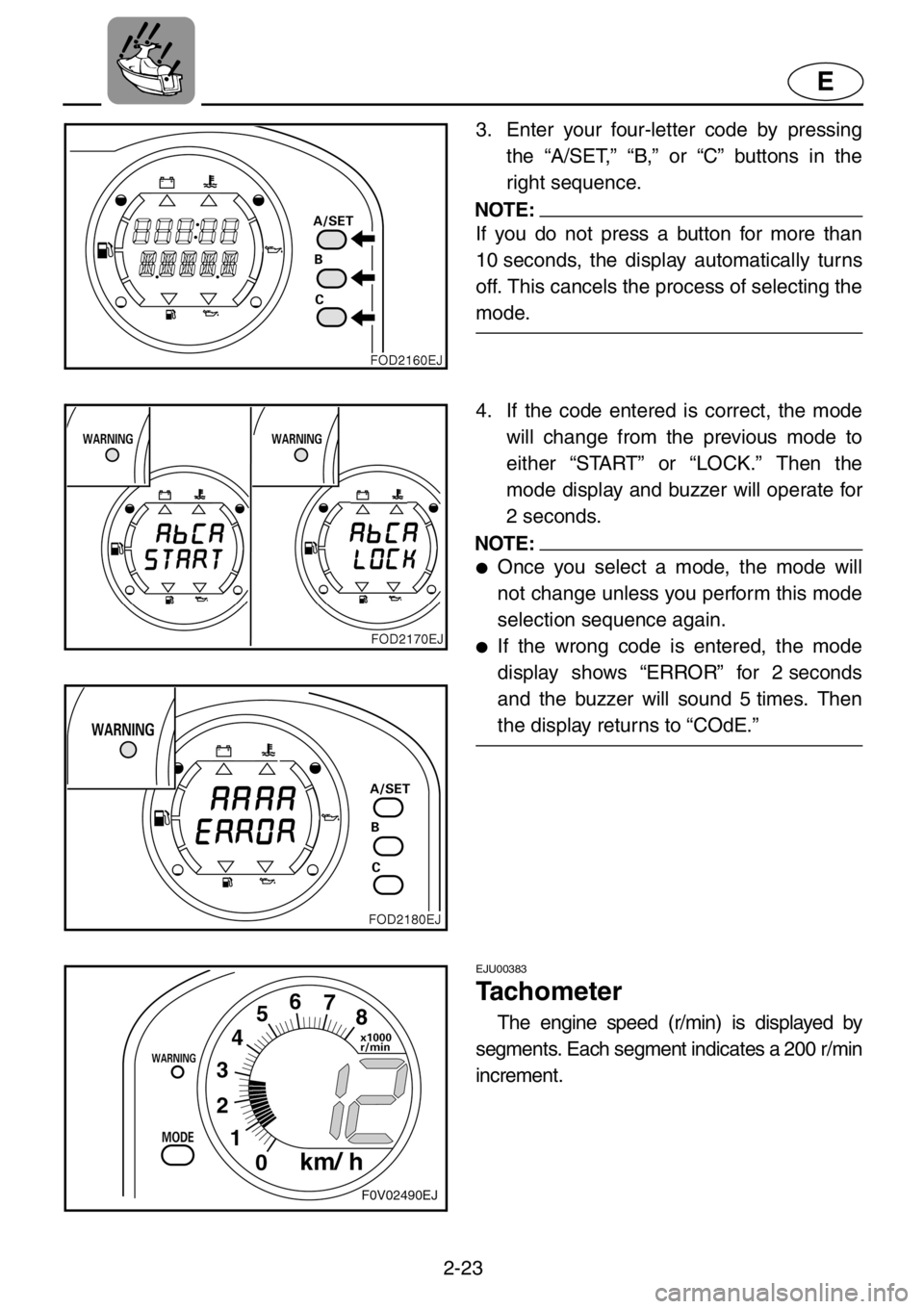
3. Enter your four-letter code by pressing
the “A/SET,” “B,” or “C” buttons in the
right sequence.
NOTE:
If you do not press a button for more than
10 seconds, the display automatically turns
off. This cancels the process of selecting the
mode.
4. If the code entered is correct, the mode
will change from the previous mode to
either “START” or “LOCK.” Then the
mode display and buzzer will operate for
2 seconds.
NOTE:
●Once you select a mode, the mode will
not change unless you perform this mode
selection sequence again.
●If the wrong code is entered, the mode
display shows “ERROR” for 2 seconds
and the buzzer will sound 5 times. Then
the display returns to “COdE.”
EJU00383
Tachometer
The engine speed (r/min) is displayed by
segments. Each segment indicates a 200 r/min
increment.
Page 50 of 131
2-25
E
EJU00387a
Engine oil meter
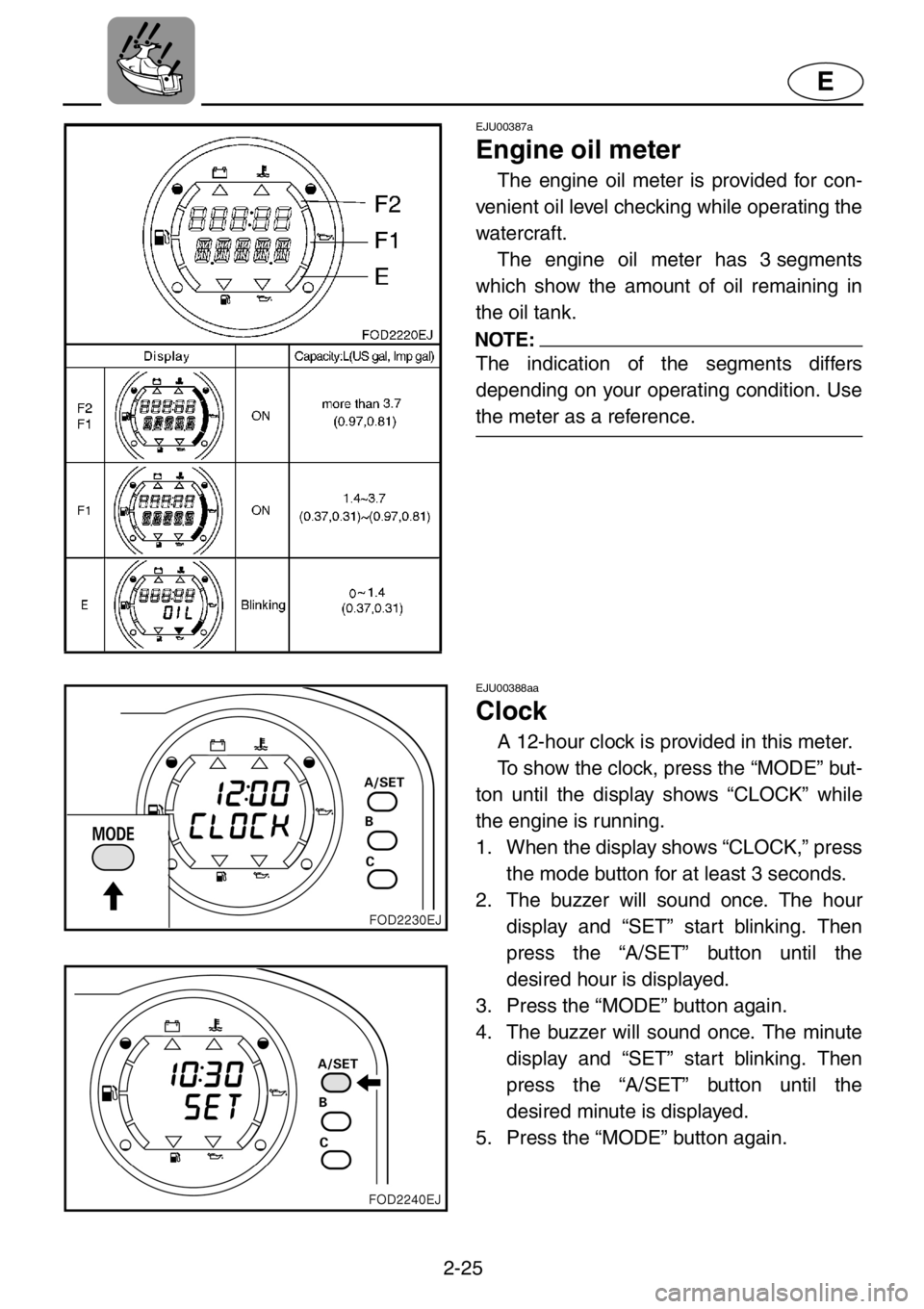
The engine oil meter is provided for con-
venient oil level checking while operating the
watercraft.
The engine oil meter has 3 segments
which show the amount of oil remaining in
the oil tank.
NOTE:
The indication of the segments differs
depending on your operating condition. Use
the meter as a reference.
EJU00388aa
Clock
A 12-hour clock is provided in this meter.
To show the clock, press the “MODE” but-
ton until the display shows “CLOCK” while
the engine is running.
1. When the display shows “CLOCK,” press
the mode button for at least 3 seconds.
2. The buzzer will sound once. The hour
display and “SET” start blinking. Then
press the “A/SET” button until the
desired hour is displayed.
3. Press the “MODE” button again.
4. The buzzer will sound once. The minute
display and “SET” start blinking. Then
press the “A/SET” button until the
desired minute is displayed.
5. Press the “MODE” button again.
Page 51 of 131
2-26
E
6. The buzzer will sound twice. The warn-
ing light and “SET” blink for 2 seconds.
Then the display turns to “CLOCK” and
shows the time.
NOTE:
If the battery terminal is disconnected, the
clock will be reset to 12:00.
EJU00390
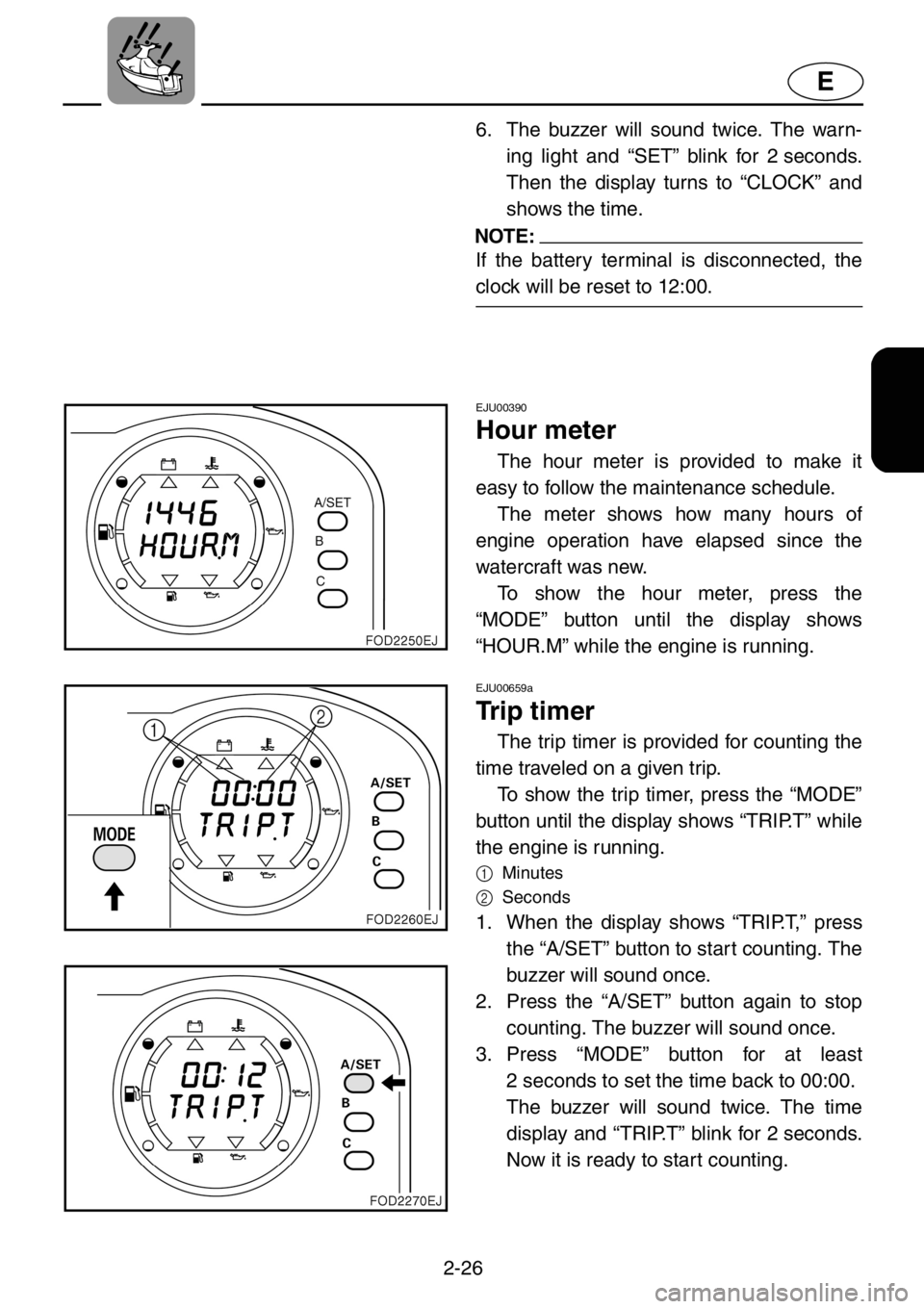
Hour meter
The hour meter is provided to make it
easy to follow the maintenance schedule.
The meter shows how many hours of
engine operation have elapsed since the
watercraft was new.
To show the hour meter, press the
“MODE” button until the display shows
“HOUR.M” while the engine is running.
EJU00659a
Trip timer
The trip timer is provided for counting the
time traveled on a given trip.
To show the trip timer, press the “MODE”
button until the display shows “TRIP.T” while
the engine is running.
1
Minutes
2
Seconds
1. When the display shows “TRIP.T,” press
the “A/SET” button to start counting. The
buzzer will sound once.
2. Press the “A/SET” button again to stop
counting. The buzzer will sound once.
3. Press “MODE” button for at least
2 seconds to set the time back to 00:00.
The buzzer will sound twice. The time
display and “TRIP.T” blink for 2 seconds.
Now it is ready to start counting.