CD changer YAMAHA XVZ1300TF 2000 Owners Manual
[x] Cancel search | Manufacturer: YAMAHA, Model Year: 2000, Model line: XVZ1300TF, Model: YAMAHA XVZ1300TF 2000Pages: 121, PDF Size: 19.23 MB
Page 38 of 121
AUDIO SYSTEM
4
Location of parts ................................................................................ 4-1
Headsets (optional) ............................................................................ 4-2
Control unit ......................................................................................... 4-3
Making basic settings ......................................................................... 4-4
Making mode settings ........................................................................ 4-5
Cassette deck operation..................................................................... 4-8
Radio operation ................................................................................ 4-12
CD changer (optional) operation ...................................................... 4-16
Auxiliary audio source operation ...................................................... 4-17
E_5jc_AudioTOC.fm Page 1 Saturday, October 16, 1999 1:08 PM
Page 43 of 121
AUDIO SYSTEM
4-5
4
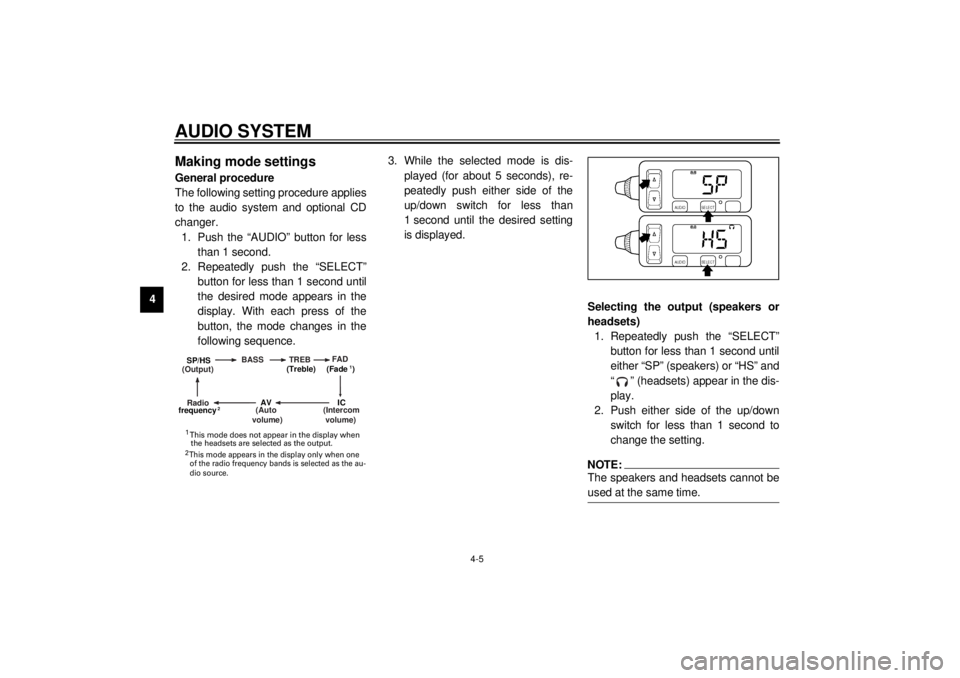
Making mode settingsGeneral procedure
The following setting procedure applies
to the audio system and optional CD
changer.
1. Push the “AUDIO” button for less
than 1 second.
2. Repeatedly push the “SELECT”
button for less than 1 second until
the desired mode appears in the
display. With each press of the
button, the mode changes in the
following sequence.3. While the selected mode is dis-
played (for about 5 seconds), re-
peatedly push either side of the
up/down switch for less than
1 second until the desired setting
is displayed.
Selecting the output (speakers or
headsets)
1. Repeatedly push the “SELECT”
button for less than 1 second until
either “SP” (speakers) or “HS” and
“ ” (headsets) appear in the dis-
play.
2. Push either side of the up/down
switch for less than 1 second to
change the setting.
NOTE:@ The speakers and headsets cannot be
used at the same time. @
(Output)BASS TREBFAD
(Auto
volume)
(Intercom
volume)
Radio SP/HS
(Treble)
frequency(Fade )
1
2
IC
AV
1
2 This mode does not appear in the display when
the headsets are selected as the output. This mode appears in the display only when one
of the radio frequency bands is selected as the au-
dio source.
E_5jc_Audio.fm Page 5 Saturday, October 16, 1999 1:09 PM
Page 54 of 121
AUDIO SYSTEM
4-16
4
CD changer (optional)
operation
WARNING
@ l
It is dangerous to operate the
CD changer while riding. Never
take your hands off the handle-
bars while riding.
l
Keep the volume at a low
enough level to be aware of traf-
fic conditions and ensure safe-
ty.
@An optional 6-disc CD changer can be
mounted in the travel trunk. Ask a
Yamaha dealer to install the genuine
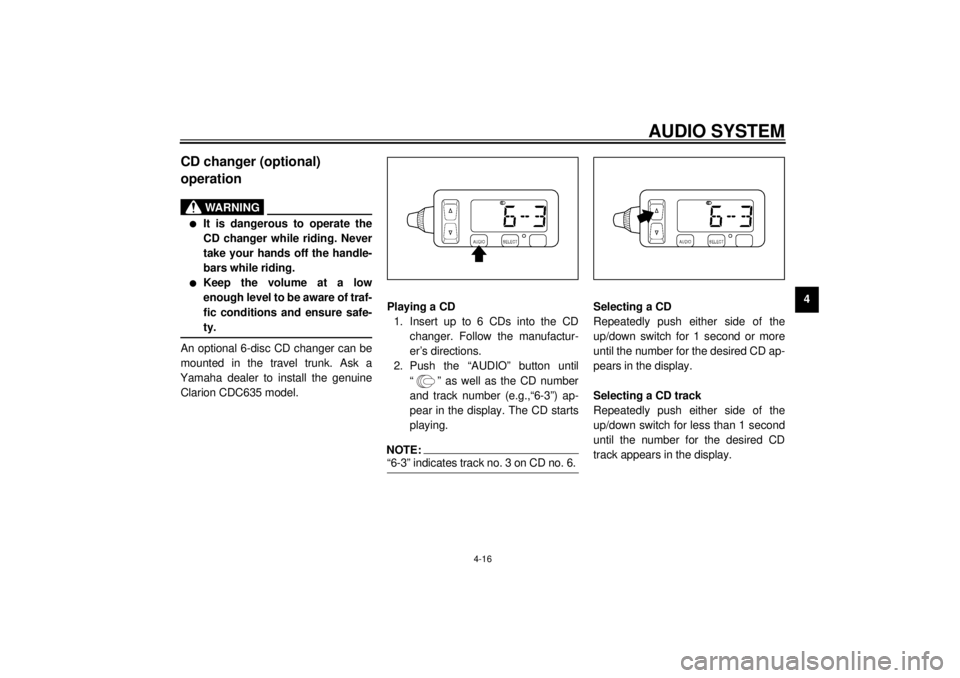
Clarion CDC635 model.Playing a CD
1. Insert up to 6 CDs into the CD
changer. Follow the manufactur-
er’s directions.
2. Push the “AUDIO” button until
“ ” as well as the CD number
and track number (e.g.,“6-3”) ap-
pear in the display. The CD starts
playing.
NOTE:@ “6-3” indicates track no. 3 on CD no. 6. @
Selecting a CD
Repeatedly push either side of the
up/down switch for 1 second or more
until the number for the desired CD ap-
pears in the display.
Selecting a CD track
Repeatedly push either side of the
up/down switch for less than 1 second
until the number for the desired CD
track appears in the display.
E_5jc_Audio.fm Page 16 Saturday, October 16, 1999 1:09 PM
Page 119 of 121
11-INDEXAAir filters................................................. 7-15
Antitheft alarm (optional) ..........................3-8
Auxiliary audio source operation ............ 4-17
Auxiliary DC jack and terminal ............... 3-23BBattery ................................................... 7-29
Brake and clutch lever lubrication........... 7-27
Brake and shift pedal lubrication ............ 7-27
Brake fluid replacement ......................... 7-26
Brake light switch adjustment ................. 7-24CCarburetor adjustment ........................... 7-17
Care.........................................................8-1
Cassette deck operation ..........................4-8
CD changer (optional) operation ............ 4-16
Checking the front and
rear brake pads ................................... 7-25
Clutch lever ............................................ 3-10
Clutch lever free play adjustment ........... 7-22
Controls/Instruments ................................2-3
Control unit ..............................................4-3
Coolant .................................................. 7-14
Coolant temperature indicator light...........3-4
Cowling A .................................................. 7-6
Cowling B .................................................. 7-7
Cowling and panel removal and
installation .............................................7-6
Cruise control indicator lights ...................3-4
Cruise control switches .......................... 3-10
Cruise control system ..............................3-7
DDimmer switch ......................................... 3-9EEngine break-in ....................................... 6-4
Engine oil .............................................. 7-11
Engine stop switch................................. 3-10
Engine trouble indicator light.................... 3-4FFinal gear oil .......................................... 7-13
Front brake lever ................................... 3-11
Front brake lever free play
adjustment .......................................... 7-23
Front fork adjustment............................. 3-19
Front fork inspection .............................. 7-28
Fuel ....................................................... 3-13
Fuel cock ............................................... 3-14
Fuel gauge .............................................. 3-9
Fuel level indicator light ........................... 3-4
Fuel tank breather hose ......................... 3-13
Fuel tank cap ......................................... 3-12
Fuse replacement.................................. 7-31GGive safety the right of way ..................... 1-1HHandlebar switches ................................. 3-9
Cruise control switches .................... 3-10
Dimmer switch ................................... 3-9
Engine stop switch ........................... 3-10
Horn switch ........................................ 3-9
Light switch ...................................... 3-10
Pass switch ........................................ 3-9
Start switch .......................................3-10
Turn signal switch ...............................3-9
Headlight bulb replacement....................7-32
Headsets (optional) ..................................4-2
Helmet holders .......................................3-16
High beam indicator light ..........................3-3
Horn switch ..............................................3-9
IIdentification number records .................10-1
Idle speed adjustment ............................7-17
Indicator lights ..........................................3-3
Coolant temperature indicator light .....3-4
Cruise control indicator lights ..............3-4
Engine trouble indicator light ...............3-4
Fuel level indicator light ......................3-4
High beam indicator light ....................3-3
Neutral indicator light ..........................3-4
Oil level indicator light .........................3-3
Overdrive indicator light ......................3-4
Turn indicator lights ............................3-3
Inspecting the brake fluid level ...............7-25KKey identification number .......................10-1LLeft view...................................................2-1
License light bulb replacement ...............7-34
Light switch ............................................3-10
Location of parts ......................................4-1MMain switch/steering lock .........................3-1
Making basic settings ...............................4-4
E_5jcIX.fm Page 1 Saturday, October 16, 1999 1:12 PM