light YAMAHA YXZ1000R 2016 User Guide
[x] Cancel search | Manufacturer: YAMAHA, Model Year: 2016, Model line: YXZ1000R, Model: YAMAHA YXZ1000R 2016Pages: 200, PDF Size: 4.58 MB
Page 44 of 200

4-6
4
EBU31360Helmet indicator light “ ”
The indicator light comes on and stays on
while the key is turned to “ ” (on) to remind
the occupants to always wear a helmet. If the
indicator light does not come on when the key
is turned to “ ” (on), have a Yamaha dealer
check the electrical circuit.EBU31370Seat belt indicator light “ ”
The indicator light comes on when the key is
turned to “ ” (on) to remind the occupants
to fasten their seat belt. The indicator light
stays on until the driver seat belt is properly
latched. If the indicator light does not come
on when the key is turned to “ ” (on), or if
the indicator light remains on after the driver
seat belt is properly latched, have a Yamaha
dealer check the electrical circuit.
EBU34953Multi-function meter unitThe multi-function meter unit is equipped with
the following:
speedometer
tachometer1. Tachometer
2. Transmission gear display
3. Shift timing indicator light
4. Speedometer
5. “SELECT” button
6. “MODE” button
7. “RESET” button
8. Clock/Hour meter/Voltage display
9. Fuel meter
10.Odometer/Tripmeter A/Tripmeter B
123456
10 9 8 7
U2HC7LE0.book Page 6 Wednesday, October 7, 2015 12:09 PM
Page 49 of 200
4-11
4
Fuel meter
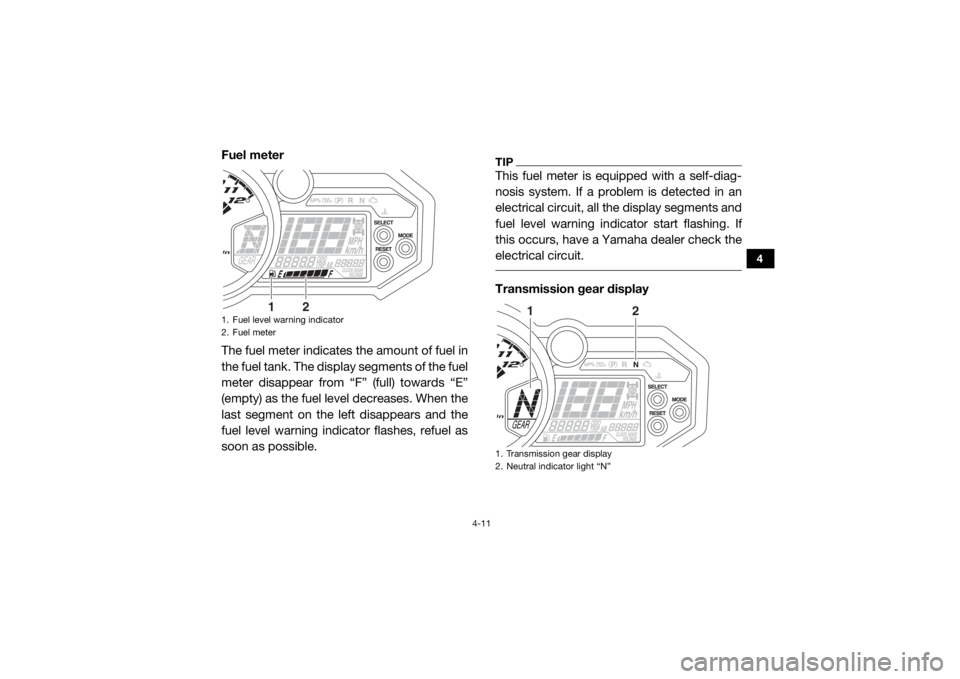
The fuel meter indicates the amount of fuel in
the fuel tank. The display segments of the fuel
meter disappear from “F” (full) towards “E”
(empty) as the fuel le vel decreases. When the
last segment on the left disappears and the
fuel level warning indicator flashes, refuel as
soon as possible.
TIPThis fuel meter is equipped with a self-diag-
nosis system. If a problem is detected in an
electrical circuit, all the display segments and
fuel level warning indicator start flashing. If
this occurs, have a Yamaha dealer check the
electrical circuit. Transmission gear display
1. Fuel level warning indicator
2. Fuel meter
1
2
1. Transmission gear display
2. Neutral indicator light “N”
1
2
U2HC7LE0.book Page 11 Wednesday, October 7, 2015 12:09 PM
Page 50 of 200

4-12
4
This display shows the selected gear. The
neutral position is indicated by “N” and by the
neutral indicator light “N”.
Self-diagnosis device
This model is equipped with a self-diagnosis
device for various electrical circuits.
If a problem is detected in any of those cir-
cuits, the engine trouble warning light comes
on or flashes, and the multi-function display
indicates an error code.If the multi-function display indicates an error
code, note the code number, and then have a
Yamaha dealer check the vehicle.
NOTICEECB00812If the multi-function display indicates an
error code, the vehicle should be checked
as soon as possible in order to avoid en-
gine damage. Shift timing indicator light
1. Error code display
2. Engine trouble warning light “ ”
12
1. Shift timing indicator light
2. “RESET” button
3. “MODE” button
1
23
U2HC7LE0.book Page 12 Wednesday, October 7, 2015 12:09 PM
Page 51 of 200

4-13
4
The shift timing indicator light has three set-
tings which can be adjusted.
Flashing pattern: this function allows you to
choose whether or not the indicator light
will come on and whether it should flash or
stay on when activated.
Activation point: this function allows you to
select the engine speed at which the indi-
cator light is activated.
Deactivation point: this function allows you
to select the engine speed at which the in-
dicator light is deactivated.
To adjust the shift timing indicator light1. Turn the key to “ ” (off).
2. Push and hold the “MODE” button.
3. Turn the key to “ ” (on), and then re- lease the “MODE” button after five sec-
onds. After all segments of the display
disappear and the shift timing indicator
light comes on, the shift timing indicator
light can be adjusted. To set the flashing pattern
1. Push the “RESET” button to select one of
the following flashing pattern settings:
On: the indicator light stays on when
activated. (The indicator light will con-
firm this setting by staying on.)
Flash: the indicator light flashes when
activated. (The indicator light will con-
firm this setting by flashing four times
per second.)
Off: the indicator light is deactivated; in
other words, it does not come on or
flash. (The indicator light will confirm
this setting by flashing once every two
seconds.)
2. Push the “MODE” button to confirm the selected flashing pattern. The control
mode changes to the activation point set-
ting mode. The shift timing indicator light
remains on and the tachometer shows
the current setting r/min for the activation
point.
U2HC7LE0.book Page 13 Wednesday, October 7, 2015 12:09 PM
Page 52 of 200

4-14
4
To set the shift activation pointTIPThe shift timing indicator light activation
point can be set between 7000 r/min and
12000 r/min. The activation point can be set
in increments of 500 r/min.
The tachometer needle will start over at
7000 r/min after 12000 r/min. 1. Push the “RESET” button to select the
desired engine speed for activating the
indicator light.
2. Push the “MODE” button to confirm the
selected engine speed. The shift timing
indicator light flashes and the tachometer
shows the current setting r/min for the
deactivation point. To set the deactivation point
TIP
The shift timing indicator light deactivation
point can be set between 7000 r/min and
12000 r/min. The deactivation point can be
set in increments of 500 r/min.
Be sure to set the deactivation point to a
higher engine speed than for the activation
point, otherwise the shift timing indicator
light will not come on.
The tachometer needle will start over at
7000 r/min after 12000 r/min. 1. Push the “RESET” button to select the
desired engine speed for deactivating the
indicator light.
2. Push the “MODE” button to confirm the selected engine speed. The display exits
the shift timing light control mode and re-
turns to the standard multi-function dis-
play mode.
U2HC7LE0.book Page 14 Wednesday, October 7, 2015 12:09 PM
Page 53 of 200

4-15
4
EBU35470Light switch “ / / ”Set the switch to “ ” to turn on the low
beam and the taillight.
Set the switch to “ ” to turn on the high
beam and the taillight.
Set the switch to “ ” to turn off the head-
lights and taillight.NOTICEECB02060Do not use the headlights with the engine
turned off for an extended period of time.
The battery may discharge to the pointthat the starter motor will not operate
properly. If this should happen, remove the
battery and recharge it.
EBU31400On-Command drive knob
“2WD/4WD/DIFF LOCK”This vehicle is equipped with an On-Com-
mand drive knob to select the drive mode.
The knob has three positions: “2WD”, “4WD”,
and “DIFF LOCK”. Select the appropriate
drive according to terrain and conditions.
1. Light switch “ / / ”
L
H
1
L
HLH
1. On-Command drive knob “2WD/4WD/DIFF LOCK”
1
U2HC7LE0.book Page 15 Wednesday, October 7, 2015 12:09 PM
Page 56 of 200
4-18
4
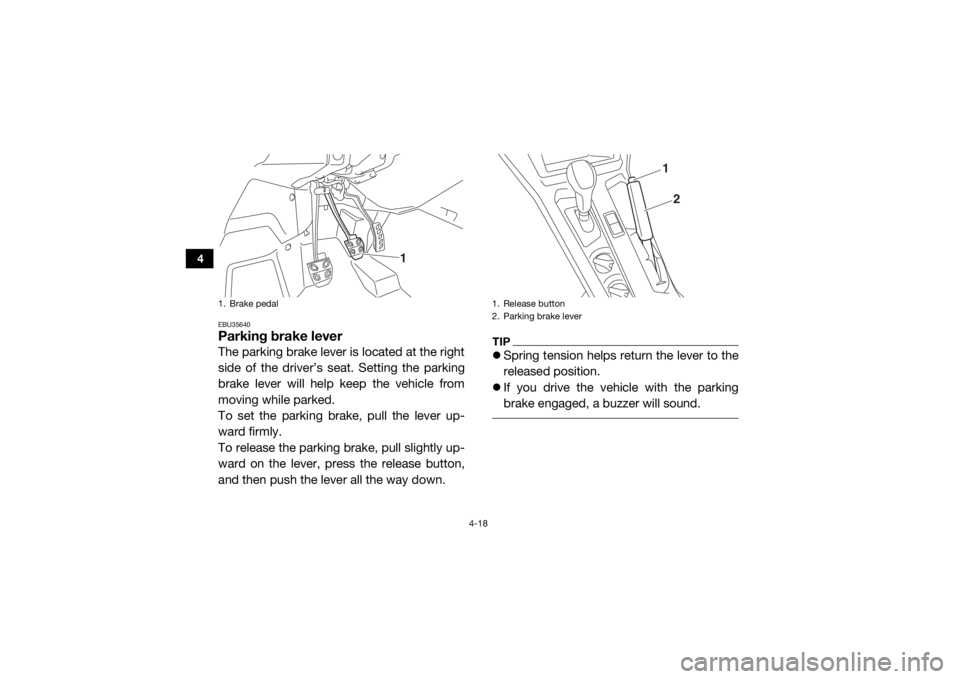
EBU35640Parking brake leverThe parking brake lever is located at the right
side of the driver’s seat. Setting the parking
brake lever will help keep the vehicle from
moving while parked.
To set the parking brake, pull the lever up-
ward firmly.
To release the parking brake, pull slightly up-
ward on the lever, press the release button,
and then push the lever all the way down.
TIPSpring tension helps return the lever to the
released position.
If you drive the vehicle with the parking
brake engaged, a buzzer will sound.
1. Brake pedal
1
1. Release button
2. Parking brake lever
12
U2HC7LE0.book Page 18 Wednesday, October 7, 2015 12:09 PM
Page 76 of 200

4-38
4
WARNING
EWB03500These shock absorber assemblies contain
highly pressurized nitrogen gas. Read and
understand the following information be-
fore handling the shock absorber assem-
blies.
Do not tamper with or attempt to open
the cylinder assemblies.
Do not subject the shock absorber as-
sembly to an open flame or other high
heat source. This may cause the unit to
explode due to excessive gas pressure.
Do not deform or damage the cylinders
in any way. Cylinder damage will result in
poor damping performance.
Do not dispose of a damaged or worn
out shock absorber assembly yourself.
Take the shock absorber assembly to a
Yamaha dealer for any service.
EBU35052Auxiliary DC jackThe auxiliary DC jack is located at the left side
of the glove compartment. The auxiliary DC
jack can be used for suitable work lights, ra-
dios, etc. The auxiliary DC jack should only be
used when the engine is running and the
lights are turned off.NOTICEECB02250 Do not use accessories requiring more
than the stated maximum capacity. Do-
ing so may overload the circuit and cau-
se the fuse to blow.
Low speed compression damping setting
Minimum (soft):4 turn(s) out from the fully turned in posi-
tion
Standard: 1 1/2 turn(s) out from the fully turned in
position
Maximum (hard): Adjusting screw fully turned in
U2HC7LE0.book Page 38 Wednesday, October 7, 2015 12:09 PM
Page 77 of 200

4-39
4
If accessories are used without the en-
gine running, the ba ttery may discharge.
Do not use an automotive cigarette light-
er or other accessories with a plug that
gets hot, because the jack can be dam-
aged. 1. Set the light switch to “ ” (off).
2. Turn the accessory off.
3. Start the engine. (See page 6-2.)
4. Open the auxiliary DC jack cap, and then
insert the accessory power plug into the
jack.
5. Turn the accessory on.
6. When the auxiliary DC jack is not beingused, cover it with the cap.
1. Auxiliary DC jack cap
2. Auxiliary DC jackMaximum rated capacity for the auxiliary DC
jack:DC 12 V, 10 A (120 W)
2
1
U2HC7LE0.book Page 39 Wednesday, October 7, 2015 12:09 PM
Page 79 of 200

5-2
5
Engine oil• Check oil level.
• Fill with oil to proper level if necessary.
5-5, 8-15
Drivetrain • Check front differential, transmission case, and rear final
gear for leakage. 5-6, 5-6, 5-7, 8-25,
8-28, 8-30
Coolant • Check coolant level in reservoir.
• Fill with coolant if necessary. 5-6, 8-33
Accelerator pedal • Check free play and for proper operation. 5-7
Seat belts • Check for proper operation and belt wear. 5-7
Passenger handhold • Check for stability and proper fastening. 5-7, 7-8
Steering • Check for proper operation. 5-7
Shift lever • Check for proper operation. 5-8
Fittings and fasteners • Check all fittings and fasteners. 5-8
Instruments, lights and
switches • Check operation, and correct if necessary.
5-8, 8-62, 8-63
Wheels and tires • Check tire pressure and for wear and damage. 5-8, 8-54, 8-55
Axle boots • Check for damage. 8-34
ITEM
ROUTINE PAGE
U2HC7LE0.book Page 2 Wednesday, October 7, 2015 12:09 PM