Sound Acura ILX 2020 Owner's Guide
[x] Cancel search | Manufacturer: ACURA, Model Year: 2020, Model line: ILX, Model: Acura ILX 2020Pages: 621, PDF Size: 34.94 MB
Page 217 of 621
216
uuAudio System Basic Operation uAdjusting the Sound
Features
Adjusting the Sound
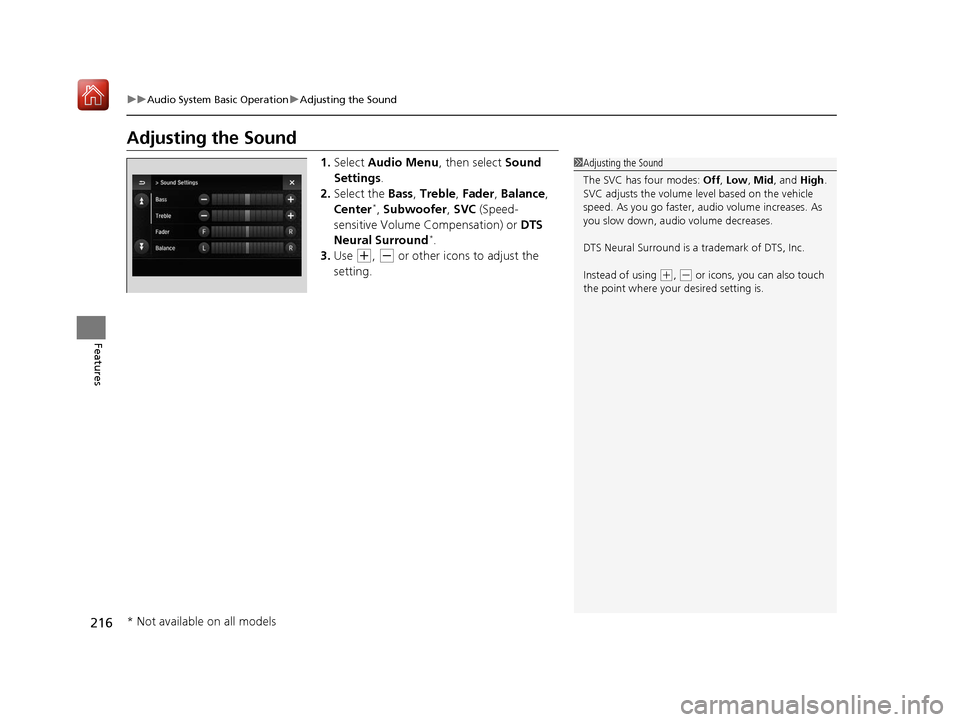
1. Select Audio Menu , then select Sound
Settings .
2. Select the Bass, Treble , Fader , Balance ,
Center
*, Subwoofer , SVC (Speed-
sensitive Volume Compensation) or DTS
Neural Surround
*.
3. Use
(+, (- or other icons to adjust the
setting.
1 Adjusting the Sound
The SVC has four modes: Off, Low , Mid, and High.
SVC adjusts the volume level based on the vehicle
speed. As you go faster, audio volume increases. As
you slow down, audi o volume decreases.
DTS Neural Surround is a trademark of DTS, Inc.
Instead of using
( +, (- or icons, you can also touch
the point where your desired setting is.
* Not available on all models
20 ACURA ILX-31TX66710.book 216 ページ 2020年4月16日 木曜日 午後8時46分
Page 241 of 621
uuAudio System Basic Operation uPlaying Hard Disk Drive (HDD) Audio
240
Features
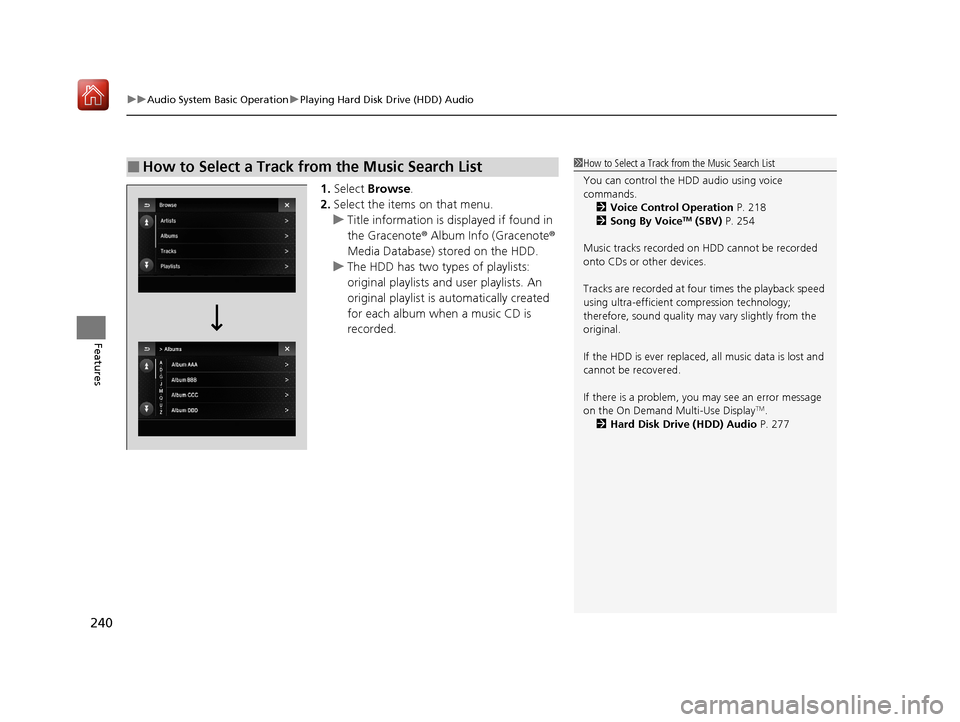
1. Select Browse .
2. Select the items on that menu.
u Title information is displayed if found in
the Gracenote ® Album Info (Gracenote ®
Media Database) stored on the HDD.
u The HDD has two types of playlists:
original playlists and user playlists. An
original playlist is automatically created
for each album when a music CD is
recorded.
■How to Select a Track from the Music Search List1 How to Select a Track from the Music Search List
You can control the HDD audio using voice
commands.
2 Voice Control Operation P. 218
2 Song By Voice
TM (SBV) P. 254
Music tracks recorded on HDD cannot be recorded
onto CDs or other devices.
Tracks are recorded at four times the playback speed
using ultra-efficient compression technology;
therefore, sound quality ma y vary slightly from the
original.
If the HDD is ever replaced, all music data is lost and
cannot be recovered.
If there is a problem, you may see an error message
on the On Demand Multi-Use Display
TM.
2 Hard Disk Drive (HDD) Audio P. 277
20 ACURA ILX-31TX66710.book 240 ページ 2020年4月16日 木曜日 午後8時46分
Page 261 of 621
260
uuAudio System Basic Operation uPlaying a USB Flash Drive
Features
Playing a USB Flash Drive
Your audio system reads and plays sound fi les on a USB flash drive in either MP3,
WMA, or AAC*1 format.
Connect your USB flash drive to the USB port, then select the USB mode.
2USB Port* P. 178
*1:Only AAC format files recorded with iTunes are playable on this unit.
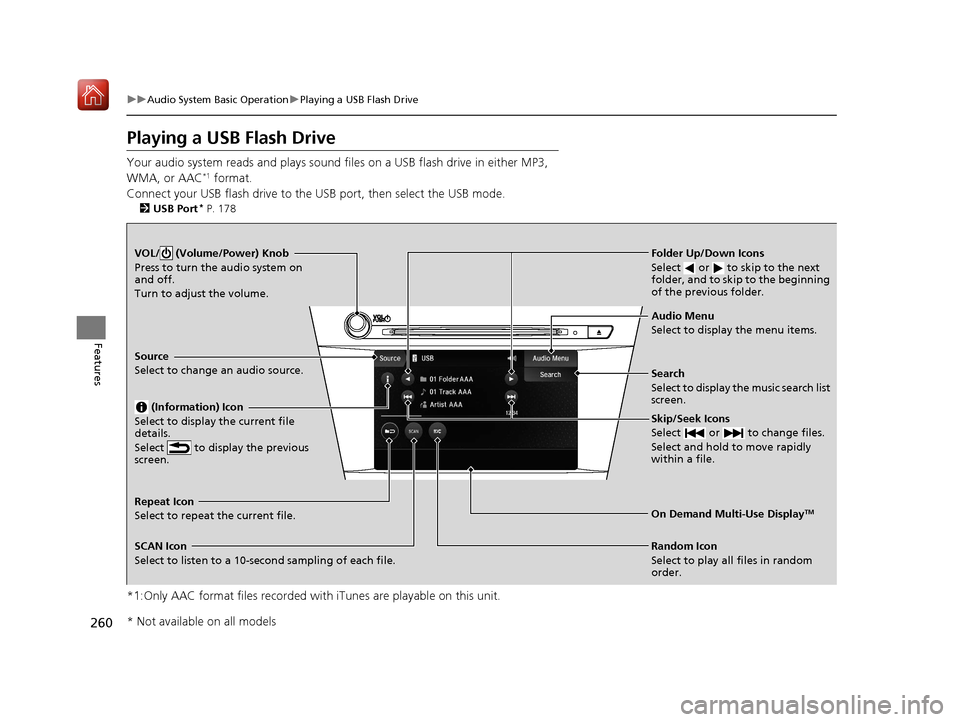
VOL/ (Volume/Power) Knob
Press to turn the audio system on
and off.
Turn to adjust the volume.
Skip/Seek Icons
Select or to change files.
Select and hold to move rapidly
within a file.
Audio Menu
Select to display the menu items.
Source
Select to change an audio source.
(Information) Icon
Select to display the current file
details.
Select to display the previous
screen.
Search
Select to display the music search list
screen.
Folder Up/Down Icons
Select or to skip to the next
folder, and to skip to the beginning
of the previous folder.
On Demand Multi-Use DisplayTMRepeat Icon
Select to repeat the current file.
SCAN Icon
Select to listen to a 10-second sampling of each file. Random Icon
Select to play all files in random
order.
* Not available on all models
20 ACURA ILX-31TX66710.book 260 ページ 2020年4月16日 木曜日 午後8時46分
Page 296 of 621
295
uuGeneral Information on the Audio System uHonda App License Agreement
Continued
Features
2. Potential Map Inaccuracy and Route Safety. Maps used by this system may be inaccurate because of changes in roads, traffic controls,
routing, or driving conditions. Always use good judgment and co mmon sense when following suggested routes. Do not follow the ro ute
suggestions if doing so would result in an unsafe or illegal driving maneuver, if you would be placed in an unsafe situation, o r if you would
be directed into an area that you consider unsafe. Do not rely on any navigation features included in the system to route you t o emergency
services. Not all emergency services such as police, fire stations, hospitals, or clinics are likely to be contained in the map database for such
navigation features. Ask local authorities or an emergency services operator for such locations and routes. The driver is ultimately
responsible for the safe operation of the vehicle and therefore, must evaluate whether it is safe to follow the suggested directions. Any
navigation features are pr ovided only as an aid. Make your driving decisions based on your obse rvations of local conditions and existing
traffic regulations. Navigation features are not a substitute for your personal judgment. Any route suggestions made by the SOFTWARE or
SERVICES should never replace any local traffic regulations or your personal judgment or knowledge of safe driving practices.
3. Speech Recognition:
You acknowledge and understand that HONDA and PROV IDERS may record, retain, and use voices commands
when you use the speech recognition componen ts of the SOFTWARE or SERVICES. You and all VEHICLE operators and passengers (a)
consent to the recording and retention of vo ice commands in support of providing speech recognition components and (b) release HONDA
and PROVIDERS from all claims, liabilities, and losses that may result from any use of such recorded voice commands. Recognition errors
are inherent in speech recognition. It is your responsibility to monitor any speech recognition f unctions included in the system and address
any errors. Neither HONDA nor PROVIDERS will be liable for any damages arising out of errors in the speech recognition process.
4. Distraction Hazards.
Navigation features may require manual (non-verbal) input or setup. Attempting to perform such set-up or insert
data while driving can seriously distract your attention and co uld cause a crash or other serious consequences; the ability to undertake such
interactions may also be limited by state or local law, which laws you are responsible to know and follow. Even occasional shor t scans of
the screen may be hazardous if your attention has been diverted away from your driving at a critical time. Pull over and stop the vehicle in
a safe and legal manner before attempting to access a function of the system requiring prolonged attention. Do not raise the vo lume
excessively. Keep the volume at a level where you can still hear outside traffic and emergency signals while driving. Driving while unable
to hear these sounds could result in a crash.
20 ACURA ILX-31TX66710.book 295 ページ 2020年4月16日 木曜日 午後8時46分
Page 306 of 621

305
uuCustomized Features u
Continued
Features
■Customization Flow
Sound SettingsBAr
RDS Information*1
Adjust Clock
TRE
FAD
BAL
SVC
Display Setup
Select
Brightness
Wallpaper
Import
Delete
Blue Color Theme
Red
Gray
Language Selection
Press the SETUP button.
*1 : Appears only when you select the FM mode.
20 ACURA ILX-31TX66710.book 305 ページ 2020年4月16日 木曜日 午後8時46分
Page 308 of 621

307
uuCustomized Features u
Continued
Features
■List of customizable options
*1:Default Setting
*2:Appears only when you select the FM mode. Setup
Group Customizable Features
Description Selectable Settings
Sound
Settings
BAS
Adjusts the settings of the audio speaker’s
sound.
2Adjusting the Sound P. 188
—
TRE
FAD
BAL
SVC
RDS Information
*2Turns on and off the RDS information. On*1/Off
Adjust ClockAdjust Clock.
2Adjusting the Clock P. 106—
20 ACURA ILX-31TX66710.book 307 ページ 2020年4月16日 木曜日 午後8時46分
Page 311 of 621
310
Features
Customized Features
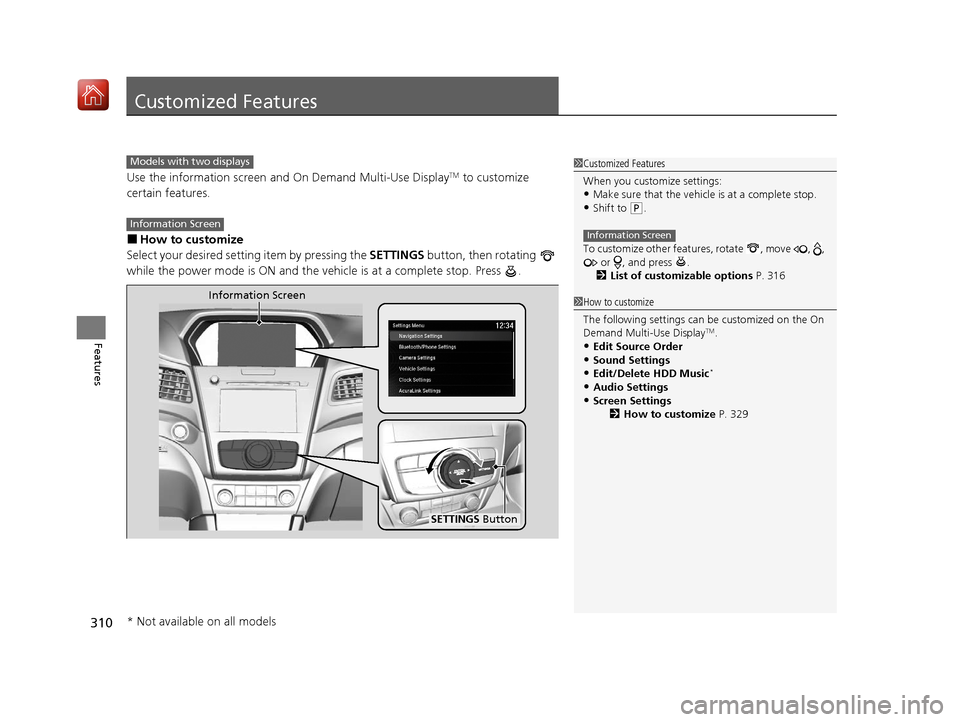
Use the information screen and On Demand Multi-Use DisplayTM to customize
certain features.
■How to customize
Select your desired setting item by pressing the SETTINGS button, then rotating
while the power mode is ON and the vehicle is at a complete stop. Press .
1 Customized Features
When you customize settings:
•Make sure that the vehicle is at a complete stop.•Shift to (P.
To customize other featur es, rotate , move , ,
or , and press .
2 List of customizable options P. 316
Information Screen
1How to customize
The following settings can be customized on the On
Demand Multi-Use Display
TM.
•Edit Source Order
•Sound Settings•Edit/Delete HDD Music*
•Audio Settings
•Screen Settings 2How to customize P. 329
Models with two displays
Information Screen
Information Screen
SETTINGS Button
* Not available on all models
20 ACURA ILX-31TX66710.book 310 ページ 2020年4月16日 木曜日 午後8時46分
Page 322 of 621

321
uuCustomized Features u
Continued
Features
*1:Default SettingSetup
Group Customizable Features Desc
ription Selectable Settings
Vehicle
Settings
Driving
Position Memory Position LinkTurns the driving position memory system on and
off.On*1/Off
Keyless
Access
Door Unlock ModeChanges which doors unloc k when you grab the
driver’s door handle.Driver Door Only*1/
All Doors
Keyless Access Light
FlashCauses some exterior li ghts to flash when you
unlock/lock the doors.On*1/ Off
Keyless Access BeepCauses the beeper to sound when you unlock/
lock the doors.On*1/Off
Remote Start System
On/Off*Turns the remote engine start feature on and off.On*1/Off
Walk Away Auto Lock
Changes the settings for the automatic locking
the doors when you walk away from the vehicle
while carrying the keyless access remote.
On /Off*1
* Not available on all models
20 ACURA ILX-31TX66710.book 321 ページ 2020年4月16日 木曜日 午後8時46分
Page 324 of 621
323
uuCustomized Features u
Continued
Features
*1:Default SettingSetup
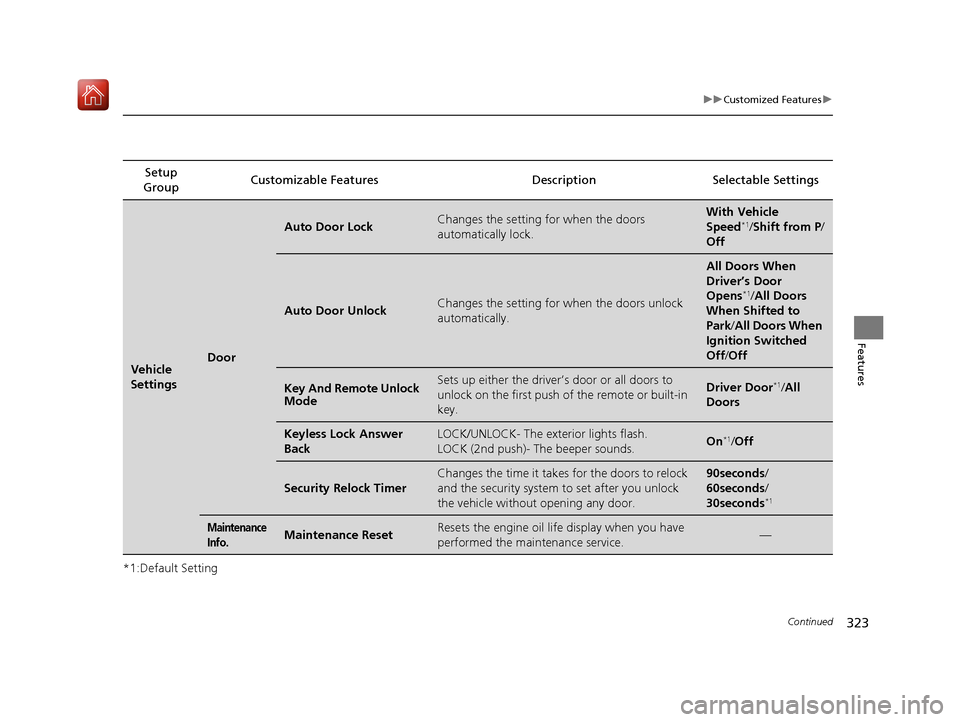
Group Customizable Features Desc
ription Selectable Settings
Vehicle
SettingsDoor
Auto Door LockChanges the setting for when the doors
automatically lock.With Vehicle
Speed*1/Shift from P /
Off
Auto Door UnlockChanges the setting for when the doors unlock
automatically.
All Doors When
Driver’s Door
Opens
*1/ All Doors
When Shifted to
Park /All Doors When
Ignition Switched
Off /Off
Key And Remote Unlock
ModeSets up either the driver’s door or all doors to
unlock on the first push of the remote or built-in
key.Driver Door*1/All
Doors
Keyless Lock Answer
BackLOCK/UNLOCK- The exterior lights flash.
LOCK (2nd push)- The beeper sounds.On*1/ Off
Security Relock Timer
Changes the time it takes for the doors to relock
and the security system to set after you unlock
the vehicle without opening any door.90seconds/
60seconds/
30seconds
*1
Maintenance
Info.Maintenance ResetResets the engine oil life display when you have
performed the maintenance service.—
20 ACURA ILX-31TX66710.book 323 ページ 2020年4月16日 木曜日 午後8時46分
Page 331 of 621
330
uuCustomized Features u
Features
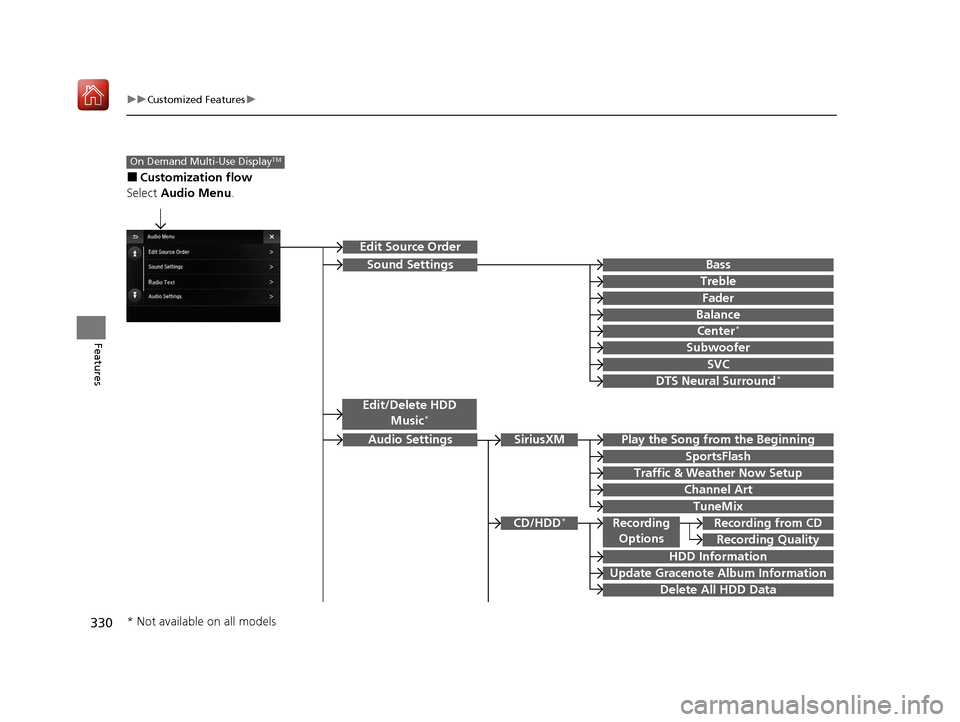
■Customization flow
Select Audio Menu .
On Demand Multi-Use DisplayTM
Play the Song from the Beginning
SportsFlash
Traffic & Weather Now Setup
Channel Art
TuneMix
SiriusXM
Bass
Treble
Fader
Balance
Subwoofer
SVC
Edit Source Order
Sound Settings
Audio Settings
CD/HDD*
Recording Quality
Recording from CDRecording
Options
HDD Information
Update Gracenote Album Information
Delete All HDD Data
DTS Neural Surround*
Edit/Delete HDD
Music*
Center*
* Not available on all models
20 ACURA ILX-31TX66710.book 330 ページ 2020年4月16日 木曜日 午後8時46分