Sound Acura ILX 2020 Workshop Manual
[x] Cancel search | Manufacturer: ACURA, Model Year: 2020, Model line: ILX, Model: Acura ILX 2020Pages: 621, PDF Size: 34.94 MB
Page 463 of 621
uuAcuraWatchTMuAdaptive Cruise Control (ACC)
462
Driving
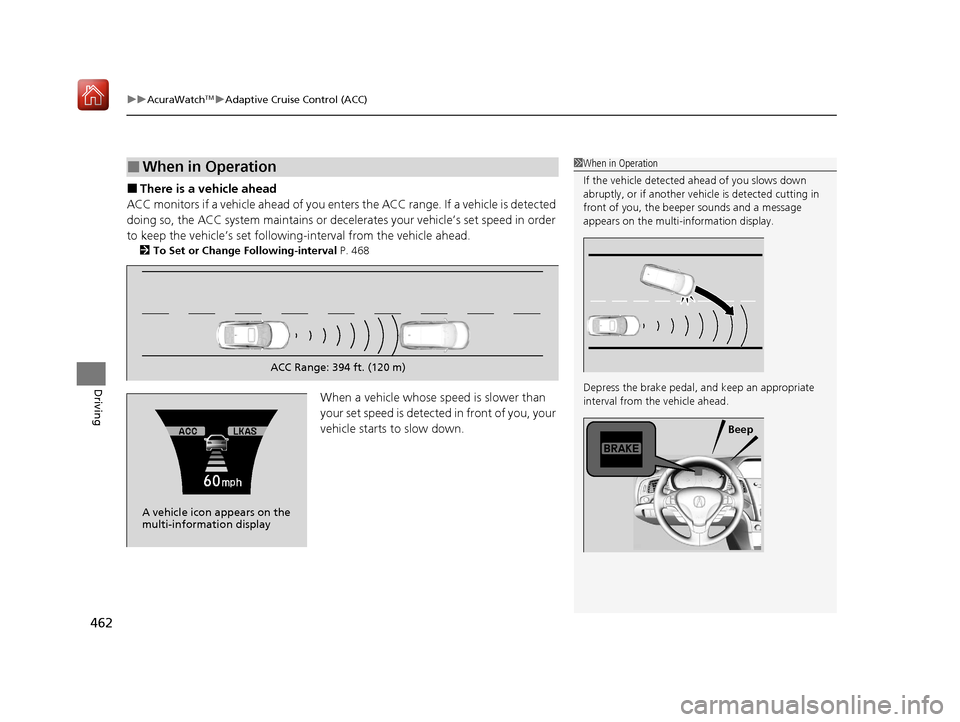
■There is a vehicle ahead
ACC monitors if a vehicle ahead of you ente rs the ACC range. If a vehicle is detected
doing so, the ACC system maintains or decele rates your vehicle’s set speed in order
to keep the vehicle’s se t following-interval from the vehicle ahead.
2To Set or Change Following-interval P. 468
When a vehicle whose speed is slower than
your set speed is detected in front of you, your
vehicle starts to slow down.
■When in Operation1 When in Operation
If the vehicle detected ahead of you slows down
abruptly, or if a nother vehicle is de tected cutting in
front of you, the beep er sounds and a message
appears on the multi-information display.
Depress the brake pedal, and keep an appropriate
interval from the vehicle ahead.
Beep
ACC Range: 394 ft. (120 m)
A vehicle icon appears on the
multi-information display
20 ACURA ILX-31TX66710.book 462 ページ 2020年4月16日 木曜日 午後8時46分
Page 472 of 621
Continued471
uuAcuraWatchTMuAdaptive Cruise Control (ACC)
Driving
■Automatic cancellation
The beeper sounds and a message appears on the multi-information display when
ACC is automatically cancel ed. Any of these conditions may cause the ACC to
automatically cancel:
• Bad weather (rain, fog, snow, etc.)
• When the radar sensor behind the emblem gets dirty.
• The vehicle ahead of yo u cannot be detected.
• An abnormal tire condition is de tected, or the tires are skidding.
• Driving on a mountainous road, or driving off road for extended periods.
• Abrupt steering wheel movement.
• When the ABS, VSA ® or CMBS
TM is activated.
• When the ABS or VSA ® system indicator comes on.
• When you manually apply the parking brake.
• When the detected vehicle within the AC C range is too close to your vehicle.
• The camera behind the rearview mirror, or the area around the camera, including
the windshield, gets dirty.
1 Automatic cancellation
Even though ACC has been automatically canceled,
you can still resume the prior set speed. Wait until the
condition that caused ACC to cancel improves, then
press the RES/ACCEL button.
20 ACURA ILX-31TX66710.book 471 ページ 2020年4月16日 木曜日 午後8時46分
Page 480 of 621

479
uuAcuraWatchTMuLane Keeping Assist System (LKAS)
Continued
Driving
■The system operatio n is suspended if
you:
• Set the wipers to continuous operation.
u Turning the wipers off resumes the
LKAS.
• Set the wiper switch to AUTO and the
wipers operate continuously.
u The LKAS resumes when the wipers stop
or operate intermittently.
• Decrease the vehicle speed to about 40
mph (64 km/h) or less.
u Increasing the vehicle speed to about 45
mph (72 km/h) or more resumes the
LKAS.
• Depress the brake pedal.
u The LKAS resumes and starts detecting
the lane lines again once you release the
brake pedal.
When the LKAS is suspended,
the lane lines on the multi-
information disp lay change to
contour lines, and the beeper
sounds (if activated).
Models with automatic intermittent wipers
All models
20 ACURA ILX-31TX66710.book 479 ページ 2020年4月16日 木曜日 午後8時46分
Page 481 of 621
480
uuAcuraWatchTMuLane Keeping Assist System (LKAS)
Driving
■The LKAS may automatically be suspended when:
• The system fails to detect lane lines.
• The steering wheel is quickly turned.
• You fail to steer the vehicle.
• Driving through a sharp curve.
• Driving at a speed in excess of approximately 90 mph (145 km/h).
Once these conditions no longer exis t, the LKAS automatically resumes.
■The LKAS may automatically be canceled when:
• The camera temperature gets extremely high or low.
• The camera behind the rearview mirror, or the area around the camera, including
the windshield, gets dirty.
• The ABS or VSA ® system engages.
The beeper sounds if the LKAS is automatically canceled.
20 ACURA ILX-31TX66710.book 480 ページ 2020年4月16日 木曜日 午後8時46分
Page 493 of 621
492
Driving
Braking
Brake System
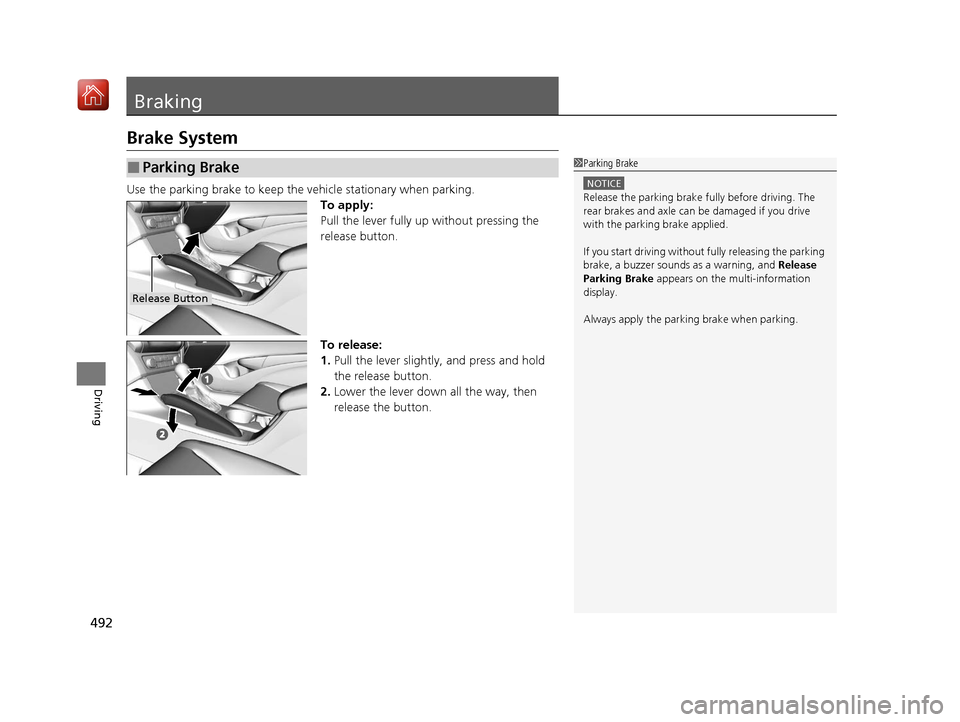
Use the parking brake to keep the vehicle stationary when parking.To apply:
Pull the lever fully up without pressing the
release button.
To release:
1. Pull the lever slightly, and press and hold
the release button.
2. Lower the lever down all the way, then
release the button.
■Parking Brake1Parking Brake
NOTICE
Release the parking brake fu lly before driving. The
rear brakes and axle can be damaged if you drive
with the parki ng brake applied.
If you start driving without fully releasing the parking
brake, a buzzer sounds as a warning, and Release
Parking Brake appears on the multi-information
display.
Always apply the parking brake when parking.
Release Button
20 ACURA ILX-31TX66710.book 492 ページ 2020年4月16日 木曜日 午後8時46分
Page 494 of 621
493
uuBraking uBrake System
Driving
Your vehicle is equipped with disc brakes at all four wheels. A vacuum power assist
helps reduce the effort needed on the brake pe dal. The brake assist system increases
the stopping force when you depress the brake pedal hard in an emergency
situation. The anti-lock brake system (ABS) helps you retain steering control when
braking very hard.
2 Brake Assist System P. 495
2 Anti-lock Brake System (ABS) P. 494
■Foot Brake1Foot Brake
Check the brakes after driving through deep water,
or if there is a buildup of road surface water. If
necessary, dry the brakes by lightly depressing the
pedal several times.
If you hear a continuous me tallic friction sound when
applying the brakes, this is caused by the brake wear
indicator rubbing on the brake rotor and indicates
that the brake pads need to be replaced. Have the
vehicle checked by a deal er. If you hear only an
occasional squeak or squeal when you initially apply
the brake pedal, this may be normal and caused by
high frequency vibr ation of the brake pads against
the rotating brake disc.
Constantly using the brake pedal while going down a
long hill builds up heat, which reduces the brake
effectiveness. Apply engine braking by taking your
foot off the accelerator pe dal and downshifting to a
lower gear.
Do not rest your foot on the brake pedal while
driving, as it will lightly apply the brakes and cause
them to lose effectiveness over time and reduce pad
life. It will also conf use drivers behind you.
20 ACURA ILX-31TX66710.book 493 ページ 2020年4月16日 木曜日 午後8時46分
Page 495 of 621
494
uuBraking uAnti-lock Brake System (ABS)
Driving
Anti-lock Brake System (ABS)
Helps prevent the wheels from locking up, an d helps you retain steering control by
pumping the brakes rapidly, much faster than you.
The electronic brake distribution (EBD) system, which is part of the ABS, also
balances the front-to-rear braking distri bution according to vehicle loading.
You should never pump the brake pedal. Let the ABS work for you by always
keeping firm, steady pressure on the brake pe dal. This is sometimes referred to as
“stomp and steer.”
■ABS operation
The brake pedal may pulsate slightly when the ABS is working. Depress the brake
pedal and keep holding the pedal firmly do wn. On dry pavement, you will need to
press on the brake pedal very hard before the ABS activates. However, you may feel
the ABS activate immediately if yo u are trying to stop on snow or ice.
ABS may activate when you depress the brake pedal when driving on:
• Wet or snow covered roads.
• Roads paved with stone.
• Roads with uneven surfaces, such as potholes, cracks, manholes, etc.
When the vehicle speed goes unde r 6 mph (10 km/h), the ABS stops.
■ABS1Anti-lock Brake System (ABS)
NOTICE
The ABS may not function correctly if you use a tire of
the wrong size or type.
If the ABS indicator comes on while driving, there
may be a problem with the system.
While normal braking will not be affected, there is a
possibility that the ABS wi ll not be operating. Have
your vehicle checked by a dealer immediately.
The ABS is not designed for the purpose of reducing
the time or distance it takes for a vehicle to stop: It is
designed to limit brake lo ckup which can lead to
skidding and loss of steering control.
In the following cases, yo ur vehicle may need more
distance to stop than a vehicle without the ABS:
•You are driving on rough or uneven road surfaces,
such as gravel or snow.
•The tires are equipped with tire chains.
The following may be observed with the ABS system:
•Motor sounds coming from the engine
compartment when the brakes are applied, or
when system checks are being performed after the
engine has been started and while the vehicle
accelerates.
•Brake pedal and/or the vehicle body vibration when
ABS activates.
These vibrations and sou nds are normal to ABS
systems and are no cause for concern.
20 ACURA ILX-31TX66710.book 494 ページ 2020年4月16日 木曜日 午後8時46分
Page 581 of 621

580
uuEngine Does Not Start uIf the Keyless Access Remote Battery is Weak
Handling the Unexpected
If the Keyless Access Re mote Battery is Weak
If the beeper sounds, the To Start, Hold Remote Near Start Button message
appears on the multi-information display, and the ENGINE START/STOP button
flashes, and the engine won’t start, start the engine as follows:
1.Touch the center of the ENGINE START/
STOP button with the A logo on the keyless
access remote while the ENGINE START/
STOP button is flashing. The buttons on
the keyless access remo te should be facing
you.
u The ENGINE START/STOP button
flashes for about 30 seconds.
2. Depress the brake pedal and press the
ENGINE START/STOP button within 10
seconds after the beeper sounds and the
ENGINE START/STOP button changes
from flashing to on.
u If you don’t depress the pedal, the mode
will change to ACCESSORY.
20 ACURA ILX-31TX66710.book 580 ページ 2020年4月16日 木曜日 午後8時46分
Page 582 of 621

581
uuEngine Does Not Start uEmergency Engine Stop
Handling the Unexpected
Emergency Engine Stop
The ENGINE START/STOP button may be used to stop the engine due to an
emergency situation even while driving. If you must stop the engine, do either of the
following operations:
• Press and hold the ENGINE START/STOP button for about two seconds.
• Firmly press the ENGINE START/STOP button three times.
The steering wheel will not lock. However, because turning off the engine disables
the power assist the engine provides to the steering and braking systems, it will
require significantly more physical effort an d time to steer and slow the vehicle. Use
both feet on the brake pedal to slow down the vehicle and stop immediately in a
safe place.
The power mode is in ACCESSORY when the engine is stopped.
To change the mode to VEHICLE OFF, put the transmission into
(P after the vehicle
comes to a complete stop.
1 Emergency Engine Stop
Do not press the ENGINE START/STOP button while
driving unless it is absolute ly necessary for the engine
to be turned off.
If you press the ENGINE START/STOP button while
driving, the beeper sounds.
20 ACURA ILX-31TX66710.book 581 ページ 2020年4月16日 木曜日 午後8時46分
Page 613 of 621
Index
612
Index
Index
A
AAC.................................................... 235, 260
ABS (Anti-lock Brake System) ................... 494
Accessories and Modifications ................. 553
Accessory Power Sockets .......................... 169
AcuraLink .................................................. 410
AcuraWatch
TM..................................... 20, 446
Adaptive Cruise Control (ACC) ........... 76, 459
Additives Coolant ................................................... 523
Engine Oil ................................................ 518
Washer .................................................... 526
Additives, Engine Oil ................................ 518
Adjusting
Armrest ................................................... 163
Front Seats .............................................. 154
Head Restraints........................................ 158
Mirrors .................................................... 152
Rear Seat ................................................. 162
Steering Wheel ........................................ 149
Temperature .............................................. 92
Air Conditioning System (Climate Control
System) .................................................... 171
Changing the Mode ................................ 171
Defrosting the Windshield and
Windows ............................................... 172
Maintenance ........................................... 546
Recirculation/Fresh Air Mode ................... 171
Sensors .................................................... 174
Synchronization Mode ............................. 173
Using Automatic Climate Control ............ 171 Air Pressure
....................................... 535, 599
Airbags ........................................................ 39
Advanced Airbags ..................................... 45
After a Collision ........................................ 42
Airbag Care............................................... 51
Event Data Recorder .................................... 0
Front Airbags (SRS) .................................... 42
Indicator.............................................. 49, 72
Passenger Airbag Off Indicator .................. 50
Sensors ..................................................... 39
Side Airbags .............................................. 46
Side Curtain Airbags.................................. 48
AM/FM Radio .................................... 190, 221
Android Auto ........................................... 270
Anti-lock Brake System (ABS) .................. 494
Indicator.................................................... 71
Apple CarPlay ........................................... 266
Armrest ..................................................... 163
Audio Remote Controls ........................... 181
Audio System ............................................ 176
Adjusting the Sound........................ 188, 216
Auxiliary Input Jack.................................. 179
Bluetooth ® Audio ............................ 204, 263
CD .................................................. 192, 235
Display Setup .................................. 189, 217
Error Messages ........................................ 275
General Information ................................ 286
HDD ........................................................ 238
iPhone............................................. 258, 289
iPod ................................................ 195, 251
MP3/WMA/AAC ...................... 201, 235, 260 Pandora
®...................................... 198, 258
Reactivating ............................................ 180
Recommended CDs ................................ 287
Recommended Devices ........................... 289
Security Code ......................................... 180
Siri Eyes Free ........................................... 265
SiriusXM ® Radio ...................................... 224
Song By VoiceTM (SBV) ............................. 254
Theft Protection ...................................... 180
USB Adapter Cable ................................. 177
USB Flash Drives...................... 201, 260, 289
USB Port ................................................. 178
Audio/Information Screen ....................... 184
Authorized Manuals ................................ 607
Auto Door Locking/Unlocking ................ 123
Customize ...................................... 101, 323
Auto High-Beam ...................................... 143
Automatic Lighting .................................. 140
Auxiliary Input Jack ................................. 179
Average Fuel Economy .............................. 92
Average Speed ........................................... 93
B
Battery...................................................... 543
Charging System Indicator ................ 70, 588
Jump Starting ......................................... 582
Maintenance (Checking the Battery) ....... 543
Maintenance (Replacing) ......................... 544
Belts (Seat) .................................................. 32
Beverage Holders ..................................... 168
20 ACURA ILX-31TX66710.book 612 ページ 2020年4月16日 木曜日 午後8時46分