Sound Acura ILX 2020 Service Manual
[x] Cancel search | Manufacturer: ACURA, Model Year: 2020, Model line: ILX, Model: Acura ILX 2020Pages: 621, PDF Size: 34.94 MB
Page 333 of 621
332
uuCustomized Features u
Features
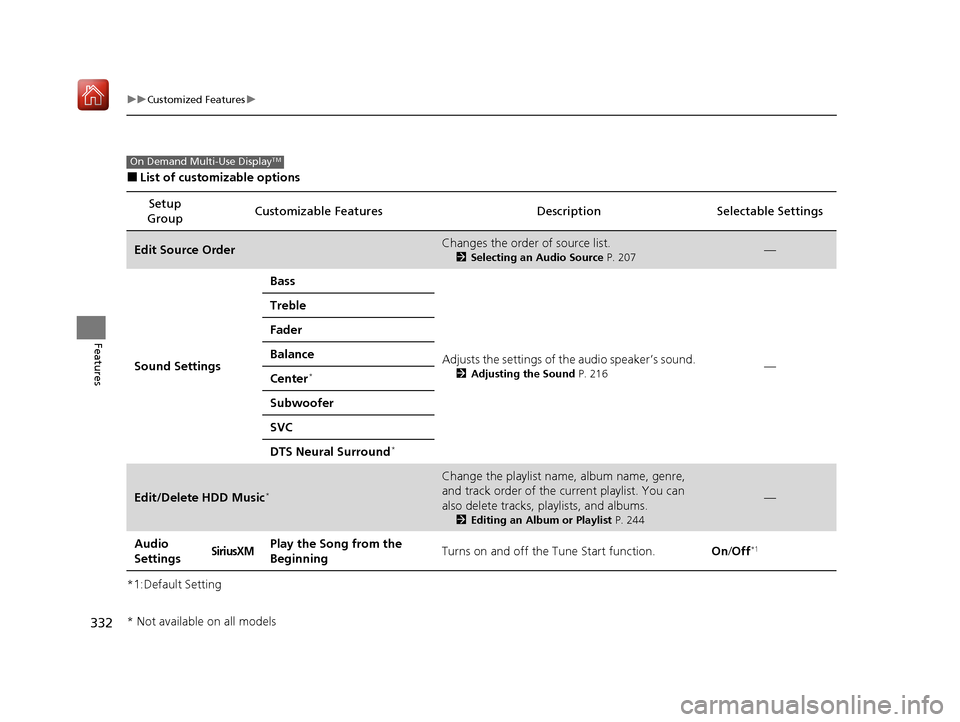
■List of customizable options
*1:Default Setting Setup
Group Customizable Features
Description Selectable Settings
Edit Source OrderChanges the order of source list.
2Selecting an Audio Source P. 207—
Sound Settings Bass
Adjusts the settings of the audio speaker’s sound.
2Adjusting the Sound P. 216—
Treble
Fader
Balance
Center*
Subwoofer
SVC
DTS Neural Surround
*
Edit/Delete HDD Music*
Change the playlist name, album name, genre,
and track order of the cu
rrent playlist. You can
also delete tracks, playlists, and albums.
2 Editing an Album or Playlist P. 244
—
Audio
SettingsSiriusXMPlay the Song from the
BeginningTurns on and off the Tune Start function.On/Off*1
On Demand Multi-Use DisplayTM
* Not available on all models
20 ACURA ILX-31TX66710.book 332 ページ 2020年4月16日 木曜日 午後8時46分
Page 335 of 621

334
uuCustomized Features u
Features
*1:Default SettingSetup
Group Customizable Features
Description Selectable Settings
Audio
SettingsOtherHD Radio Mode*Selects whether the audio system automatically
switches to the digital radio waves or receives the
analog waves only. Auto*1/
Analog
Cover Art Turns on and off the cover art display. On
*1/Off
Screen Settings
Sync Display Brightness
Selects whether the screen brightness
synchronizes with the instruments panel
brightness.
Off /On*1
BrightnessChanges the brightness of the On Demand Multi-
Use DisplayTM.—
ContrastChanges the contrast of the On Demand Multi-
Use DisplayTM.—
Black LevelChanges the black level of the On Demand Multi-
Use DisplayTM.—
BeepMutes a beep that sounds every time you touch
the screen.Off /On*1
KeyboardChanges the on-screen keyboard from the
alphabetical order to the qwerty type.Alphabet /QWERTY*1
* Not available on all models
20 ACURA ILX-31TX66710.book 334 ページ 2020年4月16日 木曜日 午後8時46分
Page 362 of 621

Continued361
uuBluetooth ® HandsFreeLink ®u HFL Menus
Features
When there is an inco ming call, an audible
notification sounds (if activated) and the
Incoming Call screen appears.
Press the button to answer the call.
Press the button to decline or end the call.
■Receiving a Call1 Receiving a Call
Call Waiting
Press the button to put th e current call on hold to
answer the incoming call.
Press the button again to return to the current
call.
Ignore the incoming call if you do not want to answer
it.
Press the button if y ou want to hang up the
current call.
HFL Mode Caller Name
20 ACURA ILX-31TX66710.book 361 ページ 2020年4月16日 木曜日 午後8時46分
Page 387 of 621
uuBluetooth ® HandsFreeLink ®u HFL Menus
386
Features
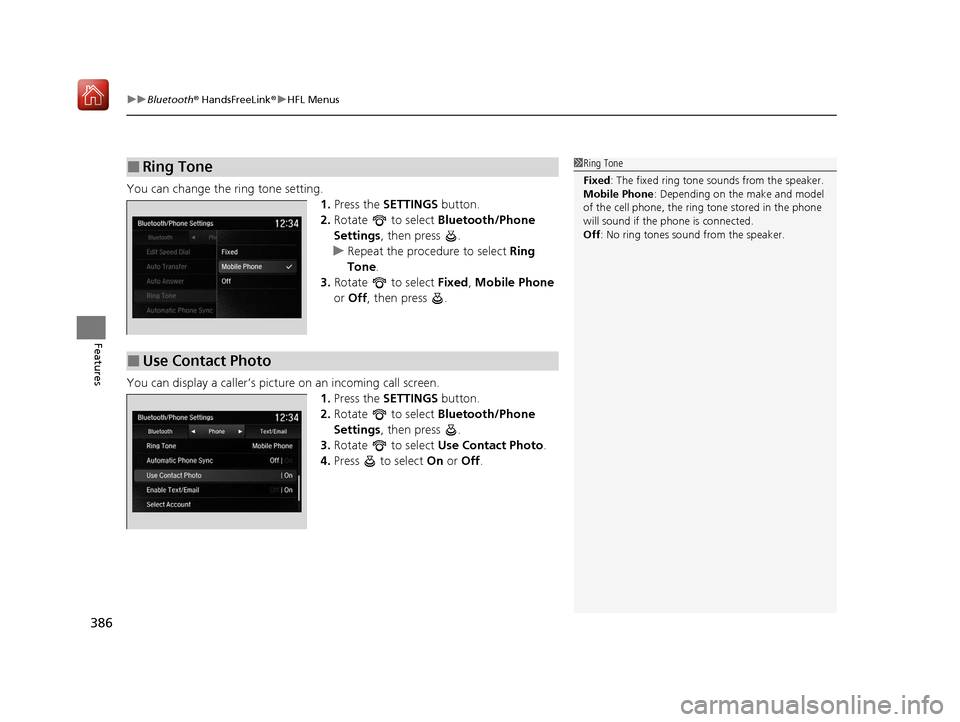
You can change the ring tone setting.
1.Press the SETTINGS button.
2. Rotate to select Bluetooth/Phone
Settings , then press .
u Repeat the procedure to select Ring
Tone .
3. Rotate to select Fixed, Mobile Phone
or Off , then press .
You can display a caller’s pict ure on an incoming call screen.
1.Press the SETTINGS button.
2. Rotate to select Bluetooth/Phone
Settings , then press .
3. Rotate to select Use Contact Photo .
4. Press to select On or Off .
■Ring Tone1Ring Tone
Fixed: The fixed ring tone sounds from the speaker.
Mobile Phone : Depending on the make and model
of the cell phone, the ring tone stored in the phone
will sound if the phone is connected.
Off : No ring tones sound from the speaker.
■Use Contact Photo
20 ACURA ILX-31TX66710.book 386 ページ 2020年4月16日 木曜日 午後8時46分
Page 402 of 621

Continued401
uuBluetooth ® HandsFreeLink ®u HFL Menus
Features
When there is an inco ming call, an audible
notification sounds (if activated) and the
Incoming Call screen appears.
Press the button to answer the call.
Press the button to decline or end the call.
■Receiving a Call1 Receiving a Call
Call Waiting
Press the button to put the current call on hold to
answer the incoming call.
Press the button again to return to the current
call.
Ignore the incoming call if you do not want to answer
it.
Press the button if you want to hang up the
current call.
Information Screen
On Demand Multi-Use Display
TM
20 ACURA ILX-31TX66710.book 401 ページ 2020年4月16日 木曜日 午後8時46分
Page 413 of 621
uuAcuraLink ®*u
412
Features
Your subscribed telematics service provider can track your vehicle’s location,
remotely lock or unlock doors, and help you find your vehicle.
To use these features, you need your us er ID and personal identification number
(PIN).
■Stolen vehicle tracking
This feature searches and tracks down your ve hicle position even if it is on the move.
If you believe that your vehicle has been stolen, contact the police as well as the
provider.
■Remote door lock/unlock
The provider can remotely lock or unlock doors upon your request.
■Vehicle finder
This feature is convenient to use when trying to locate yo ur vehicle in large areas,
such as a crowded parking lot. If you cannot locate your vehicle after using the
remote transmitter’s answerba ck function, you can contact the provider which can
then flash your vehicle’s exterior lights and sound the horn.
■Security alarm notification
If the security system in your vehicle detects an abnormal condition, such as
someone tampering with the lock on your vehicle, the provider notifies you by your
preferred method.
■Security Features1 Security Features
The contact information of your provider, your user
ID and PIN will be given when you subscribe to
AcuraLink. If you forget any of the above, contact a
dealer, or visit owners.acura.com (U.S.) or
www.acura.ca/owners/acuralink (Canada).
You can also activate the remote door lock/unlock
and vehicle finder features from the Internet or using
your smartphone app. As k a dealer, or visit
owners.acura.com (U.S.) or www.acura.ca/owners/
acuralink (Canada) for details.
1Vehicle finder
The lights will stop flas hing and horn will stop
sounding under the foll owing conditions:
•When 30 seconds have elapsed.
•You unlock the doors using the remote transmitter.•You unlock the doors using the keyless access
system.
•You unlock the doors using the built-in key.•The power mode is set to ACCESSORY or ON.
20 ACURA ILX-31TX66710.book 412 ページ 2020年4月16日 木曜日 午後8時46分
Page 427 of 621
426
Driving
When Driving
Starting the Engine
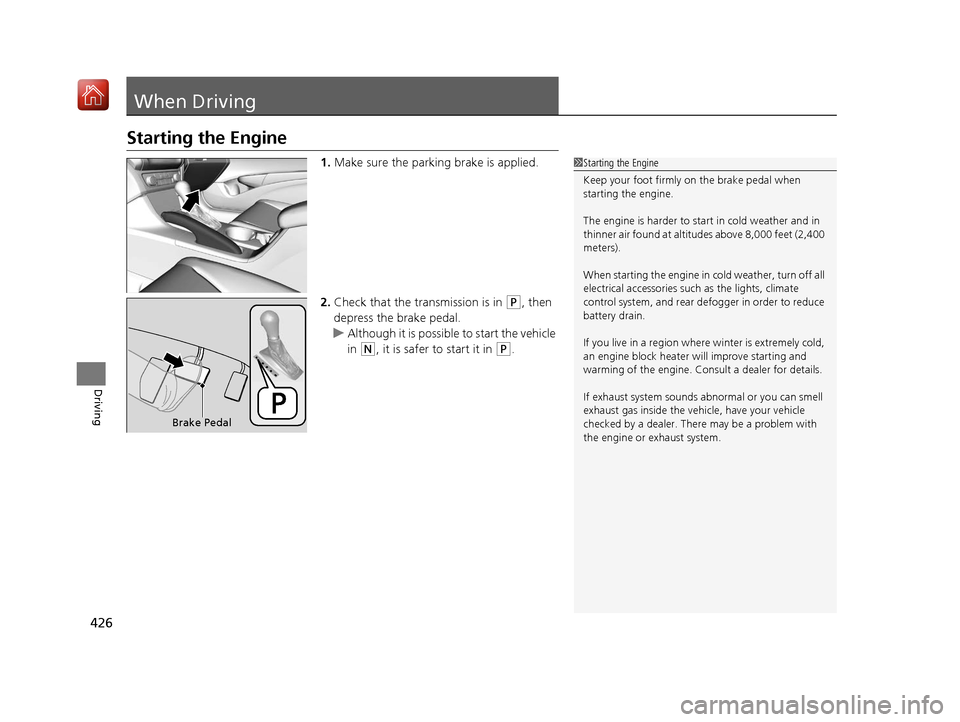
1.Make sure the parking brake is applied.
2. Check that the tr ansmission is in
(P, then
depress the brake pedal.
u Although it is possible to start the vehicle
in
(N, it is safer to start it in (P.
1Starting the Engine
Keep your foot firmly on the brake pedal when
starting the engine.
The engine is harder to st art in cold weather and in
thinner air found at altit udes above 8,000 feet (2,400
meters).
When starting the engine in cold weather, turn off all
electrical accessories such as the lights, climate
control system, and rear de fogger in order to reduce
battery drain.
If you live in a region where winter is extremely cold,
an engine block heater will improve starting and
warming of the engine. Cons ult a dealer for details.
If exhaust system sounds abnormal or you can smell
exhaust gas inside the vehi cle, have your vehicle
checked by a dealer. There may be a problem with
the engine or exhaust system.
Brake Pedal
20 ACURA ILX-31TX66710.book 426 ページ 2020年4月16日 木曜日 午後8時46分
Page 439 of 621
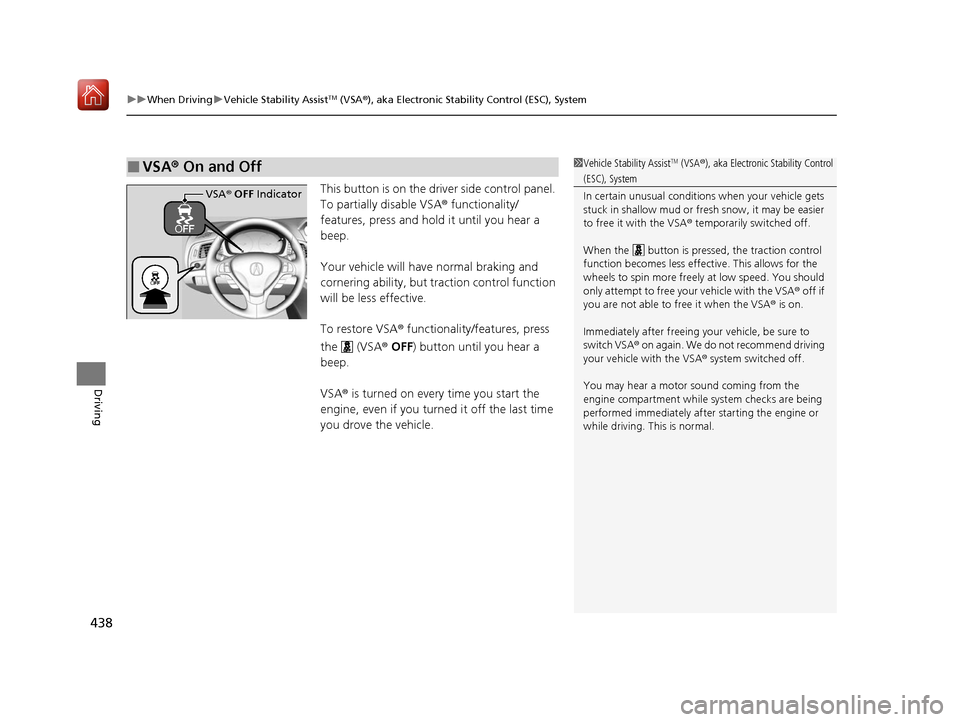
uuWhen Driving uVehicle Stability AssistTM (VSA ®), aka Electronic Stability Control (ESC), System
438
Driving
This button is on the driv er side control panel.
To partially disable VSA ® functionality/
features, press and hold it until you hear a
beep.
Your vehicle will have normal braking and
cornering ability, but traction control function
will be less effective.
To restore VSA ® functionality/features, press
the (VSA ® OFF ) button until you hear a
beep.
VSA ® is turned on every time you start the
engine, even if you turned it off the last time
you drove the vehicle.
■VSA ® On and Off1 Vehicle Stability AssistTM (VSA ®), aka Electronic Stability Control
(ESC), System
In certain unusual conditions when your vehicle gets
stuck in shallow mud or fr esh snow, it may be easier
to free it with the VSA ® temporarily switched off.
When the button is pre ssed, the traction control
function becomes less effective. This allows for the
wheels to spin more freely at low speed. You should
only attempt to free your vehicle with the VSA ® off if
you are not able to free it when the VSA ® is on.
Immediately after freeing your vehicle, be sure to
switch VSA ® on again. We do not recommend driving
your vehicle with the VSA ® system switched off.
You may hear a motor sound coming from the
engine compartment while system checks are being
performed immediately after starting the engine or
while driving. This is normal.
VSA ® OFF Indicator
20 ACURA ILX-31TX66710.book 438 ページ 2020年4月16日 木曜日 午後8時46分
Page 441 of 621
uuWhen Driving uBlind spot information System*
440
Driving
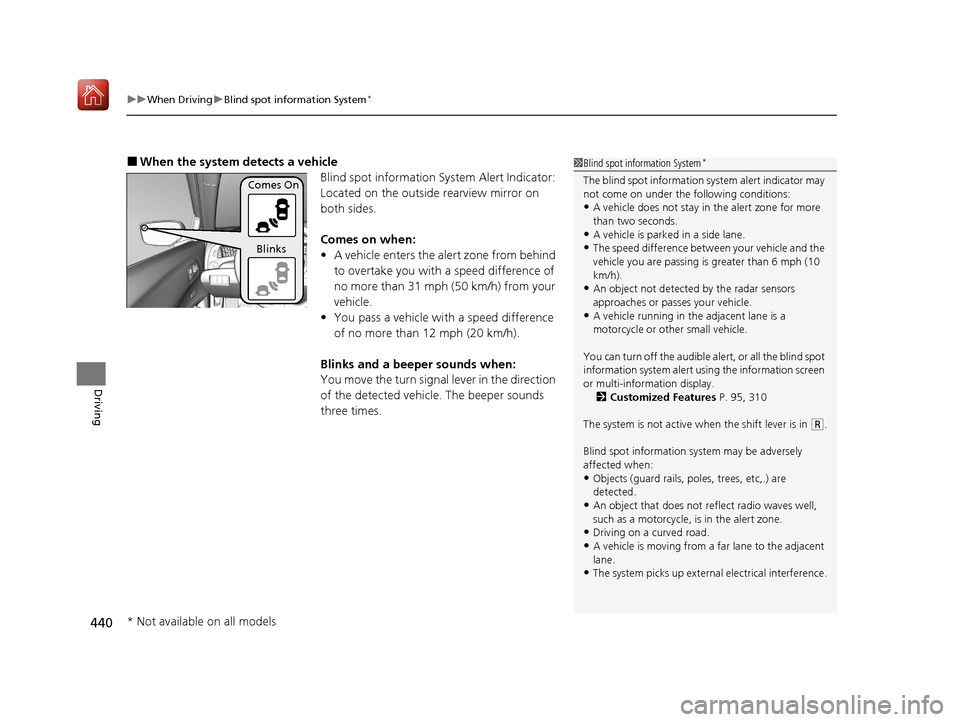
■When the system detects a vehicle
Blind spot information System Alert Indicator:
Located on the outside rearview mirror on
both sides.
Comes on when:
•A vehicle enters the alert zone from behind
to overtake you with a speed difference of
no more than 31 mph (50 km/h) from your
vehicle.
• You pass a vehicle with a speed difference
of no more than 12 mph (20 km/h).
Blinks and a beeper sounds when:
You move the turn signal lever in the direction
of the detected vehicle. The beeper sounds
three times.1 Blind spot information System*
The blind spot information system alert indicator may
not come on under the following conditions:
•A vehicle does not stay in the alert zone for more
than two seconds.
•A vehicle is parked in a side lane.
•The speed difference betw een your vehicle and the
vehicle you are passing is greater than 6 mph (10
km/h).
•An object not detected by the radar sensors
approaches or passes your vehicle.
•A vehicle running in the adjacent lane is a
motorcycle or other small vehicle.
You can turn off the audible al ert, or all the blind spot
information system alert us ing the information screen
or multi-information display. 2 Customized Features P. 95, 310
The system is not active when the shift lever is in
( R.
Blind spot information sy stem may be adversely
affected when:
•Objects (guard rails, poles, trees, etc,.) are
detected.
•An object that does not re flect radio waves well,
such as a motorcycle, is in the alert zone.
•Driving on a curved road.
•A vehicle is moving from a far lane to the adjacent
lane.
•The system picks up external electrical interference.
Comes On
Blinks
* Not available on all models
20 ACURA ILX-31TX66710.book 440 ページ 2020年4月16日 木曜日 午後8時46分
Page 453 of 621

uuAcuraWatchTMuCollision Mitigation Braking SystemTM (CMBSTM)
452
Driving
Press and hold the button until the beeper
sounds to switch the system on or off.
When the CMBS
TM is off:
• The CMBSTM indicator in the instrument
panel comes on.
• A message on the multi-information display
reminds you that the system is off.
The CMBS
TM is turned on every time you start
the engine, even if you turned it off the last
time you drove the vehicle.
■CMBSTM On and Off1 Collision Mitigation Braking SystemTM (CMBSTM)
The CMBS
TM may automatically shut off, and the
CMBSTM indicator will come an d stay on under certain
conditions:
2 CMBS
TM Conditions and Limitations P. 453
20 ACURA ILX-31TX66710.book 452 ページ 2020年4月16日 木曜日 午後8時46分