ACURA ILX 2022 Owners Manual
Manufacturer: ACURA, Model Year: 2022,
Model line: ILX,
Model: ACURA ILX 2022
Pages: 632, PDF Size: 20.56 MB
ACURA ILX 2022 Owners Manual
ILX 2022
ACURA
ACURA
https://www.carmanualsonline.info/img/32/58626/w960_58626-0.png
ACURA ILX 2022 Owners Manual
Trending: parking sensors, MPG, seats, coolant capacity, Touch screen, engine, jacking
Page 311 of 632
309
uuGeneral Information on the Audio System uLicense information*
Features
License information*
For DTS patents, see http://patents.dts.com . Manufactured under license from DTS
Licensing Limited. DTS, the Symbol, & DTS and the Symbol together are registered
trademarks, and DTS Digital Surround and Neural Surround are trademarks of DTS,
Inc. © DTS, Inc. All Rights Reserved.
■DTS
* Not available on all models
22 ACURA ILX-31TX66900.book 309 ページ 2021年4月26日 月曜日 午前11時27分
Page 312 of 632
310
Features
Customized Features
Use the audio/information screen to customize certain features.
■How to customize
While the vehicle is at a complete stop with the power mode is ON, press the SETUP
button, rotate to select a setting item, and press .
1 Customized Features
When you customize settings:
•Make sure that the vehicle is at a complete stop.
•Shift to (P.
Models with one display
1 How to customize
To customize other featur es, rotate , and press
.
2 List of customizable options P. 313
Audio/Information Screen
SETUP Button
22 ACURA ILX-31TX66900.book 310 ページ 2021年4月26日 月曜日 午前11時27分
Page 313 of 632
311
uuCustomized Features u
Continued
Features
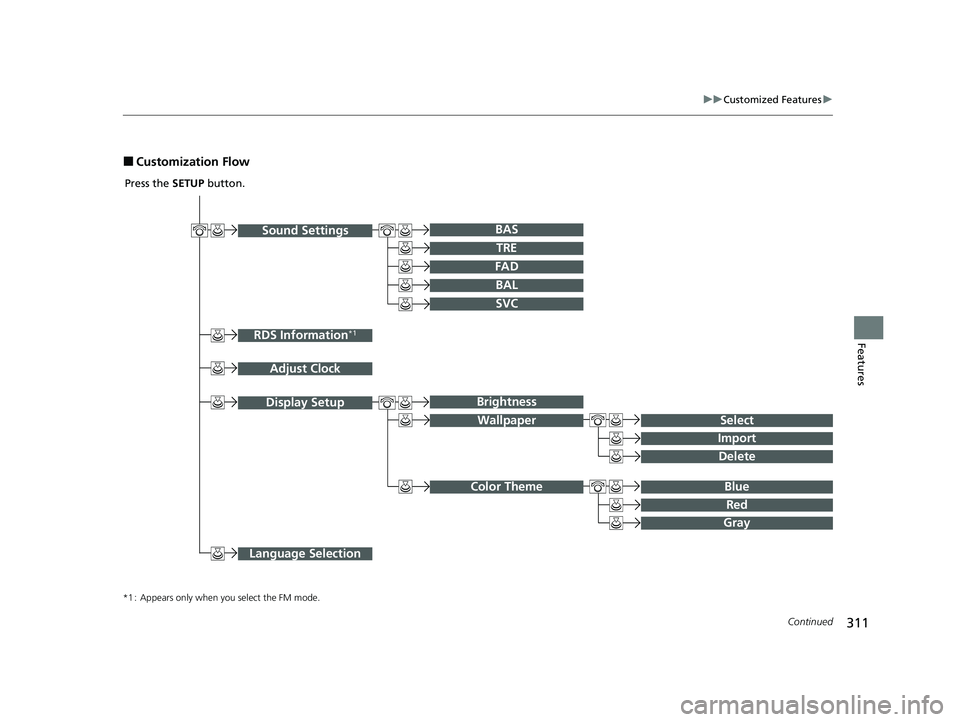
■Customization Flow
Sound SettingsBAr
RDS Information*1
Adjust Clock
TRE
FAD
BAL
SVC
Display Setup
Select
Brightness
Wallpaper
Import
Delete
Blue Color Theme
Red
Gray
Language Selection
Press the SETUP button.
*1 : Appears only when you select the FM mode.
22 ACURA ILX-31TX66900.book 311 ページ 2021年4月26日 月曜日 午前11時27分
Page 314 of 632
312
uuCustomized Features u
Features
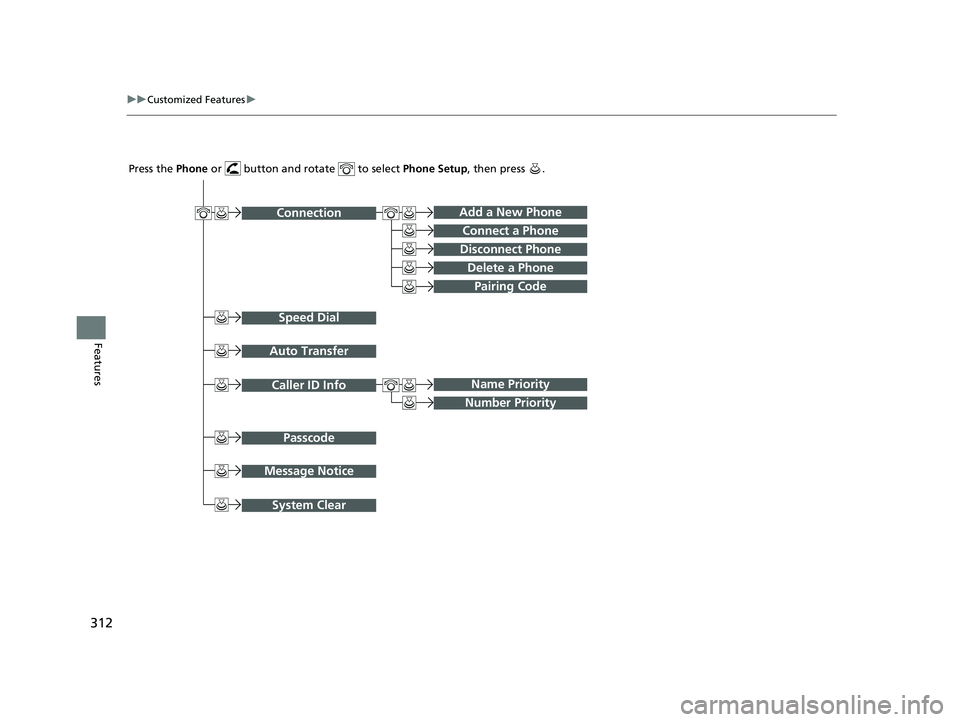
ConnectionAdd a New Phone
Speed Dial
Auto Transfer
Connect a Phone
Disconnect Phone
Delete a Phone
Pairing Code
Caller ID InfoName Priority
Number Priority
Passcode
Message Notice
System Clear
Press the Phone or button and rotate to select Phone Setup, then press .
22 ACURA ILX-31TX66900.book 312 ページ 2021年4月26日 月曜日 午前11時27分
Page 315 of 632
313
uuCustomized Features u
Continued
Features
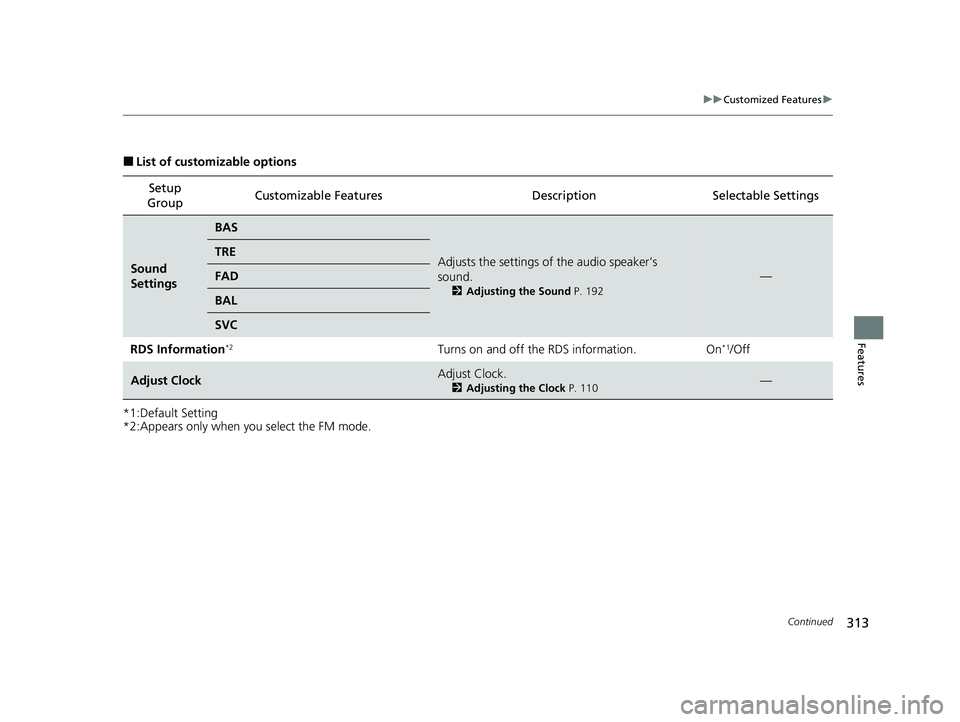
■List of customizable options
*1:Default Setting
*2:Appears only when you select the FM mode. Setup
Group Customizable Features
Description Selectable Settings
Sound
Settings
BAS
Adjusts the settings of the audio speaker’s
sound.
2Adjusting the Sound P. 192
—
TRE
FAD
BAL
SVC
RDS Information
*2Turns on and off the RDS information. On*1/Off
Adjust ClockAdjust Clock.
2Adjusting the Clock P. 110—
22 ACURA ILX-31TX66900.book 313 ページ 2021年4月26日 月曜日 午前11時27分
Page 316 of 632
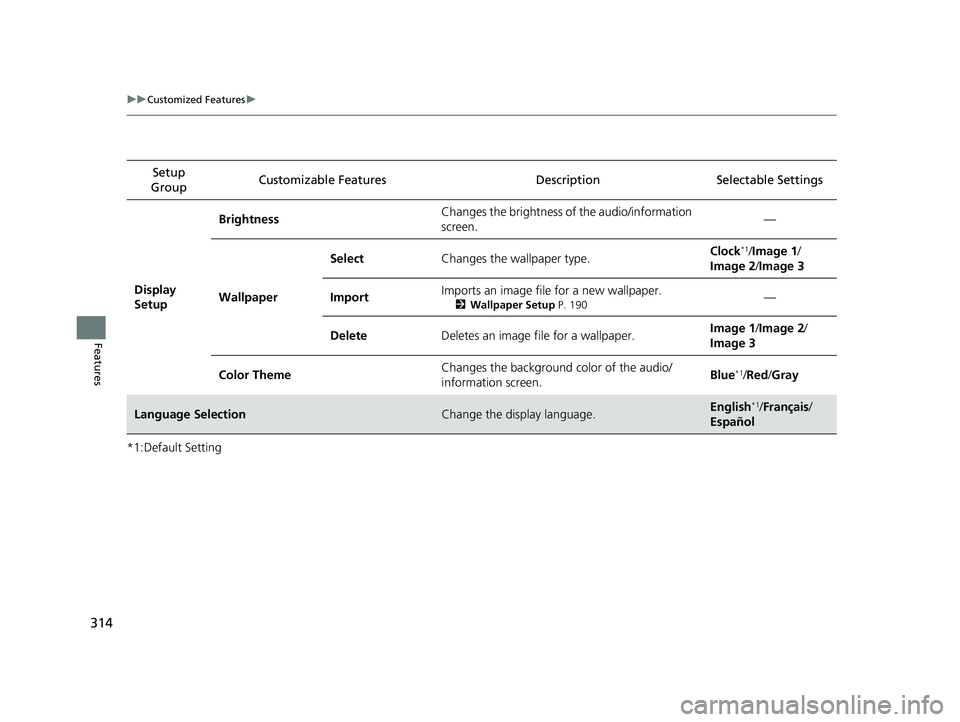
314
uuCustomized Features u
Features
*1:Default SettingSetup
Group Customizable Features Desc
ription Selectable Settings
Display
Setup Brightness
Changes the brightness of the audio/information
screen. —
Wallpaper Select
Changes the wallpaper type. Clock
*1/
Image 1 /
Image 2 /Image 3
Import Imports an image file for a new wallpaper.
2
Wallpaper Setup P. 190—
Delete Deletes an image file for a wallpaper. Image 1
/Image 2 /
Image 3
Color Theme Changes the background color of the audio/
information screen. Blue
*1/
Red /Gray
Language SelectionChange the display language.English*1/ Français /
Español
22 ACURA ILX-31TX66900.book 314 ページ 2021年4月26日 月曜日 午前11時27分
Page 317 of 632
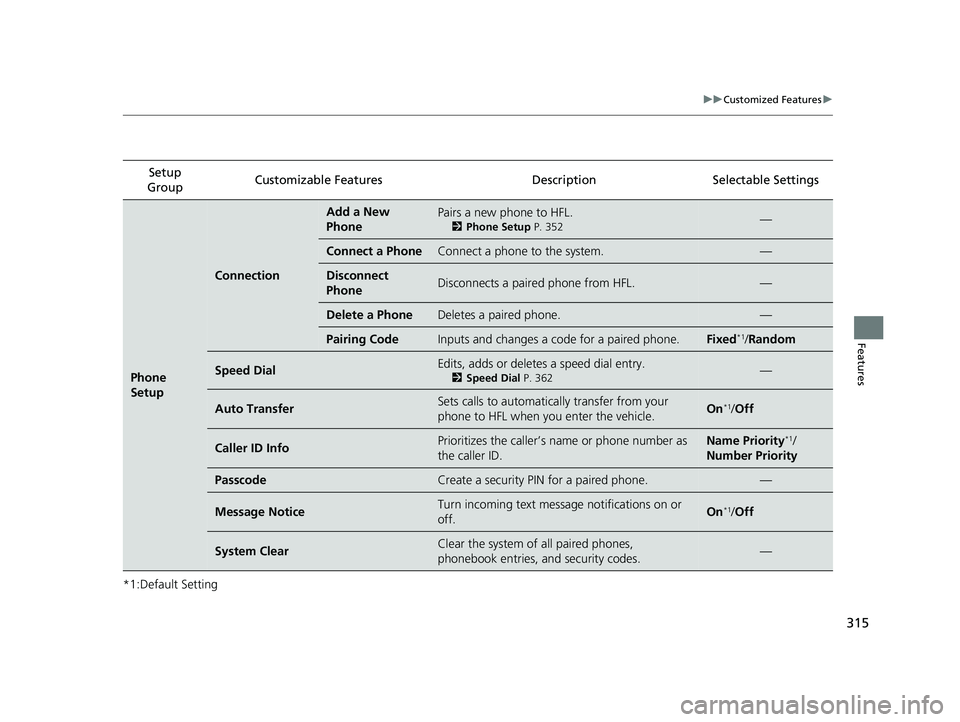
315
uuCustomized Features u
Features
*1:Default SettingSetup
Group Customizable Features
Description Selectable Settings
Phone
Setup
Connection
Add a New
PhonePairs a new phone to HFL.
2Phone Setup P. 352—
Connect a PhoneConnect a phone to the system.—
Disconnect
PhoneDisconnects a paired phone from HFL.—
Delete a PhoneDeletes a paired phone.—
Pairing CodeInputs and changes a code for a paired phone.Fixed*1/Random
Speed DialEdits, adds or deletes a speed dial entry.
2 Speed Dial P. 362—
Auto TransferSets calls to automatically transfer from your
phone to HFL when you enter the vehicle.On*1/Off
Caller ID InfoPrioritizes the caller’s name or phone number as
the caller ID.Name Priority*1/
Number Priority
PasscodeCreate a security PIN for a paired phone.—
Message NoticeTurn incoming text message notifications on or
off.On*1/ Off
System ClearClear the system of all paired phones,
phonebook entries, and security codes.—
22 ACURA ILX-31TX66900.book 315 ページ 2021年4月26日 月曜日 午前11時27分
Page 318 of 632
316
Features
Customized Features
Use the information screen and On Demand Multi-Use DisplayTM to customize
certain features.
■How to customize
Select your desired setting item by pressing the SETTINGS button, then rotating
while the power mode is ON and the ve hicle is at a complete stop. Press .
1Customized Features
When you customize settings:
•Make sure that the vehicle is at a complete stop.•Shift to (P.
To customize other featur es, rotate , move , ,
or , and press .
2 List of customizable options P. 322
Information Screen
1How to customize
The following settings can be customized on the On
Demand Multi-Use Display
TM.
•Edit Source Order
•Sound Settings•Edit/Delete HDD Music*
•Audio Settings
•Screen Settings 2How to customize P. 335
Models with two displays
Information Screen
Information Screen
SETTINGS Button
* Not available on all models
22 ACURA ILX-31TX66900.book 316 ページ 2021年4月26日 月曜日 午前11時27分
Page 319 of 632
317
uuCustomized Features u
Continued
Features
■Customization flow
Information Screen
Press the SETTINGS button.
Bluetoot'Bluetoot'
Bluetooth Device List
Edit Speed Dial
Auto Transfer
Auto Answer
Ring Tone
Automatic Phone Sync
Use Contact Photo
Enable Text/Email
Select Account
New Text/Email Alert
Text/Email
Message Auto Reading*
Default
Edit Pairing Code
Phone
Bluetooth/
Phone
Settings
See the Navigation System Manual.
Navigation Settings*
* Not available on all models
22 ACURA ILX-31TX66900.book 317 ページ 2021年4月26日 月曜日 午前11時27分
Page 320 of 632
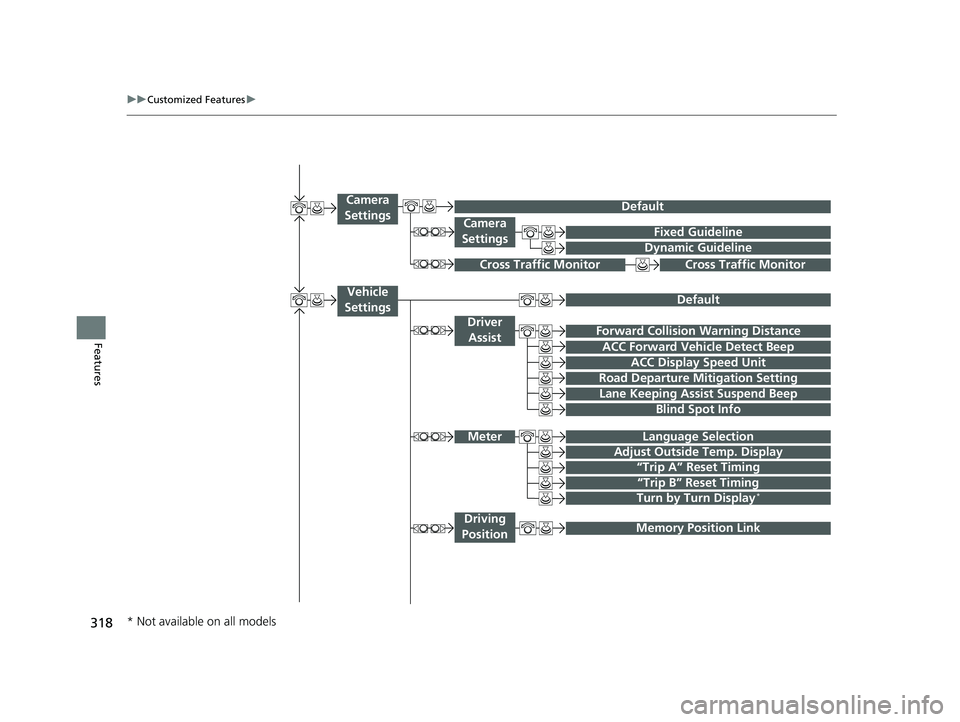
318
uuCustomized Features u
Features
Fixed Guideline
Dynamic Guideline
Camera
Settings
Cross Traffic MonitorCross Traffic Monitor
“Trip A” Reset Timing
“Trip B” Reset Timing
Language Selection
Adjust Outside Temp. Display
Forward Collision Warning Distance
ACC Forward Vehicle Detect Beep
Turn by Turn Display*
Default
Meter
Driver Assist
Lane Keeping Assist Suspend Beep
Blind Spot Info
Driving
Position
Road Departure Mi tigation Setting
ACC Display Speed Unit
Memory Position Link
Vehicle
Settings
Camera
Settings
Default
* Not available on all models
22 ACURA ILX-31TX66900.book 318 ページ 2021年4月26日 月曜日 午前11時27分
Trending: seats, suspension, charging, interior lights, steering wheel, oil temperature, maintenance schedule