lock Acura Integra 2000 Sedan Owner's Guide
[x] Cancel search | Manufacturer: ACURA, Model Year: 2000, Model line: Integra, Model: Acura Integra 2000Pages: 273, PDF Size: 4.4 MB
Page 129 of 273
Accessorie
s an d Modification s
Modification s
Do not remove any original
equipment or modify your car in any
way that would alter its design or operation. This could make your car
unsafe and illegal to drive.
For example, do not make any
modifications that would change the
ride height of your car, or install
wheels and tires with a different overall diameter.
Such modifications can adverselyaffect handling, and interfere with
the operation of the car's anti-lock
brakes and other systems. In addition, any modifications that
decrease ground clearance increase
the chance of undercarriage parts striking a curb, speed bump, or other
raised object, which could cause your airbags to deploy.
Do not modify your steering wheel or any other part of your
Supplemental Restraint System. Modifications could make the
system ineffective. Additiona
l Safet y Precautio n
Do not attach or place objects on the
airbag covers. Any object attached to
or placed on the covers marked "SRS
AIRBAG," in the center of the steering wheel and on top of the
dashboard, could interfere with the
proper operation of the airbags. Or, if the airbags inflate, the objects
could be propelled inside the car and
hurt someone.
Befor e Drivin g
Page 131 of 273
Carrying
Cargo
Loa d Limi t
The maximum load for your car is 850
lbs
(395 kg).
This figure includes the total weight of all occupants, cargo, accessories,
and the tongue weight if you are towing a trailer.
To figure out how much cargo you
can carry:
Add up the weight of all occupants. If you are towing a trailer, add the
tongue weight to the number
above.
Subtract the total from 850 lbs
(395 kg).
The final number is the total weight
of cargo you can carry.
Carryin
g Item s i n th e Passenge r
Compartmen t Store or secure all items that could
be thrown around and hurt
someone during a crash. Do not put any items on top of the
rear shelf. They can block your
view and be thrown around the car during a crash.
Be sure items placed on the floor
behind the front seats cannot rollunder the seats and interfere with
the driver's ability to operate the
pedals, or with the proper
operation of the seats. Keep the glove box closed while
driving. If the lid is open, a passenger could injure their knees
during a crash or sudden stop.
Befor e Drivin g
Overloading or improper
loading can affect handling and
stability and cause a crash in
which you can be hurt or killed.
Follow all load limits and other
loading guidelines in this
manual.
Page 134 of 273

Drivin
g
This section gives you tips on starting the engine under various
conditions, and how to operate the
5-speed manual and automatic
transmissions. It also includes
important information on parking
your car, the braking system, and facts you need if you are planning to
tow a trailer.
Preparing to Drive......................... 132
Starting the Engine........................ 133
Starting in Cold Weather at High Altitude ..................... 133
5-speed Manual Transmission..... 134 Recommended Shift Points...... 135
Engine Speed Limiter............... 135
Automatic Transmission............... 136
Shift Lever Position Indicator.. 136
Shift Lever Positions................. 136
Engine Speed Limiter............... 138
Shift Lock Release..................... 139
Parking............................................ 140
The Braking System...................... 141 Brake Wear Indicators.............. 141
Brake System Design................ 142
Anti-lock Brakes........................ 142 Important SafetyReminders.......................... 143
ABS Indicator......................... 144
Driving in Bad Weather................ 145
Towing a Trailer............................ 147
Driving
Page 135 of 273

Preparin
g to Driv e
You should do the following checks and adjustments every day before
you drive your car.
1. Make sure all windows, mirrors, and outside lights are clean and
unobstructed. Remove frost, snow,
or ice.
2. Check that the hood and trunk are fully closed.
3. Visually check the tires. If a tire looks low, use a gauge to check its
pressure.
4. Check that any items you may be carrying with you inside are stored
properly or fastened down
securely.
5. Check the adjustment of the seat
(see page 75 ).
6. Check the adjustment of the inside and outside mirrors (see
page 81 ).
7. Check the adjustment of the steering wheel (see page 65 ).
8. Make sure the doors are securely
closed and locked.
9. Fasten your seat belt. Check that
your passengers have fastened
their seat belts (see page 15 ). 10.Turn the ignition switch ON (II).
Check the indicator lights in the
instrument panel.
11.Start the engine (see page 133 ).
12.Check the gauges and indicator lights in the instrument panel (see
page 53 ).
Drivin g
Page 137 of 273
5-spee
d Manua l Transmissio n
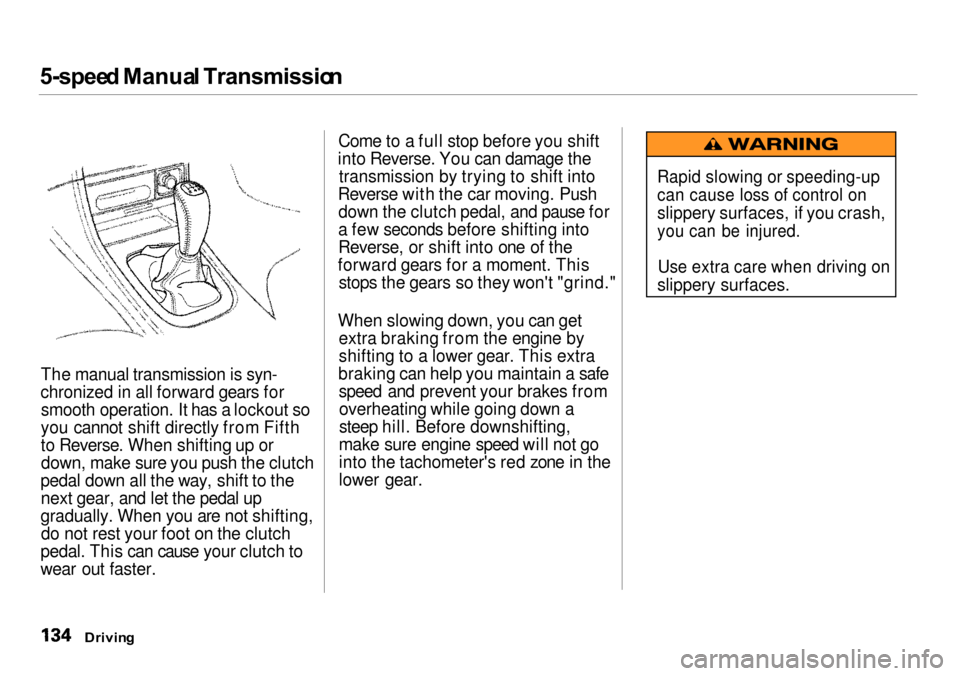
The manual transmission is syn-
chronized in all forward gears for smooth operation. It has a lockout so
you cannot shift directly from Fifth
to Reverse. When shifting up or down, make sure you push the clutch
pedal down all the way, shift to the next gear, and let the pedal up
gradually. When you are not shifting, do not rest your foot on the clutch
pedal. This can cause your clutch to
wear out faster. Come to a full stop before you shift
into Reverse. You can damage the transmission by trying to shift into
Reverse with the car moving. Push down the clutch pedal, and pause for
a few seconds before shifting into
Reverse, or shift into one of the
forward gears for a moment. This stops the gears so they won't "grind."
When slowing down, you can get extra braking from the engine by
shifting to a lower gear. This extra
braking can help you maintain a safe speed and prevent your brakes fromoverheating while going down a
steep hill. Before downshifting,
make sure engine speed will not go
into the tachometer's red zone in the
lower gear.
Drivin g
Rapid slowing or speeding-up
can cause loss of control on
slippery surfaces, if you crash,
you can be injured.
Use extra care when driving on
slippery surfaces.
Page 139 of 273

Automati
c Transmissio n
Your Acura's transmission has four
forward speeds, and is electronically controlled for smoother shifting. It
also has a "lock-up" torque converter
for better fuel economy. You may
feel what seems like another shift when the converter locks. Shif
t Leve r Positio n Indicato r
This indicator on the instrument
panel shows which position the shift
lever is in.
The "D4" indicator comes on for a
few seconds when you turn the
ignition switch ON (II). If it flashes
while driving (in any shift position),
it indicates a possible problem in the
transmission. Avoid rapid acceler-
ation and have the transmission
checked by an authorized Acura
dealer as soon as possible. Shif
t Leve r Position s
The shift lever has seven positions.
It must be in Park or Neutral to start the engine. When you are stopped in
D4, D3, 2,1, N or R, press firmly on
the brake pedal, and keep your foot
off the accelerator pedal.
Drivin g
SHIF
T
LEVE R
Page 140 of 273

Automati
c Transmissio n
Par k (P ) — This position mechani-
cally locks the transmission. Use
Park whenever you are turning off or starting the engine. To shift out of
Park, you must press on the brake
pedal and have your foot off the accelerator pedal. Press the release
button on the side of the shift lever
to move it. If you have done all of the above and
still cannot move the lever out of
Park, see Shift Lock Release on page
139.
You must also press the release button to shift into Park. To avoid
transmission damage, come to a
complete stop before shifting into
Park. The shift lever must be in Park
before you can remove the key from
the ignition switch. Revers
e (R ) — To shift to Reverse
from Park, see the explanation under Park. To shift to Reverse from
Neutral, come to a complete stop and
then shift. Press the release button before shifting into Reverse from
Neutral.
Neutra l (N ) — Use Neutral if you
need to restart a stalled engine, or if
it is necessary to stop briefly with
the engine idling. Shift to Park posi-
tion if you need to leave the car for any reason. Press on the brake pedal
when you are moving the shift lever
from Neutral to another gear.
Driv e (D 4) — Use this position for
your normal driving. The transmis- sion automatically selects a suitable
gear for your speed and acceleration.
You may notice the transmission shifting up at higher speeds when
the engine is cold. This helps the
engine warm up faster.
Driving
CONTINUED
Page 141 of 273

Automati
c Transmissio n
Driv e (D 3) — This position is similar
to D4, except only the first three
gears are selected. Use D3 when
towing a trailer in hilly terrain, or to
provide engine braking when going down a steep hill. D3 can also keep
the transmission from cycling
between third and fourth gears in stop-and-go driving.
For faster acceleration when in D3 or D4, you can get the transmission to
automatically downshift by pushing
the accelerator pedal to the floor.
The transmission will shift down one
or two gears, depending on your
speed.
Secon d (2 ) — To shift to Second,
press the release button on the side of the shift lever. This position locks
the transmission in second gear. It does not downshift to first gear
when you come to a stop. Second
gives you more power when climbing, and increased engine braking when going down steep hills. Use second
gear when starting out on a slipperysurface or in deep snow. It will help
reduce wheelspin.
Firs t (1 ) — To shift from Second to
First, press the release button on the
side of the shift lever. With the lever
in this position, the transmission
locks in First gear. By upshifting and downshifting through 1,2, D3 and D4,
you can operate this transmission much like a manual transmission
without a clutch pedal. Engin
e Spee d Limite r
If you exceed the maximum speed
for the gear you are in, the engine speed will enter into the tachometer's
red zone. If this occurs, you may feel
the engine cut in and out. This is caused by a limiter in the engine's
computer controls. The engine will
run normally when you reduce the
RPM below the red zone.
Drivin g
Page 142 of 273

Automati
c Transmissio n
Shif t Loc k Releas e
This allows you to move the shift
lever out of Park if the normal
method of pushing on the brake
pedal and pressing the release
button does not work.
1. Set the Parking brake.
2. Remove the key from the ignition
switch.
3. Put a cloth on the edge of the Shift Lock Release slot cover next to
the shift lever.
Use a small flat-tipped screwdriveror small metal plate (neither are
included in the tool kit) to remove
the cover. Carefully pry off the
edge of the cover. 4. Insert the key in the Shift Lock
Release slot.
5. Push down on the key while you press the release button on the
shift lever and move the shift lever
out of Park to Neutral. 6. Remove the key from the shift
lock release slot, then reinstall the
cover.
Depress the brake pedal and
restart the engine.
If you need to use the Shift Lock
Release, it means your car is developing a problem. Have the car
checked by your Acura dealer.
Driving
RELEAS
E BUTTO N
SHIF T LOC K
RELEAS E SLO T
Page 143 of 273
Parkin
g
Always use the parking brake when
you park your car. The indicator on
the instrument panel shows that the
parking brake is not fully released; it does not indicate that the parking brake is firmly set. Make sure the
parking brake is set firmly or your
car may roll if it is parked on an
incline.
If your car has an automatic
transmission, set the parking brake
before you put the transmission in
Park. This keeps the car from
moving and putting pressure on the
parking mechanism in the transmission — making it easier to
move the shift lever out of Park
when you want to drive away. If the car is facing uphill, turn the
front wheels away from the curb. If
you have a manual transmission, put it in first gear.
If the car is facing downhill, turn the
front wheels toward the curb. If you
have a manual transmission, put it in
reverse gear.
Make sure the parking brake is fully released before driving away.Driving with the parking brake
partially set can overheat or damage the rear brakes. Parkin
g Tip s
Make sure the moonroof and the windows are closed. Turn off the lights.
Place any packages, valuables, etc.,
in the trunk or take them with you.
Lock the doors. Never park over dry leaves, tall
grass, or other flammable
materials. The three way catalytic
converter gets very hot, and could cause these materials to catch on
fire.
Drivin g