audio Acura Integra 2000 Sedan Owner's Manual
[x] Cancel search | Manufacturer: ACURA, Model Year: 2000, Model line: Integra, Model: Acura Integra 2000Pages: 273, PDF Size: 4.4 MB
Page 1 of 273

2000 Integra Sedan Online Reference Owner's Manual
Use these links (and links throughout this manual) to navigate through this reference.
For a printed owner's manual, click on authorized manuals or go to www.helminc.com. Contents
Owner's Identification Form
Introduction........................................................................\
...................................................... .................... i
A Few Words About Safety ........................................................................\
................................................ ii
Your Vehicle at a Glance........................................................................\
.................................................... 2
Driver and Passenger Safety ........................................................................\
.............................................
5
Proper use and care of your vehicle's seat belts, and Supplemental Restraint System.
Instruments and Controls........................................................................\
................................................. 51
Instrument panel indica tor and gauge, and how to use dashboard and steering column controls.
Comfort and Convenience Features........................................................................\
...............................
89
How to operate the climate control system, the audio system, and other convenience features.
Before Driving ........................................................................\
.....................................................................117
What gasoline to use, how to break-in your new vehicle, and how to load luggage and other cargo.
Driving........................................................................\
...................................................................................131
The proper way to start the engine, shift the transmission, and park, plus towing a trailer.
Maintenance........................................................................\
.........................................................................153
The Maintenance Schedule shows you when you need to take your vehicle to the dealer.
Appearance Care........................................................................\
.................................................................211
Tips on cleaning and protecting your vehicle. Things to look for if your car ever needs body repairs.
Taking Care of the Unexpected........................................................................\
.......................................219
This section covers several problems motorists sometimes experience, and how to handle them.
Technical Information........................................................................\
.......................................................243
ID numbers, dimensions, capaciti es, and technical information.
Warranty and Customer Relations (U.S. & Canada)..........................................................................255
A summary of the warranties covering your new Honda, and how to contact us.
Authorized Manuals (U.S. only)........................................................................\
.......................................259
How to order manuals and other technical literature.
Index ........................................................................\
......................................................................................... I
Service Information Summary
A summary of information you need when you pull up to the fuel pump.
Page 55 of 273
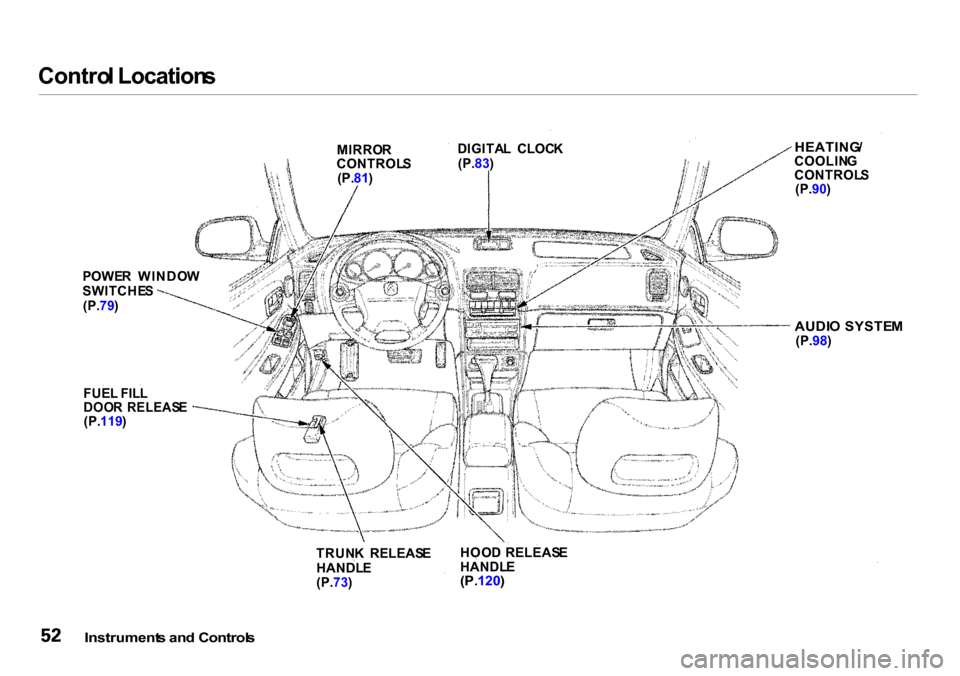
Contro
l Location s
Instrument s an d Control s
HOO
D RELEAS E
HANDL E
(P. 120 )
TRUN
K RELEAS E
HANDL E
(P. 73)
FUE
L FIL L
DOO R RELEAS E
(P. 119 )
POWE
R WINDO W
SWITCHE S
(P. 79)
AUDIO SYSTE M
(P. 98)
HEATING
/
COOLIN G
CONTROL S
(P. 90)
DIGITA
L CLOC K
(P. 83)
MIRRO
R
CONTROL S
(P. 81)
Page 74 of 273

Key
s an d Lock s
LOC K (0 ) — You can insert or
remove the key only in this position.
To switch from ACCESSORY to LOCK, you must push the key in
slightly as you turn it. If your car has
an automatic transmission, the shift
lever must also be in Park. The anti-
theft lock will lock the steering
column when you remove the key. If the front wheels are turned, the
anti-theft lock may sometimes make
it difficult to turn the key from
LOCK to ACCESSORY. Firmly turn
the steering wheel to the left or to
the right as you turn the key. ACCESSOR
Y (I ) — In this position,
you can operate the audio system and the cigarette lighter.
O N (II ) — This is the normal key
position when driving. All features
and accessories on the car are usable. Several of the lights on the instru-
ment panel come on as a test when
you turn the ignition switch from ACCESSORY to ON. STAR
T (III ) — Use this position
only to start the engine. The switch
returns to ON (II) when you let go of
the key.
The engine will not start if the Immobilizer System does not
recognize the key's coding (see page 69).
You will hear a reminder beeper if
you leave the key in the ignition switch in the LOCK (0) or
ACCESSORY (I) position and open
the driver's door. Remove the key to
turn off the beeper.
Instrument s an d Control s
Removing the key from the
ignition switch while driving
locks the steering. This can cause you to lose control.
Remove the key from the
ignition switch only when
parked.
Page 92 of 273
Comfor
t an d Convenienc e Feature s
The heating and air conditioning systems in your Acura provide a com-
fortable driving environment in all
weather conditions.
The standard audio system has
many features. This section de-
scribes those features and how to
use them. (If you selected an
optional audio system, refer to the
operating instructions that came
with it.)
Your Acura has an anti-theft audio system that requires a code number
to enable it.Heating and
Cooling..................... 90
What Each Control Does............ 90
How to Use the System............... 92
To Turn Everything Off............. 97
Audio System................................... 98
Operating the Radio.................... 99
Adjusting the Sound.................. 102 Radio Frequencies..................... 103
Radio Reception......................... 103 Operating the CD Player.......... 105
Operating the Optional CD Changer.................................. 107
Protecting Compact Discs........ 108
CD Player Error Indications..... 109
CD Changer Error Indications.............................. 110
Operating the Optional Cassette Player...................... 111
Tape Search Functions............. 112
Caring for the Cassette Player...................................... 114
Theft Protection............................. 115
Comfor t an d Convenienc e Feature s
Page 101 of 273
Audi
o Syste m
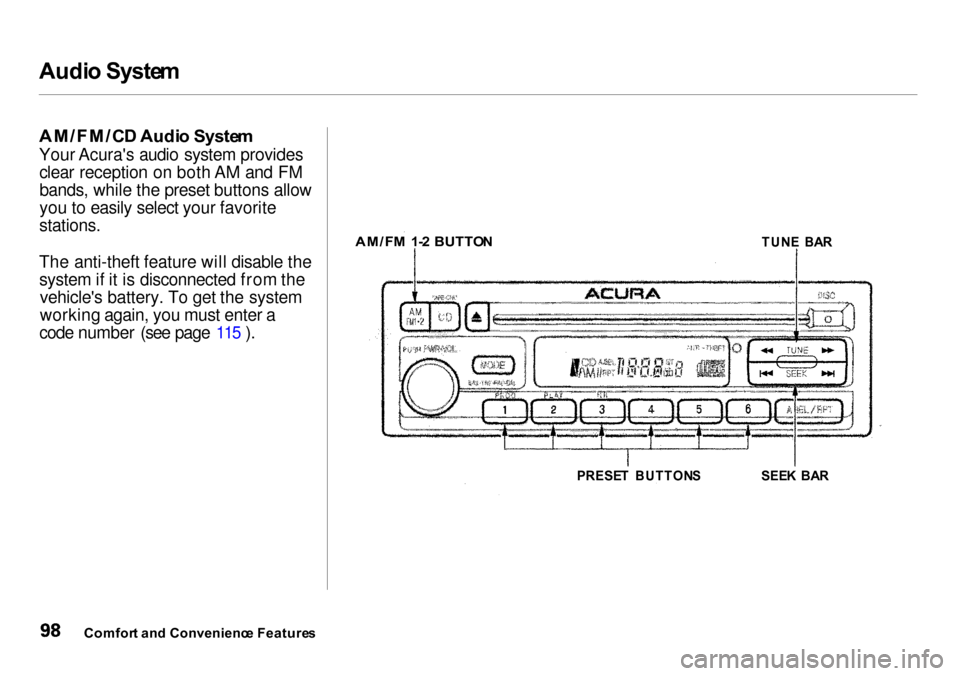
AM/FM/C D Audi o Syste m
Your Acura's audio system provides clear reception on both AM and FM bands, while the preset buttons allow
you to easily select your favorite
stations.
The anti-theft feature will disable the system if it is disconnected from the vehicle's battery. To get the system
working again, you must enter a
code number (see page 115 ).
Comfor t an d Convenienc e Feature s
SEE
K BA R
PRESE T BUTTON S
AM/F
M 1- 2 BUTTO N
TUNE BA R
Page 102 of 273

Audi
o Syste m
Operatin g th e Radi o
The ignition switch must be in
ACCESSORY (I) or ON (II) to operate the audio system. Turn the
system on by pushing the PWR/
VOL knob. Adjust the volume by turning the same knob.
The band and frequency that the
radio was last tuned to is displayed.
To change bands, press the AM/FM
1 .
2 button. On the FM band, ST will
be displayed if the station is broad-
casting in stereo. Stereo reproduc-
tion on AM is not available. You can use any of three methods to
find radio stations on the selected
band: TUNE, SEEK, or the Presetbuttons.
TUN E — Use the TUNE bar to tune
the radio to a desired frequency. Press the side of the bar to tune
to a higher frequency, and the side to tune to a lower
frequency. The frequency numbers
will start to change rapidly. Release the bar when the display reaches the
desired frequency. To change the
frequency in small increments, press
and release the TUNE bar quickly. SEE
K — The SEEK function
searches the band for a station with
a strong signal. To activate it, press the SEEK bar on either the or
side, then release it.
Depending on which side you press,
the system scans upward or down- ward from the current frequency. It
stops when it finds a station with a
strong signal.
Prese t — You can store the
frequencies of your favorite radio
stations in the six preset buttons.
Each button will store one frequency
on the AM band, and two
frequencies on the FM band.
CONTINUED
Comfor t an d Convenienc e Feature s
Page 118 of 273

Thef
t Protectio n
Your car's audio system will disable itself if it is disconnected fromelectrical power for any reason. To
make it work again, the user must
enter a specific five-digit code in the Preset buttons. Because there are
hundreds of number combinations possible from five digits, making the
system work without knowing the
exact code is nearly impossible.
You should have received a card that
lists your audio system's codenumber and serial number. It is best
to store this card in a safe place at
home. In addition, you should write the audio system's serial number in
this Owner's Manual. If you should
happen to lose the card, you must
obtain the code number from your
Acura dealer. To do this, you will
need the system's serial number. If your car's battery is disconnected
or goes dead, or the radio fuse is
removed, the audio system will
disable itself. If this happens, you
will see "Code" in the frequency
display the next time you turn on the
system. Use the Preset buttons to
enter the five-digit code. If it is
entered correctly, the radio will start
playing.
If you make a mistake entering the
code, do not start over or try to
correct your mistake. Complete the five-digit sequence, then enter the correct code. You have three tries to
enter the correct code. If you are
unsuccessful in three attempts, you
must then leave the system on for
one hour before trying again. You will have to store your favorite
stations in the Preset buttons after
the system begins working. Your original settings were lost when
power was disconnected.
Comfor t an d Convenienc e Feature s
Page 128 of 273
Accessorie
s an d Modification s
Modifying your car, or installing some non-Acura accessories, can
make your car unsafe. Before you
make any modifications or add any
accessories, be sure to read the following information.
Accessorie s
Your dealer has Genuine Acura
accessories that allow you to
personalize your car. These accessories have been designed and
approved for your car, and are
covered by warranty.
Non-Acura accessories are usually
designed for universal applications.
Although aftermarket accessories
may fit on your car, they may not
meet factory specifications, and
could adversely affect your car's
handling and stability. (See
"Modifications" on the page 126 for
additional information.) When properly installed, cellular
phones, alarms, two-way radios, and
low-powered audio systems should not interfere with your car's
computer-controlled systems, such
as the SRS and anti-lock brake
system.
However, if electronic accessories
are improperly installed, or exceed your car's electrical system capacity,
they can interfere with the operation of your car, or even cause the
airbags to deploy.
Before installing any accessory:
Make sure the accessory does not
obscure any lights, or interfere
with proper car operation or
performance. Be sure electronic accessories do
not overload electrical circuits (see page 236 ). Have the installer contact your
Acura dealer for assistance before
installing any electronic accessory.
If possible, have your dealer inspect
the final installation.
Before Drivin g
Improper accessories or
modifications can affect your
car's handling, stability and performance, and cause a
crash in which you can be hurt
or killed.
Follow all instructions in this
owner's manual regarding
accessories and modifications.
Page 190 of 273
Batter
y
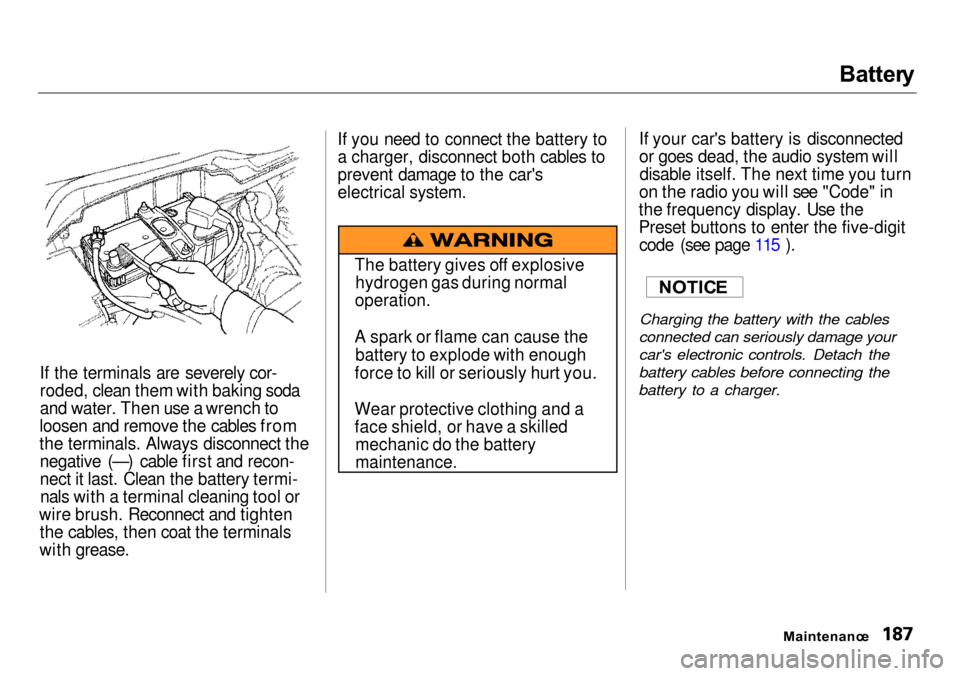
If the terminals are severely cor-
roded, clean them with baking soda
and water. Then use a wrench to
loosen and remove the cables from
the terminals. Always disconnect the negative (—) cable first and recon-
nect it last. Clean the battery termi-nals with a terminal cleaning tool or
wire brush. Reconnect and tighten the cables, then coat the terminals
with grease. If you need to connect the battery to
a charger, disconnect both cables to
prevent damage to the car's
electrical system.
If your car's battery is disconnected
or goes dead, the audio system will
disable itself. The next time you turn
on the radio you will see "Code" in
the frequency display. Use the
Preset buttons to enter the five-digit code (see page 115 ).
Charging the battery with the cables
connected can seriously damage your
car's electronic controls. Detach the
battery cables before connecting the
battery to a charger.
Maintenance
NOTIC
E
The battery gives off explosive
hydrogen gas during normal
operation.
A spark or flame can cause the battery to explode with enough
force to kill or seriously hurt you.
Wear protective clothing and a
face shield, or have a skilled mechanic do the battery
maintenance.
Page 264 of 273

Inde
x
Accessories and Modifications.... 125 Accessories................................. 125
Additional Safety Precaution.... 126 Modifications............................. 126
ACCESSORY (Ignition Key Position)........................................ 71
Adding Automatic Transmission
Fluid........................................ 178
Brake Fluid................................. 179 Clutch Fluid................................ 181
Engine Coolant........................... 172
Engine Oil................................... 167
Manual Transmission Fluid..... 179
Power Steering Fluid................. 181
Windshield Washer Fluid......... 177
Additional Information About Your Seat Belts........................ 42
Lap Belt......................................... 43
Lap/Shoulder Belt....................... 42 Seat Belt Maintenance................ 44
Seat Belt System Components... 42
Additional Information About
Your SRS................................... 45
Additional Safety Precautions.... 48
How the SRS Indicator Light
Works........................................ 47
How Your Airbags Work............ 45
SRS Components......................... 45
Additives, Engine Oil..................... 169
Adjustments
Headlights.................................. 200
Head Restraints........................... 76
Mirrors.......................................... 81
Seats.............................................. 76
Steering Wheel............................ 65
Airbag (SRS)...................................... 9
Air Cleaner Element...................... 182
Air Conditioning............................... 90 Maintenance............................... 190
Usage............................................. 90
Air Outlets (Vents).......................... 92
Air Pressure, Tires........................ 192
Alcohol in Gasoline........................ 250
Aluminum Wheels, Cleaning........ 213 Antifreeze....................................... 172
Anti-lock Brakes (ABS) Indicator Light.................... 55, 144 Operation.................................... 142
Anti-theft Steering Column
Lock............................................... 71
Appearance Care........................... 211
Ashtrays............................................ 86
Audio System................................... 98
Automatic Speed Control................ 66 Automatic Transmission............... 136
Capacity, Fluid........................... 247
Checking Fluid Level................ 178
Shifting........................................ 136
Shift Lever Position Indicator.. 136
Shift Lever Positions................. 136
Shift Lock Release..................... 139
Battery Charging System Indicator........................... 54, 232
Jump Starting............................. 227
Maintenance............................... 186
Specifications............................. 247
Before Driving............................... 117
CONTINUED