light Acura Integra 2001 Repair Manual
[x] Cancel search | Manufacturer: ACURA, Model Year: 2001, Model line: Integra, Model: Acura Integra 2001Pages: 285, PDF Size: 3.79 MB
Page 211 of 285
Light
s
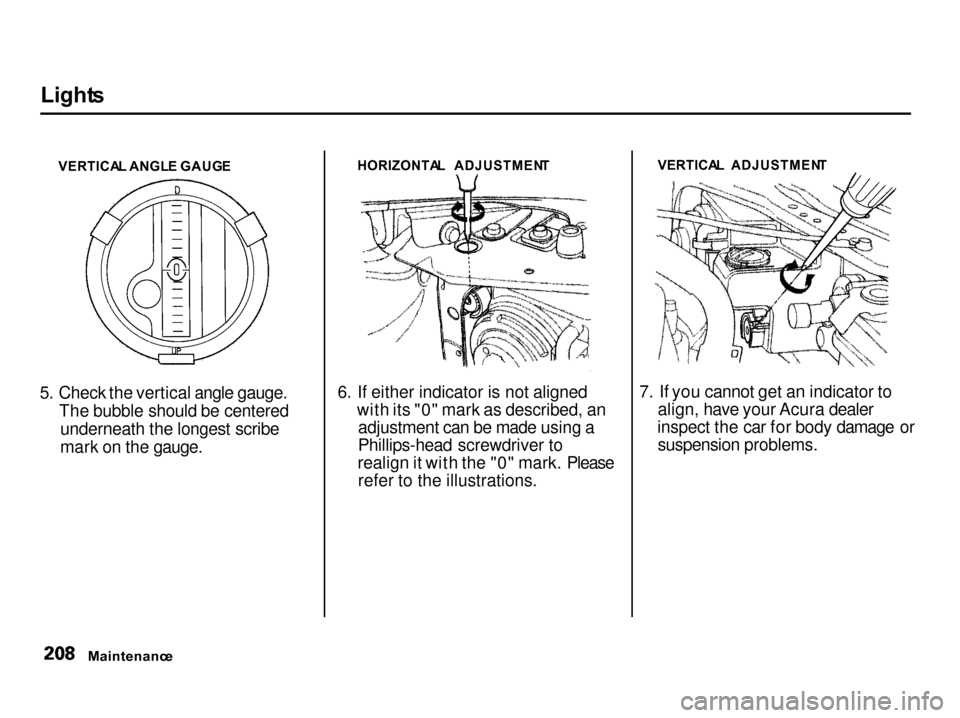
VERTICA L ANGL E GAUG E
5. Check the vertical angle gauge. The bubble should be centeredunderneath the longest scribe
mark on the gauge. HORIZONTA
L ADJUSTMEN T
6. If either indicator is not aligned with its "0" mark as described, anadjustment can be made using a
Phillips-head screwdriver to
realign it with the "0" mark. Please refer to the illustrations. VERTICA
L ADJUSTMEN T
7. If you cannot get an indicator to align, have your Acura dealer
inspect the car for body damage or suspension problems.
Maintenanc e
Page 212 of 285

Light
s
Replacin g a Headligh t Bul b
Your car has two bulbs on each side, four in total. Make sure you arereplacing the bulb that is burned out.
Your car uses halogen headlight bulbs. When replacing a bulb, handleit by its plastic case and protect the
glass from contact with your skin or
hard objects. If you touch the glass, clean it with denatured alcohol and a
clean cloth.
Halogen headlight bulbs get very hot
when lit. Oil, perspiration, or a scratch
on the glass can cause the bulb to
overheat and shatter.
1. Open the hood.
If you need to change the high
beam headlight bulb on the
passenger's side, remove the
radiator reserve tank by pulling it straight up.
2. To disconnect the bulb from the electrical harness, push on the end
of the lock tab to release the
connector then push the connec-
tor straight down. 3. Turn the bulb about one-eighth
turn counterclockwise to unlock it
from the headlight assembly.
4. Remove the bulb by pulling it straight out of its recess.
5. Align the tabs on the new bulb with the slots in the headlightassembly and push it into place.
6. Turn the bulb clockwise to lock it in place. Do not force it. Check theseating of the bulb's tabs in the
slots if the bulb will not return to
its original position.
7. Reinstall the harness connector on the bulb connector. Make sure it
locks in place.
Turn on the headlights to test the new bulb.
8. (Passenger's side) Reinstall the radiator reserve tank.
Maintenance
NOTIC
E
Page 213 of 285

Light
s
Replacin g Fron t Tur n Signal /
Parkin g an d Sid e Marke r Ligh t
Bulb s
1. Use a Phillips-head screwdriver to loosen the light assembly'smounting screw.
2. Remove the light assembly from the bumper. 3. Remove the socket of the burned-
out bulb from the light assembly
by turning it one-quarter turn counterclockwise.
4. To remove the front bulb, push it in slightly and turn it counterclock-
wise. To remove the side bulb, pull it straight out of its socket. 5. Install the new bulb in the socket.
6. Insert the socket back into the light assembly. Turn it clockwise
to lock it in place.
7. Test the lights to make sure the new bulb is working.
8. Put the light assembly into the bumper. Make sure the tab on thelight assembly fits into the bumperslot. Tighten the mounting screw.
Maintenanc e
SCRE
W
Page 214 of 285
Light
s
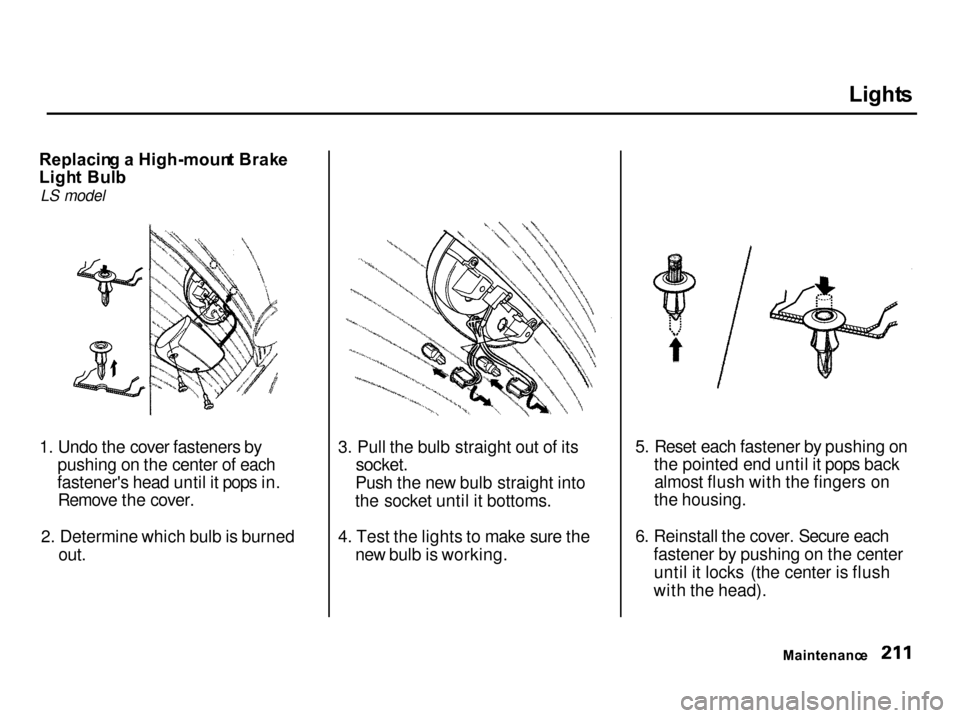
Replacin g a High-moun t Brak e
Ligh t Bul b
LS model
1. Undo the cover fasteners by pushing on the center of each
fastener's head until it pops in. Remove the cover.
2. Determine which bulb is burned out. 3. Pull the bulb straight out of its
socket.
Push the new bulb straight into
the socket until it bottoms.
4. Test the lights to make sure the new bulb is working. 5. Reset each fastener by pushing on
the pointed end until it pops backalmost flush with the fingers on
the housing.
6. Reinstall the cover. Secure each fastener by pushing on the centeruntil it locks (the center is flush
with the head).
Maintenance
Page 215 of 285

Light
s
Replacin g Rea r Tur n Signa l an d
Sid e Marke r Ligh t Bulb s
1. Open the hatch and remove the light assembly cover by pulling the
edge.
2. Remove the socket from the light assembly by turning it one-quarter
turn counterclockwise. 3. If the turn signal light bulb is
burned out, remove it by pushingit in and turning counterclockwise.
If the side marker light bulb is
burned out, remove it by pulling it straight out of its socket.
4. Install the new bulb in the reverse order of removal.
5. Push the socket into the light assembly and turn it clockwise
until it locks.
6. Test the lights to make sure the new bulb is working.
7. Install the light assembly cover. Make sure it locks in place. Replacin
g Tail/Stopligh t an d
Back-u p Ligh t Bulb s
1. Open the hatch. Remove the tether hardware cover with a small
flat-tip screwdriver and tetheranchor plate with a wrench by
turning the bolt counterclockwise.
When reinstalling tether hardware, see Protectin g Childre n on page
41.
On Type-R model
You cannot replace these bulbs
yourself, contact your Acura dealer.
Maintenanc e
Page 216 of 285

Light
s
2. Undo the seven cover fasteners by pushing on the center of each
fastener's head until it pops in. Remove the taillight cover panel. 3. Remove the socket by turning it
one-quarter turn counterclockwise. 4. Try the tail/stoplights and back-up
light to verify which bulb needs
replacing. Remove the bulb by
turning it counterclockwise.
5. Install the new bulb in the socket. Test it to make sure it works.
6. Reinstall the socket into the light
assembly.
7. Reinstall the tether anchor hardware.
Make sure the toothed washer is
on the bottom of the bolt. Tighten
the bolt to:
16 lbf.ft (22 N.m,2.2 kgf.m)
If a torque wrench was not used,
see your Acura dealer as soon as
possible to verify proper
installation.
CONTINUED
Maintenanc e
Page 217 of 285

Light
s
8. Reset each fastener by pushing on the pointed end until it pops backalmost flush with the fingers on
the housing.
9. Reinstall the cover. Secure each fastener by pushing on the center
until it locks (the center is flush
with the head). Replacin
g a Rea r Licens e Plat e
Bul b
1. Remove the two screws and remove the license plate light
assembly.
2. Remove the socket from the light assembly by turning it one-quarter
turn counterclockwise.
3. Pull the bulb straight out of its socket. Push the new bulb in until
it bottoms in the socket.
4. Turn on the parking lights and
check that the new bulb is
working.
5. Reinstall the license light assem-
bly. Install the two screws and
tighten them securely.
Maintenanc e
Page 218 of 285
Light
s
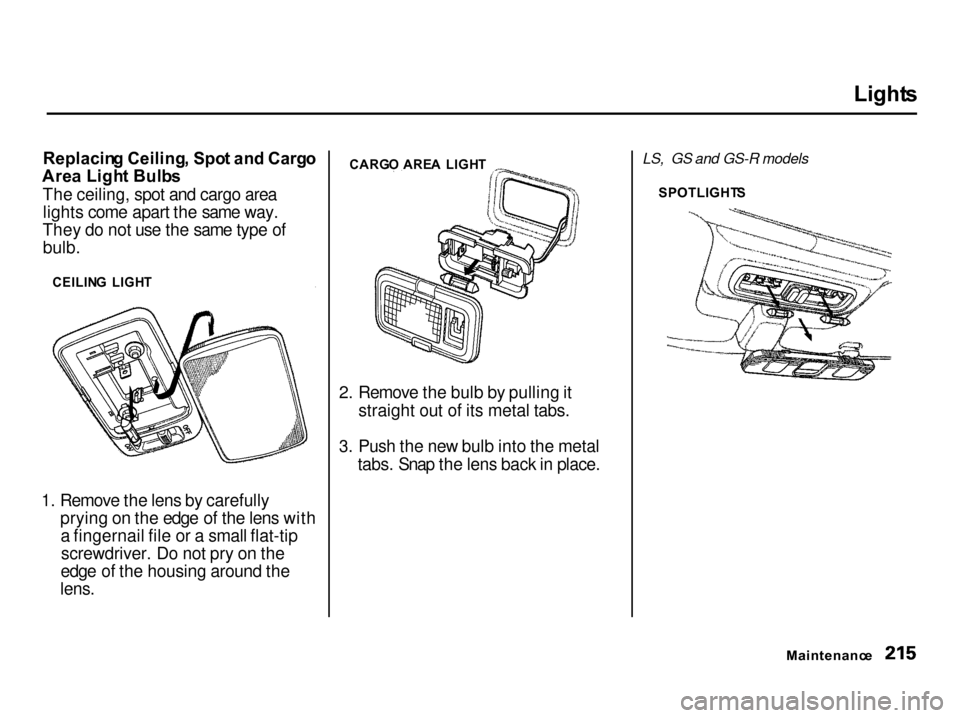
Replacin g Ceiling , Spo t an d Carg o
Are a Ligh t Bulb s
The ceiling, spot and cargo area lights come apart the same way.
They do not use the same type of bulb.
1. Remove the lens by carefully prying on the edge of the lens witha fingernail file or a small flat-tipscrewdriver. Do not pry on the
edge of the housing around the
lens.
2. Remove the bulb by pulling it
straight out of its metal tabs.
3. Push the new bulb into the metal tabs. Snap the lens back in place. LS, GS and GS-R models
Maintenance
SPOTLIGHT
S
CARG
O ARE A LIGH T
CEILIN G LIGH T
Page 219 of 285

Storin
g You r Ca r
If you need to park your car for an
extended period (more than one
month), there are several things you should do to prepare it for storage.
Proper preparation helps prevent
deterioration and makes it easier to
get your car back on the road. If
possible, store your car indoors. Fill the fuel tank.
Change the engine oil and filter
(see page 175). Wash and dry the exterior
completely.
Clean the interior. Make sure the
carpeting, floor mats, etc. are
completely dry.
Leave the parking brake off. Put
the transmission in Reverse
(5-speed manual) or Park
(automatic).
Block the rear wheels.
If the car is to be stored for a
longer period, it should be
supported on jackstands so the
tires are off the ground. Leave one window open slightly (if
the car is being stored indoors). Disconnect the battery.
Support the front and rear wiper
blade arms with a folded towel or
rag so they do not touch the
windshield.
To minimize sticking, apply a
silicone spray lubricant to all door
and hatch seals. Also, apply a body
wax to the painted surfaces that mate with the door and hatch seals. Cover the car with a "breathable"
cover, one made from a porous
material such as cotton. Nonporous materials, such as
plastic sheeting, trap moisture,
which can damage the paint. If possible, run the engine for a
while periodically (preferably once a month).
If you store your car for 12 months or longer, have your Acura dealer
perform the inspections called for in
the 24 months/30,000 miles (48,000
km) maintenance schedule (Normal Conditions) as soon as you take it
out of storage (see page 164). The
replacements called for in the
maintenance schedule are not
needed unless the car has actually
reached that time or mileage.
Maintenanc e
Page 221 of 285

Exterio
r Car e
Washin g
Frequent washing helps preserve
your car's beauty. Dirt and grit can scratch the paint, while tree sap and
bird droppings can permanently ruin
the finish.
Wash your car in a shady area, not in direct sunlight. If the car is parked in
the sun, move it into the shade and
let the exterior cool down before you start.
Only use the solvents and cleaners
recommended in this Owner's
Manual.
Chemical solvents and strong cleaners
can damage the paint, metal, and
plastic on your car.
Rinse the car thoroughly with cool
water to remove loose dirt. Fill a bucket with cool water. Mix
in a mild detergent, such as
dishwashing liquid or a product
made especially for car washing. Wash the car using the water and
detergent solution and a soft-
bristle brush, sponge, or soft cloth. Start at the top and work your waydown. Rinse frequently. Check the body for road tar, tree
sap, etc. Remove these stains with
tar remover or turpentine. Rinse it off immediately so it does not
harm the finish. Remember to re-
wax these areas, even if the rest of the car does not need waxing. When you have washed and rinsed
the whole exterior, dry it with achamois or soft towel. Letting it
air-dry will cause dulling and water
spots.
As you dry the car, inspect it for
chips and scratches that could allow
corrosion to start. Repair them with
touch-up paint (see page 219).
Powe r Antenn a Cleanin g
Twice a year, clean the antenna mast with a dry cloth and mild detergent. Scrub the antenna in upward strokes
to avoid bending it. Rinse with water.
Make sure the antenna works smoothly by turning the stereo off
and on several times with the
ignition switch ON (II). The antenna does not need lubricating.
If you use a "drive-through" car wash,
make sure you turn the stereo off
first. This retracts the antenna to
prevent damage from the car wash
brushes.
Appearanc e Car e
NOTIC
E