light Acura MDX 2009 User Guide
[x] Cancel search | Manufacturer: ACURA, Model Year: 2009, Model line: MDX, Model: Acura MDX 2009Pages: 489, PDF Size: 11.91 MB
Page 99 of 489

When your selection is successfully
completed, the display changes as
shown above, and then goes back to
the customize item screen.
If the‘‘SETTING INCOMPLETE ’’
message appears, go back to
‘‘ ELAPSED TIME RESET ’’and
repeat the procedure again.
Auto Interior IlluminationWhile the headlight switch is turned
on, the interior lights gradually dim,
as the outside light level gets low.
You can customize at which outside
light level the lights start to dim.
There are MAX, HIGH, MID, LOW
and MIN levels and OFF for the auto
interior illumination settings.
If you want the illuminations to start
dimming as early as possible, select
MAX. For illuminations to start
dimming as late as possible, select
MIN. Choose HIGH, MID, or LOW
for levels in between.
To disable the auto interior
illumination function, select OFF.
You can choose this customize item
from ‘‘METER SETUP ’’by pressing
the INFO (▲ /▼ ) button repeatedly.
CONTINUED
Multi-Information Display
95
Inst rument s and Cont rols
08/06/06 16:58:07 09 ACURA MDX MMC North America Owner's M 50 31STX620 enu
2009 MDX
Page 104 of 489

Lighting Setup
Here are the three custom settings
for the lighting setup:●INTERIOR LIGHT DIMMING
TIME●HEADLIGHT AUTO OFF TIMER●AUTO LIGHT SENSITIVITY
While ‘‘LIGHTING SETUP ’’is
shown, press the SEL/RESET button
to enter the customize mode.
Each time you press the INFO
(▲ /▼ ) button, the screen changes
as shown in the illustration. Press the
INFO (▲ /▼ ) button until you see
the setting you want to customize,
then press the SEL/RESET button to
enter your selection.
SEL/RESET
BUTTON
INFO ( ▲or▼ )
BUTTON
Multi-Information Display10008/06/06 16:58:07 09 ACURA MDX MMC North America Owner's M 50 31STX620 enu
2009 MDX
Page 105 of 489

Interior Light Dimming TimeThe interior lights fade out when you
close all doors and tailgate. To
change how long the lights stay on
before they fade out, follow these
instructions:
You can choose this customize item
from‘‘LIGHTING SETUP ’’by
pressing the INFO (▲ /▼ ) button
repeatedly.
Press the SEL/RESET button to see
the selections.
Select the desired setting by
pressing the INFO (▲ /▼ ) button,
then enter your selection by pressing
the SEL/RESET button.
When your selection is successfully
completed, the display changes as
shown above, and then goes back to
the customize item screen.
If the ‘‘SETTING INCOMPLETE ’’
message appears, go back to
‘‘ INTERIOR LIGHT DIMMING
TIME ’’and repeat the procedure
again.
CONTINUED
Multi-Information Display
101
Inst rument s and Cont rols
08/06/06 16:58:07 09 ACURA MDX MMC North America Owner's M 50 31STX620 enu
2009 MDX
Page 106 of 489
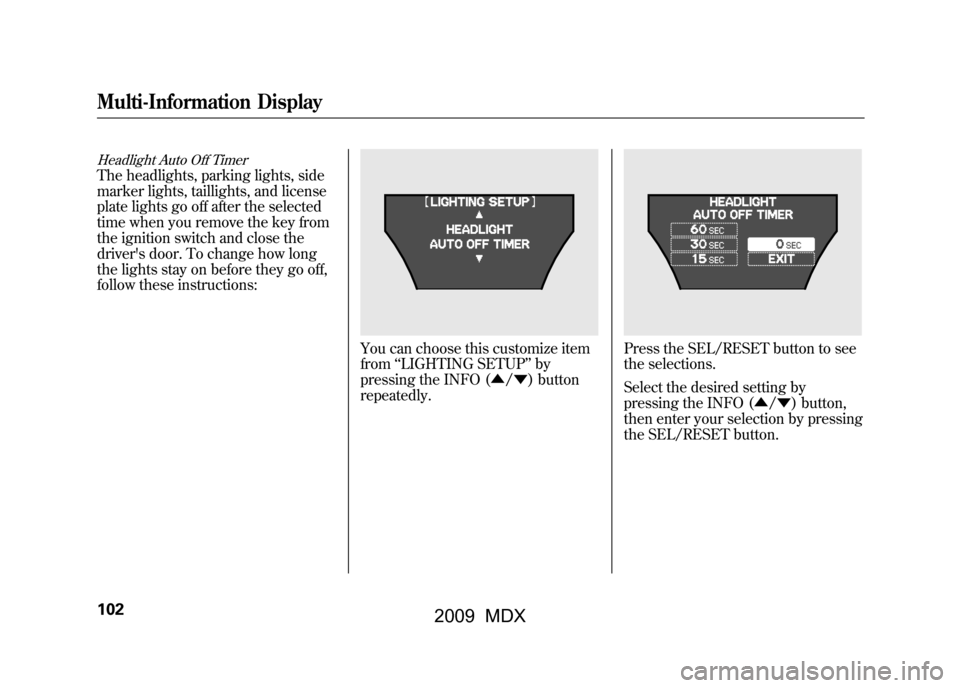
Headlight Auto Off TimerThe headlights, parking lights, side
marker lights, taillights, and license
plate lights go off after the selected
time when you remove the key from
the ignition switch and close the
driver's door. To change how long
the lights stay on before they go off,
follow these instructions:
You can choose this customize item
from‘‘LIGHTING SETUP ’’by
pressing the INFO (▲ /▼ ) button
repeatedly.
Press the SEL/RESET button to see
the selections.
Select the desired setting by
pressing the INFO (▲/ ▼) button,
then enter your selection by pressing
the SEL/RESET button.
Multi-Information Display10208/06/06 16:58:07 09 ACURA MDX MMC North America Owner's M 50 31STX620 enu
2009 MDX
Page 107 of 489
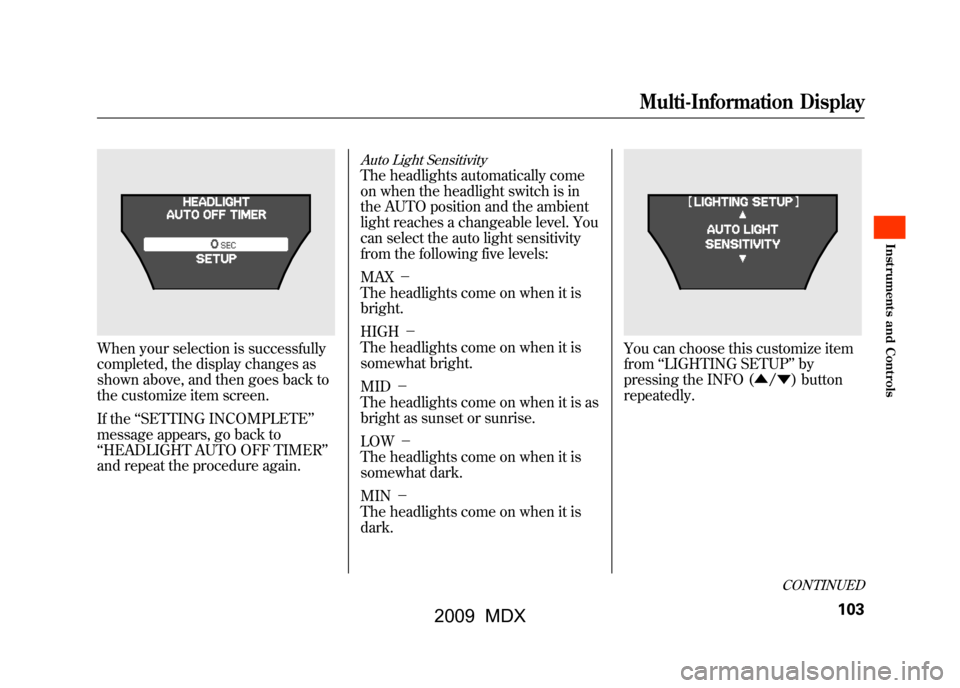
When your selection is successfully
completed, the display changes as
shown above, and then goes back to
the customize item screen.
If the‘‘SETTING INCOMPLETE ’’
message appears, go back to
‘‘ HEADLIGHT AUTO OFF TIMER ’’
and repeat the procedure again.
Auto Light SensitivityThe headlights automatically come
on when the headlight switch is in
the AUTO position and the ambient
light reaches a changeable level. You
can select the auto light sensitivity
from the following five levels:
MAX -
The headlights come on when it is
bright.
HIGH -
The headlights come on when it is
somewhat bright.
MID -
The headlights come on when it is as
bright as sunset or sunrise.
LOW -
The headlights come on when it is
somewhat dark.
MIN -
The headlights come on when it is
dark.
You can choose this customize item
from ‘‘LIGHTING SETUP ’’by
pressing the INFO (▲/ ▼) button
repeatedly.
CONTINUED
Multi-Information Display
103
Inst rument s and Cont rols
08/06/06 16:58:07 09 ACURA MDX MMC North America Owner's M 50 31STX620 enu
2009 MDX
Page 108 of 489

Press the SEL/RESET button to see
the selections.
Select the desired setting by
pressing the INFO (▲/▼ ) button,
then enter your selection by pressing
the SEL/RESET button.
When your selection is successfully
completed, the display changes as
shown above, and then goes back to
the customize item screen.
If the ‘‘SETTING INCOMPLETE ’’
message appears, go back to ‘‘AUTO
LIGHT SENSITIVITY ’’and repeat
the procedure again.
Multi-Information Display10408/06/06 16:58:07 09 ACURA MDX MMC North America Owner's M 50 31STX620 enu
2009 MDX
Page 114 of 489

Keyless Lock AcknowledgmentWhen you push the LOCK button on
the remote transmitter, some
exterior lights flash, and a beeper
sounds when you push the LOCK
button again within 5 seconds to
verify that the doors and the tailgate
are locked and the security system
has set (see page269).You can
customize the exterior lights not to
flash and the beeper not to sound.
You can choose this customize item
from‘‘DOOR/WINDOW SETUP ’’by
pressing the INFO (▲ /▼ ) button
repeatedly.
Press the SEL/RESET button to see
the selections.
Select ON or OFF by pressing the
INFO (▲ /▼ ) button, then enter
your selection by pressing the SEL/
RESET button.
Multi-Information Display11008/06/06 16:58:07 09 ACURA MDX MMC North America Owner's M 50 31STX620 enu
2009 MDX
Page 119 of 489
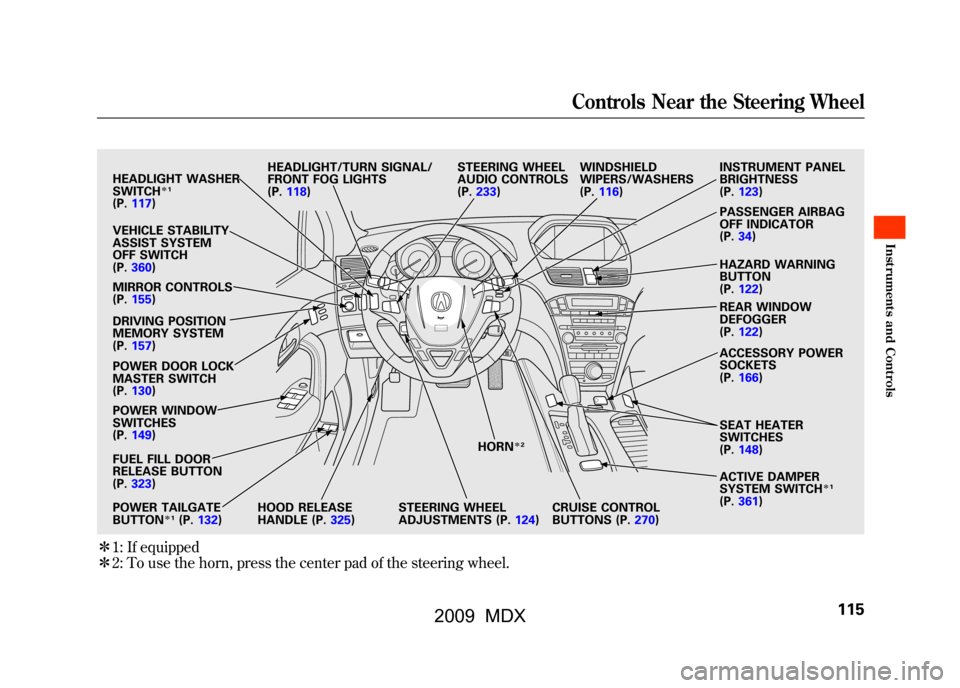
ꭧ1: If equipped
ꭧ 2: To use the horn, press the center pad of the steering wheel.
HEADLIGHT WASHER
SWITCH
ꭧ 1
(P. 117)
VEHICLE STABILITY
ASSIST SYSTEM
OFF SWITCH
(P. 360)
MIRROR CONTROLS
(P. 155)
DRIVING POSITION
MEMORY SYSTEM
(P. 157)
POWER DOOR LOCK
MASTER SWITCH
(P. 130)
POWER WINDOW
SWITCHES
(P. 149)
FUEL FILL DOOR
RELEASE BUTTON
(P. 323)
POWER TAILGATE
BUTTON
ꭧ 1(P. 132) HEADLIGHT/TURN SIGNAL/
FRONT FOG LIGHTS
(P.
118)
HOOD RELEASE
HANDLE (P. 325)STEERING WHEEL
ADJUSTMENTS (P.
124)CRUISE CONTROL
BUTTONS (P.
270)
STEERING WHEEL
AUDIO CONTROLS
(P.
233) WINDSHIELD
WIPERS/WASHERS
(P.
116) INSTRUMENT PANEL
BRIGHTNESS
(P.
123)
PASSENGER AIRBAG
OFF INDICATOR
(P. 34)
HAZARD WARNING
BUTTON
(P. 122)
REAR WINDOW
DEFOGGER
(P. 122)
ACCESSORY POWER
SOCKETS
(P. 166)
SEAT HEATER
SWITCHES
(P. 148)
ACTIVE DAMPER
SYSTEM SWITCH
ꭧ 1
(P. 361)
HORN
ꭧ
2
Controls Near the Steering Wheel
115
Inst rument s and Cont rols
08/06/06 16:58:07 09 ACURA MDX MMC North America Owner's M 50 31STX620 enu
2009 MDX
Page 121 of 489
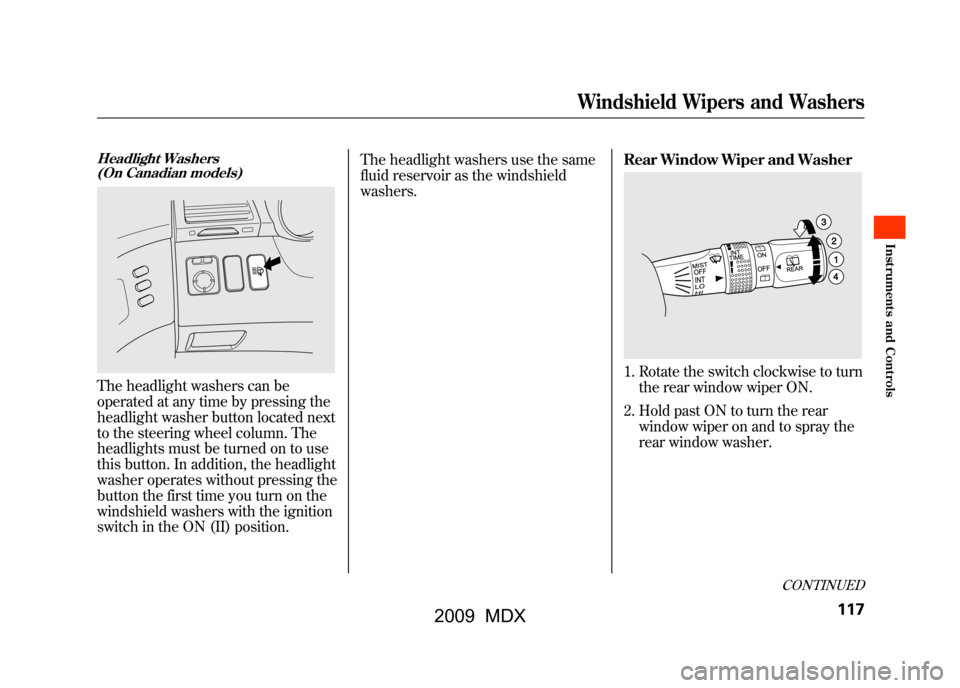
Headlight Washers(On Canadian models)The headlight washers can be
operated at any time by pressing the
headlight washer button located next
to the steering wheel column. The
headlights must be turned on to use
this button. In addition, the headlight
washer operates without pressing the
button the first time you turn on the
windshield washers with the ignition
switch in the ON (II) position. The headlight washers use the same
fluid reservoir as the windshield
washers.
Rear Window Wiper and Washer
1. Rotate the switch clockwise to turn
the rear window wiper ON.
2. Hold past ON to turn the rear window wiper on and to spray the
rear window washer.
CONTINUED
Windshield Wipers and Washers
117
Inst rument s and Cont rols
08/06/06 16:58:07 09 ACURA MDX MMC North America Owner's M 50 31STX620 enu
2009 MDX
Page 122 of 489
3. When you turn the wiper switch tothe ‘‘OFF ’’position, the wiper will
return to its parked position.
4. Rotate the switch counterclockwise to spray the
window washer.
When you shift the transmission to
the reverse position with the front
windshield wipers activated, the
rear window wiper operates
automatically.
When the wiper control lever
position is INT, the rear wiper
operates intermittently. When it is
LO or HI, the rear wiper operates
continuously.
The rear window washer uses the
same fluid reservoir as the
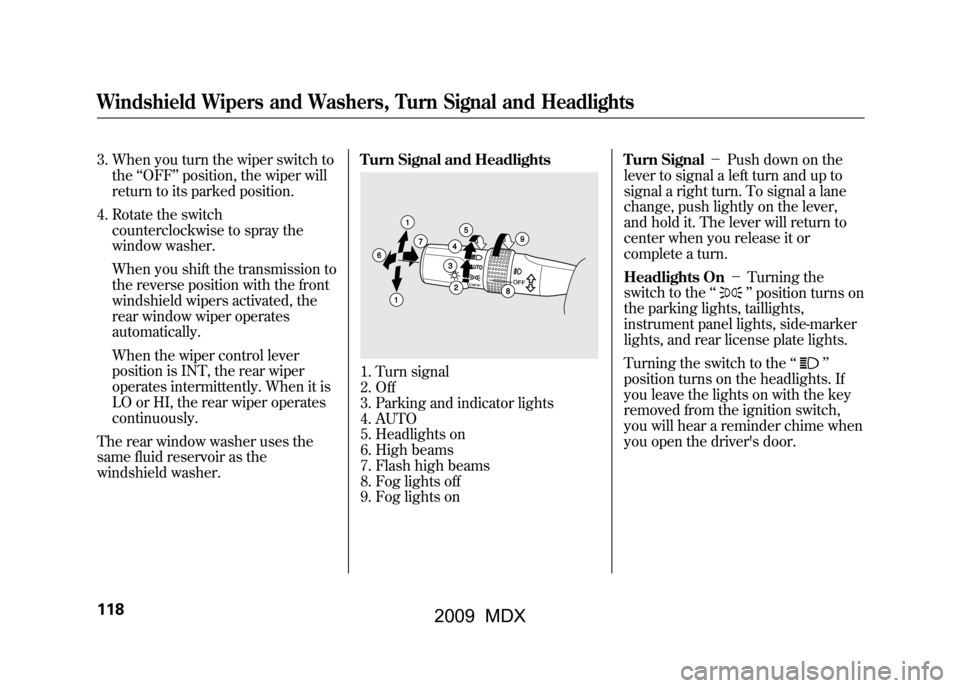
windshield washer. Turn Signal and Headlights
1. Turn signal
2. Off
3. Parking and indicator lights
4. AUTO
5. Headlights on
6. High beams
7. Flash high beams
8. Fog lights off
9. Fog lights onTurn Signal
-Push down on the
lever to signal a left turn and up to
signal a right turn. To signal a lane
change, push lightly on the lever,
and hold it. The lever will return to
center when you release it or
complete a turn.
Headlights On -Turning the
switch to the ‘‘
’’position turns on
the parking lights, taillights,
instrument panel lights, side-marker
lights, and rear license plate lights.
Turning the switch to the ‘‘
’’
position turns on the headlights. If
you leave the lights on with the key
removed from the ignition switch,
you will hear a reminder chime when
you open the driver's door.
Windshield Wipers and Washers, Turn Signal and Headlights11808/06/06 16:58:07 09 ACURA MDX MMC North America Owner's M 50 31STX620 enu
2009 MDX