audio Acura MDX 2009 Owner's Guide
[x] Cancel search | Manufacturer: ACURA, Model Year: 2009, Model line: MDX, Model: Acura MDX 2009Pages: 489, PDF Size: 11.91 MB
Page 205 of 489
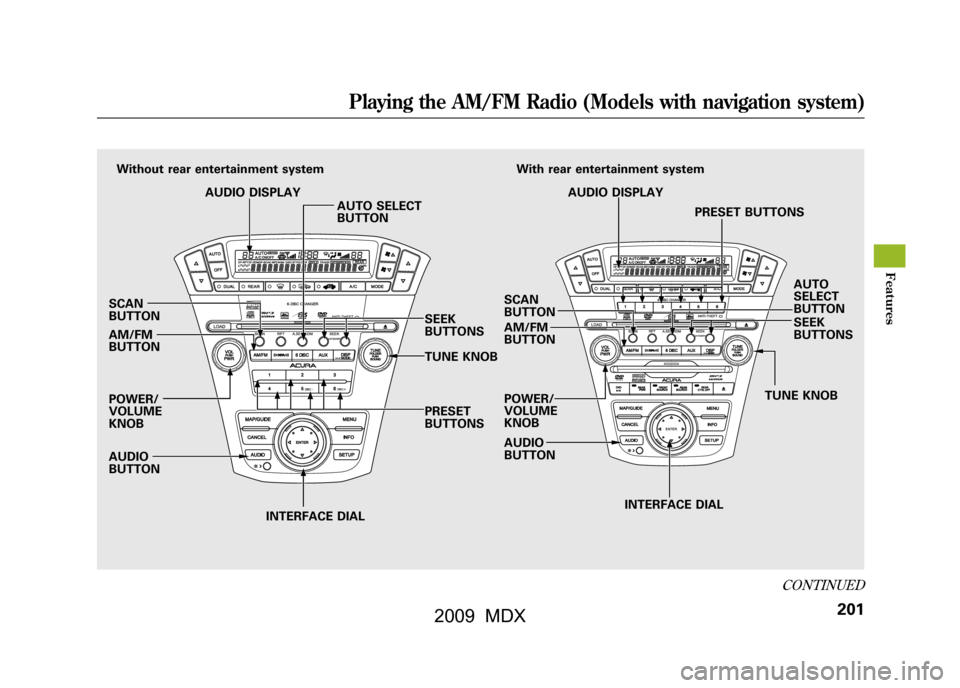
SCAN
BUTTON
AM/FM
BUTTON
POWER/
VOLUME
KNOB
AUDIO
BUTTONINTERFACE DIAL INTERFACE DIAL
PRESET
BUTTONS
Without rear entertainment system
AUDIO DISPLAY AUTO SELECT
BUTTON
SEEK
BUTTONS
TUNE KNOBSCAN
BUTTON
AM/FM
BUTTON
POWER/
VOLUME
KNOB
AUDIO
BUTTON TUNE KNOBSEEK
BUTTONS AUTO
SELECT
BUTTON
AUDIO DISPLAY
PRESET BUTTONS
With rear entertainment system
CONTINUED
Playing the AM/FM Radio (Models with navigation system)
201
Feat ures
08/06/06 16:58:07 09 ACURA MDX MMC North America Owner's M 50 31STX620 enu
2009 MDX
Page 206 of 489
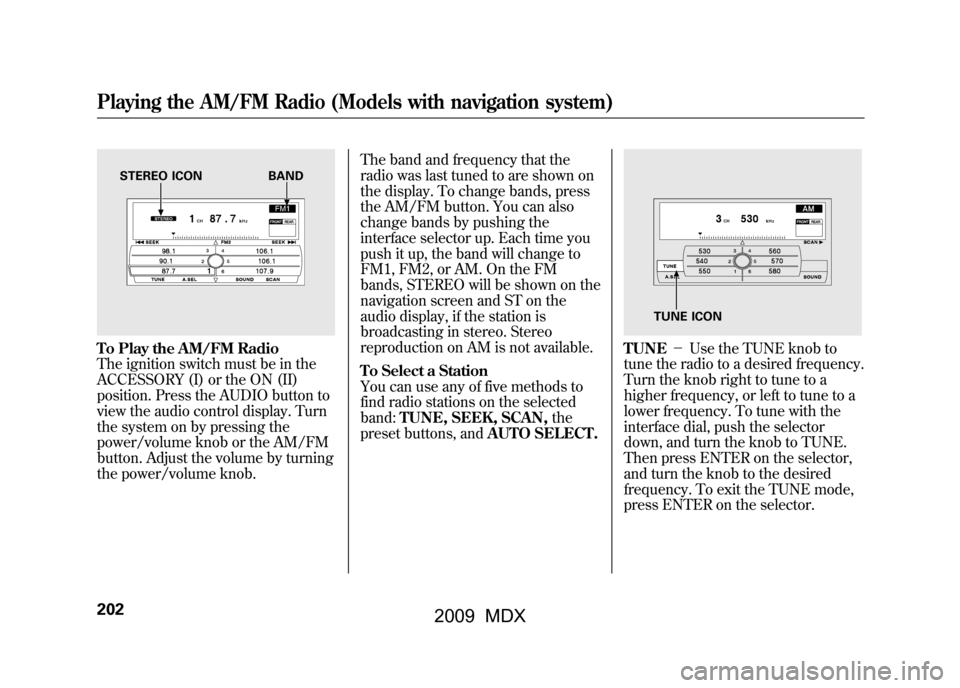
To Play the AM/FM Radio
The ignition switch must be in the
ACCESSORY (I) or the ON (II)
position. Press the AUDIO button to
view the audio control display. Turn
the system on by pressing the
power/volume knob or the AM/FM
button. Adjust the volume by turning
the power/volume knob.The band and frequency that the
radio was last tuned to are shown on
the display. To change bands, press
the AM/FM button. You can also
change bands by pushing the
interface selector up. Each time you
push it up, the band will change to
FM1, FM2, or AM. On the FM
bands, STEREO will be shown on the
navigation screen and ST on the
audio display, if the station is
broadcasting in stereo. Stereo
reproduction on AM is not available.
To Select a Station
You can use any of five methods to
find radio stations on the selected
band:
TUNE, SEEK, SCAN, the
preset buttons, and AUTO SELECT.
TUNE-Use the TUNE knob to
tune the radio to a desired frequency.
Turn the knob right to tune to a
higher frequency, or left to tune to a
lower frequency. To tune with the
interface dial, push the selector
down, and turn the knob to TUNE.
Then press ENTER on the selector,
and turn the knob to the desired
frequency. To exit the TUNE mode,
press ENTER on the selector.
STEREO ICON BAND
TUNE ICON
Playing the AM/FM Radio (Models with navigation system)20208/06/06 16:58:07 09 ACURA MDX MMC North America Owner's M 50 31STX620 enu
2009 MDX
Page 211 of 489

Adjusting the Sound
BASS, TREBLE, BALANCE, and
FADER are each adjustable. You can
also adjust the strength of the sound
coming from the center and
subwoofer speakers. In addition, you
can set the Dolby PL (ProLogic) II
and Speed-sensitive volume
compensation (SVC).
These adjustments can be made by
the SOUND button or the interface
dial.
To adjust them, press the AUDIO
button, push the interface selector
down, and turn the interface knob to
SOUND. Then press ENTER on the
selector.
Select the mode you want to adjust
by turning the interface dial.
You can also adjust the sound by
pushing the SOUND button
repeatedly. Each mode is shown in
the audio display as it changes. Turn
the TUNE knob to adjust the setting
to your liking.
SOUND ICON
CONTINUED
Playing the AM/FM Radio (Models with navigation system)
207
Feat ures
08/06/06 16:58:07 09 ACURA MDX MMC North America Owner's M 50 31STX620 enu
2009 MDX
Page 213 of 489

Dolby PL (ProLogic) II-Dolby
PL (ProLogic) II signal processing
creates multi-channel surround
sound from 2 channel stereo audio
sources. Dolby ProLogic II can only
activate when listening to DISC
(CD-DA, MP3/WMA), XM radio,
and AUX. When ProLogic II is active,
‘‘ PL II’’ is shown in the audio display.
ProLogic ON/OFF settings are
independently controlled for DISC,
XM and AUX sources. To set this feature on or off, select
Dolby PL II, and press ENTER on
the interface selector. Rotate the
interface dial to ON or OFF, and
press ENTER.
Manufactured under license from
Dolby Laboratories.
‘‘Dolby ’’,
‘‘ ProLogic ’’, and the double-D symbol
are trademarks of Dolby
Laboratories.
Speed-sensitive Volume Compensation (SVC)The SVC mode controls the volume
based on vehicle speed. The faster
you go, the louder the audio volume
becomes. As you slow down, the
audio volume decreases.
The SVC has four modes; SVC OFF,
SVC LOW, SVC MID, and SVC
HIGH. The default setting is MID. To
change the SVC mode, select SVC,
then press ENTER on the interface
selector. The current setting is
shown on the screen. Turn the
interface knob to the desired level,
and enter your selection by pressing
ENTER on the interface selector. If
you feel the sound is too loud,
choose low. If you feel the sound is
too quiet, choose high.
Playing the AM/FM Radio (Models with navigation system)
209
Feat ures
08/06/06 16:58:07 09 ACURA MDX MMC North America Owner's M 50 31STX620 enu
2009 MDX
Page 214 of 489
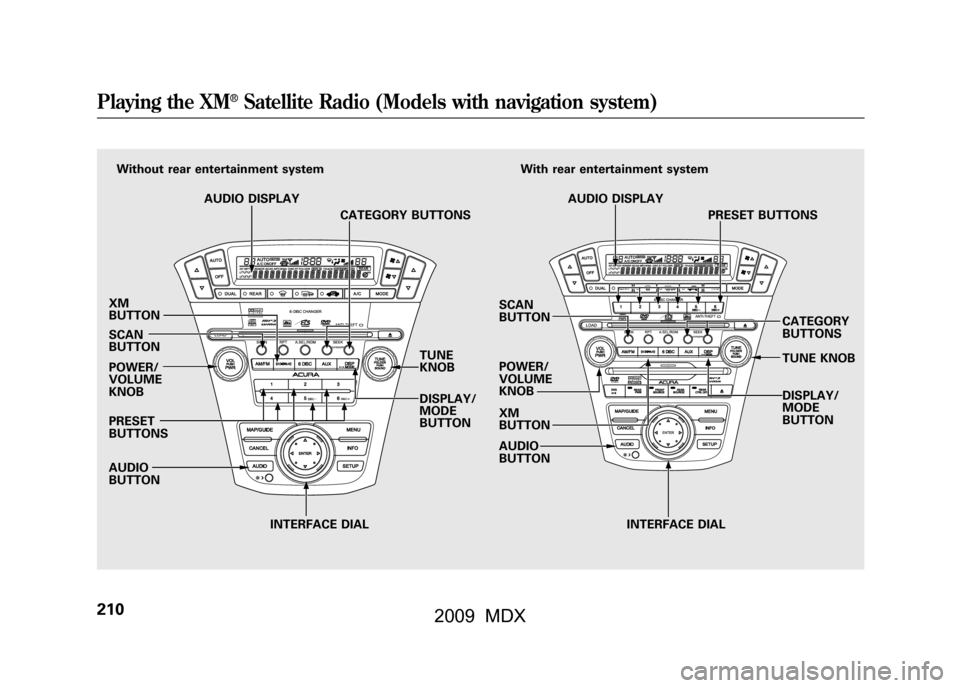
XM
BUTTON
SCAN
BUTTON
POWER/
VOLUME
KNOB
PRESET
BUTTONS
AUDIO
BUTTONINTERFACE DIAL INTERFACE DIAL
TUNE
KNOB
DISPLAY/
MODE
BUTTON
Without rear entertainment system
AUDIO DISPLAY CATEGORY BUTTONS
SCAN
BUTTON
POWER/
VOLUME
KNOB
XM
BUTTON
AUDIO
BUTTONWith rear entertainment system
AUDIO DISPLAY PRESET BUTTONS
CATEGORY
BUTTONS
TUNE KNOB
DISPLAY/
MODE
BUTTONPlaying the XM
®Satellite Radio (Models with navigation system)
21008/06/06 16:58:07 09 ACURA MDX MMC North America Owner's M 50 31STX620 enu
2009 MDX
Page 215 of 489

Your vehicle is capable of receiving
XM
®Satellite Radio anywhere in the
United States, and Canada, except
Hawaii and Alaska. XM
®is a
registered trademark of XM Satellite
Radio, Inc.
XM Satellite Radio receives signals
from two satellites to produce clear,
high-quality digital reception. It
offers many channels in several
categories. Along with a large
selection of different types of music,
XM Satellite Radio also allows you to
view channel and category selections
in the audio display. Operating the XM Radio
To listen to XM satellite radio, turn
the ignition switch to the
ACCESSORY (I) or ON (II) position.
Push the power/volume knob to turn
on the audio system, and press the
button. The last channel you
listened to will show in the display.
Adjust the volume by turning the
power/volume knob. Push the AUDIO button to display
XM information on the screen. You
can operate the XM Satellite Radio
system with the interface dial.
CONTINUED
Playing the XM
®Satellite Radio (Models with navigation system)
211
Feat ures
08/06/06 16:58:07 09 ACURA MDX MMC North America Owner's M 50 31STX620 enu
2009 MDX
Page 216 of 489

MODE-To switch between the
category mode and channel mode,
press and hold the DISP/MODE
button until the mode changes. The
CATEGORY or CHANNEL mode is
displayed on the screen. To switch
the mode with the interface dial,
scroll down, select MODE, and press
ENTER on the selector. In the category mode, such as Jazz,
Rock, Classical, etc., you can
navigate through all of the channels
within that category. In the channel
mode, you can select all of the
available channels.
Each time you press and release the
DISP/MODE button, the audio
display changes in the following
sequence: channel name, channel
number, category, artist name, and
music title.
On the screen, you will see the
selected CHANNEL (number),
CATEGORY, NAME (artist name),
and TITLE (music title).TUNE
-Turn the TUNE knob to
change channel selections. Turn the
knob right for higher numbered
channels and left for lower numbered
channels. You can also change
channels with the interface selector,
push down the interface selector to
choose TUNE and press ENTER on
the selector. Turn the interface knob
to the same directions. In the
category mode, you can only select
channels within that category.Playing the XM
®Satellite Radio (Models with navigation system)
21208/06/06 16:58:07 09 ACURA MDX MMC North America Owner's M 50 31STX620 enu
2009 MDX
Page 217 of 489

CATEGORY (-or+)- Press
either button to select another
category. You can also change a
category by pushing the interface
selector left or right. SCAN
-The scan function gives
you a sampling of all channels while
in the channel mode. In the category
mode, only the channels within that
category are scanned. To activate
SCAN, press the SCAN button. To
scan with the interface dial, scroll
down, and push the interface selector
to the right. You will see SCAN on
the screen and audio display. The system plays each channel in
numerical order for a few seconds,
then selects the next channel. When
you hear a channel you want to
continue listening to, push the
interface selector to the right again
or press the SCAN button to cancel.
CONTINUED
Playing the XM
®Satellite Radio (Models with navigation system)
213
Feat ures
08/06/06 16:58:07 09 ACURA MDX MMC North America Owner's M 50 31STX620 enu
2009 MDX
Page 219 of 489

XM Radio Display Messages
‘‘LOADING ’’-XM is loading the
audio or program
information.
‘‘ OFF AIR ’’-The channel
currently selected
is no longer
broadcasting.
‘‘ UPDATING ’’- The encryption
code is being
updated. Wait
until the
encryption code
is fully updated.
Channels 0 and 1
should still work
normally. ‘‘NO SIGNAL
’’- The signal is
currently too
weak. Move the
vehicle to an area
away from tall
buildings, and
with an
unobstructed
view of the
southern
horizon.
‘‘
’’ - The selected channel
number does not exist
or is not part of your
subscription, or this
channel has no artist or
title information at this
time.
‘‘ANTENNA ’’- There is a problem
with the XM
antenna. Please
consult your
dealer.
CONTINUED
Playing the XM
®Satellite Radio (Models with navigation system)
215
Feat ures
08/06/06 16:58:07 09 ACURA MDX MMC North America Owner's M 50 31STX620 enu
2009 MDX
Page 221 of 489

Depending on where you drive, you
may experience reception problems.
Interference can be caused by any of
these conditions:●Driving on the north side of an
east/west mountain road.●Driving on the north side of a large
commercial truck on an east/west
road.●Driving in tunnels.●Driving on a road beside a vertical
wall, steep cliff, or hill to the south
of you.●Driving on the lower level of a
multi-tiered road.●Driving on a single lane road
alongside dense trees taller than
50 ft. (15 m) to the south of you.
There may be other geographic
situations that could affect satellite
radio reception.
As required by the FCC: Changes or modifications not expresslyapproved by the party responsible for
compliance could void the user'sauthority to operate the equipment.Receiving XM Satellite Radio Service
If your XM Radio service has expired or
you purchased your vehicle from a
previous owner, you can listen to a
sampling of the broadcasts available on
XM Satellite Radio. With the ignition
switch in the ACCESSORY (I) or the ON
(II) position, push the power/volume
knob to turn on the audio system, and
press the
button. A variety of
music types and styles will play.
If you decide to purchase XM satellite
radio service, contact XM Radio at
www.
xmradio.com,
or at 1-800-852-9696. In
Canada, contact XM Canada at
www.
xmradio.ca,
or at 1-877-438-9677. You will
need to give them your radio I.D.
number and your credit card number. To
get your radio I.D. number, turn the
TUNE knob until ‘‘0 ’’ appears in the
display. Your I.D. will appear in the
display. After you've registered with XM Radio,
keep your audio system in the Satellite
Radio mode while you wait for activation.
This should take about 30 minutes.
While waiting for activation, make sure
your vehicle remains in an open area
with good reception. Once your audio
system is activated,
‘‘category ’’or ‘‘CH ’’
will appear in the display, and you'll be
able to listen to XM Radio broadcasts.
XM Radio will continue to send an
activation signal to your vehicle for at
least 12 hours from the activation
request. If the service has not been
activated after 36 hours, contact XM
Radio.
Playing the XM
®Satellite Radio (Models with navigation system)
217
Feat ures
08/06/06 16:58:07 09 ACURA MDX MMC North America Owner's M 50 31STX620 enu
2009 MDX