audio Acura MDX 2009 Service Manual
[x] Cancel search | Manufacturer: ACURA, Model Year: 2009, Model line: MDX, Model: Acura MDX 2009Pages: 489, PDF Size: 11.91 MB
Page 233 of 489
General Information●When using CD-R or CD-RW
discs, use only high quality discs
labeled for audio use.●When recording a CD-R or
CD-RW, the recording must be
closed for it to be used by the disc
changer.●Play only standard, round, 5-inch
(12 cm) discs. Smaller or odd-
shaped discs may jam in the drive
or cause other problems.●Handle your discs properly to
prevent damage and skipping.Do not use discs with adhesive labels.
The label can curl up and cause the
disc to jam in the unit.Protecting Discs
When a disc is not being played,
store it in its case to protect it from
dust and other contamination. To
prevent warpage, keep discs out of
direct sunlight and extreme heat.
To clean a disc, use a clean soft cloth.
Wipe across the disc from the center
to the outside edge.
A new disc may be rough on the
inner and outer edges. The small
plastic pieces causing this roughness
can flake off and fall on the recording
surface of the disc, causing skipping
or other problems. Remove these
pieces by rubbing the inner and
outer edges with the side of a pencil
or pen.
Never try to insert foreign objects in
the disc changer.
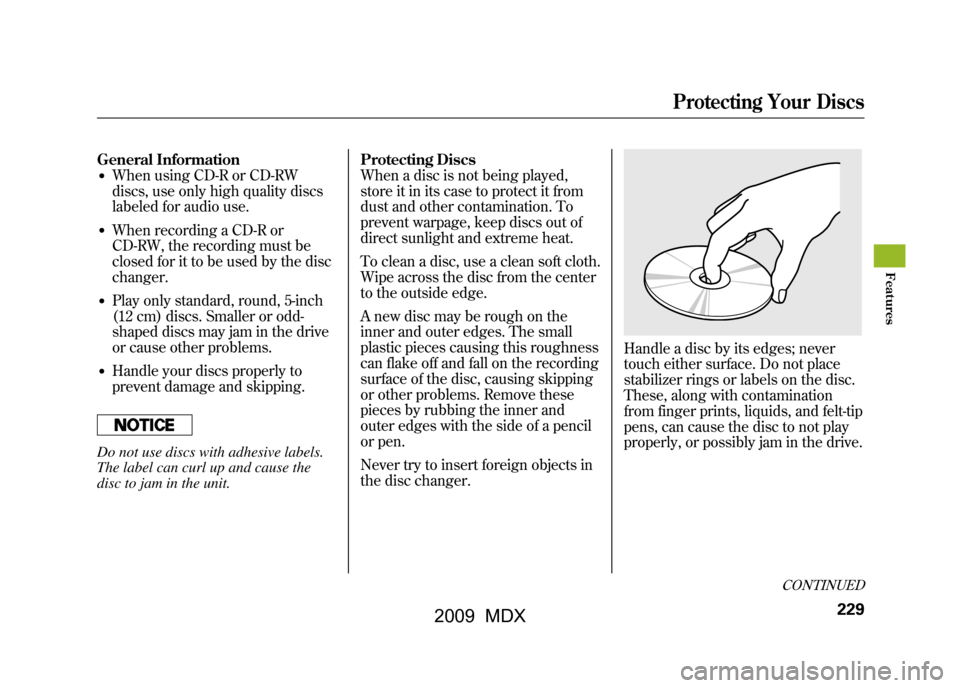
Handle a disc by its edges; never
touch either surface. Do not place
stabilizer rings or labels on the disc.
These, along with contamination
from finger prints, liquids, and felt-tip
pens, can cause the disc to not play
properly, or possibly jam in the drive.
CONTINUED
Protecting Your Discs
229
Feat ures
08/06/06 16:58:07 09 ACURA MDX MMC North America Owner's M 50 31STX620 enu
2009 MDX
Page 234 of 489
Additional Information on
Recommended Discs
The in-dash disc player/changer has
a sophisticated and delicate
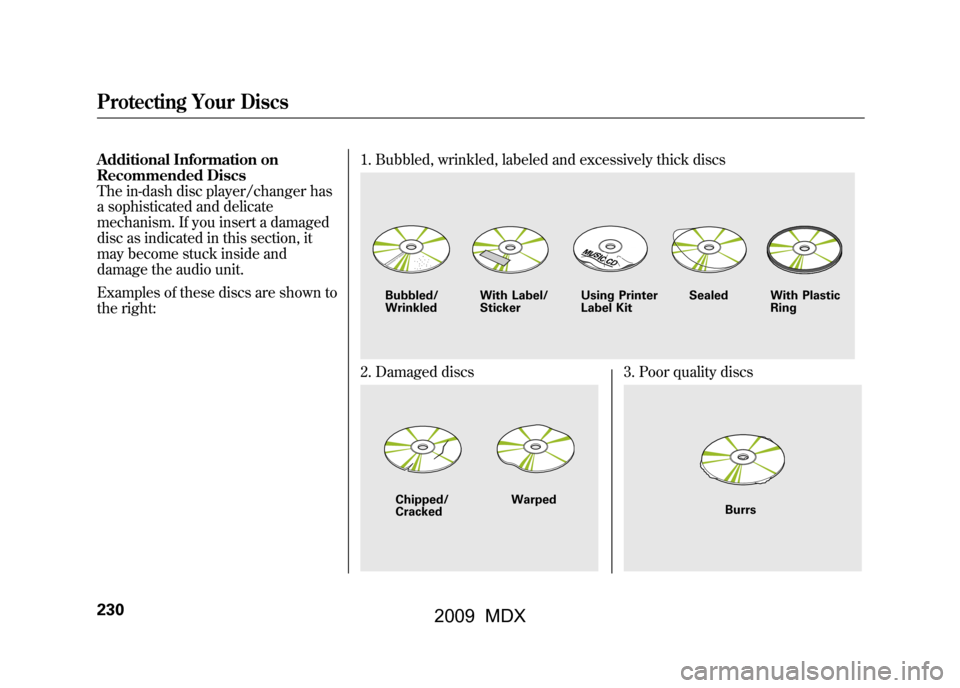
mechanism. If you insert a damaged
disc as indicated in this section, it
may become stuck inside and
damage the audio unit.
Examples of these discs are shown to
the right:1. Bubbled, wrinkled, labeled and excessively thick discs
2. Damaged discs
3. Poor quality discs
Bubbled/
Wrinkled
With Label/
Sticker Using Printer
Label Kit Sealed With Plastic
RingChipped/
Cracked Warped
Burrs
Protecting Your Discs23008/06/06 16:58:07 09 ACURA MDX MMC North America Owner's M 50 31STX620 enu
2009 MDX
Page 235 of 489
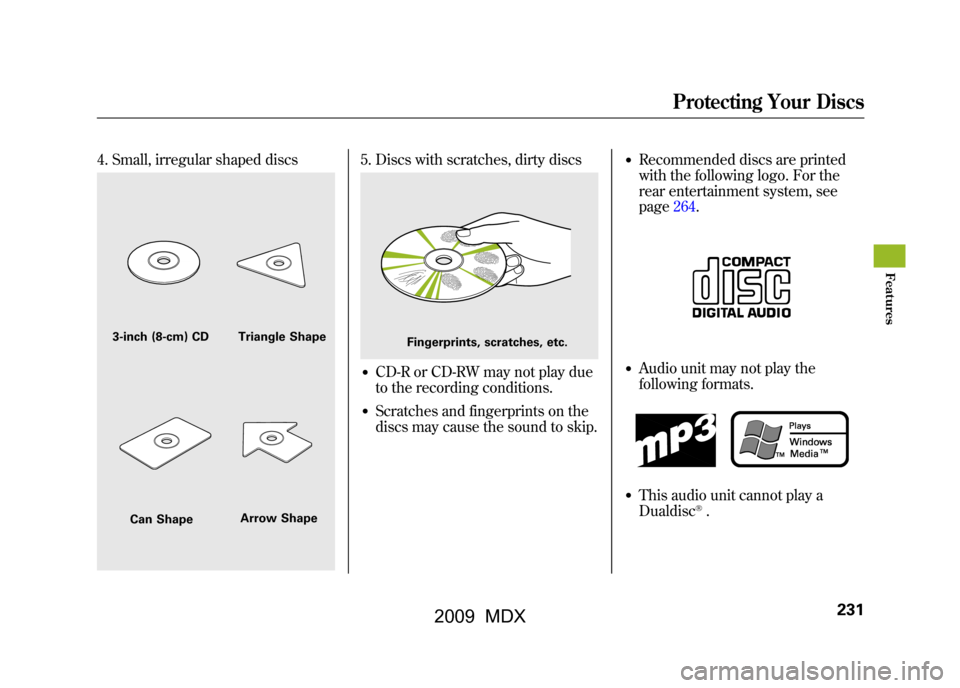
4. Small, irregular shaped discs
5. Discs with scratches, dirty discs●CD-R or CD-RW may not play due
to the recording conditions.●Scratches and fingerprints on the
discs may cause the sound to skip.
●Recommended discs are printed
with the following logo. For the
rear entertainment system, see
page264.●Audio unit may not play the
following formats.●This audio unit cannot play a
Dualdisc
®.
3-inch (8-cm) CD Triangle ShapeCan Shape Arrow Shape
Fingerprints, scratches, etc.
Protecting Your Discs
231
Feat ures
08/06/06 16:58:07 09 ACURA MDX MMC North America Owner's M 50 31STX620 enu
2009 MDX
Page 236 of 489
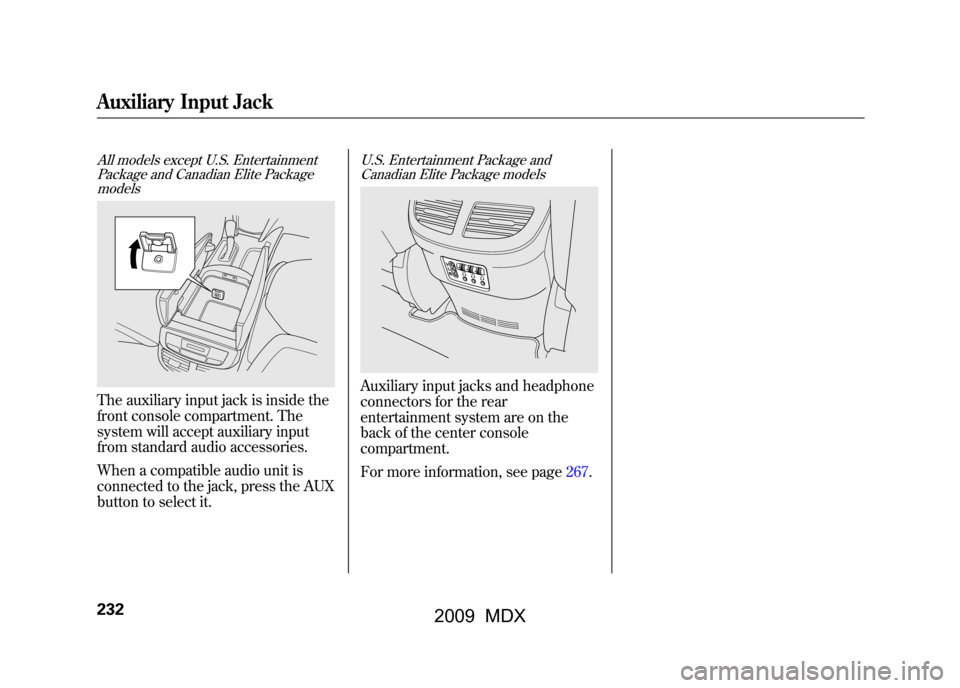
All models except U.S. EntertainmentPackage and Canadian Elite PackagemodelsThe auxiliary input jack is inside the
front console compartment. The
system will accept auxiliary input
from standard audio accessories.
When a compatible audio unit is
connected to the jack, press the AUX
button to select it.
U.S. Entertainment Package and
Canadian Elite Package modelsAuxiliary input jacks and headphone
connectors for the rear
entertainment system are on the
back of the center console
compartment.
For more information, see page267.
Auxiliary Input Jack23208/06/06 16:58:07 09 ACURA MDX MMC North America Owner's M 50 31STX620 enu
2009 MDX
Page 237 of 489
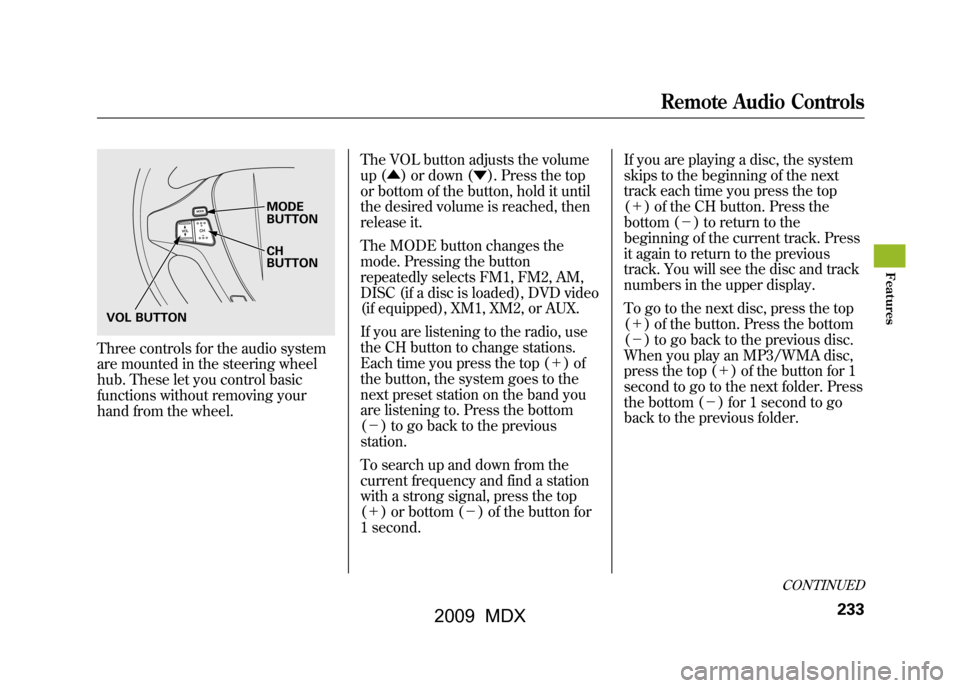
Three controls for the audio system
are mounted in the steering wheel
hub. These let you control basic
functions without removing your
hand from the wheel.The VOL button adjusts the volume
up (▲
) or down (▼). Press the top
or bottom of the button, hold it until
the desired volume is reached, then
release it.
The MODE button changes the
mode. Pressing the button
repeatedly selects FM1, FM2, AM,
DISC (if a disc is loaded), DVD video
(if equipped), XM1, XM2, or AUX.
If you are listening to the radio, use
the CH button to change stations.
Each time you press the top (+ )of
the button, the system goes to the
next preset station on the band you
are listening to. Press the bottom
(- ) to go back to the previous
station.
To search up and down from the
current frequency and find a station
with a strong signal, press the top
(+ ) or bottom (-) of the button for
1 second. If you are playing a disc, the system
skips to the beginning of the next
track each time you press the top
(+
) of the CH button. Press the
bottom (- ) to return to the
beginning of the current track. Press
it again to return to the previous
track. You will see the disc and track
numbers in the upper display.
To go to the next disc, press the top
(+ ) of the button. Press the bottom
(- ) to go back to the previous disc.
When you play an MP3/WMA disc,
press the top (+ ) of the button for 1
second to go to the next folder. Press
the bottom (- ) for 1 second to go
back to the previous folder.
MODE
BUTTON
CH
BUTTON
VOL BUTTON
CONTINUED
Remote Audio Controls
233
Feat ures
08/06/06 16:58:07 09 ACURA MDX MMC North America Owner's M 50 31STX620 enu
2009 MDX
Page 238 of 489

If you are listening to XM Satellite
Radio, use the CH button to change
channels. Each time you press the
top (+) of the button, the system
goes to the next preset channel.
Press the bottom (- ) to go back to
the previous preset channel.
To go to the next channel of the
category you are listening to, press
the top (+ ) of the button for 1
second. Press the bottom (- ) for 1
second to go back to the previous
channel. If you are playing a DVD video, use
the channel button to change
chapters. Each time you press the
top (+
) of the button, the system
goes to the next chapter. Press the
bottom (- ) to return to the
beginning of the current chapter.
Press it again to return to the
previous chapter.Remote Audio Controls23408/06/06 16:58:07 09 ACURA MDX MMC North America Owner's M 50 31STX620 enu
2009 MDX
Page 239 of 489

Your vehicle's audio system may
disable itself if it is disconnected
from electrical power for any reason.
To make it work again, you must
enter a specific five-digit code with
the preset buttons. Because there are
hundreds of number combinations
possible from the five digits, making
the system work without knowing
the exact code is nearly impossible.
You should have received a card that
lists your audio system code number
and serial number. It is best to store
this card in a safe place at home. In
addition, you should write the audio
system's serial number in this
owner's manual.
If you lose the card, you must obtain
the code number from your dealer.
To do this, you will need the audio
system's serial number.If your vehicle's battery is
disconnected or goes dead, or the
radio fuse is removed, the audio
system will disable itself. If this
happens, you will see
‘‘
’’in
the audio display the next time you
turn on the system. Use the preset
buttons to enter the five-digit code.
The code is located on the radio code
card included in your owner's
manual kit. When it is entered
correctly, the radio will start playing.
If you make a mistake entering the
code, do not start over; complete the
five-digit sequence, then enter the
correct code. You have 10 tries to
enter the correct code. If you are
unsuccessful in 10 attempts, you
must then leave the system on for 1
hour before trying again. The system will retain your AM and
FM presets even if power is
disconnected.
Radio Theft Protection
235
Feat ures
08/06/06 16:58:07 09 ACURA MDX MMC North America Owner's M 50 31STX620 enu
2009 MDX
Page 241 of 489

Available on U.S. Entertainment Packageand Canadian Elite Package modelsYour vehicle is equipped with a rear
entertainment system that includes a
DVD player for the enjoyment of the
rear passengers.
With this system, the rear
passengers can enjoy a different
entertainment source (radio, disc
changer, DVD player, XM Radio, or
optional CD changer/tape player)
than the front seat occupants. The
audio is broadcast through the
supplied wireless headphones.
The ignition switch must be in the
ACCESSORY (I) or the ON (II)
position to operate the rear
entertainment system. To Turn On the System
Press the REAR PWR button. The
indicator on the REAR PWR button
will come on, as well as the indicator
on the FRONT SOURCE button. The
rear seat passengers can then
operate the rear system from the
control panel in the ceiling. The rear
control panel can also be detached
and used as a remote control, by
pushing the RELEASE button, and
pulling the remote toward you.
Pressing the REAR CTRL OFF
button disables rear control. The
indicator in the button comes on and
your passengers can no longer
operate the system with the rear
control panel. When the button is
pressed, the
‘‘CTRL OFF ’’message
appears in the overhead screen to let
your passengers know that the
control panel is disabled. The rear system selects the source it
was last set to. If that source has
been removed (the DVD has been
ejected from the player, for example),
you will see
‘‘DVD EJECT ’’in the
display. You should select another
source or insert a DVD.
Rear Speakers
When you turn on the system, the rear
speakers are automatically turned off if
the rear system selects a different
entertainment source than the front
system. You will see the Rear Speakers
Off icon both in the audio display and the
overhead screen. The sound for the rear
system is sent to the wireless
headphones.
If you want to turn the rear speakers on
again, press and hold the REAR PWR
button until the Rear Speakers Off icon
goes off.
NOTE: The rear speakers are connected
to the front system, so they will always
play the source that the front system is
set to.
CONTINUED
Rear Entertainment System
237
Feat ures
08/06/06 16:58:07 09 ACURA MDX MMC North America Owner's M 50 31STX620 enu
2009 MDX
Page 243 of 489
To Select Rear Entertainment
from the Front Control Panel
To operate the rear entertainment
system from the front panel, press
the REAR SOURCE button. You will
hear two beeps and the indicator in
the button comes on to show that the
control panel is enabled.
If you do not operate the rear
entertainment system from the front
panel within 10 seconds, the
indicator goes off and the FRONT
SOURCE indicator comes on
automatically.
To play the radio, the buttons for the
front entertainment system have the
same functions.
If discs are loaded in the disc
changer of the upper part, select the
6 DISC button. If a disc is loaded in
the lower player, select the DVD
button.Operating the DVD Player from
the Front Control Panel
The DVD player in your rear
entertainment system can play DVD
video discs, audio CDs MP3/WMA
discs and DTS CDs.
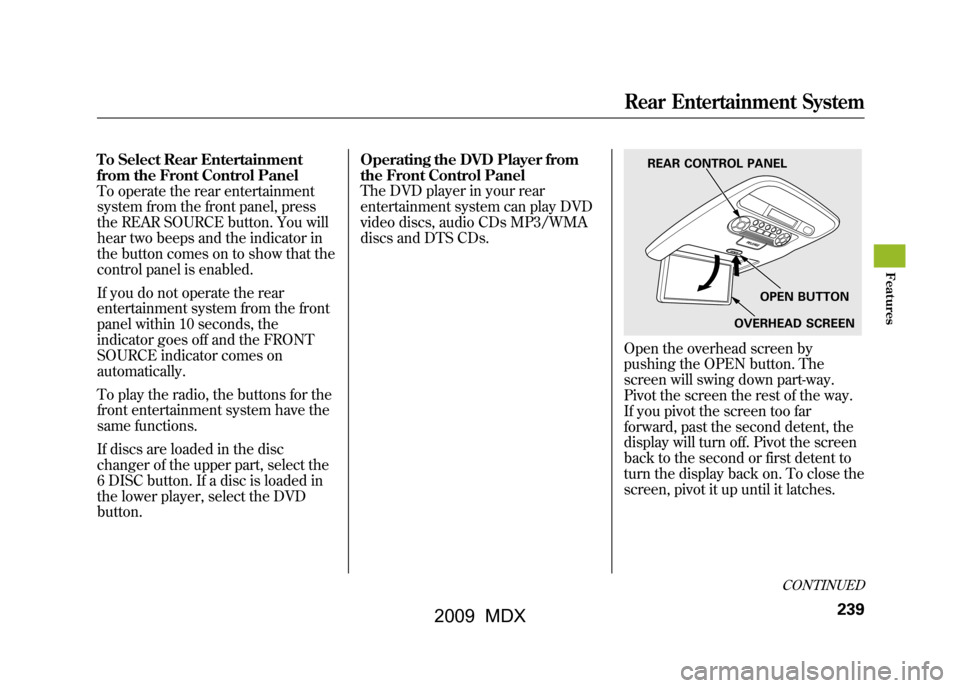
Open the overhead screen by
pushing the OPEN button. The
screen will swing down part-way.
Pivot the screen the rest of the way.
If you pivot the screen too far
forward, past the second detent, the
display will turn off. Pivot the screen
back to the second or first detent to
turn the display back on. To close the
screen, pivot it up until it latches.
REAR CONTROL PANEL
OPEN BUTTON
OVERHEAD SCREEN
CONTINUED
Rear Entertainment System
239
Feat ures
08/06/06 16:58:07 09 ACURA MDX MMC North America Owner's M 50 31STX620 enu
2009 MDX
Page 244 of 489
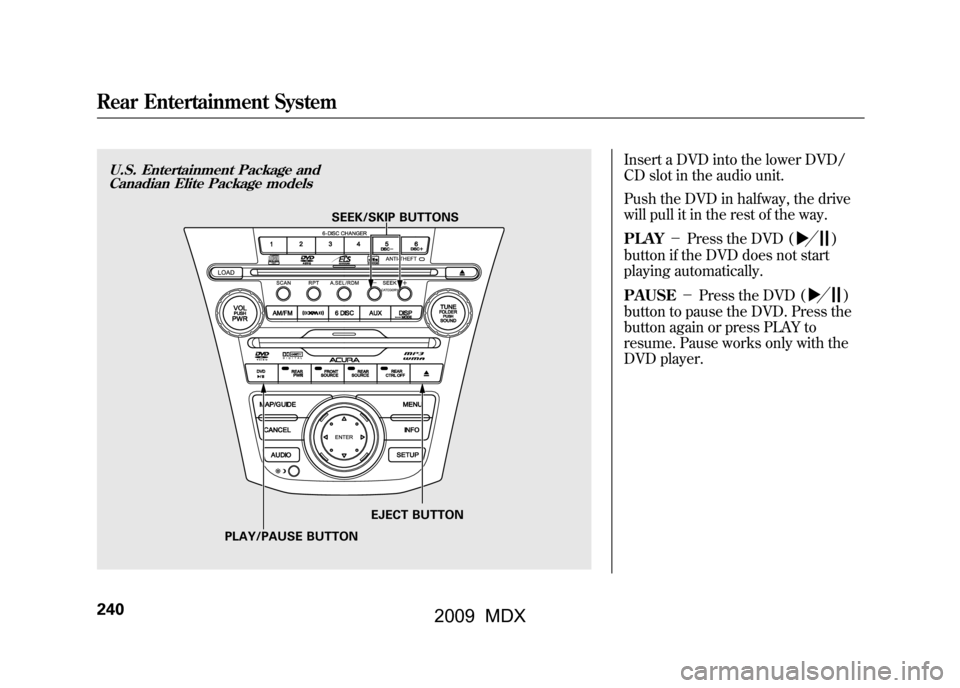
Insert a DVD into the lower DVD/
CD slot in the audio unit.
Push the DVD in halfway, the drive
will pull it in the rest of the way.
PLAY-Press the DVD (
)
button if the DVD does not start
playing automatically.
PAUSE -Press the DVD ()
button to pause the DVD. Press the
button again or press PLAY to
resume. Pause works only with the
DVD player.
U.S. Entertainment Package and Canadian Elite Package models
SEEK/SKIP BUTTONS
PLAY/PAUSE BUTTON EJECT BUTTON
Rear Entertainment System24008/06/06 16:58:07 09 ACURA MDX MMC North America Owner's M 50 31STX620 enu
2009 MDX