Dvd Acura MDX 2011 Owner's Guide
[x] Cancel search | Manufacturer: ACURA, Model Year: 2011, Model line: MDX, Model: Acura MDX 2011Pages: 609, PDF Size: 12.7 MB
Page 331 of 609

Audio LanguageYou can select the dubbed language
before playing DVDs.
Select‘‘Audio Language ’’by pressing
the
or
button.
Follow the same instructions you
used to set the menu language. Subtitle Language
You can select the subtitle language
before playing DVDs.
Select
‘‘Subtitle Language ’’by
pressing the
or
button.
Follow the same instructions you
used to set the menu language. Dynamic Range
‘‘
Dynamic Range ’’reduces the
differences between the loud and
quiet sound levels throughout the
disc. When this is on, the louder
sounds are lowered, and quieter
sounds are increased.
Rear Entertainment System32610/06/29 11:59:04 11 ACURA MDX MMC North America Owner's M 50 31STX640 enu
Page 332 of 609

Select the‘‘Dynamic Range ’’by
turning the interface dial.
To turn ‘‘Dynamic Range ’’on or off,
select ‘‘ON ’’or ‘‘OFF ’’by turning the
interface dial, and then press the
ENTER button. Angle Mark
When you switch to another angle
while playing a DVD, the angle mark
is displayed in the upper right corner
of the screen.
You can set the system to display or
not display this angle mark.
Select the
‘‘Angle Mark ’’by turning
the interface dial. If you want the
angle mark to be displayed, select
‘‘ ON ’’by turning the interface dial,
and then press the ENTER button.
ANGLE MARK
CONTINUED
Rear Entertainment System
327
Features
10/06/29 11:59:04 11 ACURA MDX MMC North America Owner's M 50 31STX640 enu
Page 338 of 609

Playable DVDsThere are various types of DVDs
available. Some of them are not
compatible with your system.
The DVD player in your rear
entertainment system can play DVDs
and CDs bearing the above marks on
their packages or jackets.The DVD player can also play discs
recorded in MP3/WMA formats and
DTS CDs.
Those packages or jackets should
also bear the designation of
‘‘1’’ or
‘‘ ALL ’’. DVD-ROMs cannot be played
in this system.
This product incorporates copyright
protection technology that is
protected by U.S. patents and other
intellectual property rights.
Use of this copyright protection
technology must be authorized by
Macrovision, and is intended for
home and other limited viewing uses
only unless otherwise authorized by
Macrovision.
Reverse engineering or disassembly
is prohibited. Protecting DVDs
The tips on how to handle and
protect DVDs are basically the same
as those for compact discs. Refer to
‘‘
Protecting Your Discs ’’on page 244.
CONTINUED
Rear Entertainment System
333
Features
10/06/29 11:59:04 11 ACURA MDX MMC North America Owner's M 50 31STX640 enu
Page 339 of 609

DVD Player Error Messages
The chart on the right explains the
error messages you may see in the
display while playing a disc.
If you see an error message in the
display while playing a disc, press
the eject button. After ejecting the
disc, check it for damage or
deformation. If there is no damage,
insert the disc again.
The audio system will try to play the
disc. If there is still a problem, the
error message will reappear. Press
the eject button, and pull out the
disc.
Insert a different disc. If the new disc
plays, there is a problem with the
first disc. If the error message cycle
repeats and you cannot clear it, take
your vehicle to a dealer.Error Message Cause Solution
DISC ERROR
FOCUS Error Press the disc eject button, and remove the disc.
Check for an error indication. Insert the disc again.
If the code does not disappear or the disc cannot be
removed, consult your dealer.
MECH ERROR Mechanical Error Press the disc eject button, and remove the disc.
Check for an error indication. Insert the disc again.
If the code does not disappear or the disc cannot be
removed, consult your dealer.
HEAT ERROR High Temperature Will disappear when the temperature returns to
normal.
REGION ERR Invalid region code The disc is not playable in this unit. Eject the disc,
and insert a disc compatible with this system.
PARENT ERR Invalid parental
control level Reinsert the disc, and increase the parental control
level (see page 328).
Rear Entertainment System33410/06/29 11:59:04 11 ACURA MDX MMC North America Owner's M 50 31STX640 enu
Page 598 of 609
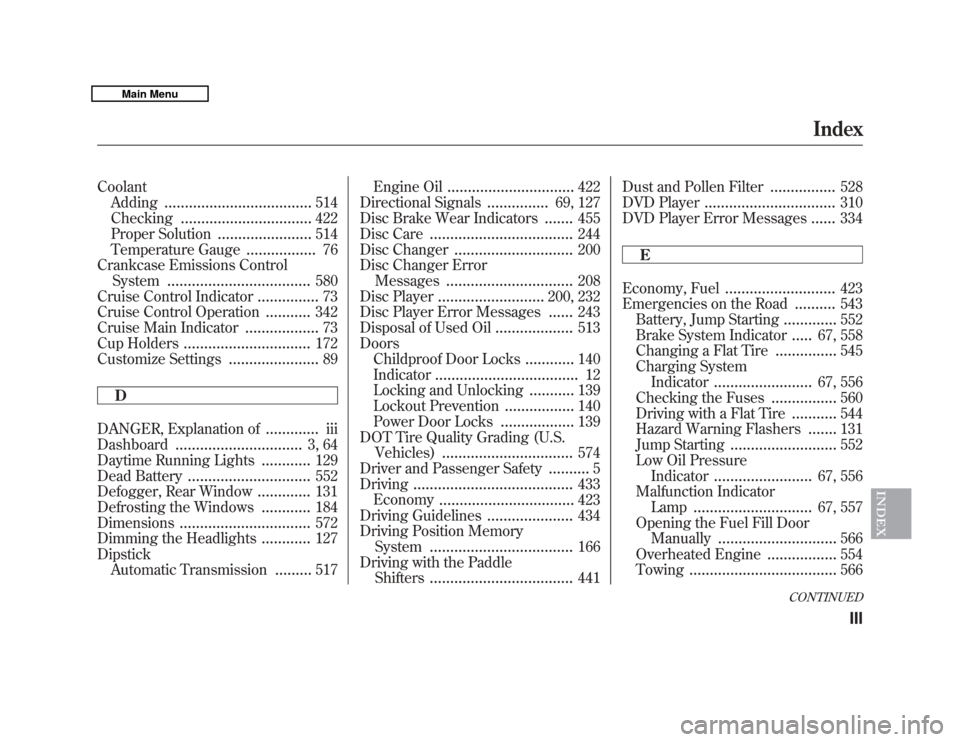
CoolantAdding
....................................
514
Checking
................................
422
Proper Solution
.......................
514
Temperature Gauge
.................
76
Crankcase Emissions Control System
...................................
580
Cruise Control Indicator
...............
73
Cruise Control Operation
...........
342
Cruise Main Indicator
..................
73
Cup Holders
...............................
172
Customize Settings
......................
89
D
DANGER, Explanation of
.............
iii
Dashboard
...............................
3, 64
Daytime Running Lights
............
129
Dead Battery
..............................
552
Defogger, Rear Window
.............
131
Defrosting the Windows
............
184
Dimensions
................................
572
Dimming the Headlights
............
127
Dipstick Automatic Transmission
.........
517 Engine Oil
...............................
422
Directional Signals
...............
69, 127
Disc Brake Wear Indicators.......
455
Disc Care
...................................
244
Disc Changer
.............................
200
Disc Changer Error Messages
...............................
208
Disc Player
..........................
200, 232
Disc Player Error Messages......
243
Disposal of Used Oil
...................
513
Doors Childproof Door Locks
............
140
Indicator
...................................
12
Locking and Unlocking
...........
139
Lockout Prevention
.................
140
Power Door Locks
..................
139
DOT Tire Quality Grading (U.S. Vehicles)
................................
574
Driver and Passenger Safety
..........
5
Driving
.......................................
433
Economy
.................................
423
Driving Guidelines
.....................
434
Driving Position Memory System
...................................
166
Driving with the Paddle Shifters
...................................
441 Dust and Pollen Filter
................
528
DVD Player
................................
310
DVD Player Error Messages
......
334
E
Economy, Fuel
...........................
423
Emergencies on the Road
..........
543
Battery, Jump Starting
.............
552
Brake System Indicator
.....
67, 558
Changing a Flat Tire
...............
545
Charging System Indicator
........................
67, 556
Checking the Fuses
................
560
Driving with a Flat Tire
...........
544
Hazard Warning Flashers
.......
131
Jump Starting
..........................
552
Low Oil Pressure Indicator
........................
67, 556
Malfunction Indicator Lamp
.............................
67, 557
Opening the Fuel Fill Door Manually
.............................
566
Overheated Engine
.................
554
Towing
....................................
566
CONTINUED
Index
III
INDEX
10/06/29 11:59:04 11 ACURA MDX MMC North America Owner's M 50 31STX640 enu