driving position Acura MDX 2011 Owner's Guide
[x] Cancel search | Manufacturer: ACURA, Model Year: 2011, Model line: MDX, Model: Acura MDX 2011Pages: 609, PDF Size: 12.7 MB
Page 139 of 609
When you remove the key from the
ignition switch, the steering wheel
automatically moves fully in and up.
To change the‘‘AUTO TILT &
TELESCOPE STEERING WHEEL ’’
setting, see page 108.
The steering wheel then returns to
its original position when you insert
the key back in the ignition switch.
Steering wheel movement is also
controlled by the driving position
memory system (see page 166). If your vehicle's battery is
disconnected or goes dead, or the
fuse for the power tilt and telescopic
steering wheel is removed, the
power tilt and telescopic steering
wheel system needs to be reset when
you reconnect the battery or install
the fuse.
Insert the key into the ignition
switch, and remove it. The steering
wheel automatically moves fully in
and up to let you know the system is
reset.Steering Wheel Adjustments13410/06/29 11:59:04 11 ACURA MDX MMC North America Owner's M 50 31STX640 enu
Page 143 of 609
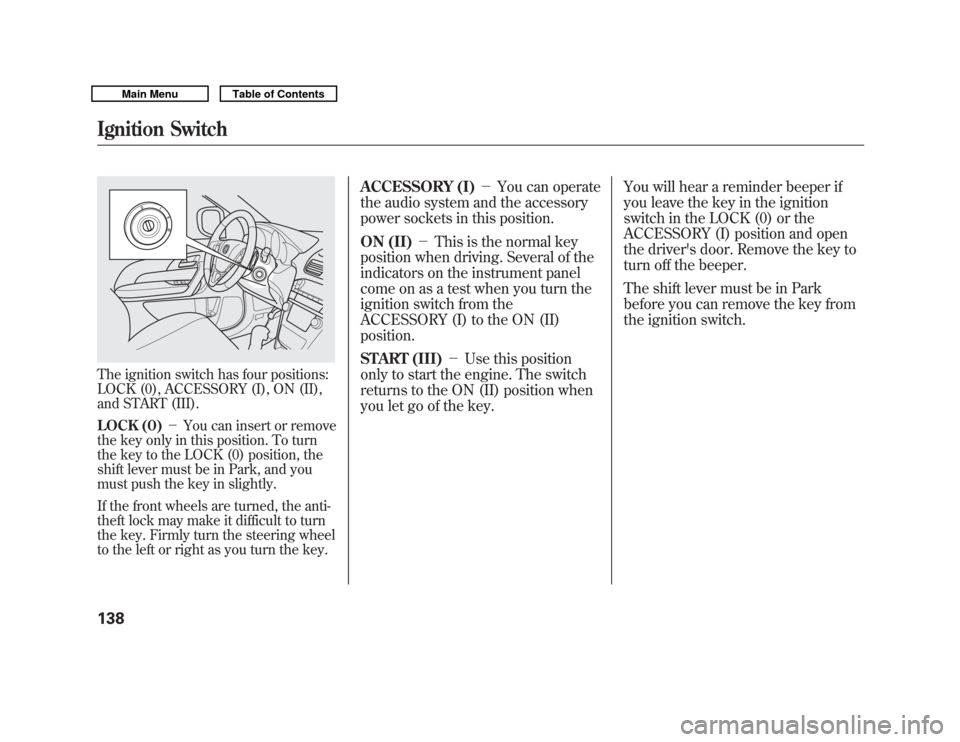
The ignition switch has four positions:
LOCK (0), ACCESSORY (I), ON (II),
and START (III).
LOCK (0)-You can insert or remove
the key only in this position. To turn
the key to the LOCK (0) position, the
shift lever must be in Park, and you
must push the key in slightly.
If the front wheels are turned, the anti-
theft lock may make it difficult to turn
the key. Firmly turn the steering wheel
to the left or right as you turn the key.
ACCESSORY (I) -You can operate
the audio system and the accessory
power sockets in this position.
ON (II) -This is the normal key
position when driving. Several of the
indicators on the instrument panel
come on as a test when you turn the
ignition switch from the
ACCESSORY (I) to the ON (II)
position.
START (III) -Use this position
only to start the engine. The switch
returns to the ON (II) position when
you let go of the key. You will hear a reminder beeper if
you leave the key in the ignition
switch in the LOCK (0) or the
ACCESSORY (I) position and open
the driver's door. Remove the key to
turn off the beeper.
The shift lever must be in Park
before you can remove the key from
the ignition switch.
Ignition Switch13810/06/29 11:59:04 11 ACURA MDX MMC North America Owner's M 50 31STX640 enu
Page 145 of 609
Lockout PreventionWith any door and the tailgate open
and the key in the ignition, both
master door lock switches are
disabled. They are not disabled if all
the doors and the tailgate are closed.
If you try to lock an open driver's
door by pulling the lock tab rearward
the lock tab on the driver's door pops
out.Childproof Door Locks
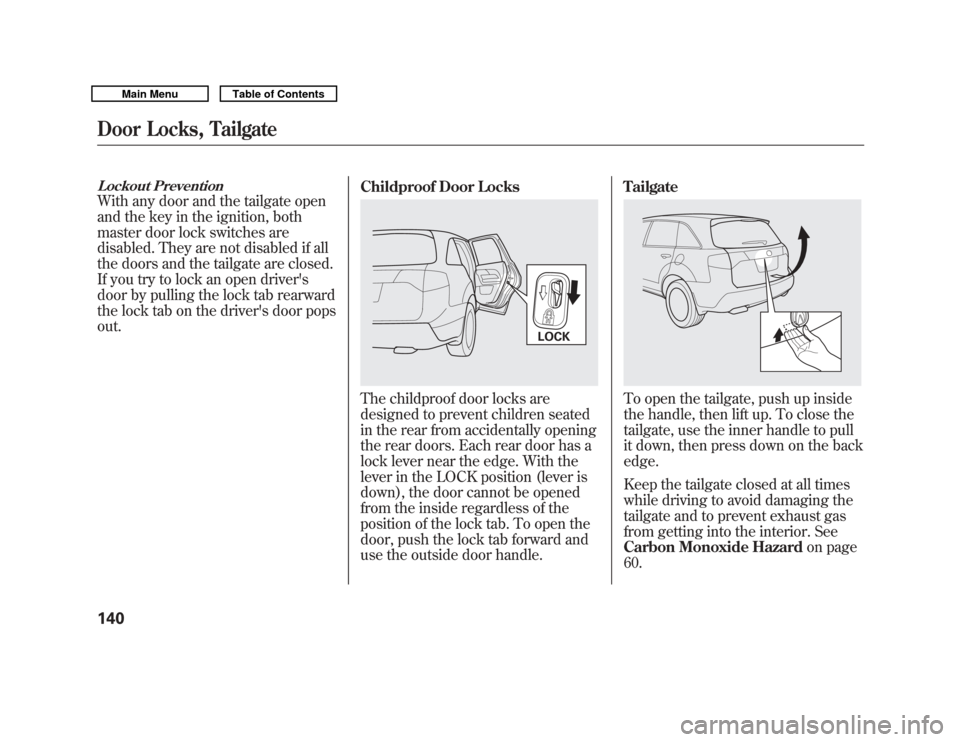
The childproof door locks are
designed to prevent children seated
in the rear from accidentally opening
the rear doors. Each rear door has a
lock lever near the edge. With the
lever in the LOCK position (lever is
down), the door cannot be opened
from the inside regardless of the
position of the lock tab. To open the
door, push the lock tab forward and
use the outside door handle.Tailgate
To open the tailgate, push up inside
the handle, then lift up. To close the
tailgate, use the inner handle to pull
it down, then press down on the back
edge.
Keep the tailgate closed at all times
while driving to avoid damaging the
tailgate and to prevent exhaust gas
from getting into the interior. See
Carbon Monoxide Hazard
on page
60.
LOCK
Door Locks, Tailgate14010/06/29 11:59:04 11 ACURA MDX MMC North America Owner's M 50 31STX640 enu
Page 152 of 609
Recalling a Memorized Driving
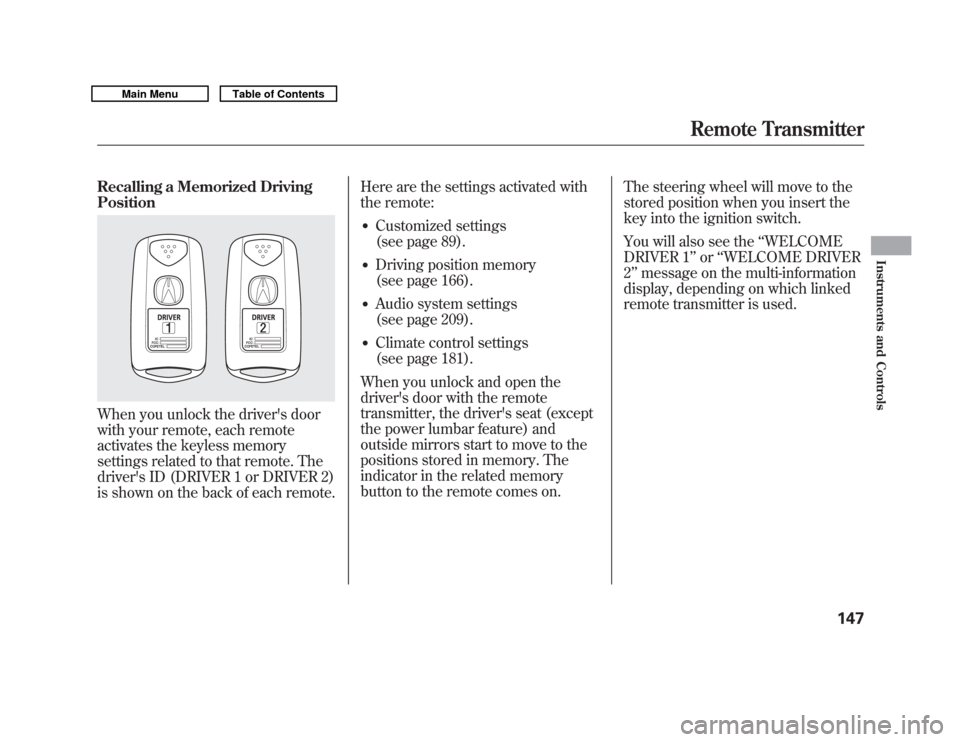
PositionWhen you unlock the driver's door
with your remote, each remote
activates the keyless memory
settings related to that remote. The
driver's ID (DRIVER 1 or DRIVER 2)
is shown on the back of each remote.Here are the settings activated with
the remote:
●
Customized settings
(see page 89).
●
Driving position memory
(see page 166).
●
Audio system settings
(see page 209).
●
Climate control settings
(see page 181).
When you unlock and open the
driver's door with the remote
transmitter, the driver's seat (except
the power lumbar feature) and
outside mirrors start to move to the
positions stored in memory. The
indicator in the related memory
button to the remote comes on. The steering wheel will move to the
stored position when you insert the
key into the ignition switch.
You will also see the
‘‘WELCOME
DRIVER 1’’ or‘‘WELCOME DRIVER
2’’ message on the multi-information
display, depending on which linked
remote transmitter is used.
Remote Transmitter
147
Instruments and Controls
10/06/29 11:59:04 11 ACURA MDX MMC North America Owner's M 50 31STX640 enu
Page 153 of 609
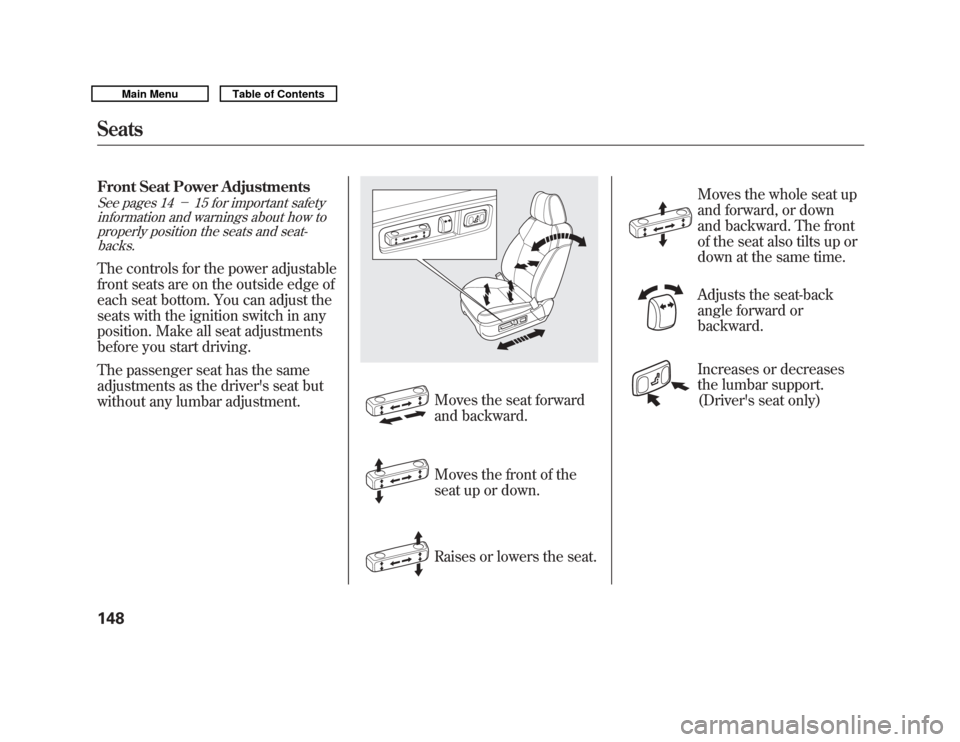
Front Seat Power AdjustmentsSee pages 14-15 for important safety
information and warnings about how to properly position the seats and seat-backs.The controls for the power adjustable
front seats are on the outside edge of
each seat bottom. You can adjust the
seats with the ignition switch in any
position. Make all seat adjustments
before you start driving.
The passenger seat has the same
adjustments as the driver's seat but
without any lumbar adjustment.
Moves the seat forward
and backward.
Moves the front of the
seat up or down.
Raises or lowers the seat. Moves the whole seat up
and forward, or down
and backward. The front
of the seat also tilts up or
down at the same time.
Adjusts the seat-back
angle forward or
backward.
Increases or decreases
the lumbar support.
(Driver's seat only)
Seats14810/06/29 11:59:04 11 ACURA MDX MMC North America Owner's M 50 31STX640 enu
Page 154 of 609
Head RestraintsSee page 15 for important safetyinformation and a warning aboutimproperly positioning head restraints.Your vehicle is equipped with head
restraints in all seating positions to
help protect you and your
passengers from the likelihood of
whiplash and other injuries.
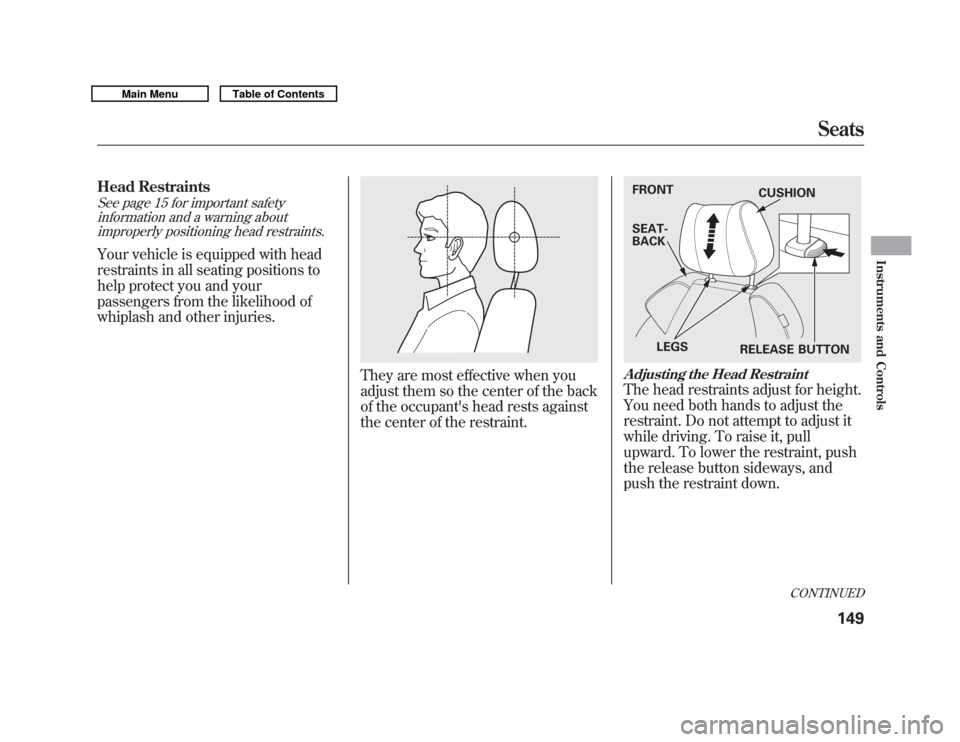
They are most effective when you
adjust them so the center of the back
of the occupant's head rests against
the center of the restraint.
Adjusting the Head RestraintThe head restraints adjust for height.
You need both hands to adjust the
restraint. Do not attempt to adjust it
while driving. To raise it, pull
upward. To lower the restraint, push
the release button sideways, and
push the restraint down.FRONT
SEAT-
BACK
LEGS RELEASE BUTTONCUSHION
CONTINUED
Seats
149
Instruments and Controls
10/06/29 11:59:04 11 ACURA MDX MMC North America Owner's M 50 31STX640 enu
Page 155 of 609
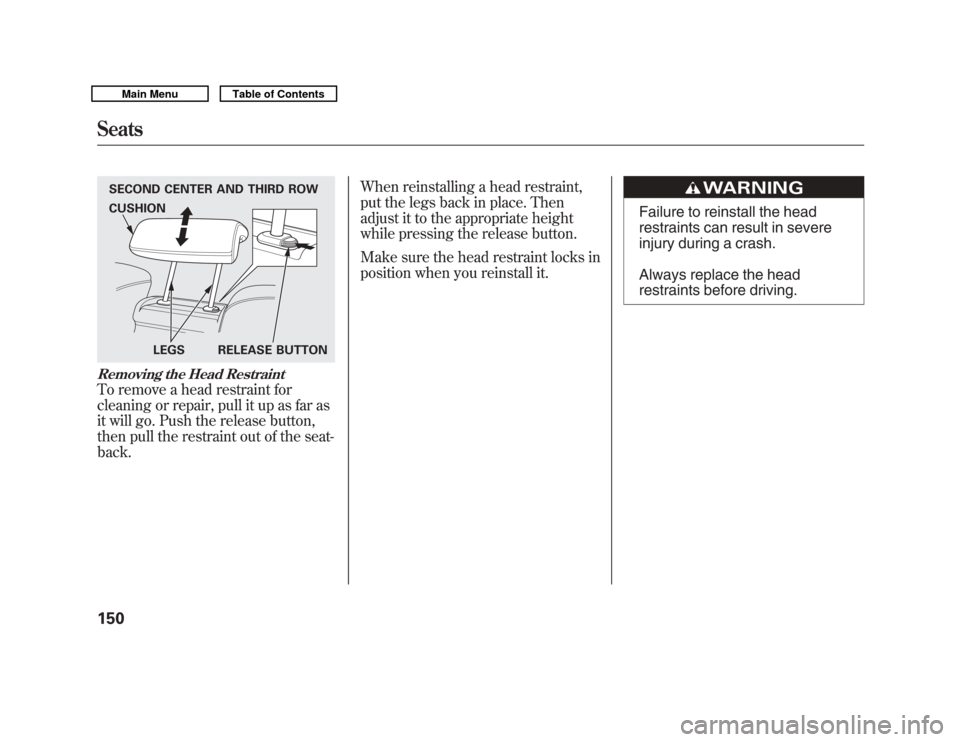
Removing the Head RestraintTo remove a head restraint for
cleaning or repair, pull it up as far as
it will go. Push the release button,
then pull the restraint out of the seat-
back.When reinstalling a head restraint,
put the legs back in place. Then
adjust it to the appropriate height
while pressing the release button.
Make sure the head restraint locks in
position when you reinstall it.
Failure to reinstall the head
restraints can result in severe
injury during a crash.
Always replace the head
restraints before driving.
SECOND CENTER AND THIRD ROW
LEGS RELEASE BUTTON
CUSHIONSeats15010/06/29 11:59:04 11 ACURA MDX MMC North America Owner's M 50 31STX640 enu
Page 157 of 609

Adjusting the Second Row SeatsTo change the seat-back angle of the
seats in the second row, pull up on
the handle on the outside of the seat-
back, and push the seat-back.
Overall, the seat-back has six
different positions.Folding the Second Row Seats
The left and right halves can be
folded separately.
1. To unlatch the detachable anchor
before folding the seat-back, insert
the latch plate into the slot on the
side of the anchor buckle (see
page 154) and allow the seat belt to
retract. Store the detachable
anchor and seat belt latch plates in
the retractor housing.
2. Lower the head restraints to their lowest positions.
3. Pull up the handle on the outside of the seat-back.
4. Fold the seat-back forward.
Reverse this procedure to return the
seat to the upright position. Make
sure the seat is locked securely
before driving. Make sure that the folded seat-back
does not press against the front
passenger's seat, as this could cause
the weight sensors to work
improperly.
HANDLE
Seats15210/06/29 11:59:04 11 ACURA MDX MMC North America Owner's M 50 31STX640 enu
Page 159 of 609

Reverse this procedure to return the
seat to the upright position. Make
sure the seat is locked securely
before driving. Reconnect the seat
belts to the detachable anchors.
Make sure all items in the cargo area
are secured. Loose items can fly
forward and cause injury if you have
to brake hard (SeeCarrying Cargo
on page 428). Detachable Anchor
The seat belts in the second row
center seat and the third row seats
are equipped with detachable
anchors.
To unlatch the detachable anchor,
insert the latch plate into the slot on
the side of the anchor buckle. Store
the detachable anchor and seat belt
latch plates in the retractor housing.When the seats are returned to the
upright position, these detachable
anchors should be latched back
properly.
Using the seat belt with the
detachable anchor unlatched
increases the chance of serious
injury or death in a crash.
Before using the seat belt,
make sure the detachable
anchor is correctly latched.
LATCH PLATE
Seats15410/06/29 11:59:04 11 ACURA MDX MMC North America Owner's M 50 31STX640 enu
Page 170 of 609

3. Push the appropriate edge of theadjustment switch to move the
mirror right, left, up, or down.
4. When you finish, move the selector switch to the center (off)
position. This turns the adjustment
switch off to keep your settings. Reverse Tilt Door Mirror
Both outside door mirrors have a
reverse tilt feature. When in reverse,
the selected mirror will tilt down
slightly to improve your view as you
parallel park. Shifting out of reverse
will return the mirror to its original
position.
●
To tilt the driver's mirror, place the
selector switch in the left position.
●
To tilt the passenger's mirror,
place the switch in the right
position.
●
To turn the feature off, place the
switch in the center position.
Outside mirror positions can be
stored in the driving position
memory system (see page 166). Heated Mirrors
The outside mirrors are heated to
remove fog and frost. With the
ignition switch in the ON (II)
position, turn on the heaters by
pressing the button. The indicator in
the button comes on as a reminder.
Press the button again to turn the
heaters off. Pressing this button also
turns the rear window defogger on
and off.
HEATED MIRROR BUTTON
Mirrors
165
Instruments and Controls
10/06/29 11:59:04 11 ACURA MDX MMC North America Owner's M 50 31STX640 enu