driving position Acura MDX 2011 Service Manual
[x] Cancel search | Manufacturer: ACURA, Model Year: 2011, Model line: MDX, Model: Acura MDX 2011Pages: 609, PDF Size: 12.7 MB
Page 446 of 609
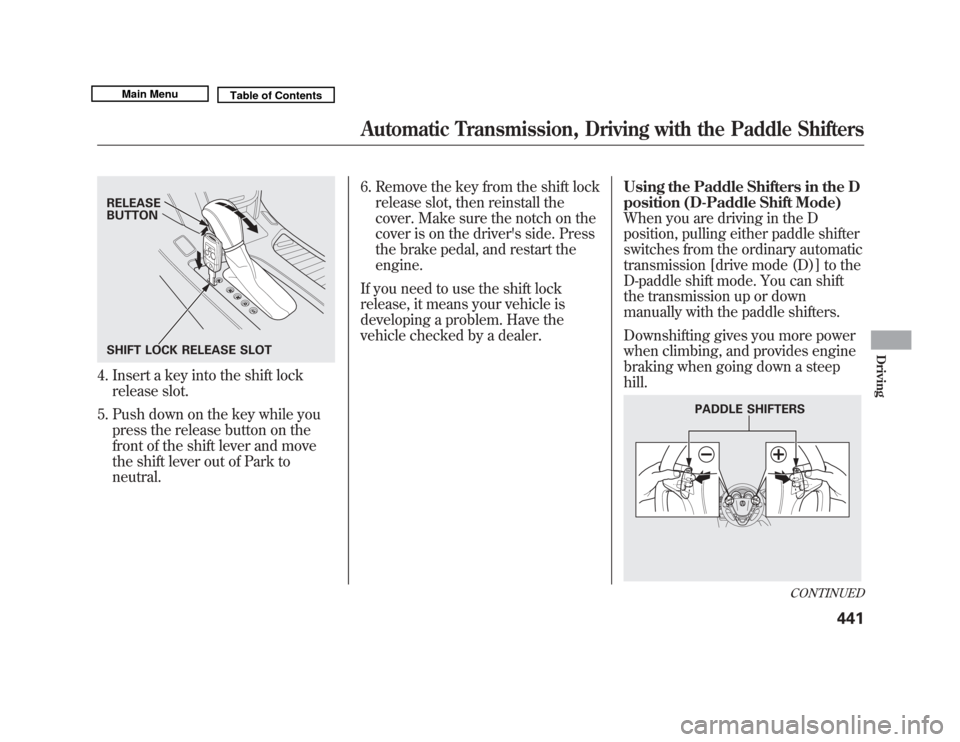
4. Insert a key into the shift lockrelease slot.
5. Push down on the key while you press the release button on the
front of the shift lever and move
the shift lever out of Park to
neutral. 6. Remove the key from the shift lock
release slot, then reinstall the
cover. Make sure the notch on the
cover is on the driver's side. Press
the brake pedal, and restart the
engine.
If you need to use the shift lock
release, it means your vehicle is
developing a problem. Have the
vehicle checked by a dealer. Using the Paddle Shifters in the D
position (D-Paddle Shift Mode)
When you are driving in the D
position, pulling either paddle shifter
switches from the ordinary automatic
transmission [drive mode (D)] to the
D-paddle shift mode. You can shift
the transmission up or down
manually with the paddle shifters.
Downshifting gives you more power
when climbing, and provides engine
braking when going down a steep
hill.RELEASE
BUTTON
SHIFT LOCK RELEASE SLOT
PADDLE SHIFTERS
CONTINUED
Automatic Transmission, Driving with the Paddle Shifters
441
Driving
10/06/29 11:59:04 11 ACURA MDX MMC North America Owner's M 50 31STX640 enu
Page 447 of 609

To shift up or down, use the+
(right) or -(left) paddle shifter on
either side of the steering wheel.
Each time you pull +(right), the
transmission shifts to a higher gear.
Pull -(left) to downshift. You will
see the selected gear number on the
instrument panel.When you pull either paddle shifter,
the gear position indicator shows you
the selected gear number. The transmission control system
monitors the accelerator pedal use
and your driving conditions. When
you press the accelerator pedal as in
normal driving, the system judges
that you are driving at a constant
cruising speed without using the
paddle shifters. Under these
conditions, D-paddle shift mode is
canceled, and the transmission
automatically returns to drive mode
(D).
Hold the
+(right) paddle shifter for
2 seconds to return to drive mode
(D).
When the transmission returns to
drive mode (D), the displayed gear
number goes out.
The transmission remains in the
selected gear if you do not
accelerate. Each time you pull either paddle
shifter, the transmission shifts one
gear up or down. If you want to shift
up or down more than two gears, pull
the paddle shifter twice, pause, and
then pull it again.
The automatic transmission will not
allow you to shift up or down if:
●
You downshift before the engine
speed reaches the highest
threshold of the lower gear.
If you try to do this, the gear
position indicator will flash the
number of the lower gear several
times, then return to a higher gear.
●
You upshift before the engine
speed reaches the lowest
threshold of the higher gear.
●
You press both paddle shifters at
the same time.
GEAR POSITION INDICATOR
Driving with the Paddle Shifters44210/06/29 11:59:04 11 ACURA MDX MMC North America Owner's M 50 31STX640 enu
Page 448 of 609
●
You press one of the two paddle
shifters while another paddle
shifter is being pressed.
●
You are trying to downshift from
second to first with the accelerator
pedal off. This will only work when
the accelerator pedal is applied
deeply.
The transmission downshifts to first
gear and returns to drive mode (D)
when the vehicle comes to a
complete stop and the vehicle speed
is about 6 mph (9 km/h).
If there is a problem in the
transmission while you are driving
with the paddle shifters, the D
indicator flashes, the D-paddle shift
mode is canceled, and the
transmission returns to drive mode
(D). Using the Paddle Shifters in the S
position (Sequential Shift Mode)
With the shift lever in the S position,
you can select the sequential shift
mode to shift gears; much like a
manual transmission using the
paddle shifters, but without a clutch
pedal.
To enter the sequential shift mode,
press the release button on the front
of the shift lever, move the lever to
the S position, then pull either paddle
shifter. To cancel the sequential shift
mode and return to the ordinary
automatic transmission, move the
shift lever from S position. When
moving the shift lever, be careful not
to operate incorrectly. While you are
driving in the sequential shift mode,
the transmission will not
automatically return to ordinary
automatic transmission.
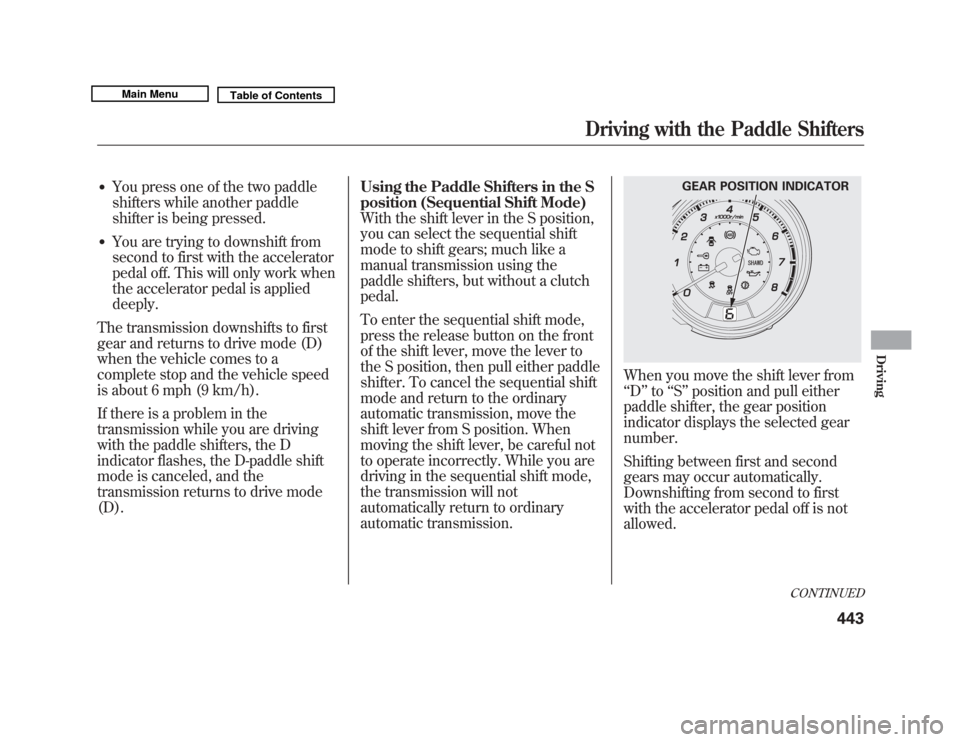
When you move the shift lever from
‘‘
D ’’to ‘‘S ’’ position and pull either
paddle shifter, the gear position
indicator displays the selected gear
number.
Shifting between first and second
gears may occur automatically.
Downshifting from second to first
with the accelerator pedal off is not
allowed.
GEAR POSITION INDICATOR
CONTINUED
Driving with the Paddle Shifters
443
Driving
10/06/29 11:59:04 11 ACURA MDX MMC North America Owner's M 50 31STX640 enu
Page 449 of 609
To upshift, pull the+(right) paddle
shifter. To downshift, pull the -
(left) paddle shifter.
When you accelerate from a stop, the
transmission starts in first gear, and
shifts from first to second
automatically. You must manually
upshift between second and sixth
gears. Make sure you upshift before
the engine speed reaches the
tachometer's red zone.
The transmission remains in the
selected gear (6, 5, 4, 3, or 2). There
is no automatic downshift when you
push the accelerator pedal to the
floor.
When you are driving, the
transmission downshifts to the lower
gear under the following conditions:●
The vehicle slows down to a
certain speed.
●
You press the brake pedal. Downshifting with the paddle shifter
allows you to increase the engine
braking when going down steep or
long hills, and provides more power
when climbing uphills. You can
upshift the transmission manually to
reduce the rpm.
The transmission also shifts
automatically as the vehicle comes to
a complete stop. It downshifts to first
gear when the vehicle speed reaches
6 mph (9 km/h) or less.
The automatic transmission will not
allow you to shift up or down if:
●
You downshift before the engine
speed reaches the highest
threshold of the lower gear.
If you try to do this, the gear
position indicator will flash the
number of the lower gear several
times, then return to a higher gear.
●
You cannot upshift with the paddle
shifter before the engine speed
reaches the lowest threshold of the
higher gear.
●
You try to shift to third or a higher
gear when the vehicle is
stationary.
●
You press both paddle shifters at
the same time.
●
You press one of the two paddle
shifters while another paddle
shifter is being pressed.
●
The vehicle detects that you are
driving uphill or downhill.
Driving with the Paddle Shifters44410/06/29 11:59:04 11 ACURA MDX MMC North America Owner's M 50 31STX640 enu
Page 466 of 609
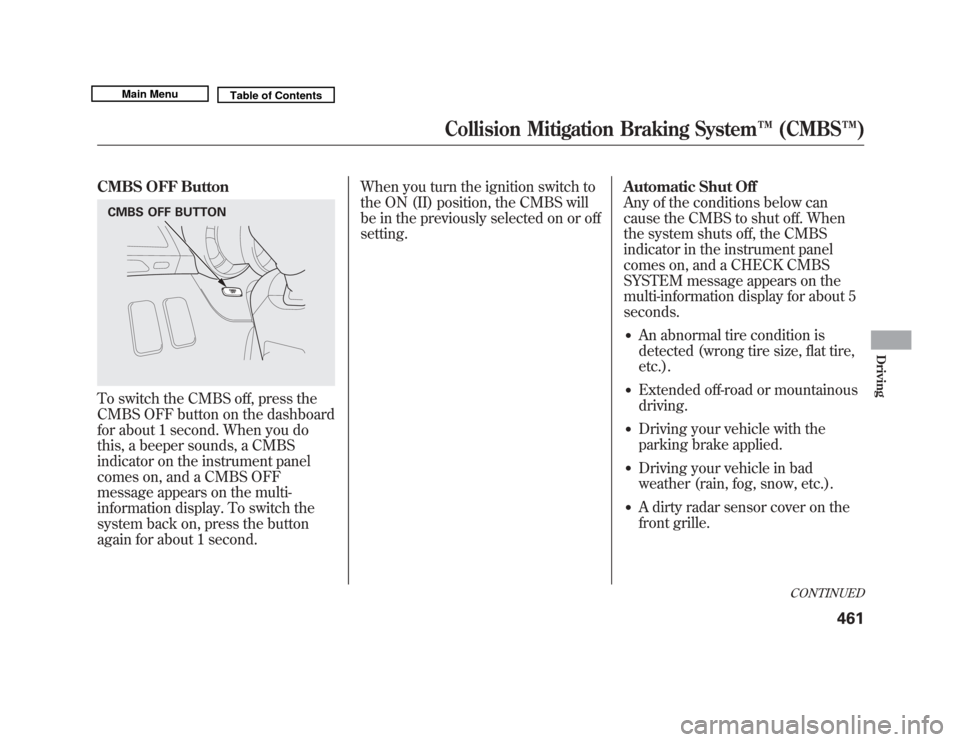
CMBS OFF ButtonTo switch the CMBS off, press the
CMBS OFF button on the dashboard
for about 1 second. When you do
this, a beeper sounds, a CMBS
indicator on the instrument panel
comes on, and a CMBS OFF
message appears on the multi-
information display. To switch the
system back on, press the button
again for about 1 second.When you turn the ignition switch to
the ON (II) position, the CMBS will
be in the previously selected on or off
setting.
Automatic Shut Off
Any of the conditions below can
cause the CMBS to shut off. When
the system shuts off, the CMBS
indicator in the instrument panel
comes on, and a CHECK CMBS
SYSTEM message appears on the
multi-information display for about 5
seconds.
●
An abnormal tire condition is
detected (wrong tire size, flat tire,
etc.).
●
Extended off-road or mountainous
driving.
●
Driving your vehicle with the
parking brake applied.
●
Driving your vehicle in bad
weather (rain, fog, snow, etc.).
●
A dirty radar sensor cover on the
front grille.
CMBS OFF BUTTON
CONTINUED
Collision Mitigation Braking System
™(CMBS™ )
461
Driving
10/06/29 11:59:04 11 ACURA MDX MMC North America Owner's M 50 31STX640 enu
Page 468 of 609

●
When the VSA system indicator
comes on (see page 467).
●
When you turn the ignition switch
to the ON (II) position, the CMBS
indicator should come on for a few
seconds, then go off. If the
indicator comes on at any other
time and a CHECK CMBS
SYSTEM message appears on the
multi-information display, there is
a problem with the CMBS. You
can still drive your vehicle, but
CMBS will not be operating. Have
your vehicle checked by a dealer.Limitations
The CMBS may not activate under
some conditions. Here are a few
examples:
●
The distance between your vehicle
and the vehicle ahead of you is too
short.
●
A vehicle cuts in front of you at a
slow speed, or it brakes suddenly.
●
When you accelerate rapidly and
approach the vehicle ahead of you
at high speed.
●
Immediately after you begin
driving.
YOUR VEHICLE
CONTINUED
Collision Mitigation Braking System
™(CMBS™ )
463
Driving
10/06/29 11:59:04 11 ACURA MDX MMC North America Owner's M 50 31STX640 enu
Page 471 of 609

Because of the road condition
(curved, winding, etc.) or the state of
your vehicle (turning angle, lane
position, etc.), CMBS can sometimes
mistake a stationary object (light
pole, traffic sign, guard rail, etc.) as a
vehicle ahead of you and temporarily
operate. This is normal.Important Safety Reminder
The main purpose of the CMBS is to
reduce the severity of injuries caused
by an unavoidable collision. While
the CMBS may help to alert you and
minimize the severity of a collision, it
may not activate in every dangerous
situation.
Even with the CMBS, it is still your
responsibility to operate the brake
pedal and steering wheel
appropriately, according to the
driving conditions.
As required by the FCC:
This device complies with Part 15 of theFCC rules. Operation is subject to the
following two conditions: (1) This devicemay not cause harmful interference, and(2) this device must accept any
interference received, includinginterference that may cause undesiredoperation.
Changes or modifications not expresslyapproved by the party responsible for
compliance could void the user'sauthority to operate the equipment.
This device complies with IndustryCanada Standard RSS-210.
Operation is subject to the following twoconditions: (1) this device may not causeinterference, and (2) this device must
accept any interference that may causeundesired operation of the device.
YOUR VEHICLE
SIGN, POLE, etc.
Collision Mitigation Braking System ™(CMBS™ )46610/06/29 11:59:04 11 ACURA MDX MMC North America Owner's M 50 31STX640 enu
Page 472 of 609

The vehicle stability assist (VSA)
system helps to stabilize the vehicle
during cornering if the vehicle turns
more or less than desired. It also
assists you in maintaining traction
while accelerating on loose or
slippery road surfaces. It does this by
regulating the engine's output and by
selectively applying the brakes.
When VSA activates, you may notice
that the engine does not respond to
the accelerator in the same way it
does at other times. There may also
be some noise from the VSA
hydraulic system. You will also see
the VSA system indicator blink.
The VSA system cannot enhance the
vehicle's driving stability in all
situations and does not control your
vehicle's entire braking system. It is
still your responsibility to drive and
corner at reasonable speeds and to
leave a sufficient margin of safety.
VSA Off Indicator
When VSA is off, the VSA off
indicator comes on as reminder.Vehicle Stability Assist
(VSA) System Indicator
When VSA activates, you will see the
VSA system indicator blink.
If this indicator comes on while
driving, pull to the side of the road
when it is safe, and turn off the
engine. Reset the system by
restarting the engine. If the VSA
system indicator stays on or comes
back on while driving, have the VSA
system inspected by your dealer.
NOTE: The main function of the VSA
system is generally known as
Electronic Stability Control (ESC).
The system also includes a traction
control function. If the indicator does not come on
when the ignition switch is turned to
the ON (II) position, there may be a
problem with the VSA system. Have
your dealer inspect your vehicle as
soon as possible.
CONTINUED
Vehicle Stability Assist (VSA
®), aka Electronic Stability Control (ESC), System
467
Driving
10/06/29 11:59:04 11 ACURA MDX MMC North America Owner's M 50 31STX640 enu
Page 474 of 609
VSA and Tire Sizes
Driving with varying tire or wheel
sizes may cause the VSA to
malfunction. When replacing tires,
make sure they are of the same size
and type as your original tires (see
page 539).
If you install winter tires, make sure
they are the same size as those that
were originally supplied with your
vehicle. Exercise the same caution
during winter driving as you would if
your vehicle was not equipped with
VSA.Hill Start Assist
Your vehicle is equipped with a hill
start assist feature to help prevent
the vehicle from rolling on steep
inclines as you move your foot from
the brake pedal to the accelerator.
This feature starts operating a few
seconds after you are in any drive
gear position (when faced uphill) or
in reverse (when faced downhill).
This feature requires that the vehicle
has come to a complete stop before it
can work.
Hill start assist may not hold a
heavily loaded vehicle, such as when
your vehicle is connected to a trailer,
or prevent your vehicle from rolling
downhill on a very steep or slippery
slope.
Vehicle Stability Assist (VSA
®), aka Electronic Stability Control (ESC), System
469
Driving
10/06/29 11:59:04 11 ACURA MDX MMC North America Owner's M 50 31STX640 enu
Page 476 of 609

BSI OperationA: Approximately 1.6 ft. (0.5m)
B: Approximately 10 ft. (3m)
C: Approximately 10 ft. (3m)
BSI is designed to detect vehicles in
specified alert zones adjacent to your
vehicle, particularly in harder to see
areas commonly known as‘‘blind
spots. ’’ When BSI detects a vehicle in an alert
zone, a BSI alert indicator comes on
near the corresponding outside
rearview mirror.
While your vehicle is moving forward
at a speed between 6 mph (10 km/h)
and 100 mph (160 km/h), the BSI alert
indicator comes on under either of the
following conditions:
●
Another vehicle overtakes you,
entering the alert zone from behind,
at a speed that differs from your
vehicle's speed by no more than 31
mph (50 km/h).
●
You pass a vehicle at a speed that
differs from that vehicle's speed by
no more than 12 mph (20 km/h).
The indicator comes on
approximately 2 seconds after the
vehicle enters the alert zone.
The system will not alert you to all
vehicles in blind spot zones (such as
vehicles you have just passed which
you should already be aware of) unless
it remains in the alert zone for
approximately 2 or more seconds.
While the system is on, BSI is active
whenever the shift lever is in the D or S
position.
A
C
B ALERT
ZONE
CONTINUED
Blind Spot Information System (BSI)
471
Driving
10/06/29 11:59:04 11 ACURA MDX MMC North America Owner's M 50 31STX640 enu