change time Acura MDX 2011 Service Manual
[x] Cancel search | Manufacturer: ACURA, Model Year: 2011, Model line: MDX, Model: Acura MDX 2011Pages: 609, PDF Size: 12.7 MB
Page 244 of 609
Changing the Folders
While playing an MP3/WMA/AAC
disc, you can select a folder within
the disc by pressing either side of
the category button. Each time you
press either side of the button, the
folder title and its first file's
information appear on the audio
display and on the navigation screen
in hierarchical order of the folders
which contain files within the disc.
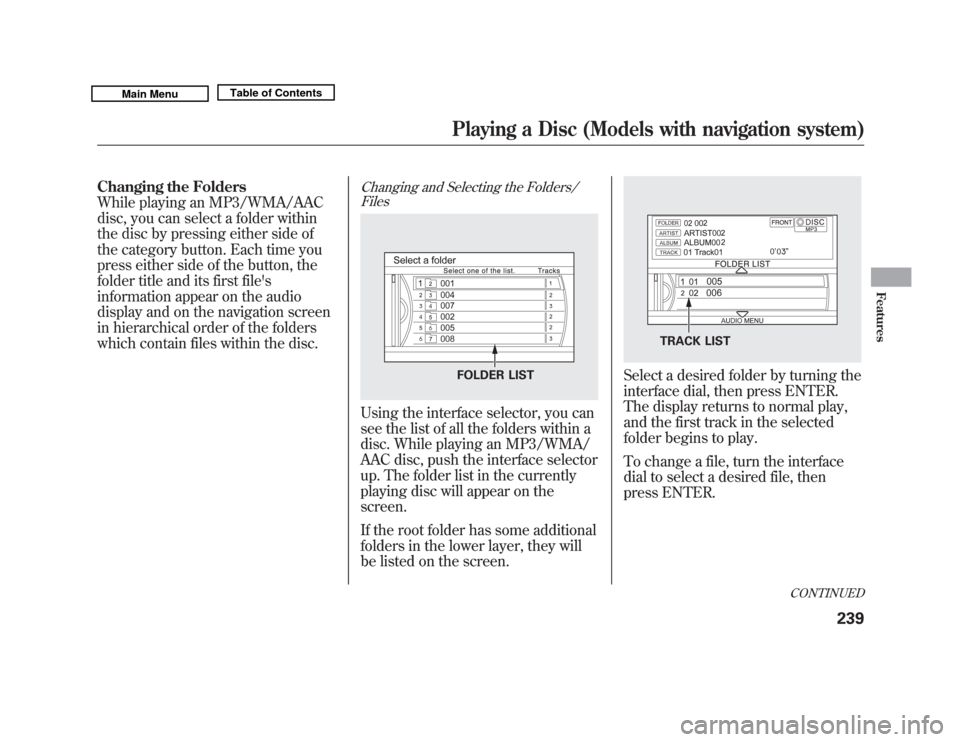
Changing and Selecting the Folders/FilesUsing the interface selector, you can
see the list of all the folders within a
disc. While playing an MP3/WMA/
AAC disc, push the interface selector
up. The folder list in the currently
playing disc will appear on the
screen.
If the root folder has some additional
folders in the lower layer, they will
be listed on the screen.
Select a desired folder by turning the
interface dial, then press ENTER.
The display returns to normal play,
and the first track in the selected
folder begins to play.
To change a file, turn the interface
dial to select a desired file, then
press ENTER.
FOLDER LIST
TRACK LIST
CONTINUED
Playing a Disc (Models with navigation system)
239
Features
10/06/29 11:59:04 11 ACURA MDX MMC North America Owner's M 50 31STX640 enu
Page 247 of 609
Folder Scan
This feature, when activated, samples
the first file of each folder for 10
seconds. To scan a folder, press the
SCAN button. Or, push the interface
selector down while playing a disc.
Turn the interface dial to select Scan
on the AUDIO MENU, and press
ENTER on the interface selector.
Turn the interface dial to select the
folder scan icon, and press ENTER
on the interface selector.
The system plays the first file in the
first folder for about 10 seconds. If
you do nothing, the system will then
play the first files in the next folders
for 10 seconds. After playing the first
file of the last folder, the system
plays normally.To turn this feature off, turn the
interface dial to select the OFF icon,
and press ENTER on the interface
selector. The last track sampled
begins to play.
NOTE:
When playing MP3, WMA or AAC
format disc, each time you press the
SCAN button, the system changes in
the following sequence: Scan
ꭟScan
first track in folder ꭟOFF ꭟScan.
Removing Discs from the Disc
Player
To remove the disc, press the eject
(
) button.
If you do not remove the disc from
the slot, the system will reload the
disc after 10 seconds. The disc starts
playing automatically.
Playing a DVD-A Disc
Use the disc controls previously
described.
Playing a Disc (Models with navigation system)24210/06/29 11:59:04 11 ACURA MDX MMC North America Owner's M 50 31STX640 enu
Page 256 of 609

●
You can listen to tracks from other
playlists that have already been
recorded while recording. Press
the HDD button and switch over to
HDD Audio.
●
With the factory settings, all of the
songs on a music CD are
automatically recorded.
●
Recording settings cannot be
changed during recording.
●
If the number of songs in the
playlist exceeds 999, the oldest
song will be overwritten each time
you add a new song.To Cancel Recording a Music CD
to HDD
In order to suspend recording, push
the interface selector down, select
Cancel Rec to HDD, and press
ENTER on the interface selector.
Changing the Recording Settings
Recording a Track on a Music CD
ManuallyTo change the setting to manual
mode, push the interface selector
down on the HDD screen. Turn the
interface dial to select HDD Setup
and press ENTER on the interface
selector. Turn the interface dial to
select Ripping, and press ENTER on
the interface selector.
HDD SETUP ICON
CONTINUED
Playing Hard Disc Drive (HDD) Audio (Models with navigation system)
251
Features
10/06/29 11:59:04 11 ACURA MDX MMC North America Owner's M 50 31STX640 enu
Page 279 of 609
Gracenote makes no representations
or warranties, express or implied,
regarding the accuracy of any
Gracenote Data from in the
Gracenote Servers. Gracenote
reserves the right to delete data from
the Gracenote Servers or to change
data categories for any cause that
Gracenote deems sufficient. No
warranty is made that the Gracenote
Software or Gracenote Servers are
error-free or that functioning of
Gracenote Software or Gracenote
Servers will be uninterrupted.
Gracenote is not obligated to provide
you with new enhanced or additional
data types or categories that
Gracenote may provide in the future
and is free to discontinue its services
at any time.GRACENOTE DISCLAIMS ALL
WARRANTIES EXPRESS OR
IMPLIED, INCLUDING, BUT NOT
LIMITED TO, IMPLIED
WARRANTIES OF
MERCHANTABILITY, FITNESS
FOR A PARTICULAR PURPOSE,
TITLE, AND
NONINFRINGEMENT.
GRACENOTE DOES NOT
WARRANT THE RESULTS THAT
WILL BE OBTAINED BY YOUR
USE OF THE GRACENOTE
SOFTWARE OR ANY GRACENOTE
SERVER. IN NO CASE WILL
GRACENOTE BE LIABLE FOR ANY
CONSEQUENTIAL OR
INCIDENTAL DAMAGES OR FOR
ANY LOST PROFITS OR LOST
REVENUES.
©Gracenote 2010Playing Hard Disc Drive (HDD) Audio (Models with navigation system)27410/06/29 11:59:04 11 ACURA MDX MMC North America Owner's M 50 31STX640 enu
Page 283 of 609
If the iPod indicator does not appear
in the audio display, check the
connections, and try to reconnect the
iPod a few times.
If the audio system still does not
recognize the iPod, the iPod may
need to be reset. Follow the
instructions that came with your
iPod, or you can find reset
instructions online at
www.apple.com/
ipod
.
The current file number and total of
the selected playable files are
displayed in the center display.
Pressing the AUDIO button displays
the artist, album and track (file)
names on the navigation screen.
To Change or Select FilesUse the SKIP button an iPod is
playing to select passages and
change files.
SKIP -Each time you press and
release the
side of the SKIP
button, the system skips forward to
the beginning of the next track.
Press and release the
side of the
button to skip backward to the
beginning of the current track. Press
it again to skip to the beginning of
the previous track.
To move rapidly within playing track,
press and hold either side (
or
) of the SKIP button.
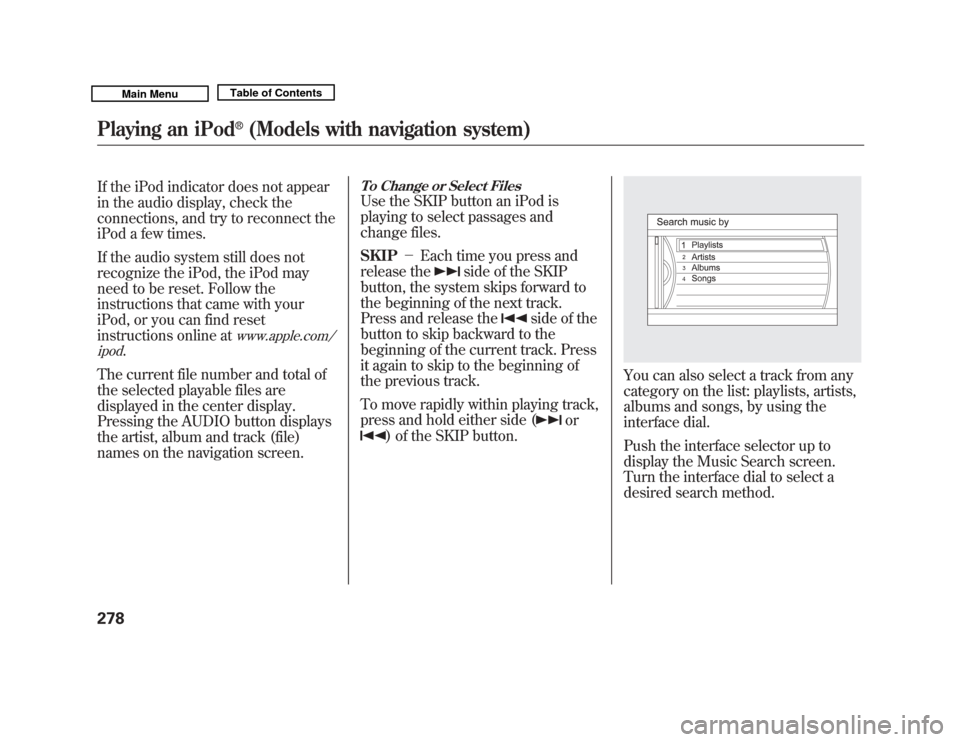
You can also select a track from any
category on the list: playlists, artists,
albums and songs, by using the
interface dial.
Push the interface selector up to
display the Music Search screen.
Turn the interface dial to select a
desired search method.
Playing an iPod
®
(Models with navigation system)
27810/06/29 11:59:04 11 ACURA MDX MMC North America Owner's M 50 31STX640 enu
Page 292 of 609
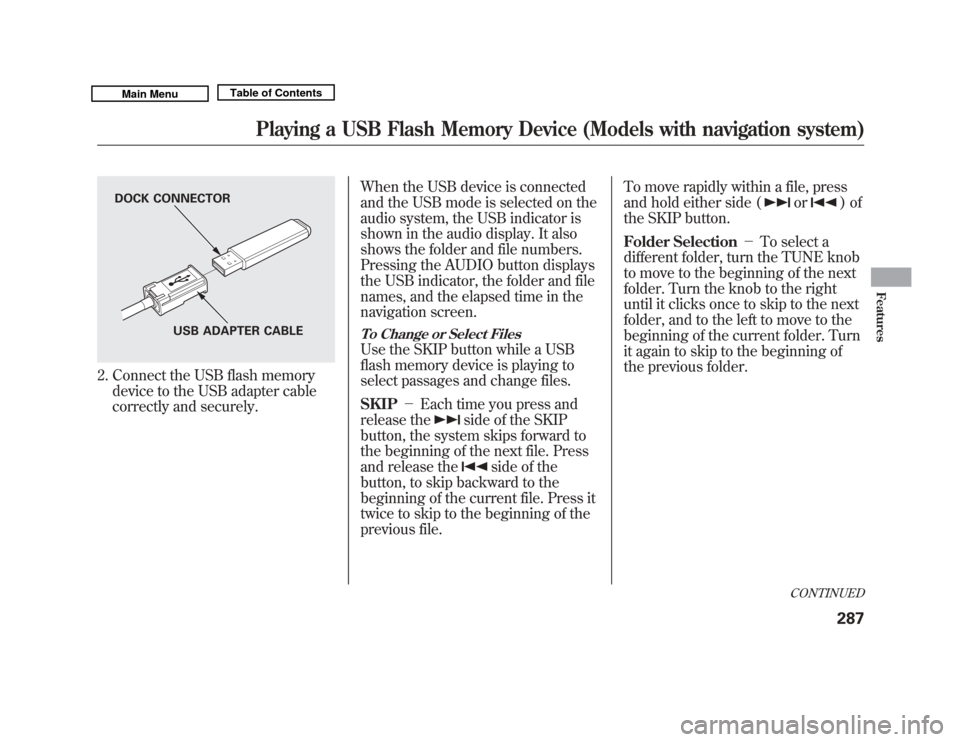
2. Connect the USB flash memorydevice to the USB adapter cable
correctly and securely. When the USB device is connected
and the USB mode is selected on the
audio system, the USB indicator is
shown in the audio display. It also
shows the folder and file numbers.
Pressing the AUDIO button displays
the USB indicator, the folder and file
names, and the elapsed time in the
navigation screen.
To Change or Select FilesUse the SKIP button while a USB
flash memory device is playing to
select passages and change files.
SKIP
-Each time you press and
release the
side of the SKIP
button, the system skips forward to
the beginning of the next file. Press
and release the
side of the
button, to skip backward to the
beginning of the current file. Press it
twice to skip to the beginning of the
previous file. To move rapidly within a file, press
and hold either side (
or
)of
the SKIP button.
Folder Selection -To select a
different folder, turn the TUNE knob
to move to the beginning of the next
folder. Turn the knob to the right
until it clicks once to skip to the next
folder, and to the left to move to the
beginning of the current folder. Turn
it again to skip to the beginning of
the previous folder.
DOCK CONNECTOR
USB ADAPTER CABLE
CONTINUED
Playing a USB Flash Memory Device (Models with navigation system)
287
Features
10/06/29 11:59:04 11 ACURA MDX MMC North America Owner's M 50 31STX640 enu
Page 303 of 609
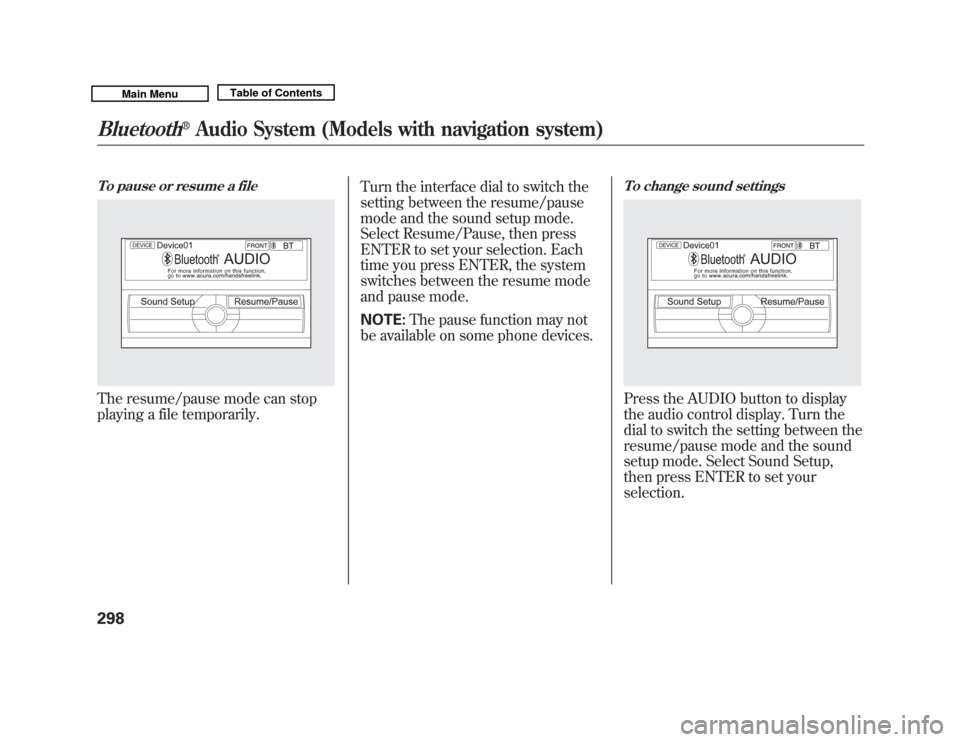
To pause or resume a fileThe resume/pause mode can stop
playing a file temporarily.Turn the interface dial to switch the
setting between the resume/pause
mode and the sound setup mode.
Select Resume/Pause, then press
ENTER to set your selection. Each
time you press ENTER, the system
switches between the resume mode
and pause mode.
NOTE:
The pause function may not
be available on some phone devices.
To change sound settingsPress the AUDIO button to display
the audio control display. Turn the
dial to switch the setting between the
resume/pause mode and the sound
setup mode. Select Sound Setup,
then press ENTER to set your
selection.
Bluetooth
®
Audio System (Models with navigation system)
29810/06/29 11:59:04 11 ACURA MDX MMC North America Owner's M 50 31STX640 enu
Page 307 of 609
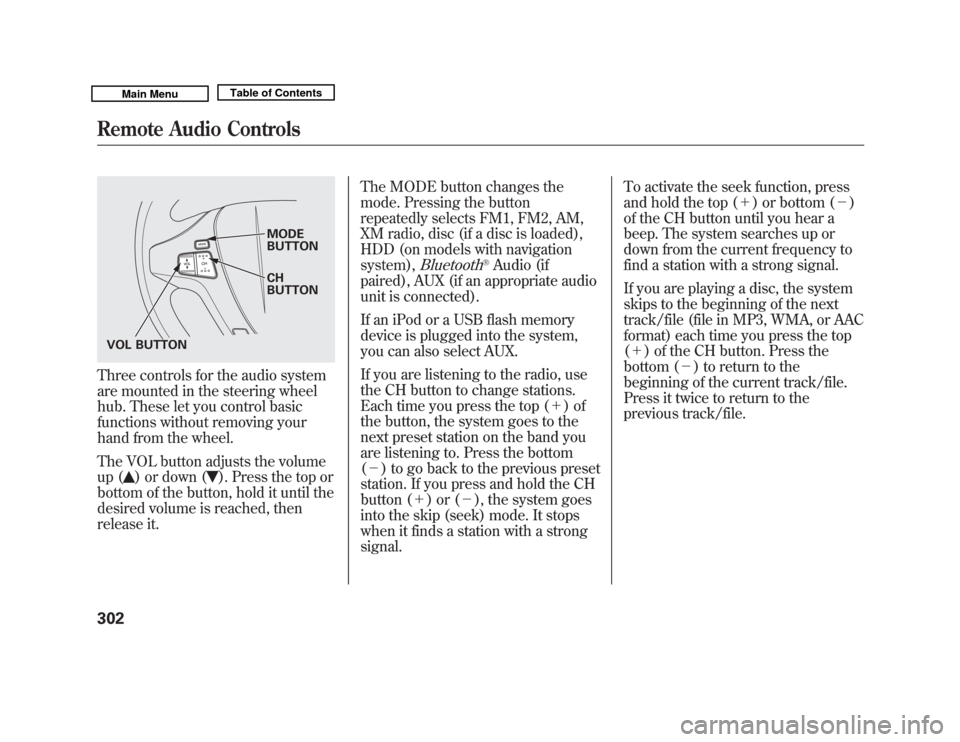
Three controls for the audio system
are mounted in the steering wheel
hub. These let you control basic
functions without removing your
hand from the wheel.
The VOL button adjusts the volume
up (
) or down (
). Press the top or
bottom of the button, hold it until the
desired volume is reached, then
release it. The MODE button changes the
mode. Pressing the button
repeatedly selects FM1, FM2, AM,
XM radio, disc (if a disc is loaded),
HDD (on models with navigation
system),
Bluetooth
®Audio (if
paired), AUX (if an appropriate audio
unit is connected).
If an iPod or a USB flash memory
device is plugged into the system,
you can also select AUX.
If you are listening to the radio, use
the CH button to change stations.
Each time you press the top (+ )of
the button, the system goes to the
next preset station on the band you
are listening to. Press the bottom
(- ) to go back to the previous preset
station. If you press and hold the CH
button (+ )or(-), the system goes
into the skip (seek) mode. It stops
when it finds a station with a strong
signal. To activate the seek function, press
and hold the top (+
) or bottom (-)
of the CH button until you hear a
beep. The system searches up or
down from the current frequency to
find a station with a strong signal.
If you are playing a disc, the system
skips to the beginning of the next
track/file (file in MP3, WMA, or AAC
format) each time you press the top
(+ ) of the CH button. Press the
bottom (- ) to return to the
beginning of the current track/file.
Press it twice to return to the
previous track/file.
MODE
BUTTON
CH
BUTTON
VOL BUTTON
Remote Audio Controls30210/06/29 11:59:04 11 ACURA MDX MMC North America Owner's M 50 31STX640 enu
Page 311 of 609
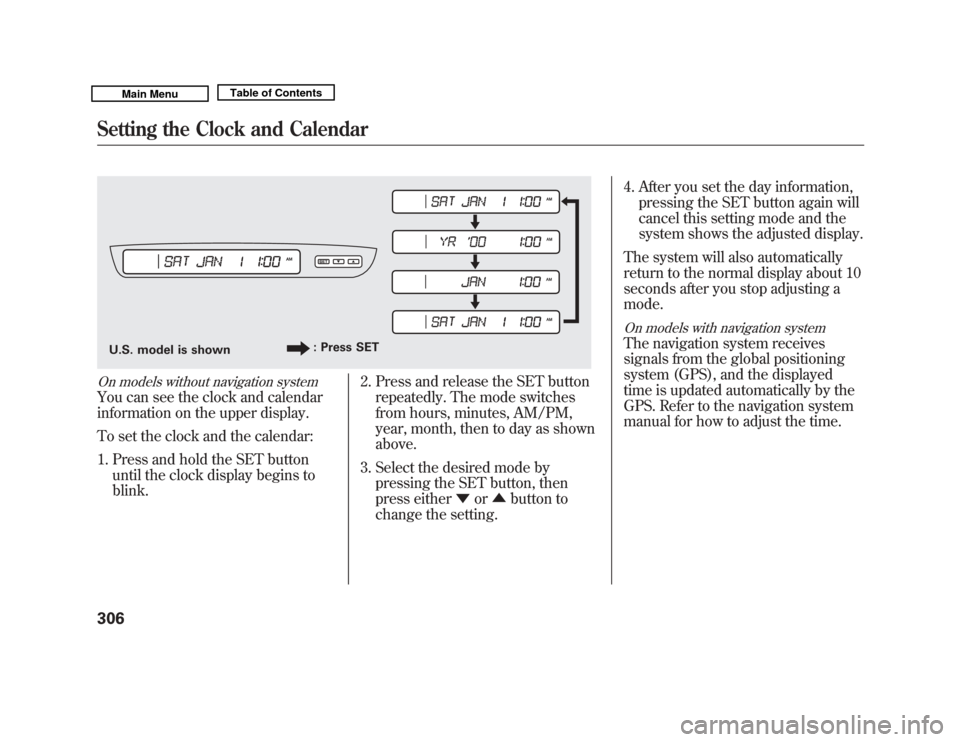
On models without navigation systemYou can see the clock and calendar
information on the upper display.
To set the clock and the calendar:1. Press and hold the SET button until the clock display begins to
blink. 2. Press and release the SET button
repeatedly. The mode switches
from hours, minutes, AM/PM,
year, month, then to day as shown
above.
3. Select the desired mode by pressing the SET button, then
press either ▼or▲ button to
change the setting. 4. After you set the day information,
pressing the SET button again will
cancel this setting mode and the
system shows the adjusted display.
The system will also automatically
return to the normal display about 10
seconds after you stop adjusting a
mode.
On models with navigation systemThe navigation system receives
signals from the global positioning
system (GPS), and the displayed
time is updated automatically by the
GPS. Refer to the navigation system
manual for how to adjust the time.
U.S. model is shown : Press SETSetting the Clock and Calendar30610/06/29 11:59:04 11 ACURA MDX MMC North America Owner's M 50 31STX640 enu
Page 320 of 609
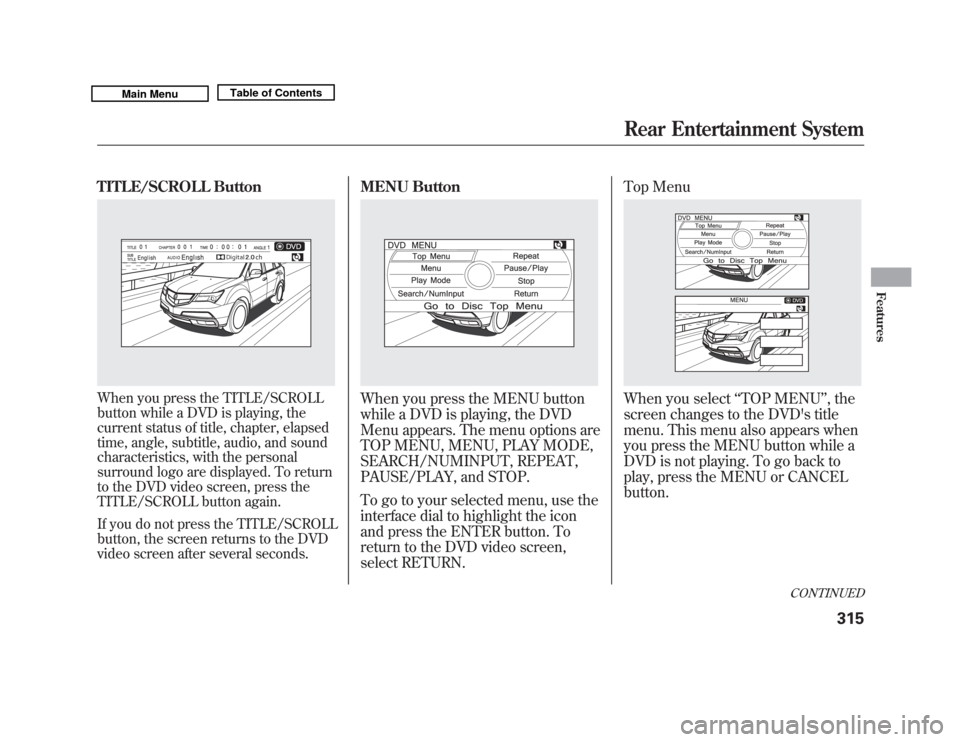
TITLE/SCROLL ButtonWhen you press the TITLE/SCROLL
button while a DVD is playing, the
current status of title, chapter, elapsed
time, angle, subtitle, audio, and sound
characteristics, with the personal
surround logo are displayed. To return
to the DVD video screen, press the
TITLE/SCROLL button again.
If you do not press the TITLE/SCROLL
button, the screen returns to the DVD
video screen after several seconds.
MENU ButtonWhen you press the MENU button
while a DVD is playing, the DVD
Menu appears. The menu options are
TOP MENU, MENU, PLAY MODE,
SEARCH/NUMINPUT, REPEAT,
PAUSE/PLAY, and STOP.
To go to your selected menu, use the
interface dial to highlight the icon
and press the ENTER button. To
return to the DVD video screen,
select RETURN.Top Menu
When you select
‘‘TOP MENU ’’, the
screen changes to the DVD's title
menu. This menu also appears when
you press the MENU button while a
DVD is not playing. To go back to
play, press the MENU or CANCEL
button.
CONTINUED
Rear Entertainment System
315
Features
10/06/29 11:59:04 11 ACURA MDX MMC North America Owner's M 50 31STX640 enu