change time Acura MDX 2011 Workshop Manual
[x] Cancel search | Manufacturer: ACURA, Model Year: 2011, Model line: MDX, Model: Acura MDX 2011Pages: 609, PDF Size: 12.7 MB
Page 336 of 609

If you forget the password, select
‘‘Password,’’ and press the
button
10 times.
The display changes as shown above.
If you want to use the default
password (1111), select ‘‘Yes, ’’and
press the ENTER button.
The message ‘‘Default password
setting applied ’’is displayed for 5
seconds. Remote Control
The rear control panel can be
detached from the ceiling unit and
used as a remote control. To remove
it from the ceiling unit, press the
release button. The control panel will
swing down partway. Pivot it down
further past the detent until it
detaches from the hinge. To reinstall
it, reverse the procedure.RELEASE BUTTON
CONTINUED
Rear Entertainment System
331
Features
10/06/29 11:59:04 11 ACURA MDX MMC North America Owner's M 50 31STX640 enu
Page 358 of 609

To slow down in small amounts, tap
the SET/DECEL button repeatedly.
Each time you do this, your vehicle
slows down about 1 mph (1 km/h).
The set cruising speed will be shown
on the multi-information display.
On a steep downhill, the vehicle
speed may exceed the set cruising
speed.
To decrease the set speed with the
brake pedal, do this:
Tap the brake pedal. When the
vehicle slows down to the speed you
want, press the SET/DECEL button.
The set speed will be shown on the
multi-information display. If you use
the brake pedal to decrease speed,
and then press the RES/ACCEL
button, your vehicle will return to the
previously set speed.Detecting a Vehicle Ahead of You
When the system detects a vehicle
ahead of you, a beeper sounds once
and a solid-line vehicle icon appears
on the multi-information display.
When that vehicle changes lanes or
goes out of ACC range, a beeper
sounds once. If there is no vehicle
ahead of you within ACC range, a
dotted-line vehicle icon will be on the
multi-information display.
To set the ACC beeper on or off, see
page 96.
U.S.
CANADA
U.S.
CANADA
CONTINUED
Adaptive Cruise Control (ACC)
353
Features
10/06/29 11:59:04 11 ACURA MDX MMC North America Owner's M 50 31STX640 enu
Page 359 of 609

Changing Vehicle DistanceWith ACC on, the distance between
your vehicle and the vehicle ahead of
you is controlled and maintained.
You can change this distance to one
of three ranges: long, middle, or
short.To change the range, press the
distance button. Each time you press
the button, the range changes from
Long, to Middle, and then to Short.
The higher your vehicle speed is, the
longer the distance between the
vehicle in front will be set as shown
below.
Speed 50 mph
(80 Km/h) 65 mph
(104 Km/h)
Vehicle
Distance Long 154 feet 47 meters 200 feet
61 meters
Middle 111 feet 34 meters 173 feet
42 meters
Short 85 feet 26 meters 101 feet
31 meters
The distance you select is also shown
on the multi-information display.
DISTANCE BUTTON
U.S.
LONG
RANGE
U.S.
CANADA CANADA
U.S.
CANADA
MIDDLE
RANGE
SHORT
RANGE
Adaptive Cruise Control (ACC)35410/06/29 11:59:04 11 ACURA MDX MMC North America Owner's M 50 31STX640 enu
Page 369 of 609
●
To change the volume level of
HFL, use the audio system volume
knob or the steering wheel volume
controls.
Help Features●
To hear general HFL information,
including help on pairing a phone
or setting up the system, say
‘‘Tutorial. ’’
●
For help at any time, including a
list of available commands, say
‘‘Hands free help.’’
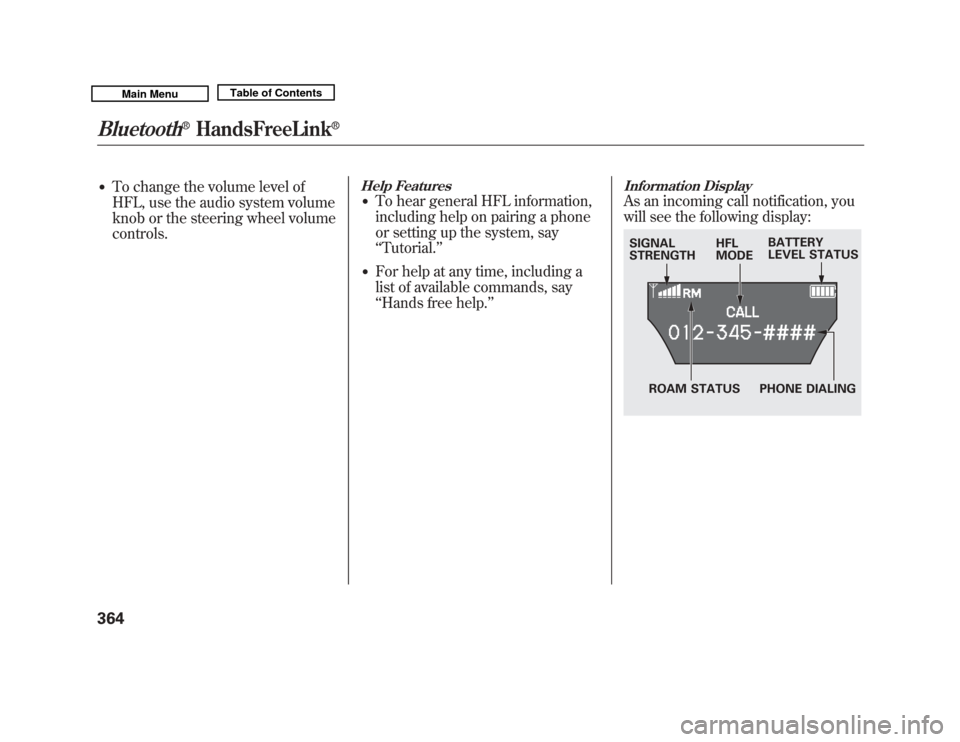
Information DisplayAs an incoming call notification, you
will see the following display:SIGNAL
STRENGTH HFL
MODEBATTERY
LEVEL STATUS
PHONE DIALING
ROAM STATUS
Bluetooth
®
HandsFreeLink
®
36410/06/29 11:59:04 11 ACURA MDX MMC North America Owner's M 50 31STX640 enu
Page 373 of 609

Press and release the HFL Talk button each time you give a command.‘‘
System
Set up ’’
ꭧ : Canadian modelsPress HFL
Talk button
‘‘
Security ’’
‘‘ Change Passcode ’’
‘‘ Call Notification ’’
‘‘ Auto Transfer ’’
‘‘ Clear ’’
‘‘ Change Language ’’
‘‘ Tutorial ’’
‘‘ Hands Free Help ’’Change language from English to French (See page 378)
ꭧ
Hear a list of available commands and additional information describing each
command (See page 364)
Hear a tutorial for general rules on using the system (See page 364) Clear the system of all paired phones, phonebook entries and security
passcode (See page 377)
Set calls to automatically transfer from your phone to HFL when
you enter the vehicle (See page 377)
Set how you would like to be notified of an incoming call
(See page 376)
Change your security passcode (See page 376)
Apply a security passcode to the system that must be input at each
key cycle to access the system (See page 376)
Bluetooth
®
HandsFreeLink
®
36810/06/29 11:59:04 11 ACURA MDX MMC North America Owner's M 50 31STX640 enu
Page 374 of 609
To use HFL, you need to pair your
Bluetooth-compatible cell phone to
the system.
Phone Setup
This command group is available for
paired cell phones.Phone pairing tips●
You cannot pair your phone while
the vehicle is moving.
●
Your phone must be in discovery
or search mode to pair. Refer to
your phone's manual.
●
Up to six phones can be paired.
●
Your phone's battery may drain
faster when it is paired to HFL.
●
If after three minutes your phone
is not ready to pair or a phone is
not found, the system will time out
and return to idle.
To pair a cell phone:1. Press and release the HFL Talkbutton. If you are pairing a phone
for the first time, HFL will give you
information about the pairing
process. If it is not the first phone
you are pairing, say ‘‘Phone
setup ’’and say ‘‘Pair .’’
2. Follow the HFL prompts and put your phone in discovery or search
mode. HFL will give you a 4-digit
pairing code and begin searching
for your phone.
3. When your phone finds a Bluetooth device, select HFL from
the options and enter the 4-digit
code from the previous step.
4. Follow the HFL prompts and name the newly paired phone.
To rename a paired phone:Press and release the HFL Talk
button before a command.
1. Say ‘‘Phone setup .’’
2. Say ‘‘Edit’’ after the prompts.
3. If there is more than one phone paired to the system, HFL will ask
you which phone's name you want
to change. Follow the HFL
prompts and rename the phone.
CONTINUED
Bluetooth
®
HandsFreeLink
®
369
Features
10/06/29 11:59:04 11 ACURA MDX MMC North America Owner's M 50 31STX640 enu
Page 376 of 609
To change from the currently linkedphone to another paired phone:Press and release the HFL Talk
button before a command.
1. Say ‘‘Phone setup .’’
2. Say ‘‘Next phone ’’after the
prompts.
3. HFL disconnects the linked phone and searches for another paired
phone.
4. Once another phone is found, it is linked to the system. HFL will
inform you which phone is now
linked.
If no other phones are found or
paired, HFL will inform you that the
original phone is linked again.
To change the pairing code setting:Press and release the HFL Talk
button before a command.
1. Say ‘‘Phone setup .’’
2. Say ‘‘Set pairing code ’’after the
prompts.
3. If you want HFL to create a random code each time you pair a
phone, say ‘‘Random .’’ If you want
to choose your own 4-digit code to
be used each time, say ‘‘Fixed ’’
and follow the HFL prompts. Making a Call
You can make calls using a name in
the HFL phonebook or any phone
number. You can also redial the last
number called.
HFL uses a Class 2 Bluetooth, which
means the maximum range between
your phone and vehicle is 30 feet (10
meters).
During a call, HFL allows you to talk
up to 30 minutes after you remove
the key from the ignition switch.
However, this may weaken the
vehicle's battery.
CONTINUED
Bluetooth
®
HandsFreeLink
®
371
Features
10/06/29 11:59:04 11 ACURA MDX MMC North America Owner's M 50 31STX640 enu
Page 381 of 609

To set a 4-digit passcode to lock theHFL system for security purposes:Press and release the HFL Talk
button before a command.
1. Say ‘‘System setup .’’
2. Say ‘‘Security ’’after the prompts.
3. Follow the HFL prompts and say the 4-digit passcode you want to
set.
4. Follow the HFL prompts to confirm the number. NOTE:
Once a passcode is set, you
will need to enter it to use HFL each
time you start the vehicle. If you
forget the code, your dealer will have
to reset it for you, or you will have to
clear the entire system (see page
377).
To change your security pass code:Press and release the HFL Talk
button before a command.
1. Say ‘‘System setup .’’
2. Say ‘‘Change passcode ’’after the
prompts.
3. Follow the HFL prompts and say the new 4-digit passcode.
4. Follow the HFL prompts to confirm the number.
Bluetooth
®
HandsFreeLink
®
37610/06/29 11:59:04 11 ACURA MDX MMC North America Owner's M 50 31STX640 enu
Page 385 of 609
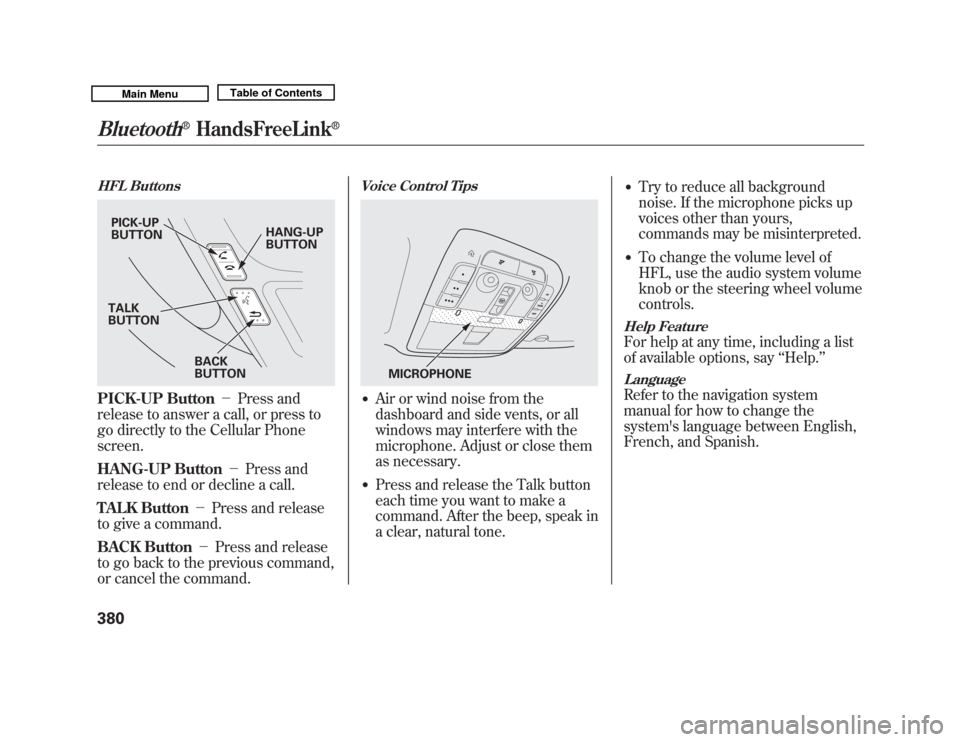
HFL ButtonsPICK-UP Button-Press and
release to answer a call, or press to
go directly to the Cellular Phone
screen.
HANG-UP Button -Press and
release to end or decline a call.
TALK Button -Press and release
to give a command.
BACK Button -Press and release
to go back to the previous command,
or cancel the command.
Voice Control Tips●
Air or wind noise from the
dashboard and side vents, or all
windows may interfere with the
microphone. Adjust or close them
as necessary.
●
Press and release the Talk button
each time you want to make a
command. After the beep, speak in
a clear, natural tone.
●
Try to reduce all background
noise. If the microphone picks up
voices other than yours,
commands may be misinterpreted.
●
To change the volume level of
HFL, use the audio system volume
knob or the steering wheel volume
controls.
Help FeatureFor help at any time, including a list
of available options, say ‘‘Help. ’’LanguageRefer to the navigation system
manual for how to change the
system's language between English,
French, and Spanish.
PICK-UP
BUTTON HANG-UP
BUTTON
BACK
BUTTON
TALK
BUTTON
MICROPHONE
Bluetooth
®
HandsFreeLink
®
38010/06/29 11:59:04 11 ACURA MDX MMC North America Owner's M 50 31STX640 enu
Page 392 of 609
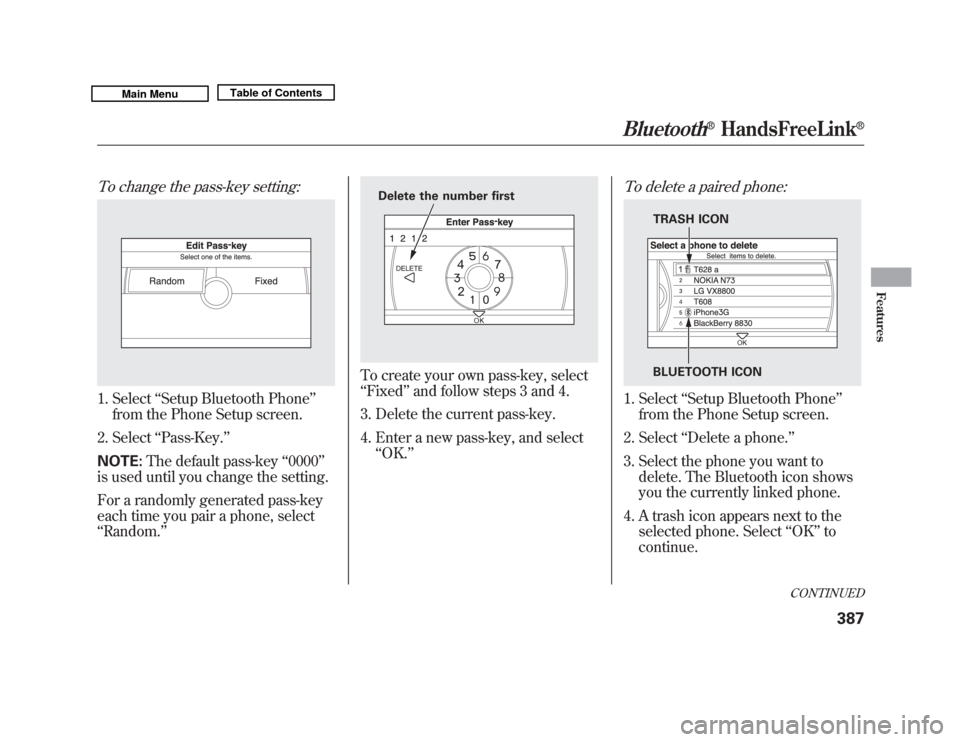
To change the pass-key setting:1. Select‘‘Setup Bluetooth Phone ’’
from the Phone Setup screen.
2. Select ‘‘Pass-Key. ’’
NOTE: The default pass-key ‘‘0000 ’’
is used until you change the setting.
For a randomly generated pass-key
each time you pair a phone, select
‘‘ Random. ’’
To create your own pass-key, select
‘‘Fixed ’’and follow steps 3 and 4.
3. Delete the current pass-key.
4. Enter a new pass-key, and select ‘‘OK. ’’
To delete a paired phone:1. Select ‘‘Setup Bluetooth Phone ’’
from the Phone Setup screen.
2. Select ‘‘Delete a phone. ’’
3. Select the phone you want to delete. The Bluetooth icon shows
you the currently linked phone.
4. A trash icon appears next to the selected phone. Select ‘‘OK ’’to
continue.
Delete the number first
TRASH ICON
BLUETOOTH ICON
CONTINUED
Bluetooth
®
HandsFreeLink
®
387
Features
10/06/29 11:59:04 11 ACURA MDX MMC North America Owner's M 50 31STX640 enu