change time Acura MDX 2011 Repair Manual
[x] Cancel search | Manufacturer: ACURA, Model Year: 2011, Model line: MDX, Model: Acura MDX 2011Pages: 609, PDF Size: 12.7 MB
Page 406 of 609
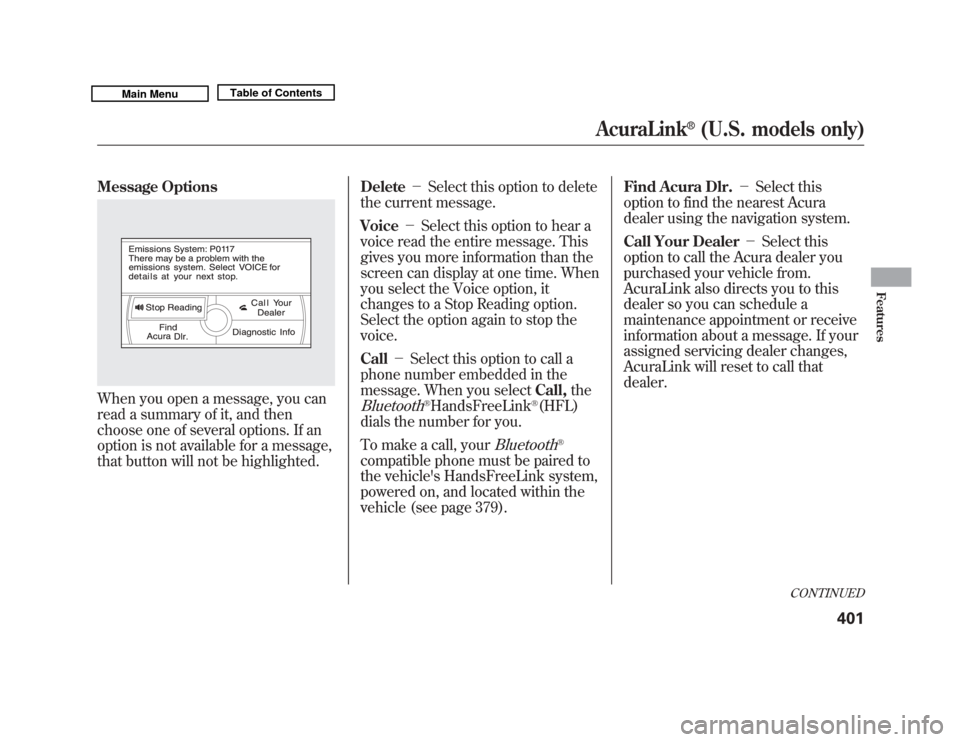
Message OptionsWhen you open a message, you can
read a summary of it, and then
choose one of several options. If an
option is not available for a message,
that button will not be highlighted.Delete
-Select this option to delete
the current message.
Voice -Select this option to hear a
voice read the entire message. This
gives you more information than the
screen can display at one time. When
you select the Voice option, it
changes to a Stop Reading option.
Select the option again to stop the
voice.
Call -Select this option to call a
phone number embedded in the
message. When you select Call,the
Bluetooth
®HandsFreeLink
®(HFL)
dials the number for you.
To make a call, your
Bluetooth
®
compatible phone must be paired to
the vehicle's HandsFreeLink system,
powered on, and located within the
vehicle (see page 379). Find Acura Dlr.
-Select this
option to find the nearest Acura
dealer using the navigation system.
Call Your Dealer -Select this
option to call the Acura dealer you
purchased your vehicle from.
AcuraLink also directs you to this
dealer so you can schedule a
maintenance appointment or receive
information about a message. If your
assigned servicing dealer changes,
AcuraLink will reset to call that
dealer.
CONTINUED
AcuraLink
®
(U.S. models only)
401
Features
10/06/29 11:59:04 11 ACURA MDX MMC North America Owner's M 50 31STX640 enu
Page 411 of 609
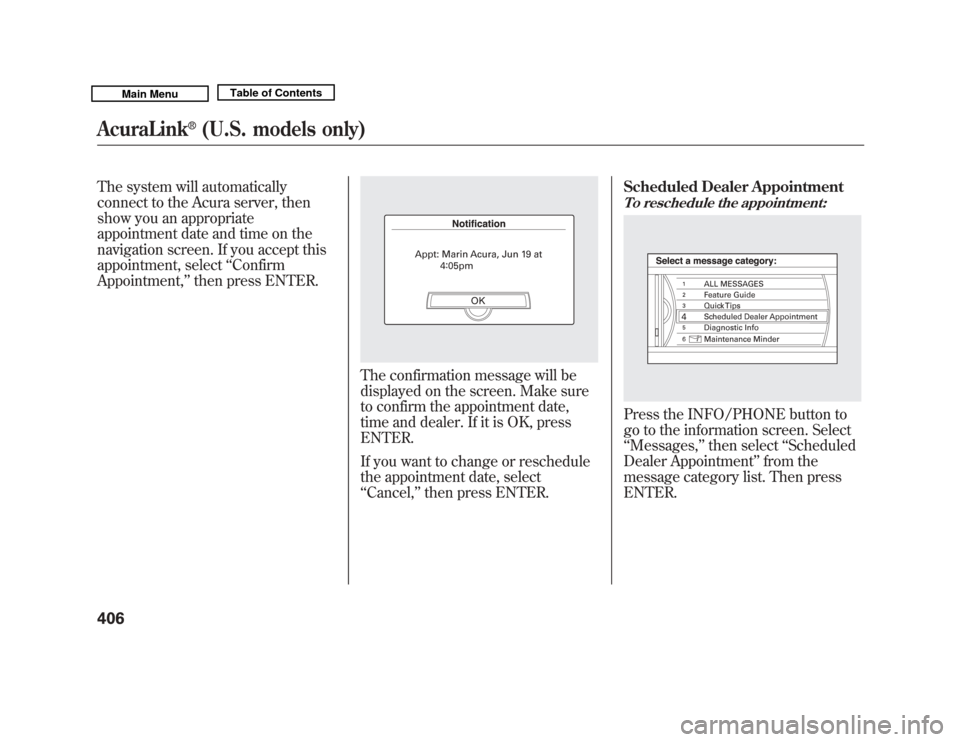
The system will automatically
connect to the Acura server, then
show you an appropriate
appointment date and time on the
navigation screen. If you accept this
appointment, select‘‘Confirm
Appointment, ’’then press ENTER.
The confirmation message will be
displayed on the screen. Make sure
to confirm the appointment date,
time and dealer. If it is OK, press
ENTER.
If you want to change or reschedule
the appointment date, select
‘‘Cancel,’’ then press ENTER. Scheduled Dealer Appointment
To reschedule the appointment:Press the INFO/PHONE button to
go to the information screen. Select
‘‘
Messages, ’’then select ‘‘Scheduled
Dealer Appointment ’’from the
message category list. Then press
ENTER.
AcuraLink
®
(U.S. models only)
40610/06/29 11:59:04 11 ACURA MDX MMC North America Owner's M 50 31STX640 enu
Page 418 of 609

To find more information onBluetooth
®compatible and enabled
cell phones, visit
www.acura.com/handsfreelink
or call
the HandsFreeLink
®consumer
support at 1-888-528-7876. Connect to the Acura Server
-
The default setting is prompt. When
a diagnostic info message appears,
and you select the Check Now
option, the system will prompt you
before connecting to the Acura
server. If you do not wish to connect
at that time, select No at the prompt,
and you will see the information from
the onboard database. The ‘‘Auto ’’
setting will remove the prompt when
you select the Check Now option and
will automatically connect to the
Acura server. This setting only
applies when you have a
Bluetooth
®
enabled phone that is paired with the
HFL and you have completed the
Phone-Data Connection setup.
As required by the FCC:
This device complies with Part 15 of theFCC rules. Operation is subject to the
following two conditions: (1) This devicemay not cause harmful interference, and(2) this device must accept any
interference received, includinginterference that may cause undesiredoperation.
Changes or modifications not expresslyapproved by the party responsible for
compliance could void the user'sauthority to operate the equipment.
AcuraLink
®
(U.S. models only)
413
Features
10/06/29 11:59:04 11 ACURA MDX MMC North America Owner's M 50 31STX640 enu
Page 451 of 609
The super handling-all wheel drive
(SH-AWD) system is a full time all-
wheel-drive system that
automatically controls and transfers
varying amounts of engine torque to
all wheels independently, according
to the driving conditions.
While the SH-AWD system helps to
enhance the vehicle's driving
stability in all situations, it is still
your responsibility to drive and
corner at reasonable speeds and to
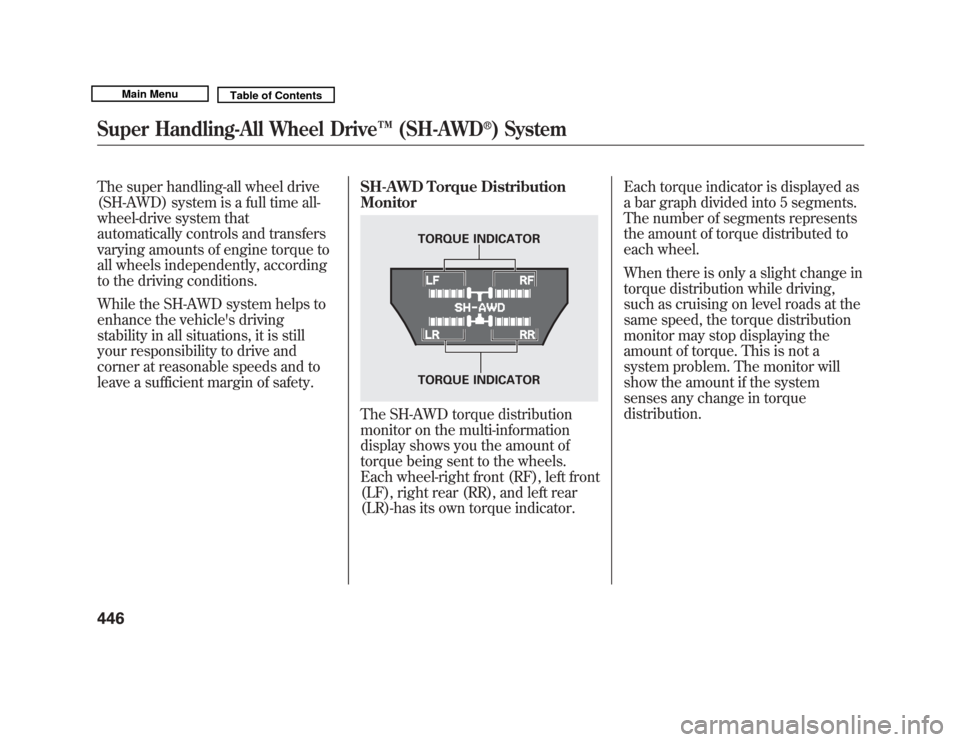
leave a sufficient margin of safety.SH-AWD Torque Distribution
Monitor
The SH-AWD torque distribution
monitor on the multi-information
display shows you the amount of
torque being sent to the wheels.
Each wheel-right front (RF), left front
(LF), right rear (RR), and left rear
(LR)-has its own torque indicator.Each torque indicator is displayed as
a bar graph divided into 5 segments.
The number of segments represents
the amount of torque distributed to
each wheel.
When there is only a slight change in
torque distribution while driving,
such as cruising on level roads at the
same speed, the torque distribution
monitor may stop displaying the
amount of torque. This is not a
system problem. The monitor will
show the amount if the system
senses any change in torque
distribution.
TORQUE INDICATOR
TORQUE INDICATOR
Super Handling-All Wheel Drive
™(SH-AWD
®) System
44610/06/29 11:59:04 11 ACURA MDX MMC North America Owner's M 50 31STX640 enu
Page 459 of 609
As required by the FCC:This device complies with Part 15 of theFCC rules. Operation is subject to the
following two conditions: (1) This devicemay not cause harmful interference, and(2) this device must accept any
interference received, includinginterference that may cause undesiredoperation.
Changes or modifications not expresslyapproved by the party responsible forcompliance could void the user's
authority to operate the equipment.This device complies with IndustryCanada Standard RSS-210.
Operation is subject to the following twoconditions: (1) this device may not cause
interference, and (2) this device mustaccept any interference that may causeundesired operation of the device.
Braking System
Your vehicle is equipped with disc
brakes at all four wheels. A power
assist helps reduce the effort needed
on the brake pedal. The emergency
brake assist system increases the
stopping force when you depress the
brake pedal hard in an emergency
situation. The anti-lock brake system
(ABS) helps you retain steering
control when braking very hard.
Resting your foot on the pedal keeps
the brakes applied lightly, builds up
heat, and reduces their effectiveness
and reduces brake pad life. In
addition, fuel economy can be
reduced. It also keeps your brake
lights on all the time, confusing
drivers behind you. Constant application of the brakes
when going down a long hill builds
up heat and reduces their
effectiveness. Use the engine to
assist the brakes by taking your foot
off the accelerator and downshifting
to a lower gear.
Check the brakes after driving
through deep water. Apply the
brakes moderately to see if they feel
normal. If not, apply them gently and
frequently until they do. Be extra
cautious in your driving.
Tire Pressure Monitoring System (TPMS), Braking System45410/06/29 11:59:04 11 ACURA MDX MMC North America Owner's M 50 31STX640 enu
Page 461 of 609
ABS Indicator
If this indicator comes on, the anti-
lock function of the braking system
has shut down. The brakes still work
like a conventional system, but
without anti-lock. You should have
your dealer inspect your vehicle as
soon as possible.
You will also see a ‘‘CHECK ABS
SYSTEM ’’message on the multi-
information display (see page 87).
If the indicator comes on while
driving, test the brakes as instructed
on page 558. If the ABS indicator and the brake
system indicator come on together,
and the parking brake is fully
released, the EBD system may also
be shut down.
Test your brakes as instructed on
page 558. If the brakes feel normal,
drive slowly and have your vehicle
repaired by your dealer as soon as
possible. Avoid sudden hard braking
which could cause the rear wheels to
lock up and possibly lead to a loss of
control.
Important Safety Reminders
ABS does not reduce the time or
distance it takes to stop the
vehicle.
It only helps with steering
control during braking.
ABS will not prevent a skid that
results from changing direction
abruptly, such as trying to take a
corner too fast or making a sudden
lane change. Always drive at a safe
speed for the road and weather
conditions.
ABS cannot prevent a loss of
stability. Always steer moderately
when you are braking hard. Severe
or sharp steering wheel movement
can still cause your vehicle to veer
into oncoming traffic or off the road.
A vehicle with ABS may require a
longer distance to stop on loose or
uneven surfaces, such as gravel or
snow, than a vehicle without anti-
lock.
Anti-lock Brakes (ABS)45610/06/29 11:59:04 11 ACURA MDX MMC North America Owner's M 50 31STX640 enu
Page 471 of 609

Because of the road condition
(curved, winding, etc.) or the state of
your vehicle (turning angle, lane
position, etc.), CMBS can sometimes
mistake a stationary object (light
pole, traffic sign, guard rail, etc.) as a
vehicle ahead of you and temporarily
operate. This is normal.Important Safety Reminder
The main purpose of the CMBS is to
reduce the severity of injuries caused
by an unavoidable collision. While
the CMBS may help to alert you and
minimize the severity of a collision, it
may not activate in every dangerous
situation.
Even with the CMBS, it is still your
responsibility to operate the brake
pedal and steering wheel
appropriately, according to the
driving conditions.
As required by the FCC:
This device complies with Part 15 of theFCC rules. Operation is subject to the
following two conditions: (1) This devicemay not cause harmful interference, and(2) this device must accept any
interference received, includinginterference that may cause undesiredoperation.
Changes or modifications not expresslyapproved by the party responsible for
compliance could void the user'sauthority to operate the equipment.
This device complies with IndustryCanada Standard RSS-210.
Operation is subject to the following twoconditions: (1) this device may not causeinterference, and (2) this device must
accept any interference that may causeundesired operation of the device.
YOUR VEHICLE
SIGN, POLE, etc.
Collision Mitigation Braking System ™(CMBS™ )46610/06/29 11:59:04 11 ACURA MDX MMC North America Owner's M 50 31STX640 enu
Page 507 of 609
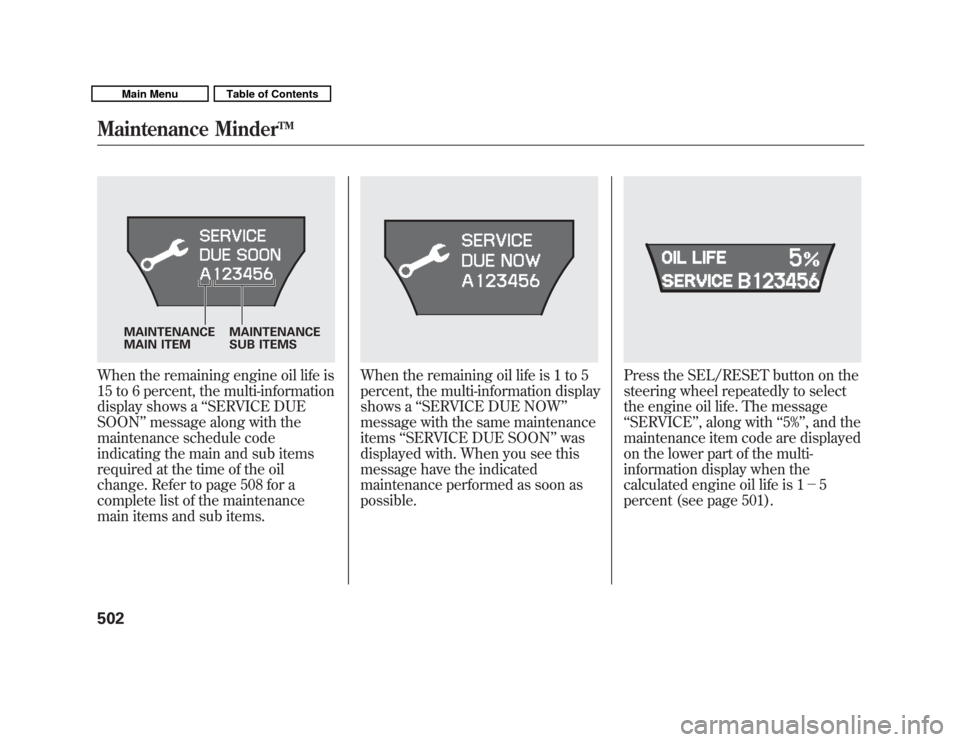
When the remaining engine oil life is
15 to 6 percent, the multi-information
display shows a‘‘SERVICE DUE
SOON ’’message along with the
maintenance schedule code
indicating the main and sub items
required at the time of the oil
change. Refer to page 508 for a
complete list of the maintenance
main items and sub items.
When the remaining oil life is 1 to 5
percent, the multi-information display
shows a ‘‘SERVICE DUE NOW ’’
message with the same maintenance
items ‘‘SERVICE DUE SOON ’’was
displayed with. When you see this
message have the indicated
maintenance performed as soon as
possible.
Press the SEL/RESET button on the
steering wheel repeatedly to select
the engine oil life. The message
‘‘ SERVICE ’’, along with ‘‘5% ’’, and the
maintenance item code are displayed
on the lower part of the multi-
information display when the
calculated engine oil life is 1- 5
percent (see page 501).
MAINTENANCE
MAIN ITEM MAINTENANCE
SUB ITEMS
Maintenance Minder
TM
50210/06/29 11:59:04 11 ACURA MDX MMC North America Owner's M 50 31STX640 enu
Page 529 of 609
Replacing Front Fog/Daytime
Running Light Bulbs
Your vehicle uses halogen light
bulbs. When replacing a bulb, handle
it by its plastic case, and protect the
glass from contact with your skin or
hard objects. If you touch the glass,
clean it with denatured alcohol and a
clean cloth.Halogen bulbs get very hot when lit.
Oil, perspiration, or a scratch on the
glass can cause the bulb to overheat
and shatter.1. To change the bulb on the driver's side, start the engine, turn the
steering wheel all the way to the
right, then turn off the engine. To
change the bulb on the
passenger's side, turn the steering
wheel to the left.
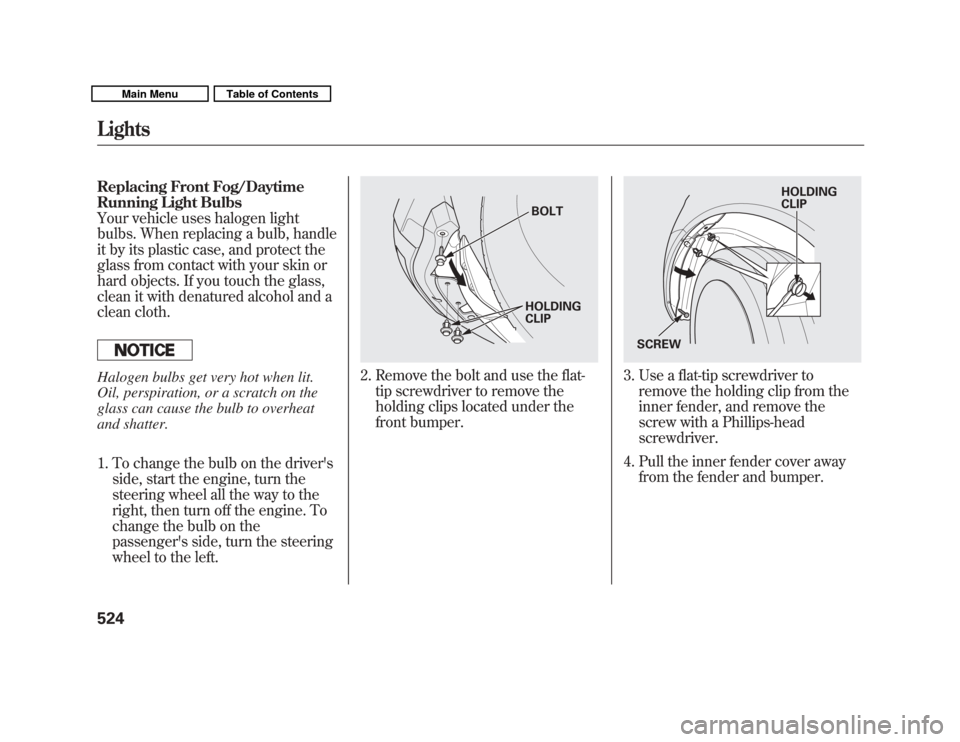
2. Remove the bolt and use the flat-tip screwdriver to remove the
holding clips located under the
front bumper.
3. Use a flat-tip screwdriver toremove the holding clip from the
inner fender, and remove the
screw with a Phillips-head
screwdriver.
4. Pull the inner fender cover away from the fender and bumper.
BOLT
HOLDING
CLIP
HOLDING
CLIP
SCREW
Lights52410/06/29 11:59:04 11 ACURA MDX MMC North America Owner's M 50 31STX640 enu
Page 598 of 609
CoolantAdding
....................................
514
Checking
................................
422
Proper Solution
.......................
514
Temperature Gauge
.................
76
Crankcase Emissions Control System
...................................
580
Cruise Control Indicator
...............
73
Cruise Control Operation
...........
342
Cruise Main Indicator
..................
73
Cup Holders
...............................
172
Customize Settings
......................
89
D
DANGER, Explanation of
.............
iii
Dashboard
...............................
3, 64
Daytime Running Lights
............
129
Dead Battery
..............................
552
Defogger, Rear Window
.............
131
Defrosting the Windows
............
184
Dimensions
................................
572
Dimming the Headlights
............
127
Dipstick Automatic Transmission
.........
517 Engine Oil
...............................
422
Directional Signals
...............
69, 127
Disc Brake Wear Indicators.......
455
Disc Care
...................................
244
Disc Changer
.............................
200
Disc Changer Error Messages
...............................
208
Disc Player
..........................
200, 232
Disc Player Error Messages......
243
Disposal of Used Oil
...................
513
Doors Childproof Door Locks
............
140
Indicator
...................................
12
Locking and Unlocking
...........
139
Lockout Prevention
.................
140
Power Door Locks
..................
139
DOT Tire Quality Grading (U.S. Vehicles)
................................
574
Driver and Passenger Safety
..........
5
Driving
.......................................
433
Economy
.................................
423
Driving Guidelines
.....................
434
Driving Position Memory System
...................................
166
Driving with the Paddle Shifters
...................................
441 Dust and Pollen Filter
................
528
DVD Player
................................
310
DVD Player Error Messages
......
334
E
Economy, Fuel
...........................
423
Emergencies on the Road
..........
543
Battery, Jump Starting
.............
552
Brake System Indicator
.....
67, 558
Changing a Flat Tire
...............
545
Charging System Indicator
........................
67, 556
Checking the Fuses
................
560
Driving with a Flat Tire
...........
544
Hazard Warning Flashers
.......
131
Jump Starting
..........................
552
Low Oil Pressure Indicator
........................
67, 556
Malfunction Indicator Lamp
.............................
67, 557
Opening the Fuel Fill Door Manually
.............................
566
Overheated Engine
.................
554
Towing
....................................
566
CONTINUED
Index
III
INDEX
10/06/29 11:59:04 11 ACURA MDX MMC North America Owner's M 50 31STX640 enu