display Acura MDX 2016 Navigation Manual
[x] Cancel search | Manufacturer: ACURA, Model Year: 2016, Model line: MDX, Model: Acura MDX 2016Pages: 349, PDF Size: 14.87 MB
Page 140 of 349

139
XX
Changing Your Destination
XSelecting a Destination on the Map
Navigation
Selecting a Destination on the MapSelect a new destination when en route by selecting a location on the map.
1.Scroll the map to position the
cursor over your desired
destination, adjusting the map
scale as necessary. Press u.
X
If the address displayed is not
the desired location, press the
BACK button and repeat the
procedure.
2. Rotate i to select Set as
Destination . Press u.
2Calculating the Route
P. 114
3. Move r to select Clear Current
Route . Press u.
X
The route is automatically
recalculated and displayed on
the map screen.
X
Rotate i to edit the order to
set the location as a new
waypoint. Press u.
1Selecting a Destination on the Map
If there is more than one icon or street under the
map cursor, you are prompted to select the item
from a list.
Rotate i to select an item. Press u.
MDX_KA-31TZ58200.book 139 ページ 2014年12月18日 木曜日 午後3時59分
Page 141 of 349

140
XX
Changing Your Destination
XEntering a New Destination
Navigation
Entering a New DestinationHMENU button (when en route)
X Destination
Enter a new destination using the Destinat ion Menu screen even when you are en
route.
1.Rotate i to select a method to
enter a new destination.
2 Entering a Destination
P. 90
X
After entering a new
destination, the address is
displayed on the Calculate
Route screen.
2. Rotate i to select Set as
Destination . Press u.
3. Move r to select Clear Current
Route . Press u.
X
The route is automatically
recalculated and displayed on
the map screen.
X
Rotate i to edit the order to
set the location as a new
waypoint. Press u.
1Entering a New Destination
d “Display Destination” , d “Display
Navigation”
MDX_KA-31TZ58200.book 140 ページ 2014年12月18日 木曜日 午後3時59分
Page 142 of 349
141Navigation
Resuming Your TripStop your vehicle en route (e.g., to rest, stop for gas, etc.), and then continue on
your route.
If you did not complete your route, the C ontinue Trip screen is displayed when you
restart your vehicle.
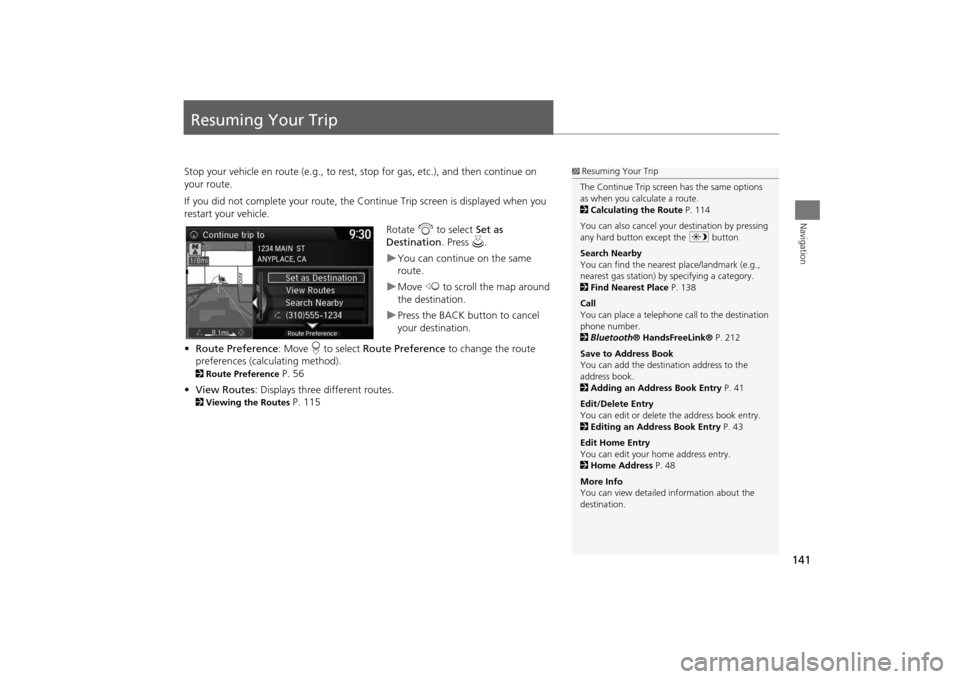
Rotate i to select Set as
Destination . Press u.
XYou can continue on the same
route.XMove w to scroll the map around
the destination.XPress the BACK button to cancel
your destination.
• Route Preference : Move r to select Route Preference to change the route
preferences (calculating method).
2 Route Preference
P. 56
• View Routes : Displays three different routes.
2Viewing the Routes
P. 115
1R
esum
ing
Your
Trip
The Continue Trip screen has the same options
as when you calculate a route.
2 Calculating the Route P. 114
You can also cancel your destination by pressing
any hard button except the a button
Search Nearby
You can find the nearest place/landmark (e.g.,
nearest gas station) by specifying a category.
2 Find Nearest Place P. 138
Call
You can place a telephone ca ll to the destination
phone number.
2 Bluetooth ® HandsFreeLink® P. 212
Save to Address Book
You can add the destination address to the
address book.
2 Adding an Address Book Entry P. 41
Edit/Delete Entry
You can edit or delete the address book entry.
2 Editing an Address Book Entry P. 43
Edit Home Entry
You can edit your home address entry.
2 Home Address P. 48
More Info
You can view detailed information about the
destination.
MDX_KA-31TZ58200.book 141 ページ 2014年12月18日 木曜日 午後3時59分
Page 146 of 349
145
XX
Audio System
XUSB Port
Audio
USB Port
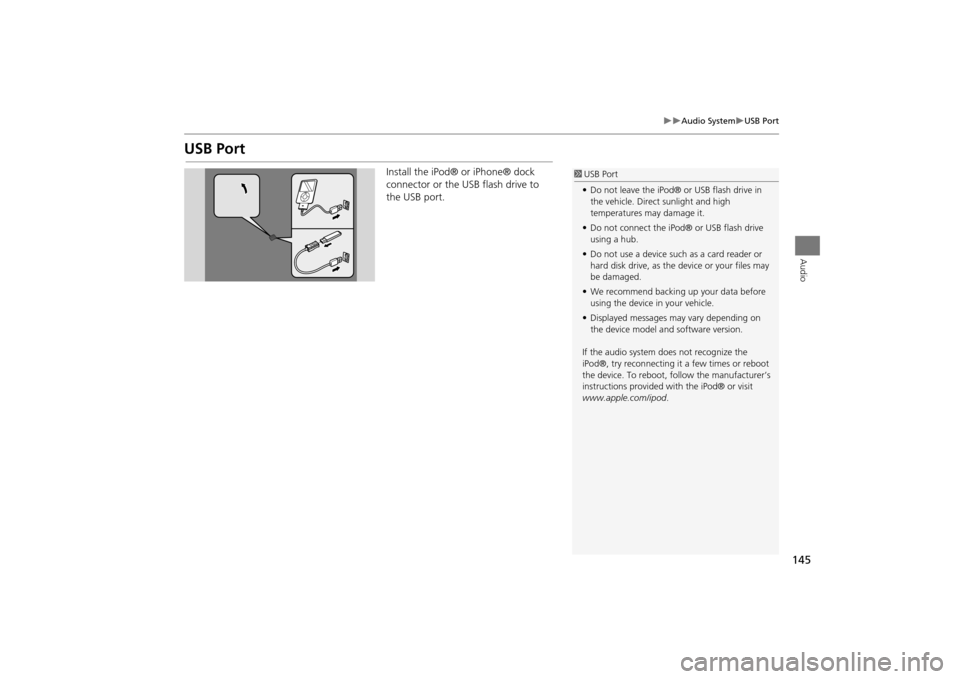
Install the iPod® or iPhone® dock
connector or the USB flash drive to
the USB port.
1 USB Port
• Do not leave the iPod® or USB flash drive in
the vehicle. Direct sunlight and high
temperatures may damage it.
• Do not connect the iPod® or USB flash drive
using a hub.
• Do not use a device such as a card reader or
hard disk drive, as the device or your files may
be damaged.
• We recommend backing up your data before
using the device in your vehicle.
• Displayed messages may vary depending on
the device model a nd software version.
If the audio system does not recognize the
iPod®, try reconnecting it a few times or reboot
the device. To reboot, fo llow the manufacturer’s
instructions provided wi th the iPod® or visit
www.apple.com/ipod.
MDX_KA-31TZ58200.book 145 ページ 2014年12月18日 木曜日 午後3時59分
Page 148 of 349
147
XX
Audio System
XAudio System Theft Protection
Audio
Audio System Theft ProtectionThe audio system is disabled when it is disconnected from the power source, such as
when the battery is disconnected or goes dead. In certain conditions, the system may
display Enter code . If this occurs, reactivate the audio system.
1. Set the power mode to ON.
2. Turn on the audio system.
3. Press and hold the audio system power button for more than two seconds.X
The audio system is reac tivated when the audio c ontrol unit establishes a
connection with the vehicle control unit. If the control unit fails to recognize
the audio unit, you must go to a deal er and have the audio unit checked.
■Reactivate the audio system
MDX_KA-31TZ58200.book 147 ページ 2014年12月18日 木曜日 午後3時59分
Page 152 of 349
151Audio
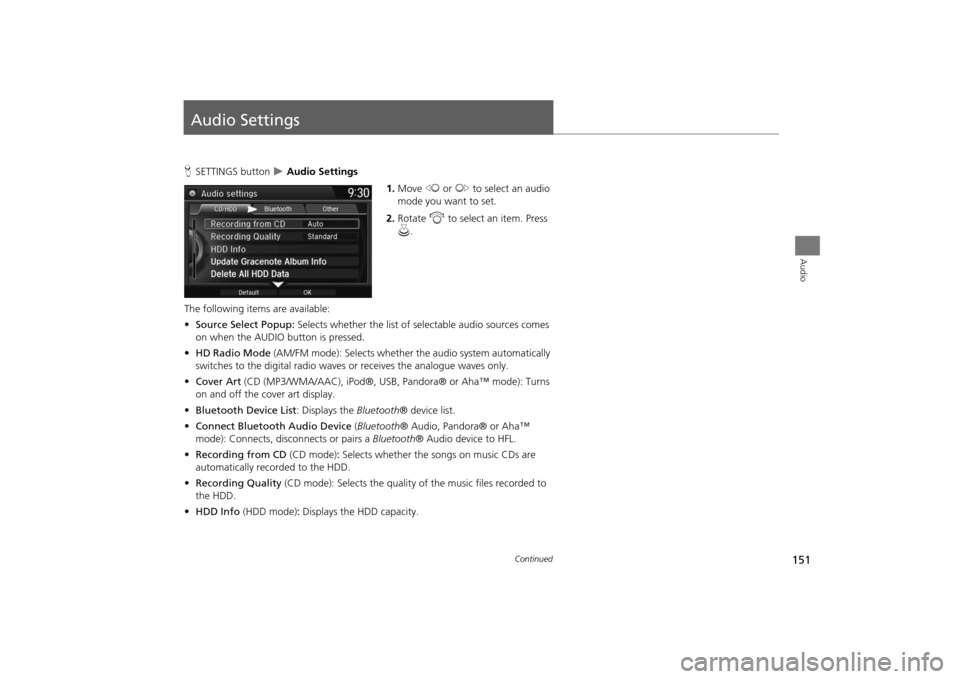
Audio SettingsHSETTINGS button
X Audio Settings
1.Move w or y to select an audio
mode you want to set.
2. Rotate i to select an item. Press
u .
The following items are available:
• Source Select Popup: Selects whether the list of selectable audio sources comes
on when the AUDIO button is pressed.
• HD Radio Mode (AM/FM mode): Selects whether the audio system automatically
switches to the digital radio waves or receives the analogue waves only.
• Cover Art (CD (MP3/WMA/AAC), iPod ®, USB, Pandora® or Aha™ mode): Turns
on and off the cover art display.
• Bluetooth Device List: Displays the Bluetooth® device list.
• Connect Bluetooth Audio Device (Bluetooth ® Audio, Pandora® or Aha™
mode): Connects, disconnects or pairs a Bluetooth® Audio device to HFL.
• Recording from CD (CD mode): Selects whether the songs on music CDs are
automatically recorded to the HDD.
• Recording Quality (CD mode): Selects the quality of the music files recorded to
the HDD.
• HDD Info (HDD mode) : Displays the HDD capacity.
Continued
MDX_KA-31TZ58200.book 151 ページ 2014年12月18日 木曜日 午後3時59分
Page 153 of 349
152
XX
Audio Settings
X
Audio
•Update Gracenote Album Info (CD or HDD mode): Updates the Gracenote®
Album Info (Gracenote® Media Database) from CD or from USB.
2
Updating Gracenote® Album Info
P. 183
• DVD Auto Play (DVD mode): Turns the auto play feature on or off.
• Audio Language (DVD mode): Selects a language for the audio that is available
on the DVD.
• Subtitle Language (DVD mode): Selects a language for the subtitle that is
available on the DVD.
• Menu Language (DVD mode): Selects a language for the DVD menu that is
available on the DVD.
• Angle Mark (DVD mode): Sets whether to display the angle symbol.
• Dynamic Range (DVD mode): Sets whether to control the range of the loud and
low sounds.
• Delete All HDD Data (HDD mode): Resets all the menu and customized settings,
and delete all music data on the HDD.
• Default: Cancels/Resets all cu stomized items in the Audio Settings group as
default.
MDX_KA-31TZ58200.book 152 ページ 2014年12月18日 木曜日 午後3時59分
Page 155 of 349
154
XX
Audio Settings
XAdjusting the Sound
Audio
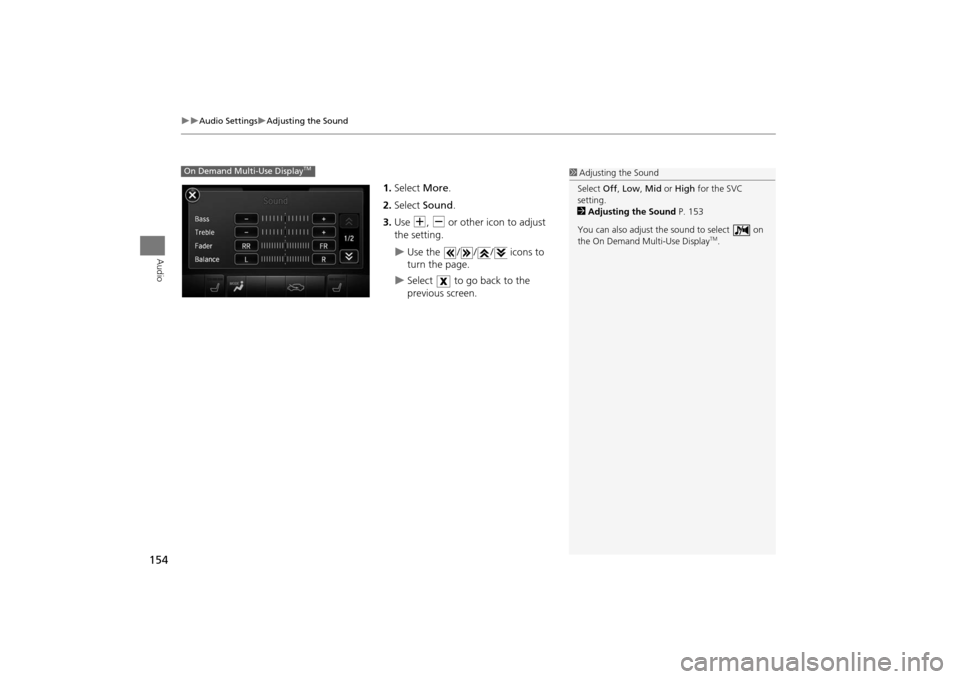
1.Select More.
2. Select Sound .
3. Use N, B or other icon to adjust
the setting.X
Use the / / / icons to
turn the page.
X
Select to go back to the
previous screen.
On Demand Multi-Use Display
TM
1 Adjusting the Sound
Select Off, Low , Mid or High for the SVC
setting.
2 Adjusting the Sound P. 153
You can also adjust th e sound to select on
the On Demand Multi-Use Display
TM.
MDX_KA-31TZ58200.book 154 ページ 2014年12月18日 木曜日 午後3時59分
Page 156 of 349
155Audio
Playing FM/AM RadioSelecting FM/AM Mode1.Press the MENU button.(in AUDIO mode)
2. Rotate i to select Change Source . Press u.
3. Rotate i to select the frequency band (FM, AM). Press u.X
The band and frequency are displayed on the audio/information screen.
1. Select Audio Source .
2. Select the frequency band (AM, FM) icon.
X
The band and frequency are displayed on the On Demand Multi-Use Display
TM.
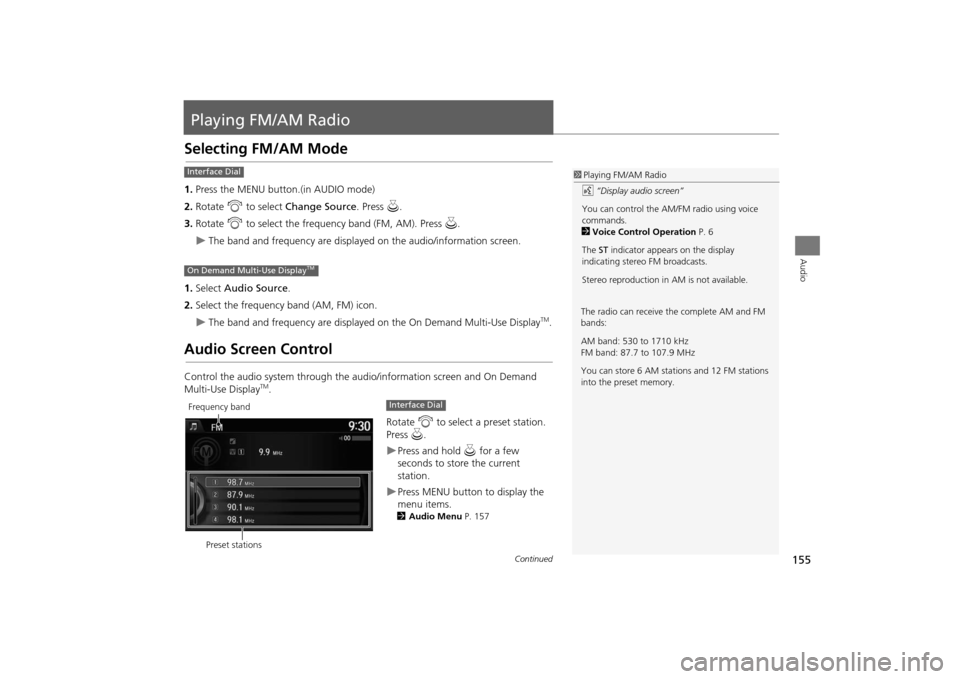
Audio Screen ControlControl the audio system through the audio/information screen and On Demand
Multi-Use Display
TM.
Rotate i to select a preset station.
Press u.
XPress and hold u for a few
seconds to store the current
station.XPress MENU button to display the
menu items.2 Audio Menu P. 157
1Playing FM/AM Radio
d “Display audio screen”
You can control the AM/FM radio using voice
commands.
2 Voice Control Operation P. 6
The ST indicator appears on the display
indicating stereo FM broadcasts.
Stereo reproduction in AM is not available.
Interface DialOn Demand Multi-Use Display
TM
The radio can receive the complete AM and FM
bands:
AM band: 530 to 1710 kHz
FM band: 87.7 to 107.9 MHz
You can store 6 AM stations and 12 FM stations
into the preset memory.
Preset stations
Frequency band
Interface Dial
Continued
MDX_KA-31TZ58200.book 155 ページ 2014年12月18日 木曜日 午後3時59分
Page 157 of 349
156
XX
Playing FM/AM Radio
XAudio Screen Control
Audio
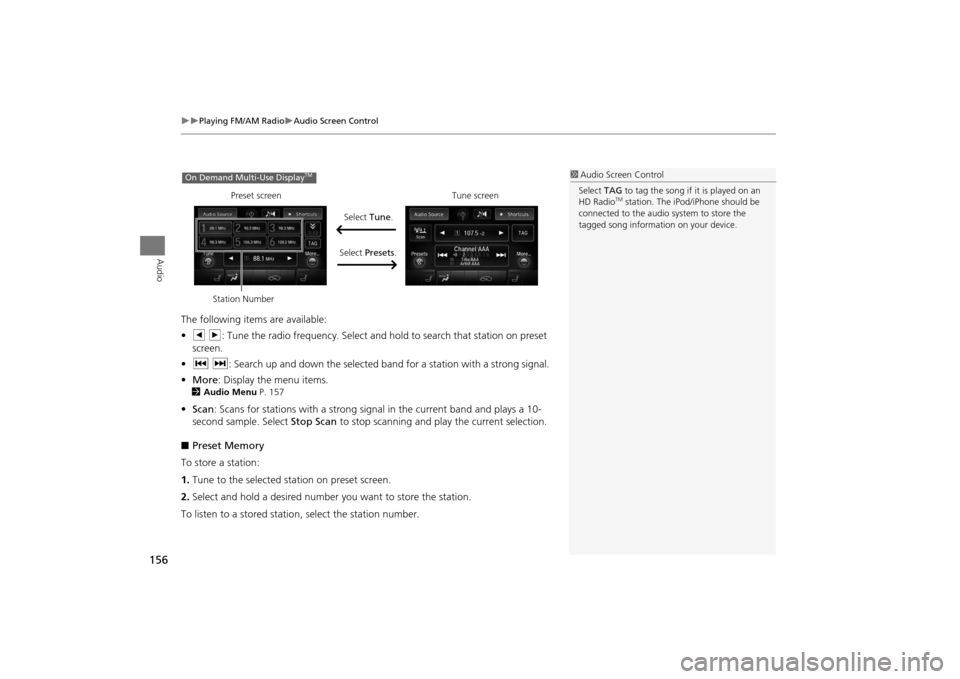
The following items are available:
• b n: Tune the radio frequency. Select and hold to search that station on preset
screen.
• c x : Search up and down the selected band for a station with a strong signal.
• More : Display the menu items.2Audio Menu P. 157•Scan : Scans for stations with a strong signal in the current band and plays a 10-
second sample. Select Stop Scan to stop scanning and play the current selection.
■ Preset Memory
To store a station:
1. Tune to the selected station on preset screen.
2. Select and hold a desired number you want to store the station.
To listen to a stored statio n, select the station number.
1Audio Screen Control
Select TAG to tag the song if it is played on an
HD Radio
TM station. The iPod/iPhone should be
connected to the audio system to store the
tagged song information on your device.
On Demand Multi-Use Display
TM
Preset screen
Tune screen
Select Tune.
Select Presets .
Station Number
MDX_KA-31TZ58200.book 156 ページ 2014年12月18日 木曜日 午後3時59分