display Acura MDX 2016 Navigation Manual
[x] Cancel search | Manufacturer: ACURA, Model Year: 2016, Model line: MDX, Model: Acura MDX 2016Pages: 349, PDF Size: 14.87 MB
Page 207 of 349
206
XX
Playing a USB Flash Drive
XAudio Menu
Audio
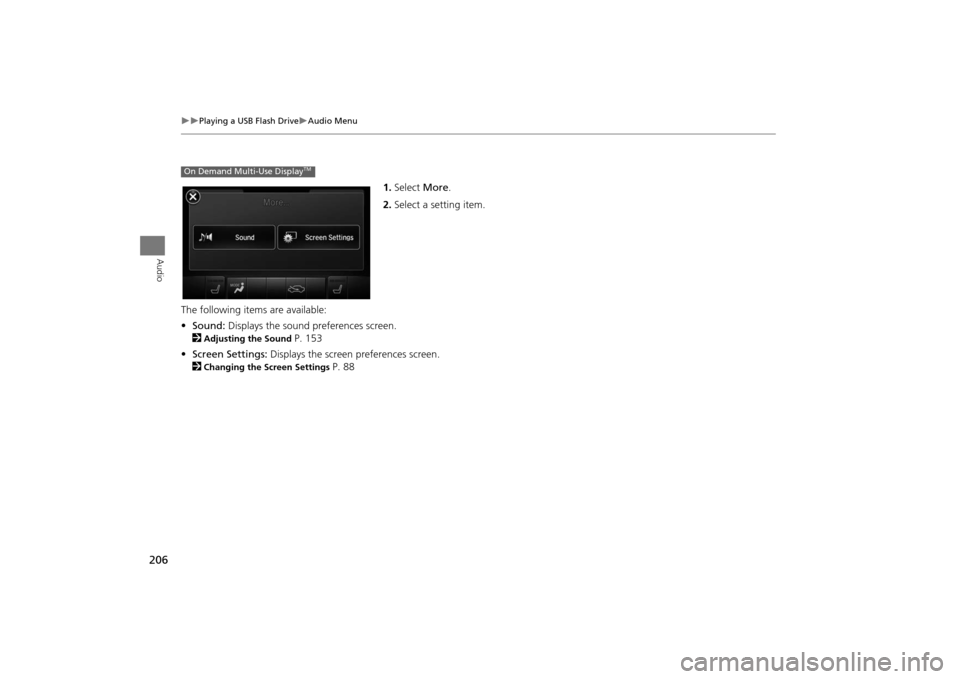
1.Select More.
2. Select a setting item.
The following item s are available:
• Sound: Displays the sound preferences screen.
2
Adjusting the Sound
P. 153
• Screen Settings: Displays the screen preferences screen.
2
Changing the Screen Settings
P. 88
On Demand Multi-Use Display
TM
MDX_KA-31TZ58200.book 206 ページ 2014年12月18日 木曜日 午後3時59分
Page 209 of 349
208Audio
Playing Bluetooth ® AudioYour audio system allows you to listen to music from your Bluetooth®-compatible
phone.
This function is available when the phone is paired and connected to the vehicle’s
Bluetooth ® HandsFreeLink® (HFL) system.
2Bluetooth® HandsFreeLink®
P. 212
Selecting Bluetooth ® Audio Mode1.Make sure that your phone is on, paired, and linked to HFL.2Phone Settings P. 2322.Press the MENU button. (in AUDIO mode)
3. Rotate i to select Change Source . Press u.
4. Rotate i to select Bluetooth Audio . Press u.
2. Select Audio Source .
3. Select the Bluetooth icon.Interface DialOn Demand Multi-Use Display
TM
1Playing Bluetooth ® Audio
Not all Bluetooth ®-enabled phones with
streaming audio capabiliti es are compatible with
the system.
For a list of compat ible phones, visit
www.acura.com / handsfreelink, or
call 1-888-528-7876.
State or local laws may prohibit the operation of
handheld electronic devi ces while operating a
vehicle.
If more than one phone is paired to the HFL
system, there will be a delay before the system
begins to play.
You can control Bluetooth® Audio using
voicecommands.
2 Voice Control Operation P. 6
MDX_KA-31TZ58200.book 208 ページ 2014年12月18日 木曜日 午後3時59分
Page 210 of 349
209
XX
Playing Bluetooth ® Audio
XAudio Screen Control
Audio
Audio Screen ControlControl the audio system through the audio/information screen and On Demand
Multi-Use Display
TM.
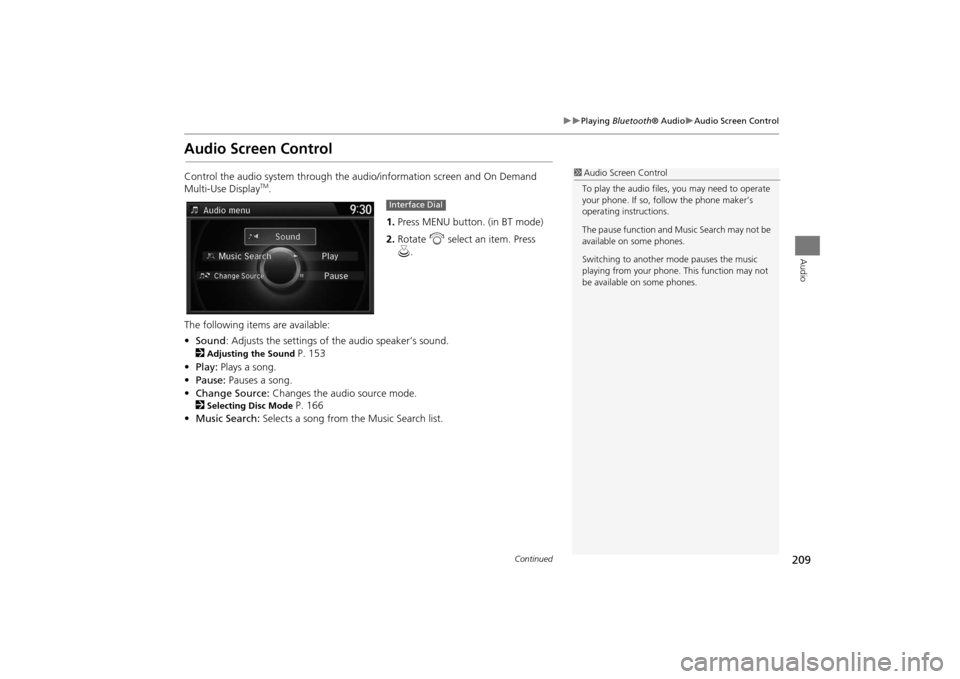
1.Press MENU button. (in BT mode) .
2. Rotate i select an item. Press
u .
The following items are available:
• Sound : Adjusts the settings of the audio speaker’s sound.
2
Adjusting the Sound
P. 153
• Play: Plays a song.
• Pause: Pauses a song.
• Change Source: Changes the audio source mode.
2
Selecting Disc Mode
P. 166
• Music Search: Selects a song from the Music Search list.
1Audio Screen Control
To play the audio files, you may need to operate
your phone. If so, follow the phone maker’s
operating instructions.
The pause function and Music Search may not be
available on some phones.
Switching to another mode pauses the music
playing from your phone. This function may not
be available on some phones.
Interface Dial
Continued
MDX_KA-31TZ58200.book 209 ページ 2014年12月18日 木曜日 午後3時59分
Page 211 of 349
210
XX
Playing Bluetooth ® Audio
XAudio Screen Control
Audio
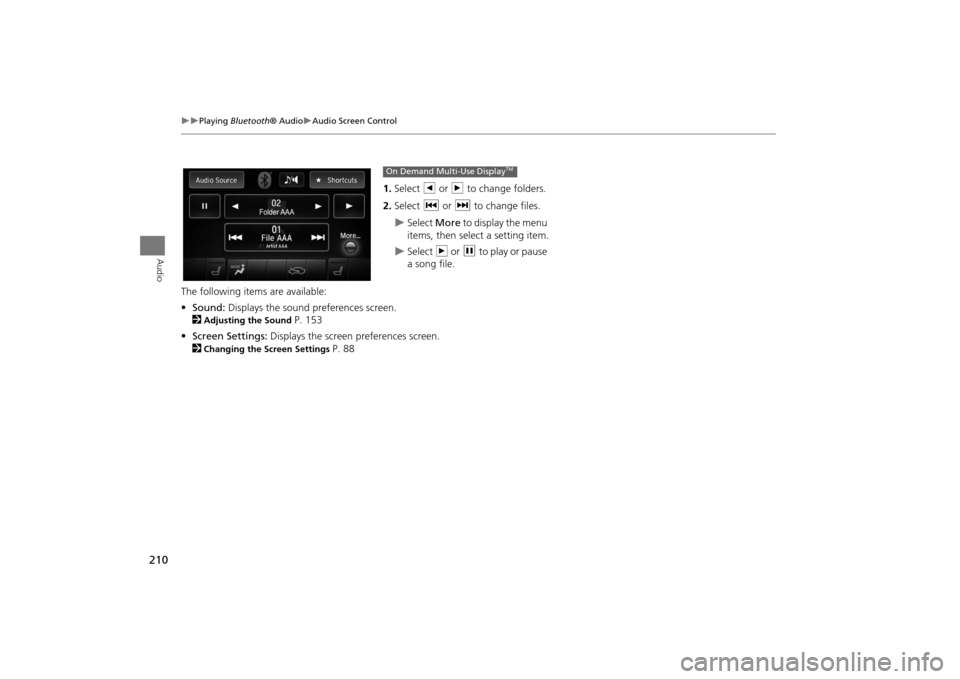
1.Select b or n to change folders.
2. Select c or x to change files.X
Select More to display the menu
items, then select a setting item.
X
Select n or h to play or pause
a song file.
The following item s are available:
• Sound: Displays the sound preferences screen.
2
Adjusting the Sound
P. 153
• Screen Settings: Displays the screen preferences screen.
2
Changing the Screen Settings
P. 88
On Demand Multi-Use Display
TM
MDX_KA-31TZ58200.book 210 ページ 2014年12月18日 木曜日 午後3時59分
Page 212 of 349
211
Bluetooth® HandsFreeLink®
This section describes how to operate Bluetooth® HandsFreeLink®. You
can place and receive phone calls using your vehicle’s audio system without handling your cell phone.Bluetooth® HandsFreeLink®................212
Using HFL .............................................212
Pairing a Phone .....................................214
Importing Phonebook Data ...................220
Setting Up Speed Dialing ......................221
Phonebook Phonetic Modification .........227
Phone Settings ......................................232
Making a Call .......................................237
Receiving a Call .....................................242
Text/E-mail Message .............................244
Setting a Text Message/E-mail ...............244
Selecting a Mail Account.......................246
Receiving a Text/E-mail Message ...........247
Displaying Messages .............................248 Roadside Assistance* ........................... 252
HFL Menus ........................................... 253
MDX_KA-31TZ58200.book 211 ページ 2014年12月18日 木曜日 午後3時59分
Page 213 of 349
212Bluetooth® HandsFreeLink®
Bluetooth® HandsFreeLink®Bluetooth® HandsFreeLink® (HFL) allows you to place and receive phone calls using
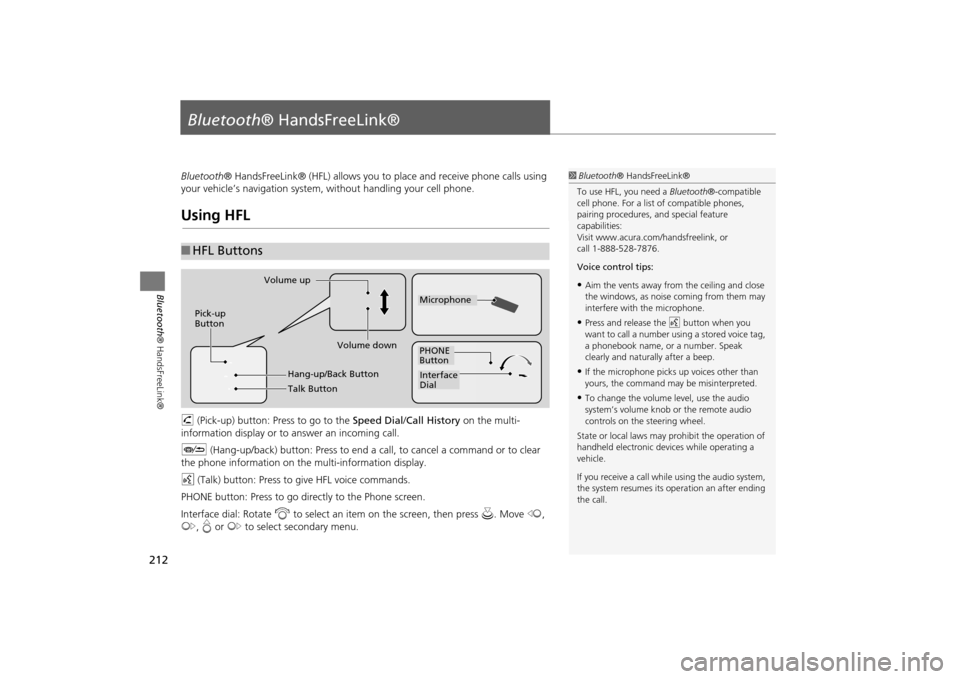
your vehicle’s navigation system, without handling your cell phone.Using HFLh (Pick-up) button: Press to go to the Speed Dial/Call History on the multi-
information display or to answer an incoming call.
J (Hang-up/back) button: Press to end a call, to cancel a command or to clear
the phone information on th e multi-information display.
d (Talk) button: Press to give HFL voice commands.
PHONE button: Press to go dire ctly to the Phone screen.
Interface dial: Rotate i to select an item on the screen, then press u. Move w,
y , e or y to select secondary menu.■HFL Buttons
1 Bluetooth ® HandsFreeLink®
To use HFL, you need a Bluetooth®-compatible
cell phone. For a list of compatible phones,
pairing procedures, and special feature
capabilities:
Visit www.acura.com/ handsfreelink, or
call 1-888-528-7876.
Voice control tips:•Aim the vents away from the ceiling and close
the windows, as noise coming from them may
interfere with the microphone.•Press and release the d button when you
want to call a number using a stored voice tag,
a phonebook name, or a number. Speak
clearly and naturally after a beep.•If the microphone picks up voices other than
yours, the command may be misinterpreted.•To change the volume level, use the audio
system’s volume knob or the remote audio
controls on the steering wheel.
State or local laws may pr ohibit the operation of
handheld electronic devices while operating a
vehicle.
If you receive a call whil e using the audio system,
the system resumes its operation an after ending
the call.
Volume down
Volume up
Pick-up
Button
PHONE
ButtonInterface
DialMicrophone
Hang-up/Back ButtonTalk Button
MDX_KA-31TZ58200.book 212 ページ 2014年12月18日 木曜日 午後3時59分
Page 214 of 349
213
XX
Bluetooth® HandsFreeLink®
XUsing HFL
Bluetooth ® HandsFreeLink®
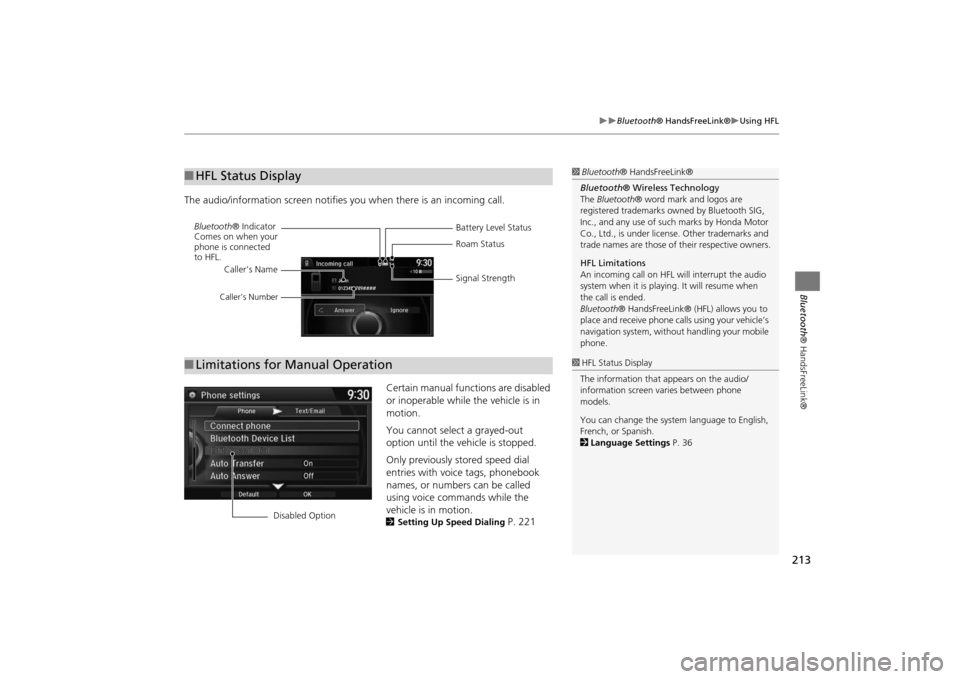
The audio/information screen notifies you when there is an incoming call.
Certain manual functions are disabled
or inoperable while the vehicle is in
motion.
You cannot select a grayed-out
option until the vehicle is stopped.
Only previously stored speed dial
entries with voice tags, phonebook
names, or numbers can be called
using voice commands while the
vehicle is in motion.
2Setting Up Speed Dialing
P. 221
■HFL Status Display
1Bluetooth ® HandsFreeLink®
Bluetooth ® Wireless Technology
The Bluetooth ® word mark and logos are
registered trademarks ow ned by Bluetooth SIG,
Inc., and any use of such marks by Honda Motor
Co., Ltd., is under license. Other trademarks and
trade names are t hose of their respective owners.
HFL Limitations
An incoming call on HFL will interrupt the audio
system when it is playing. It will resume when
the call is ended.
Bluetooth ® HandsFreeLink® (HFL ) allows you to
place and receive phone call s using your vehicle’s
navigation system, without handling your mobile
phone.
Battery Level Status
Bluetooth
® Indicator
Comes on when your
phone is connected
to HFL. Roam Status
Signal Strength
Caller’s Name
Caller’s Number
■
Limitations for Manual Operation
1 HFL Status Display
The information that appears on the audio/
information screen varies between phone
models.
You can change the system language to English,
French, or Spanish.
2 Language Settings P. 36
Disabled Option
MDX_KA-31TZ58200.book 213 ページ 2014年12月18日 木曜日 午後3時59分
Page 215 of 349
214
XX
Bluetooth® HandsFreeLink®
XPairing a Phone
Bluetooth ® HandsFreeLink®
Pairing a PhoneHPHONE button
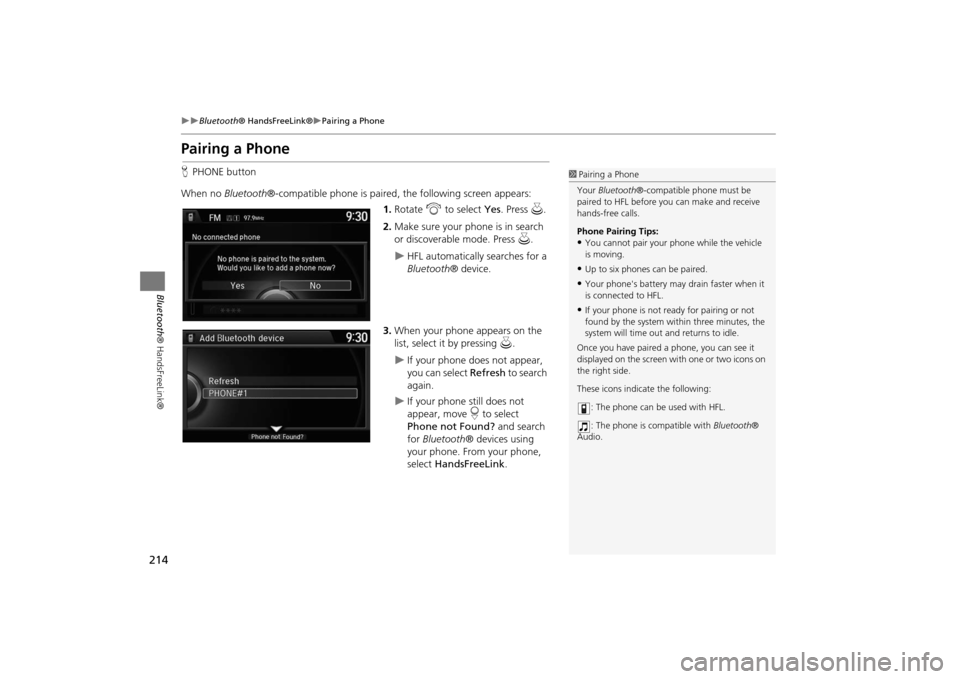
When no Bluetooth®-compatible phone is paired, the following screen appears:
1. Rotate i to select Yes. Press u.
2. Make sure your phone is in search
or discoverable mode. Press u.
X
HFL automatically searches for a
Bluetooth ® device.
3. When your phone appears on the
list, select it by pressing u.
X
If your phone does not appear,
you can select Refresh to search
again.
X
If your phone still does not
appear, move r to select
Phone not Found? and search
for Bluetooth ® devices using
your phone. From your phone,
select HandsFreeLink .
1Pairing a Phone
Your Bluetooth ®-compatible phone must be
paired to HFL before you can make and receive
hands-free calls.
Phone Pairing Tips:•You cannot pair your phone while the vehicle
is moving.•Up to six phones can be paired.•Your phone's battery may drain faster when it
is connected to HFL.•If your phone is not r eady for pairing or not
found by the system within three minutes, the
system will time out and returns to idle.
Once you have paired a phone, you can see it
displayed on the screen wi th one or two icons on
the right side.
These icons indicate the following:
: The phone can be used with HFL.
: The phone is compatible with Bluetooth®
Audio.
MDX_KA-31TZ58200.book 214 ページ 2014年12月18日 木曜日 午後3時59分
Page 225 of 349
224
XX
Bluetooth® HandsFreeLink®
XSetting Up Speed Dialing
Bluetooth ® HandsFreeLink®
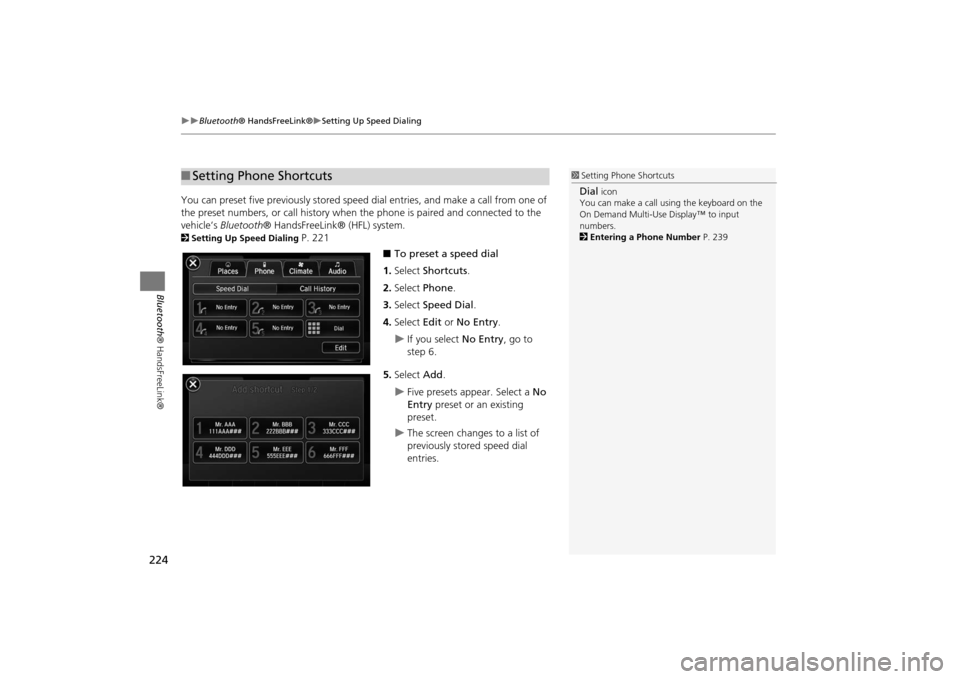
You can preset five previously stored speed dial entries, and make a call from one of
the preset numbers, or call history when the phone is paired and connected to the
vehicle‘s Bluetooth ® HandsFreeLink® (HFL) system. 2Setting Up Speed Dialing
P. 221
■To preset a speed dial
1. Select Shortcuts .
2. Select Phone .
3. Select Speed Dial .
4. Select Edit or No Entry .
X
If you select No Entry, go to
step 6.
5. Select Add.
X
Five presets appear. Select a No
Entry preset or an existing
preset.
X
The screen changes to a list of
previously stored speed dial
entries.
■ Setting Phone Shortcuts
1 Setting Phone ShortcutsDial
icon
You can make a call using the keyboard on the
On Demand Multi-Use Display™ to input
numbers.
2 Entering a Phone Number P. 239
MDX_KA-31TZ58200.book 224 ページ 2014年12月18日 木曜日 午後3時59分
Page 227 of 349
226
XX
Bluetooth® HandsFreeLink®
XSetting Up Speed Dialing
Bluetooth ® HandsFreeLink®
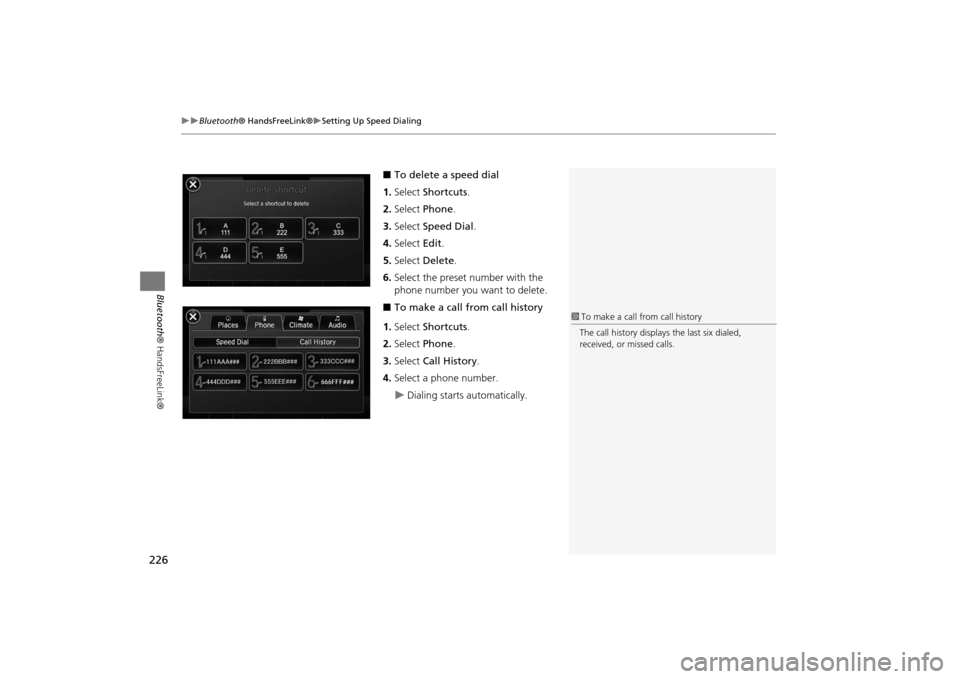
■To delete a speed dial
1. Select Shortcuts .
2. Select Phone .
3. Select Speed Dial .
4. Select Edit.
5. Select Delete .
6. Select the preset number with the
phone number you want to delete.
■ To make a call from call history
1. Select Shortcuts .
2. Select Phone .
3. Select Call History .
4. Select a phone number.X
Dialing starts automatically.
1To make a call from call history
The call history displays the last six dialed,
received, or missed calls.
MDX_KA-31TZ58200.book 226 ページ 2014年12月18日 木曜日 午後3時59分