vent Acura MDX 2019 Owner's Guide
[x] Cancel search | Manufacturer: ACURA, Model Year: 2019, Model line: MDX, Model: Acura MDX 2019Pages: 701, PDF Size: 38.75 MB
Page 222 of 701
Continued221
uuClimate Control System uUsing Automatic Climate Control
Controls
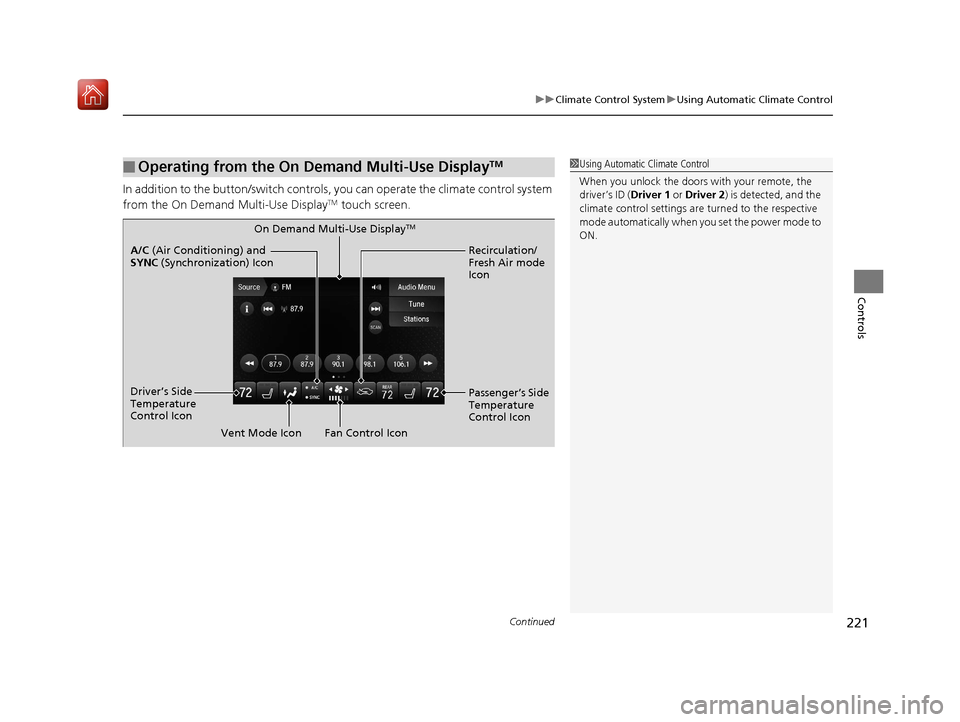
In addition to the button/sw itch controls, you can operate the climate control system
from the On Demand Multi-Use DisplayTM touch screen.
■Operating from the On Demand Multi-Use DisplayTM1 Using Automatic Climate Control
When you unlock the doors with your remote, the
driver’s ID ( Driver 1 or Driver 2) is detected, and the
climate control settings are turned to the respective
mode automatically when you set the power mode to
ON.
On Demand Multi-Use DisplayTM
A/C (Air Conditioning) and
SYNC (Synchronization) Icon
Driver’s Side
Temperature
Control Icon Recirculation/
Fresh Air mode
Icon
Fan Control Icon Passenger’s Side
Temperature
Control Icon
Vent Mode Icon
19 ACURA MDX-31TZ56510.book 221 ページ 2018年12月11日 火曜日 午後4時47分
Page 224 of 701
Continued223
uuClimate Control System uUsing Automatic Climate Control
Controls
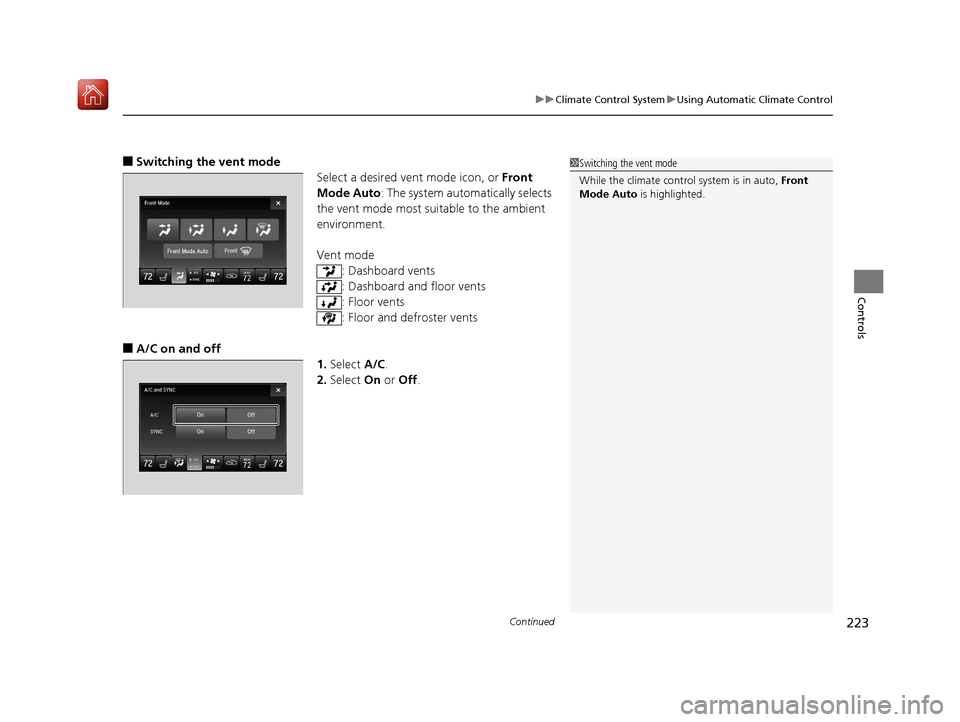
■Switching the vent mode
Select a desired vent mode icon, or Front
Mode Auto: The system automatically selects
the vent mode most suitable to the ambient
environment.
Vent mode
: Dashboard vents
: Dashboard and floor vents
: Floor vents
: Floor and defroster vents
■A/C on and off 1.Select A/C.
2. Select On or Off .
1Switching the vent mode
While the climate control system is in auto, Front
Mode Auto is highlighted.
19 ACURA MDX-31TZ56510.book 223 ページ 2018年12月11日 火曜日 午後4時47分
Page 226 of 701
225
uuClimate Control System uUsing Automatic Climate Control
Continued
Controls
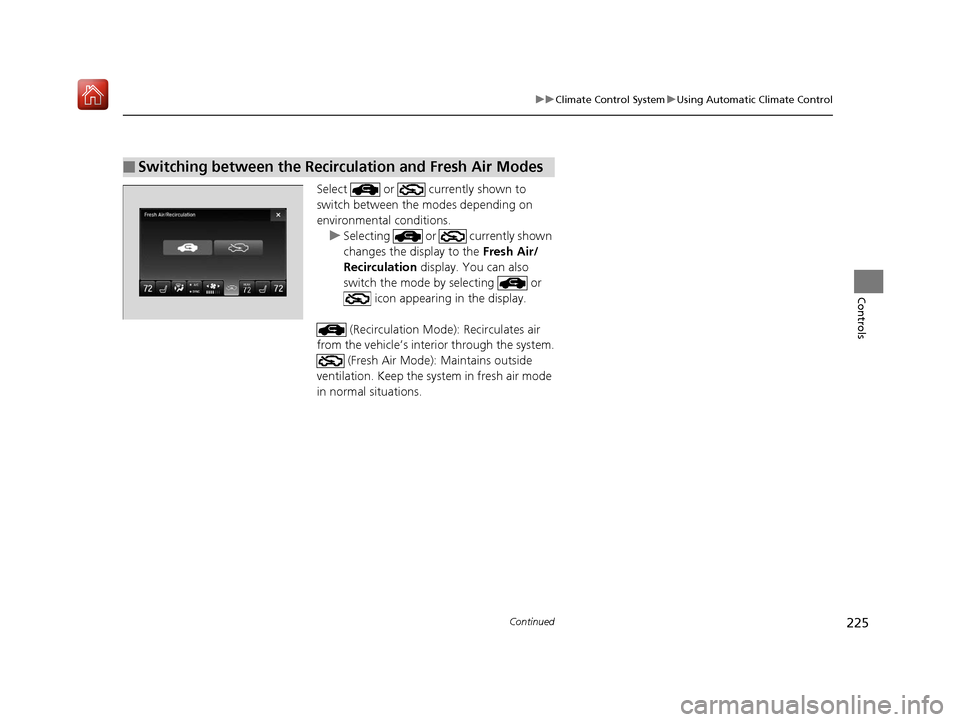
Select or currently shown to
switch between the modes depending on
environmental conditions.
u Selecting or currently shown
changes the display to the Fresh Air/
Recirculation display. You can also
switch the mode by selecting or icon appearing in the display.
(Recirculation Mode ): Recirculates air
from the vehicle’s interior through the system.
(Fresh Air Mode): Maintains outside
ventilation. Keep the system in fresh air mode
in normal situations.
■Switching between the Recirculation and Fresh Air Modes
19 ACURA MDX-31TZ56510.book 225 ページ 2018年12月11日 火曜日 午後4時47分
Page 227 of 701
uuClimate Control System uUsing Automatic Climate Control
226
Controls
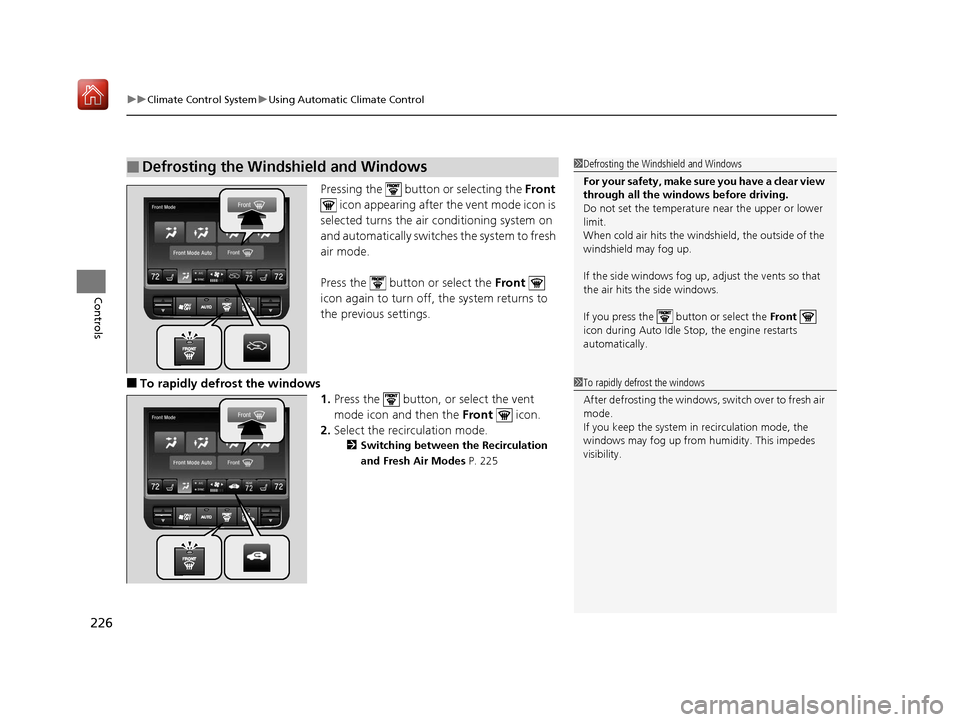
Pressing the button or selecting the Front
icon appearing after the vent mode icon is
selected turns the air conditioning system on
and automatically switches the system to fresh
air mode.
Press the button or select the Front
icon again to turn off, the system returns to
the previous settings.
■To rapidly defrost the windows
1.Press the button, or select the vent
mode icon and then the Front icon.
2. Select the recirculation mode.
2 Switching between the Recirculation
and Fresh Air Modes P. 225
■Defrosting the Windshield and Windows1Defrosting the Windshield and Windows
For your safety, make sure you have a clear view
through all the windows before driving.
Do not set the temperatur e near the upper or lower
limit.
When cold air hits the windshield, the outside of the
windshield may fog up.
If the side windows fog up, adjust the vents so that
the air hits th e side windows.
If you press the button or select the Front
icon during Auto Idle Stop, the engine restarts
automatically.
1 To rapidly defrost the windows
After defrosting the windows, switch over to fresh air
mode.
If you keep the system in recirculation mode, the
windows may fog up from humidity. This impedes
visibility.
19 ACURA MDX-31TZ56510.book 226 ページ 2018年12月11日 火曜日 午後4時47分
Page 228 of 701
227
uuClimate Control System uRear Climate Control System
Continued
Controls
Rear Climate Control System
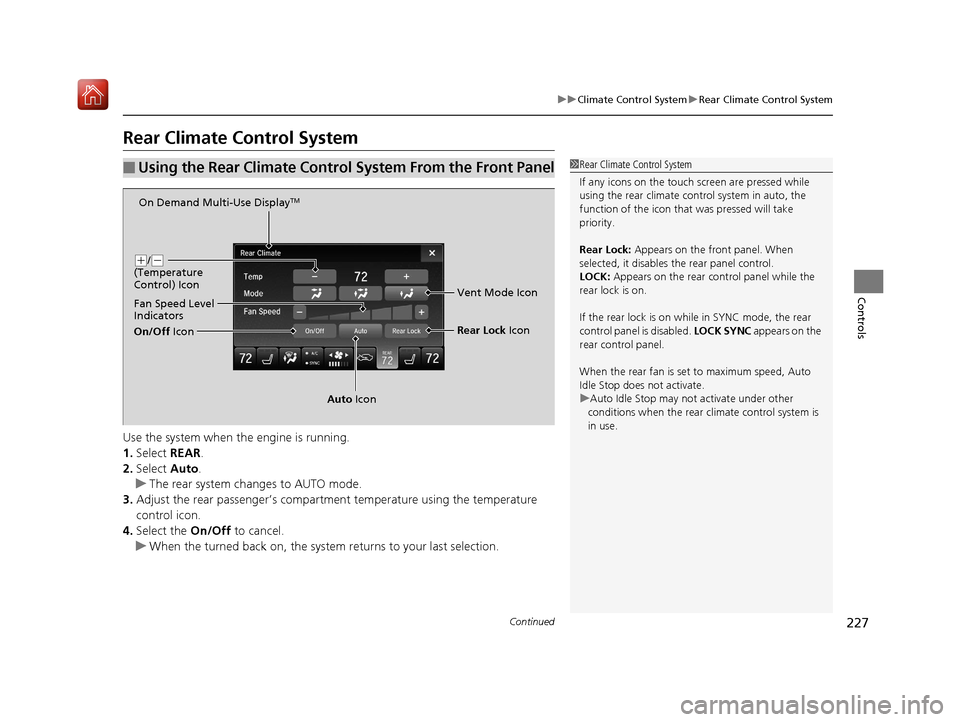
Use the system when the engine is running.
1. Select REAR.
2. Select Auto.
u The rear system changes to AUTO mode.
3. Adjust the rear passenger’s compartm ent temperature using the temperature
control icon.
4. Select the On/Off to cancel.
u When the turned back on, the system returns to your last selection.
■Using the Rear Climate Control System From the Front Panel1Rear Climate Control System
If any icons on the touch screen are pressed while
using the rear climate control system in auto, the
function of the icon that was pressed will take
priority.
Rear Lock: Appears on the front panel. When
selected, it disables the rear panel control.
LOCK: Appears on the rear c ontrol panel while the
rear lock is on.
If the rear lock is on while in SYNC mode, the rear
control panel is disabled. LOCK SYNC appears on the
rear control panel.
When the rear fan is set to maximum speed, Auto
Idle Stop does not activate.
u Auto Idle Stop may not activate under other
conditions when the rear climate control system is
in use.
On Demand Multi-Use DisplayTM
( +/(-
(Temperature
Control) Icon
Fan Speed Level
Indicators
On/Off Icon
Auto Icon Rear Lock
Icon
Vent Mode Icon
19 ACURA MDX-31TZ56510.book 227 ページ 2018年12月11日 火曜日 午後4時47分
Page 229 of 701
uuClimate Control System uRear Climate Control System
228
Controls
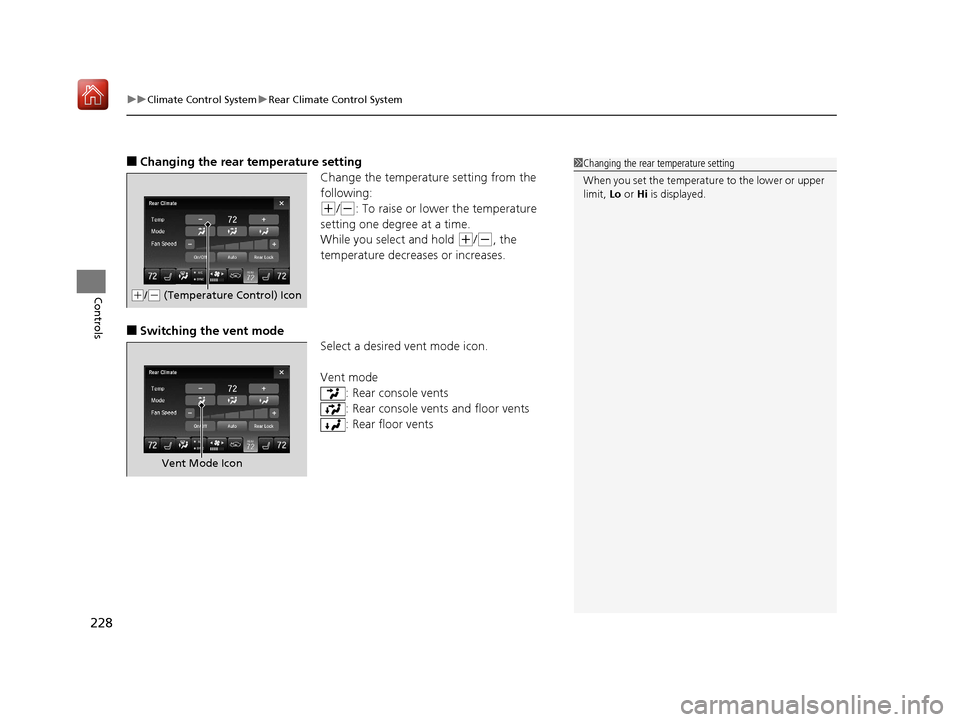
■Changing the rear temperature setting
Change the temperature setting from the
following:
(+/(-: To raise or lower the temperature
setting one degree at a time.
While you select and hold
(+/(-, the
temperature decreases or increases.
■Switching the vent mode Select a desired vent mode icon.
Vent mode: Rear console vents
: Rear console vents and floor vents
: Rear floor vents
1Changing the rear temperature setting
When you set the temperat ure to the lower or upper
limit, Lo or Hi is displayed.
(+/(- (Temperature Control) Icon
Vent Mode Icon
19 ACURA MDX-31TZ56510.book 228 ページ 2018年12月11日 火曜日 午後4時47分
Page 231 of 701

uuClimate Control System uRear Climate Control System
230
Controls
Use the system when the engine is running
1. Press the AUTO button.
2. Adjust the interior temperature using the rear temperature control button.
3. To turn off the rear climate control system, press button.
■Using the Rear Climate Control System From the Rear Panel1Using the Rear Climate Control System From the Rear Panel
When the Rear Lock icon on the front control panel
is off, the temperature of the rear passenger
compartment can be cont rolled independently.
Rear floor
ventsRear console
vents and
floor vents Rear console
vents
/
(Fan Control)
Buttons
(On/Off) Button
Rear Temperature
Control Buttons
AUTO Button
19 ACURA MDX-31TZ56510.book 230 ページ 2018年12月11日 火曜日 午後4時47分
Page 254 of 701

253
uuAudio System Basic Operation uVoice Control Operation
Continued
Features
Voice Control Operation
Your vehicle has a voice control syst em that allows hands-free operation.
The voice control system uses the (Tal k) and (hang-up/back) buttons on the
steering wheel and a microphone near the map lights in the ceiling.
To achieve optimum voice recognition when using the voice control system:
• Make sure the correct screen is displa yed for the voice command that you are
using.
The system recognizes only certain commands.
Available voice command P. 254
• Close the windows and moonroof.
• Adjust the dashboard and side vents so air does not blow onto the microphone in
the ceiling.
• Speak clearly in a natural speaking vo ice without pausing between words.
• Reduce any background noise if possible. The system may misinterpret your
command if more than one person is speaking at the same time.
■Voice Recognition
Models with navigation system
1Voice Control Operation
When you press the button, a helpful prompt asks
what you would like to do. Press and release the
button again to bypass th is prompt and give a
command.
1 Voice Recognition
The voice control system can only be used from the
driver’s seat because the microphone unit removes
noises from the front passenger’s side.
19 ACURA MDX-31TZ56510.book 253 ページ 2018年12月11日 火曜日 午後4時47分
Page 326 of 701
325
uuGeneral Information on the Audio System uHonda App License Agreement
Continued
Features
5. Unauthorized Use and Abuse. You are responsible for ensuring your (and any aut horized third parties’) use of the SOFTWARE and
SERVICES remains in compliance with this AGREEMENT and all other applicable HONDA TERMS and PR OVIDER TERMS. You acknowledge
and agree that any use of the SOFTWARE or SERVICES occurring through your VEHICLE will be deemed your actions and that HONDA and
PROVIDERS may rely upon such actions. You agree to immediately notify us if you suspect fraudulent or abusive activity involvin g the
SOFTWARE or SERVICES. If you so notify us or if we otherwise suspect fraudulent or abusive activity, you agree to cooperate with us in any
fraud investigation and to use any fraud prevention measures we pr escribe. Your failure to immediately notify us or cooperate to use such
measures will result in your liability for all fraudulent usage or abusive activity associated with your VEHICLE.
6. SOFTWARE Updates.
The SOFTWARE and SERVICES may be updated when your VEHICLE is serviced by a DEALER or remotely, over-the-
air, by HONDA from time to time; such updates may occur with or without further notice or your future consent. The SOFTWARE may be
updated at HONDA’s discretion and for any purpose including, with out limitation, to patch or otherwise improve the SOFTWARE or
SERVICES functionality, security, or stability. All updates to the SOFTWARE and SERVICES are subject to this AGREEMENT and any other
applicable HONDA TERMS and PROVIDER TERMS.
7. Uninstalling, Removing, and Replacing the SOFTWARE.
Replacing SOFTWARE or HONDA SERVICE S with software or firmware not
provided and installed by HONDA or a DEAL ER will render all representations and warranties for the SOFTWARE, HONDA SERVICES, an d
VEHICLE functionality reliant upon the SOFTWARE or HONDA SERVICES null and void.
D. SOFTWARE Operationa l Notices and Warnings
1. Vehicle Geolocation Information.
You acknowledge that your VEHICLE may be equi pped with certain traffic and map features. The
traffic feature will automatically collect and transmit, through GPS technology, your Vehicle’s cu rrent location (longitude and latitude),
travel direction and speed (“VEHICLE GEOLOCATION INFORMATION”) to HONDA and PROVIDERS. The VEHICLE GEOLOCATION
INFORMATION is used by HONDA and PROVIDERS to provide traffic and navigation-related information to you, but may also be used to
provide other SERVICES or offers to you. HONDA will not use such VEHICLE GEOLOCATION INFORMATION for its own marketing efforts,
or provide such information to unaffiliated third parti es for their own purposes, without your express consent.
19 ACURA MDX-31TZ56510.book 325 ページ 2018年12月11日 火曜日 午後4時47分
Page 333 of 701
332
uuGeneral Information on the Audio System uHonda App License Agreement
Features
N. Miscellaneous: You may not assign this AGREEMENT without HONDA’s pr ior written consent. This AGREEMENT and any additional
HONDA TERMS and PROVIDER TERMS represents the entire agreement between you and US. HONDA may amend the terms of this
AGREEMENT by providing you with notices of such updated terms. If you do not consent to be bound by the updated terms, your sole
remedy will be to cease using the SOFTWARE and SERVICES. If any part of this AGREEMENT is found invalid, void, or unenforceable, the
balance of the AGREEMENT will remain valid and enforceable according to its terms. To the fullest extent permitted by law, and except as
explicitly provided otherwise, this AGREEMEN T and any disputes arising out of or relating to it will be governed by the laws of the State of
California, except that California laws co ncerning choice of law or conflicts shall not apply if they would cause the substanti ve law of
another jurisdiction to apply. Notwithstand ing the foregoing, Section M shall be governed by the Federal Arbitration Act and the laws of
the State of California, as applicable, as set forth therein. The failure to enforce any term of this AGREEMENT on one occasion shall not
prevent enforcement on any other occasion or the enforcement of any other term. Headings and captions shall not be considered included
for purposes of interpretation or applicat ion hereof, but are for convenience only.
Arbitrator shall be an attorney or current
or retired judge familiar with automotive or consumer software. The arbitrator shall follow
substantive law, statute of limitations and decide all issues relating to the interpretation, construction, enforceability and applicability of
this provision. The arbitrator may order relie f permitted by law. This provision is governed and enforceable by the FAA. An awa rd shall
include a written opinion and be final, subject to appeal by the FAA.
This provision survives termination of this Agreement or relationship, bankruptcy, assi gnment or transfer. If part of this provision is
unenforceable, the remainder remains in effe ct. If unenforceability allows arbitration as a class action, then this provision is entirely
unenforceable. YOU may opt out wi thin 30 days of your initial use of the Software by sending a signed, written notice to HONDA at
Honda Financial Services, P.O. Box 165007, Irving, TX 75016. HO NDA reserves the right to make changes to this provision after
providing written notice and an opportunity to opt out.
19 ACURA MDX-31TZ56510.book 332 ページ 2018年12月11日 火曜日 午後4時47分