ten Acura MDX 2020 Owners Manual
[x] Cancel search | Manufacturer: ACURA, Model Year: 2020, Model line: MDX, Model: Acura MDX 2020Pages: 701, PDF Size: 38.91 MB
Page 335 of 701

334
uuGeneral Information on the Audio System uLicense information*
Features
License information*
Manufactured under license from Dolby Laboratories. Dolby and the double-D
symbol are registered trade marks of Dolby Laboratories.
For DTS patents, see http://patents.dts.com . Manufactured under license from DTS
Licensing Limited. DTS, the Symbol, & DTS and the Symbol together are registered
trademarks, and DTS Digital Surround and Neural Surround are trademarks of DTS,
Inc. © DTS, Inc. All Rights Reserved.
■DOLBY DIGITAL*
■DTS
* Not available on all models
20 ACURA MDX-31TZ56600.book 334 ページ 2019年4月24日 水曜日 午後5時44分
Page 336 of 701
335
Features
Rear Entertainment System (RES)*
Allows the rear passengers to enjoy a different entertainment source, such as DVD,
CD, and radio, than the front passengers.
Wireless Headphones
The rear seat passengers can listen to audio from the rear entertainment system by
a wireless headphone that comes with your vehicle.
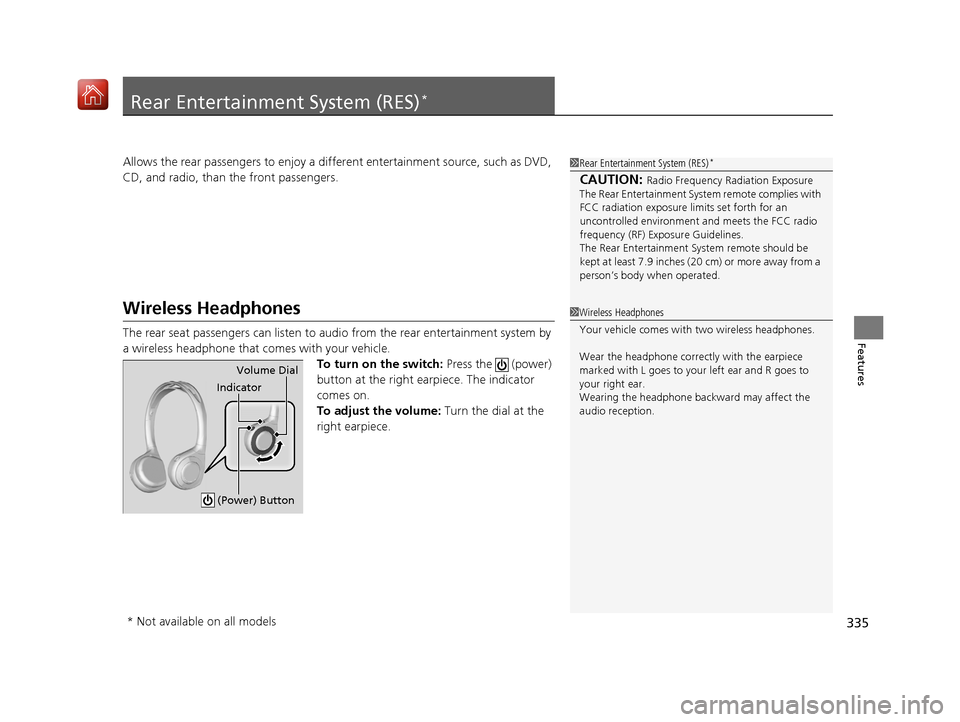
To turn on the switch: Press the (power)
button at the right earpiece. The indicator
comes on.
To adjust the volume: Turn the dial at the
right earpiece.
1 Rear Entertainment System (RES)*
CAUTION: Radio Frequency Radiation Exposure
The Rear Entertainment Syst em remote complies with
FCC radiation exposure lim its set forth for an
uncontrolled environment and meets the FCC radio
frequency (RF) Exposure Guidelines.
The Rear Entertainment Sy stem remote should be
kept at least 7.9 inches ( 20 cm) or more away from a
person’s body when operated.
1 Wireless Headphones
Your vehicle comes with two wireless headphones.
Wear the headphone correctly with the earpiece
marked with L goes to y our left ear and R goes to
your right ear.
Wearing the headphone back ward may affect the
audio reception.
Indicator Volume Dial
(Power) Button
* Not available on all models
20 ACURA MDX-31TZ56600.book 335 ページ 2019年4月24日 水曜日 午後5時44分
Page 339 of 701
338
uuRear Entertainment System (RES)*uOverhead Screen
Features
Overhead Screen
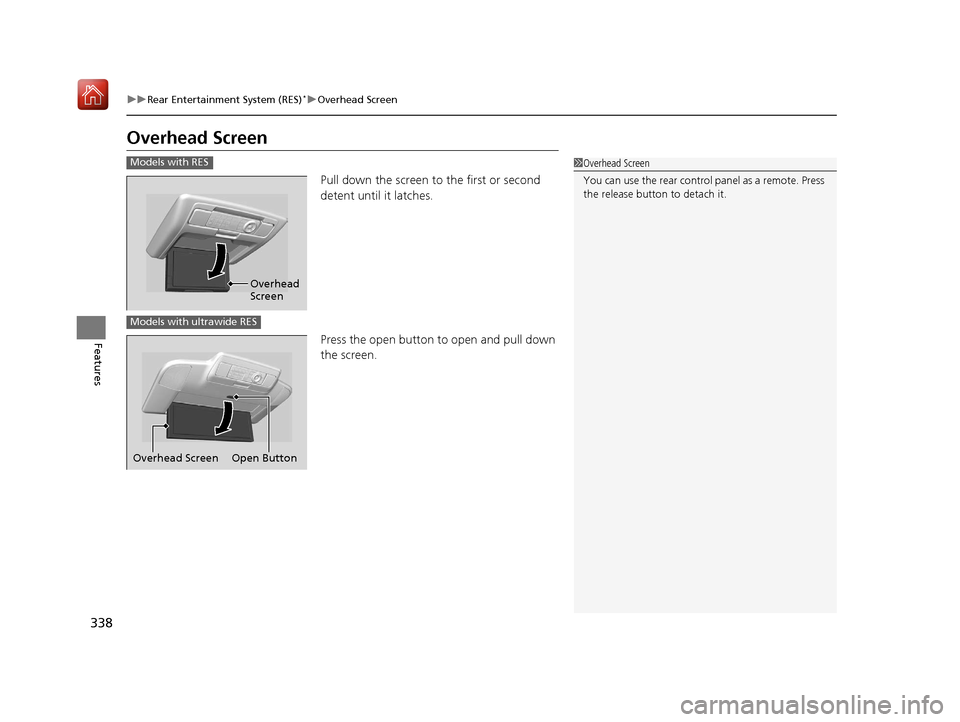
Pull down the screen to the first or second
detent until it latches.
Press the open button to open and pull down
the screen.
1 Overhead Screen
You can use the rear control panel as a remote. Press
the release button to detach it.Models with RES
Overhead
Screen
Models with ultrawide RES
Open Button
Overhead Screen
20 ACURA MDX-31TZ56600.book 338 ページ 2019年4月24日 水曜日 午後5時44分
Page 358 of 701
357
uuRear Entertainment System (RES)*uPlayable Discs
Features
Playable Discs
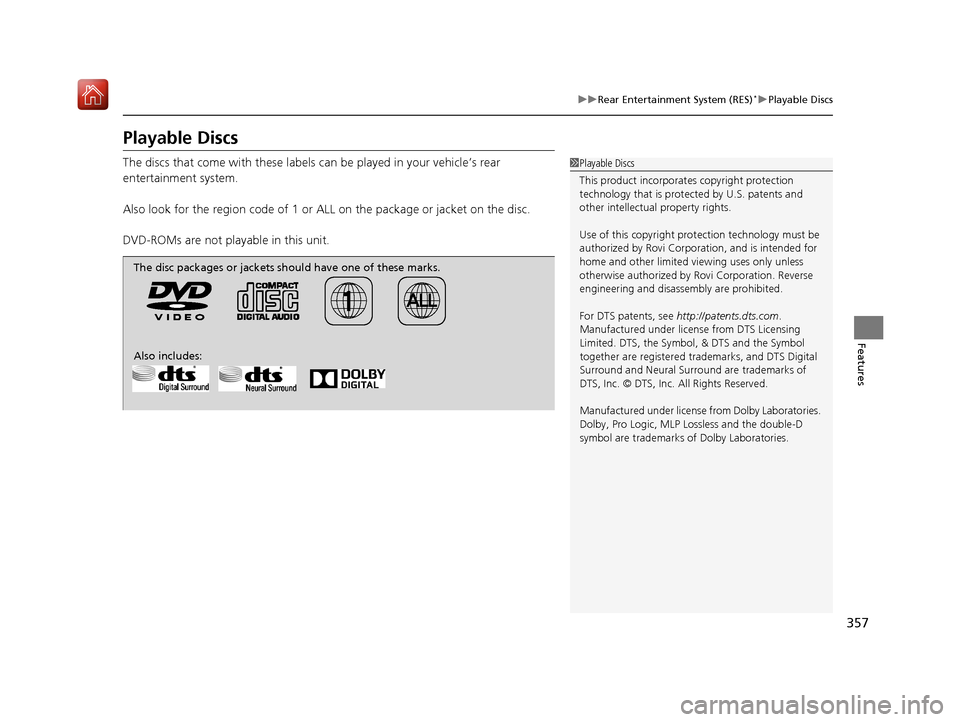
The discs that come with these labels can be played in your vehicle’s rear
entertainment system.
Also look for the region code of 1 or ALL on the package or jacket on the disc.
DVD-ROMs are not playable in this unit.1 Playable Discs
This product incorporates copyright protection
technology that is protec ted by U.S. patents and
other intellectual property rights.
Use of this copyright prot ection technology must be
authorized by Rovi Corporation, and is intended for
home and other limited vi ewing uses only unless
otherwise authorized by Rovi Corporation. Reverse
engineering and disassembly are prohibited.
For DTS patents, see http://patents.dts.com .
Manufactured under licens e from DTS Licensing
Limited. DTS, the Symbol, & DTS and the Symbol
together are registered trademarks, and DTS Digital
Surround and Neural Surro und are trademarks of
DTS, Inc. © DTS, Inc. All Rights Reserved.
Manufactured under license from Dolby Laboratories.
Dolby, Pro Logic, MLP Lossless and the double-D
symbol are trademarks of Dolby Laboratories.
The disc packages or jackets should have one of these marks.
Also includes:
20 ACURA MDX-31TZ56600.book 357 ページ 2019年4月24日 水曜日 午後5時44分
Page 363 of 701
362
uuCustomized Features u
Features
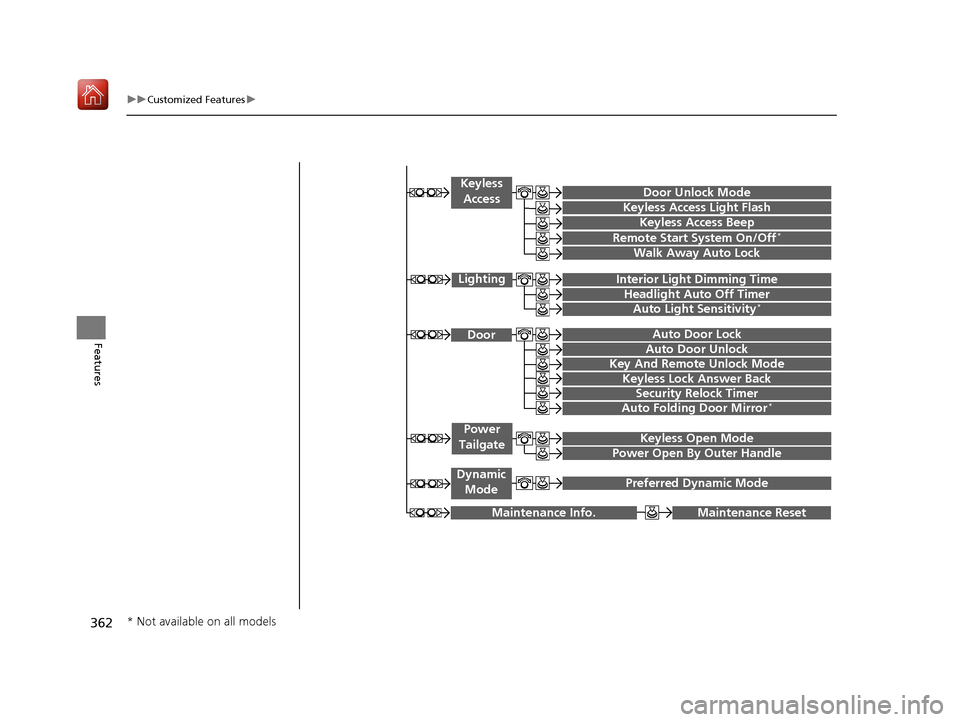
Maintenance ResetMaintenance Info.
Preferred Dynamic ModeDynamic
Mode
Key And Remote Unlock Mode
Keyless Lock Answer Back
Security Relock Timer
Auto Door Lock
Auto Door Unlock Door
Auto Folding Door Mirror*
Door Unlock Mode
Keyless Access Beep
Interior Light Dimming Time
Headlight Auto Off Timer
Auto Light Sensitivity*
Remote Start System On/Off*
Walk Away Auto Lock
Lighting
Keyless
Access
Keyless Access Light Flash
Keyless Open Mode
Power Open By Outer Handle
Power
Tailgate
* Not available on all models
20 ACURA MDX-31TZ56600.book 362 ページ 2019年4月24日 水曜日 午後5時44分
Page 376 of 701
375
uuCustomized Features u
Continued
Features
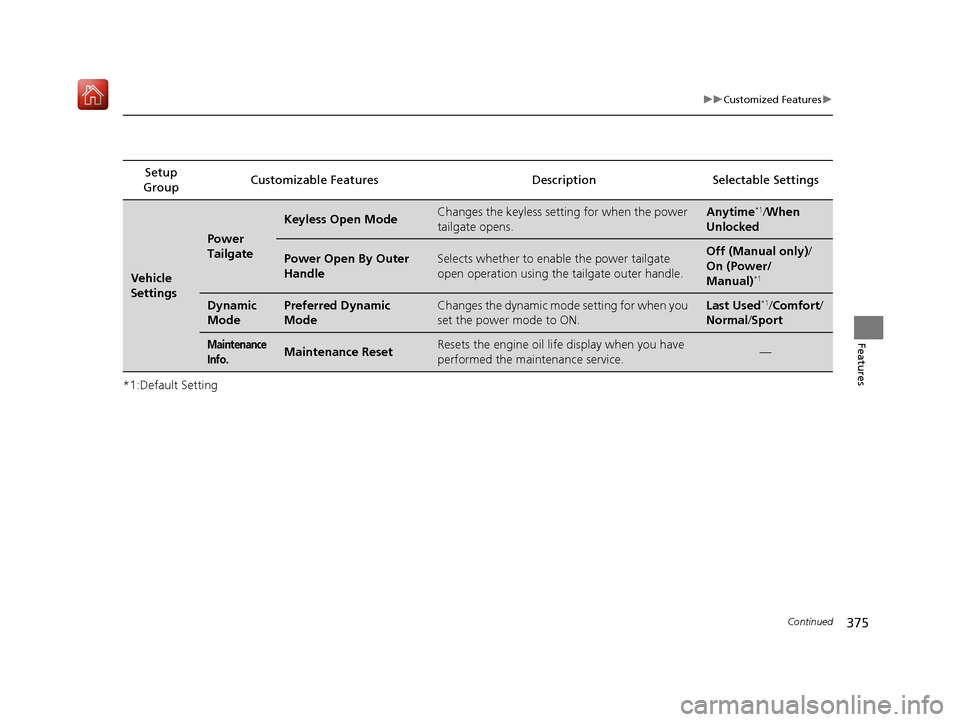
*1:Default SettingSetup
Group Customizable Features Desc
ription Selectable Settings
Vehicle
Settings
Power
Tailgate
Keyless Open ModeChanges the keyless setting for when the power
tailgate opens.Anytime*1/When
Unlocked
Power Open By Outer
HandleSelects whether to enable the power tailgate
open operation using the tailgate outer handle.Off (Manual only) /
On (Power/
Manual)
*1
Dynamic
ModePreferred Dynamic
ModeChanges the dynamic mode setting for when you
set the power mode to ON.Last Used*1/ Comfort/
Normal /Sport
Maintenance
Info.Maintenance ResetResets the engine oil life display when you have
performed the maintenance service.—
20 ACURA MDX-31TZ56600.book 375 ページ 2019年4月24日 水曜日 午後5時44分
Page 391 of 701

390
Features
HomeLink® Universal Transceiver
The HomeLink ® Universal Transceiver can be pr ogrammed to operate up to three
remote controlled devices around your home, such as garage doors, lighting, or
home security systems.
Refer to the safety information that came wi th your garage door opener to test that
the safety features are functioning properly. If you do not have the safety
information, contact the manufacturer.
Before programming HomeLink, make sure that people and objects are out of the
way of the garage or gate to prevent potential injury or damage.
When programming a garage door opener, park just outside the garage door’s
path.
■Important Safety Precautions
1 HomeLink ® Universal Transceiver
Before programming HomeLi nk to operate a garage
door opener, confirm that the opener has an external
entrapment protection system, such as an “electronic
eye,” or other safety and reverse stop features. If it
does not, HomeLink may not be able to operate it.
20 ACURA MDX-31TZ56600.book 390 ページ 2019年4月24日 水曜日 午後5時44分
Page 413 of 701
uuBluetooth ® HandsFreeLink ®u HFL Menus
412
Features
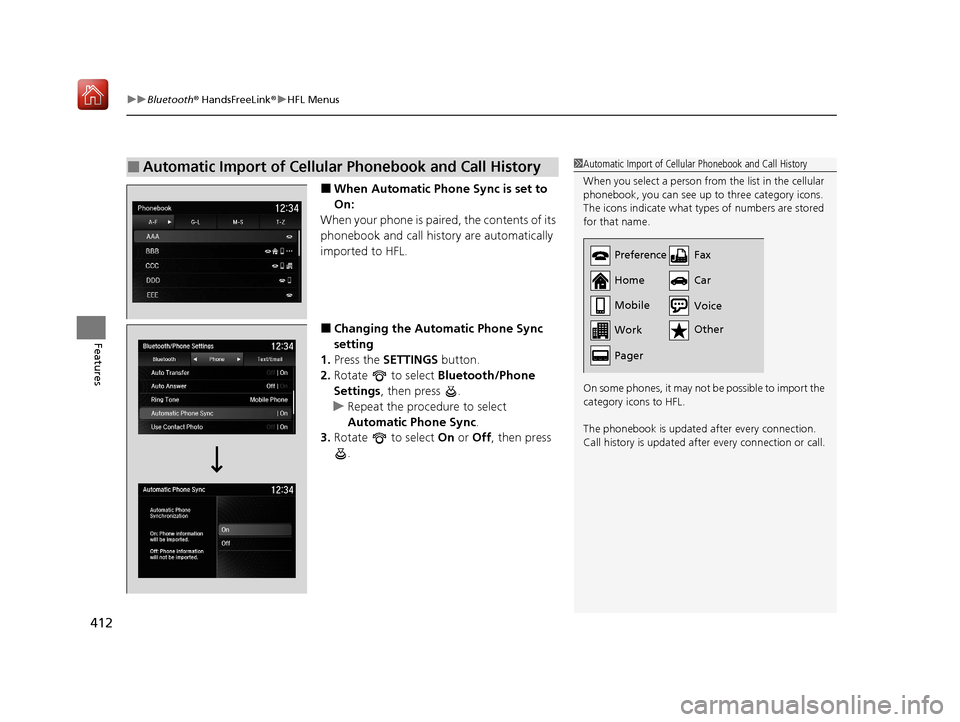
■When Automatic Phon e Sync is set to
On:
When your phone is paired, the contents of its
phonebook and call hist ory are automatically
imported to HFL.
■Changing the Automatic Phone Sync
setting
1. Press the SETTINGS button.
2. Rotate to select Bluetooth/Phone
Settings , then press .
u Repeat the procedure to select
Automatic Phone Sync .
3. Rotate to select On or Off , then press
.
■Automatic Import of Cellular Phonebook and Call History1 Automatic Import of Cellular Phonebook and Call History
When you select a person from the list in the cellular
phonebook, you can see up to three category icons.
The icons indicate what types of numbers are stored
for that name.
On some phones, it may no t be possible to import the
category icons to HFL.
The phonebook is updated after every connection.
Call history is updated after every connection or call.
Preference
Home
Mobile
Work
PagerFax
Car
Other Voice
20 ACURA MDX-31TZ56600.book 412 ページ 2019年4月24日 水曜日 午後5時44分
Page 429 of 701

uuBluetooth ® HandsFreeLink ®u HFL Menus
428
Features
HFL can display newly received text and e-ma il messages as well as 20 of the most
recently received messages on a linked ce ll phone. Each received message can be
read aloud and replied to using a fixed common phrase. 1.A pop-up appears and notifies you of a new
text or e-mail message.
2. Rotate to select Read to listen to the
message, then press .
u The text or e-mail message is displayed.
The system automatically starts reading
out the message.
3. To discontinue the message read-out, press
.
■Receiving a Text/E-mail Message1Receiving a Text/E-mail Message
The system does not display any received messages
while you are driving. You can only hear them read
aloud.
With some phones, you may be able to display up to
20 most recent text and e-mail messages.
State or local laws may limi t your use of the HFL text/
e-mail message feature. Only use the text/e-mail
message feature when conditions allow you to do so
safely.
When you receive a text or e-mail message for the
first time since the phone is paired to HFL, you are
asked to turn the New Text/Email Alert setting to
On .
2 To turn on or off the text/e-mail message
notice P. 406
20 ACURA MDX-31TZ56600.book 428 ページ 2019年4月24日 水曜日 午後5時44分
Page 439 of 701

uuAcuraLink ®*u
438
Features
Connect to the AcuraLink opera tor when trying to find a destination or for roadside
assistance. 1.Press the LINK button.
u Connection to the operator begins.
2. Talk to the operator.
u To disconnect, select End Call or press
the (Hang-up/back) button on the
steering wheel.
■Operator Assistance1 Operator Assistance
Remain attentive to road conditions and driving
during operator assistance.
LINK Button
20 ACURA MDX-31TZ56600.book 438 ページ 2019年4月24日 水曜日 午後5時44分