ten Acura MDX 2020 Owner's Manual
[x] Cancel search | Manufacturer: ACURA, Model Year: 2020, Model line: MDX, Model: Acura MDX 2020Pages: 701, PDF Size: 38.91 MB
Page 440 of 701
Continued439
uuAcuraLink ®*u
Features
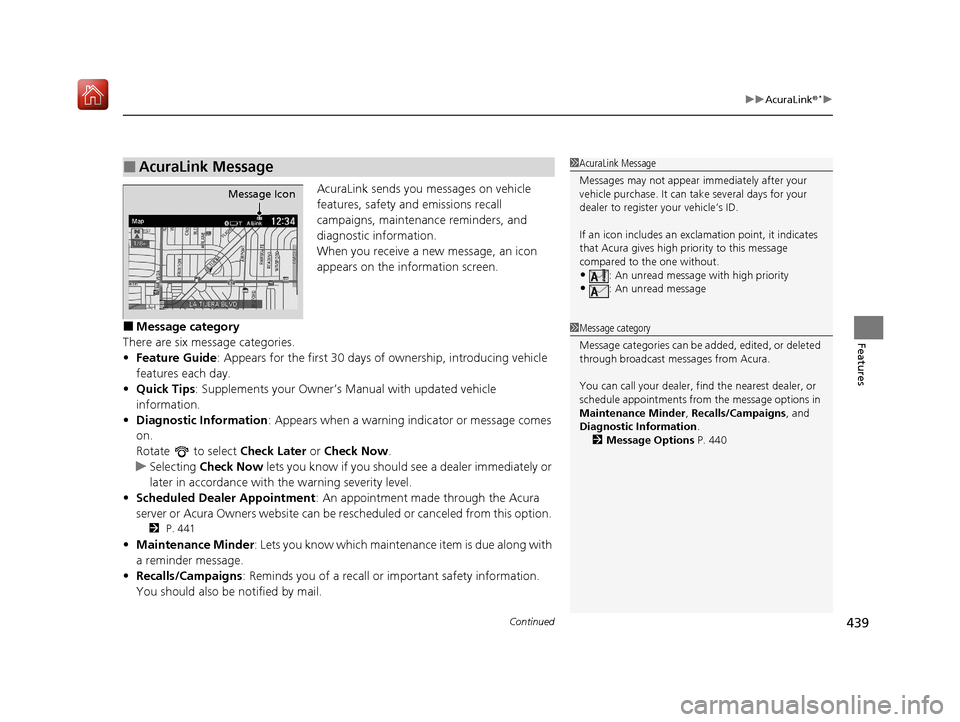
AcuraLink sends you messages on vehicle
features, safety and emissions recall
campaigns, maintenance reminders, and
diagnostic information.
When you receive a new message, an icon
appears on the information screen.
■Message category
There are six message categories.
• Feature Guide : Appears for the first 30 days of ownership, introducing vehicle
features each day.
• Quick Tips : Supplements your Owner’s Manual with updated vehicle
information.
• Diagnostic Information : Appears when a warning in dicator or message comes
on.
Rotate to select Check Later or Check Now .
u Selecting Check Now lets you know if you should see a dealer immediately or
later in accordance with the warning severity level.
• Scheduled Dealer Appointment : An appointment made through the Acura
server or Acura Owners website can be re scheduled or canceled from this option.
2 P. 441
•Maintenance Minder: Lets you know which maintenance item is due along with
a reminder message.
• Recalls/Campaigns : Reminds you of a recall or important safety information.
You should also be notified by mail.
■AcuraLink Message1 AcuraLink Message
Messages may not appear immediately after your
vehicle purchase. It can ta ke several days for your
dealer to register your vehicle’s ID.
If an icon includes an excl amation point, it indicates
that Acura gives high priority to this message
compared to the one without.
•: An unread message with high priority
•: An unread message
Message Icon
1 Message category
Message categories can be added, edited, or deleted
through broadcast me ssages from Acura.
You can call your dealer, find the nearest dealer, or
schedule appointments from the message options in
Maintenance Minder , Recalls/Campaigns, and
Diagnostic Information .
2 Message Options P. 440
20 ACURA MDX-31TZ56600.book 439 ページ 2019年4月24日 水曜日 午後5時44分
Page 442 of 701
Continued441
uuAcuraLink ®*u
Features
■Dealer Appointments
You can confirm the scheduled appointment date when you receive a
Maintenance Minder , Recalls/Campaigns , or Diagnostic Information
message, or reschedule an y existing appointments.
1. Select a Maintenance Minder , Recalls/Campaigns, Diagnostic Information ,
or Scheduled Dealer Appointment message.
2. Rotate to select Schedule Dealer Appoi… or Reschedule Appoint…
(depending on the screen). Press .
u A suggested time and date are displayed.
3. Rotate to select Confirm Appointment . Press to accept the time and
date.
4. Press to select OK.1Dealer Appointments
To set up an automated de aler appointment when a
regular maintenance is due , visit the Acura Owners
website at owners.acura.com (U.S.) or
www.acura.ca/owners/acuralink (Canada), and set
the required option. A remi nder message will be sent
as the date for the dealer appointment approaches. A
reminder message will also be sent if you schedule an
appointment online using Schedule Service
Appointment function.
If you are not satisfied with the proposed
appointment date and time, ca ll your dealer directly.
To cancel the scheduled appointment, select Cancel
Appointment when a message is displayed.
20 ACURA MDX-31TZ56600.book 441 ページ 2019年4月24日 水曜日 午後5時44分
Page 443 of 701

442
uuAcuraLink ®*u
Features
You can confirm your AcuraLink subscription status.
1.Press the SETTINGS button.
2. Rotate to select AcuraLink Settings ,
then press .
u Repeat the procedure to select
AcuraLink Subscription Status .
■AcuraLink Subscription Status
Signal Strength
ItemInformation
You can check the signal strength.
Current ContractThe AcuraLink subscription numb er and subscription level is
displayed.
ServiceYou can confirm the type of service.
SubscriptionYou can confirm the expiration date.
StatusThe following message can be displayed:●Check Antenna : There is a problem with the AcuraLink
antenna. Contact a dealer.
●No Signal : Signal is not received.●No data: The signal is received, but some error has occurred
in the system.
●OK : The system is receiving the signal or traffic data*.
* Not available on all models
20 ACURA MDX-31TZ56600.book 442 ページ 2019年4月24日 水曜日 午後5時44分
Page 444 of 701
443
Features
Compass*
When you set the power mode to ON, the compass self-calibrates, and the compass
display appears.
Compass Calibration
If the compass indicates the wrong direction, or the CAL indicator blinks, you need
to manually calibrate the system.
1. Set the power mode to ON.
2. On the top screen of any source, press and hold for five seconds.
u The display switches to the Compass Settings screen.
3. Rotate to select Calibration, then press .
4. When the display changes to Calibration Start, press .
5. Drive the vehicle slowly in two circles.
u The compass starts to show a di rection after the calibration. The CAL indicator
goes off.
1 Compass*
Compass operation can be affected under the
following conditions:
•Driving near power lines or stations•Crossing a bridge
•Passing a large vehicle, or driving near a large
object that can cause a magnetic disturbance
•When accessories such as antennas and roof racks
are mounted by magnets
1 Compass Calibration
Calibrate the compass in an open area.
While setting the compass, press the BACK button to
cancel the setting mode a nd return to the previous
screen.
Models with navigation self -calibrate using GPS. The
compass in the MID and the direction arrow on the
map screen (when Heading-Up view selected) may
not be in sync when firs t starting the vehicle, but
should correct themselves as you drive.
If the compass in the MID continues to indicate an
incorrect direction, please see your Acura dealer.
Models with navigation system
* Not available on all models
20 ACURA MDX-31TZ56600.book 443 ページ 2019年4月24日 水曜日 午後5時44分
Page 447 of 701
446
Driving
Before Driving
Driving Preparation
Check the following items before you start driving.
• Make sure there are no obstructions on th e windows, door mirrors, exterior
lights, or other parts of the vehicle.
u Remove any frost, snow, or ice.
u Remove any snow on the roof, as this can slip down and obstruct your field of
vision while driving. If frozen solid , remove ice once it has softened.
u When removing ice from around the wheel s, be sure not to damage the wheel
or wheel components.
• Make sure the hood is securely closed.
u If the hood opens while driving, your front view will be blocked.
• Make sure the tires are in good condition.
u Check air pressure, and check for damage and excessive wear.
2 Checking and Maintaining Tires P. 602
•Make sure there are no people or ob jects behind or around the vehicle.
u There are blind spots from the inside.
■Exterior Checks1Exterior Checks
NOTICE
When doors are frozen s hut, use warm water around
the door edges to melt any ice. Do not try to force
them open, as this can damage the rubber trim
around the doors. When done, wipe dry to avoid
further freezing.
Do not pour warm water into the key cylinder.
You will be unable to insert the key if the water
freezes in the hole.
Heat from the engine and exhaust can ignite
flammable material s left under the hood, causing a
fire. If you’ve parked y our vehicle for an extended
period, inspect and remove any debris that may have
collected, such as dried grass and leaves that have
fallen or have been carried in for use as a nest by a
small animal. Also check under the hood for leftover
flammable materials after you or someone else has
performed maintenance on your vehicle.
20 ACURA MDX-31TZ56600.book 446 ページ 2019年4月24日 水曜日 午後5時44分
Page 449 of 701

448
uuBefore Driving uDriving Preparation
Driving
• Be sure items placed on the floor behind the front seats cannot roll under the
seats.
u They can interfere with the driver’s ability to operate the pedals, the operation
of the seats, or the operation of the sensors under the seats.
• Everyone in the vehicle must fasten their seat belt.
2Fastening a Seat Belt P. 36
•Make sure that the indicators in the in strument panel come on when you start the
vehicle, and go off soon after.
u Always have a dealer check the vehicle if a problem is indicated.
2 Indicators P. 78
20 ACURA MDX-31TZ56600.book 448 ページ 2019年4月24日 水曜日 午後5時44分
Page 455 of 701

uuTowing a Trailer uTowing Preparation
454
Driving
■How to weigh the trailer lo ads using the public scale
Check each weight in the order indicated as shown.
Refer to the table on the right for each we ight’s limit except for the tongue load.
2Tongue load P. 453
•If you cannot weigh the rear axle, subtract 1 from 2.
• The maximum gross combined weight (4) decreases by 2% for every 1,000 feet
(305 meters) of elevation.
• To calculate the tongue load, subtract 5 from 6.
• Refer to the trailer owner’s manu al for additional information.
1How to weigh the trailer loads using the public scale
Fully load the vehicle and trailer. An attendant who
watches the scale is needed as all occupants should
stay in the vehicle.
If a public scale is not available, add the estimated
weight of your cargo load to the weight of your
trailer (as quoted by the manufacturer), and then
measure the tongue load with an appropriate scale or
tongue gauge or estima te it based on cargo
distribution. Weight limit for 2WD models AWD models
Front gross axle2,811 lbs
(1,275 kg)2,910 lbs
(1,320 kg)
Gross vehicle 5,368 lbs
(2,435 kg) 5,677 lbs
(2,575 kg)
Rear gross axle2,734 lbs
(1,240 kg)2,965 lbs
(1,345 kg)
Gross combined 8,036 lbs
(3,645 kg) 9,833 lbs
(4,460 kg)
1. Front gross axle weight.
2. Gross vehicle weight.4. Gross combined weight.
3. Rear gross axle weight. 5. Hitched trailer weight.
6. Unhitched trailer weight.
20 ACURA MDX-31TZ56600.book 454 ページ 2019年4月24日 水曜日 午後5時44分
Page 457 of 701
uuTowing a Trailer uTowing Preparation
456
Driving
■Trailer brakes
Recommended for any trailer with a total weight of 1,000 lbs (450 kg) or more:
There are two common types of trailer brake s: surge and electric. Surge brakes are
common for boat trailers, since the brakes will get wet.
If you choose electric brakes, be sure th ey are electronically actuated. Do not
attempt to attach trailer brakes to your ve hicle’s hydraulic system, as it will lower
braking effectiveness and create a potential hazard.
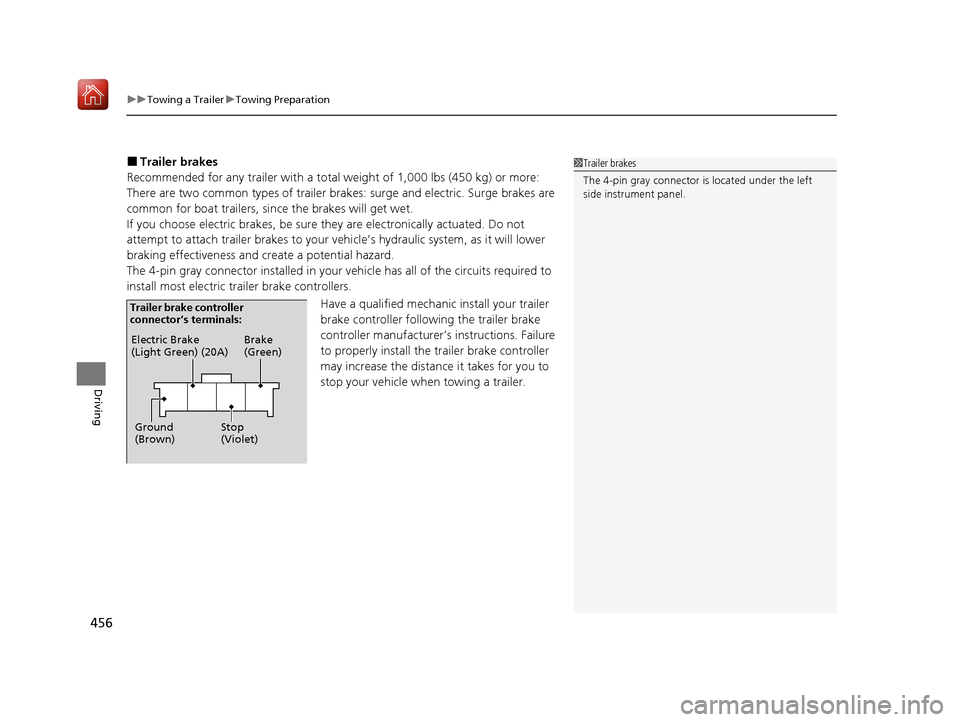
The 4-pin gray connector installed in your vehicle has all of the circuits required to
install most electric trailer brake controllers.
Have a qualified mechanic install your trailer
brake controller following the trailer brake
controller manufacturer’s instructions. Failure
to properly install the trailer brake controller
may increase the distance it takes for you to
stop your vehicle when towing a trailer.1 Trailer brakes
The 4-pin gray connector is located under the left
side instrument panel.
Electric Brake
(Light Green) (20A)
Ground
(Brown) Brake
(Green)
Stop
(Violet)
Trailer brake controller
connector’s terminals:
20 ACURA MDX-31TZ56600.book 456 ページ 2019年4月24日 水曜日 午後5時44分
Page 463 of 701
462
Driving
Off-Highway Driving Guidelines
General Information
Your vehicle has been designed primarily for use on pavement, however, its higher
ground clearance allows you to occasionally travel on unpaved roads. It is not
designed for trail-blazing, or other challenging off-highway activities.
If you decide to drive on unpaved roads, you will find that it requires somewhat
different driving skills and that your vehicle will handle somewhat differently than it
does on pavement. Pay attention to the precautions and tips in this section, and get
acquainted with your vehicle before leaving the pavement.
Important Safety Precautions
To avoid loss of control or rollover, be sure to follow all precautions and
recommendations:
• Be sure to store cargo properly and do not exceed your cargo load limits.
2 Maximum Load Limit P. 449
•Whenever you drive, make sure you and your passengers always wear seat belts.
• Keep your speed low, and never go faster than the conditions allow.
• It’s up to you to continually assess the situation and drive within the limits.
1Off-Highway Driving Guidelines
Failure to operate your vehicle correctly might result
in a crash or a rollover.
2 Important Handling Information P. 30
2 Precautions While Driving P. 470
Spinning the tires can al so damage the SH-AWD ®
system.
3WARNING
Improperly operating this vehicle on or off-
pavement can cause a crash or rollover in
which you and your passengers could be
seriously injured or killed.
• Follow all instructions and guidelines in
this owner’s manual.
• Keep your speed low, and don’t drive
faster than conditions permit.
20 ACURA MDX-31TZ56600.book 462 ページ 2019年4月24日 水曜日 午後5時44分
Page 464 of 701
463
uuOff-Highway Driving Guidelines uAvoiding Trouble
Driving
Avoiding Trouble
• Check Out Your Vehicle before you leave the pavement and make sure that all
scheduled maintenance has been completed. Pay special attention to the
condition of the tires, and check the tire pressures.
• Remember the route you choose presents limi ts (too steep or bumpy), you have
limits (driving skill and comfort), and your ve hicle has limits (traction, stability, and
power). Failing to recognize these limits will likely put you and your passengers in
a hazardous situation.
• Accelerating and Braking should be done slowly and gradually. Trying to start
or stop too fast can cause a loss of traction and you could lose control.
• Avoiding Obstacles and Debris in the road reduces the likelihood of a rollover
or damage to your suspension or other components.
• Driving on Slopes increases your risk of a rollover, particularly if you attempt to
drive across a slope that is too steep. Goin g straight up or down a slope is usually
the safest. If you can’t clearly see all cond itions or obstacles on a slope, walk it
before you drive it. If there is any doubt whether you can safely pass, don’t try it.
Find another route. If you get stuck when climbing, do not try to turn around.
Back down slowly following the same route you took up the hill.
• Crossing a Stream - Avoid driving through deep water. If you encounter water
in your route (a small stream or large pu ddle, for example), evaluate it carefully
before going ahead. Make sure it is shallow, flowing slowly, and has firm ground
underneath. If you are not sure of the depth or the ground, turn around and find
another route. Driving thro ugh deep water can also damage your vehicle. The
water can get into the transmission and di fferential, diluting the lubricant and
causing an eventual failure. It can also wash the grease out of the wheel bearings.
• If You Get Stuck , carefully go in the direction that you think will get you
unstuck. Do not spin the tires as this will only make things worse and could
damage the transmission. If you are unable to free yourself, your vehicle will need
to be towed. Front and rear tow ho oks are provided for this purpose.
20 ACURA MDX-31TZ56600.book 463 ページ 2019年4月24日 水曜日 午後5時44分