wheel ACURA MDX 2022 Workshop Manual
[x] Cancel search | Manufacturer: ACURA, Model Year: 2022, Model line: MDX, Model: ACURA MDX 2022Pages: 712, PDF Size: 22.65 MB
Page 243 of 712
242
uuAudio System uAudio Remote Controls
Features
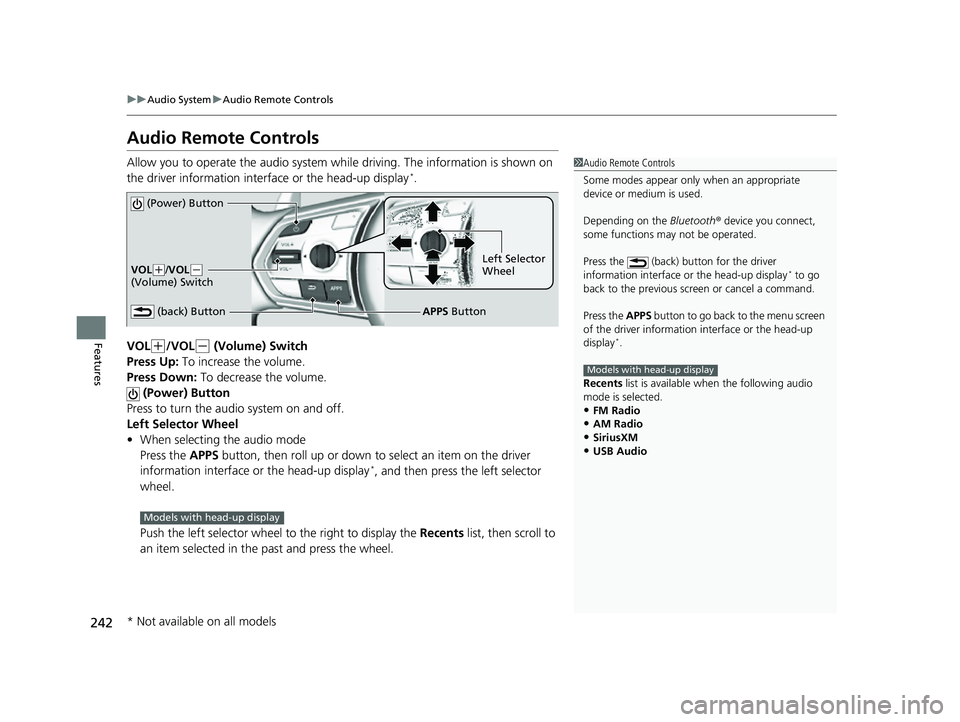
Audio Remote Controls
Allow you to operate the audio system while driving. The information is shown on
the driver information interface or the head-up display*.
VOL
(+/VOL(- (Volume) Switch
Press Up: To increase the volume.
Press Down: To decrease the volume.
(Power) Button
Press to turn the audio system on and off.
Left Selector Wheel
• When selecting the audio mode
Press the APPS button, then roll up or down to select an item on the driver
information interface or the head-up display
*, and then press the left selector
wheel.
Push the left selector wheel to the right to display the Recents list, then scroll to
an item selected in the past and press the wheel.
1 Audio Remote Controls
Some modes appear only when an appropriate
device or medium is used.
Depending on the Bluetooth® device you connect,
some functions ma y not be operated.
Press the (back) button for the driver
information interface or the head-up display
* to go
back to the previous screen or cancel a command.
Press the APPS button to go back to the menu screen
of the driver information interface or the head-up
display
*.
Recents list is available wh en the following audio
mode is selected.
•FM Radio•AM Radio
•SiriusXM
•USB Audio
Models with head-up display
(Power) Button
VOL( +/VOL(-
(Volume) Switch
(back) ButtonLeft Selector
Wheel
APPS Button
Models with head-up display
* Not available on all models
22 ACURA MDX-31TYA6000_02.book 242 ページ 2020年11月5日 木曜日 午前11時39分
Page 244 of 712
243
uuAudio System uAudio Remote Controls
Features
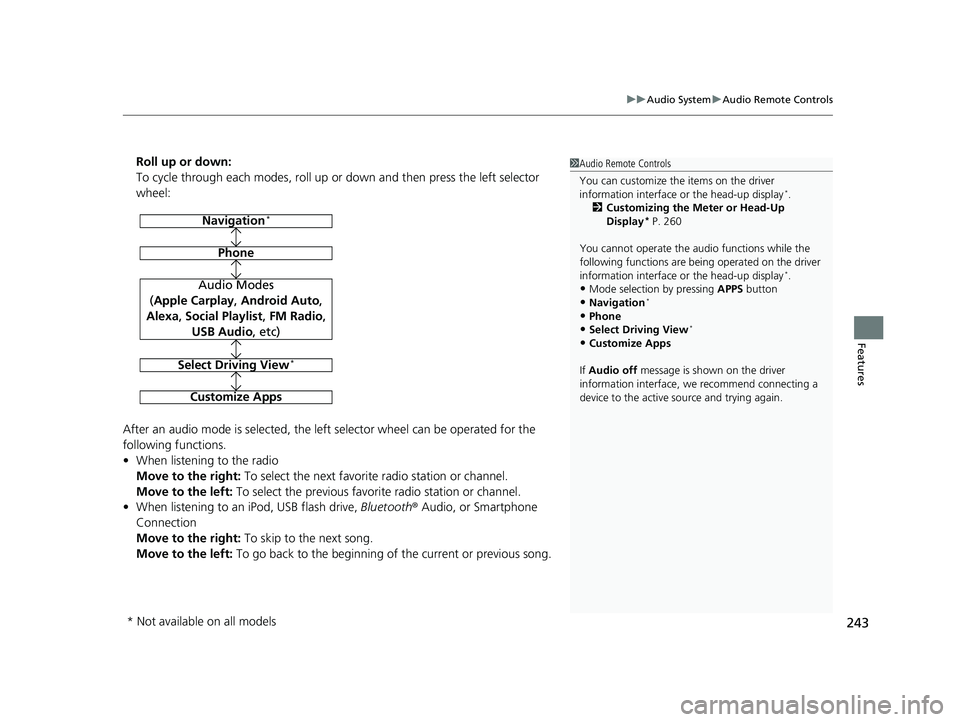
Roll up or down:
To cycle through each modes, roll up or down and then press the left selector
wheel:
After an audio mode is selected, the left selector wheel can be operated for the
following functions.
• When listening to the radio
Move to the right: To select the next favorite radio station or channel.
Move to the left: To select the previous favori te radio station or channel.
• When listening to an iPod, USB flash drive, Bluetooth® Audio, or Smartphone
Connection
Move to the right: To skip to the next song.
Move to the left: To go back to the beginning of the current or previous song.1Audio Remote Controls
You can customize the items on the driver
information interface or the head-up display
*.
2 Customizing the Meter or Head-Up
Display
* P. 260
You cannot operate the a udio functions while the
following functions are bei ng operated on the driver
information interface or the head-up display
*.•Mode selection by pressing APPS button
•Navigation*
•Phone
•Select Driving View*
•Customize Apps
If Audio off message is shown on the driver
information interface, we recommend connecting a
device to the active source and trying again.
Navigation*
Phone
Audio Modes
(Apple Carplay , Android Auto,
Alexa, Social Playlist , FM Radio,
USB Audio , etc)
Select Driving View*
Customize Apps
* Not available on all models
22 ACURA MDX-31TYA6000_02.book 243 ページ 2020年11月5日 木曜日 午前11時39分
Page 261 of 712
260
uuAudio System Basic Operation uAudio/Information Screen
Features
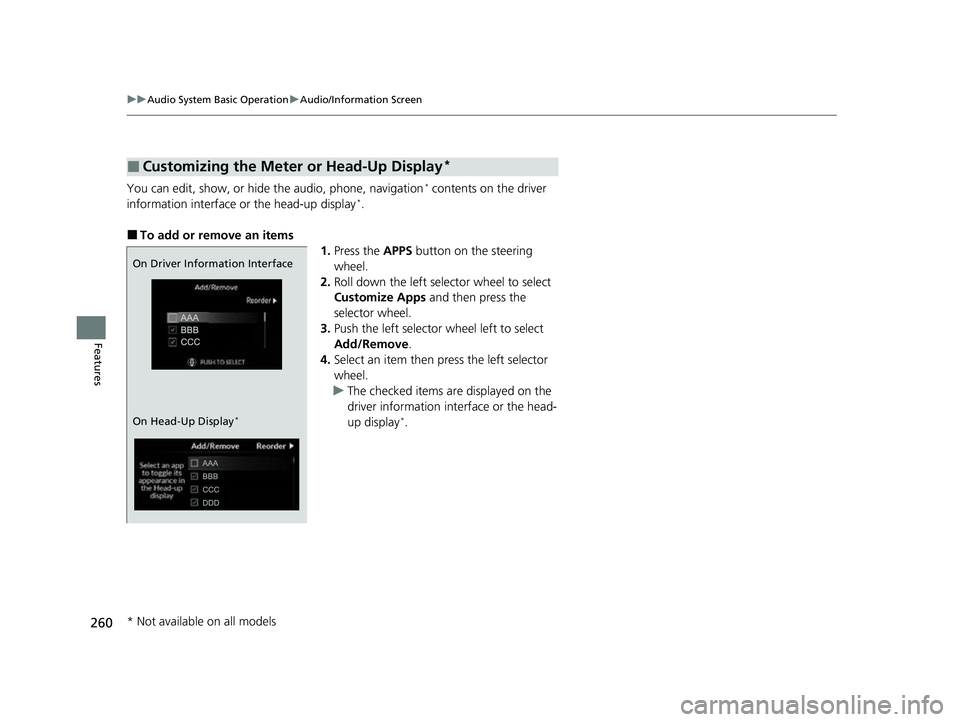
You can edit, show, or hide the audio, phone, navigation* contents on the driver
information interface or the head-up display*.
■To add or remove an items 1.Press the APPS button on the steering
wheel.
2. Roll down the left selector wheel to select
Customize Apps and then press the
selector wheel.
3. Push the left selector wheel left to select
Add/Remove .
4. Select an item then press the left selector
wheel.
u The checked items are displayed on the
driver information in terface or the head-
up display
*.
■Customizing the Meter or Head-Up Display*
On Driver Information Interface
On Head-Up Display
*
* Not available on all models
22 ACURA MDX-31TYA6000_02.book 260 ページ 2020年11月5日 木曜日 午前11時39分
Page 262 of 712
261
uuAudio System Basic Operation uAudio/Information Screen
Features
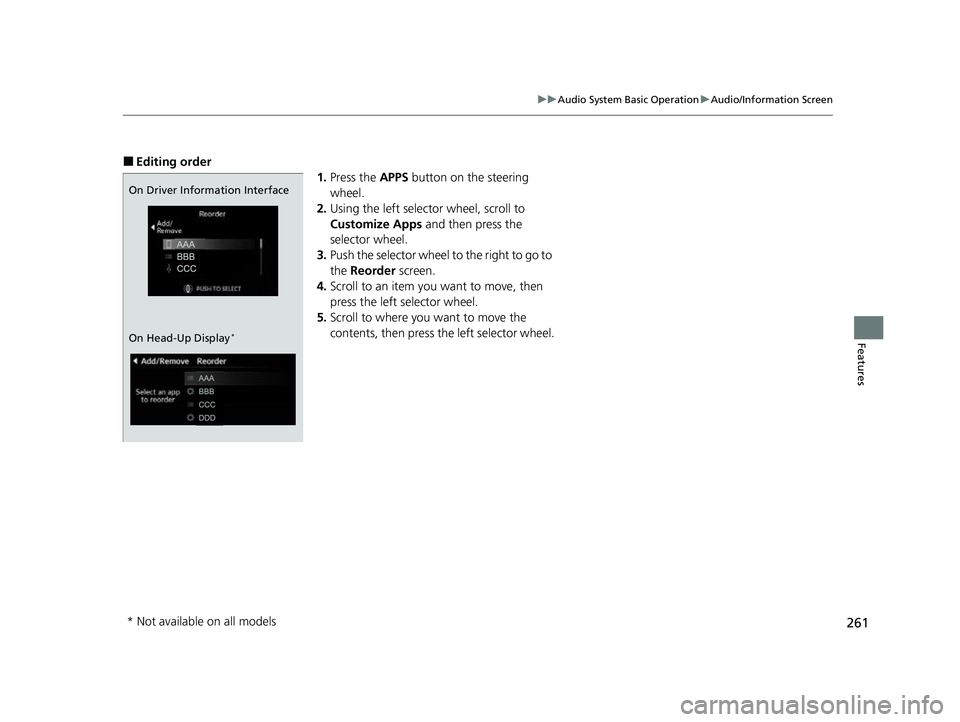
■Editing order
1.Press the APPS button on the steering
wheel.
2. Using the left selector wheel, scroll to
Customize Apps and then press the
selector wheel.
3. Push the selector wheel to the right to go to
the Reorder screen.
4. Scroll to an item you want to move, then
press the left selector wheel.
5. Scroll to where you want to move the
contents, then press the left selector wheel.
On Driver Information Interface
On Head-Up Display
*
* Not available on all models
22 ACURA MDX-31TYA6000_02.book 261 ページ 2020年11月5日 木曜日 午前11時39分
Page 274 of 712
273
uuAudio System Basic Operation uAlexa Built-In
Features
Alexa Built-In
You can talk to Amazon Alexa through the audio system. With Alexa, you can:
• Stream audio
• Navigate to plac es (If available)
• Call Alexa contacts
• And more with supported Alexa skills
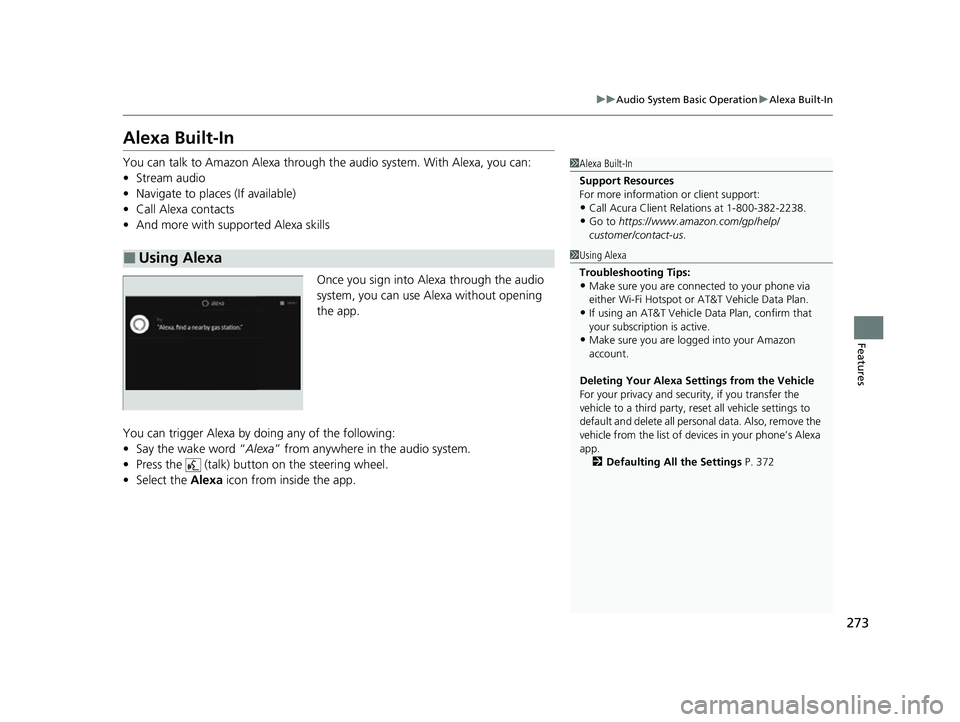
Once you sign into Alexa through the audio
system, you can use Alexa without opening
the app.
You can trigger Alexa by doing any of the following:
• Say the wake word “ Alexa” from anywhere in the audio system.
• Press the (talk) button on the steering wheel.
• Select the Alexa icon from inside the app.
■Using Alexa
1Alexa Built-In
Support Resources
For more information or client support:
•Call Acura Client Re lations at 1-800-382-2238.
•Go to https://www.amazon.com/gp/help/
customer/contact-us .
1Using Alexa
Troubleshooting Tips:
•Make sure you are connected to your phone via
either Wi-Fi Hotspot or AT&T Vehicle Data Plan.
•If using an AT&T Vehicle Data Plan, confirm that
your subscription is active.
•Make sure you are logged into your Amazon
account.
Deleting Your Alexa Settings from the Vehicle
For your privacy and securi ty, if you transfer the
vehicle to a third party, re set all vehicle settings to
default and delete all personal data. Also, remove the
vehicle from the list of de vices in your phone’s Alexa
app. 2 Defaulting All the Settings P. 372
22 ACURA MDX-31TYA6000_02.book 273 ページ 2020年11月5日 木曜日 午前11時39分
Page 275 of 712
274
uuAudio System Basic Operation uVoice Control Operation
Features
Voice Control Operation
Your vehicle has a voice control system that allows hands-free operation.
The voice control system uses the (tal k) and (back) buttons on the steering
wheel and a microphone near the map lights on the ceiling.
To achieve optimum voice recognition when using the voice control system:
• The system recognize a natural language and accept your free form voice
command.
An example of voice commands:
2 Voice Recognition Screen P. 275
•Close the windows and panoramic roof.
• Adjust the dashboard and side vents so air does not blow onto the microphone
on the ceiling.
• Speak clearly in a clear, natural speakin g voice without pausing between words.
• Reduce any background noise if possible. The system may misinterpret your
command if more than one person is speaking at the same time.
■Voice Recognition
1Voice Control Operation
When you press the button, the system beeps and
the display changes to the voice recognition screen.
Press the (home) button, (back) button on
the True Touchpad Interface or APPS button on the
steering wheel to cancel a voice recognition function.
22 ACURA MDX-31TYA6000_02.book 274 ページ 2020年11月5日 木曜日 午前11時39分
Page 279 of 712
uuAudio System Basic Operation uPlaying AM/FM Radio
278
Features
To add a favorite station:
1. Tune to the selected station.
2. Select Add Favorite , then select Current Station .
u When you select From Station List , you can store a station from the station
list.
■Editing a favorite station
Select and hold to desired favorite station icon.
The following items are available:
• Remove Favorite : Delete the favorite station icon from the favorite station list.
• Replace with (number): Replace the stor ed favorite station icon.
• Add to Home Page : Add the shortcut icon of the stored favorite station to the
home screen.
• Add to Heads-Up Display
*: Add the shortcut item of the stored favorite station
to the head-up display menu.
■Favorite Station1 Favorite Station
The ST indicator appears on the display indicating
stereo FM broadcasts.
Stereo reproduction in AM is not available.
Switching the Audio Mode
Press the APPS button on the steering wheel, then
select an item or select the audio source icon on the
home screen.
2 Audio Remote Controls P. 242
You can store 12 AM/FM st ations into favorite
station.
HD Radio Technology manufactured under license
from iBiquity Digital Cor poration. U.S. and Foreign
Patents. For patents see http://dts.com/patents. HD
Radio, Artist Experience, and the HD, HD Radio, and
“ARC” logos are registered trademarks or
trademarks of iBiquity Di gital Corporation in the
United States and/ or other countries.
* Not available on all models
22 ACURA MDX-31TYA6000_02.book 278 ページ 2020年11月5日 木曜日 午前11時39分
Page 283 of 712
uuAudio System Basic Operation uPlaying SiriusXM ® Radio
282
Features
1. Select MENU .
2. Select SiriusXM Settings .
3. Select Tune Mode .
4. Select All Channels or Within Category .
■To Change the Tune Mode1Playing SiriusXM ® Radio
In the channel mode, all available channels are
selectable. In the category mode, you can select a
channel within a ca tegory (Jazz, Rock, Classical, etc.).
There may be instances when SiriusXM ® Radio does
not broadcast all the data fi elds (artist name, title).
This does not indicate a problem with your audio
system.
SiriusXM ® Radio stations load in ascending order,
which can take about a minute. Once they have
loaded you will be able to scroll up or down to make
your selections.
Switching the Audio Mode
Press the APPS button on the steering wheel, then
select an item or select the audio source icon on the
home screen. 2 Audio Remote Controls P. 242
Tune Start:
When you change to a favorite channel, a song being
played on that channel restarts from the beginning
with this function. This can be turned on or off by the
following procedure.
1. Select MENU.
2. Select SiriusXM Settings .
3. Select Tune Start .
4. Select On or Off .
To change a category, select Category icons, or
select Channels and then select category item.
22 ACURA MDX-31TYA6000_02.book 282 ページ 2020年11月5日 木曜日 午前11時39分
Page 323 of 712
322
Features
General Information on the Audio System
SiriusXM® Radio Service
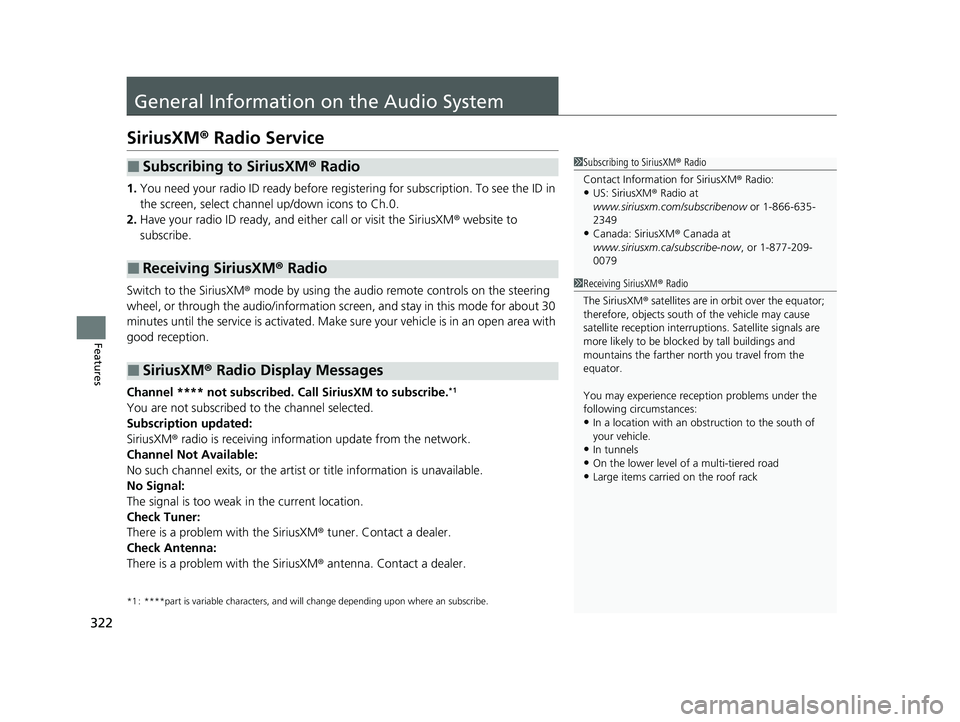
1. You need your radio ID ready before regist ering for subscription. To see the ID in
the screen, select channel up/down icons to Ch.0.
2. Have your radio ID ready, and either call or visit the SiriusXM® website to
subscribe.
Switch to the SiriusXM ® mode by using the audio remote controls on the steering
wheel, or through the audio/information screen, and stay in this mode for about 30
minutes until the service is activated. Make sure your vehicle is in an open area with
good reception.
Channel **** not subscribed. Ca ll SiriusXM to subscribe.
*1
You are not subscribed to the channel selected.
Subscription updated:
SiriusXM® radio is receiving information update from the network.
Channel Not Available:
No such channel exits, or the artist or title information is unavailable.
No Signal:
The signal is too weak in the current location.
Check Tuner:
There is a problem with the SiriusXM ® tuner. Contact a dealer.
Check Antenna:
There is a problem with the SiriusXM ® antenna. Contact a dealer.
*1 : ****part is variable characters, and w ill change depending upon where an subscribe.
■Subscribing to SiriusXM® Radio
■Receiving SiriusXM ® Radio
■SiriusXM ® Radio Display Messages
1 Subscribing to SiriusXM ® Radio
Contact Information for SiriusXM ® Radio:
•US: SiriusXM ® Radio at
www.siriusxm.com/subscribenow or 1-866-635-
2349
•Canada: SiriusXM ® Canada at
www.siriusxm.ca/subscribe-now , or 1-877-209-
0079
1 Receiving SiriusXM ® Radio
The SiriusXM ® satellites are in orbit over the equator;
therefore, objects south of the vehicle may cause
satellite rece ption interruptions. Sa tellite signals are
more likely to be blocked by tall buildings and
mountains the farther north you travel from the
equator.
You may experience rece ption problems under the
following circumstances:
•In a location with an obstruction to the south of
your vehicle.
•In tunnels•On the lower level of a multi-tiered road
•Large items carried on the roof rack
22 ACURA MDX-31TYA6000_02.book 322 ページ 2020年11月5日 木曜日 午前11時39分
Page 350 of 712
349
uuCustomized Features u
Continued
Features
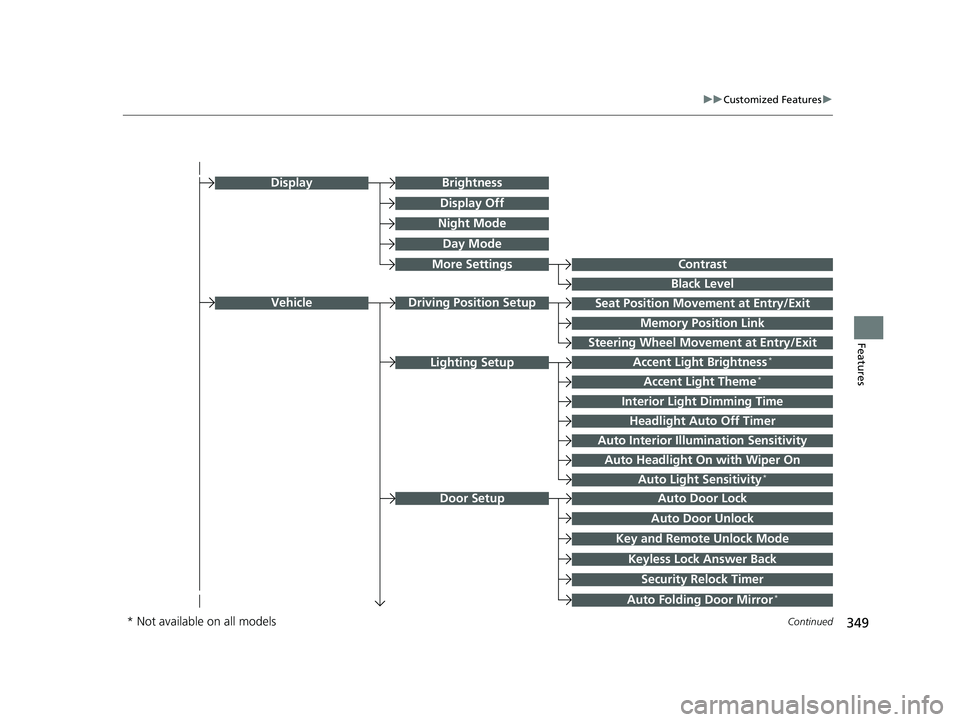
Seat Position Movement at Entry/Exit
Memory Position Link
VehicleDriving Position Setup
Night Mode
Day Mode
BrightnessDisplay
Contrast
Black Level
More Settings
Display Off
Key and Remote Unlock Mode
Auto Door Lock
Auto Door Unlock
Door Setup
Keyless Lock Answer Back
Security Relock Timer
Accent Light Brightness*
Accent Light Theme*
Interior Light Dimming Time
Headlight Auto Off Timer
Auto Interior Illumi nation Sensitivity
Lighting Setup
Auto Folding Door Mirror*
Auto Headlight On with Wiper On
Auto Light Sensitivity*
Steering Wheel Movement at Entry/Exit
* Not available on all models
22 ACURA MDX-31TYA6000_02.book 349 ページ 2020年11月5日 木曜日 午前11時39分